​ ​ ​Find Tutorial 
 
In this tutorial we are going to discuss one of the most important commands in linux that is 
Find. 
 
Uses: 
 
● Helps in finding the files using names,permissions,size  
● Helps in finding the files owned by a specific user and also helps in finding files with 
suid bits. 
● Helps in finding the files which are modified previously. 
 
Most importantly it is very useful in the Privilege Escalation part in our Penetration testing. 
 
Till now we have learned what are the uses of find command now we will discuss some 
examples so that we get clear understanding about find command. 
 
Syntax: ​ find filename   
 
Ex: find cyber.txt 


Now I will tell you the most important flags and options we are going to use with find 
command. 
 
Just learn the below flags and don't worry about examples. I will clearly explain how to use 
them after explaining flags. 
 
-type : d,f 
This flag is used to specify the file type. 
● For example if you are searching for directory then we will write ​-type d 
● If we are searching for the file type the we use ​-type  
-name :   
This flag lets us search a file using file name or the words that contain in the file name. 
Ex: finding a file having name .txt at the end ​ -name “*.txt” 
 
-size: m,k,c 
This flag is used to search the file with the help of the size of that file. 
Options: 
M for Mibs 
K for kibs 
C for bytes 
 
Ex: finding a file having size 10 bits ​-size 20c 
 
Till​ now we have learned about the flags and options.Now comes the interesting part of 
practical execution. 
 
To search a directory we need to use “/” after find command. 
 
Some Examples: 
● To search in the home directory : find /home … 
● To search in /usr/bin directory : find /usr/bin... 
● To search in the root directory then : find /root .. 
No​w we will combine all our flags to get the desired result. 
 
See you just need to remember this while writing the command: 
 
Where to search[Directory] 
What to search[File specifications] 
 
Example 1 : Finding a file in /home directory having last name “*.txt” 
Now we need to search in /home dir then search for file type after finding file type then 
we are going to find out using file name. 
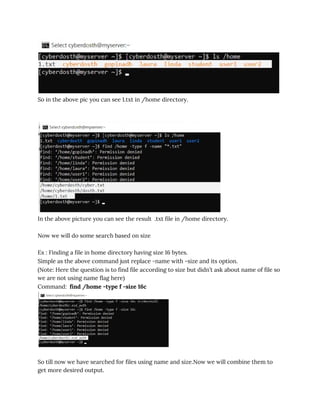
Command: ​ find /home -type f -name “*.txt” 
 
Check the Screenshots for more understanding. 
 
So in the above pic you can see 1.txt in /home directory.  


In the above picture you can see the result .txt file in /home directory. 
 
Now we will do some search based on size 
 
Ex : Finding a file in home directory having size 16 bytes. 
Simple as the above command just replace -name with -size and its option. 
(Note: Here the question is to find file according to size but didn’t ask about name of file so 
we are not using name flag here) 
Command: ​ find /home -type f -size 16c 
 
 
So till now we have searched for files using name and size.Now we will combine them to 
get more desired output. 
Ex: Suppose I want to find all the “.txt” files with the size of 20 bytes in /usr directory. 
Now here we don't need to do anything new just combine the flags. 
Command: ​find /usr -type f -size 20c -name “*.txt” 
 
 
Till now I have explained to you the basic level of using find command. I don’t want this 
blog to be lengthy.So, I will make part 2 with some advance level which is helpful while 
doing pentesting and privilege escalation. 
 
Suggestions are always welcome.Share my blog if you like it. 

Find

  • 1.
    ​ ​ ​FindTutorial    In this tutorial we are going to discuss one of the most important commands in linux that is  Find.    Uses:    ● Helps in finding the files using names,permissions,size   ● Helps in finding the files owned by a specific user and also helps in finding files with  suid bits.  ● Helps in finding the files which are modified previously.    Most importantly it is very useful in the Privilege Escalation part in our Penetration testing.    Till now we have learned what are the uses of find command now we will discuss some  examples so that we get clear understanding about find command.    Syntax: ​ find filename      Ex: find cyber.txt          Now I will tell you the most important flags and options we are going to use with find  command.    Just learn the below flags and don't worry about examples. I will clearly explain how to use  them after explaining flags.    -type : d,f 
  • 2.
    This flag isused to specify the file type.  ● For example if you are searching for directory then we will write ​-type d  ● If we are searching for the file type the we use ​-type   -name :    This flag lets us search a file using file name or the words that contain in the file name.  Ex: finding a file having name .txt at the end ​ -name “*.txt”    -size: m,k,c  This flag is used to search the file with the help of the size of that file.  Options:  M for Mibs  K for kibs  C for bytes    Ex: finding a file having size 10 bits ​-size 20c    Till​ now we have learned about the flags and options.Now comes the interesting part of  practical execution.    To search a directory we need to use “/” after find command.    Some Examples:  ● To search in the home directory : find /home …  ● To search in /usr/bin directory : find /usr/bin...  ● To search in the root directory then : find /root ..  No​w we will combine all our flags to get the desired result.    See you just need to remember this while writing the command:    Where to search[Directory]  What to search[File specifications]    Example 1 : Finding a file in /home directory having last name “*.txt”  Now we need to search in /home dir then search for file type after finding file type then  we are going to find out using file name.  Command: ​ find /home -type f -name “*.txt”    Check the Screenshots for more understanding. 
  • 3.
      So in theabove pic you can see 1.txt in /home directory.         In the above picture you can see the result .txt file in /home directory.    Now we will do some search based on size    Ex : Finding a file in home directory having size 16 bytes.  Simple as the above command just replace -name with -size and its option.  (Note: Here the question is to find file according to size but didn’t ask about name of file so  we are not using name flag here)  Command: ​ find /home -type f -size 16c      So till now we have searched for files using name and size.Now we will combine them to  get more desired output. 
  • 4.
    Ex: Suppose Iwant to find all the “.txt” files with the size of 20 bytes in /usr directory.  Now here we don't need to do anything new just combine the flags.  Command: ​find /usr -type f -size 20c -name “*.txt”      Till now I have explained to you the basic level of using find command. I don’t want this  blog to be lengthy.So, I will make part 2 with some advance level which is helpful while  doing pentesting and privilege escalation.    Suggestions are always welcome.Share my blog if you like it.