Prog_2 course- 2014 
2 bytes team 
Kinan keshkeh 
IT Engineering-Damascus University 
3rd year
Binary 
files
 
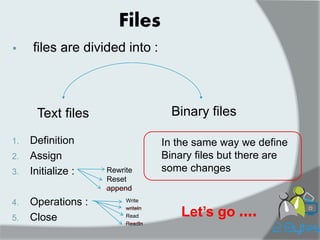
files are divided into : 
Binary files 
Text files 
1.Definition 
2.Assign 
3.Initialize : 
4.Operations : 
5.Close 
Files 
Rewrite 
Reset 
append 
Write 
writeln 
Read 
Readln 
In the same way we define Binary files but there are some changes 
Let’s go ....
Binary file 
It is a type of files that has the same kind of elements and each element inside binary file has the same 
size ….. 
1)Definition : 
var filename : file of <type>; 
• filename : name from user 
• file of : Two words are reserved 
• type : any type standard or structure ( char ,integer , string , array , record ……)
Ex: 
1. Type person=record 
fname: string[20]; 
lname: string[25]; 
age: integer; 
end; 
Var f1 : file of person ; 
2.Var f2: file of char ; 
3.Type arr=array[1..100] of real; 
Var f3: file of arr ; 
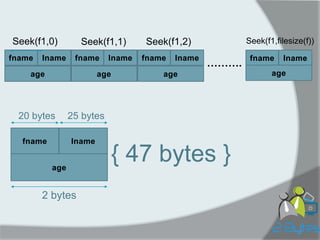
Note : Binary files are similar to arrays but there are 
Two different points … 
A. Accessible to the element 
B. Size 
fname 
lname 
age 
fname 
lname 
age 
fname 
lname 
age 
fname 
lname 
age 
………. 
fname 
lname 
age 
20 bytes 
25 bytes 
2 bytes 
{ 47 bytes } 
Seek(f1,0) 
Seek(f1,filesize(f)) 
Seek(f1,2) 
Seek(f1,1)
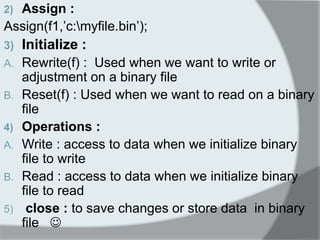
2)Assign : 
Assign(f1,’c:myfile.bin’); 
3)Initialize : 
A.Rewrite(f) : Used when we want to write or adjustment on a binary file 
B.Reset(f) : Used when we want to read on a binary file 
4)Operations : 
A.Write : access to data when we initialize binary file to write 
B.Read : access to data when we initialize binary file to read 
5) close : to save changes or store data in binary file 
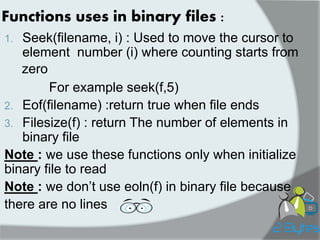
Functions uses in binary files : 
1.Seek(filename, i) : Used to move the cursor to element number (i) where counting starts from 
For example seek(f,5) 
2.Eof(filename) :return true when file ends 
3.Filesize(f) : return The number of elements in binary file 
Note : we use these functions only when initialize binary file to read 
Note : we don’t use eoln(f) in binary file because 
there are no lines 
zero
Lets make it real :D !!
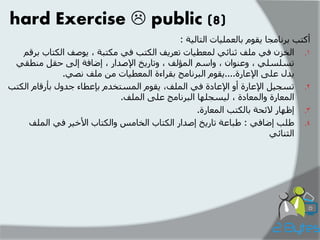
hard Exercise  public (8) 
أكتة تر اَيجا يقىو تانع هًياخ انتانيح : 
.1 انخز في يهف ث اُئي ن عًطياخ تعريف انكتة في يكتثح , يىصف انكتاب ترقى 
تسهسهي , وع ىُا , واسى ان ؤًنف , وتاريخ الإصذار , إضافح إنى حقم ي طُقي 
يذل عهى الإعارج....يقىو انثر اَيج تقراءج ان عًطياخ ي يهف صَي. 
.2 تسجيم الإعارج أو الإعادج في ان هًف, يقىو ان سًتخذو تئعطاء جذول تأرقاو انكتة 
ان عًارج وان عًادج , نيسجهها انثر اَيج عهى ان هًف. 
. 
3 إظهار لائحح تانكتة ان عًارج. 
.4 طهة إضافي : طثاعح تاريخ إصذار انكتاب انخايس وانكتاب الأخير في ان هًف 
انث اُئي
Program 2_bytesprog 
Uses wincrt 
Type Date=record 
day:1..31; 
month:1..12; 
year:1900..2013; 
end; 
Book=record 
number : integer; 
title,author: string[30]; 
pub_date : Data; 
borrowed : Boolean; 
end; 
Var : f_text :text; 
f_bin,temp :file of Book; 
i,j,n : integer; 
abook: book; 
C: char; found: Boolean; 
Borrowed_book : array of integer;
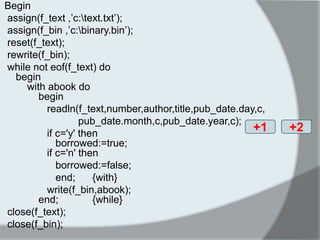
Begin 
assign(f_text ,’c:text.txt’); 
assign(f_bin ,’c:binary.bin’); 
reset(f_text); 
rewrite(f_bin); 
while not eof(f_text) do begin with abook do begin 
readln(f_text,number,author,title,pub_date.day,c, 
pub_date.month,c,pub_date.year,c); 
if c='y' then borrowed:=true; if c='n' then 
borrowed:=false; 
end; {with} 
write(f_bin,abook); end; {while} 
close(f_text); 
close(f_bin); 
+1 
+2
writeln('enter the total number of the lend books'); 
readln(n); 
for i:=1 to n do 
begin 
writeln('enter the number of the book'); readln(Borrowed_book[i]); 
end; 
Assign(temp,’c:/myfile.bin) 
reset(f_bin); 
rewrite(temp); 
While not eof(f_bin) do begin read(f_bin,abook); found:=false; i:=1; while i<=n and not found do begin if Borrowed_book[i]=abook.number then found:= true; i:=i+1; end; if found then abook.borrowed:=true; write(temp,abook); end;
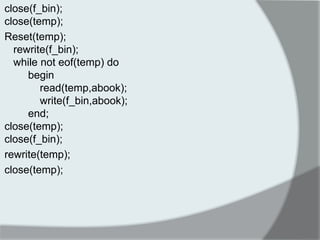
close(f_bin); close(temp); 
Reset(temp); rewrite(f_bin); while not eof(temp) do begin read(temp,abook); write(f_bin,abook); end; close(temp); close(f_bin); 
rewrite(temp); 
close(temp);
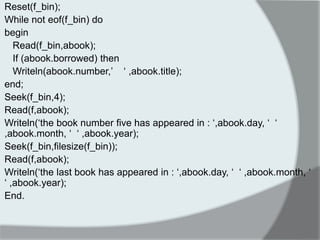
Reset(f_bin); 
While not eof(f_bin) do 
begin 
Read(f_bin,abook); 
If (abook.borrowed) then 
Writeln(abook.number,’ ‘ ,abook.title); 
end; 
Seek(f_bin,4); 
Read(f,abook); 
Writeln(‘the book number five has appeared in : ‘,abook.day, ‘ ‘ ,abook.month, ‘ ‘ ,abook.year); 
Seek(f_bin,filesize(f_bin)); 
Read(f,abook); 
Writeln(‘the last book has appeared in : ‘,abook.day, ‘ ‘ ,abook.month, ‘ ‘ ,abook.year); 
End.
Homework: 
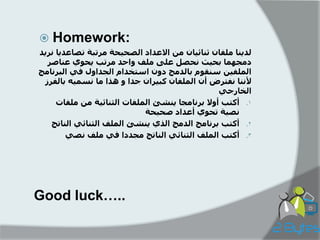
لذ ىٌا ملفان ثىائ اٍن مه الاعذاد الصح حٍة مزتبة تصاعذ اٌ وز ذٌ 
دمجهما بح ثٍ وحصل على ملف واحذ مزتب حٌىي عىاصز 
الملف هٍ سىقىم بالذمج دون استخذام الجذاول ف البزوامج 
لأوىا وفتزض أن الملفان كب زٍان جذا و هذا ما وسم هٍ بالفزس 
الخارج . 
1 أكتب أولا بزوامجا ىٌشئ الملفات الثىائ ةٍ مه ملفات 
وص ةٍ تحىي أعذاد صح حٍة 
. 
2 أكتب بزوامج الذمج الذي ىٌشئ الملف الثىائ الىاتج 
. 
3 أكتب الملف الثىائ الىاتج مجذدا ف ملف وص Good luck…..
Group : group link 
Mobile phone- Kinan : 0994385748 
Facebook account : kinan’s account 
2 bytes team

2Bytesprog2 course_2014_c4_binaryfiles

  • 1.
    Prog_2 course- 2014 2 bytes team Kinan keshkeh IT Engineering-Damascus University 3rd year
  • 2.
  • 3.
     files aredivided into : Binary files Text files 1.Definition 2.Assign 3.Initialize : 4.Operations : 5.Close Files Rewrite Reset append Write writeln Read Readln In the same way we define Binary files but there are some changes Let’s go ....
  • 4.
    Binary file Itis a type of files that has the same kind of elements and each element inside binary file has the same size ….. 1)Definition : var filename : file of <type>; • filename : name from user • file of : Two words are reserved • type : any type standard or structure ( char ,integer , string , array , record ……)
  • 5.
    Ex: 1. Typeperson=record fname: string[20]; lname: string[25]; age: integer; end; Var f1 : file of person ; 2.Var f2: file of char ; 3.Type arr=array[1..100] of real; Var f3: file of arr ; Note : Binary files are similar to arrays but there are Two different points … A. Accessible to the element B. Size 
  • 6.
    fname lname age fname lname age fname lname age fname lname age ………. fname lname age 20 bytes 25 bytes 2 bytes { 47 bytes } Seek(f1,0) Seek(f1,filesize(f)) Seek(f1,2) Seek(f1,1)
  • 7.
    2)Assign : Assign(f1,’c:myfile.bin’); 3)Initialize : A.Rewrite(f) : Used when we want to write or adjustment on a binary file B.Reset(f) : Used when we want to read on a binary file 4)Operations : A.Write : access to data when we initialize binary file to write B.Read : access to data when we initialize binary file to read 5) close : to save changes or store data in binary file 
  • 8.
    Functions uses inbinary files : 1.Seek(filename, i) : Used to move the cursor to element number (i) where counting starts from For example seek(f,5) 2.Eof(filename) :return true when file ends 3.Filesize(f) : return The number of elements in binary file Note : we use these functions only when initialize binary file to read Note : we don’t use eoln(f) in binary file because there are no lines zero
  • 9.
    Lets make itreal :D !!
  • 10.
    hard Exercise public (8) أكتة تر اَيجا يقىو تانع هًياخ انتانيح : .1 انخز في يهف ث اُئي ن عًطياخ تعريف انكتة في يكتثح , يىصف انكتاب ترقى تسهسهي , وع ىُا , واسى ان ؤًنف , وتاريخ الإصذار , إضافح إنى حقم ي طُقي يذل عهى الإعارج....يقىو انثر اَيج تقراءج ان عًطياخ ي يهف صَي. .2 تسجيم الإعارج أو الإعادج في ان هًف, يقىو ان سًتخذو تئعطاء جذول تأرقاو انكتة ان عًارج وان عًادج , نيسجهها انثر اَيج عهى ان هًف. . 3 إظهار لائحح تانكتة ان عًارج. .4 طهة إضافي : طثاعح تاريخ إصذار انكتاب انخايس وانكتاب الأخير في ان هًف انث اُئي
  • 11.
    Program 2_bytesprog Useswincrt Type Date=record day:1..31; month:1..12; year:1900..2013; end; Book=record number : integer; title,author: string[30]; pub_date : Data; borrowed : Boolean; end; Var : f_text :text; f_bin,temp :file of Book; i,j,n : integer; abook: book; C: char; found: Boolean; Borrowed_book : array of integer;
  • 12.
    Begin assign(f_text ,’c:text.txt’); assign(f_bin ,’c:binary.bin’); reset(f_text); rewrite(f_bin); while not eof(f_text) do begin with abook do begin readln(f_text,number,author,title,pub_date.day,c, pub_date.month,c,pub_date.year,c); if c='y' then borrowed:=true; if c='n' then borrowed:=false; end; {with} write(f_bin,abook); end; {while} close(f_text); close(f_bin); +1 +2
  • 13.
    writeln('enter the totalnumber of the lend books'); readln(n); for i:=1 to n do begin writeln('enter the number of the book'); readln(Borrowed_book[i]); end; Assign(temp,’c:/myfile.bin) reset(f_bin); rewrite(temp); While not eof(f_bin) do begin read(f_bin,abook); found:=false; i:=1; while i<=n and not found do begin if Borrowed_book[i]=abook.number then found:= true; i:=i+1; end; if found then abook.borrowed:=true; write(temp,abook); end;
  • 14.
    close(f_bin); close(temp); Reset(temp);rewrite(f_bin); while not eof(temp) do begin read(temp,abook); write(f_bin,abook); end; close(temp); close(f_bin); rewrite(temp); close(temp);
  • 15.
    Reset(f_bin); While noteof(f_bin) do begin Read(f_bin,abook); If (abook.borrowed) then Writeln(abook.number,’ ‘ ,abook.title); end; Seek(f_bin,4); Read(f,abook); Writeln(‘the book number five has appeared in : ‘,abook.day, ‘ ‘ ,abook.month, ‘ ‘ ,abook.year); Seek(f_bin,filesize(f_bin)); Read(f,abook); Writeln(‘the last book has appeared in : ‘,abook.day, ‘ ‘ ,abook.month, ‘ ‘ ,abook.year); End.
  • 16.
    Homework: لذ ىٌاملفان ثىائ اٍن مه الاعذاد الصح حٍة مزتبة تصاعذ اٌ وز ذٌ دمجهما بح ثٍ وحصل على ملف واحذ مزتب حٌىي عىاصز الملف هٍ سىقىم بالذمج دون استخذام الجذاول ف البزوامج لأوىا وفتزض أن الملفان كب زٍان جذا و هذا ما وسم هٍ بالفزس الخارج . 1 أكتب أولا بزوامجا ىٌشئ الملفات الثىائ ةٍ مه ملفات وص ةٍ تحىي أعذاد صح حٍة . 2 أكتب بزوامج الذمج الذي ىٌشئ الملف الثىائ الىاتج . 3 أكتب الملف الثىائ الىاتج مجذدا ف ملف وص Good luck…..
  • 17.
    Group : grouplink Mobile phone- Kinan : 0994385748 Facebook account : kinan’s account 2 bytes team