Filing System
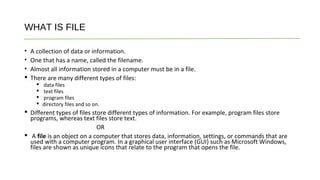
WHAT IS FILE
• A collection of data or information.
• One that has a name, called the filename.
• Almost all information stored in a computer must be in a file.
 There are many different types of files:
 data files
 text files
 program files
 directory files and so on.
 Different types of files store different types of information. For example, program files store
programs, whereas text files store text.
OR
 A file is an object on a computer that stores data, information, settings, or commands that are
used with a computer program. In a graphical user interface (GUI) such as Microsoft Windows,
files are shown as unique icons that relate to the program that opens the file.
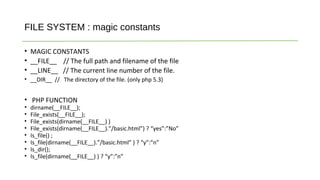
FILE SYSTEM : magic constants
• MAGIC CONSTANTS
• __FILE__ // The full path and filename of the file
• __LINE__ // The current line number of the file.
• __DIR__ // The directory of the file. (only php 5.3)
• PHP FUNCTION
• dirname(__FILE__);
• File_exists(__FILE__);
• File_exists(dirname(__FILE__) )
• File_exists(dirname(__FILE__).”/basic.html”) ? “yes”:”No”
• Is_file() ;
• Is_file(dirname(__FILE__).”/basic.html” ) ? “y”:”n”
• Is_dir();
• Is_file(dirname(__FILE__) ) ? “y”:”n”
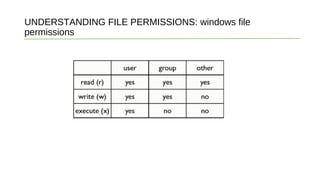
UNDERSTANDING FILE PERMISSIONS: windows file
permissions
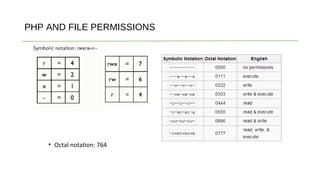
PHP AND FILE PERMISSIONS
• Octal notation: 764
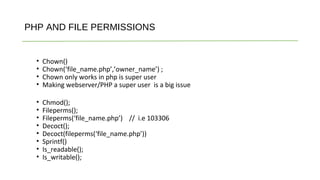
PHP AND FILE PERMISSIONS
• Chown()
• Chown(‘file_name.php’,’owner_name’) ;
• Chown only works in php is super user
• Making webserver/PHP a super user is a big issue
• Chmod();
• Fileperms();
• Fileperms(‘file_name.php’) // i.e 103306
• Decoct();
• Decoct(fileperms(‘file_name.php’))
• Sprintf()
• Is_readable();
• Is_writable();
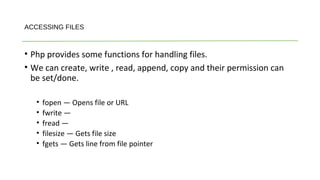
ACCESSING FILES
• Php provides some functions for handling files.
• We can create, write , read, append, copy and their permission can
be set/done.
• fopen — Opens file or URL
• fwrite —
• fread —
• filesize — Gets file size
• fgets — Gets line from file pointer
ACCESSING FILES
• ACCESSING FILES
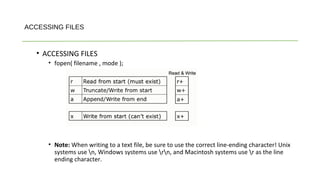
• fopen( filename , mode );
• Note: When writing to a text file, be sure to use the correct line-ending character! Unix
systems use n, Windows systems use rn, and Macintosh systems use r as the line
ending character.
ACCESSING FILES
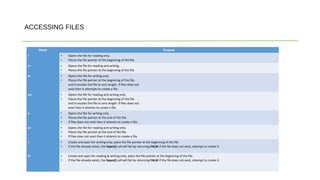
Mode Purpose
r • Opens the file for reading only.
• Places the file pointer at the beginning of the file.
r+ • Opens the file for reading and writing.
• Places the file pointer at the beginning of the file.
w • Opens the file for writing only.
• Places the file pointer at the beginning of the file.
and truncates the file to zero length. If files does not
exist then it attempts to create a file.
w+ • Opens the file for reading and writing only.
• Places the file pointer at the beginning of the file.
and truncates the file to zero length. If files does not
exist then it attemts to create a file.
a • Opens the file for writing only.
• Places the file pointer at the end of the file.
• If files does not exist then it attemts to create a file.
a+ • Opens the file for reading and writing only.
• Places the file pointer at the end of the file.
• If files does not exist then it attemts to create a file.
x • Create and open for writing only; place the file pointer at the beginning of the file.
• If the file already exists, the fopen() call will fail by returning FALSE If the file does not exist, attempt to create it.
X+ • Create and open for reading & writing only; place the file pointer at the beginning of the file.
• If the file already exists, the fopen() call will fail by returning FALSE If the file does not exist, attempt to create it.
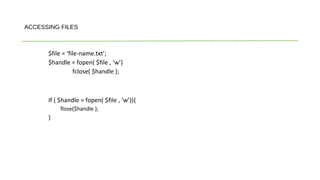
$file = ‘file-name.txt’;
$handle = fopen( $file , ‘w’)
fclose( $handle );
If ( $handle = fopen( $file , ‘w’)){
flose($handle );
}
ACCESSING FILES
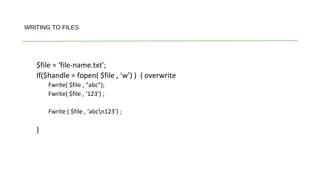
$file = ‘file-name.txt’;
If($handle = fopen( $file , ‘w’) ) { overwrite
Fwrite( $file , “abc”);
Fwrite( $file , ‘123’) ;
Fwrite ( $file , ‘abcn123’) ;
}
WRITING TO FILES
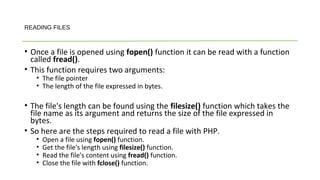
• Once a file is opened using fopen() function it can be read with a function
called fread().
• This function requires two arguments:
• The file pointer
• The length of the file expressed in bytes.
• The file's length can be found using the filesize() function which takes the
file name as its argument and returns the size of the file expressed in
bytes.
• So here are the steps required to read a file with PHP.
• Open a file using fopen() function.
• Get the file's length using filesize() function.
• Read the file's content using fread() function.
• Close the file with fclose() function.
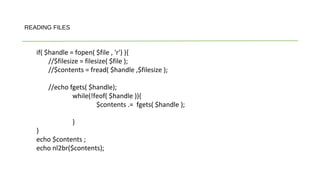
READING FILES
if( $handle = fopen( $file , 'r') ){
//$filesize = filesize( $file );
//$contents = fread( $handle ,$filesize );
//echo fgets( $handle);
while(!feof( $handle )){
$contents .= fgets( $handle );
}
}
echo $contents ;
echo nl2br($contents);
READING FILES
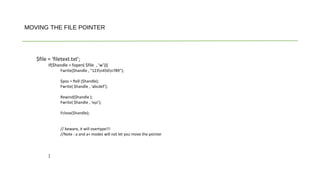
$file = ‘filetext.txt’;
If($handle = fopen( $file , ‘w’)){
Fwrite($handle , “123n456n789”);
$pos = ftell ($handle);
Fwrite( $handle , ‘abcdef’);
Rewind($handle );
Fwrite( $handle , ‘xyz’);
Fclose($handle);
// beware, it will overtype!!!
//Note : a and a+ modes will not let you move the pointer
}
MOVING THE FILE POINTER
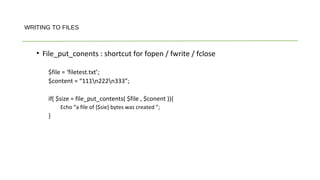
• File_put_conents : shortcut for fopen / fwrite / fclose
$file = ‘filetest.txt’;
$content = “111n222n333”;
if( $size = file_put_contents( $file , $conent )){
Echo “a file of {$sie} bytes was created ”;
}
WRITING TO FILES
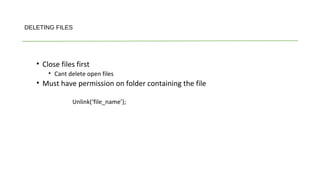
• Close files first
• Cant delete open files
• Must have permission on folder containing the file
Unlink(‘file_name’);
DELETING FILES
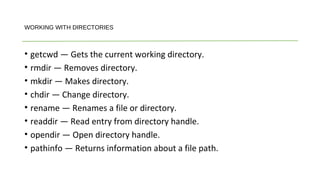
• getcwd — Gets the current working directory.
• rmdir — Removes directory.
• mkdir — Makes directory.
• chdir — Change directory.
• rename — Renames a file or directory.
• readdir — Read entry from directory handle.
• opendir — Open directory handle.
• pathinfo — Returns information about a file path.
WORKING WITH DIRECTORIES
• readfile — Reads the contents of a file and returns the number of
bytes read on success
Other PHP File System Functions

Filing system in PHP

  • 1.
  • 2.
    WHAT IS FILE •A collection of data or information. • One that has a name, called the filename. • Almost all information stored in a computer must be in a file.  There are many different types of files:  data files  text files  program files  directory files and so on.  Different types of files store different types of information. For example, program files store programs, whereas text files store text. OR  A file is an object on a computer that stores data, information, settings, or commands that are used with a computer program. In a graphical user interface (GUI) such as Microsoft Windows, files are shown as unique icons that relate to the program that opens the file.
  • 3.
    FILE SYSTEM :magic constants • MAGIC CONSTANTS • __FILE__ // The full path and filename of the file • __LINE__ // The current line number of the file. • __DIR__ // The directory of the file. (only php 5.3) • PHP FUNCTION • dirname(__FILE__); • File_exists(__FILE__); • File_exists(dirname(__FILE__) ) • File_exists(dirname(__FILE__).”/basic.html”) ? “yes”:”No” • Is_file() ; • Is_file(dirname(__FILE__).”/basic.html” ) ? “y”:”n” • Is_dir(); • Is_file(dirname(__FILE__) ) ? “y”:”n”
  • 4.
    UNDERSTANDING FILE PERMISSIONS:windows file permissions
  • 5.
    PHP AND FILEPERMISSIONS • Octal notation: 764
  • 6.
    PHP AND FILEPERMISSIONS • Chown() • Chown(‘file_name.php’,’owner_name’) ; • Chown only works in php is super user • Making webserver/PHP a super user is a big issue • Chmod(); • Fileperms(); • Fileperms(‘file_name.php’) // i.e 103306 • Decoct(); • Decoct(fileperms(‘file_name.php’)) • Sprintf() • Is_readable(); • Is_writable();
  • 7.
    ACCESSING FILES • Phpprovides some functions for handling files. • We can create, write , read, append, copy and their permission can be set/done. • fopen — Opens file or URL • fwrite — • fread — • filesize — Gets file size • fgets — Gets line from file pointer
  • 8.
    ACCESSING FILES • ACCESSINGFILES • fopen( filename , mode ); • Note: When writing to a text file, be sure to use the correct line-ending character! Unix systems use n, Windows systems use rn, and Macintosh systems use r as the line ending character.
  • 9.
    ACCESSING FILES Mode Purpose r• Opens the file for reading only. • Places the file pointer at the beginning of the file. r+ • Opens the file for reading and writing. • Places the file pointer at the beginning of the file. w • Opens the file for writing only. • Places the file pointer at the beginning of the file. and truncates the file to zero length. If files does not exist then it attempts to create a file. w+ • Opens the file for reading and writing only. • Places the file pointer at the beginning of the file. and truncates the file to zero length. If files does not exist then it attemts to create a file. a • Opens the file for writing only. • Places the file pointer at the end of the file. • If files does not exist then it attemts to create a file. a+ • Opens the file for reading and writing only. • Places the file pointer at the end of the file. • If files does not exist then it attemts to create a file. x • Create and open for writing only; place the file pointer at the beginning of the file. • If the file already exists, the fopen() call will fail by returning FALSE If the file does not exist, attempt to create it. X+ • Create and open for reading & writing only; place the file pointer at the beginning of the file. • If the file already exists, the fopen() call will fail by returning FALSE If the file does not exist, attempt to create it.
  • 10.
    $file = ‘file-name.txt’; $handle= fopen( $file , ‘w’) fclose( $handle ); If ( $handle = fopen( $file , ‘w’)){ flose($handle ); } ACCESSING FILES
  • 11.
    $file = ‘file-name.txt’; If($handle= fopen( $file , ‘w’) ) { overwrite Fwrite( $file , “abc”); Fwrite( $file , ‘123’) ; Fwrite ( $file , ‘abcn123’) ; } WRITING TO FILES
  • 12.
    • Once afile is opened using fopen() function it can be read with a function called fread(). • This function requires two arguments: • The file pointer • The length of the file expressed in bytes. • The file's length can be found using the filesize() function which takes the file name as its argument and returns the size of the file expressed in bytes. • So here are the steps required to read a file with PHP. • Open a file using fopen() function. • Get the file's length using filesize() function. • Read the file's content using fread() function. • Close the file with fclose() function. READING FILES
  • 13.
    if( $handle =fopen( $file , 'r') ){ //$filesize = filesize( $file ); //$contents = fread( $handle ,$filesize ); //echo fgets( $handle); while(!feof( $handle )){ $contents .= fgets( $handle ); } } echo $contents ; echo nl2br($contents); READING FILES
  • 14.
    $file = ‘filetext.txt’; If($handle= fopen( $file , ‘w’)){ Fwrite($handle , “123n456n789”); $pos = ftell ($handle); Fwrite( $handle , ‘abcdef’); Rewind($handle ); Fwrite( $handle , ‘xyz’); Fclose($handle); // beware, it will overtype!!! //Note : a and a+ modes will not let you move the pointer } MOVING THE FILE POINTER
  • 15.
    • File_put_conents :shortcut for fopen / fwrite / fclose $file = ‘filetest.txt’; $content = “111n222n333”; if( $size = file_put_contents( $file , $conent )){ Echo “a file of {$sie} bytes was created ”; } WRITING TO FILES
  • 16.
    • Close filesfirst • Cant delete open files • Must have permission on folder containing the file Unlink(‘file_name’); DELETING FILES
  • 17.
    • getcwd —Gets the current working directory. • rmdir — Removes directory. • mkdir — Makes directory. • chdir — Change directory. • rename — Renames a file or directory. • readdir — Read entry from directory handle. • opendir — Open directory handle. • pathinfo — Returns information about a file path. WORKING WITH DIRECTORIES
  • 18.
    • readfile —Reads the contents of a file and returns the number of bytes read on success Other PHP File System Functions