1/39
Introduction Stationarity ARIMA Models Forecasting Summary
Financial Time Series Analysis using R
Interactive Brokers Webinar Series
Presented by Majeed Simaan 1
1Lally School of Management at RPI
June 15, 2017
2/39
Introduction Stationarity ARIMA Models Forecasting Summary
About Me
PhD Finance Candidate at RPI
Research Interests:
Banking and Risk Management
Financial Networks and Interconnectedness
Portfolio and Asset Pricing Theory
Computational and Statistical Learning
Contact:
1 simaam@rpi.edu
2 Linkedin
3 Homepage
3/39
Introduction Stationarity ARIMA Models Forecasting Summary
Acknowledgment
Interactive Brokers - special thanks to
Violeta Petrova
Cynthia Tomain
Special thanks to Prof. Tom Shohfi
Faculty advisor to the RPI James Student Managed Investment
Fund
Click here for more info
Finally, special thanks to the Lally School of Management and
Technology for hosting this presentation
4/39
Introduction Stationarity ARIMA Models Forecasting Summary
Agenda
Intro to R and Financial Time Series
Stationarity
ARIMA Models
Forecasting
5/39
Introduction Stationarity ARIMA Models Forecasting Summary
Suggested Readings and Resources
The classic textbook on time series analysis
Hamilton, 1994
Time series using R:
1 Econometrics in R, Farnsworth, 2008
2 An introduction to analysis of financial data with R, Tsay, 2014
3 Manipulating time series in R, J. Ryan, 2017
Advanced time series using R
1 Analysis of integrated and cointegrated time series with R, Pfaff,
2008
2 Multivariate time series analysis, Tsay, 2013
6/39
Introduction Stationarity ARIMA Models Forecasting Summary
Introduction
7/39
Introduction Stationarity ARIMA Models Forecasting Summary
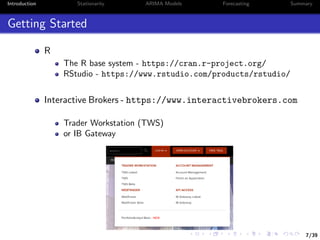
Getting Started
R
The R base system - https://cran.r-project.org/
RStudio - https://www.rstudio.com/products/rstudio/
Interactive Brokers - https://www.interactivebrokers.com
Trader Workstation (TWS)
or IB Gateway
8/39
Introduction Stationarity ARIMA Models Forecasting Summary
Time Series in R
The xts package, (J. A. Ryan & Ulrich, 2014), provides efficient
ways to manipulate time series1
> library(xts)
> library(lubridate)
> n <- 100
> set.seed(13)
> x <- rnorm(n)
> names(x) <- as.character(date(today()) - 0:(n-1))
> x <- as.xts(x)
> x[today(),]
[,1]
2017-06-08 0.5543269
1
lubridate package, (Grolemund & Wickham, 2011), makes date format handling much easier
8/39
Introduction Stationarity ARIMA Models Forecasting Summary
Time Series in R
The xts package, (J. A. Ryan & Ulrich, 2014), provides efficient
ways to manipulate time series1
> library(xts)
> library(lubridate)
> n <- 100
> set.seed(13)
> x <- rnorm(n)
> names(x) <- as.character(date(today()) - 0:(n-1))
> x <- as.xts(x)
> x[today(),]
[,1]
2017-06-08 0.5543269
# it is easy to plot an xts object
> plot(x)
Feb 27
2017
Mar 20
2017
Apr 10
2017
May 01
2017
May 22
2017
Jun 06
2017
−2−1012
x
1
lubridate package, (Grolemund & Wickham, 2011), makes date format handling much easier
9/39
Introduction Stationarity ARIMA Models Forecasting Summary
Time Series in R II
We can also look at x as a data frame instead
> x <- data.frame(Date = date(x), x = x[,1])
> rownames(x) <- NULL
> summary(x)
Date x
Min. :2017-03-01 Min. :-2.02704
1st Qu.:2017-03-25 1st Qu.:-0.75623
Median :2017-04-19 Median :-0.07927
Mean :2017-04-19 Mean :-0.06183
3rd Qu.:2017-05-14 3rd Qu.: 0.55737
Max. :2017-06-08 Max. : 1.83616
> # add year and month variables
> x$Y <- year(x$Date); x$M <- month(x$Date);
9/39
Introduction Stationarity ARIMA Models Forecasting Summary
Time Series in R II
We can also look at x as a data frame instead
> x <- data.frame(Date = date(x), x = x[,1])
> rownames(x) <- NULL
> summary(x)
Date x
Min. :2017-03-01 Min. :-2.02704
1st Qu.:2017-03-25 1st Qu.:-0.75623
Median :2017-04-19 Median :-0.07927
Mean :2017-04-19 Mean :-0.06183
3rd Qu.:2017-05-14 3rd Qu.: 0.55737
Max. :2017-06-08 Max. : 1.83616
> # add year and month variables
> x$Y <- year(x$Date); x$M <- month(x$Date);
The package plyr, (Wickham, 2011), provides efficient data split
summary
> library(plyr)
> max_month_x <- ddply(x,c("Y","M"),function(z) max(z[,"x"]))
> max_month_x # max value over month
Y M V1
1 2017 3 1.745427
2 2017 4 1.614479
3 2017 5 1.836163
4 2017 6 1.775163
10/39
Introduction Stationarity ARIMA Models Forecasting Summary
IB API
The IBrokers package, J. A. Ryan, 2014, provides access to IB Trader
Workstation (TWS) API
The package also allows users to automate trades and receive real-
time data2
2
See the recent Webinar presentation by Anil Yadav here.
10/39
Introduction Stationarity ARIMA Models Forecasting Summary
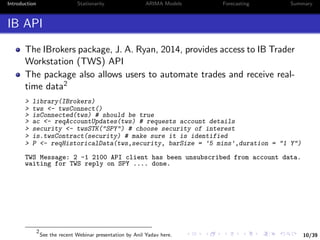
IB API
The IBrokers package, J. A. Ryan, 2014, provides access to IB Trader
Workstation (TWS) API
The package also allows users to automate trades and receive real-
time data2
> library(IBrokers)
> tws <- twsConnect()
> isConnected(tws) # should be true
> ac <- reqAccountUpdates(tws) # requests account details
> security <- twsSTK("SPY") # choose security of interest
> is.twsContract(security) # make sure it is identified
> P <- reqHistoricalData(tws,security, barSize = '5 mins',duration = "1 Y")
TWS Message: 2 -1 2100 API client has been unsubscribed from account data.
waiting for TWS reply on SPY .... done.
2
See the recent Webinar presentation by Anil Yadav here.
10/39
Introduction Stationarity ARIMA Models Forecasting Summary
IB API
The IBrokers package, J. A. Ryan, 2014, provides access to IB Trader
Workstation (TWS) API
The package also allows users to automate trades and receive real-
time data2
> library(IBrokers)
> tws <- twsConnect()
> isConnected(tws) # should be true
> ac <- reqAccountUpdates(tws) # requests account details
> security <- twsSTK("SPY") # choose security of interest
> is.twsContract(security) # make sure it is identified
> P <- reqHistoricalData(tws,security, barSize = '5 mins',duration = "1 Y")
TWS Message: 2 -1 2100 API client has been unsubscribed from account data.
waiting for TWS reply on SPY .... done.
> P[c(1,nrow(P))] # look at first and last data points
SPY.Open SPY.High SPY.Low SPY.Close SPY.Volume SPY.WAP
2016-06-09 09:30:00 211.51 211.62 211.37 211.41 26766 211.501
2017-06-08 15:55:00 243.77 243.86 243.68 243.76 30984 243.772
SPY.hasGaps SPY.Count
2016-06-09 09:30:00 0 8378
2017-06-08 15:55:00 0 8952
2
See the recent Webinar presentation by Anil Yadav here.
11/39
Introduction Stationarity ARIMA Models Forecasting Summary
Stationarity
12/39
Introduction Stationarity ARIMA Models Forecasting Summary
Basic Concepts
Let yt denote a time series observed over t = 1, .., T periods
yt is called weakly stationary, if
E[yt] = µ and V[yt] = σ2
, ∀t (1)
i.e. expectation and variance of y are time invariant
3
See for instance Tsay, 2005
12/39
Introduction Stationarity ARIMA Models Forecasting Summary
Basic Concepts
Let yt denote a time series observed over t = 1, .., T periods
yt is called weakly stationary, if
E[yt] = µ and V[yt] = σ2
, ∀t (1)
i.e. expectation and variance of y are time invariant
Also, yt is called strictly stationary, if
f (yt1 , ..., ytm ) = f (yt1+j , ..., ytm+j ) (2)
where m, j, and (t1, ..., tm) are arbitrary positive integers3
3
See for instance Tsay, 2005
13/39
Introduction Stationarity ARIMA Models Forecasting Summary
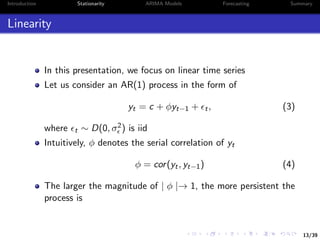
Linearity
In this presentation, we focus on linear time series
Let us consider an AR(1) process in the form of
yt = c + φyt−1 + t, (3)
where t ∼ D(0, σ2) is iid
Intuitively, φ denotes the serial correlation of yt
φ = cor(yt, yt−1) (4)
The larger the magnitude of | φ |→ 1, the more persistent the
process is
14/39
Introduction Stationarity ARIMA Models Forecasting Summary
Unit Root
Weak stationarity holds true if E[yt] = µ < ∞ for all t, such
that
µ = c + φµ ⇒ µ =
c
1 − φ
(5)
The same applies to V[yt] = σ2 < ∞, ∀t:
σ2
= φ2
σ2
+ σ2
⇒ σ2
=
σ2
1 − φ2
(6)
A necessary condition for weak stationarity implies | φ |< 1
Unit Root
If φ = 1, the process yt is a unit root
15/39
Introduction Stationarity ARIMA Models Forecasting Summary
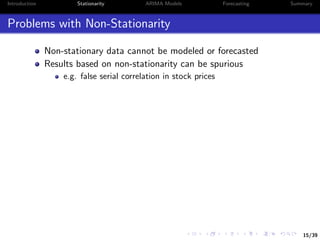
Problems with Non-Stationarity
Non-stationary data cannot be modeled or forecasted
Results based on non-stationarity can be spurious
e.g. false serial correlation in stock prices
15/39
Introduction Stationarity ARIMA Models Forecasting Summary
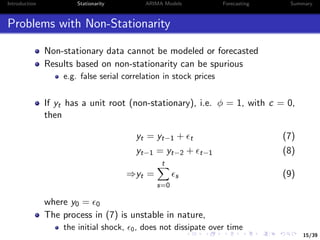
Problems with Non-Stationarity
Non-stationary data cannot be modeled or forecasted
Results based on non-stationarity can be spurious
e.g. false serial correlation in stock prices
If yt has a unit root (non-stationary), i.e. φ = 1, with c = 0,
then
yt = yt−1 + t (7)
yt−1 = yt−2 + t−1 (8)
⇒yt =
t
s=0
s (9)
where y0 = 0
The process in (7) is unstable in nature,
the initial shock, 0, does not dissipate over time
16/39
Introduction Stationarity ARIMA Models Forecasting Summary
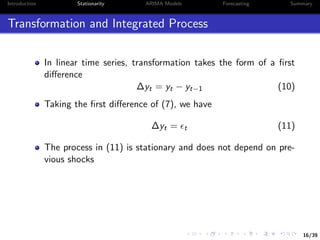
Transformation and Integrated Process
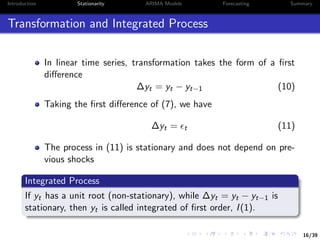
In linear time series, transformation takes the form of a first
difference
∆yt = yt − yt−1 (10)
Taking the first difference of (7), we have
∆yt = t (11)
The process in (11) is stationary and does not depend on pre-
vious shocks
16/39
Introduction Stationarity ARIMA Models Forecasting Summary
Transformation and Integrated Process
In linear time series, transformation takes the form of a first
difference
∆yt = yt − yt−1 (10)
Taking the first difference of (7), we have
∆yt = t (11)
The process in (11) is stationary and does not depend on pre-
vious shocks
Integrated Process
If yt has a unit root (non-stationary), while ∆yt = yt − yt−1 is
stationary, then yt is called integrated of first order, I(1).
17/39
Introduction Stationarity ARIMA Models Forecasting Summary
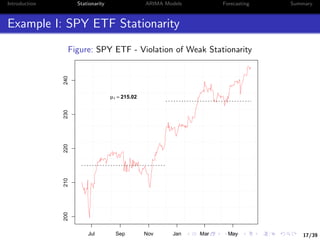
Example I: SPY ETF Stationarity
Figure: SPY ETF - Violation of Weak Stationarity
Jul Sep Nov Jan Mar May
200210220230240
µ1 = 215.02
µ2 = 233.88
18/39
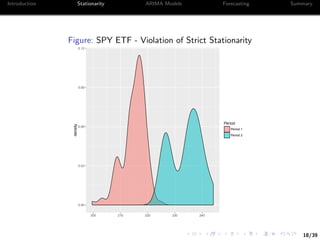
Introduction Stationarity ARIMA Models Forecasting Summary
Figure: SPY ETF - Violation of Strict Stationarity
0.00
0.03
0.06
0.09
0.12
200 210 220 230 240
density
Period
Period 1
Period 2
19/39
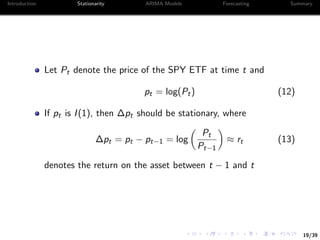
Introduction Stationarity ARIMA Models Forecasting Summary
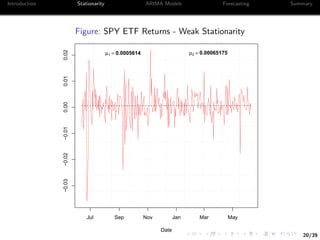
Let Pt denote the price of the SPY ETF at time t and
pt = log(Pt) (12)
If pt is I(1), then ∆pt should be stationary, where
∆pt = pt − pt−1 = log
Pt
Pt−1
≈ rt (13)
denotes the return on the asset between t − 1 and t
20/39
Introduction Stationarity ARIMA Models Forecasting Summary
Figure: SPY ETF Returns - Weak Stationarity
Jul Sep Nov Jan Mar May
−0.03−0.02−0.010.000.010.02
Date
µ1 = 0.0005614 µ2 = 0.00065175
21/39
Introduction Stationarity ARIMA Models Forecasting Summary
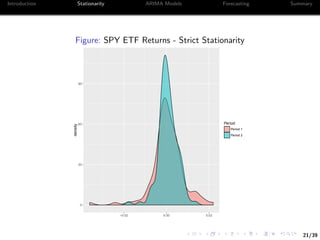
Figure: SPY ETF Returns - Strict Stationarity
0
30
60
90
−0.02 0.00 0.02
density
Period
Period 1
Period 2
22/39
Introduction Stationarity ARIMA Models Forecasting Summary
Let’s take a look at the serial correlation of the prices
We will focus on the closing price
> find.close <- grep("Close",names(P))
> P_daily <- apply.daily(P[,find.close],function(x) x[nrow(x),])
> dim(P_daily)
[1] 252 1
> cor(P_daily[-1],lag(P_daily)[-1])
SPY.Close
SPY.Close 0.99238
22/39
Introduction Stationarity ARIMA Models Forecasting Summary
Let’s take a look at the serial correlation of the prices
We will focus on the closing price
> find.close <- grep("Close",names(P))
> P_daily <- apply.daily(P[,find.close],function(x) x[nrow(x),])
> dim(P_daily)
[1] 252 1
> cor(P_daily[-1],lag(P_daily)[-1])
SPY.Close
SPY.Close 0.99238
On the other hand, the corresponding statistic for returns is
> R_daily <- P_daily[-1]/lag(P_daily)[-1] - 1
> cor(R_daily[-1],lag(R_daily)[-1])
SPY.Close
SPY.Close -0.06828564
23/39
Introduction Stationarity ARIMA Models Forecasting Summary
Test for Unit Root
It is important to plot the time series before running any tests
of unit root
It is recommended to use reasoning where the non-stationarity
might come from
In the case of stock prices, time is one major factor
Assuming that a time series has a unit root when it does not
can bias inference
23/39
Introduction Stationarity ARIMA Models Forecasting Summary
Test for Unit Root
It is important to plot the time series before running any tests
of unit root
It is recommended to use reasoning where the non-stationarity
might come from
In the case of stock prices, time is one major factor
Assuming that a time series has a unit root when it does not
can bias inference
Augmented Dickey-Fuller Test
A common test for unit root is the Augmented Dickey-Fuller
(ADF) test
It tests the null hypothesis whether a unit root is present in the
time series
The more negative the statistic is the more likely to reject the
null
24/39
Introduction Stationarity ARIMA Models Forecasting Summary
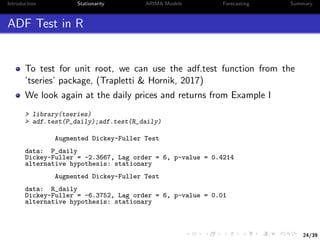
ADF Test in R
To test for unit root, we can use the adf.test function from the
’tseries’ package, (Trapletti & Hornik, 2017)
We look again at the daily prices and returns from Example I
> library(tseries)
> adf.test(P_daily);adf.test(R_daily)
Augmented Dickey-Fuller Test
data: P_daily
Dickey-Fuller = -2.3667, Lag order = 6, p-value = 0.4214
alternative hypothesis: stationary
Augmented Dickey-Fuller Test
data: R_daily
Dickey-Fuller = -6.3752, Lag order = 6, p-value = 0.01
alternative hypothesis: stationary
25/39
Introduction Stationarity ARIMA Models Forecasting Summary
ARIMA Models
(Autoregressive Integrated Moving Average)
26/39
Introduction Stationarity ARIMA Models Forecasting Summary
ARIMA Models
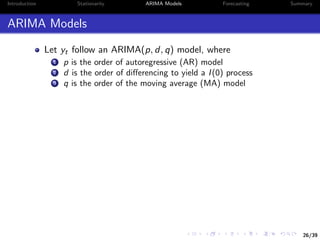
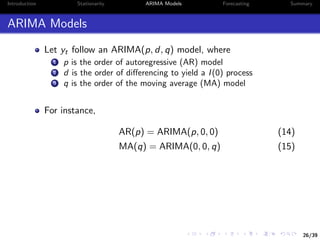
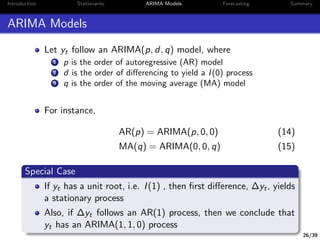
Let yt follow an ARIMA(p, d, q) model, where
1 p is the order of autoregressive (AR) model
2 d is the order of differencing to yield a I(0) process
3 q is the order of the moving average (MA) model
26/39
Introduction Stationarity ARIMA Models Forecasting Summary
ARIMA Models
Let yt follow an ARIMA(p, d, q) model, where
1 p is the order of autoregressive (AR) model
2 d is the order of differencing to yield a I(0) process
3 q is the order of the moving average (MA) model
For instance,
AR(p) = ARIMA(p, 0, 0) (14)
MA(q) = ARIMA(0, 0, q) (15)
26/39
Introduction Stationarity ARIMA Models Forecasting Summary
ARIMA Models
Let yt follow an ARIMA(p, d, q) model, where
1 p is the order of autoregressive (AR) model
2 d is the order of differencing to yield a I(0) process
3 q is the order of the moving average (MA) model
For instance,
AR(p) = ARIMA(p, 0, 0) (14)
MA(q) = ARIMA(0, 0, q) (15)
Special Case
If yt has a unit root, i.e. I(1) , then first difference, ∆yt, yields
a stationary process
Also, if ∆yt follows an AR(1) process, then we conclude that
yt has an ARIMA(1, 1, 0) process
27/39
Introduction Stationarity ARIMA Models Forecasting Summary
ARIMA Identification
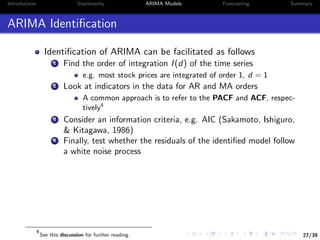
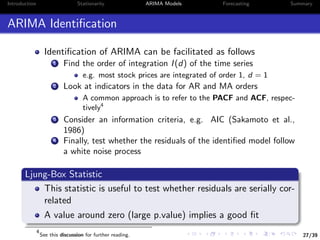
Identification of ARIMA can be facilitated as follows
1 Find the order of integration I(d) of the time series
e.g. most stock prices are integrated of order 1, d = 1
2 Look at indicators in the data for AR and MA orders
A common approach is to refer to the PACF and ACF, respec-
tively4
3 Consider an information criteria, e.g. AIC (Sakamoto, Ishiguro,
& Kitagawa, 1986)
4 Finally, test whether the residuals of the identified model follow
a white noise process
4
See this discussion for further reading.
27/39
Introduction Stationarity ARIMA Models Forecasting Summary
ARIMA Identification
Identification of ARIMA can be facilitated as follows
1 Find the order of integration I(d) of the time series
e.g. most stock prices are integrated of order 1, d = 1
2 Look at indicators in the data for AR and MA orders
A common approach is to refer to the PACF and ACF, respec-
tively4
3 Consider an information criteria, e.g. AIC (Sakamoto et al.,
1986)
4 Finally, test whether the residuals of the identified model follow
a white noise process
Ljung-Box Statistic
This statistic is useful to test whether residuals are serially cor-
related
A value around zero (large p.value) implies a good fit
4
See this discussion for further reading.
28/39
Introduction Stationarity ARIMA Models Forecasting Summary
Example II: Identifying ARIMA Models
We consider a simulated time series from a given ARIMA model
Specifically, we consider an ARIMA(3,1,2) process
> N <- 10^3
> set.seed(13)
> y <- arima.sim(N,model = list(order = c(3,1,2), ar = c(0.8, -0.5,0.4),
+ ma = c(0.5,-0.3))) + 200
# Note that y is a ts object rather than xts
Step 1: Plot and Test for Unit Root
> plot(y);
> ADF <- adf.test(y); ADF$p.value
[1] 0.4148301
# lag on ts object should be assigned as -1
> delta_y <- na.omit(y - lag(y,-1) )
> plot(delta_y);
> ADF2 <- adf.test(delta_y); ADF2$p.value
[1] 0.01
29/39
Introduction Stationarity ARIMA Models Forecasting Summary
Step 1 tells us that d = 1, i.e. yt follows an ARIMA(p, 1, q)
We need to identify p and q
Step 2: Identify p and q using the AIC information criterion
> p.seq <- 0:4
> q.seq <- 0:4
> pq.seq <- expand.grid(p.seq,q.seq)
> AIC.list <- lapply(1:nrow(pq.seq),function(i)
+ AIC(arima(y,c(pq.seq[i,1],1,pq.seq[i,2]))))
> AIC.matrix <- matrix(unlist(AIC.list),length(p.seq))
> rownames(AIC.matrix) <- p.seq
> colnames(AIC.matrix) <- q.seq
AIC.matrix
p  q 0 1 2 3 4
0 3973.32 3075.67 2923.06 2914.88 2916.86
1 3542.07 2983.22 2916.50 2916.88 2883.02
2 3407.54 2949.70 2912.02 2907.37 2866.26
3 3053.10 2851.96 2844.42 2846.41 2848.31
4 2987.36 2845.46 2846.41 2847.81 2850.41
30/39
Introduction Stationarity ARIMA Models Forecasting Summary
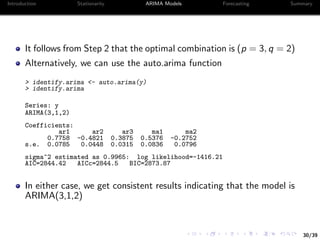
It follows from Step 2 that the optimal combination is (p = 3, q = 2)
Alternatively, we can use the auto.arima function
> identify.arima <- auto.arima(y)
> identify.arima
Series: y
ARIMA(3,1,2)
Coefficients:
ar1 ar2 ar3 ma1 ma2
0.7758 -0.4821 0.3875 0.5376 -0.2752
s.e. 0.0785 0.0448 0.0315 0.0836 0.0796
sigma^2 estimated as 0.9965: log likelihood=-1416.21
AIC=2844.42 AICc=2844.5 BIC=2873.87
In either case, we get consistent results indicating that the model is
ARIMA(3,1,2)
31/39
Introduction Stationarity ARIMA Models Forecasting Summary
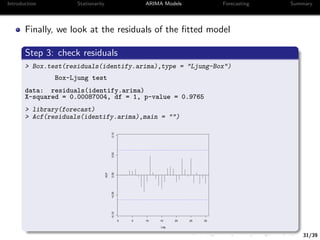
Finally, we look at the residuals of the fitted model
Step 3: check residuals
> Box.test(residuals(identify.arima),type = "Ljung-Box")
Box-Ljung test
data: residuals(identify.arima)
X-squared = 0.00087004, df = 1, p-value = 0.9765
> library(forecast)
> Acf(residuals(identify.arima),main = "")
−0.10−0.050.000.050.10
Lag
ACF
0 5 10 15 20 25 30
32/39
Introduction Stationarity ARIMA Models Forecasting Summary
Forecasting
33/39
Introduction Stationarity ARIMA Models Forecasting Summary
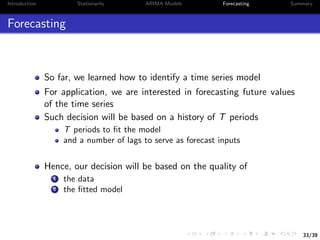
Forecasting
So far, we learned how to identify a time series model
For application, we are interested in forecasting future values
of the time series
Such decision will be based on a history of T periods
T periods to fit the model
and a number of lags to serve as forecast inputs
Hence, our decision will be based on the quality of
1 the data
2 the fitted model
34/39
Introduction Stationarity ARIMA Models Forecasting Summary
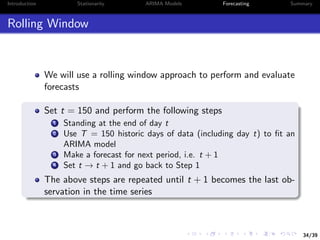
Rolling Window
We will use a rolling window approach to perform and evaluate
forecasts
Set t = 150 and perform the following steps
1 Standing at the end of day t
2 Use T = 150 historic days of data (including day t) to fit an
ARIMA model
3 Make a forecast for next period, i.e. t + 1
4 Set t → t + 1 and go back to Step 1
The above steps are repeated until t + 1 becomes the last ob-
servation in the time series
35/39
Introduction Stationarity ARIMA Models Forecasting Summary
Example III: Forecast the SPY ETF
In total we have 252 days of closing prices for the SPY ETF
To avoid price non-stationary, we focus on returns alone
This leaves us with 101 days to test our forecasts5
We consider three models for forecast
1 Dynamically fitted ARIMA(p,0,q) model
2 Dynamically fitted AR(1) model
3 Plain moving average (momentum)
> library(forecast)
> T. <- 150
> arma.list <- numeric()
> ar1.list <- numeric()
> ma.list <- numeric()
> for(i in T.:(length(R_daily)-1) ) {
+ arma.list[i] <- list(auto.arima(R_daily[(i-T.+1):i])) # ARIMA(p,0,q)
+ ar1.list[i] <- list(arima(R_daily[(i-T.+1):i],c(1,0,0))) # AR(1)
+ ma.list[i] <- list(mean(R_daily[(i-T.+1):i])) # momentum
+ }
5
The experiment relies on the forecast package, Hyndman, 2017
36/39
Introduction Stationarity ARIMA Models Forecasting Summary
> y_hat <- sapply(arma.list[T.:length(arma.list)],
+ function(x) forecast(x,1)[[4]] )
> y_hat2 <- sapply(ar1.list[T.:length(ar1.list)],
+ function(x) forecast(x,1)[[4]] )
> y_hat3 <- sign(unlist(ma.list))
> forecast_accuracy <- cbind(mean(sign(y_hat) == sign(y)),
+ mean(sign(y_hat2) == sign(y)),
+ mean(sign(y_hat3) == sign(y)))
Finally, summarize the forecast accuracy in a table
ARIMA AR(1) Momentum
Accuracy 55.45% 53.47% 52.48%
Among the three, ARIMA performs the best
Could be attributed to more flexibility in fitting the model over time
37/39
Introduction Stationarity ARIMA Models Forecasting Summary
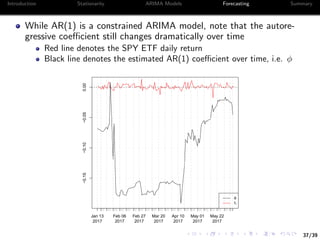
While AR(1) is a constrained ARIMA model, note that the autore-
gressive coefficient still changes dramatically over time
Red line denotes the SPY ETF daily return
Black line denotes the estimated AR(1) coefficient over time, i.e. φ
Jan 13
2017
Feb 06
2017
Feb 27
2017
Mar 20
2017
Apr 10
2017
May 01
2017
May 22
2017
−0.15−0.10−0.050.00
φ
rt
38/39
Introduction Stationarity ARIMA Models Forecasting Summary
Summary
Importance of stationarity
Non-stationary models could imply spurious results
Plots are always insightful
Use tests carefully
Consider multiple time series to form forecasts
Hence the idea of multivariate time series analysis
39/39
Introduction Stationarity ARIMA Models Forecasting Summary
Good Luck!
40/39
References
References I
[]Farnsworth, G. V. 2008. Econometrics in r. Technical
report, October 2008. Available at http://cran. rproject.
org/doc/contrib/Farnsworth-EconometricsInR. pdf.
[]Grolemund, G., & Wickham, H. 2011. Dates and times made easy
with lubridate. Journal of Statistical Software, 40(3), 1–25.
Retrieved from http://www.jstatsoft.org/v40/i03/
[]Hamilton, J. D. 1994. Time series analysis (Vol. 2). Princeton
university press Princeton.
[]Hyndman, R. J. 2017. forecast: Forecasting functions for time
series and linear models [Computer software manual]. Re-
trieved from http://github.com/robjhyndman/forecast
(R package version 8.0)
[]Pfaff, B. 2008. Analysis of integrated and cointegrated time series
with r. Springer Science & Business Media.
41/39
References
References II
[]Ryan, J. 2017. Manipulating time series data in r with xts & zoo.
Data Camp.
[]Ryan, J. A. 2014. Ibrokers: R api to interactive brokers trader
workstation [Computer software manual]. Retrieved from
https://CRAN.R-project.org/package=IBrokers (R
package version 0.9-12)
[]Ryan, J. A., & Ulrich, J. M. 2014. xts: extensible time series
[Computer software manual]. Retrieved from https://CRAN
.R-project.org/package=xts (R package version 0.9-7)
[]Sakamoto, Y., Ishiguro, M., & Kitagawa, G. 1986. Akaike infor-
mation criterion statistics. Dordrecht, The Netherlands: D.
Reidel.
[]Trapletti, A., & Hornik, K. 2017. tseries: Time series analy-
sis and computational finance [Computer software manual].
Retrieved from https://CRAN.R-project.org/package=
tseries (R package version 0.10-41.)
42/39
References
References III
[]Tsay, R. S. 2005. Analysis of financial time series (Vol. 543). John
Wiley & Sons.
[]Tsay, R. S. 2013. Multivariate time series analysis: with r and
financial applications. John Wiley & Sons.
[]Tsay, R. S. 2014. An introduction to analysis of financial data
with r. John Wiley & Sons.
[]Wickham, H. 2011. The split-apply-combine strategy for data anal-
ysis. Journal of Statistical Software, 40(1), 1–29. Retrieved
from http://www.jstatsoft.org/v40/i01/

Financial Time Series Analysis Using R

  • 1.
    1/39 Introduction Stationarity ARIMAModels Forecasting Summary Financial Time Series Analysis using R Interactive Brokers Webinar Series Presented by Majeed Simaan 1 1Lally School of Management at RPI June 15, 2017
  • 2.
    2/39 Introduction Stationarity ARIMAModels Forecasting Summary About Me PhD Finance Candidate at RPI Research Interests: Banking and Risk Management Financial Networks and Interconnectedness Portfolio and Asset Pricing Theory Computational and Statistical Learning Contact: 1 simaam@rpi.edu 2 Linkedin 3 Homepage
  • 3.
    3/39 Introduction Stationarity ARIMAModels Forecasting Summary Acknowledgment Interactive Brokers - special thanks to Violeta Petrova Cynthia Tomain Special thanks to Prof. Tom Shohfi Faculty advisor to the RPI James Student Managed Investment Fund Click here for more info Finally, special thanks to the Lally School of Management and Technology for hosting this presentation
  • 4.
    4/39 Introduction Stationarity ARIMAModels Forecasting Summary Agenda Intro to R and Financial Time Series Stationarity ARIMA Models Forecasting
  • 5.
    5/39 Introduction Stationarity ARIMAModels Forecasting Summary Suggested Readings and Resources The classic textbook on time series analysis Hamilton, 1994 Time series using R: 1 Econometrics in R, Farnsworth, 2008 2 An introduction to analysis of financial data with R, Tsay, 2014 3 Manipulating time series in R, J. Ryan, 2017 Advanced time series using R 1 Analysis of integrated and cointegrated time series with R, Pfaff, 2008 2 Multivariate time series analysis, Tsay, 2013
  • 6.
    6/39 Introduction Stationarity ARIMAModels Forecasting Summary Introduction
  • 7.
    7/39 Introduction Stationarity ARIMAModels Forecasting Summary Getting Started R The R base system - https://cran.r-project.org/ RStudio - https://www.rstudio.com/products/rstudio/ Interactive Brokers - https://www.interactivebrokers.com Trader Workstation (TWS) or IB Gateway
  • 8.
    8/39 Introduction Stationarity ARIMAModels Forecasting Summary Time Series in R The xts package, (J. A. Ryan & Ulrich, 2014), provides efficient ways to manipulate time series1 > library(xts) > library(lubridate) > n <- 100 > set.seed(13) > x <- rnorm(n) > names(x) <- as.character(date(today()) - 0:(n-1)) > x <- as.xts(x) > x[today(),] [,1] 2017-06-08 0.5543269 1 lubridate package, (Grolemund & Wickham, 2011), makes date format handling much easier
  • 9.
    8/39 Introduction Stationarity ARIMAModels Forecasting Summary Time Series in R The xts package, (J. A. Ryan & Ulrich, 2014), provides efficient ways to manipulate time series1 > library(xts) > library(lubridate) > n <- 100 > set.seed(13) > x <- rnorm(n) > names(x) <- as.character(date(today()) - 0:(n-1)) > x <- as.xts(x) > x[today(),] [,1] 2017-06-08 0.5543269 # it is easy to plot an xts object > plot(x) Feb 27 2017 Mar 20 2017 Apr 10 2017 May 01 2017 May 22 2017 Jun 06 2017 −2−1012 x 1 lubridate package, (Grolemund & Wickham, 2011), makes date format handling much easier
  • 10.
    9/39 Introduction Stationarity ARIMAModels Forecasting Summary Time Series in R II We can also look at x as a data frame instead > x <- data.frame(Date = date(x), x = x[,1]) > rownames(x) <- NULL > summary(x) Date x Min. :2017-03-01 Min. :-2.02704 1st Qu.:2017-03-25 1st Qu.:-0.75623 Median :2017-04-19 Median :-0.07927 Mean :2017-04-19 Mean :-0.06183 3rd Qu.:2017-05-14 3rd Qu.: 0.55737 Max. :2017-06-08 Max. : 1.83616 > # add year and month variables > x$Y <- year(x$Date); x$M <- month(x$Date);
  • 11.
    9/39 Introduction Stationarity ARIMAModels Forecasting Summary Time Series in R II We can also look at x as a data frame instead > x <- data.frame(Date = date(x), x = x[,1]) > rownames(x) <- NULL > summary(x) Date x Min. :2017-03-01 Min. :-2.02704 1st Qu.:2017-03-25 1st Qu.:-0.75623 Median :2017-04-19 Median :-0.07927 Mean :2017-04-19 Mean :-0.06183 3rd Qu.:2017-05-14 3rd Qu.: 0.55737 Max. :2017-06-08 Max. : 1.83616 > # add year and month variables > x$Y <- year(x$Date); x$M <- month(x$Date); The package plyr, (Wickham, 2011), provides efficient data split summary > library(plyr) > max_month_x <- ddply(x,c("Y","M"),function(z) max(z[,"x"])) > max_month_x # max value over month Y M V1 1 2017 3 1.745427 2 2017 4 1.614479 3 2017 5 1.836163 4 2017 6 1.775163
  • 12.
    10/39 Introduction Stationarity ARIMAModels Forecasting Summary IB API The IBrokers package, J. A. Ryan, 2014, provides access to IB Trader Workstation (TWS) API The package also allows users to automate trades and receive real- time data2 2 See the recent Webinar presentation by Anil Yadav here.
  • 13.
    10/39 Introduction Stationarity ARIMAModels Forecasting Summary IB API The IBrokers package, J. A. Ryan, 2014, provides access to IB Trader Workstation (TWS) API The package also allows users to automate trades and receive real- time data2 > library(IBrokers) > tws <- twsConnect() > isConnected(tws) # should be true > ac <- reqAccountUpdates(tws) # requests account details > security <- twsSTK("SPY") # choose security of interest > is.twsContract(security) # make sure it is identified > P <- reqHistoricalData(tws,security, barSize = '5 mins',duration = "1 Y") TWS Message: 2 -1 2100 API client has been unsubscribed from account data. waiting for TWS reply on SPY .... done. 2 See the recent Webinar presentation by Anil Yadav here.
  • 14.
    10/39 Introduction Stationarity ARIMAModels Forecasting Summary IB API The IBrokers package, J. A. Ryan, 2014, provides access to IB Trader Workstation (TWS) API The package also allows users to automate trades and receive real- time data2 > library(IBrokers) > tws <- twsConnect() > isConnected(tws) # should be true > ac <- reqAccountUpdates(tws) # requests account details > security <- twsSTK("SPY") # choose security of interest > is.twsContract(security) # make sure it is identified > P <- reqHistoricalData(tws,security, barSize = '5 mins',duration = "1 Y") TWS Message: 2 -1 2100 API client has been unsubscribed from account data. waiting for TWS reply on SPY .... done. > P[c(1,nrow(P))] # look at first and last data points SPY.Open SPY.High SPY.Low SPY.Close SPY.Volume SPY.WAP 2016-06-09 09:30:00 211.51 211.62 211.37 211.41 26766 211.501 2017-06-08 15:55:00 243.77 243.86 243.68 243.76 30984 243.772 SPY.hasGaps SPY.Count 2016-06-09 09:30:00 0 8378 2017-06-08 15:55:00 0 8952 2 See the recent Webinar presentation by Anil Yadav here.
  • 15.
    11/39 Introduction Stationarity ARIMAModels Forecasting Summary Stationarity
  • 16.
    12/39 Introduction Stationarity ARIMAModels Forecasting Summary Basic Concepts Let yt denote a time series observed over t = 1, .., T periods yt is called weakly stationary, if E[yt] = µ and V[yt] = σ2 , ∀t (1) i.e. expectation and variance of y are time invariant 3 See for instance Tsay, 2005
  • 17.
    12/39 Introduction Stationarity ARIMAModels Forecasting Summary Basic Concepts Let yt denote a time series observed over t = 1, .., T periods yt is called weakly stationary, if E[yt] = µ and V[yt] = σ2 , ∀t (1) i.e. expectation and variance of y are time invariant Also, yt is called strictly stationary, if f (yt1 , ..., ytm ) = f (yt1+j , ..., ytm+j ) (2) where m, j, and (t1, ..., tm) are arbitrary positive integers3 3 See for instance Tsay, 2005
  • 18.
    13/39 Introduction Stationarity ARIMAModels Forecasting Summary Linearity In this presentation, we focus on linear time series Let us consider an AR(1) process in the form of yt = c + φyt−1 + t, (3) where t ∼ D(0, σ2) is iid Intuitively, φ denotes the serial correlation of yt φ = cor(yt, yt−1) (4) The larger the magnitude of | φ |→ 1, the more persistent the process is
  • 19.
    14/39 Introduction Stationarity ARIMAModels Forecasting Summary Unit Root Weak stationarity holds true if E[yt] = µ < ∞ for all t, such that µ = c + φµ ⇒ µ = c 1 − φ (5) The same applies to V[yt] = σ2 < ∞, ∀t: σ2 = φ2 σ2 + σ2 ⇒ σ2 = σ2 1 − φ2 (6) A necessary condition for weak stationarity implies | φ |< 1 Unit Root If φ = 1, the process yt is a unit root
  • 20.
    15/39 Introduction Stationarity ARIMAModels Forecasting Summary Problems with Non-Stationarity Non-stationary data cannot be modeled or forecasted Results based on non-stationarity can be spurious e.g. false serial correlation in stock prices
  • 21.
    15/39 Introduction Stationarity ARIMAModels Forecasting Summary Problems with Non-Stationarity Non-stationary data cannot be modeled or forecasted Results based on non-stationarity can be spurious e.g. false serial correlation in stock prices If yt has a unit root (non-stationary), i.e. φ = 1, with c = 0, then yt = yt−1 + t (7) yt−1 = yt−2 + t−1 (8) ⇒yt = t s=0 s (9) where y0 = 0 The process in (7) is unstable in nature, the initial shock, 0, does not dissipate over time
  • 22.
    16/39 Introduction Stationarity ARIMAModels Forecasting Summary Transformation and Integrated Process In linear time series, transformation takes the form of a first difference ∆yt = yt − yt−1 (10) Taking the first difference of (7), we have ∆yt = t (11) The process in (11) is stationary and does not depend on pre- vious shocks
  • 23.
    16/39 Introduction Stationarity ARIMAModels Forecasting Summary Transformation and Integrated Process In linear time series, transformation takes the form of a first difference ∆yt = yt − yt−1 (10) Taking the first difference of (7), we have ∆yt = t (11) The process in (11) is stationary and does not depend on pre- vious shocks Integrated Process If yt has a unit root (non-stationary), while ∆yt = yt − yt−1 is stationary, then yt is called integrated of first order, I(1).
  • 24.
    17/39 Introduction Stationarity ARIMAModels Forecasting Summary Example I: SPY ETF Stationarity Figure: SPY ETF - Violation of Weak Stationarity Jul Sep Nov Jan Mar May 200210220230240 µ1 = 215.02 µ2 = 233.88
  • 25.
    18/39 Introduction Stationarity ARIMAModels Forecasting Summary Figure: SPY ETF - Violation of Strict Stationarity 0.00 0.03 0.06 0.09 0.12 200 210 220 230 240 density Period Period 1 Period 2
  • 26.
    19/39 Introduction Stationarity ARIMAModels Forecasting Summary Let Pt denote the price of the SPY ETF at time t and pt = log(Pt) (12) If pt is I(1), then ∆pt should be stationary, where ∆pt = pt − pt−1 = log Pt Pt−1 ≈ rt (13) denotes the return on the asset between t − 1 and t
  • 27.
    20/39 Introduction Stationarity ARIMAModels Forecasting Summary Figure: SPY ETF Returns - Weak Stationarity Jul Sep Nov Jan Mar May −0.03−0.02−0.010.000.010.02 Date µ1 = 0.0005614 µ2 = 0.00065175
  • 28.
    21/39 Introduction Stationarity ARIMAModels Forecasting Summary Figure: SPY ETF Returns - Strict Stationarity 0 30 60 90 −0.02 0.00 0.02 density Period Period 1 Period 2
  • 29.
    22/39 Introduction Stationarity ARIMAModels Forecasting Summary Let’s take a look at the serial correlation of the prices We will focus on the closing price > find.close <- grep("Close",names(P)) > P_daily <- apply.daily(P[,find.close],function(x) x[nrow(x),]) > dim(P_daily) [1] 252 1 > cor(P_daily[-1],lag(P_daily)[-1]) SPY.Close SPY.Close 0.99238
  • 30.
    22/39 Introduction Stationarity ARIMAModels Forecasting Summary Let’s take a look at the serial correlation of the prices We will focus on the closing price > find.close <- grep("Close",names(P)) > P_daily <- apply.daily(P[,find.close],function(x) x[nrow(x),]) > dim(P_daily) [1] 252 1 > cor(P_daily[-1],lag(P_daily)[-1]) SPY.Close SPY.Close 0.99238 On the other hand, the corresponding statistic for returns is > R_daily <- P_daily[-1]/lag(P_daily)[-1] - 1 > cor(R_daily[-1],lag(R_daily)[-1]) SPY.Close SPY.Close -0.06828564
  • 31.
    23/39 Introduction Stationarity ARIMAModels Forecasting Summary Test for Unit Root It is important to plot the time series before running any tests of unit root It is recommended to use reasoning where the non-stationarity might come from In the case of stock prices, time is one major factor Assuming that a time series has a unit root when it does not can bias inference
  • 32.
    23/39 Introduction Stationarity ARIMAModels Forecasting Summary Test for Unit Root It is important to plot the time series before running any tests of unit root It is recommended to use reasoning where the non-stationarity might come from In the case of stock prices, time is one major factor Assuming that a time series has a unit root when it does not can bias inference Augmented Dickey-Fuller Test A common test for unit root is the Augmented Dickey-Fuller (ADF) test It tests the null hypothesis whether a unit root is present in the time series The more negative the statistic is the more likely to reject the null
  • 33.
    24/39 Introduction Stationarity ARIMAModels Forecasting Summary ADF Test in R To test for unit root, we can use the adf.test function from the ’tseries’ package, (Trapletti & Hornik, 2017) We look again at the daily prices and returns from Example I > library(tseries) > adf.test(P_daily);adf.test(R_daily) Augmented Dickey-Fuller Test data: P_daily Dickey-Fuller = -2.3667, Lag order = 6, p-value = 0.4214 alternative hypothesis: stationary Augmented Dickey-Fuller Test data: R_daily Dickey-Fuller = -6.3752, Lag order = 6, p-value = 0.01 alternative hypothesis: stationary
  • 34.
    25/39 Introduction Stationarity ARIMAModels Forecasting Summary ARIMA Models (Autoregressive Integrated Moving Average)
  • 35.
    26/39 Introduction Stationarity ARIMAModels Forecasting Summary ARIMA Models Let yt follow an ARIMA(p, d, q) model, where 1 p is the order of autoregressive (AR) model 2 d is the order of differencing to yield a I(0) process 3 q is the order of the moving average (MA) model
  • 36.
    26/39 Introduction Stationarity ARIMAModels Forecasting Summary ARIMA Models Let yt follow an ARIMA(p, d, q) model, where 1 p is the order of autoregressive (AR) model 2 d is the order of differencing to yield a I(0) process 3 q is the order of the moving average (MA) model For instance, AR(p) = ARIMA(p, 0, 0) (14) MA(q) = ARIMA(0, 0, q) (15)
  • 37.
    26/39 Introduction Stationarity ARIMAModels Forecasting Summary ARIMA Models Let yt follow an ARIMA(p, d, q) model, where 1 p is the order of autoregressive (AR) model 2 d is the order of differencing to yield a I(0) process 3 q is the order of the moving average (MA) model For instance, AR(p) = ARIMA(p, 0, 0) (14) MA(q) = ARIMA(0, 0, q) (15) Special Case If yt has a unit root, i.e. I(1) , then first difference, ∆yt, yields a stationary process Also, if ∆yt follows an AR(1) process, then we conclude that yt has an ARIMA(1, 1, 0) process
  • 38.
    27/39 Introduction Stationarity ARIMAModels Forecasting Summary ARIMA Identification Identification of ARIMA can be facilitated as follows 1 Find the order of integration I(d) of the time series e.g. most stock prices are integrated of order 1, d = 1 2 Look at indicators in the data for AR and MA orders A common approach is to refer to the PACF and ACF, respec- tively4 3 Consider an information criteria, e.g. AIC (Sakamoto, Ishiguro, & Kitagawa, 1986) 4 Finally, test whether the residuals of the identified model follow a white noise process 4 See this discussion for further reading.
  • 39.
    27/39 Introduction Stationarity ARIMAModels Forecasting Summary ARIMA Identification Identification of ARIMA can be facilitated as follows 1 Find the order of integration I(d) of the time series e.g. most stock prices are integrated of order 1, d = 1 2 Look at indicators in the data for AR and MA orders A common approach is to refer to the PACF and ACF, respec- tively4 3 Consider an information criteria, e.g. AIC (Sakamoto et al., 1986) 4 Finally, test whether the residuals of the identified model follow a white noise process Ljung-Box Statistic This statistic is useful to test whether residuals are serially cor- related A value around zero (large p.value) implies a good fit 4 See this discussion for further reading.
  • 40.
    28/39 Introduction Stationarity ARIMAModels Forecasting Summary Example II: Identifying ARIMA Models We consider a simulated time series from a given ARIMA model Specifically, we consider an ARIMA(3,1,2) process > N <- 10^3 > set.seed(13) > y <- arima.sim(N,model = list(order = c(3,1,2), ar = c(0.8, -0.5,0.4), + ma = c(0.5,-0.3))) + 200 # Note that y is a ts object rather than xts Step 1: Plot and Test for Unit Root > plot(y); > ADF <- adf.test(y); ADF$p.value [1] 0.4148301 # lag on ts object should be assigned as -1 > delta_y <- na.omit(y - lag(y,-1) ) > plot(delta_y); > ADF2 <- adf.test(delta_y); ADF2$p.value [1] 0.01
  • 41.
    29/39 Introduction Stationarity ARIMAModels Forecasting Summary Step 1 tells us that d = 1, i.e. yt follows an ARIMA(p, 1, q) We need to identify p and q Step 2: Identify p and q using the AIC information criterion > p.seq <- 0:4 > q.seq <- 0:4 > pq.seq <- expand.grid(p.seq,q.seq) > AIC.list <- lapply(1:nrow(pq.seq),function(i) + AIC(arima(y,c(pq.seq[i,1],1,pq.seq[i,2])))) > AIC.matrix <- matrix(unlist(AIC.list),length(p.seq)) > rownames(AIC.matrix) <- p.seq > colnames(AIC.matrix) <- q.seq AIC.matrix p q 0 1 2 3 4 0 3973.32 3075.67 2923.06 2914.88 2916.86 1 3542.07 2983.22 2916.50 2916.88 2883.02 2 3407.54 2949.70 2912.02 2907.37 2866.26 3 3053.10 2851.96 2844.42 2846.41 2848.31 4 2987.36 2845.46 2846.41 2847.81 2850.41
  • 42.
    30/39 Introduction Stationarity ARIMAModels Forecasting Summary It follows from Step 2 that the optimal combination is (p = 3, q = 2) Alternatively, we can use the auto.arima function > identify.arima <- auto.arima(y) > identify.arima Series: y ARIMA(3,1,2) Coefficients: ar1 ar2 ar3 ma1 ma2 0.7758 -0.4821 0.3875 0.5376 -0.2752 s.e. 0.0785 0.0448 0.0315 0.0836 0.0796 sigma^2 estimated as 0.9965: log likelihood=-1416.21 AIC=2844.42 AICc=2844.5 BIC=2873.87 In either case, we get consistent results indicating that the model is ARIMA(3,1,2)
  • 43.
    31/39 Introduction Stationarity ARIMAModels Forecasting Summary Finally, we look at the residuals of the fitted model Step 3: check residuals > Box.test(residuals(identify.arima),type = "Ljung-Box") Box-Ljung test data: residuals(identify.arima) X-squared = 0.00087004, df = 1, p-value = 0.9765 > library(forecast) > Acf(residuals(identify.arima),main = "") −0.10−0.050.000.050.10 Lag ACF 0 5 10 15 20 25 30
  • 44.
    32/39 Introduction Stationarity ARIMAModels Forecasting Summary Forecasting
  • 45.
    33/39 Introduction Stationarity ARIMAModels Forecasting Summary Forecasting So far, we learned how to identify a time series model For application, we are interested in forecasting future values of the time series Such decision will be based on a history of T periods T periods to fit the model and a number of lags to serve as forecast inputs Hence, our decision will be based on the quality of 1 the data 2 the fitted model
  • 46.
    34/39 Introduction Stationarity ARIMAModels Forecasting Summary Rolling Window We will use a rolling window approach to perform and evaluate forecasts Set t = 150 and perform the following steps 1 Standing at the end of day t 2 Use T = 150 historic days of data (including day t) to fit an ARIMA model 3 Make a forecast for next period, i.e. t + 1 4 Set t → t + 1 and go back to Step 1 The above steps are repeated until t + 1 becomes the last ob- servation in the time series
  • 47.
    35/39 Introduction Stationarity ARIMAModels Forecasting Summary Example III: Forecast the SPY ETF In total we have 252 days of closing prices for the SPY ETF To avoid price non-stationary, we focus on returns alone This leaves us with 101 days to test our forecasts5 We consider three models for forecast 1 Dynamically fitted ARIMA(p,0,q) model 2 Dynamically fitted AR(1) model 3 Plain moving average (momentum) > library(forecast) > T. <- 150 > arma.list <- numeric() > ar1.list <- numeric() > ma.list <- numeric() > for(i in T.:(length(R_daily)-1) ) { + arma.list[i] <- list(auto.arima(R_daily[(i-T.+1):i])) # ARIMA(p,0,q) + ar1.list[i] <- list(arima(R_daily[(i-T.+1):i],c(1,0,0))) # AR(1) + ma.list[i] <- list(mean(R_daily[(i-T.+1):i])) # momentum + } 5 The experiment relies on the forecast package, Hyndman, 2017
  • 48.
    36/39 Introduction Stationarity ARIMAModels Forecasting Summary > y_hat <- sapply(arma.list[T.:length(arma.list)], + function(x) forecast(x,1)[[4]] ) > y_hat2 <- sapply(ar1.list[T.:length(ar1.list)], + function(x) forecast(x,1)[[4]] ) > y_hat3 <- sign(unlist(ma.list)) > forecast_accuracy <- cbind(mean(sign(y_hat) == sign(y)), + mean(sign(y_hat2) == sign(y)), + mean(sign(y_hat3) == sign(y))) Finally, summarize the forecast accuracy in a table ARIMA AR(1) Momentum Accuracy 55.45% 53.47% 52.48% Among the three, ARIMA performs the best Could be attributed to more flexibility in fitting the model over time
  • 49.
    37/39 Introduction Stationarity ARIMAModels Forecasting Summary While AR(1) is a constrained ARIMA model, note that the autore- gressive coefficient still changes dramatically over time Red line denotes the SPY ETF daily return Black line denotes the estimated AR(1) coefficient over time, i.e. φ Jan 13 2017 Feb 06 2017 Feb 27 2017 Mar 20 2017 Apr 10 2017 May 01 2017 May 22 2017 −0.15−0.10−0.050.00 φ rt
  • 50.
    38/39 Introduction Stationarity ARIMAModels Forecasting Summary Summary Importance of stationarity Non-stationary models could imply spurious results Plots are always insightful Use tests carefully Consider multiple time series to form forecasts Hence the idea of multivariate time series analysis
  • 51.
    39/39 Introduction Stationarity ARIMAModels Forecasting Summary Good Luck!
  • 52.
    40/39 References References I []Farnsworth, G.V. 2008. Econometrics in r. Technical report, October 2008. Available at http://cran. rproject. org/doc/contrib/Farnsworth-EconometricsInR. pdf. []Grolemund, G., & Wickham, H. 2011. Dates and times made easy with lubridate. Journal of Statistical Software, 40(3), 1–25. Retrieved from http://www.jstatsoft.org/v40/i03/ []Hamilton, J. D. 1994. Time series analysis (Vol. 2). Princeton university press Princeton. []Hyndman, R. J. 2017. forecast: Forecasting functions for time series and linear models [Computer software manual]. Re- trieved from http://github.com/robjhyndman/forecast (R package version 8.0) []Pfaff, B. 2008. Analysis of integrated and cointegrated time series with r. Springer Science & Business Media.
  • 53.
    41/39 References References II []Ryan, J.2017. Manipulating time series data in r with xts & zoo. Data Camp. []Ryan, J. A. 2014. Ibrokers: R api to interactive brokers trader workstation [Computer software manual]. Retrieved from https://CRAN.R-project.org/package=IBrokers (R package version 0.9-12) []Ryan, J. A., & Ulrich, J. M. 2014. xts: extensible time series [Computer software manual]. Retrieved from https://CRAN .R-project.org/package=xts (R package version 0.9-7) []Sakamoto, Y., Ishiguro, M., & Kitagawa, G. 1986. Akaike infor- mation criterion statistics. Dordrecht, The Netherlands: D. Reidel. []Trapletti, A., & Hornik, K. 2017. tseries: Time series analy- sis and computational finance [Computer software manual]. Retrieved from https://CRAN.R-project.org/package= tseries (R package version 0.10-41.)
  • 54.
    42/39 References References III []Tsay, R.S. 2005. Analysis of financial time series (Vol. 543). John Wiley & Sons. []Tsay, R. S. 2013. Multivariate time series analysis: with r and financial applications. John Wiley & Sons. []Tsay, R. S. 2014. An introduction to analysis of financial data with r. John Wiley & Sons. []Wickham, H. 2011. The split-apply-combine strategy for data anal- ysis. Journal of Statistical Software, 40(1), 1–29. Retrieved from http://www.jstatsoft.org/v40/i01/