



Financial Districts  Wireless Vulnerability Study A study conducted by AirTight Networks, Inc. www.airtightnetworks.com
Study Purpose and Methodology Scan Financial districts for WiFi vulnerabilities To assess adoption of WiFi security best practices by organizations in major financial districts Methodology Visited 7 financial districts (6 in US, 1 in UK) Scanned WiFi signal for 5 minutes at a randomly selected location  3632 APs scanned 547 Clients scanned
Financial Districts Covered in this Study New York Chicago Boston Wilmington, DE Philadelphia San Francisco London A sample WiFi trace tells a lot about network security posture in each location. Picked up WiFi signals at 30 randomly selected points in:
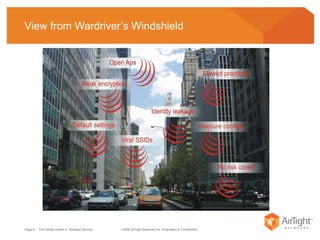
View from Wardriver’s Windshield
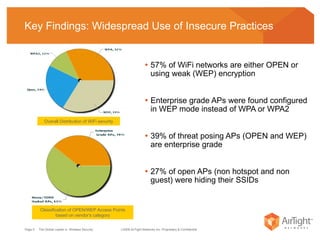
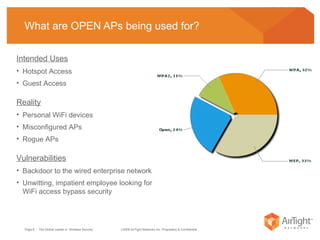
Key Findings: Widespread Use of Insecure Practices   57% of WiFi networks are either OPEN or using weak (WEP) encryption Enterprise grade APs were found configured in WEP mode instead of WPA or WPA2  39% of threat posing APs (OPEN and WEP) are enterprise grade 27% of open APs (non hotspot and non guest) were hiding their SSIDs  Overall Distribution of WiFi security Classification of OPEN/WEP Access Points based on vendor’s category
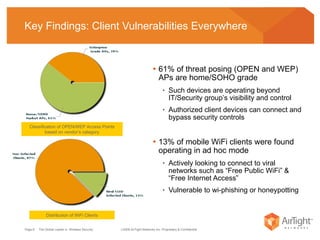
Key Findings: Client Vulnerabilities Everywhere  61% of threat posing (OPEN and WEP) APs are home/SOHO grade Such devices are operating beyond IT/Security group’s visibility and control Authorized client devices can connect and bypass security controls 13% of mobile WiFi clients were found operating in ad hoc mode Actively looking to connect to viral networks such as “Free Public WiFi” &  “Free Internet Access”  Vulnerable to wi-phishing or honeypotting Distribution of WiFi Clients Classification of OPEN/WEP Access Points based on vendor’s category
A Closer Look at OPEN Access Points Page    Wireless Vulnerability Management   2008 AirTight Networks, Inc.
What are OPEN APs being used for? Intended Uses Hotspot Access Guest Access Reality Personal WiFi devices Misconfigured APs Rogue APs Vulnerabilities Backdoor to the wired enterprise network Unwitting, impatient employee looking for WiFi access bypass security
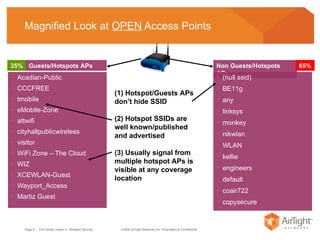
Magnified Look at  OPEN  Access Points Acadian-Public CCCFREE tmobile eMobile-Zone attwifi cityhallpublicwireless visitor WiFi Zone – The Cloud WIZ XCEWLAN-Guest Wayport_Access Martiz Guest Non Guests/Hotspots APs 35% 65% (null ssid) BE11g any linksys monkey  nikwlan  WLAN kellie   engineers default coair722 copysecure (1) Hotspot/Guests APs don’t hide SSID (2) Hotspot SSIDs are well known/published and advertised (3) Usually signal from multiple hotspot APs is visible at any coverage location Guests/Hotspots APs
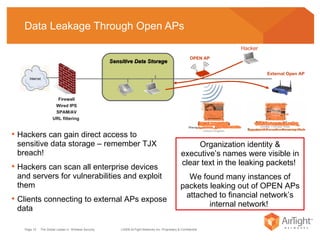
Data Leakage Through Open APs Sensitive Data Storage  Firewall Wired IPS SPAM/AV URL filtering  OPEN AP Hackers can gain direct access to sensitive data storage – remember TJX breach!  Hackers can scan all enterprise devices and servers for vulnerabilities and exploit them Clients connecting to external APs expose data Organization identity & executive’s names were visible in clear text in the leaking packets!  We found many instances of packets leaking out of OPEN APs attached to financial network’s internal network!  Hacker External Open AP
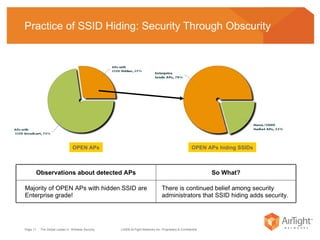
Practice of SSID Hiding: Security Through Obscurity OPEN APs hiding SSIDs OPEN APs There is continued belief among security administrators that SSID hiding adds security.  Majority of OPEN APs with hidden SSID are Enterprise grade!  So What? Observations about detected APs
A Closer Look at WEP Access Points Page    Wireless Vulnerability Management   2008 AirTight Networks, Inc.
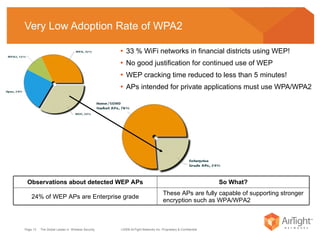
Very Low Adoption Rate of WPA2 33 % WiFi networks in financial districts using WEP! No good justification for continued use of WEP  WEP cracking time reduced to less than 5 minutes! APs intended for private applications must use WPA/WPA2 These APs are fully capable of supporting stronger encryption such as WPA/WPA2 24% of WEP APs are Enterprise grade So What? Observations about detected WEP APs
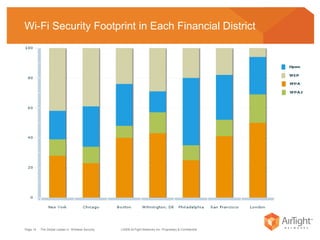
Wi-Fi Security Footprint in Each Financial District
A Closer Look at WiFi Clients, iPhones, Blackberry’s Page    Wireless Vulnerability Management   2008 AirTight Networks, Inc.
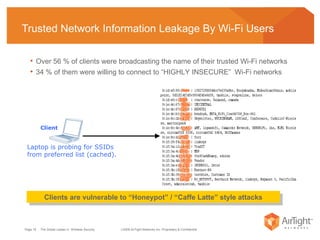
Trusted Network Information Leakage By Wi-Fi Users  Over 56 % of clients were broadcasting the name of their trusted Wi-Fi networks  34 % of them were willing to connect to “HIGHLY INSECURE”  Wi-Fi networks Clients are vulnerable to “Honeypot” / “Caffe Latte” style attacks Laptop is probing for SSIDs from preferred list (cached). Client
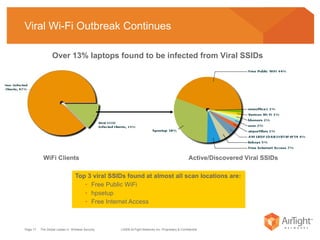
Viral Wi-Fi Outbreak Continues Top 3 viral SSIDs found at almost all scan locations are: Free Public WiFi hpsetup Free Internet Access Over 13% laptops found to be infected from Viral SSIDs  Active/Discovered Viral SSIDs WiFi Clients
Conclusions Page    Wireless Vulnerability Management   2008 AirTight Networks, Inc.
Weak Wi-Fi Security Policy Definition and Enforcement Identity & data leakage from corporate Wi-Fi devices and clients Alarming number of mis-configured, unmanaged Access Points Clients actively probing for “familiar SSIDs” Client ad-hoc connections bypassing security
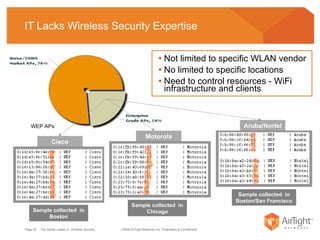
IT Lacks Wireless Security Expertise Not limited to specific WLAN vendor No limited to specific locations Need to control resources - WiFi infrastructure and clients Cisco Motorola Aruba/Nortel Sample collected  in Boston Sample collected  in Chicago Sample collected  in Boston/San Francisco WEP APs
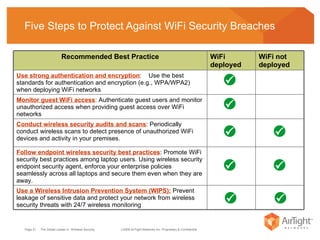
Five Steps to Protect Against WiFi Security Breaches Use a Wireless Intrusion Prevention System (WIPS):  Prevent leakage of sensitive data and protect your network from wireless security threats with 24/7 wireless monitoring Follow endpoint wireless security best practices : Promote WiFi security best practices among laptop users. Using wireless security endpoint security agent, enforce your enterprise policies seamlessly across all laptops and secure them even when they are away.  Conduct wireless security audits and scans : Periodically conduct wireless scans to detect presence of unauthorized WiFi devices and activity in your premises.  Monitor guest WiFi access : Authenticate guest users and monitor unauthorized access when providing guest access over WiFi networks Use strong authentication and encryption :  Use the best standards for authentication and encryption (e.g., WPA/WPA2) when deploying WiFi networks WiFi not deployed WiFi deployed Recommended Best Practice

Financial Districs Wi Fi Scan

  • 1.
    FinancialDistricts Wireless Vulnerability Study A study conducted by AirTight Networks, Inc. www.airtightnetworks.com
  • 2.
    Study Purpose andMethodology Scan Financial districts for WiFi vulnerabilities To assess adoption of WiFi security best practices by organizations in major financial districts Methodology Visited 7 financial districts (6 in US, 1 in UK) Scanned WiFi signal for 5 minutes at a randomly selected location 3632 APs scanned 547 Clients scanned
  • 3.
    Financial Districts Coveredin this Study New York Chicago Boston Wilmington, DE Philadelphia San Francisco London A sample WiFi trace tells a lot about network security posture in each location. Picked up WiFi signals at 30 randomly selected points in:
  • 4.
  • 5.
    Key Findings: WidespreadUse of Insecure Practices 57% of WiFi networks are either OPEN or using weak (WEP) encryption Enterprise grade APs were found configured in WEP mode instead of WPA or WPA2 39% of threat posing APs (OPEN and WEP) are enterprise grade 27% of open APs (non hotspot and non guest) were hiding their SSIDs Overall Distribution of WiFi security Classification of OPEN/WEP Access Points based on vendor’s category
  • 6.
    Key Findings: ClientVulnerabilities Everywhere 61% of threat posing (OPEN and WEP) APs are home/SOHO grade Such devices are operating beyond IT/Security group’s visibility and control Authorized client devices can connect and bypass security controls 13% of mobile WiFi clients were found operating in ad hoc mode Actively looking to connect to viral networks such as “Free Public WiFi” & “Free Internet Access” Vulnerable to wi-phishing or honeypotting Distribution of WiFi Clients Classification of OPEN/WEP Access Points based on vendor’s category
  • 7.
    A Closer Lookat OPEN Access Points Page Wireless Vulnerability Management  2008 AirTight Networks, Inc.
  • 8.
    What are OPENAPs being used for? Intended Uses Hotspot Access Guest Access Reality Personal WiFi devices Misconfigured APs Rogue APs Vulnerabilities Backdoor to the wired enterprise network Unwitting, impatient employee looking for WiFi access bypass security
  • 9.
    Magnified Look at OPEN Access Points Acadian-Public CCCFREE tmobile eMobile-Zone attwifi cityhallpublicwireless visitor WiFi Zone – The Cloud WIZ XCEWLAN-Guest Wayport_Access Martiz Guest Non Guests/Hotspots APs 35% 65% (null ssid) BE11g any linksys monkey nikwlan WLAN kellie engineers default coair722 copysecure (1) Hotspot/Guests APs don’t hide SSID (2) Hotspot SSIDs are well known/published and advertised (3) Usually signal from multiple hotspot APs is visible at any coverage location Guests/Hotspots APs
  • 10.
    Data Leakage ThroughOpen APs Sensitive Data Storage Firewall Wired IPS SPAM/AV URL filtering OPEN AP Hackers can gain direct access to sensitive data storage – remember TJX breach! Hackers can scan all enterprise devices and servers for vulnerabilities and exploit them Clients connecting to external APs expose data Organization identity & executive’s names were visible in clear text in the leaking packets! We found many instances of packets leaking out of OPEN APs attached to financial network’s internal network! Hacker External Open AP
  • 11.
    Practice of SSIDHiding: Security Through Obscurity OPEN APs hiding SSIDs OPEN APs There is continued belief among security administrators that SSID hiding adds security. Majority of OPEN APs with hidden SSID are Enterprise grade! So What? Observations about detected APs
  • 12.
    A Closer Lookat WEP Access Points Page Wireless Vulnerability Management  2008 AirTight Networks, Inc.
  • 13.
    Very Low AdoptionRate of WPA2 33 % WiFi networks in financial districts using WEP! No good justification for continued use of WEP WEP cracking time reduced to less than 5 minutes! APs intended for private applications must use WPA/WPA2 These APs are fully capable of supporting stronger encryption such as WPA/WPA2 24% of WEP APs are Enterprise grade So What? Observations about detected WEP APs
  • 14.
    Wi-Fi Security Footprintin Each Financial District
  • 15.
    A Closer Lookat WiFi Clients, iPhones, Blackberry’s Page Wireless Vulnerability Management  2008 AirTight Networks, Inc.
  • 16.
    Trusted Network InformationLeakage By Wi-Fi Users Over 56 % of clients were broadcasting the name of their trusted Wi-Fi networks 34 % of them were willing to connect to “HIGHLY INSECURE” Wi-Fi networks Clients are vulnerable to “Honeypot” / “Caffe Latte” style attacks Laptop is probing for SSIDs from preferred list (cached). Client
  • 17.
    Viral Wi-Fi OutbreakContinues Top 3 viral SSIDs found at almost all scan locations are: Free Public WiFi hpsetup Free Internet Access Over 13% laptops found to be infected from Viral SSIDs Active/Discovered Viral SSIDs WiFi Clients
  • 18.
    Conclusions Page Wireless Vulnerability Management  2008 AirTight Networks, Inc.
  • 19.
    Weak Wi-Fi SecurityPolicy Definition and Enforcement Identity & data leakage from corporate Wi-Fi devices and clients Alarming number of mis-configured, unmanaged Access Points Clients actively probing for “familiar SSIDs” Client ad-hoc connections bypassing security
  • 20.
    IT Lacks WirelessSecurity Expertise Not limited to specific WLAN vendor No limited to specific locations Need to control resources - WiFi infrastructure and clients Cisco Motorola Aruba/Nortel Sample collected in Boston Sample collected in Chicago Sample collected in Boston/San Francisco WEP APs
  • 21.
    Five Steps toProtect Against WiFi Security Breaches Use a Wireless Intrusion Prevention System (WIPS): Prevent leakage of sensitive data and protect your network from wireless security threats with 24/7 wireless monitoring Follow endpoint wireless security best practices : Promote WiFi security best practices among laptop users. Using wireless security endpoint security agent, enforce your enterprise policies seamlessly across all laptops and secure them even when they are away. Conduct wireless security audits and scans : Periodically conduct wireless scans to detect presence of unauthorized WiFi devices and activity in your premises. Monitor guest WiFi access : Authenticate guest users and monitor unauthorized access when providing guest access over WiFi networks Use strong authentication and encryption : Use the best standards for authentication and encryption (e.g., WPA/WPA2) when deploying WiFi networks WiFi not deployed WiFi deployed Recommended Best Practice