Non-WiFi Interference Combat Guide (www.blog.airtightnetworks.com)

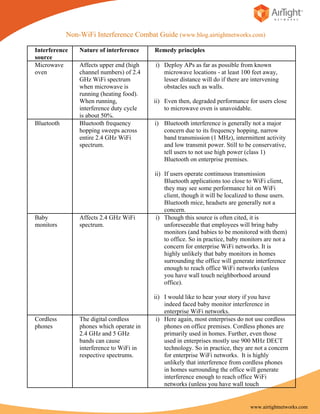
Interference    Nature of interference    Remedy principles
source
Microwave       Affects upper end (high   i) Deploy APs as far as possible from known
oven            channel numbers) of 2.4      microwave locations - at least 100 feet away,
                GHz WiFi spectrum            lesser distance will do if there are intervening
                when microwave is            obstacles such as walls.
                running (heating food).
                When running,             ii) Even then, degraded performance for users close
                interference duty cycle       to microwave oven is unavoidable.
                is about 50%.
Bluetooth       Bluetooth frequency       i) Bluetooth interference is generally not a major
                hopping sweeps across        concern due to its frequency hopping, narrow
                entire 2.4 GHz WiFi          band transmission (1 MHz), intermittent activity
                spectrum.                    and low transmit power. Still to be conservative,
                                             tell users to not use high power (class 1)
                                             Bluetooth on enterprise premises.

                                          ii) If users operate continuous transmission
                                              Bluetooth applications too close to WiFi client,
                                              they may see some performance hit on WiFi
                                              client, though it will be localized to those users.
                                              Bluetooth mice, headsets are generally not a
                                              concern.
Baby            Affects 2.4 GHz WiFi      i) Though this source is often cited, it is
monitors        spectrum.                     unforeseeable that employees will bring baby
                                              monitors (and babies to be monitored with them)
                                              to office. So in practice, baby monitors are not a
                                              concern for enterprise WiFi networks. It is
                                              highly unlikely that baby monitors in homes
                                              surrounding the office will generate interference
                                              enough to reach office WiFi networks (unless
                                              you have wall touch neighborhood around
                                              office).

                                          ii) I would like to hear your story if you have
                                              indeed faced baby monitor interference in
                                              enterprise WiFi networks.
Cordless        The digital cordless       i) Here again, most enterprises do not use cordless
phones          phones which operate in       phones on office premises. Cordless phones are
                2.4 GHz and 5 GHz             primarily used in homes. Further, even those
                bands can cause               used in enterprises mostly use 900 MHz DECT
                interference to WiFi in       technology. So in practice, they are not a concern
                respective spectrums.         for enterprise WiFi networks. It is highly
                                              unlikely that interference from cordless phones
                                              in homes surrounding the office will generate
                                              interference enough to reach office WiFi
                                              networks (unless you have wall touch


                                                                                 www.airtightnetworks.com
neighborhood around office).


                                                  ii) I would like to hear your story if you have
                                                      indeed faced cordless phone interference in
                                                      enterprise WiFi networks (even when you don’t
                                                      have cordless phones as part of enterprise
                                                      infrastructure).
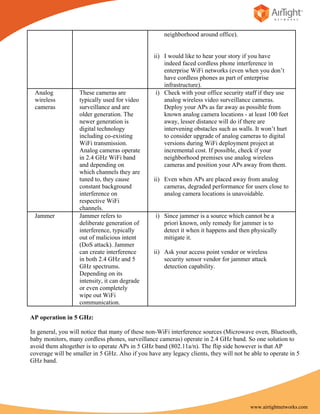
 Analog            These cameras are               i) Check with your office security staff if they use
 wireless          typically used for video           analog wireless video surveillance cameras.
 cameras           surveillance and are               Deploy your APs as far away as possible from
                   older generation. The              known analog camera locations - at least 100 feet
                   newer generation is                away, lesser distance will do if there are
                   digital technology                 intervening obstacles such as walls. It won’t hurt
                   including co-existing              to consider upgrade of analog cameras to digital
                   WiFi transmission.                 versions during WiFi deployment project at
                   Analog cameras operate             incremental cost. If possible, check if your
                   in 2.4 GHz WiFi band               neighborhood premises use analog wireless
                   and depending on                   cameras and position your APs away from them.
                   which channels they are
                   tuned to, they cause           ii) Even when APs are placed away from analog
                   constant background                cameras, degraded performance for users close to
                   interference on                    analog camera locations is unavoidable.
                   respective WiFi
                   channels.
 Jammer            Jammer refers to               i) Since jammer is a source which cannot be a
                   deliberate generation of          priori known, only remedy for jammer is to
                   interference, typically           detect it when it happens and then physically
                   out of malicious intent           mitigate it.
                   (DoS attack). Jammer
                   can create interference        ii) Ask your access point vendor or wireless
                   in both 2.4 GHz and 5              security sensor vendor for jammer attack
                   GHz spectrums.                     detection capability.
                   Depending on its
                   intensity, it can degrade
                   or even completely
                   wipe out WiFi
                   communication.

AP operation in 5 GHz:

In general, you will notice that many of these non-WiFi interference sources (Microwave oven, Bluetooth,
baby monitors, many cordless phones, surveillance cameras) operate in 2.4 GHz band. So one solution to
avoid them altogether is to operate APs in 5 GHz band (802.11a/n). The flip side however is that AP
coverage will be smaller in 5 GHz. Also if you have any legacy clients, they will not be able to operate in 5
GHz band.


                                                                                         www.airtightnetworks.com

Non WiFi interference combat guide 1

  • 1.
    Non-WiFi Interference CombatGuide (www.blog.airtightnetworks.com) Interference Nature of interference Remedy principles source Microwave Affects upper end (high i) Deploy APs as far as possible from known oven channel numbers) of 2.4 microwave locations - at least 100 feet away, GHz WiFi spectrum lesser distance will do if there are intervening when microwave is obstacles such as walls. running (heating food). When running, ii) Even then, degraded performance for users close interference duty cycle to microwave oven is unavoidable. is about 50%. Bluetooth Bluetooth frequency i) Bluetooth interference is generally not a major hopping sweeps across concern due to its frequency hopping, narrow entire 2.4 GHz WiFi band transmission (1 MHz), intermittent activity spectrum. and low transmit power. Still to be conservative, tell users to not use high power (class 1) Bluetooth on enterprise premises. ii) If users operate continuous transmission Bluetooth applications too close to WiFi client, they may see some performance hit on WiFi client, though it will be localized to those users. Bluetooth mice, headsets are generally not a concern. Baby Affects 2.4 GHz WiFi i) Though this source is often cited, it is monitors spectrum. unforeseeable that employees will bring baby monitors (and babies to be monitored with them) to office. So in practice, baby monitors are not a concern for enterprise WiFi networks. It is highly unlikely that baby monitors in homes surrounding the office will generate interference enough to reach office WiFi networks (unless you have wall touch neighborhood around office). ii) I would like to hear your story if you have indeed faced baby monitor interference in enterprise WiFi networks. Cordless The digital cordless i) Here again, most enterprises do not use cordless phones phones which operate in phones on office premises. Cordless phones are 2.4 GHz and 5 GHz primarily used in homes. Further, even those bands can cause used in enterprises mostly use 900 MHz DECT interference to WiFi in technology. So in practice, they are not a concern respective spectrums. for enterprise WiFi networks. It is highly unlikely that interference from cordless phones in homes surrounding the office will generate interference enough to reach office WiFi networks (unless you have wall touch www.airtightnetworks.com
  • 2.
    neighborhood around office). ii) I would like to hear your story if you have indeed faced cordless phone interference in enterprise WiFi networks (even when you don’t have cordless phones as part of enterprise infrastructure). Analog These cameras are i) Check with your office security staff if they use wireless typically used for video analog wireless video surveillance cameras. cameras surveillance and are Deploy your APs as far away as possible from older generation. The known analog camera locations - at least 100 feet newer generation is away, lesser distance will do if there are digital technology intervening obstacles such as walls. It won’t hurt including co-existing to consider upgrade of analog cameras to digital WiFi transmission. versions during WiFi deployment project at Analog cameras operate incremental cost. If possible, check if your in 2.4 GHz WiFi band neighborhood premises use analog wireless and depending on cameras and position your APs away from them. which channels they are tuned to, they cause ii) Even when APs are placed away from analog constant background cameras, degraded performance for users close to interference on analog camera locations is unavoidable. respective WiFi channels. Jammer Jammer refers to i) Since jammer is a source which cannot be a deliberate generation of priori known, only remedy for jammer is to interference, typically detect it when it happens and then physically out of malicious intent mitigate it. (DoS attack). Jammer can create interference ii) Ask your access point vendor or wireless in both 2.4 GHz and 5 security sensor vendor for jammer attack GHz spectrums. detection capability. Depending on its intensity, it can degrade or even completely wipe out WiFi communication. AP operation in 5 GHz: In general, you will notice that many of these non-WiFi interference sources (Microwave oven, Bluetooth, baby monitors, many cordless phones, surveillance cameras) operate in 2.4 GHz band. So one solution to avoid them altogether is to operate APs in 5 GHz band (802.11a/n). The flip side however is that AP coverage will be smaller in 5 GHz. Also if you have any legacy clients, they will not be able to operate in 5 GHz band. www.airtightnetworks.com