CYBER THREAT
DNS FLOOD - DDOS ATTACK
DDOS ATTACK
• What is DDOS attack
• Distributed Denial of Service attack is also referred as DDOS is an attack to
bring down the online service of any system by overloading it with request or
ping
• Types of DDOS
• Volume based
• Protocol Based
• Application Based
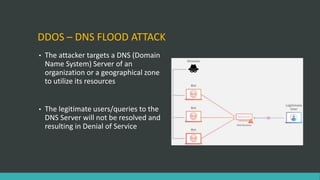
DDOS – DNS FLOOD ATTACK
• The attacker targets a DNS (Domain
Name System) Server of an
organization or a geographical zone
to utilize its resources
• The legitimate users/queries to the
DNS Server will not be resolved and
resulting in Denial of Service
MIRAI BOTNET
MELBOURNE IT – DDOS ATTACK
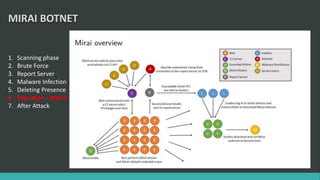
MIRAI BOTNET
1. Scanning phase
2. Brute Force
3. Report Server
4. Malware Infection
5. Deleting Presence
6. Execution - Attack
7. After Attack
MIRAI BOTNET
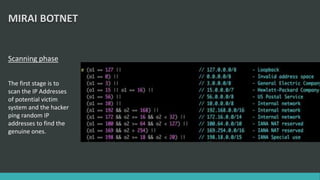
Scanning phase
The first stage is to
scan the IP Addresses
of potential victim
system and the hacker
ping random IP
addresses to find the
genuine ones.
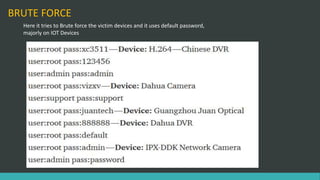
BRUTE FORCE
Here it tries to Brute force the victim devices and it uses default password,
majorly on IOT Devices
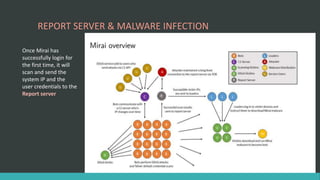
REPORT SERVER & MALWARE INFECTION
Once Mirai has
successfully login for
the first time, it will
scan and send the
system IP and the
user credentials to the
Report server
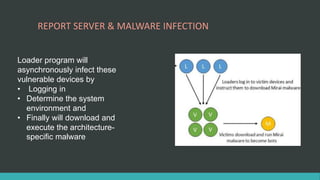
REPORT SERVER & MALWARE INFECTION
Loader program will
asynchronously infect these
vulnerable devices by
• Logging in
• Determine the system
environment and
• Finally will download and
execute the architecture-
specific malware
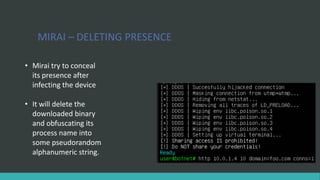
MIRAI – DELETING PRESENCE
• Mirai try to conceal
its presence after
infecting the device
• It will delete the
downloaded binary
and obfuscating its
process name into
some pseudorandom
alphanumeric string.
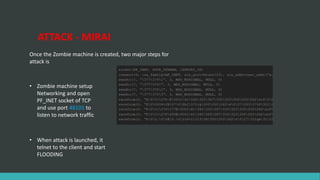
ATTACK - MIRAI
Once the Zombie machine is created, two major steps for
attack is
• Zombie machine setup
Networking and open
PF_INET socket of TCP
and use port 48101 to
listen to network traffic
• When attack is launched, it
telnet to the client and start
FLOODING
AFTER ATTACK
• Mirai use Telnet to communicate to C2 Server, so after the attack
is launched it will kill other processes bound to TCP/22 or
TCP/23, as well as processes associated with competing bot
infections
• It also simultaneously scan for new victims
DEFENSE & FORENSIC
MIRAI Prevention and Mitigation
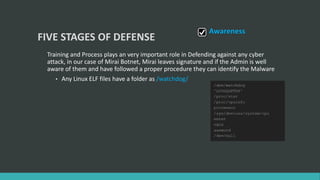
FIVE STAGES OF DEFENSE
Training and Process plays an very important role in Defending against any cyber
attack, in our case of Mirai Botnet, Mirai leaves signature and if the Admin is well
aware of them and have followed a proper procedure they can identify the Malware
• Any Linux ELF files have a folder as /watchdog/
Awareness
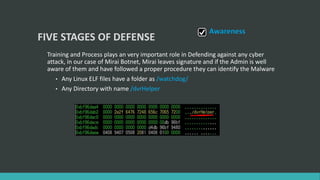
FIVE STAGES OF DEFENSE
Training and Process plays an very important role in Defending against any cyber
attack, in our case of Mirai Botnet, Mirai leaves signature and if the Admin is well
aware of them and have followed a proper procedure they can identify the Malware
• Any Linux ELF files have a folder as /watchdog/
• Any Directory with name /dvrHelper
Awareness
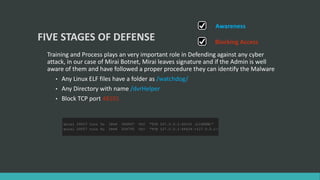
FIVE STAGES OF DEFENSE
Training and Process plays an very important role in Defending against any cyber
attack, in our case of Mirai Botnet, Mirai leaves signature and if the Admin is well
aware of them and have followed a proper procedure they can identify the Malware
• Any Linux ELF files have a folder as /watchdog/
• Any Directory with name /dvrHelper
• Block TCP port 48101
Blocking Access
Awareness
FIVE STAGES OF DEFENSE
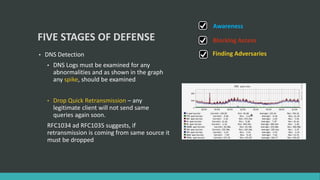
• DNS Detection
• DNS Logs must be examined for any
abnormalities and as shown in the graph
any spike, should be examined
• Drop Quick Retransmission – any
legitimate client will not send same
queries again soon.
RFC1034 ad RFC1035 suggests, if
retransmission is coming from same source it
must be dropped
Blocking Access
Awareness
Finding Adversaries
FIVE STAGES OF DEFENSE
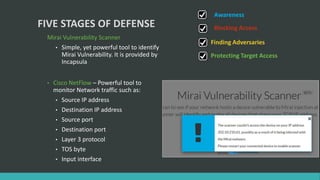
Mirai Vulnerability Scanner
• Simple, yet powerful tool to identify
Mirai Vulnerability. It is provided by
Incapsula
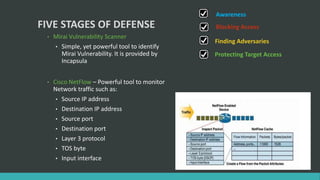
• Cisco NetFlow – Powerful tool to
monitor Network traffic such as:
• Source IP address
• Destination IP address
• Source port
• Destination port
• Layer 3 protocol
• TOS byte
• Input interface
Blocking Access
Awareness
Finding Adversaries
Protecting Target Access
FIVE STAGES OF DEFENSE
• Mirai Vulnerability Scanner
• Simple, yet powerful tool to identify
Mirai Vulnerability. It is provided by
Incapsula
• Cisco NetFlow – Powerful tool to monitor
Network traffic such as:
• Source IP address
• Destination IP address
• Source port
• Destination port
• Layer 3 protocol
• TOS byte
• Input interface
Blocking Access
Awareness
Finding Adversaries
Protecting Target Access
FIVE STAGES OF DEFENSE
DDOS Mitigation plans
• Geographic Infrastructure
Diversity
• Hybrid Cloud Infrastructure
• Multi WAN Entry point for Large
Enterprise and help from ISP to re-
route the traffic
• Get help from experts
Blocking Access
Awareness
Finding Adversaries
Protecting Target Access
Mitigation Plans
DDOS ATTACK - MIRAI BOTNET

DDOS ATTACK - MIRAI BOTNET

  • 1.
  • 2.
    DDOS ATTACK • Whatis DDOS attack • Distributed Denial of Service attack is also referred as DDOS is an attack to bring down the online service of any system by overloading it with request or ping • Types of DDOS • Volume based • Protocol Based • Application Based
  • 3.
    DDOS – DNSFLOOD ATTACK • The attacker targets a DNS (Domain Name System) Server of an organization or a geographical zone to utilize its resources • The legitimate users/queries to the DNS Server will not be resolved and resulting in Denial of Service
  • 5.
  • 6.
    MIRAI BOTNET 1. Scanningphase 2. Brute Force 3. Report Server 4. Malware Infection 5. Deleting Presence 6. Execution - Attack 7. After Attack
  • 7.
    MIRAI BOTNET Scanning phase Thefirst stage is to scan the IP Addresses of potential victim system and the hacker ping random IP addresses to find the genuine ones.
  • 8.
    BRUTE FORCE Here ittries to Brute force the victim devices and it uses default password, majorly on IOT Devices
  • 9.
    REPORT SERVER &MALWARE INFECTION Once Mirai has successfully login for the first time, it will scan and send the system IP and the user credentials to the Report server
  • 10.
    REPORT SERVER &MALWARE INFECTION Loader program will asynchronously infect these vulnerable devices by • Logging in • Determine the system environment and • Finally will download and execute the architecture- specific malware
  • 11.
    MIRAI – DELETINGPRESENCE • Mirai try to conceal its presence after infecting the device • It will delete the downloaded binary and obfuscating its process name into some pseudorandom alphanumeric string.
  • 12.
    ATTACK - MIRAI Oncethe Zombie machine is created, two major steps for attack is • Zombie machine setup Networking and open PF_INET socket of TCP and use port 48101 to listen to network traffic • When attack is launched, it telnet to the client and start FLOODING
  • 13.
    AFTER ATTACK • Miraiuse Telnet to communicate to C2 Server, so after the attack is launched it will kill other processes bound to TCP/22 or TCP/23, as well as processes associated with competing bot infections • It also simultaneously scan for new victims
  • 14.
    DEFENSE & FORENSIC MIRAIPrevention and Mitigation
  • 15.
    FIVE STAGES OFDEFENSE Training and Process plays an very important role in Defending against any cyber attack, in our case of Mirai Botnet, Mirai leaves signature and if the Admin is well aware of them and have followed a proper procedure they can identify the Malware • Any Linux ELF files have a folder as /watchdog/ Awareness
  • 16.
    FIVE STAGES OFDEFENSE Training and Process plays an very important role in Defending against any cyber attack, in our case of Mirai Botnet, Mirai leaves signature and if the Admin is well aware of them and have followed a proper procedure they can identify the Malware • Any Linux ELF files have a folder as /watchdog/ • Any Directory with name /dvrHelper Awareness
  • 17.
    FIVE STAGES OFDEFENSE Training and Process plays an very important role in Defending against any cyber attack, in our case of Mirai Botnet, Mirai leaves signature and if the Admin is well aware of them and have followed a proper procedure they can identify the Malware • Any Linux ELF files have a folder as /watchdog/ • Any Directory with name /dvrHelper • Block TCP port 48101 Blocking Access Awareness
  • 18.
    FIVE STAGES OFDEFENSE • DNS Detection • DNS Logs must be examined for any abnormalities and as shown in the graph any spike, should be examined • Drop Quick Retransmission – any legitimate client will not send same queries again soon. RFC1034 ad RFC1035 suggests, if retransmission is coming from same source it must be dropped Blocking Access Awareness Finding Adversaries
  • 19.
    FIVE STAGES OFDEFENSE Mirai Vulnerability Scanner • Simple, yet powerful tool to identify Mirai Vulnerability. It is provided by Incapsula • Cisco NetFlow – Powerful tool to monitor Network traffic such as: • Source IP address • Destination IP address • Source port • Destination port • Layer 3 protocol • TOS byte • Input interface Blocking Access Awareness Finding Adversaries Protecting Target Access
  • 20.
    FIVE STAGES OFDEFENSE • Mirai Vulnerability Scanner • Simple, yet powerful tool to identify Mirai Vulnerability. It is provided by Incapsula • Cisco NetFlow – Powerful tool to monitor Network traffic such as: • Source IP address • Destination IP address • Source port • Destination port • Layer 3 protocol • TOS byte • Input interface Blocking Access Awareness Finding Adversaries Protecting Target Access
  • 21.
    FIVE STAGES OFDEFENSE DDOS Mitigation plans • Geographic Infrastructure Diversity • Hybrid Cloud Infrastructure • Multi WAN Entry point for Large Enterprise and help from ISP to re- route the traffic • Get help from experts Blocking Access Awareness Finding Adversaries Protecting Target Access Mitigation Plans