Security Level: Internal
Chapter6
Telecommunications
and
Networks
Nitin Mehta (Roll no -33)
Nitin Singhi ( Roll no.-34)
Pankaj Tandon ( Roll no.-35)
Page 2
Identify several major developments and trends in the industries,
technologies, and business applications of telecommunications and
Internet technologies.
Provide examples of the business value of Internet, intranet, and
extranet applications.
Identify the basic components, functions, and types of
telecommunications networks used in business.
Explain the functions of major types of telecommunications network
hardware, software, media, and services.
ChapterObjectives
Page 3
Trends in Telecommunications
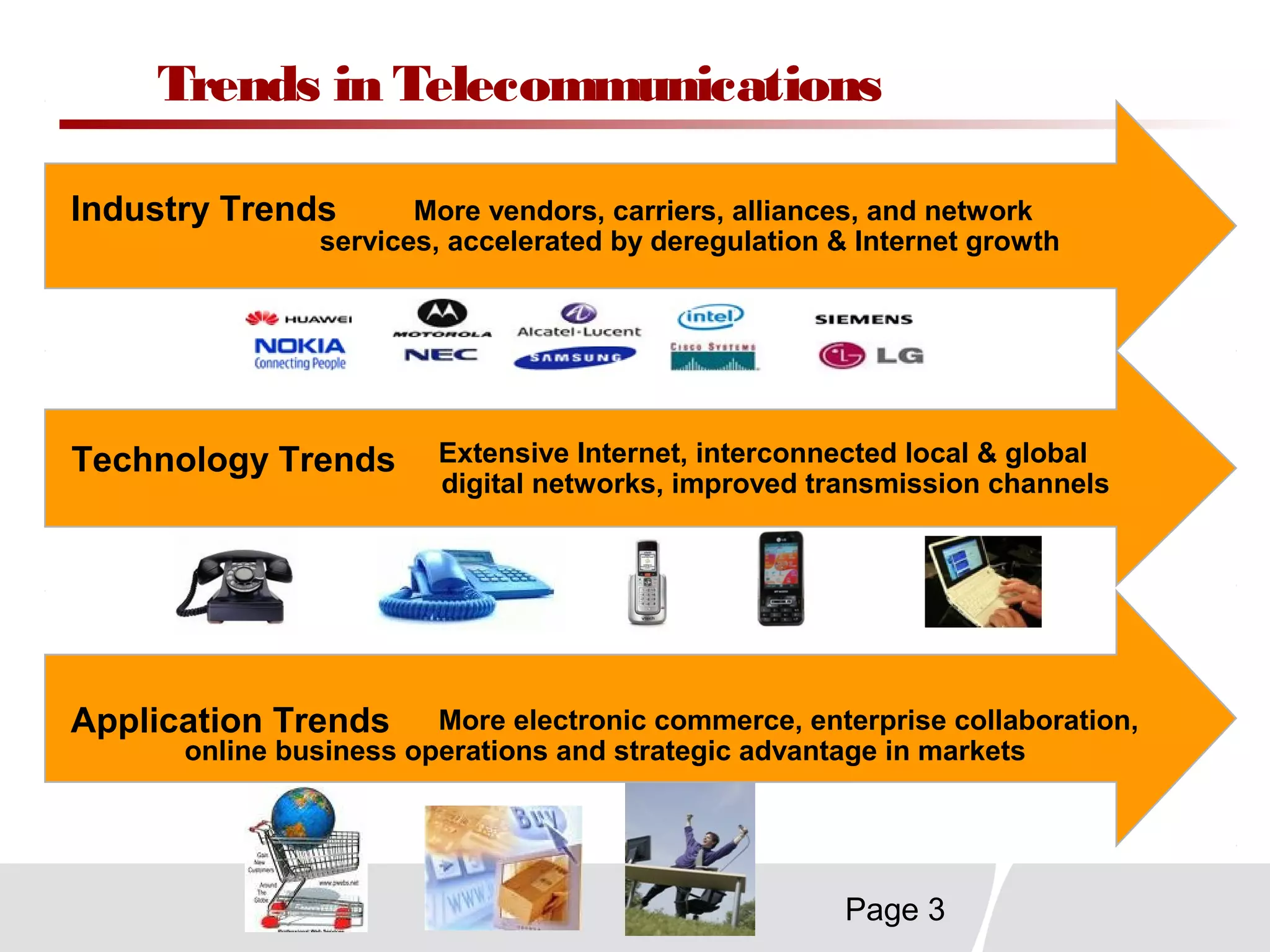
More electronic commerce, enterprise collaboration,
online business operations and strategic advantage in markets
More vendors, carriers, alliances, and network
services, accelerated by deregulation & Internet growth
Extensive Internet, interconnected local & global
digital networks, improved transmission channels
Industry Trends
Technology Trends
Application Trends
Page 4
Telecommunications Strategic Capabilities
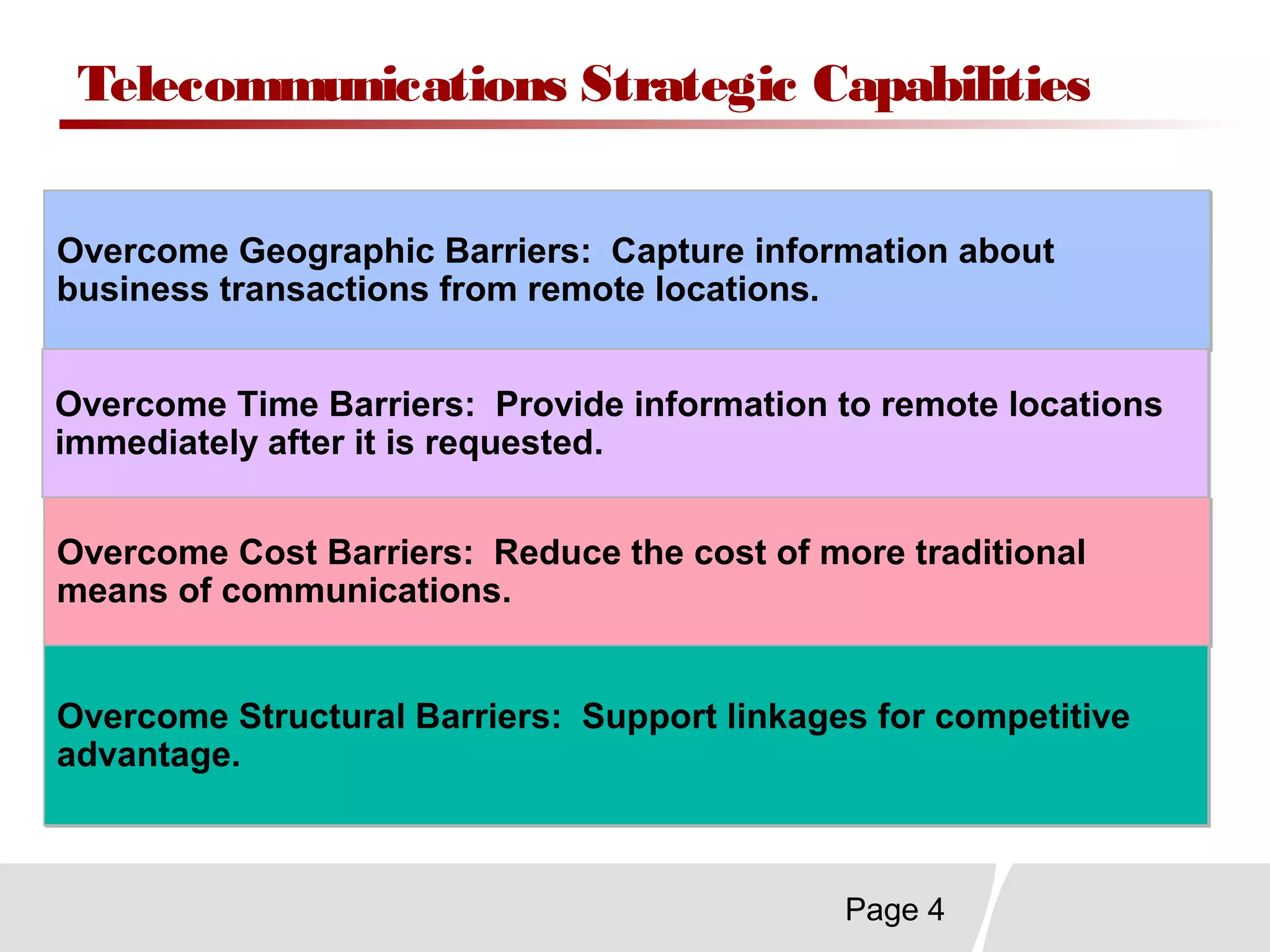
Overcome Geographic Barriers: Capture information about
business transactions from remote locations.
Overcome Geographic Barriers: Capture information about
business transactions from remote locations.
Overcome Time Barriers: Provide information to remote locations
immediately after it is requested.
Overcome Time Barriers: Provide information to remote locations
immediately after it is requested.
Overcome Cost Barriers: Reduce the cost of more traditional
means of communications.
Overcome Cost Barriers: Reduce the cost of more traditional
means of communications.
Overcome Structural Barriers: Support linkages for competitive
advantage.
Overcome Structural Barriers: Support linkages for competitive
advantage.
Page 5
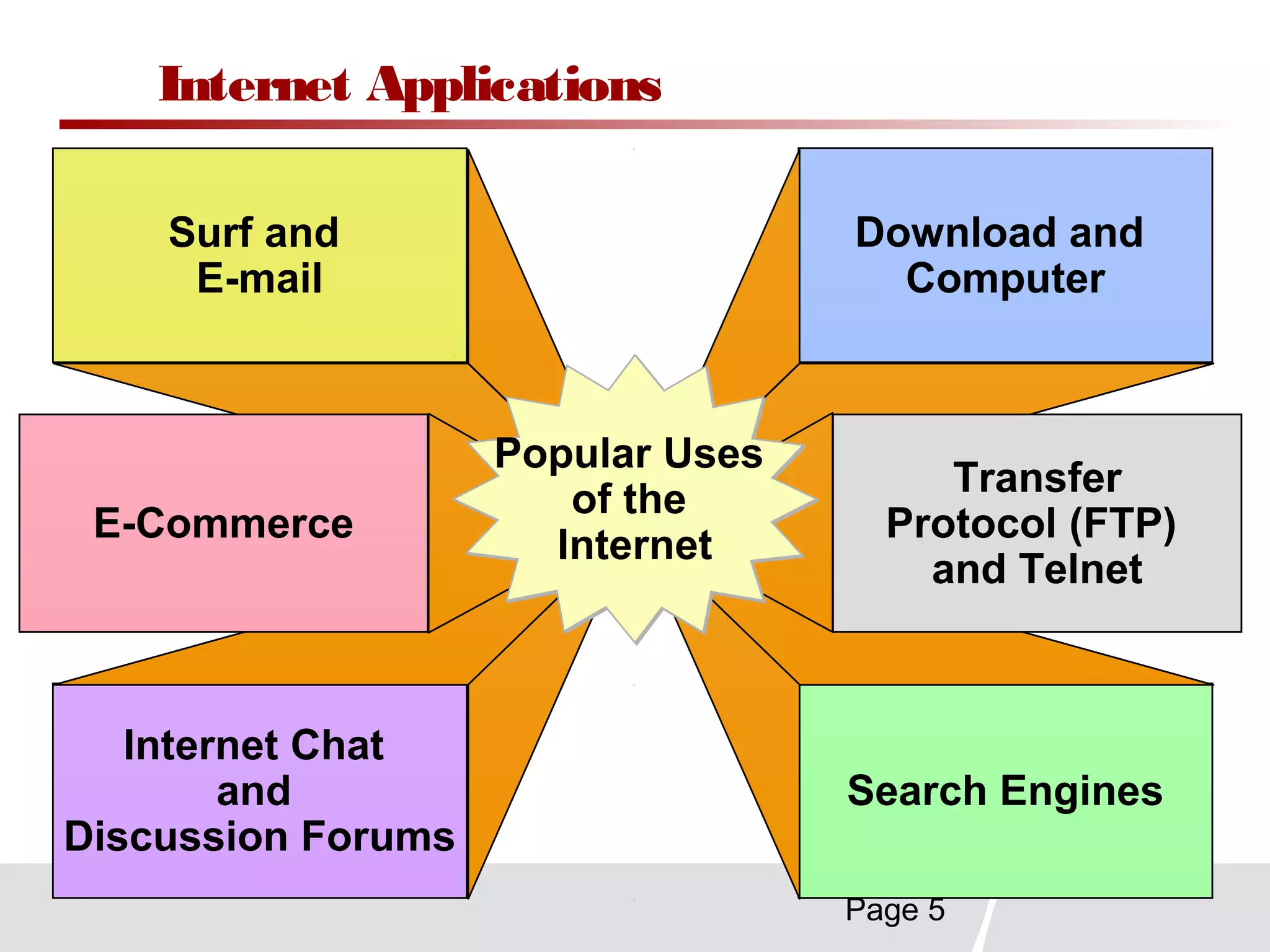
Internet Applications
Surf and
E-mail
Internet Chat
and
Discussion Forums
Download and
Computer
Search Engines
E-Commerce
Transfer
Protocol (FTP)
and Telnet
Popular Uses
of the
Internet
Popular Uses
of the
Internet
Page 6
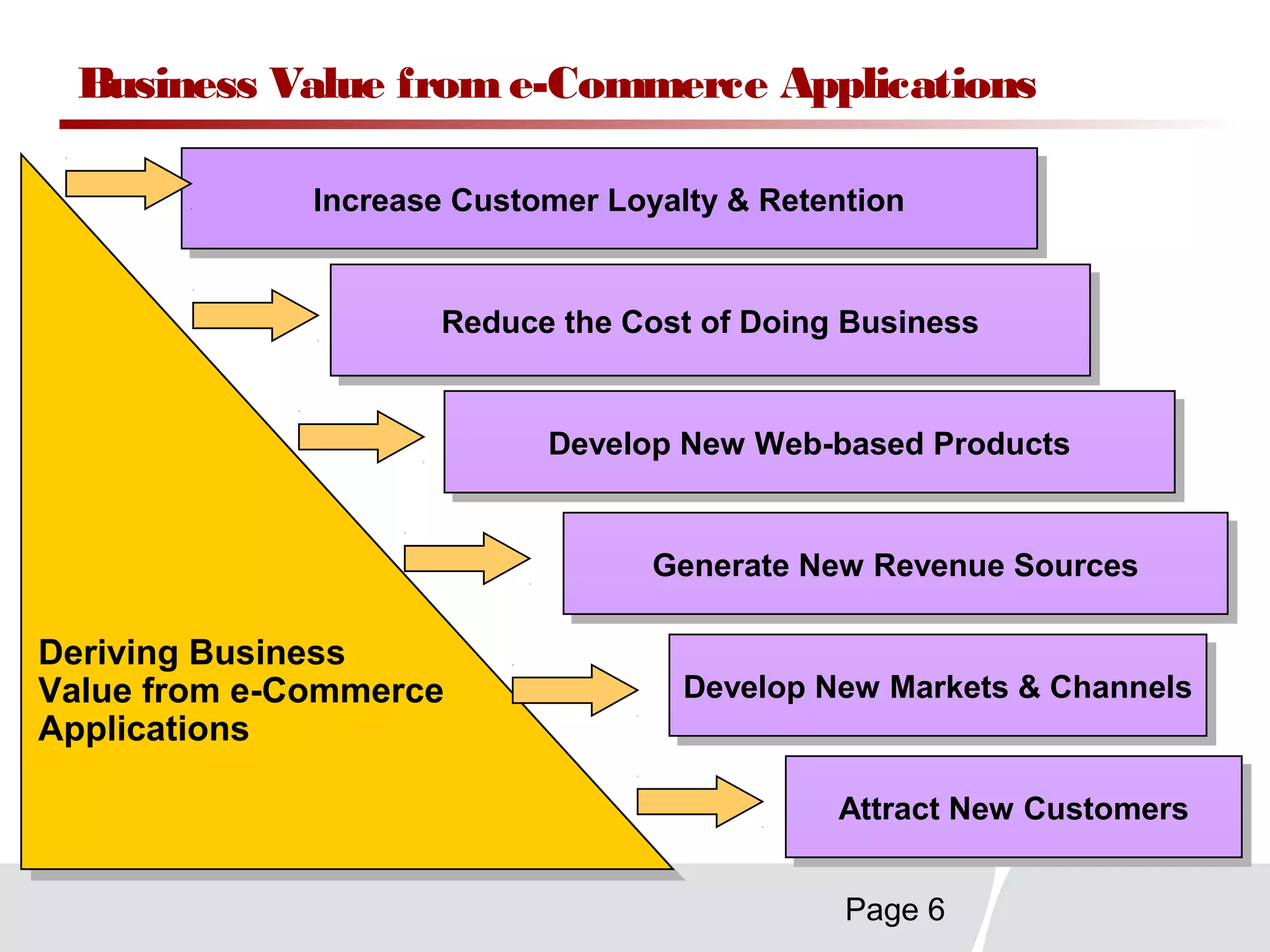
Business Value from e-Commerce Applications
Increase Customer Loyalty & RetentionIncrease Customer Loyalty & Retention
Reduce the Cost of Doing BusinessReduce the Cost of Doing Business
Generate New Revenue SourcesGenerate New Revenue Sources
Attract New CustomersAttract New Customers
Deriving Business
Value from e-Commerce
Applications
Deriving Business
Value from e-Commerce
Applications
Develop New Markets & ChannelsDevelop New Markets & Channels
Develop New Web-based ProductsDevelop New Web-based Products
Page 7
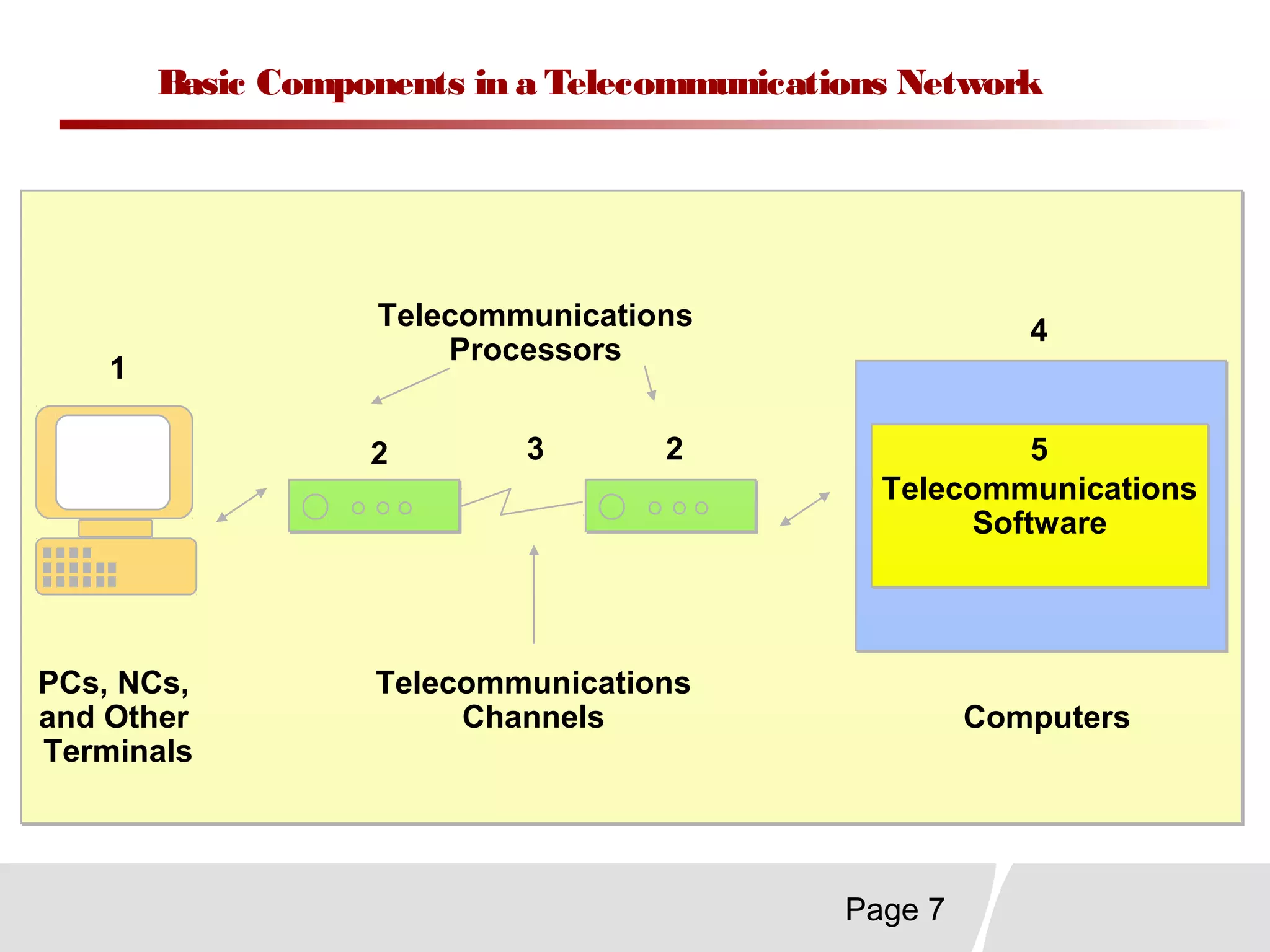
Basic Components in a Telecommunications Network
Telecommunications
Software
Telecommunications
Software
1
2 3
4
52
PCs, NCs,
and Other
Terminals
Computers
Telecommunications
Channels
Telecommunications
Processors
Page 8
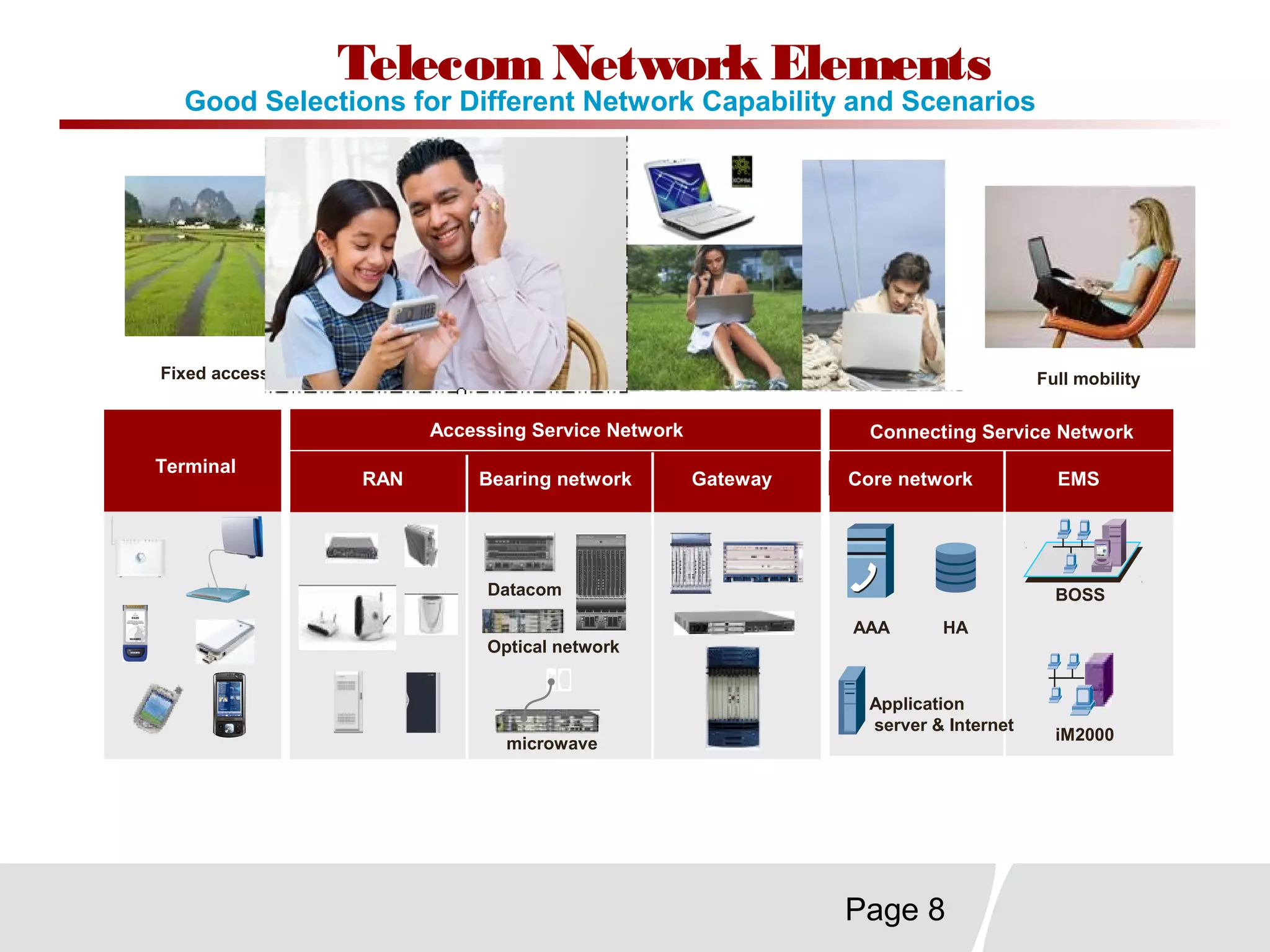
Fixed access Nomadic access Full mobilitySimple mobility
Terminal
RAN Bearing network Gateway
Accessing Service Network
Core network
Connecting Service Network
EMS
BOSS
iM2000
AAA HA
Application
server & Internet
Datacom
Optical network
microwave
Good Selections for Different Network Capability and Scenarios
TelecomNetworkElements
Page 9
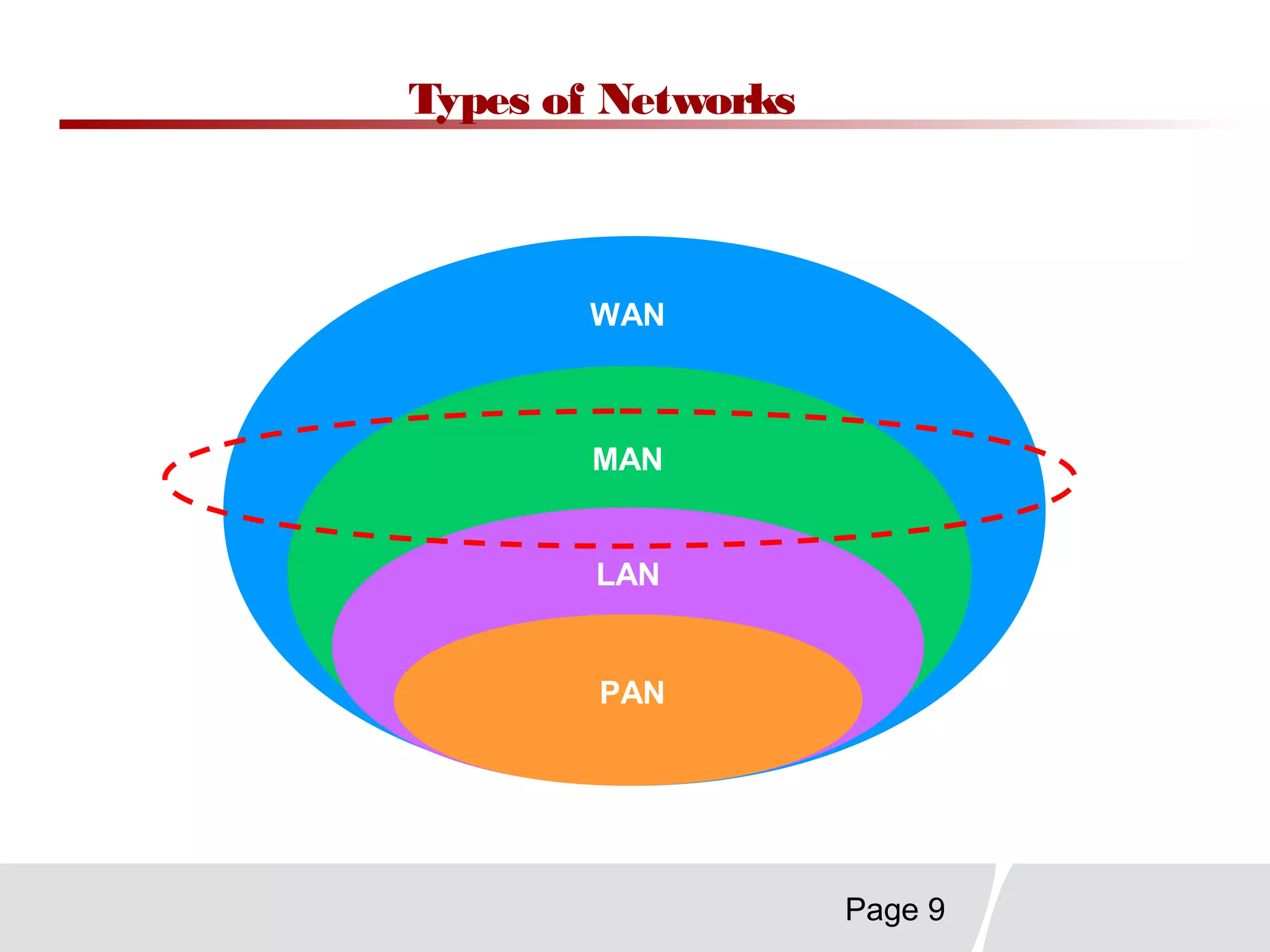
Types of Networks
WAN
MAN
LAN
PAN
Page 10
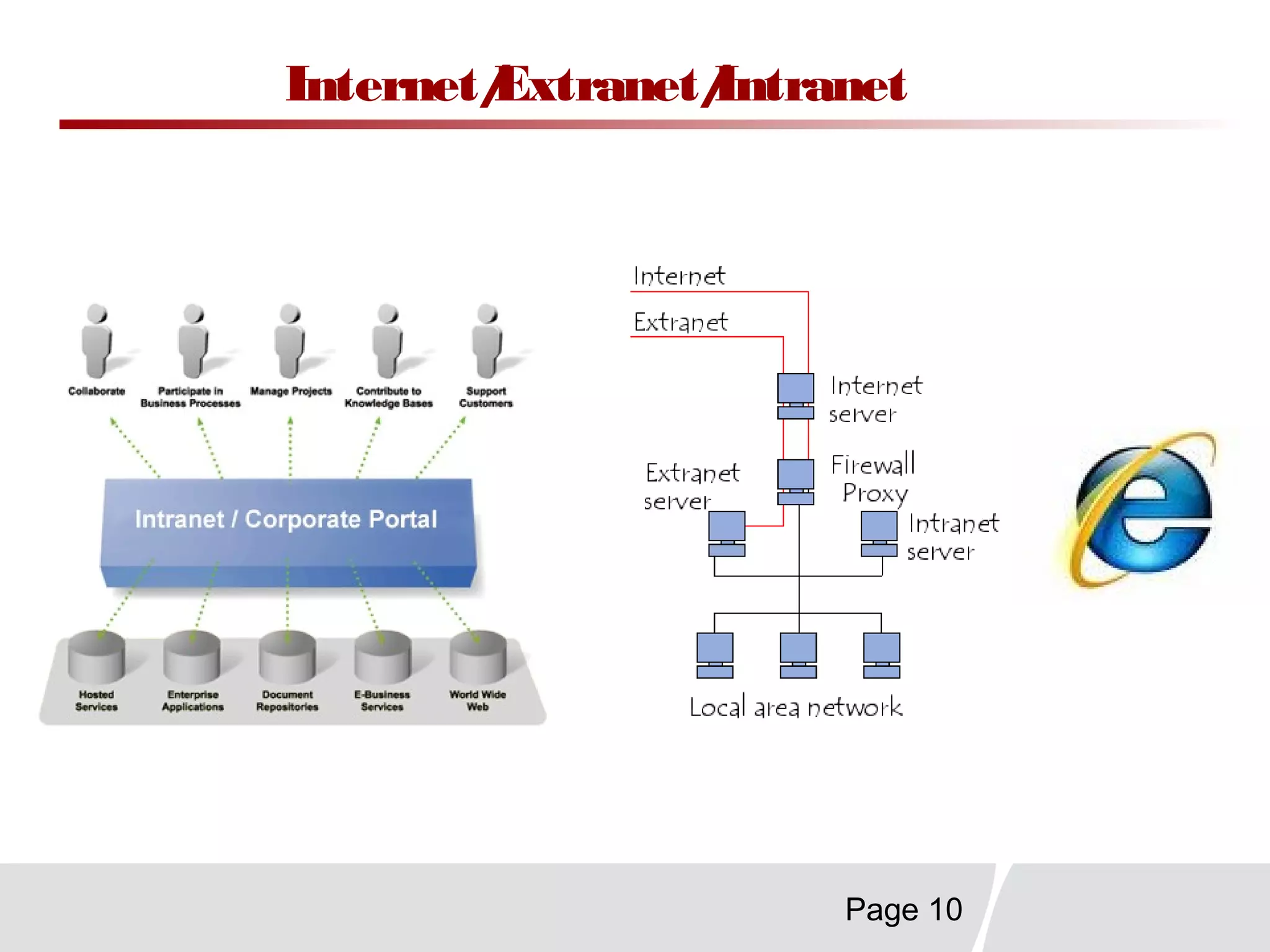
Internet/Extranet/Intranet
Page 11
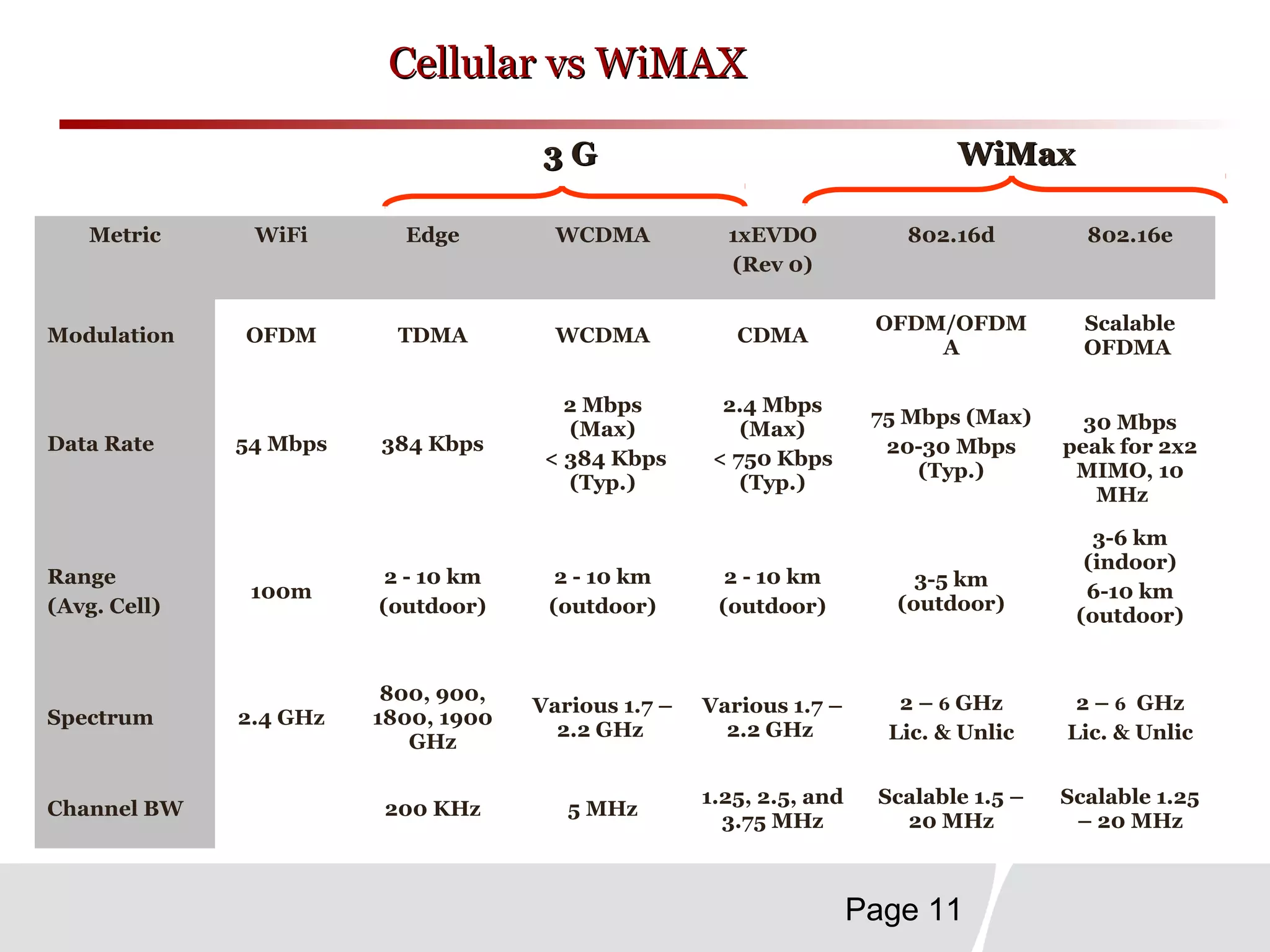
Cellular vs WiMAXCellular vs WiMAX
Metric WiFi Edge WCDMA 1xEVDO
(Rev 0)
802.16d 802.16e
Modulation OFDM TDMA WCDMA CDMA
OFDM/OFDM
A
Scalable
OFDMA
Data Rate 54 Mbps 384 Kbps
2 Mbps
(Max)
< 384 Kbps
(Typ.)
2.4 Mbps
(Max)
< 750 Kbps
(Typ.)
75 Mbps (Max)
20-30 Mbps
(Typ.)
30 Mbps
peak for 2x2
MIMO, 10
MHz
Range
(Avg. Cell)
100m
2 - 10 km
(outdoor)
2 - 10 km
(outdoor)
2 - 10 km
(outdoor)
3-5 km
(outdoor)
3-6 km
(indoor)
6-10 km
(outdoor)
Spectrum 2.4 GHz
800, 900,
1800, 1900
GHz
Various 1.7 –
2.2 GHz
Various 1.7 –
2.2 GHz
2 – 6 GHz
Lic. & Unlic
2 – 6 GHz
Lic. & Unlic
Channel BW 200 KHz 5 MHz
1.25, 2.5, and
3.75 MHz
Scalable 1.5 –
20 MHz
Scalable 1.25
– 20 MHz
3 G3 G WiMaxWiMax
Page 12
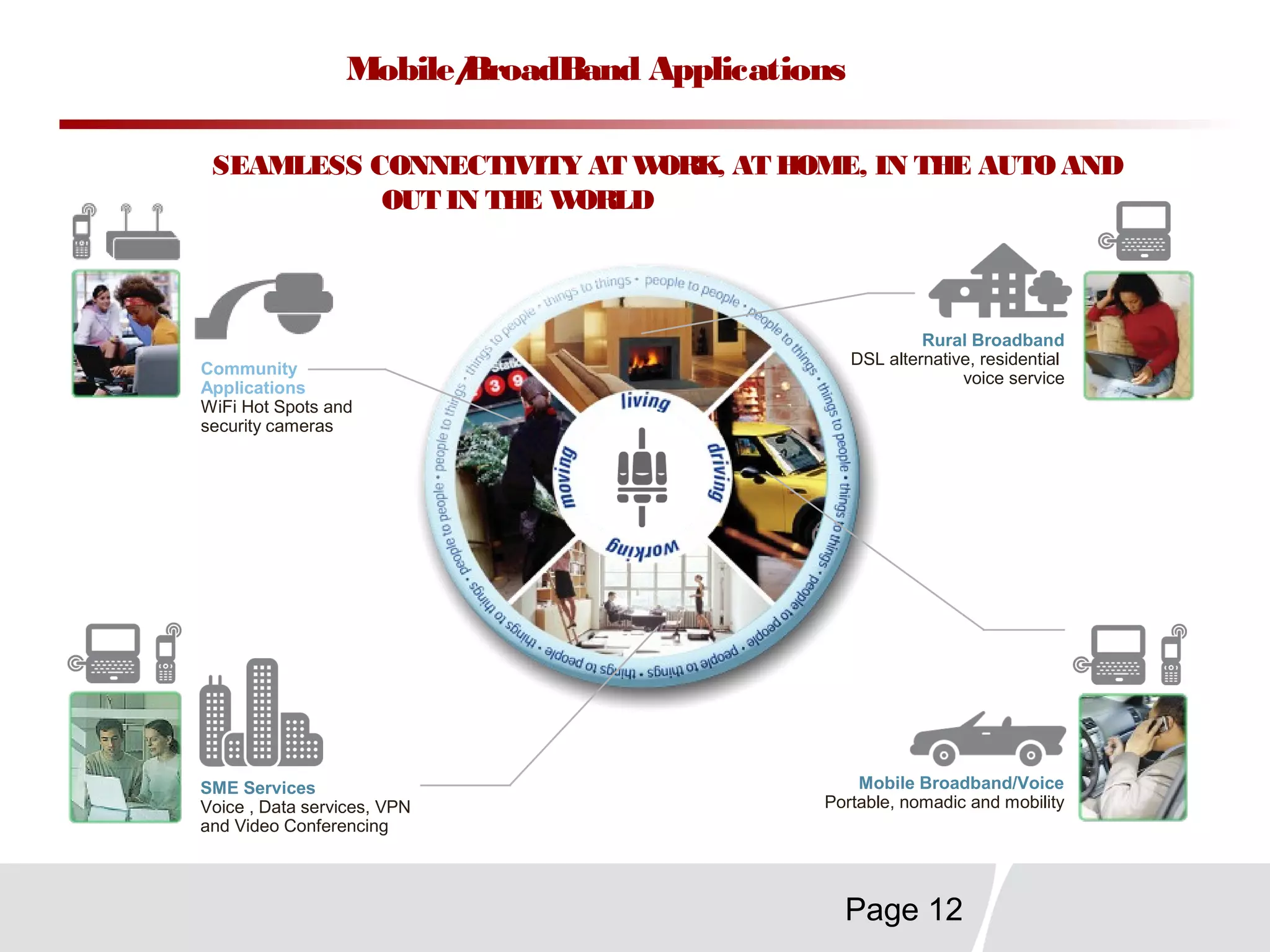
Mobile/BroadBand Applications
Rural Broadband
DSL alternative, residential
voice service
Mobile Broadband/Voice
Portable, nomadic and mobility
Community
Applications
WiFi Hot Spots and
security cameras
SME Services
Voice , Data services, VPN
and Video Conferencing
SEAMLESS CONNECTIVITY AT WORK, AT HOME, IN THE AUTO AND
OUT IN THE WORLD
Page 13
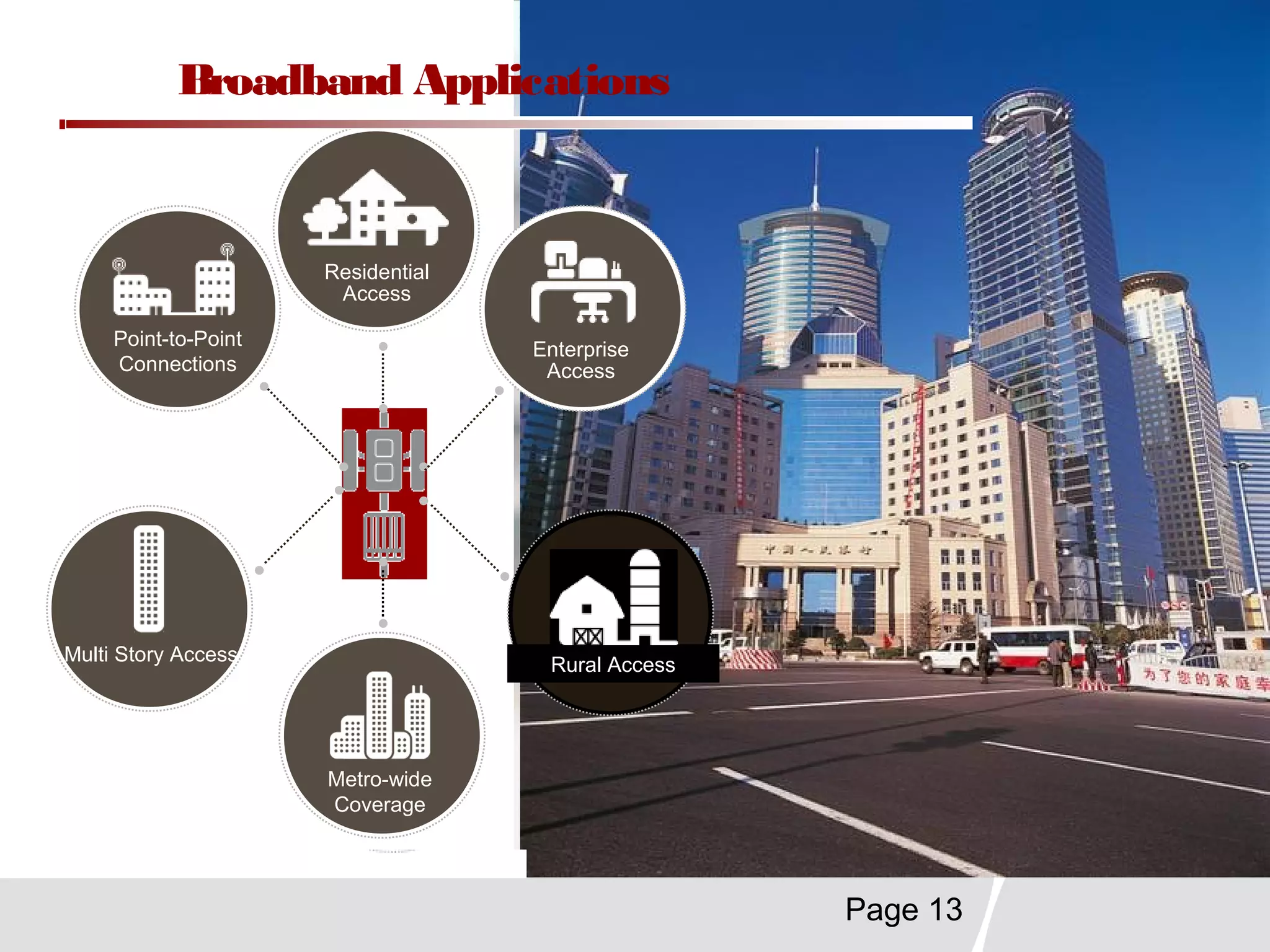
Metro-wide
Coverage
Enterprise
Access
Rural Access
Residential
Access
Multi Story Access
Point-to-Point
Connections
Broadband Applications
Page 14
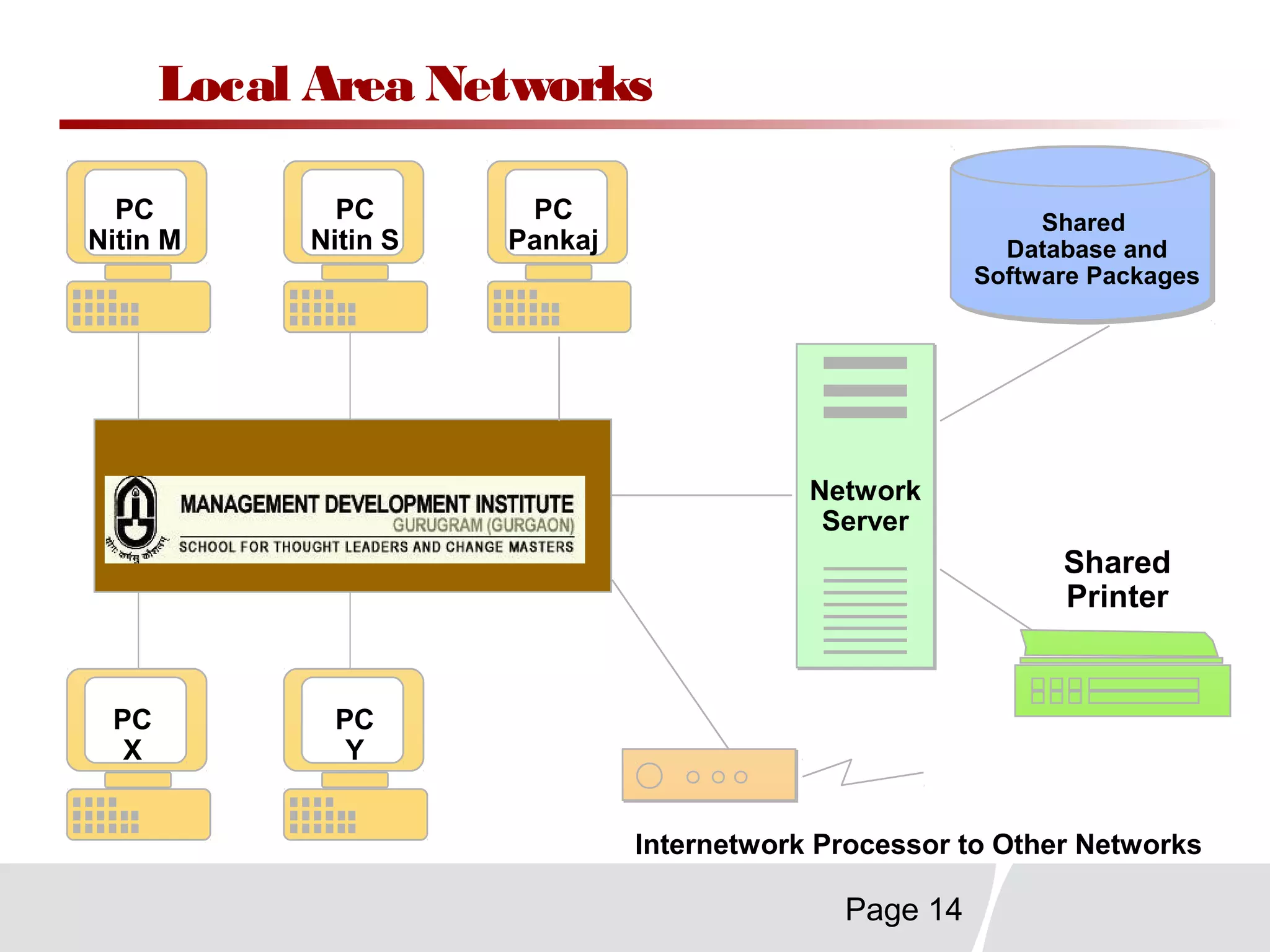
Local Area Networks
Network
Server
Network
ServerMDI
Shared
Database and
Software Packages
Shared
Printer
PC
Y
PC
X
PC
Nitin M
PC
Nitin S
PC
Pankaj
Internetwork Processor to Other Networks
Page 15
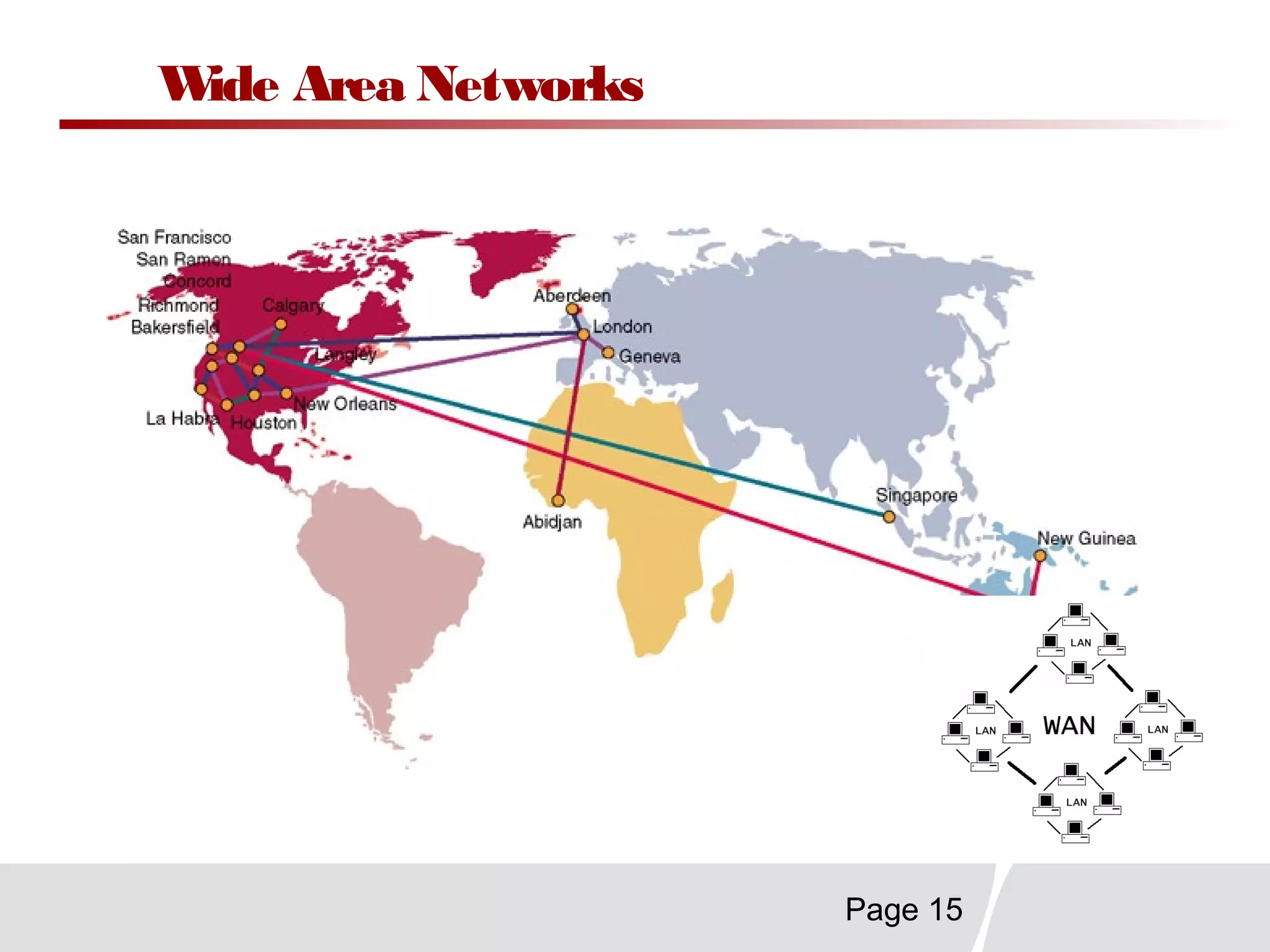
Wide Area Networks
Page 16
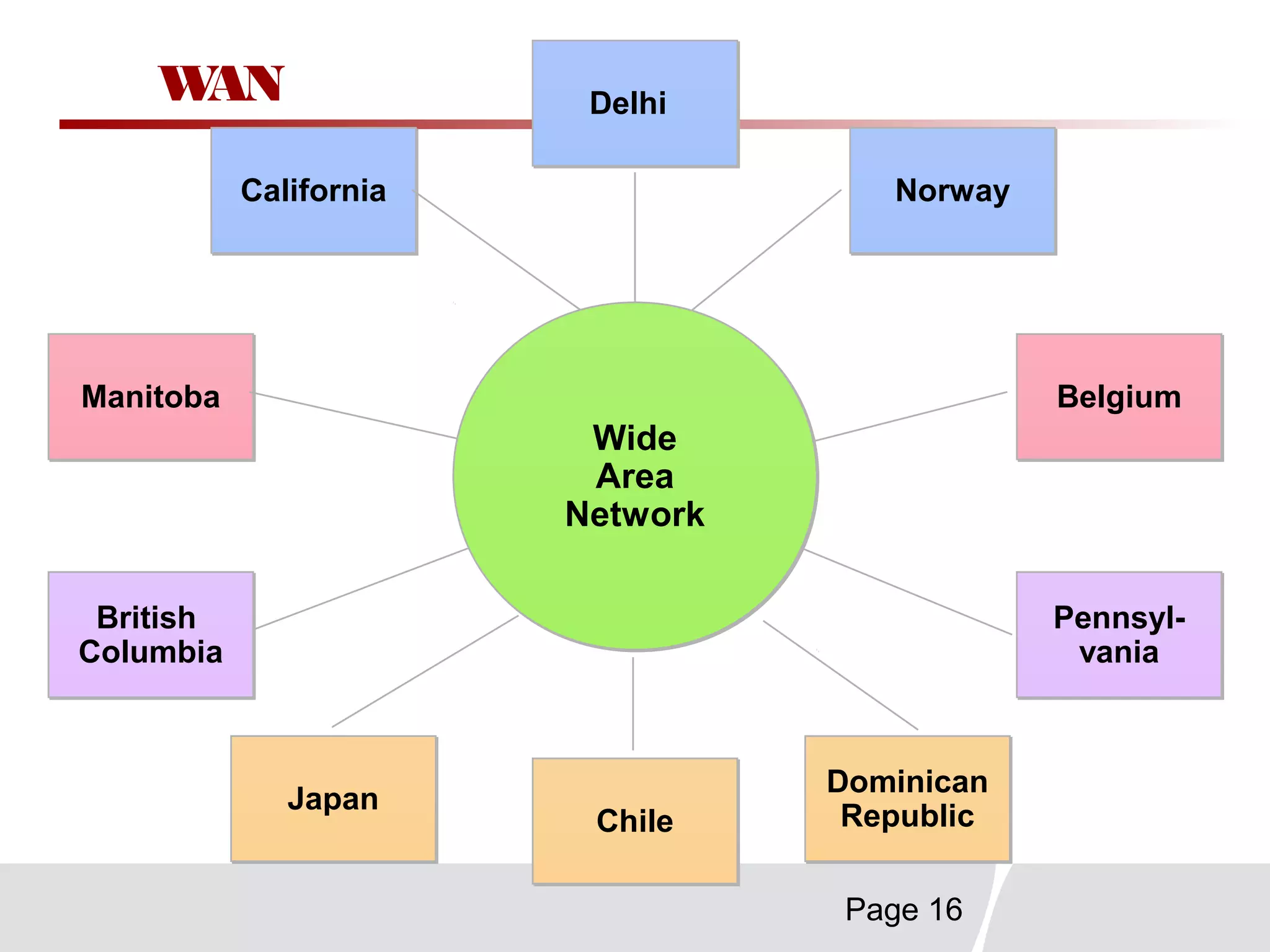
CaliforniaCalifornia NorwayNorway
BelgiumBelgium
Pennsyl-
vania
Pennsyl-
vania
ManitobaManitoba
British
Columbia
British
Columbia
ChileChile
DelhiDelhi
JapanJapan Dominican
Republic
Dominican
Republic
Wide
Area
Network
Wide
Area
Network
WAN
Page 17
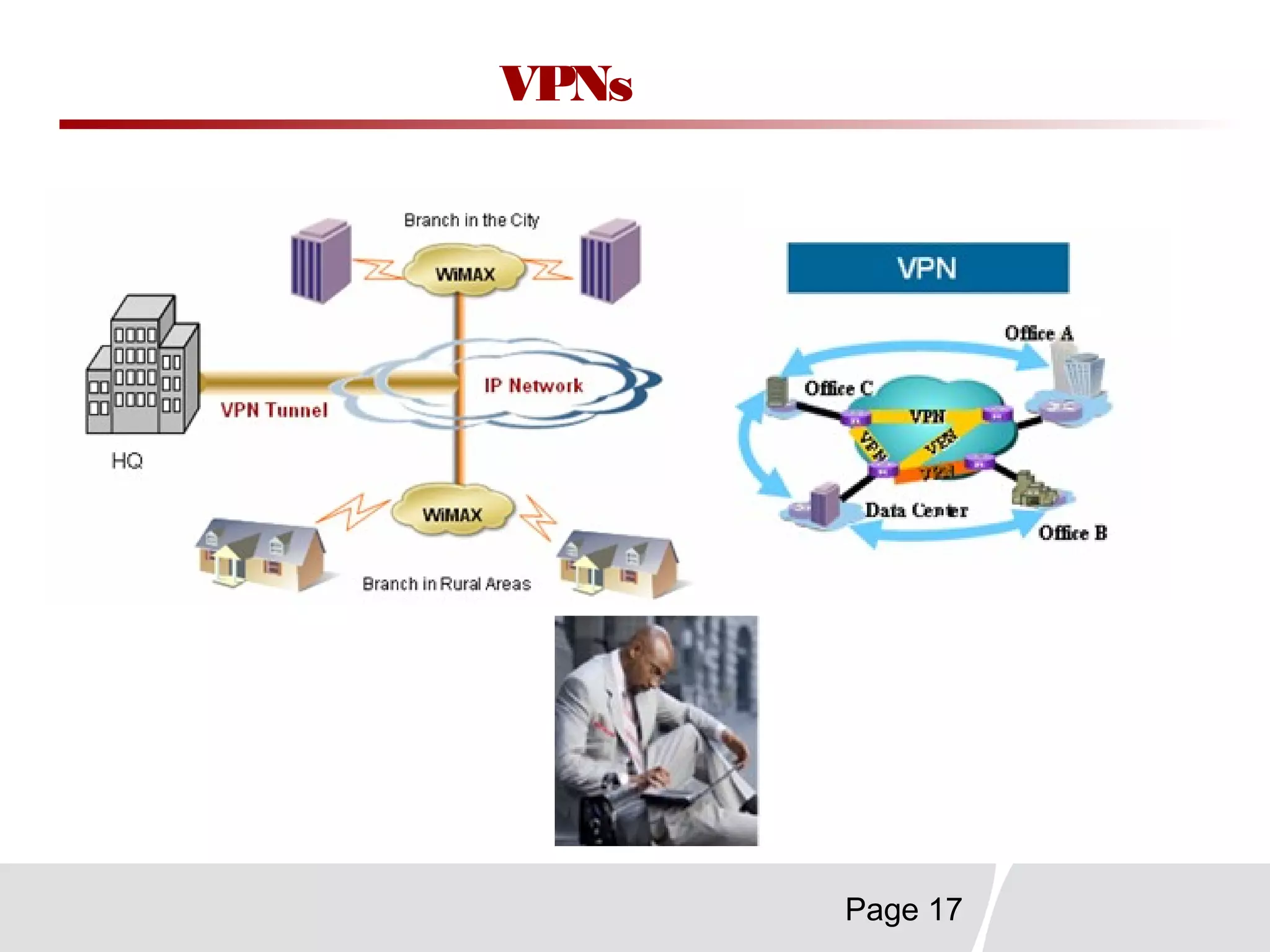
VPNs
Page 18
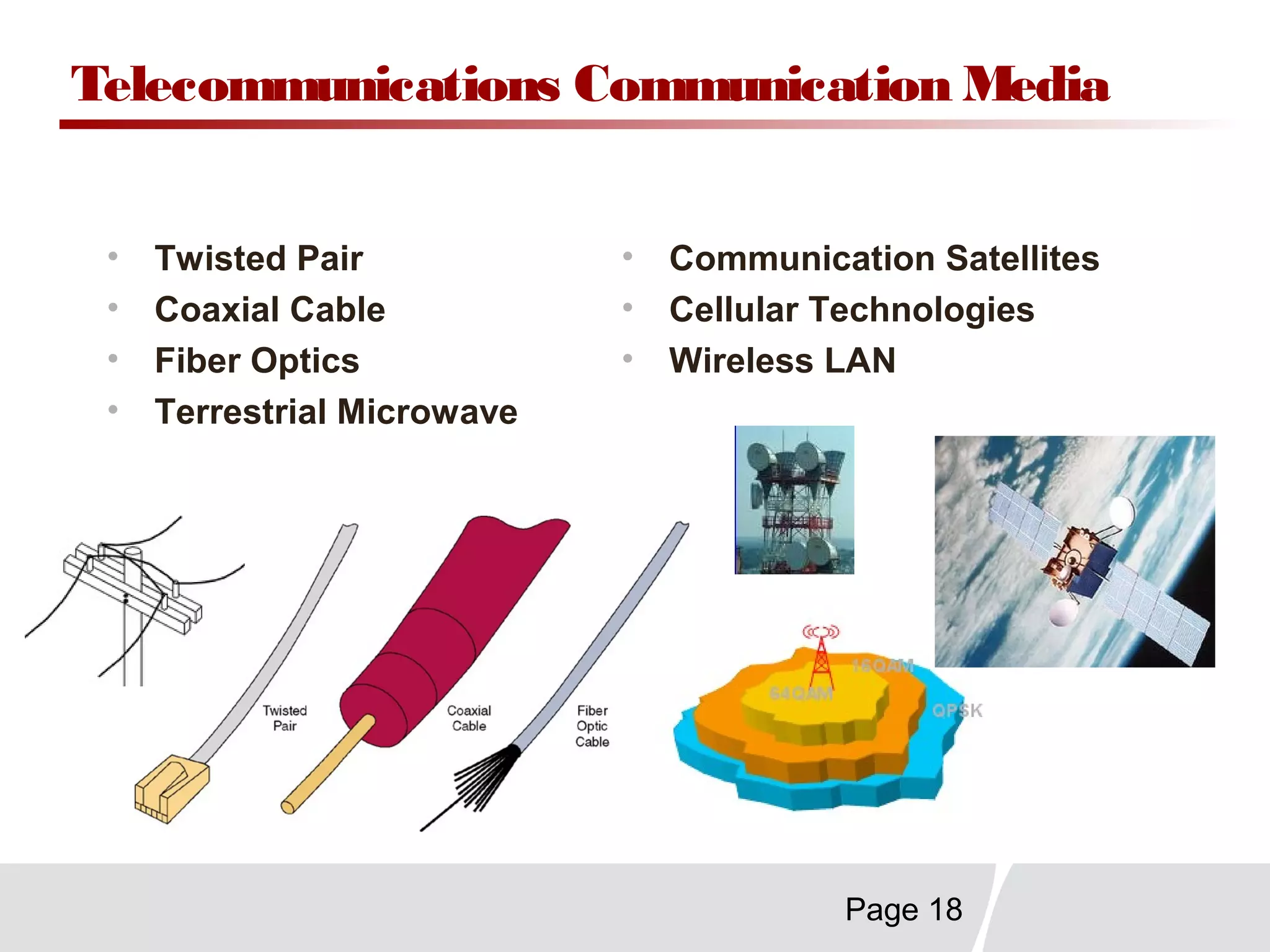
Telecommunications Communication Media
• Twisted Pair
• Coaxial Cable
• Fiber Optics
• Terrestrial Microwave
• Communication Satellites
• Cellular Technologies
• Wireless LAN
Page 19
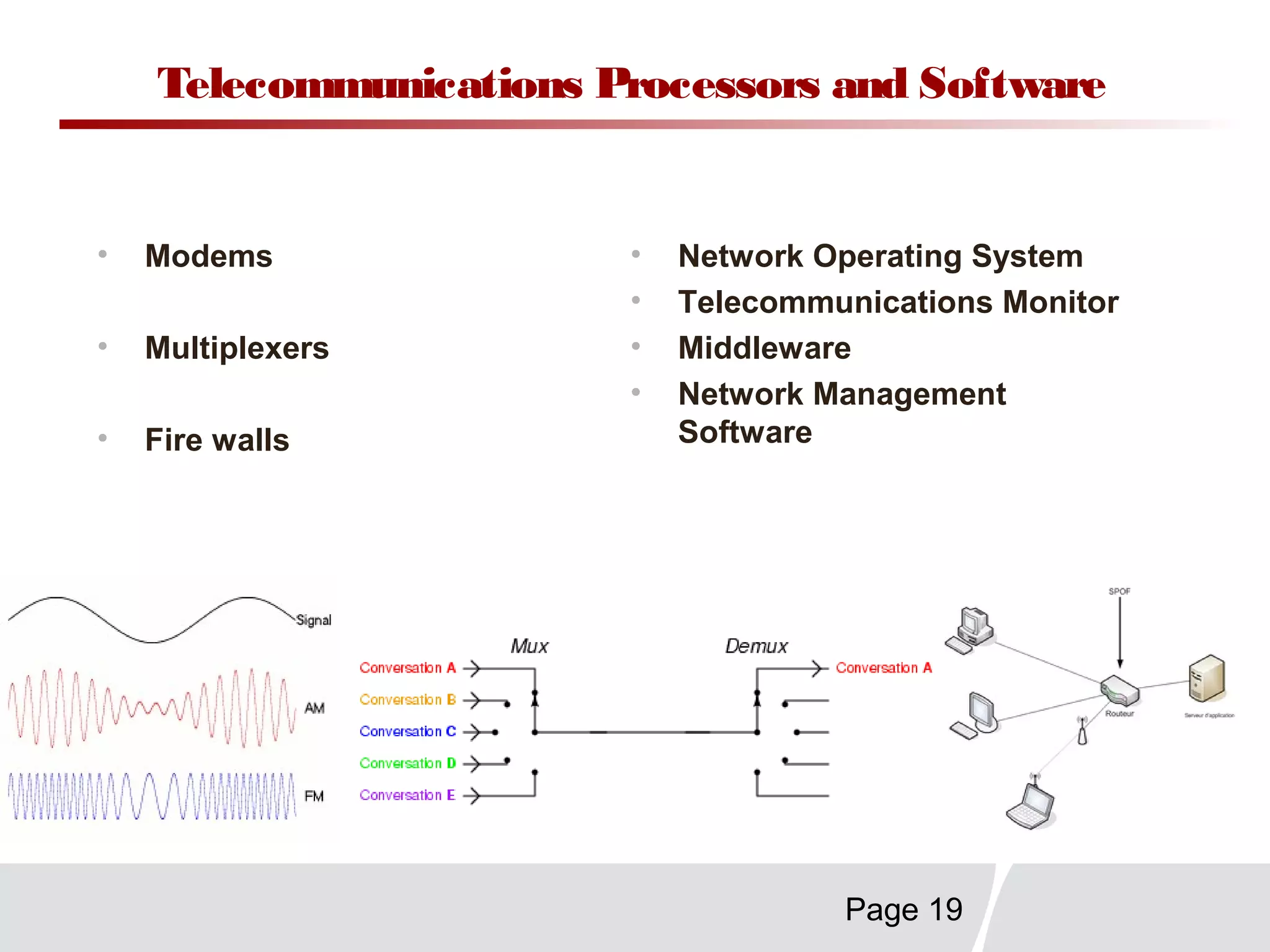
Telecommunications Processors and Software
• Modems
• Multiplexers
• Fire walls
• Network Operating System
• Telecommunications Monitor
• Middleware
• Network Management
Software
Page 20
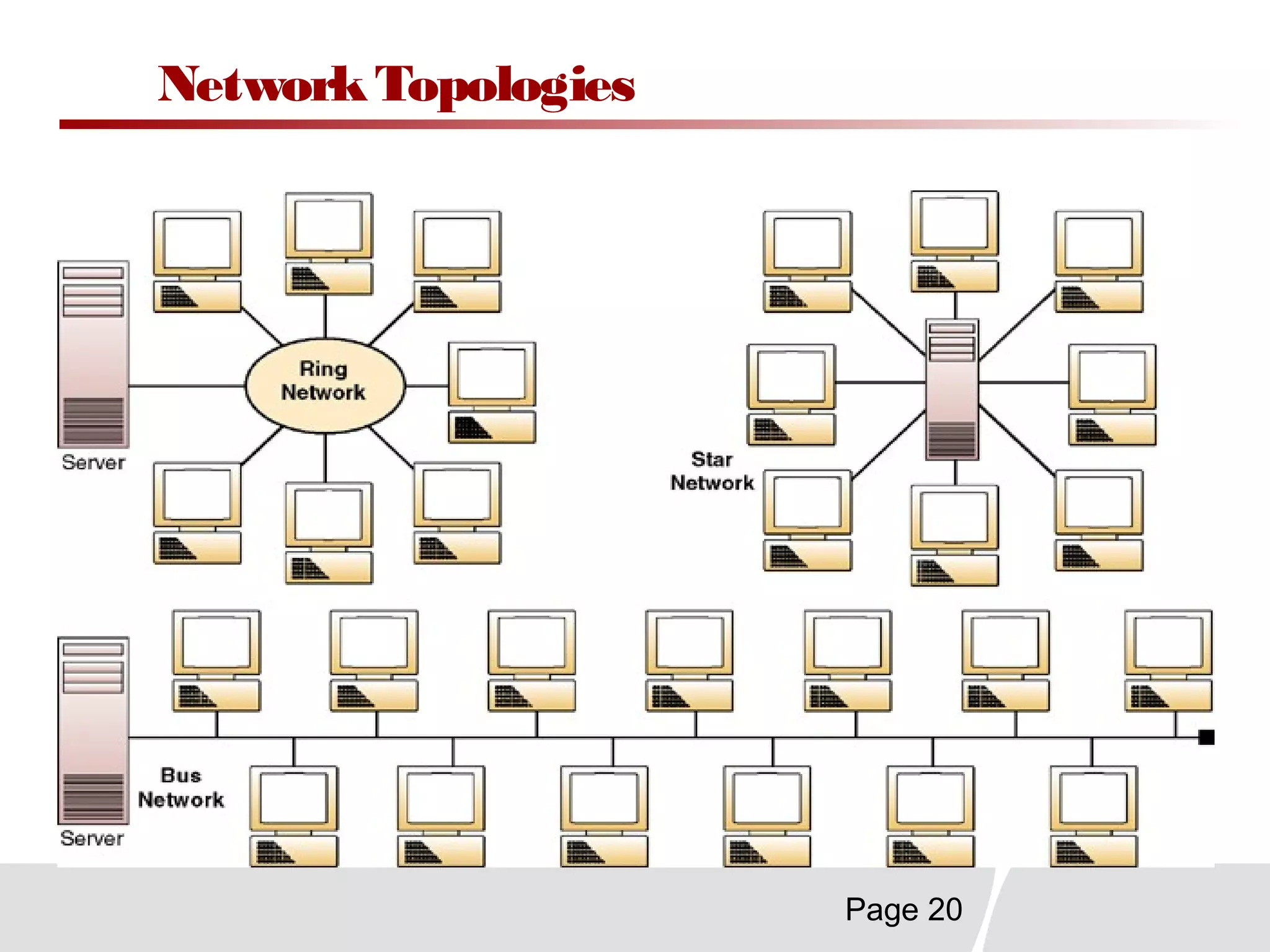
NetworkTopologies
Page 21
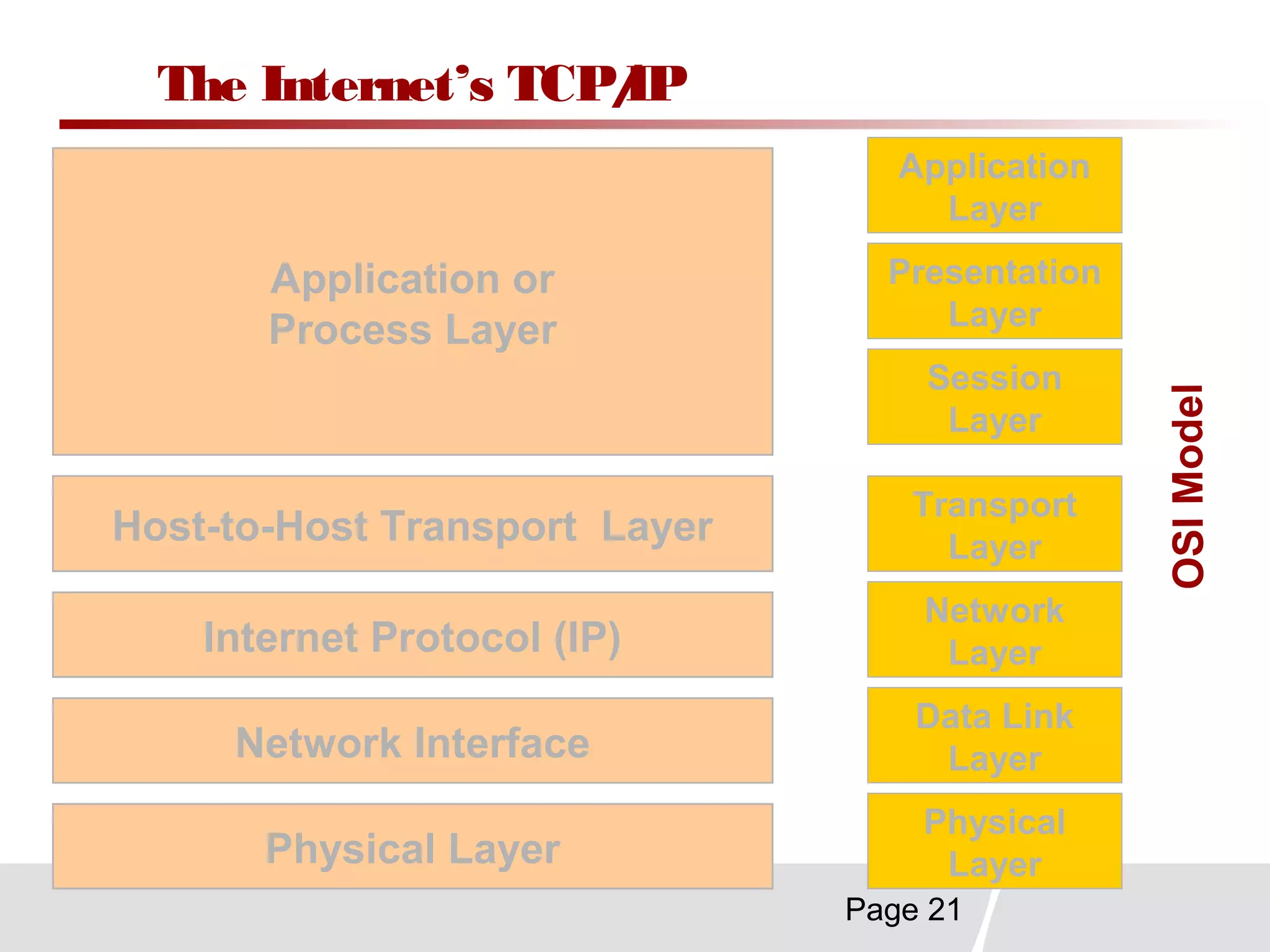
The Internet’s TCP/IP
Application or
Process Layer
Internet Protocol (IP)
Host-to-Host Transport Layer
Network Interface
Physical Layer
Application
Layer
Presentation
Layer
Session
Layer
Transport
Layer
Network
Layer
Data Link
Layer
Physical
Layer
OSIModel
Page 22
ChapterSummary
Organizations are becoming internetworked enterprises that use
the Internet, intranets, and other telecommunications networks
to support e-business.
Telecommunications has entered a deregulated and fiercely
competitive environment with many vendors, carriers, and
services
A major trend is towards pervasive use of the Internet and its
technologies to build interconnected enterprise and global
networks.
Page 23
ChapterSummary (cont)
The major components of any telecommunications
network are:
 Terminals,
 Telecommunications processors,
 Communication channels,
 Computers, and
 Telecommunications software.
There are several basic types of telecomm networks,
including wide area networks (WANs) and local area
networks (LANs).
Page 24
ChapterSummary (cont)
Key telecommunications network alternatives include
telecommunications media, processors, software,
channels, and architectures.
Thank You

final presentation

  • 1.
    Security Level: Internal Chapter6 Telecommunications and Networks NitinMehta (Roll no -33) Nitin Singhi ( Roll no.-34) Pankaj Tandon ( Roll no.-35)
  • 2.
    Page 2 Identify severalmajor developments and trends in the industries, technologies, and business applications of telecommunications and Internet technologies. Provide examples of the business value of Internet, intranet, and extranet applications. Identify the basic components, functions, and types of telecommunications networks used in business. Explain the functions of major types of telecommunications network hardware, software, media, and services. ChapterObjectives
  • 3.
    Page 3 Trends inTelecommunications More electronic commerce, enterprise collaboration, online business operations and strategic advantage in markets More vendors, carriers, alliances, and network services, accelerated by deregulation & Internet growth Extensive Internet, interconnected local & global digital networks, improved transmission channels Industry Trends Technology Trends Application Trends
  • 4.
    Page 4 Telecommunications StrategicCapabilities Overcome Geographic Barriers: Capture information about business transactions from remote locations. Overcome Geographic Barriers: Capture information about business transactions from remote locations. Overcome Time Barriers: Provide information to remote locations immediately after it is requested. Overcome Time Barriers: Provide information to remote locations immediately after it is requested. Overcome Cost Barriers: Reduce the cost of more traditional means of communications. Overcome Cost Barriers: Reduce the cost of more traditional means of communications. Overcome Structural Barriers: Support linkages for competitive advantage. Overcome Structural Barriers: Support linkages for competitive advantage.
  • 5.
    Page 5 Internet Applications Surfand E-mail Internet Chat and Discussion Forums Download and Computer Search Engines E-Commerce Transfer Protocol (FTP) and Telnet Popular Uses of the Internet Popular Uses of the Internet
  • 6.
    Page 6 Business Valuefrom e-Commerce Applications Increase Customer Loyalty & RetentionIncrease Customer Loyalty & Retention Reduce the Cost of Doing BusinessReduce the Cost of Doing Business Generate New Revenue SourcesGenerate New Revenue Sources Attract New CustomersAttract New Customers Deriving Business Value from e-Commerce Applications Deriving Business Value from e-Commerce Applications Develop New Markets & ChannelsDevelop New Markets & Channels Develop New Web-based ProductsDevelop New Web-based Products
  • 7.
    Page 7 Basic Componentsin a Telecommunications Network Telecommunications Software Telecommunications Software 1 2 3 4 52 PCs, NCs, and Other Terminals Computers Telecommunications Channels Telecommunications Processors
  • 8.
    Page 8 Fixed accessNomadic access Full mobilitySimple mobility Terminal RAN Bearing network Gateway Accessing Service Network Core network Connecting Service Network EMS BOSS iM2000 AAA HA Application server & Internet Datacom Optical network microwave Good Selections for Different Network Capability and Scenarios TelecomNetworkElements
  • 9.
    Page 9 Types ofNetworks WAN MAN LAN PAN
  • 10.
  • 11.
    Page 11 Cellular vsWiMAXCellular vs WiMAX Metric WiFi Edge WCDMA 1xEVDO (Rev 0) 802.16d 802.16e Modulation OFDM TDMA WCDMA CDMA OFDM/OFDM A Scalable OFDMA Data Rate 54 Mbps 384 Kbps 2 Mbps (Max) < 384 Kbps (Typ.) 2.4 Mbps (Max) < 750 Kbps (Typ.) 75 Mbps (Max) 20-30 Mbps (Typ.) 30 Mbps peak for 2x2 MIMO, 10 MHz Range (Avg. Cell) 100m 2 - 10 km (outdoor) 2 - 10 km (outdoor) 2 - 10 km (outdoor) 3-5 km (outdoor) 3-6 km (indoor) 6-10 km (outdoor) Spectrum 2.4 GHz 800, 900, 1800, 1900 GHz Various 1.7 – 2.2 GHz Various 1.7 – 2.2 GHz 2 – 6 GHz Lic. & Unlic 2 – 6 GHz Lic. & Unlic Channel BW 200 KHz 5 MHz 1.25, 2.5, and 3.75 MHz Scalable 1.5 – 20 MHz Scalable 1.25 – 20 MHz 3 G3 G WiMaxWiMax
  • 12.
    Page 12 Mobile/BroadBand Applications RuralBroadband DSL alternative, residential voice service Mobile Broadband/Voice Portable, nomadic and mobility Community Applications WiFi Hot Spots and security cameras SME Services Voice , Data services, VPN and Video Conferencing SEAMLESS CONNECTIVITY AT WORK, AT HOME, IN THE AUTO AND OUT IN THE WORLD
  • 13.
    Page 13 Metro-wide Coverage Enterprise Access Rural Access Residential Access MultiStory Access Point-to-Point Connections Broadband Applications
  • 14.
    Page 14 Local AreaNetworks Network Server Network ServerMDI Shared Database and Software Packages Shared Printer PC Y PC X PC Nitin M PC Nitin S PC Pankaj Internetwork Processor to Other Networks
  • 15.
  • 16.
  • 17.
  • 18.
    Page 18 Telecommunications CommunicationMedia • Twisted Pair • Coaxial Cable • Fiber Optics • Terrestrial Microwave • Communication Satellites • Cellular Technologies • Wireless LAN
  • 19.
    Page 19 Telecommunications Processorsand Software • Modems • Multiplexers • Fire walls • Network Operating System • Telecommunications Monitor • Middleware • Network Management Software
  • 20.
  • 21.
    Page 21 The Internet’sTCP/IP Application or Process Layer Internet Protocol (IP) Host-to-Host Transport Layer Network Interface Physical Layer Application Layer Presentation Layer Session Layer Transport Layer Network Layer Data Link Layer Physical Layer OSIModel
  • 22.
    Page 22 ChapterSummary Organizations arebecoming internetworked enterprises that use the Internet, intranets, and other telecommunications networks to support e-business. Telecommunications has entered a deregulated and fiercely competitive environment with many vendors, carriers, and services A major trend is towards pervasive use of the Internet and its technologies to build interconnected enterprise and global networks.
  • 23.
    Page 23 ChapterSummary (cont) Themajor components of any telecommunications network are:  Terminals,  Telecommunications processors,  Communication channels,  Computers, and  Telecommunications software. There are several basic types of telecomm networks, including wide area networks (WANs) and local area networks (LANs).
  • 24.
    Page 24 ChapterSummary (cont) Keytelecommunications network alternatives include telecommunications media, processors, software, channels, and architectures.
  • 25.

Editor's Notes

  • #3 &amp;lt;number&amp;gt;
  • #4 &amp;lt;number&amp;gt; Major trends occurring in the field of telecommunications have a significant impact on management decisions in this area. Key trends include: Industry Trends. The key trend in this area is a move away from a few, large, regulated monopolies as suppliers toward an industry structure with many suppliers in fierce competition for new customers with new products and innovative services. Bottom line: The service and vendor options available to meet a company&amp;apos;s telecommunications needs have increased dramatically. Technology Trends. Digital transmission of information is the wave of the future. Besides being &amp;quot;computer ready&amp;quot; digital communication offer four distinct advantages to businesses and end users: 1. Significantly higher transmission speeds. 2. Movement of larger amounts of information. 3. Greater economy. 4. Much lower error rates (compared to analog transmission). Another major technology trend is the advent of open systems -- information systems that use common standards for hardware, software, applications, and networking. Open systems create a computing environment characterized by easy access by developers, suppliers, and end users. Application Trends. Technology and industry trends combine to open up application development to more providers, more products, and more choices for businesses and end users. Discussion Note: Some choices are misleading. For example, application software for the personal computer in the utilities area (Symantec), statistics (SPSS), and personal finance (Quicken) are dominated by single companies who have bought their smaller rivals. The products and brands are maintained, but the control in these areas is very much monopolistic. Teaching Tips This slide corresponds to Figure 6.2 on pp. 176 and relates to the material on pp. 176-178.
  • #5 &amp;lt;number&amp;gt; The figure of the slide outlines the four major strategic capabilities of information technology: Time Barriers. Strategic use of information systems helps overcome time barriers by focusing on interval reduction and just-in-time operations. The goal is to shorten the response time to customer demands and reduce inventory investment to a minimum. Operating in real time means no time lag between the identification and fulfillment of a need. Geographic Barriers. Telecommunications and computing technologies make it possible to distribute key business activities to where they are needed most, where they are best performed, or where they best support the competitive advantage of a business. Telecommunication networks allow instantaneous access to all members and resources of the organization, however remote, so that the best combination of talent and ability can be brought to bear on problems or opportunities. Cost Barriers. Information systems help reduce costs in many areas: production, inventory, distribution, or communications. For example, decentralized decision making can be combined with centralized implementation of those decisions for greater economy without sacrificing the efficiency of the process. Teaching Tip: The IS also reduces travel costs as distance conferencing makes it less necessary to bring staff to headquarters for meetings. Structural Barriers. Structural barriers in business include traditional constraints in how business is conducted (such as hours of operation and labor costs) and the processing time various firms in a channel of distribution take to act on customer demand. An IS can extend hours of operation (example: automatic teller machines at banks), service support (example: 24 hour customer support for software products), and improve distribution (example: EDI between manufacturers and suppliers, or wholesalers and retailers). Teaching Tips This slide corresponds to Figure 6.4 on pp. 178 relates to the material on pp. 178-179.
  • #6 &amp;lt;number&amp;gt; The Internet is the largest &amp;quot;network of networks&amp;quot; and the closest model of the information superhighway to come. The Internet is accessible to anyone with a modem and the proper communications software on their computer. Nature of the Internet. The Internet developed from a US Defense Department network called ARPANET, established in 1969. One of the extraordinary features of the Net is its decentralized nature. No one &amp;quot;runs&amp;quot; the Net, it is not controlled either from a central headquarters nor governed by a single business or government agency. Like a real highway, it is &amp;quot;there&amp;quot; maintained to some degree by those who use it. But travel on it is pretty much up to the end users themselves. Business of the Internet. By 1995, over 1.5 million host networks on the Internet belonged to businesses. Businesses on the Internet are there in part to take advantage of the easy, world-wide communications available through email and file transfer protocols (FTPs). But business is also on the Net to help shape the network as a channel for conducting business transactions -- buying and selling goods and services in Cyberspace to distant customers linked by computers and modems. lectronic commerce, commonly known as (electronic marketing) e-commerce or eCommerce, consists of the buying and selling of products or services over electronic systems such as the Internet and other computer networks Teaching Tips This slide corresponds to Figure 6.5 on pp. 179 relates to the material on pp. 179-180.
  • #7 &amp;lt;number&amp;gt; Many companies perceive the business value of the Internet for electronic commerce. Substantial cost savings can arise because applications that use the Internet and Internet-based technologies (like intranets and extranets) are typically less expensive to develop, operate, and maintain than traditional systems. Example: American Airlines saves money every time customers use their website instead of their customer support telephone system. Other primary reasons for business value include: Attracting new customers with innovative marketing and products, and retaining present customers with improved customer service and support. Generating revenue through e-commerce applications is a major source of business value (discussed in Chapter 8). Summary: Most companies are building e-commerce websites to achieve six major business values: 1. Generate new revenue from online sales. 2. Reduce costs through online sales and customer support. 3. Attract new customers via Web marketing and advertising and online sales. 4. Increase the loyalty of existing customers via improved Web customer service and support. 5. Develop new Web-based markets and distribution channels for existing products. 6. Develop new information-based accessible on the Web. Teaching Tips This slide corresponds to Figure 6.7 on pp. 182 relates to the material on pp. 181-182.
  • #8 &amp;lt;number&amp;gt; Like any communications model, a telecommunications network connects a sender to a receiver over a channel for sharing messages. The basic components of a telecommunications network are: Terminals. These are networked microcomputer workstations or video input/output stations that provide the sending and receiving endpoints for the network. Telecommunications Processors. These are specialized hardware components that support data transmission and reception between terminals and computers. Telecommunications Channels and Media. A channel connects two or more parties in a network. Media are the particular way a channel is connected. Telecommunications channels use combinations of media such as copper wires, coaxial cables, fiber optic cables, and microwave carriers to transmit information. Computers. All sizes and types of computers can and are connected to telecommunications networks. Typical arrangements include using a mainframe as a host for the network, a minicomputer as a front-end processor, with a dedicated microcomputer as a network server to a smaller local group of networked microcomputer workstations. Telecommunications Control Software. Software controls the interaction of the computers on the telecommunications information system. Mainframes use telecommunications monitors in their role as host computers. Network operating systems are specially designed for microcomputer servers while individual microcomputers on the network access its functions by communications packages. Teaching Tips This slide corresponds to Figure 6.12 on pp. 188 relates to the material on pp. 188-189.
  • #9 Bearing Network----Datacom( IP Band netwrok) ,Optical Network, Microwave-----The Bearer Service is a type of telecommunication service that provides the capability for the transmission of signals between access points. BSS-Base Station System OSS –Operating Support System EMS-Element Management System BOSS : Business and operation sub system Gateways are network points that acts as an entrance to another network. WiFi Terminal –Antenna ----Used for transmission at the home/office in which we have a WiFi terminal—So input is WiMax and Output is WiFi DataCom-Router ,LAN switch Application Server ---Like VOD, email
  • #10 ETSI – European Telecommunication Standard Institute MAN – Metropolitan Area Network The 802.20 working group was proposed in response to ArrayComm&amp;apos;s iBurst standard. The Mobile Broadband Wireless Access (MBWA) Working Group was approved by IEEE Standards Board onDecember 11, 2002 with aims to prepare a formal specification for a packet-based air interface designed for IP-based services. From the start Qualcomm saw iBurst and its standardization as a competitive threat; they did all they could to thwart the progress of the standard.
  • #12 EDGE (Enhanced Data rate for GSM Evolution) is a specification for data transfer on GSM networks. Further enhancements to GSM networks are provided by Enhanced Data rates for GSM Evolution (EDGE) technology. EDGE provides up to three times the data capacity of GPRS. Using EDGE, operators can handle three times more subscribers than GPRS; triple their data rate per subscriber, or add extra capacity to their voice communications. EDGE uses the same TDMA (Time Division Multiple Access) frame structure, logic channel and 200kHz carrier bandwidth as today&amp;apos;s GSM networks, which allows it to be overlaid directly onto an existing GSM network. For many existing GSM/GPRS networks, EDGE is a simple software-upgrade W-CDMA (Wideband Code Division Multiple Access) is a type of 3G cellular network. W-CDMA is the higher speed transmission protocol used in the Japanese FOMA system and in the UMTS system Universal Mobile Telecommunications System , a third generation follow-on to the 2G GSM networks deployed worldwide. More technically, W-CDMA is a wideband spread-spectrum mobile air interface that utilizes the direct-sequence spread spectrum method of asynchronous code division multiple access to achieve higher speeds and support more users compared to the implementation of time division multiplexing (TDMA) used by 2G GSM networks. Maximum user data rate (Physical channel): ~ 2.3Mbps (spreading factor 4, parallel codes (3 DL / 6 UL), 1/2 rate coding), but interference limited.Maximum user data rate (Offered): 384 kbps (year 2002), higher rates ( ~ 2 Mbps) in the near future. HSPDA will offer data speeds up to 8-10 Mbps (and 20 Mbps for MIMO systems) HSDPA is a downlink-only air interface defined in the Third-generation Partnership Project (3GPP) UMTS Release 5 specifications. HSDPA is capable of providing a peak user data rate (layer 2 throughput) of 14.4Mbps, using a 5MHz channel. Realizing this data rate, however, requires the use of all 15 codes, which is unlikely to be implemented in mobile terminals. Using 5 and 10 codes, HSDPA supports peak data rates of 3.6Mbps and 7.2Mbps, respectively. Typical average rates that users obtain are in the range of 250kbps to 750kbps. Enhancements, such as spatial processing, diversity reception in mobiles, and multiuser detection, can provide significantly higher performance over basic HSDPA systems. EVDO, Evolution Data Optimized, Evolution Data Only -DO is a high-speed network protocol used for wireless data communications, primarily Internet access. EV-DO is considered a broadband technology like DSL or cable modem Internet services. How Fast Is EV-DO? The EV-DO protocol uses asymmetric communications, allocating more bandwidth for downloads than for uploads. The original EVDO Revision 0 standard supports up to 2.4 Mbps data rates down but only 0.15 Mbps (about 150 Kbps) up. Also Known As: EVDO, Evolution Data Optimized, Evolution Data Only EVDO is an acronym for &amp;quot;Evolution Data Only&amp;quot; or &amp;quot;Evolution Data Optimized&amp;quot; which is a standard for high speed wireless networks used for Broadband Internet connectivity. EVDO enables computer users to have high speed Internet access without the help of a hotspot. Just by inserting an EVDO card into the computer, users get connected to the Internet within seconds and have Net access at DSL-compatible speeds. While traditional wireless networks assign a dedicated path between the source and destination for the entire duration of the call very similar to fixed-line telephone networks, EVDO transmits several users&amp;apos; data through a single channel using Code Division Multiple Access (CDMA) as well as Time Division Multiple Access (TDMA) to achieve higher throughput and better utilization of network bandwidth. The standard underwent many revisions denoted as Rev. 0, Rev. A, and Rev. B and so on. Rev. 0 supports forward link speeds up to 2.4 Mbit/s. while Rev. A can go up to 3.1 Mbit/s. EVDO is part of the CDMA2000 family of standards and has been adopted by many service providers offering high speed broadband connectivity for mobile phone users through CDMA networks. It was developed by Qualcomm during the late 90s. Since the standard was a direct evolution from the 1xRTT standard which carried only data, it was initially called Evolution Data only. Later on, since the word &amp;apos;only&amp;apos; seemed to add a negative connotation to the name, the name was switched to Evolution Data Optimized. Since the new name was more marketable and sounded more hi-tech, it stuck. EVDO uses the current broadcast frequencies of existing CDMA networks which is a major advantage when compared to competing technologies which often require expensive hardware and software changes or upgrades to the network. Verizon and Sprint are the two major service providers in the US using EVDO. Verizon has implemented Rev. A throughout its network, and Sprint is rapidly catching up. While there is also a large presence of EVDO technology in Korea, it has made relatively no impact in Europe and countries in Asia which predominantly use the W-CDMA standard for high speed data access. EVDO –Rev 0 supports 2.4Mbps Revision A of 1x EV-DO supports a peak rate of 3.1Mbps to a mobile user; Revision B will support 4.9Mbps. Only technology which can come near WiMAX is LTE which has still 2 years before it comes
  • #13 &amp;lt;number&amp;gt;
  • #14 Residential - Alternative to fixed wireline broadband – personal broadband on-the-go Enterprise - Bridge office locations and cover enterprise campus Rural - Extend the reach of broadband networks – close the digital divide Metro - Low cost, secure connections over public infrastructure – with mobility BPL - Wireless backhaul to powerline access point as alternative to residential broadband Backhaul - Manage growing aggregate of user data demands
  • #15 &amp;lt;number&amp;gt; Local Area Networks (LANs) connect computers and other information processing devices within a limited physical area, such as an office, a building, or work site. LANs use a variety of telecommunications media. Key concepts and components of LANs include: Network Interface Card. PCs on a network must have a circuit board installed to handle the network interface. This is the typical way of expanding PC capability. Teaching Tip: The advent of Windows 95 and Plug and Play architecture should make the installation of network cards by end users much easier. Network Server. As mentioned earlier, this is a dedicated PC with a large hard disk capacity for secondary storage. Many servers also have more RAM than the individual workstations on the network. Network Operating System. Just as individual PCs have their own operating systems, the network operating system controls the interface between users and machine hardware as well as the telecommunications peripherals linking them. Internetworks. Most LANs are connected via telecommunications to other networks, which might be other LANs, wide area networks (WANs), mainframes, or very large networks like the Internet. Teaching Tips This slide corresponds to Figure 6.14 on pp. 190 relates to the material on pp. 189-190.
  • #16 &amp;lt;number&amp;gt; Local Area Networks (LAN) connect computers and other information processing devices within a limited physical area, such as an office, classroom, building, manufacturing plant, or other work site. LANs have become commonplace in many organizations for providing telecommunications network capabilities that link end users in offices, departments, and other workgroups. Wide Area Networks (MAN) cover a large geographic areas. Networks that cover a large city or metropolitan area (MAN) are also included in this category. Such large networks have become a necessity for carrying out the day-to-day activities of many business and government organizations and their end users. Example: WANs are used by many multinational companies to transmit and receive information among their employees, customers, suppliers, and other organizations across cities, regions, countries, and the world. Teaching Tips This slide corresponds to Figure 6.13 on pp. 190 relates to the material on pp. 189-190.
  • #17 &amp;lt;number&amp;gt;
  • #19 &amp;lt;number&amp;gt; Telecommunications channels make use of a wide variety of media. In some cases, the media are complementary and the use of more than one media increases the functions and features of the telecommunications network. In other cases, the media are in direct competition with each other, hoping to capture customers from other media choices. Discussion Note: The dual nature of telecommunications has implications yet to be resolved for open systems architecture. Some major types of telecommunications media include: Twisted-Pair Wire. This is the traditional phone line used throughout the world. It is the most widely distributed telecommunications media but is limited in the amount of data and speed of transmission. Coaxial Cable. This is a sturdy copper or aluminum wire wrapped in spacers to insulate and protect it. Coaxial cable can carry more information and at higher speeds than twisted pair wires. It also is a higher-quality carrier, with little interference. Fiber Optics. These are hair-thin glass filaments spun into wires and wrapped in a protective jacket. Fiber optics transmit light pulses as carriers of information and so are extremely fast and produce no electromagnetic radiation. This makes them extremely reliable channels, although splicing cables for connections is difficult. Terrestrial Microwave. Earthbound microwave radiation transmit high-speed radio signals in line-of-sight paths between relay stations.. Communications Satellites. Satellites in geosynchronous orbit are used to transmit microwave signals to any place on earth using dish antennas for sending and receiving. Cellular Radio. Low power transmitters on each cell of the system allow users to take advantage of several frequencies for communications. Wireless LANs. Using radio or infrared transmission, some LANs are completely wireless, thus eliminating the cost of installing wire in existing structures. Teaching Tip: The information in this slide comes from pp 194 - 197.
  • #20 &amp;lt;number&amp;gt; Modem (Modulator-DEModulator). A device that converts the digital signals from input/output devices into appropriate frequencies at a transmission terminal and converts them back into digital signals at a receiving terminal. Multiplexer: An electronic device that allows a single communications channel to carry simultaneous data transmission from many terminals. Internetwork Processors: Communications processors used by local area networks to interconnect them with other local area and wide area networks. Examples include switches, routers, hubs, and gateways. Fire wall: Computers, communications processors, and software that protect computer networks from intrusion by screening all network traffic and serving as a safe transfer point for access to and from other networks. Network Operating System: Is a program that controls telecommunications and the use and sharing of network resources. Telecommunications Monitor: Computer programs that control and support the communications between the computers and terminals in a telecommunications network. Middleware: Software that helps diverse networked computer systems work together, thus promoting their interoperability. Network Management Software: Software packages such as network operating systems and telecommunications monitors used to determine transmission priorities, route (switch) messages, poll terminals in the network, and form waiting waiting lines (queues) of transmission requests. Teaching Tip: The information in this slide comes from pages 198-201. Function The network switch, packet switch (or just switch) plays an integral part in most Ethernet local area networks or LANs. Mid-to-large sized LANs contain a number of linked managed switches. Small office/home office (SOHO) applications typically use a single switch, or an all-purpose converged device such as gateway access to small office/home broadband services such as DSL router or cable Wi-Fi router. In most of these cases, the end user device contains a router and components that interface to the particular physical broadband technology, as in the Linksys 8-port and 48-port devices. User devices may also include a telephone interface to VoIP. In the context of a standard 10/100 Ethernet switch, a switch operates at the data-link layer of the OSI model to create a different collision domain per switch port. If you have 4 computers A/B/C/D on 4 switch ports, then A and B can transfer data between them as well as C and D at the same time, and they will never interfere with each others&amp;apos; conversations. In the case of a &amp;quot;hub&amp;quot; then they would all have to share the bandwidth, run in Half duplex and there would be collisions and retransmissions. Using a switch is called micro-segmentation. It allows you to have dedicated bandwidth on point to point connections with every computer and to therefore run in Full duplex with no collisions. [edit]Role of switches in networks Network switch is a marketing term rather than a technical one.[citation needed] Switches may operate at one or more OSI layers, including physical, data link, network, or transport (i.e., end-to-end). A device that operates simultaneously at more than one of these layers is called a multilayer switch, although use of the term is diminishing.[citation needed] In switches intended for commercial use, built-in or modular interfaces make it possible to connect different types of networks, including Ethernet, Fibre Channel, ATM, ITU-T G.hn and 802.11. This connectivity can be at any of the layers mentioned. While Layer 2 functionality is adequate for speed-shifting within one technology, interconnecting technologies such as Ethernet and token ring are easier at Layer 3. Interconnection of different Layer 3 networks is done by routers. If there are any features that characterize &amp;quot;Layer-3 switches&amp;quot; as opposed to general-purpose routers, it tends to be that they are optimized, in larger switches, for high-density Ethernet connectivity. In some service provider and other environments where there is a need for a great deal of analysis of network performance and security, switches may be connected between WAN routers as places for analytic modules. Some vendors provide firewall,[2][3] network intrusion detection,[4] and performance analysis modules that can plug into switch ports. Some of these functions may be on combined modules.[5] In other cases, the switch is used to create a mirror image of data that can go to an external device. Since most switch port mirroring provides only one mirrored stream, network hubs can be useful for fanning out data to several read-only analyzers, such as intrusion detection systems and packet sniffers.
  • #21 &amp;lt;number&amp;gt; There are several basic types of network topologies, or structures, in telecommunications networks. Three basic topologies used in wide area and local area telecommunications networks are: 1. Star: A star network ties end user computers to a central computer. 2. Ring: A ring network ties local computer processors together in a ring on a more equal basis. 3. Bus: A bus network is a network in which local processors share the same bus, or communications channel. Teaching Tip: Instructors may wish to discuss the advantages and disadvantages associated with each of these types of topologies. This discussion is laid out in the Instructors Manual. Teaching Tips This slide corresponds to Figure 6.24 on pp. 201 and relates to the material on pp. 201-202. StarThe type of network topology in which each of the nodes of the network is connected to a central node with a point-to-point link in a &amp;apos;hub&amp;apos; and &amp;apos;spoke&amp;apos; fashion, the central node being the &amp;apos;hub&amp;apos; and the nodes that are attached to the central node being the &amp;apos;spokes&amp;apos; (e.g., a collection of point-to-point links from the peripheral nodes that converge at a central node) – all data that is transmitted between nodes in the network is transmitted to this central node, which is usually some type of device that then retransmits the data to some or all of the other nodes in the network, although the central node may also be a simple common connection point (such as a &amp;apos;punch-down&amp;apos; block) without any active device to repeat the signals. RingThe type of network topology in which each of the nodes of the network is connected to two other nodes in the network and with the first and last nodes being connected to each other, forming a ring – all data that is transmitted between nodes in the network travels from one node to the next node in a circular manner and the data generally flows in a single direction only. BusLinear bus The type of network topology in which all of the nodes of the network are connected to a common transmission medium which has exactly two endpoints (this is the &amp;apos;bus&amp;apos;, which is also commonly referred to as the backbone, or trunk) – all data that is transmitted between nodes in the network is transmitted over this common transmission medium and is able to be received by all nodes in the network virtually simultaneously (disregarding propagation delays) us Bus network topology In local area networks where bus technology is used, each machine is connected to a single cable. Each computer or server is connected to the single bus cable through some kind of connector. A terminator is required at each end of the bus cable to prevent the signal from bouncing back and forth on the bus cable. A signal from the source travels in both directions to all machines connected on the bus cable until it finds the MAC address or IP address on the network that is the intended recipient. If the machine address does not match the intended address for the data, the machine ignores the data. Alternatively, if the data does match the machine address, the data is accepted. Since the bus topology consists of only one wire, it is rather inexpensive to implement when compared to other topologies. However, the low cost of implementing the technology is offset by the high cost of managing the network. Additionally, since only one cable is utilized, it can be the single point of failure. If the network cable breaks, the entire network will be down. n local area networks where the star topology is used, each machine is connected to a central hub. In contrast to the bus topology, the star topology allows each machine on the network to have a point to point connection to the central hub. All of the traffic which transverses the network passes through the central hub. The hub acts as a signal booster or repeater which in turn allows the signal to travel greater distances. As a result of each machine connecting directly to the hub, the star topology is considered the easiest topology to design and implement. An advantage of the star topology is the simplicity of adding other machines. The primary disadvantage of the star topology is the hub is a single point of failure. If the hub were to fail the entire network would fail as a result of the hub being connected to every machine on the network. Notes: n local area networks where the ring topology is used, each computer is connected to the network in a closed loop or ring. Each machine or computer has a unique address that is used for identification purposes. The signal passes through each machine or computer connected to the ring in one direction. Ring topologies typically utilize a token passing scheme, used to control access to the network. By utilizing this scheme, only one machine can transmit on the network at a time. The machines or computers connected to the ring act as signal boosters or repeaters which strengthen the signals that transverse the network. The primary disadvantage of ring topology is the failure of one machine will cause the entire network to fail. Ring and Bus is obselete
  • #22 &amp;lt;number&amp;gt; The International Standards Organization (ISO) has developed a seven-layer Open Systems Interconnection (OSI) model to serve as a standard model for network architecture. Application Layer. This layer provides communications services for end user applications. Presentation Layer. This layer provides appropriate data transmission formats and codes. Session Layer. This layer supports the accomplishment of telecommunications sessions. Transport Layer. This layer supports the organization and transfer of data between nodes in the network. Network Layer. This layer provides appropriate routing by establishing connections among network links. Data Link Layer. This layer supports error free organization and transmission of data in the network. Physical Layer. This layer provides physical access to the telecommunications media in the network. In TCP/IP The layers near the top are logically closer to the user application, while those near the bottom are logically closer to the physical transmission of the data Teaching Tips This slide corresponds to Figure 6.25 on pp. 203 relates to the material on pp. 202-203. The three top layers in the OSI model—the Application Layer, the Presentation Layer and the Session Layer—are not distinguished separately in the TCP/IP model where it is just the Application Layer. While some pure OSI protocol applications, such as X.400, also combined them, there is no requirement that a TCP/IP protocol stack needs to impose monolithic architecture above the Transport Layer. For example, the Network File System (NFS) application protocol runs over the eXternal Data Representation (XDR) presentation protocol, which, in turn, runs over a protocol with Session Layer functionality, Remote Procedure Call (RPC). RPC provides reliable record transmission, so it can run safely over the best-effort User Datagram Protocol (UDP) transport. The Session Layer roughly corresponds to the Telnet virtual terminal functionality[citation needed], which is part of text based protocols such as the HTTP and SMTP TCP/IP model Application Layer protocols. It also corresponds to TCP and UDP port numbering, which is considered as part of the transport layer in the TCP/IP model. Some functions that would have been performed by an OSI presentation layer are realized at the Internet application layer using the MIME standard, which is used in application layer protocols such as HTTP and SMTP. Since the IETF protocol development effort is not concerned with strict layering, some of its protocols may not appear to fit cleanly into the OSI model. These conflicts, however, are more frequent when one only looks at the original OSI model, ISO 7498, without looking at the annexes to this model (e.g., ISO 7498/4 Management Framework), or the ISO 8648 Internal Organization of the Network Layer (IONL). When the IONL and Management Framework documents are considered, the ICMP and IGMP are neatly defined as layer management protocols for the network layer. In like manner, the IONL provides a structure for &amp;quot;subnetwork dependent convergence facilities&amp;quot; such as ARP and RARP. IETF protocols can be encapsulated recursively, as demonstrated by tunneling protocols such as Generic Routing Encapsulation (GRE). While basic OSI documents do not consider tunneling, there is some concept of tunneling in yet another extension to the OSI architecture, specifically the transport layer gateways within the International Standardized Profile framework [11]. The associated OSI development effort, however, has been abandoned given the overwhelming adoption of TCP/IP protocols. This chapter gives a brief comparison between OSI and TCP/IP protocols with a special focus on the similarities and on how the protocols from both worlds map to each other. The adoption of TCP/IP does not conflict with the OSI standards because the two protocol stacks were developed concurrently. In some ways, TCP/IP contributed to OSI, and vice-versa. Several important differences do exist, though, which arise from the basic requirements of TCP/IP which are: A common set of applications Dynamic routing Connectionless protocols at the networking level Universal connectivity Packet-switching The main differences between the OSI architecture and that of TCP/IP relate to the layers above the transport layer (layer 4) and those at the network layer (layer 3). OSI has both, the session layer and the presentation layer, whereas TCP/IP combines both into an application layer. The requirement for a connectionless protocol also required TCP/IP to combine OSI’s physical layer and data link layer into a network level.
  • #23 &amp;lt;number&amp;gt;
  • #24 &amp;lt;number&amp;gt;
  • #25 &amp;lt;number&amp;gt;