Chapter 6
Telecommunications
and Networks
James A. O'Brien, and George Marakas.
Management Information Systems with MISource
2007, 8th
ed. Boston, MA: McGraw-Hill, Inc.,
2007. ISBN: 13 9780073323091
Chapter 6 Telecommunications and Networks 2
Network Concepts
 A network is an interconnected or interrelated
chain, group, or system
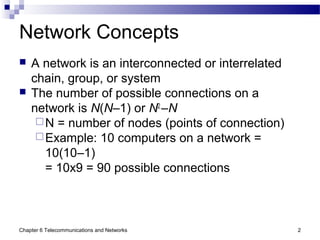
 The number of possible connections on a
network is N(N–1) or N2
–N
N = number of nodes (points of connection)
Example: 10 computers on a network =
10(10–1)
= 10x9 = 90 possible connections
Chapter 6 Telecommunications and Networks 3
Metcalfe’s Law
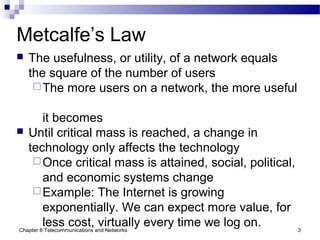
 The usefulness, or utility, of a network equals
the square of the number of users
The more users on a network, the more useful
it becomes
 Until critical mass is reached, a change in
technology only affects the technology
Once critical mass is attained, social, political,
and economic systems change
Example: The Internet is growing
exponentially. We can expect more value, for
less cost, virtually every time we log on.
Chapter 6 Telecommunications and Networks 4
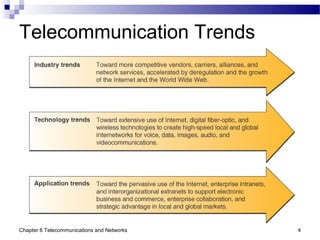
Telecommunication Trends
Chapter 6 Telecommunications and Networks 5
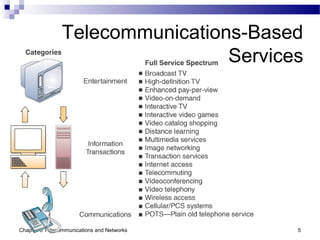
Telecommunications-Based
Services
Chapter 6 Telecommunications and Networks 6
Internet Networking Technologies
 Internet networking technologies are being
used as technology platform
Web browser suites
HTML Web page editors
Network management software
Firewalls
 Being applied in Internet, intranet, and
extranet applications
 Reinforces previous move toward client/server
networks based on open-systems architecture
Chapter 6 Telecommunications and Networks 7
Open Systems
 Open systems use common standards for
hardware, software, applications, and networks
Internet networking technologies are a
common standard for open systems
 Connectivity
Open systems provide greater connectivity
and network interoperability
Middleware may be needed to help diverse
systems work together
Chapter 6 Telecommunications and Networks 8
Middleware
 Middleware
A general term for any programming that
mediates between two separate programs
Allows a particular database to access other
databases without custom programming
 Commonly known as the “plumbing” of an
information system
It routes data and information between back-
end data sources and end user applications
An essential component of any IT
infrastructure
Chapter 6 Telecommunications and Networks 9
Digital Network Technologies
 Telecommunications are being revolutionized by
switch from analog to digital
Analog: voice-oriented transmission
Digital: discrete pulse transmission
 Benefits
Higher transmission speeds
Moves larger amounts of information
Greater economy and much lower error rates
Transmits multiple types of communications
(data, voice, video) on the same circuits
Chapter 6 Telecommunications and Networks 10
Wireless Technologies
 Fiber-optic
Uses pulses of laser-generated light
Reduced size and installation effort
Vastly greater communication capacity
Faster transmission speeds
Freedom from electrical interference
 Satellite Transmission
Can move massive quantities of data, audio,
and video over global networks
Especially useful in isolated areas
Chapter 6 Telecommunications and Networks 11
Business Application Trends
 Telecommunications networks now play a vital
and pervasive role in Web-enabled…
E-business processes
Electronic commerce
Enterprise collaboration
Other applications that support operations,
management, and strategic objectives
Chapter 6 Telecommunications and Networks 12
Internet2
 Next generation of the Internet
High-performance
Different infrastructure than the current
Internet
Will not replace the current Internet
In use at over 200 universities, scientific
institutions, communications corporations
May never become totally open
Users are connected via Abilene, a backbone
that supports throughput of 10 Gbps
Infinite bandwidth
Chapter 6 Telecommunications and Networks 13
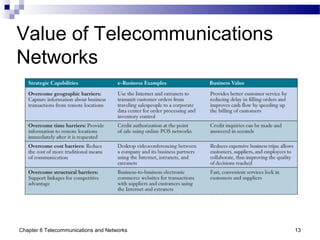
Value of Telecommunications
Networks
Chapter 6 Telecommunications and Networks 14
The Internet Revolution
 The Internet has become a global information
superhighway
Millions of smaller, private networks operating
independent of, or in harmony with, each
other
10 servers in 1991 to over 46 million today
Sustained growth in excess of 1 million
servers per month
No central computer system
No governing body
Based on common standards
Chapter 6 Telecommunications and Networks 15
Internet Service Providers
 ISP
A company that specializes in providing easy
access to the Internet
For a monthly fee, provides software, user
name, password, and Internet access
 ISPs themselves are connected to one another
through network access points
One ISP can easily connect to another to
obtain addresses of websites or user nodes
Chapter 6 Telecommunications and Networks 16
Internet Applications
 Most popular Internet applications and uses
E-mail
Instant messaging
Browsing the Web
Newsgroups
Chat rooms
Publish opinions, subject matter, creative work
Buy and sell
Downloading (data, software, reports, pictures,
music, videos)
Chapter 6 Telecommunications and Networks 17
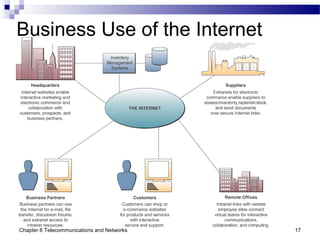
Business Use of the Internet
Chapter 6 Telecommunications and Networks 18
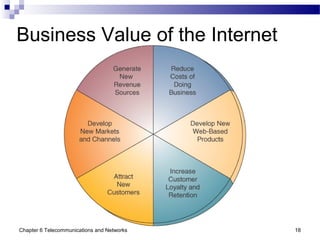
Business Value of the Internet
Chapter 6 Telecommunications and Networks 19
The Role of Intranets
 Many companies have sophisticated and
widespread intranets, offering…
Detailed data retrieval
Collaboration
Personalized customer profiles
Links to the Internet
 Intranets use Internet technologies
Web browsers and servers
TCP/IP network protocols
HTML publishing and databases
Chapter 6 Telecommunications and Networks 20
Intranets
 Intranets are protected by…
Passwords
Encryption
Firewalls
 Customers, suppliers, and other business
partners can access an intranet via extranet
links
Chapter 6 Telecommunications and Networks 21
Business Value of Intranets
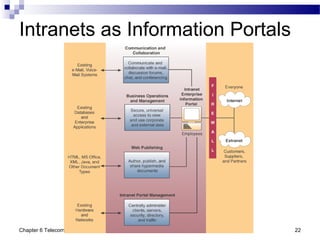
 Intranets support
Communications and collaboration
Business operations and management
Web publishing
Intranet portal management
Chapter 6 Telecommunications and Networks 22
Intranets as Information Portals
Chapter 6 Telecommunications and Networks 23
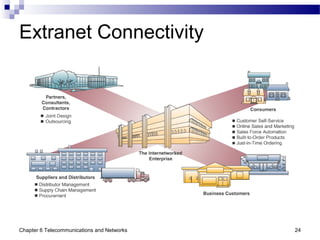
Extranets
 Network links that use Internet technologies to
connect the intranet of a business to the
intranets of another
 Virtual Private Networks
Direct private network links, or private secure
Internet links between companies
 Unsecured Extranet
Link between a company and others via the
Internet, relying on encryption of sensitive
data and firewall security systems
Chapter 6 Telecommunications and Networks 24
Extranet Connectivity
Chapter 6 Telecommunications and Networks 25
Business Value of Extranets
 Web browser technology makes customer and
supplier access to intranets easier and faster
 Another way to build and strengthen strategic
relationships
 Enables and improves collaboration between a
business, customers, and partners
 Facilitates online, interactive product development
and marketing
Chapter 6 Telecommunications and Networks 26
Telecommunications Network
Alternatives
 Telecommunications is a highly technical,
rapidly changing field
Most business professionals don’t need
detailed technical knowledge
However, understanding basic components
and their characteristics is necessary
Can help you make informed decisions about
telecommunications alternatives
Chapter 6 Telecommunications and Networks 27
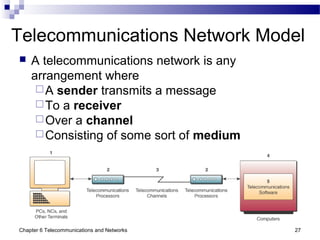
Telecommunications Network Model
 A telecommunications network is any
arrangement where
A sender transmits a message
To a receiver
Over a channel
Consisting of some sort of medium
Chapter 6 Telecommunications and Networks 28
Telecommunications Network
Components
 Terminals
Any input/output device that uses networks
to transmit or receive data
 Telecommunications processors
Devices that support data transmission,
reception
 Telecommunications channels
Media over which data are transmitted,
received
 Computers
All sizes and types
Chapter 6 Telecommunications and Networks 29
Telecommunications Network
Components
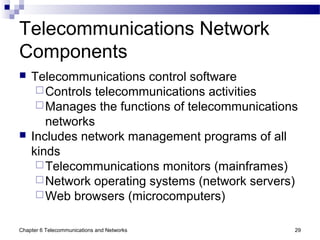
 Telecommunications control software
Controls telecommunications activities
Manages the functions of telecommunications
networks
 Includes network management programs of all
kinds
Telecommunications monitors (mainframes)
Network operating systems (network servers)
Web browsers (microcomputers)
Chapter 6 Telecommunications and Networks 30
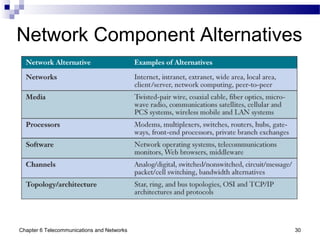
Network Component Alternatives
Chapter 6 Telecommunications and Networks 31
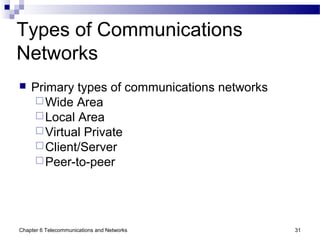
Types of Communications
Networks
 Primary types of communications networks
Wide Area
Local Area
Virtual Private
Client/Server
Peer-to-peer
Chapter 6 Telecommunications and Networks 32
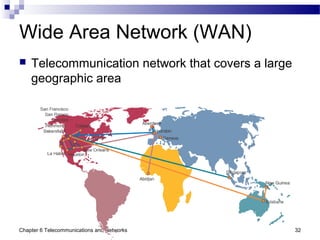
Wide Area Network (WAN)
 Telecommunication network that covers a large
geographic area
Chapter 6 Telecommunications and Networks 33
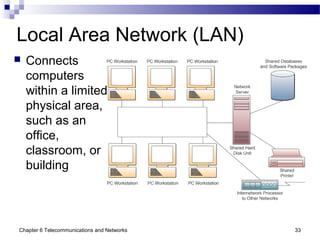
Local Area Network (LAN)
 Connects
computers
within a limited
physical area,
such as an
office,
classroom, or
building
Chapter 6 Telecommunications and Networks 34
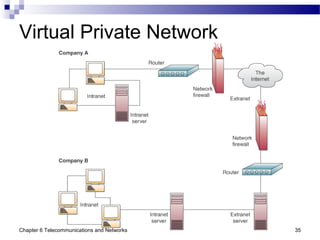
Virtual Private Networks (VPN)
 Used to establish secure intranets and extranets
The Internet is the main backbone network
Relies on network firewalls, encryption, and
other security features to build a “pipe”
through the Internet
Creates a private network without the high
cost of a separate proprietary connection
Chapter 6 Telecommunications and Networks 35
Virtual Private Network
Chapter 6 Telecommunications and Networks 36
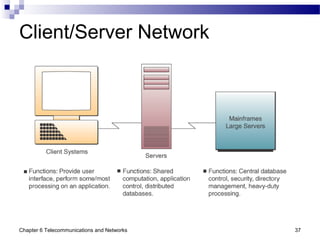
Client/Server Networks
 Clients
End user personal computers or networked
computers
 Servers
Used to manage the networks
 Processing
Shared between the clients and servers
Sometimes called a two-tier architecture
 Larger computer systems are being replaced with
multiple client/server networks
Chapter 6 Telecommunications and Networks 37
Client/Server Network
Chapter 6 Telecommunications and Networks 38
Network Computing
 Networks are the central computing resource of
the organization
Thin clients provide a browser-based user
interface for processing applets
 Thin clients include
Network computers
Net PCs
Other low-cost network devices or
information appliances
Chapter 6 Telecommunications and Networks 39
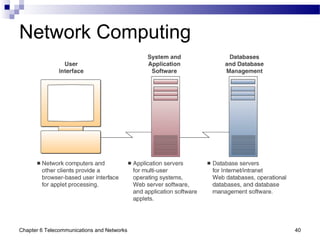
Network Computing
 Application and database servers provide
The operating system
Application software
Applets
Databases
Database management software
 Sometimes called a three-tier client/server
model because it consists of
Thin clients
Application servers
Database servers
Chapter 6 Telecommunications and Networks 40
Network Computing
Chapter 6 Telecommunications and Networks 41
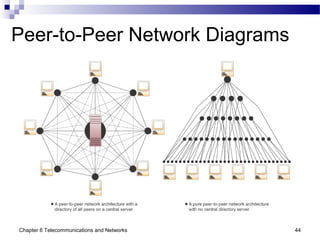
Peer-to-Peer Networks
 Central Server Architecture
P2P file-sharing software connects all PCs
to a central server
When a PC requests a file, the server
searches
all active peers on the network
The server sends the requesting PC a list of
links to all active peers who have the file
Clicking a link connects the two PCs and
automatically transfers the file to the
requesting PC
Chapter 6 Telecommunications and Networks 42
Peer-to-Peer Networks
 Pure Peer-to-Peer Architecture
No central directory or server
File-sharing software connects one PC to
another online user
When you request a file, the software
searches every online user and sends you a
list of active file names
Clicking a link automatically transfers the file
from that user’s hard drive to yours
Chapter 6 Telecommunications and Networks 43
Central Server Peer-to-Peer
Networks
 Advantages
Can better protect the integrity and security
of the content and users of the network
 Disadvantages
Directory server can be slowed or
overwhelmed by too many users or technical
problems
Chapter 6 Telecommunications and Networks 44
Peer-to-Peer Network Diagrams
Chapter 6 Telecommunications and Networks 45
Digital and Analog Signals
 Analog or digital refers to the method used to
convert information into an electrical signal
Analog: an electrical current is generated that
is proportional to the quantity being observed
Digital: the quantity being observed is
expressed as a number
 Analog: if the temperature is 83 degrees, a
measuring device would generate 8.3 volts
 Digital: a measurement of 83 degrees
would be displayed as the number 83
Chapter 6 Telecommunications and Networks 46
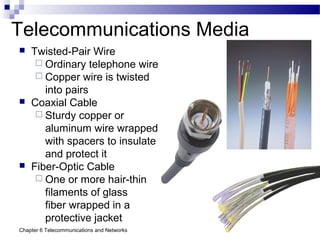
Telecommunications Media
 Twisted-Pair Wire
 Ordinary telephone wire
 Copper wire is twisted
into pairs
 Coaxial Cable
 Sturdy copper or
aluminum wire wrapped
with spacers to insulate
and protect it
 Fiber-Optic Cable
 One or more hair-thin
filaments of glass
fiber wrapped in a
protective jacket
Chapter 6 Telecommunications and Networks 47
The Problem of “The Last Mile”
 Network providers use fiber optic cable as a
communications backbone
Houses connected to the backbone are wired
with twisted pair
Users don’t benefit from the faster, better
technology
Chapter 6 Telecommunications and Networks 48
Wireless Technologies
 Terrestrial Microwave
 Earthbound microwave systems transmit
high-speed radio signals
 Follows a line-of-sight path between relay systems
spaced about 30 miles apart
 Communications Satellites
 Serve as relay stations
 Use microwave radio signals
 Earth stations beam signals to the satellites
 Not suitable for interactive, real-time processing
Chapter 6 Telecommunications and Networks 49
Wireless Technologies
 Cellular and PCS Telephone and Pager Systems
 Geographic areas are divided into cells
 Each cell has a low-power transmitter or radio relay
antenna
 Computers and other communications processors
coordinate and control the transmissions to and from
mobile users
 Wireless LANS
 Uses wireless radio-wave technology to
connect PCs within an office or a building
 Can be high-frequency, similar to digital
cellular, or low frequency (spread spectrum)
Chapter 6 Telecommunications and Networks 50
Wireless Technologies
 Bluetooth
 Short-range wireless technology
 Connects PCs to devices, such as a printer
 Fairly low cost to implement
 Other Wireless Systems
 Cellular phones
 Mobile radio
 PDAs
 Telecommunications networks now play vital and
pervasive roles in
 Web-enabled e-business processes
 Electronic commerce
 Enterprise collaboration
 Other applications that support business operations,
management, and strategic objectives
Chapter 6 Telecommunications and Networks 51
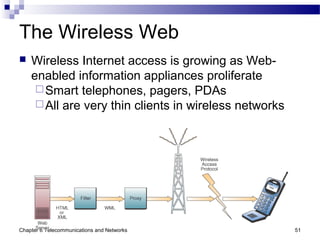
The Wireless Web
 Wireless Internet access is growing as Web-
enabled information appliances proliferate
Smart telephones, pagers, PDAs
All are very thin clients in wireless networks
Chapter 6 Telecommunications and Networks 52
Telecommunications Processors
 Modems
The most common type of communications
processor
Converts a digital signal to an analog
frequency that can be transmitted over phone
lines, then back into a digital signal
 Modulation and demodulation
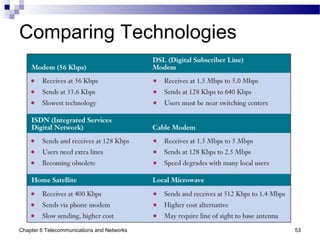
Chapter 6 Telecommunications and Networks 53
Comparing Technologies
Chapter 6 Telecommunications and Networks 54
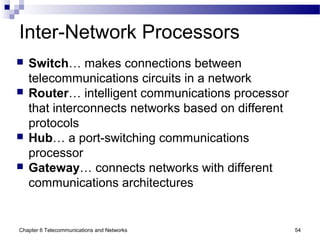
Inter-Network Processors
 Switch… makes connections between
telecommunications circuits in a network
 Router… intelligent communications processor
that interconnects networks based on different
protocols
 Hub… a port-switching communications
processor
 Gateway… connects networks with different
communications architectures
Chapter 6 Telecommunications and Networks 55
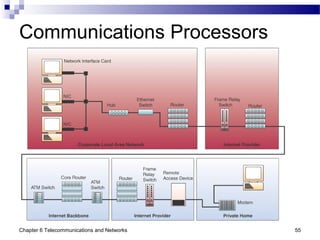
Communications Processors
Chapter 6 Telecommunications and Networks 56
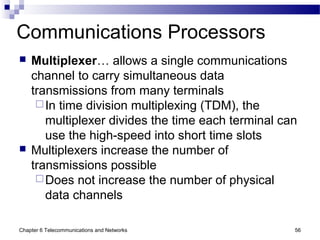
Communications Processors
 Multiplexer… allows a single communications
channel to carry simultaneous data
transmissions from many terminals
In time division multiplexing (TDM), the
multiplexer divides the time each terminal can
use the high-speed into short time slots
 Multiplexers increase the number of
transmissions possible
Does not increase the number of physical
data channels
Chapter 6 Telecommunications and Networks 57
Telecommunications Software
 May reside in PCs, servers, mainframes, and
communications processors
Vital part of all telecommunications networks
Used to manage network performance
WANs often use telecommunications
monitors or teleprocessing monitors
Other networks use operating system
software
Middleware helps diverse networks
communicate with each other
Chapter 6 Telecommunications and Networks 58
Network Management Functions
 Traffic Management
 Manage network resources and traffic to
avoid congestion and optimize service levels
 Security
 Provide authentication, encryption, firewall, auditing,
and enforcement
 Network Monitoring
 Troubleshoot and watch over the network, alerting
administrators of potential problems
 Capacity Planning
 Survey network resources, traffic patterns, and users’
needs
 Determine the best way to accommodate the needs
of the network as it grows and changes
Chapter 6 Telecommunications and Networks 59
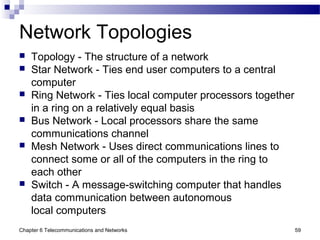
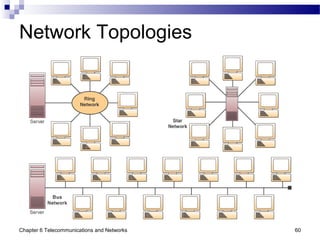
Network Topologies
 Topology - The structure of a network
 Star Network - Ties end user computers to a central
computer
 Ring Network - Ties local computer processors together
in a ring on a relatively equal basis
 Bus Network - Local processors share the same
communications channel
 Mesh Network - Uses direct communications lines to
connect some or all of the computers in the ring to
each other
 Switch - A message-switching computer that handles
data communication between autonomous
local computers
Chapter 6 Telecommunications and Networks 60
Network Topologies
Chapter 6 Telecommunications and Networks 61
Network Architectures and
Protocols
 Protocol
 A standard set of rules and procedures for the control of
communications in a network
 Handshaking
 The process of exchanging predetermined
signals and characters
 Establishes a telecommunications session between terminals
and computers
 Network Architecture
 Master plan of standard protocols, hardware, software, and
interfaces between end users
and computer systems
 Goal is to promote an open, simple, flexible,
and efficient telecommunications environment
Chapter 6 Telecommunications and Networks 62
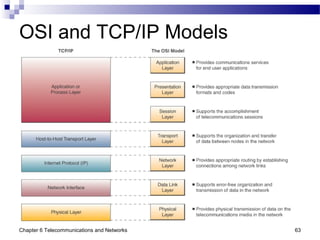
OSI and TCP/IP Models
 Open Systems Interconnection (OSI) Model
A seven-layer model that serves as a
standard model for network architectures
Model for how messages should be
transmitted between two points in a network
Each layer adds functions
 Transmission Control Protocol/Internet Protocol
(TCP/IP)
A five-layer telecommunications protocol used
by the Internet
Chapter 6 Telecommunications and Networks 63
OSI and TCP/IP Models
Chapter 6 Telecommunications and Networks 64
Voice Over IP
 Internet Telephony
Using an Internet connection to pass voice
data using IP instead of a telephone network
Often referred to as voice over IP or VoIP
Works like a regular phone, but skips long-
distance charges
Runs over standard network infrastructure
Requires a well-configured network to work
smoothly
Chapter 6 Telecommunications and Networks 65
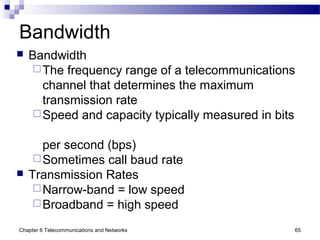
Bandwidth
 Bandwidth
The frequency range of a telecommunications
channel that determines the maximum
transmission rate
Speed and capacity typically measured in bits
per second (bps)
Sometimes call baud rate
 Transmission Rates
Narrow-band = low speed
Broadband = high speed
Chapter 6 Telecommunications and Networks 66
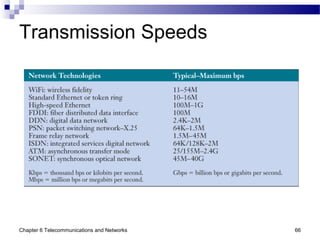
Transmission Speeds
Chapter 6 Telecommunications and Networks 67
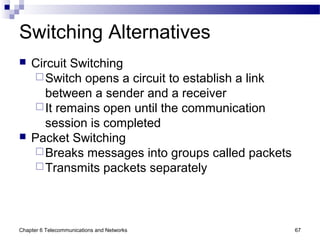
Switching Alternatives
 Circuit Switching
Switch opens a circuit to establish a link
between a sender and a receiver
It remains open until the communication
session is completed
 Packet Switching
Breaks messages into groups called packets
Transmits packets separately
Chapter 6 Telecommunications and Networks 68
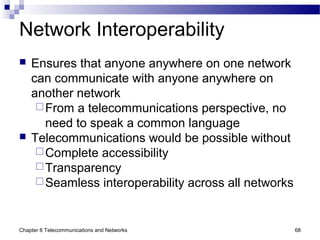
Network Interoperability
 Ensures that anyone anywhere on one network
can communicate with anyone anywhere on
another network
From a telecommunications perspective, no
need to speak a common language
 Telecommunications would be possible without
Complete accessibility
Transparency
Seamless interoperability across all networks

Chap06 Telecomunications and Networks

  • 1.
    Chapter 6 Telecommunications and Networks JamesA. O'Brien, and George Marakas. Management Information Systems with MISource 2007, 8th ed. Boston, MA: McGraw-Hill, Inc., 2007. ISBN: 13 9780073323091
  • 2.
    Chapter 6 Telecommunicationsand Networks 2 Network Concepts  A network is an interconnected or interrelated chain, group, or system  The number of possible connections on a network is N(N–1) or N2 –N N = number of nodes (points of connection) Example: 10 computers on a network = 10(10–1) = 10x9 = 90 possible connections
  • 3.
    Chapter 6 Telecommunicationsand Networks 3 Metcalfe’s Law  The usefulness, or utility, of a network equals the square of the number of users The more users on a network, the more useful it becomes  Until critical mass is reached, a change in technology only affects the technology Once critical mass is attained, social, political, and economic systems change Example: The Internet is growing exponentially. We can expect more value, for less cost, virtually every time we log on.
  • 4.
    Chapter 6 Telecommunicationsand Networks 4 Telecommunication Trends
  • 5.
    Chapter 6 Telecommunicationsand Networks 5 Telecommunications-Based Services
  • 6.
    Chapter 6 Telecommunicationsand Networks 6 Internet Networking Technologies  Internet networking technologies are being used as technology platform Web browser suites HTML Web page editors Network management software Firewalls  Being applied in Internet, intranet, and extranet applications  Reinforces previous move toward client/server networks based on open-systems architecture
  • 7.
    Chapter 6 Telecommunicationsand Networks 7 Open Systems  Open systems use common standards for hardware, software, applications, and networks Internet networking technologies are a common standard for open systems  Connectivity Open systems provide greater connectivity and network interoperability Middleware may be needed to help diverse systems work together
  • 8.
    Chapter 6 Telecommunicationsand Networks 8 Middleware  Middleware A general term for any programming that mediates between two separate programs Allows a particular database to access other databases without custom programming  Commonly known as the “plumbing” of an information system It routes data and information between back- end data sources and end user applications An essential component of any IT infrastructure
  • 9.
    Chapter 6 Telecommunicationsand Networks 9 Digital Network Technologies  Telecommunications are being revolutionized by switch from analog to digital Analog: voice-oriented transmission Digital: discrete pulse transmission  Benefits Higher transmission speeds Moves larger amounts of information Greater economy and much lower error rates Transmits multiple types of communications (data, voice, video) on the same circuits
  • 10.
    Chapter 6 Telecommunicationsand Networks 10 Wireless Technologies  Fiber-optic Uses pulses of laser-generated light Reduced size and installation effort Vastly greater communication capacity Faster transmission speeds Freedom from electrical interference  Satellite Transmission Can move massive quantities of data, audio, and video over global networks Especially useful in isolated areas
  • 11.
    Chapter 6 Telecommunicationsand Networks 11 Business Application Trends  Telecommunications networks now play a vital and pervasive role in Web-enabled… E-business processes Electronic commerce Enterprise collaboration Other applications that support operations, management, and strategic objectives
  • 12.
    Chapter 6 Telecommunicationsand Networks 12 Internet2  Next generation of the Internet High-performance Different infrastructure than the current Internet Will not replace the current Internet In use at over 200 universities, scientific institutions, communications corporations May never become totally open Users are connected via Abilene, a backbone that supports throughput of 10 Gbps Infinite bandwidth
  • 13.
    Chapter 6 Telecommunicationsand Networks 13 Value of Telecommunications Networks
  • 14.
    Chapter 6 Telecommunicationsand Networks 14 The Internet Revolution  The Internet has become a global information superhighway Millions of smaller, private networks operating independent of, or in harmony with, each other 10 servers in 1991 to over 46 million today Sustained growth in excess of 1 million servers per month No central computer system No governing body Based on common standards
  • 15.
    Chapter 6 Telecommunicationsand Networks 15 Internet Service Providers  ISP A company that specializes in providing easy access to the Internet For a monthly fee, provides software, user name, password, and Internet access  ISPs themselves are connected to one another through network access points One ISP can easily connect to another to obtain addresses of websites or user nodes
  • 16.
    Chapter 6 Telecommunicationsand Networks 16 Internet Applications  Most popular Internet applications and uses E-mail Instant messaging Browsing the Web Newsgroups Chat rooms Publish opinions, subject matter, creative work Buy and sell Downloading (data, software, reports, pictures, music, videos)
  • 17.
    Chapter 6 Telecommunicationsand Networks 17 Business Use of the Internet
  • 18.
    Chapter 6 Telecommunicationsand Networks 18 Business Value of the Internet
  • 19.
    Chapter 6 Telecommunicationsand Networks 19 The Role of Intranets  Many companies have sophisticated and widespread intranets, offering… Detailed data retrieval Collaboration Personalized customer profiles Links to the Internet  Intranets use Internet technologies Web browsers and servers TCP/IP network protocols HTML publishing and databases
  • 20.
    Chapter 6 Telecommunicationsand Networks 20 Intranets  Intranets are protected by… Passwords Encryption Firewalls  Customers, suppliers, and other business partners can access an intranet via extranet links
  • 21.
    Chapter 6 Telecommunicationsand Networks 21 Business Value of Intranets  Intranets support Communications and collaboration Business operations and management Web publishing Intranet portal management
  • 22.
    Chapter 6 Telecommunicationsand Networks 22 Intranets as Information Portals
  • 23.
    Chapter 6 Telecommunicationsand Networks 23 Extranets  Network links that use Internet technologies to connect the intranet of a business to the intranets of another  Virtual Private Networks Direct private network links, or private secure Internet links between companies  Unsecured Extranet Link between a company and others via the Internet, relying on encryption of sensitive data and firewall security systems
  • 24.
    Chapter 6 Telecommunicationsand Networks 24 Extranet Connectivity
  • 25.
    Chapter 6 Telecommunicationsand Networks 25 Business Value of Extranets  Web browser technology makes customer and supplier access to intranets easier and faster  Another way to build and strengthen strategic relationships  Enables and improves collaboration between a business, customers, and partners  Facilitates online, interactive product development and marketing
  • 26.
    Chapter 6 Telecommunicationsand Networks 26 Telecommunications Network Alternatives  Telecommunications is a highly technical, rapidly changing field Most business professionals don’t need detailed technical knowledge However, understanding basic components and their characteristics is necessary Can help you make informed decisions about telecommunications alternatives
  • 27.
    Chapter 6 Telecommunicationsand Networks 27 Telecommunications Network Model  A telecommunications network is any arrangement where A sender transmits a message To a receiver Over a channel Consisting of some sort of medium
  • 28.
    Chapter 6 Telecommunicationsand Networks 28 Telecommunications Network Components  Terminals Any input/output device that uses networks to transmit or receive data  Telecommunications processors Devices that support data transmission, reception  Telecommunications channels Media over which data are transmitted, received  Computers All sizes and types
  • 29.
    Chapter 6 Telecommunicationsand Networks 29 Telecommunications Network Components  Telecommunications control software Controls telecommunications activities Manages the functions of telecommunications networks  Includes network management programs of all kinds Telecommunications monitors (mainframes) Network operating systems (network servers) Web browsers (microcomputers)
  • 30.
    Chapter 6 Telecommunicationsand Networks 30 Network Component Alternatives
  • 31.
    Chapter 6 Telecommunicationsand Networks 31 Types of Communications Networks  Primary types of communications networks Wide Area Local Area Virtual Private Client/Server Peer-to-peer
  • 32.
    Chapter 6 Telecommunicationsand Networks 32 Wide Area Network (WAN)  Telecommunication network that covers a large geographic area
  • 33.
    Chapter 6 Telecommunicationsand Networks 33 Local Area Network (LAN)  Connects computers within a limited physical area, such as an office, classroom, or building
  • 34.
    Chapter 6 Telecommunicationsand Networks 34 Virtual Private Networks (VPN)  Used to establish secure intranets and extranets The Internet is the main backbone network Relies on network firewalls, encryption, and other security features to build a “pipe” through the Internet Creates a private network without the high cost of a separate proprietary connection
  • 35.
    Chapter 6 Telecommunicationsand Networks 35 Virtual Private Network
  • 36.
    Chapter 6 Telecommunicationsand Networks 36 Client/Server Networks  Clients End user personal computers or networked computers  Servers Used to manage the networks  Processing Shared between the clients and servers Sometimes called a two-tier architecture  Larger computer systems are being replaced with multiple client/server networks
  • 37.
    Chapter 6 Telecommunicationsand Networks 37 Client/Server Network
  • 38.
    Chapter 6 Telecommunicationsand Networks 38 Network Computing  Networks are the central computing resource of the organization Thin clients provide a browser-based user interface for processing applets  Thin clients include Network computers Net PCs Other low-cost network devices or information appliances
  • 39.
    Chapter 6 Telecommunicationsand Networks 39 Network Computing  Application and database servers provide The operating system Application software Applets Databases Database management software  Sometimes called a three-tier client/server model because it consists of Thin clients Application servers Database servers
  • 40.
    Chapter 6 Telecommunicationsand Networks 40 Network Computing
  • 41.
    Chapter 6 Telecommunicationsand Networks 41 Peer-to-Peer Networks  Central Server Architecture P2P file-sharing software connects all PCs to a central server When a PC requests a file, the server searches all active peers on the network The server sends the requesting PC a list of links to all active peers who have the file Clicking a link connects the two PCs and automatically transfers the file to the requesting PC
  • 42.
    Chapter 6 Telecommunicationsand Networks 42 Peer-to-Peer Networks  Pure Peer-to-Peer Architecture No central directory or server File-sharing software connects one PC to another online user When you request a file, the software searches every online user and sends you a list of active file names Clicking a link automatically transfers the file from that user’s hard drive to yours
  • 43.
    Chapter 6 Telecommunicationsand Networks 43 Central Server Peer-to-Peer Networks  Advantages Can better protect the integrity and security of the content and users of the network  Disadvantages Directory server can be slowed or overwhelmed by too many users or technical problems
  • 44.
    Chapter 6 Telecommunicationsand Networks 44 Peer-to-Peer Network Diagrams
  • 45.
    Chapter 6 Telecommunicationsand Networks 45 Digital and Analog Signals  Analog or digital refers to the method used to convert information into an electrical signal Analog: an electrical current is generated that is proportional to the quantity being observed Digital: the quantity being observed is expressed as a number  Analog: if the temperature is 83 degrees, a measuring device would generate 8.3 volts  Digital: a measurement of 83 degrees would be displayed as the number 83
  • 46.
    Chapter 6 Telecommunicationsand Networks 46 Telecommunications Media  Twisted-Pair Wire  Ordinary telephone wire  Copper wire is twisted into pairs  Coaxial Cable  Sturdy copper or aluminum wire wrapped with spacers to insulate and protect it  Fiber-Optic Cable  One or more hair-thin filaments of glass fiber wrapped in a protective jacket
  • 47.
    Chapter 6 Telecommunicationsand Networks 47 The Problem of “The Last Mile”  Network providers use fiber optic cable as a communications backbone Houses connected to the backbone are wired with twisted pair Users don’t benefit from the faster, better technology
  • 48.
    Chapter 6 Telecommunicationsand Networks 48 Wireless Technologies  Terrestrial Microwave  Earthbound microwave systems transmit high-speed radio signals  Follows a line-of-sight path between relay systems spaced about 30 miles apart  Communications Satellites  Serve as relay stations  Use microwave radio signals  Earth stations beam signals to the satellites  Not suitable for interactive, real-time processing
  • 49.
    Chapter 6 Telecommunicationsand Networks 49 Wireless Technologies  Cellular and PCS Telephone and Pager Systems  Geographic areas are divided into cells  Each cell has a low-power transmitter or radio relay antenna  Computers and other communications processors coordinate and control the transmissions to and from mobile users  Wireless LANS  Uses wireless radio-wave technology to connect PCs within an office or a building  Can be high-frequency, similar to digital cellular, or low frequency (spread spectrum)
  • 50.
    Chapter 6 Telecommunicationsand Networks 50 Wireless Technologies  Bluetooth  Short-range wireless technology  Connects PCs to devices, such as a printer  Fairly low cost to implement  Other Wireless Systems  Cellular phones  Mobile radio  PDAs  Telecommunications networks now play vital and pervasive roles in  Web-enabled e-business processes  Electronic commerce  Enterprise collaboration  Other applications that support business operations, management, and strategic objectives
  • 51.
    Chapter 6 Telecommunicationsand Networks 51 The Wireless Web  Wireless Internet access is growing as Web- enabled information appliances proliferate Smart telephones, pagers, PDAs All are very thin clients in wireless networks
  • 52.
    Chapter 6 Telecommunicationsand Networks 52 Telecommunications Processors  Modems The most common type of communications processor Converts a digital signal to an analog frequency that can be transmitted over phone lines, then back into a digital signal  Modulation and demodulation
  • 53.
    Chapter 6 Telecommunicationsand Networks 53 Comparing Technologies
  • 54.
    Chapter 6 Telecommunicationsand Networks 54 Inter-Network Processors  Switch… makes connections between telecommunications circuits in a network  Router… intelligent communications processor that interconnects networks based on different protocols  Hub… a port-switching communications processor  Gateway… connects networks with different communications architectures
  • 55.
    Chapter 6 Telecommunicationsand Networks 55 Communications Processors
  • 56.
    Chapter 6 Telecommunicationsand Networks 56 Communications Processors  Multiplexer… allows a single communications channel to carry simultaneous data transmissions from many terminals In time division multiplexing (TDM), the multiplexer divides the time each terminal can use the high-speed into short time slots  Multiplexers increase the number of transmissions possible Does not increase the number of physical data channels
  • 57.
    Chapter 6 Telecommunicationsand Networks 57 Telecommunications Software  May reside in PCs, servers, mainframes, and communications processors Vital part of all telecommunications networks Used to manage network performance WANs often use telecommunications monitors or teleprocessing monitors Other networks use operating system software Middleware helps diverse networks communicate with each other
  • 58.
    Chapter 6 Telecommunicationsand Networks 58 Network Management Functions  Traffic Management  Manage network resources and traffic to avoid congestion and optimize service levels  Security  Provide authentication, encryption, firewall, auditing, and enforcement  Network Monitoring  Troubleshoot and watch over the network, alerting administrators of potential problems  Capacity Planning  Survey network resources, traffic patterns, and users’ needs  Determine the best way to accommodate the needs of the network as it grows and changes
  • 59.
    Chapter 6 Telecommunicationsand Networks 59 Network Topologies  Topology - The structure of a network  Star Network - Ties end user computers to a central computer  Ring Network - Ties local computer processors together in a ring on a relatively equal basis  Bus Network - Local processors share the same communications channel  Mesh Network - Uses direct communications lines to connect some or all of the computers in the ring to each other  Switch - A message-switching computer that handles data communication between autonomous local computers
  • 60.
    Chapter 6 Telecommunicationsand Networks 60 Network Topologies
  • 61.
    Chapter 6 Telecommunicationsand Networks 61 Network Architectures and Protocols  Protocol  A standard set of rules and procedures for the control of communications in a network  Handshaking  The process of exchanging predetermined signals and characters  Establishes a telecommunications session between terminals and computers  Network Architecture  Master plan of standard protocols, hardware, software, and interfaces between end users and computer systems  Goal is to promote an open, simple, flexible, and efficient telecommunications environment
  • 62.
    Chapter 6 Telecommunicationsand Networks 62 OSI and TCP/IP Models  Open Systems Interconnection (OSI) Model A seven-layer model that serves as a standard model for network architectures Model for how messages should be transmitted between two points in a network Each layer adds functions  Transmission Control Protocol/Internet Protocol (TCP/IP) A five-layer telecommunications protocol used by the Internet
  • 63.
    Chapter 6 Telecommunicationsand Networks 63 OSI and TCP/IP Models
  • 64.
    Chapter 6 Telecommunicationsand Networks 64 Voice Over IP  Internet Telephony Using an Internet connection to pass voice data using IP instead of a telephone network Often referred to as voice over IP or VoIP Works like a regular phone, but skips long- distance charges Runs over standard network infrastructure Requires a well-configured network to work smoothly
  • 65.
    Chapter 6 Telecommunicationsand Networks 65 Bandwidth  Bandwidth The frequency range of a telecommunications channel that determines the maximum transmission rate Speed and capacity typically measured in bits per second (bps) Sometimes call baud rate  Transmission Rates Narrow-band = low speed Broadband = high speed
  • 66.
    Chapter 6 Telecommunicationsand Networks 66 Transmission Speeds
  • 67.
    Chapter 6 Telecommunicationsand Networks 67 Switching Alternatives  Circuit Switching Switch opens a circuit to establish a link between a sender and a receiver It remains open until the communication session is completed  Packet Switching Breaks messages into groups called packets Transmits packets separately
  • 68.
    Chapter 6 Telecommunicationsand Networks 68 Network Interoperability  Ensures that anyone anywhere on one network can communicate with anyone anywhere on another network From a telecommunications perspective, no need to speak a common language  Telecommunications would be possible without Complete accessibility Transparency Seamless interoperability across all networks