Business Networks and
Telecommunications
Chapter 6
By Attaullah Sahil
 Understanding telecommunication and networks
 Difference between internet, Intranet and Extranet
Identify major developments and trends in the
industries, technologies and business applications
Identify the basic functions and types of
telecommunications networks used in business.
Explain the major types of telecommunications
network hardware, media, and services.
Learning OutcomesLearning Outcomes
Grouping of two or more computers and/or
devices by a medium for the purpose of data
and resource sharing
NetworkNetwork
The exchange of information in any form (voice,
data, text, images, audio, video) over networks or
over distance
TelecommunicationTelecommunication
1. Sharing files
2. Sharing printers and other devices
3. Enabling common administration and security
4. Supporting network applications like e-mailing
5. Computing applications become available for
business-to-business coordination and commerce
Primary reasons for networkingPrimary reasons for networking
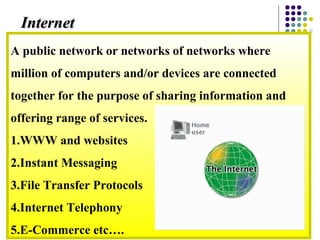
A public network or networks of networks where
million of computers and/or devices are connected
together for the purpose of sharing information and
offering range of services.
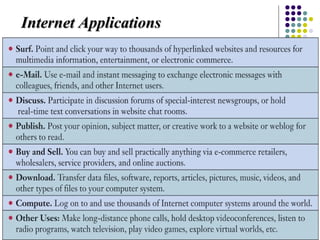
1.WWW and websites
2.Instant Messaging
3.File Transfer Protocols
4.Internet Telephony
5.E-Commerce etc….
InternetInternet
Internet ApplicationsInternet Applications
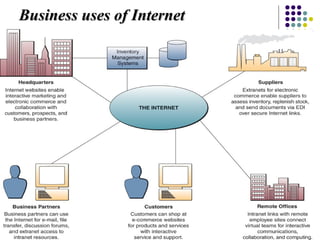
Business uses of InternetBusiness uses of Internet
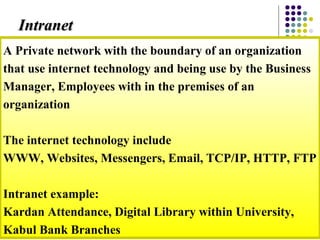
A Private network with the boundary of an organization
that use internet technology and being use by the Business
Manager, Employees with in the premises of an
organization
The internet technology include
WWW, Websites, Messengers, Email, TCP/IP, HTTP, FTP
Intranet example:
Kardan Attendance, Digital Library within University,
Kabul Bank Branches
IntranetIntranet
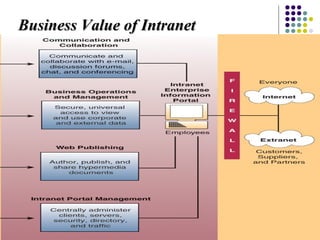
Business Value of IntranetBusiness Value of Intranet
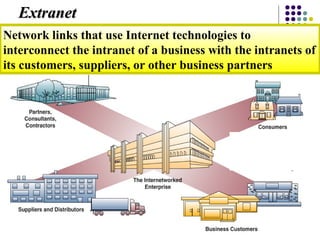
Network links that use Internet technologies to
interconnect the intranet of a business with the intranets of
its customers, suppliers, or other business partners
ExtranetExtranet
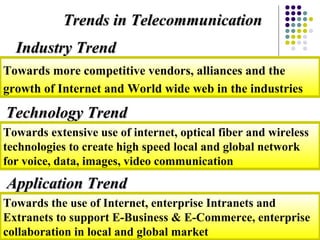
Trends in TelecommunicationTrends in Telecommunication
Towards more competitive vendors, alliances and the
growth of Internet and World wide web in the industries
Industry TrendIndustry Trend
Towards extensive use of internet, optical fiber and wireless
technologies to create high speed local and global network
for voice, data, images, video communication
Technology TrendTechnology Trend
Towards the use of Internet, enterprise Intranets and
Extranets to support E-Business & E-Commerce, enterprise
collaboration in local and global market
Application TrendApplication Trend
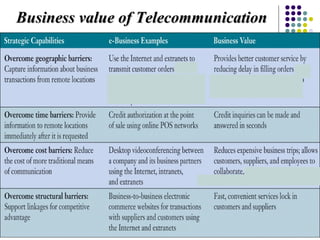
Business value of TelecommunicationBusiness value of Telecommunication
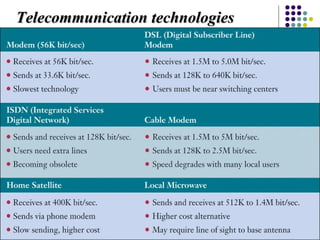
Telecommunication technologiesTelecommunication technologies
1. Computers
1. Servers
2. Client
2. Network Operating System
3. Networking Hardware
4. Networking Media
5. Protocols
Elements of NetworkingElements of Networking
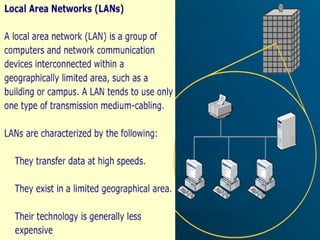
1. LAN (Local Area Network)
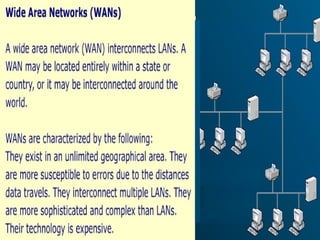
2. WAN (Wide Area Network)
Network Classification by Geographic sizeNetwork Classification by Geographic size
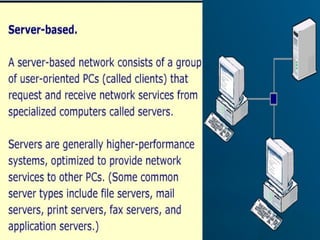
1. Client/Server network
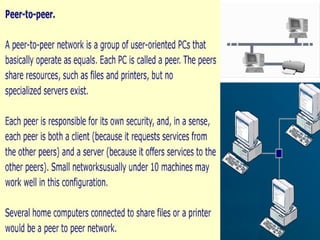
2. Peer to Peer network
Classification by Network ArchitectureClassification by Network Architecture
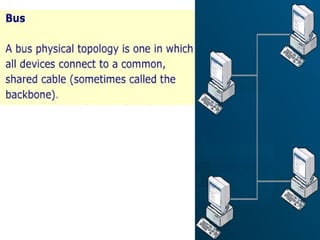
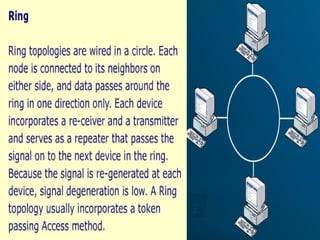
Topology is the physical layout of a network
Three main topologies are most commonly used for
setting a LAN
• BUS
• Ring
• Star
Network TopologiesNetwork Topologies
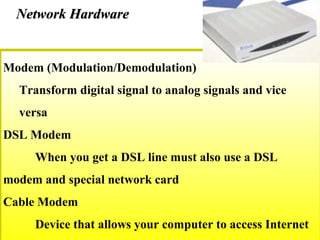
Modem (Modulation/Demodulation)
Transform digital signal to analog signals and vice
versa
DSL Modem
When you get a DSL line must also use a DSL
modem and special network card
Cable Modem
Device that allows your computer to access Internet
Network HardwareNetwork Hardware
Switching and Routing
Messages you transmit must be routed to arrive at
the destination computer
Packet Switching
 Data is divided up into small chunks called packets
 Each packet has a number and is separately addressed
to the destination computer
 Use TCP/IP to makes sure the packets are delivered
Network HardwareNetwork Hardware
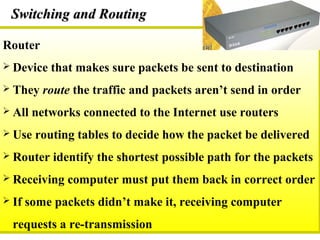
Router
 Device that makes sure packets be sent to destination
 They route the traffic and packets aren’t send in order
 All networks connected to the Internet use routers
 Use routing tables to decide how the packet be delivered
 Router identify the shortest possible path for the packets
 Receiving computer must put them back in correct order
 If some packets didn’t make it, receiving computer
requests a re-transmission
Switching and RoutingSwitching and Routing
The amount of data transmitting in a media/cable per unit
time. The more the bandwidth the more the speed of data
transmitted.
Classified into:
Downstream Bandwidth (Download)
Upstream Bandwidth (Upstream)
Measured in bps, Kbps, Mbps, Gbps
How much do we need?
For text – 56 Kbps is enough
For graphics as in the Internet – 128 Kbps or high
BandwidthBandwidth
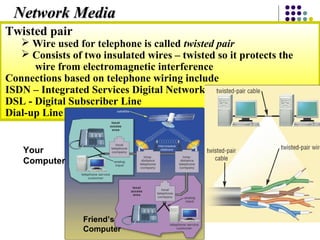
Twisted pair
 Wire used for telephone is called twisted pair
 Consists of two insulated wires – twisted so it protects the
wire from electromagnetic interference
Connections based on telephone wiring include
ISDN – Integrated Services Digital Network
DSL - Digital Subscriber Line
Dial-up Line
Network MediaNetwork Media
Your
Computer
Friend’s
Computer
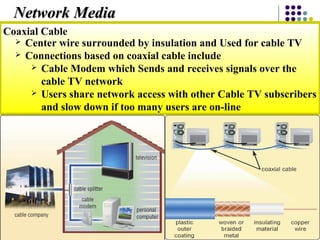
Coaxial Cable
 Center wire surrounded by insulation and Used for cable TV
 Connections based on coaxial cable include
 Cable Modem which Sends and receives signals over the
cable TV network
 Users share network access with other Cable TV subscribers
and slow down if too many users are on-line
Network MediaNetwork Media
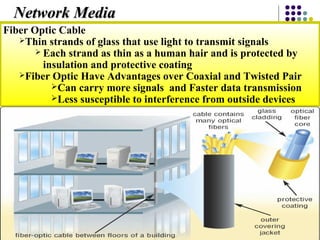
Fiber Optic Cable
Thin strands of glass that use light to transmit signals
 Each strand as thin as a human hair and is protected by
insulation and protective coating
Fiber Optic Have Advantages over Coaxial and Twisted Pair
Can carry more signals and Faster data transmission
Less susceptible to interference from outside devices
Network MediaNetwork Media
Complete OverviewComplete Overview

Business networks and telecomunication

  • 1.
  • 2.
     Understanding telecommunicationand networks  Difference between internet, Intranet and Extranet Identify major developments and trends in the industries, technologies and business applications Identify the basic functions and types of telecommunications networks used in business. Explain the major types of telecommunications network hardware, media, and services. Learning OutcomesLearning Outcomes
  • 3.
    Grouping of twoor more computers and/or devices by a medium for the purpose of data and resource sharing NetworkNetwork The exchange of information in any form (voice, data, text, images, audio, video) over networks or over distance TelecommunicationTelecommunication
  • 4.
    1. Sharing files 2.Sharing printers and other devices 3. Enabling common administration and security 4. Supporting network applications like e-mailing 5. Computing applications become available for business-to-business coordination and commerce Primary reasons for networkingPrimary reasons for networking
  • 5.
    A public networkor networks of networks where million of computers and/or devices are connected together for the purpose of sharing information and offering range of services. 1.WWW and websites 2.Instant Messaging 3.File Transfer Protocols 4.Internet Telephony 5.E-Commerce etc…. InternetInternet
  • 6.
  • 7.
    Business uses ofInternetBusiness uses of Internet
  • 8.
    A Private networkwith the boundary of an organization that use internet technology and being use by the Business Manager, Employees with in the premises of an organization The internet technology include WWW, Websites, Messengers, Email, TCP/IP, HTTP, FTP Intranet example: Kardan Attendance, Digital Library within University, Kabul Bank Branches IntranetIntranet
  • 9.
    Business Value ofIntranetBusiness Value of Intranet
  • 10.
    Network links thatuse Internet technologies to interconnect the intranet of a business with the intranets of its customers, suppliers, or other business partners ExtranetExtranet
  • 11.
    Trends in TelecommunicationTrendsin Telecommunication Towards more competitive vendors, alliances and the growth of Internet and World wide web in the industries Industry TrendIndustry Trend Towards extensive use of internet, optical fiber and wireless technologies to create high speed local and global network for voice, data, images, video communication Technology TrendTechnology Trend Towards the use of Internet, enterprise Intranets and Extranets to support E-Business & E-Commerce, enterprise collaboration in local and global market Application TrendApplication Trend
  • 12.
    Business value ofTelecommunicationBusiness value of Telecommunication
  • 13.
  • 14.
    1. Computers 1. Servers 2.Client 2. Network Operating System 3. Networking Hardware 4. Networking Media 5. Protocols Elements of NetworkingElements of Networking
  • 15.
    1. LAN (LocalArea Network) 2. WAN (Wide Area Network) Network Classification by Geographic sizeNetwork Classification by Geographic size
  • 18.
    1. Client/Server network 2.Peer to Peer network Classification by Network ArchitectureClassification by Network Architecture
  • 21.
    Topology is thephysical layout of a network Three main topologies are most commonly used for setting a LAN • BUS • Ring • Star Network TopologiesNetwork Topologies
  • 25.
    Modem (Modulation/Demodulation) Transform digitalsignal to analog signals and vice versa DSL Modem When you get a DSL line must also use a DSL modem and special network card Cable Modem Device that allows your computer to access Internet Network HardwareNetwork Hardware
  • 26.
    Switching and Routing Messagesyou transmit must be routed to arrive at the destination computer Packet Switching  Data is divided up into small chunks called packets  Each packet has a number and is separately addressed to the destination computer  Use TCP/IP to makes sure the packets are delivered Network HardwareNetwork Hardware
  • 27.
    Router  Device thatmakes sure packets be sent to destination  They route the traffic and packets aren’t send in order  All networks connected to the Internet use routers  Use routing tables to decide how the packet be delivered  Router identify the shortest possible path for the packets  Receiving computer must put them back in correct order  If some packets didn’t make it, receiving computer requests a re-transmission Switching and RoutingSwitching and Routing
  • 28.
    The amount ofdata transmitting in a media/cable per unit time. The more the bandwidth the more the speed of data transmitted. Classified into: Downstream Bandwidth (Download) Upstream Bandwidth (Upstream) Measured in bps, Kbps, Mbps, Gbps How much do we need? For text – 56 Kbps is enough For graphics as in the Internet – 128 Kbps or high BandwidthBandwidth
  • 29.
    Twisted pair  Wireused for telephone is called twisted pair  Consists of two insulated wires – twisted so it protects the wire from electromagnetic interference Connections based on telephone wiring include ISDN – Integrated Services Digital Network DSL - Digital Subscriber Line Dial-up Line Network MediaNetwork Media Your Computer Friend’s Computer
  • 30.
    Coaxial Cable  Centerwire surrounded by insulation and Used for cable TV  Connections based on coaxial cable include  Cable Modem which Sends and receives signals over the cable TV network  Users share network access with other Cable TV subscribers and slow down if too many users are on-line Network MediaNetwork Media
  • 31.
    Fiber Optic Cable Thinstrands of glass that use light to transmit signals  Each strand as thin as a human hair and is protected by insulation and protective coating Fiber Optic Have Advantages over Coaxial and Twisted Pair Can carry more signals and Faster data transmission Less susceptible to interference from outside devices Network MediaNetwork Media
  • 32.