Film Poster Development
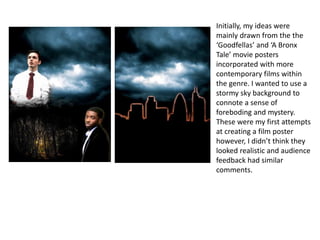
Initially, my ideas were
mainly drawn from the the
‘Goodfellas’ and ‘A Bronx
Tale’ movie posters
incorporated with more
contemporary films within
the genre. I wanted to use a
stormy sky background to
connote a sense of
foreboding and mystery.
These were my first attempts
at creating a film poster
however, I didn’t think they
looked realistic and audience
feedback had similar
comments.
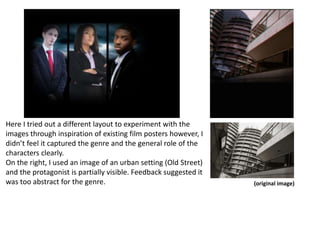
Here I tried out a different layout to experiment with the
images through inspiration of existing film posters however, I
didn’t feel it captured the genre and the general role of the
characters clearly.
On the right, I used an image of an urban setting (Old Street)
and the protagonist is partially visible. Feedback suggested it
was too abstract for the genre. (original image)
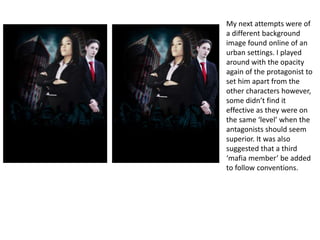
My next attempts were of
a different background
image found online of an
urban settings. I played
around with the opacity
again of the protagonist to
set him apart from the
other characters however,
some didn’t find it
effective as they were on
the same ‘level’ when the
antagonists should seem
superior. It was also
suggested that a third
‘mafia member’ be added
to follow conventions.
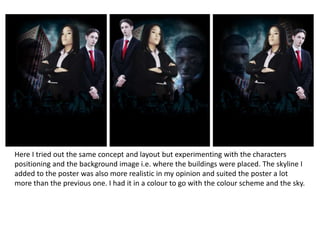
Here I tried out the same concept and layout but experimenting with the characters
positioning and the background image i.e. where the buildings were placed. The skyline I
added to the poster was also more realistic in my opinion and suited the poster a lot
more than the previous one. I had it in a colour to go with the colour scheme and the sky.
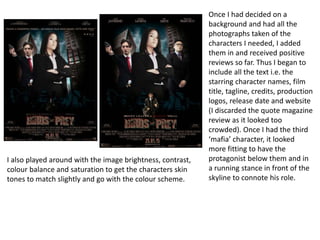
Once I had decided on a
background and had all the
photographs taken of the
characters I needed, I added
them in and received positive
reviews so far. Thus I began to
include all the text i.e. the
starring character names, film
title, tagline, credits, production
logos, release date and website
(I discarded the quote magazine
review as it looked too
crowded). Once I had the third
‘mafia’ character, it looked
more fitting to have the
protagonist below them and in
a running stance in front of the
skyline to connote his role.
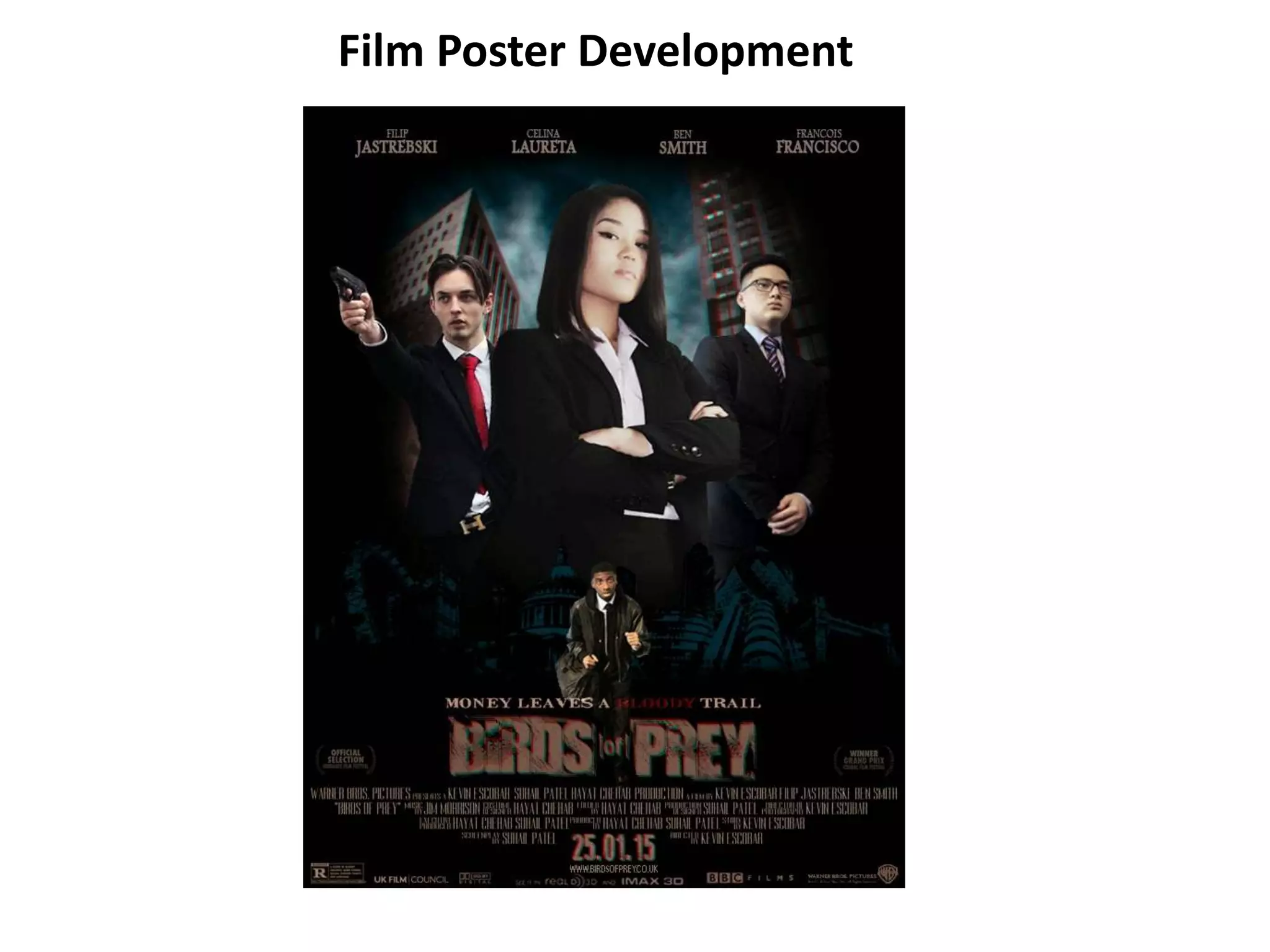
I also played around with the image brightness, contrast,
colour balance and saturation to get the characters skin
tones to match slightly and go with the colour scheme.
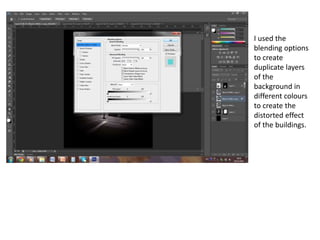
I used the
blending options
to create
duplicate layers
of the
background in
different colours
to create the
distorted effect
of the buildings.
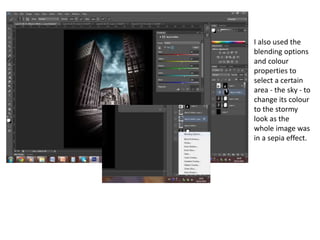
I also used the
blending options
and colour
properties to
select a certain
area - the sky - to
change its colour
to the stormy
look as the
whole image was
in a sepia effect.
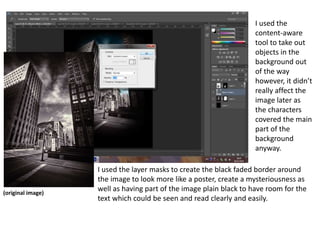
I used the
content-aware
tool to take out
objects in the
background out
of the way
however, it didn’t
really affect the
image later as
the characters
covered the main
part of the
background
anyway.
(original image)
I used the layer masks to create the black faded border around
the image to look more like a poster, create a mysteriousness as
well as having part of the image plain black to have room for the
text which could be seen and read clearly and easily.
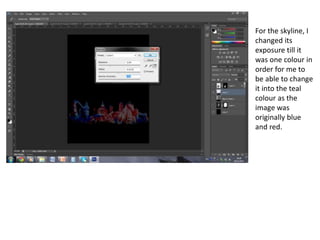
For the skyline, I
changed its
exposure till it
was one colour in
order for me to
be able to change
it into the teal
colour as the
image was
originally blue
and red.

Film Poster Development

  • 1.
  • 2.
    Initially, my ideaswere mainly drawn from the the ‘Goodfellas’ and ‘A Bronx Tale’ movie posters incorporated with more contemporary films within the genre. I wanted to use a stormy sky background to connote a sense of foreboding and mystery. These were my first attempts at creating a film poster however, I didn’t think they looked realistic and audience feedback had similar comments.
  • 3.
    Here I triedout a different layout to experiment with the images through inspiration of existing film posters however, I didn’t feel it captured the genre and the general role of the characters clearly. On the right, I used an image of an urban setting (Old Street) and the protagonist is partially visible. Feedback suggested it was too abstract for the genre. (original image)
  • 4.
    My next attemptswere of a different background image found online of an urban settings. I played around with the opacity again of the protagonist to set him apart from the other characters however, some didn’t find it effective as they were on the same ‘level’ when the antagonists should seem superior. It was also suggested that a third ‘mafia member’ be added to follow conventions.
  • 5.
    Here I triedout the same concept and layout but experimenting with the characters positioning and the background image i.e. where the buildings were placed. The skyline I added to the poster was also more realistic in my opinion and suited the poster a lot more than the previous one. I had it in a colour to go with the colour scheme and the sky.
  • 6.
    Once I haddecided on a background and had all the photographs taken of the characters I needed, I added them in and received positive reviews so far. Thus I began to include all the text i.e. the starring character names, film title, tagline, credits, production logos, release date and website (I discarded the quote magazine review as it looked too crowded). Once I had the third ‘mafia’ character, it looked more fitting to have the protagonist below them and in a running stance in front of the skyline to connote his role. I also played around with the image brightness, contrast, colour balance and saturation to get the characters skin tones to match slightly and go with the colour scheme.
  • 7.
    I used the blendingoptions to create duplicate layers of the background in different colours to create the distorted effect of the buildings.
  • 8.
    I also usedthe blending options and colour properties to select a certain area - the sky - to change its colour to the stormy look as the whole image was in a sepia effect.
  • 9.
    I used the content-aware toolto take out objects in the background out of the way however, it didn’t really affect the image later as the characters covered the main part of the background anyway. (original image) I used the layer masks to create the black faded border around the image to look more like a poster, create a mysteriousness as well as having part of the image plain black to have room for the text which could be seen and read clearly and easily.
  • 10.
    For the skyline,I changed its exposure till it was one colour in order for me to be able to change it into the teal colour as the image was originally blue and red.