Prepared by Prof. Anand H. D., Dept. of ECE, Dr. AIT, Bengaluru-56
OPERATING SYSTEM
Mr. Anand H. D.
1
Department of Electronics & Communication Engineering
Dr. Ambedkar Institute of Technology
Bengaluru-56
Operating System: FILE SYSTEMS
Prepared by Prof. Anand H. D., Dept. of ECE, Dr. AIT, Bengaluru-56 2
Topics to be covered:
File system and IOCS
Files and file organization
Fundamentals of file organizations
Directory structures
File protection
Interface between file system and IOCS
Allocation of disk space
implementation of file access
Operating System: FILE SYSTEMS
Prepared by Prof. Anand H. D., Dept. of ECE, Dr. AIT, Bengaluru-56 3
Topics to be covered:
File system and IOCS
Files and file organization
Fundamentals of file organizations
Directory structures
File protection
Interface between file system and IOCS
Allocation of disk space
Implementation of file access
Operating System: FILE SYSTEMS
Prepared by Prof. Anand H. D., Dept. of ECE, Dr. AIT, Bengaluru-56 4
File system and IOCS
 A file system views a file as a collection of data that is owned by a user, can be shared by a set
of authorized users, and has to be reliably stored over an extended period of time.
 A file system gives users freedom in naming their files, as an aspect of ownership, so that a
user can give a desired name to a file without worrying whether it conflicts with names of
other users’ files; and it provides privacy by protecting against interference by other users.
 The IOCS, on the other hand, views a file as a repository of data that need to be accessed
speedily and are stored on an I/O device that needs to be used efficiently.
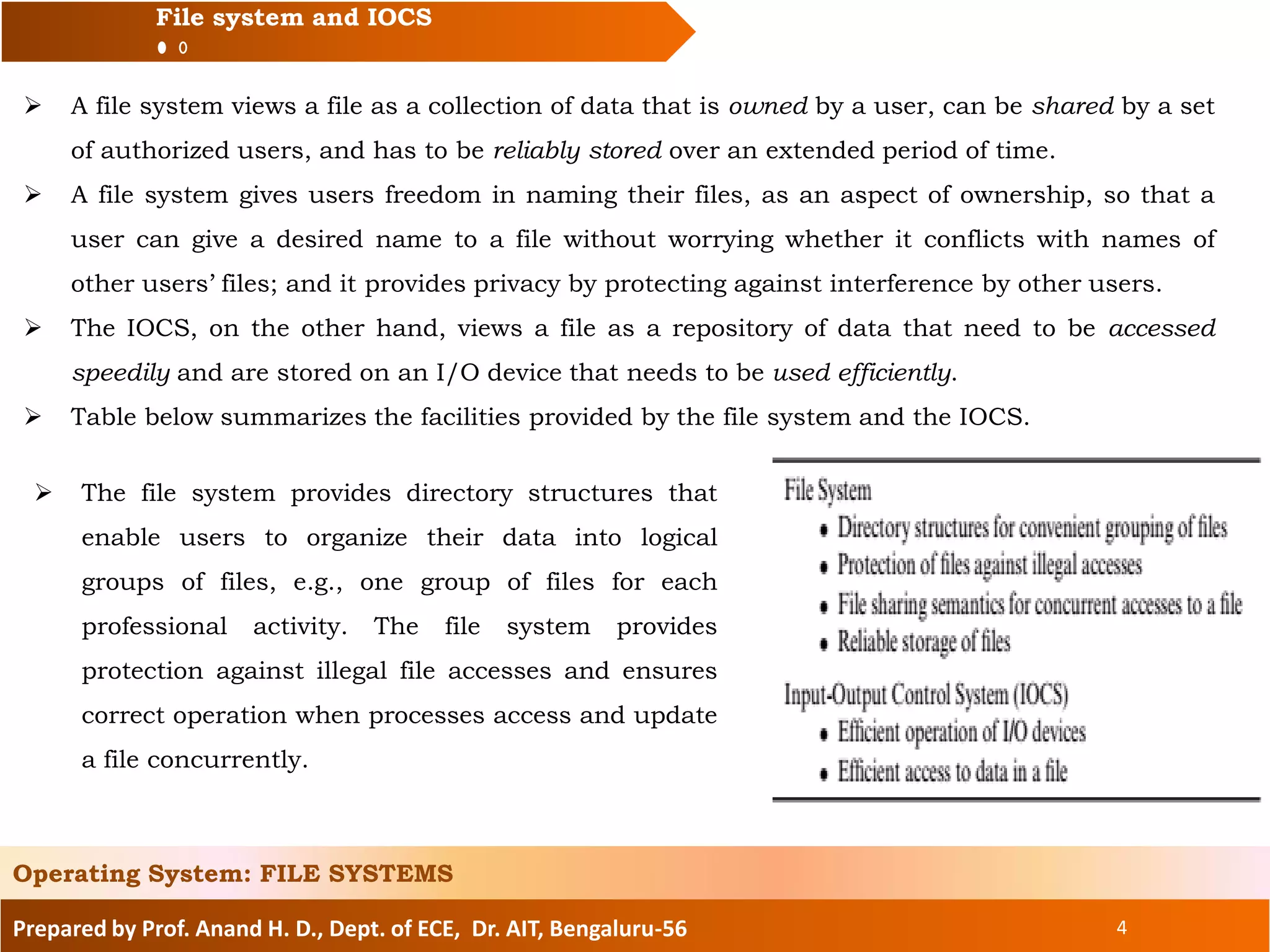
 Table below summarizes the facilities provided by the file system and the IOCS.
Operating System: FILE SYSTEMS
 The file system provides directory structures that
enable users to organize their data into logical
groups of files, e.g., one group of files for each
professional activity. The file system provides
protection against illegal file accesses and ensures
correct operation when processes access and update
a file concurrently.
Prepared by Prof. Anand H. D., Dept. of ECE, Dr. AIT, Bengaluru-56 5
File system and IOCS
 It also ensures that data is reliably stored, i.e., data is not lost when system crashes occur.
The file system and the IOCS form a hierarchy. Each of them has policies and
provides mechanisms to implement the policies.
 The IOCS and the file system provide different abstractions that lead to the following division
of functions:
• The file system provides an interface through which a process can perform open, read/write,
and close operations on files. Its policy modules handle protection and sharing of files during
open and read/write operations. Its mechanism modules assist in the implementation of open
and close operations by accessing directories. They also pass on read/write requests for file
data to the IOCS.
• The IOCS policy modules ensure efficient operation of I/O devices and efficient file
processing in each process through the IOCS mechanism modules. The mechanism modules
in the IOCS, in turn, invoke the kernel through system calls to initiate I/O operations.
Operating System: FILE SYSTEMS
Data and Metadata: A file system houses two kinds of data—data contained within files, and data
used to access files. We call the data within files file data, or simply data. The data used to
access files is called control data, or metadata.
Prepared by Prof. Anand H. D., Dept. of ECE, Dr. AIT, Bengaluru-56 6
Topics to be covered:
File system and IOCS
Files and file organization
Fundamentals of file organizations
Directory structures
File protection
Interface between file system and IOCS
Allocation of disk space
Implementation of file access
Operating System: FILE SYSTEMS
Prepared by Prof. Anand H. D., Dept. of ECE, Dr. AIT, Bengaluru-56 7
File Files and file organization
 File Types A file system houses and organizes different types of files, e.g., data files, executable
programs, object modules, textual information, documents, spreadsheets, photos, and video
clips. Each of these file types has its own format for recording the data. These file types can be
grouped into two classes:
• Structured files
• Byte stream files
 A structured file is a collection of records, where a record is a meaningful unit for processing
of data. A record is a collection of fields, and a field contains a single data item. Each record
in a file is assumed to contain a key field. The value in the key field of a record is unique in a
file; i.e., no two records contain an identical key.
File types used by standard system software like compilers and linkers have a structure
determined by the OS designer, while file types of user files depend on the applications or
programs that create them.
 A byte stream file is “flat.” There are no records and fields in it; it is looked upon as a
sequence of bytes by the processes that use it. The next example illustrates structured and
byte stream files.
Operating System: FILE SYSTEMS
Prepared by Prof. Anand H. D., Dept. of ECE, Dr. AIT, Bengaluru-56 8
File Files and file organization
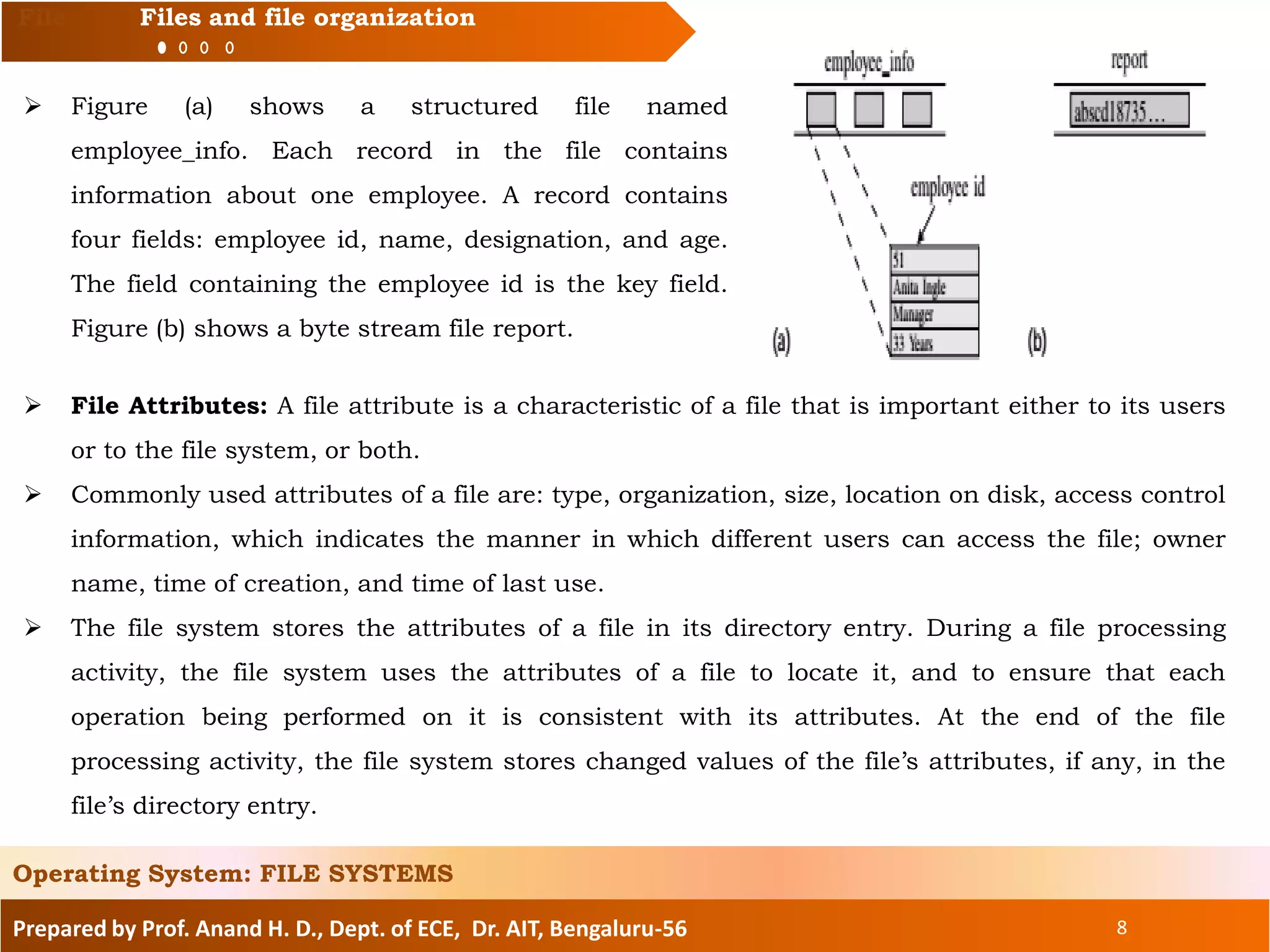
 Figure (a) shows a structured file named
employee_info. Each record in the file contains
information about one employee. A record contains
four fields: employee id, name, designation, and age.
The field containing the employee id is the key field.
Figure (b) shows a byte stream file report.
Operating System: FILE SYSTEMS
 File Attributes: A file attribute is a characteristic of a file that is important either to its users
or to the file system, or both.
 Commonly used attributes of a file are: type, organization, size, location on disk, access control
information, which indicates the manner in which different users can access the file; owner
name, time of creation, and time of last use.
 The file system stores the attributes of a file in its directory entry. During a file processing
activity, the file system uses the attributes of a file to locate it, and to ensure that each
operation being performed on it is consistent with its attributes. At the end of the file
processing activity, the file system stores changed values of the file’s attributes, if any, in the
file’s directory entry.
Prepared by Prof. Anand H. D., Dept. of ECE, Dr. AIT, Bengaluru-56 9
File Files and file organization
File Operations:
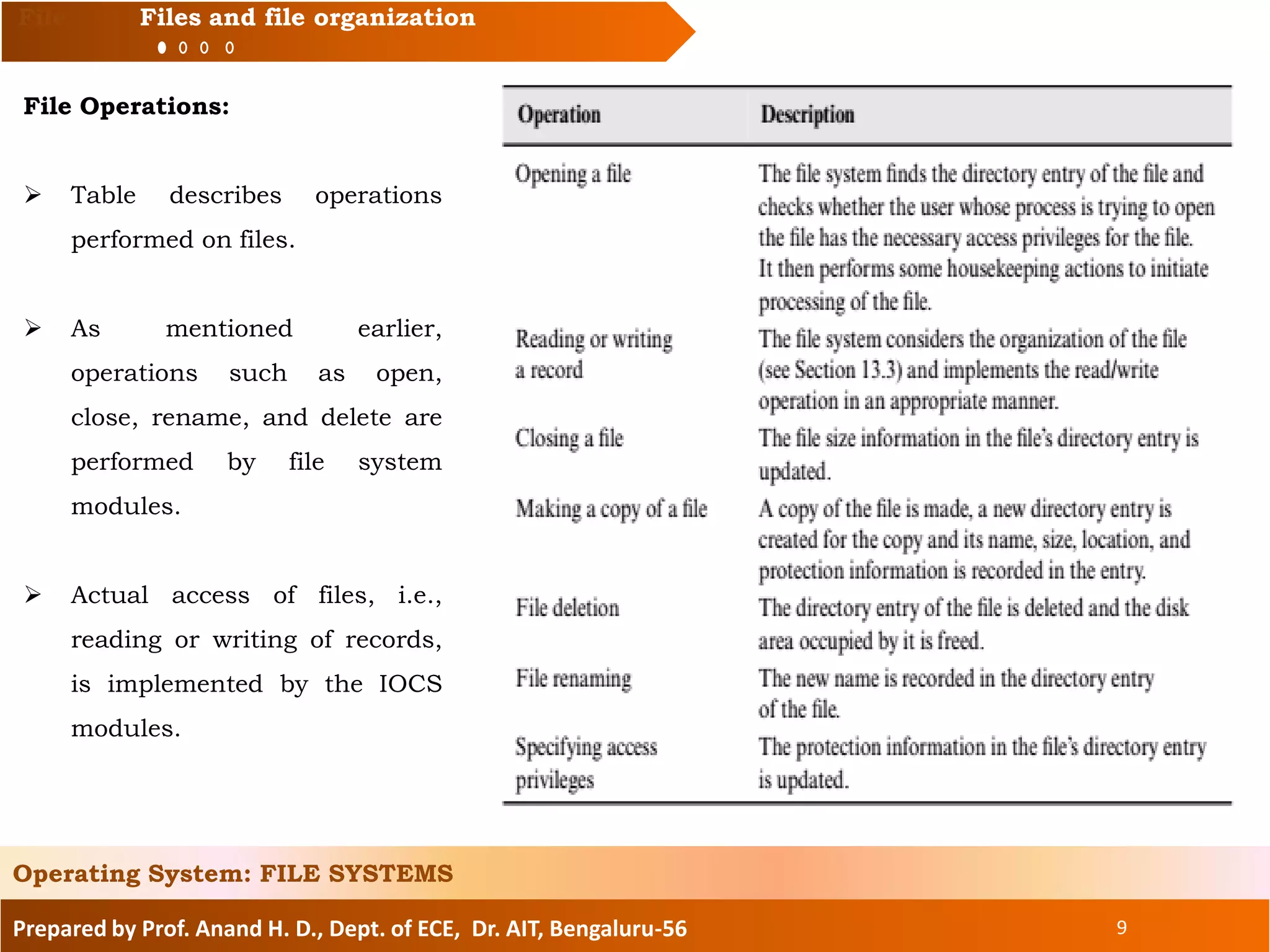
 Table describes operations
performed on files.
 As mentioned earlier,
operations such as open,
close, rename, and delete are
performed by file system
modules.
 Actual access of files, i.e.,
reading or writing of records,
is implemented by the IOCS
modules.
Operating System: FILE SYSTEMS
Prepared by Prof. Anand H. D., Dept. of ECE, Dr. AIT, Bengaluru-56 10
Topics to be covered:
File system and IOCS
Files and file organization
Fundamentals of file organizations
Directory structures
File protection
Interface between file system and IOCS
Allocation of disk space
Implementation of file access
Operating System: FILE SYSTEMS
Prepared by Prof. Anand H. D., Dept. of ECE, Dr. AIT, Bengaluru-56 11
Fundamentals of file organizations
 We use the term “record access pattern” to describe the order in which records in a file are
accessed by a process. The two fundamental record access patterns are sequential access, in
which records are accessed in the order in which they fall in a file (or in the reverse of that
order), and random access, in which records may be accessed in any order.
 The file processing actions of a process will execute efficiently only if the process’s record
access pattern can be implemented efficiently in the file system. The characteristics of an I/O
device make it suitable for a specific record access pattern.
 For example, a tape drive can access only the record that is placed immediately before or after
the current position of its read/write head. Hence it is suitable for sequential access to records.
A disk drive can directly access any record given its address. Hence it can efficiently implement
both the sequential and random record access patterns
Operating System: FILE SYSTEMS
 A file organization is a combination of two features—a method of arranging records in a file
and a procedure for accessing them.
 A file organization is designed to exploit the characteristics of an I/O device for providing
efficient record access for a specific record access pattern. A file system supports several file
organizations so that a process can employ the one that best suits its file processing
requirements and the I/O device in use.
Prepared by Prof. Anand H. D., Dept. of ECE, Dr. AIT, Bengaluru-56 12
Fundamentals of file organizations
 Accesses to files governed by a specific file organization are implemented by an IOCS module
called an access method.
 An access method is a policy module of the IOCS. While compiling a program, the compiler
infers the file organization governing a file from the file’s declaration statement (or from the
rules for default, if the program does not contain a file declaration statement), and identifies
the correct access method to invoke for operations on the file.
Operating System: FILE SYSTEMS
Sequential File Organization
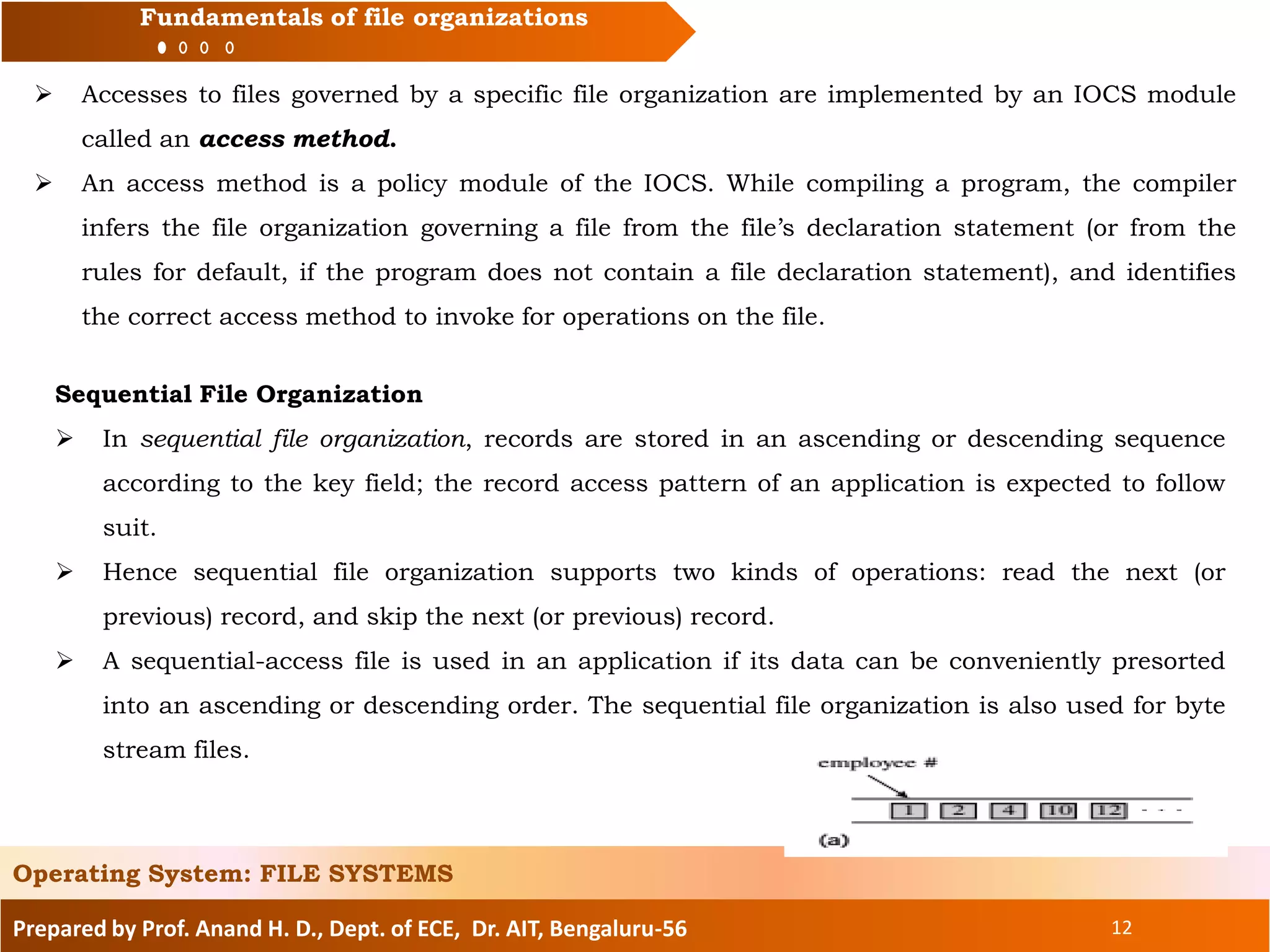
 In sequential file organization, records are stored in an ascending or descending sequence
according to the key field; the record access pattern of an application is expected to follow
suit.
 Hence sequential file organization supports two kinds of operations: read the next (or
previous) record, and skip the next (or previous) record.
 A sequential-access file is used in an application if its data can be conveniently presorted
into an ascending or descending order. The sequential file organization is also used for byte
stream files.
Prepared by Prof. Anand H. D., Dept. of ECE, Dr. AIT, Bengaluru-56 13
Fundamentals of file organizations
Direct File Organization
 The direct file organization provides convenience and efficiency of file processing when records
are accessed in a random order. To access a record, a read/write command needs to mention
the value in its key field. We refer to such files as direct-access files.
 A direct-access file is implemented as follows: When a process provides the key value of a
record to be accessed, the access method module for the direct file organization applies a
transformation to the key value that generates the address of the record in the storage
medium.
 If the file is organized on a disk, he transformation generates a (track_no, record_no) address.
The disk heads are now positioned on the track track_no before a read or write command is
issued on the record record_no.
 Consider a file of employee information organized as a direct-access file. Let p records be
written on one track of the disk. Assuming the employee numbers and the track and record
numbers of the file to start from 1, the address of the record for employee number n is (track
number (tn), record number (rn)) where
and [. . ] indicates a rounded-up integer value.
Operating System: FILE SYSTEMS
Prepared by Prof. Anand H. D., Dept. of ECE, Dr. AIT, Bengaluru-56 14
Fundamentals of file organizations
 Direct file organization provides access efficiency when records are processed randomly.
However, it has three drawbacks compared to sequential file organization:
• Record address calculation consumes CPU time.
• Disks can store much more data along the outermost track than along the innermost track.
However, the direct file organization stores an equal amount of data along each track. Hence
some recording capacity is wasted.
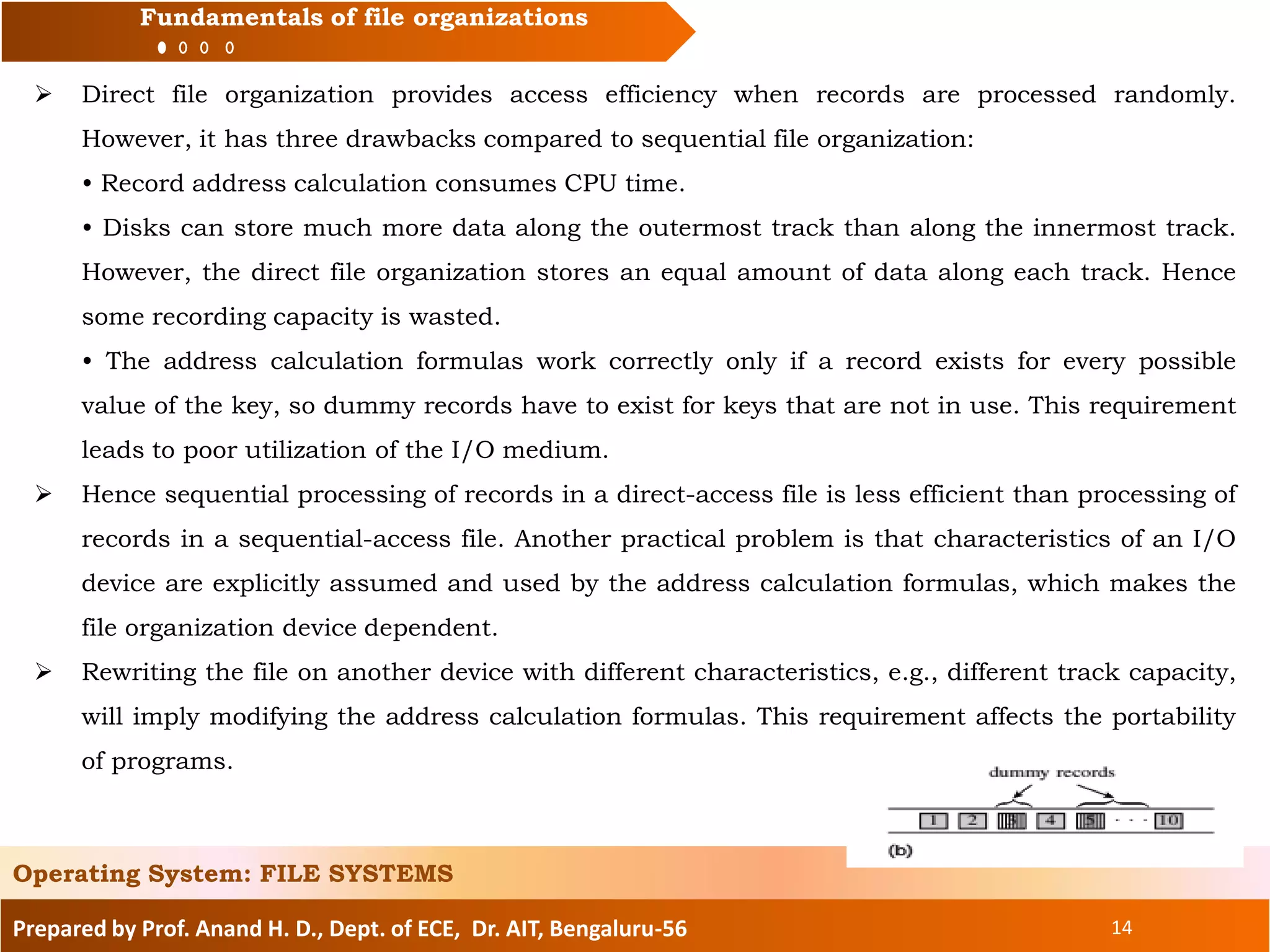
• The address calculation formulas work correctly only if a record exists for every possible
value of the key, so dummy records have to exist for keys that are not in use. This requirement
leads to poor utilization of the I/O medium.
 Hence sequential processing of records in a direct-access file is less efficient than processing of
records in a sequential-access file. Another practical problem is that characteristics of an I/O
device are explicitly assumed and used by the address calculation formulas, which makes the
file organization device dependent.
 Rewriting the file on another device with different characteristics, e.g., different track capacity,
will imply modifying the address calculation formulas. This requirement affects the portability
of programs.
Operating System: FILE SYSTEMS
Prepared by Prof. Anand H. D., Dept. of ECE, Dr. AIT, Bengaluru-56 15
Fundamentals of file organizations
Index Sequential File Organization
 An index helps to determine the location of a record from its key value. In a pure indexed file
organization, the index of a file contains an index entry with the format (key value, disk
address) for each key value existing in the file.
 To access a record with key k, the index entry containing k is found by searching the index,
and the disk address mentioned in the entry is used to access the record. If an index is smaller
than a file, this arrangement provides high access efficiency because a search in the index is
more efficient than a search in the file.
 The index sequential file organization is a hybrid organization that combines elements of the
indexed and the sequential file organizations. To locate a desired record, the access method
module for this organization searches an index to identify a section of the disk that may
contain the record, and searches the records in this section of the disk sequentially to find the
record.
 The search succeeds if the record is present in the file; otherwise, it results in a failure. This
arrangement requires a much smaller index than does a pure indexed file because the index
contains entries for only some of the key values. It also provides better access efficiency than
the sequential file organization while ensuring comparably efficient use of I/O media.
Operating System: FILE SYSTEMS
Prepared by Prof. Anand H. D., Dept. of ECE, Dr. AIT, Bengaluru-56 16
Fundamentals of file organizations
 For a large file the index would still contain a large number of entries, and so the time required
to search through the index would be large. A higher-level index can be used to reduce the
search time. An entry in the higher-level index points to a section of the index. This section of
the index is searched to find the section of the disk that may contain a desired record, and this
section of the disk is searched sequentially for the desired record. The next example illustrates
this arrangement.
Operating System: FILE SYSTEMS
Access Methods
 An access method is a module of the IOCS that implements accesses to a class of files
using a specific file organization. The procedure to be used for accessing records in a file,
whether by a sequential search or by address calculation, is determined by the file
organization.
The access method module uses this procedure to access records. It may also use
some advanced techniques in I/O programming to make file processing more efficient. Two
such techniques are buffering and blocking of records.
Prepared by Prof. Anand H. D., Dept. of ECE, Dr. AIT, Bengaluru-56 17
Fundamentals of file organizations
 Buffering of Records The access method reads records of an input file ahead of the time when
they are needed by a process and holds them temporarily in memory areas called buffers until
they are actually used by the process.
The purpose of buffering is to reduce or eliminate the wait for an I/O operation to
complete; the process faces a wait only when the required record does not already exist in a
buffer.
The converse actions are performed for an output file. When the process performs a
write operation, the data to be written into the file is copied into a buffer and the process is
allowed to continue its operation.
The data is written on the I/O device sometime later and the buffer is released for reuse.
The process faces a wait only if a buffer is not available when it performs a write operation.
 Blocking of Records The access method always reads or writes a large block of data, which
contains several file records, from or to the I/O medium. This feature reduces the total number
of I/O operations required for processing a file, thereby improving the file processing efficiency
of a process. Blocking also improves utilization of an I/O medium and throughput of a device.
Operating System: FILE SYSTEMS
Prepared by Prof. Anand H. D., Dept. of ECE, Dr. AIT, Bengaluru-56 18
Topics to be covered:
File system and IOCS
Files and file organization
Fundamentals of file organizations
Directory structures
File protection
Interface between file system and IOCS
Allocation of disk space
Implementation of file access
Operating System: FILE SYSTEMS
Prepared by Prof. Anand H. D., Dept. of ECE, Dr. AIT, Bengaluru-56 19
Directory structures
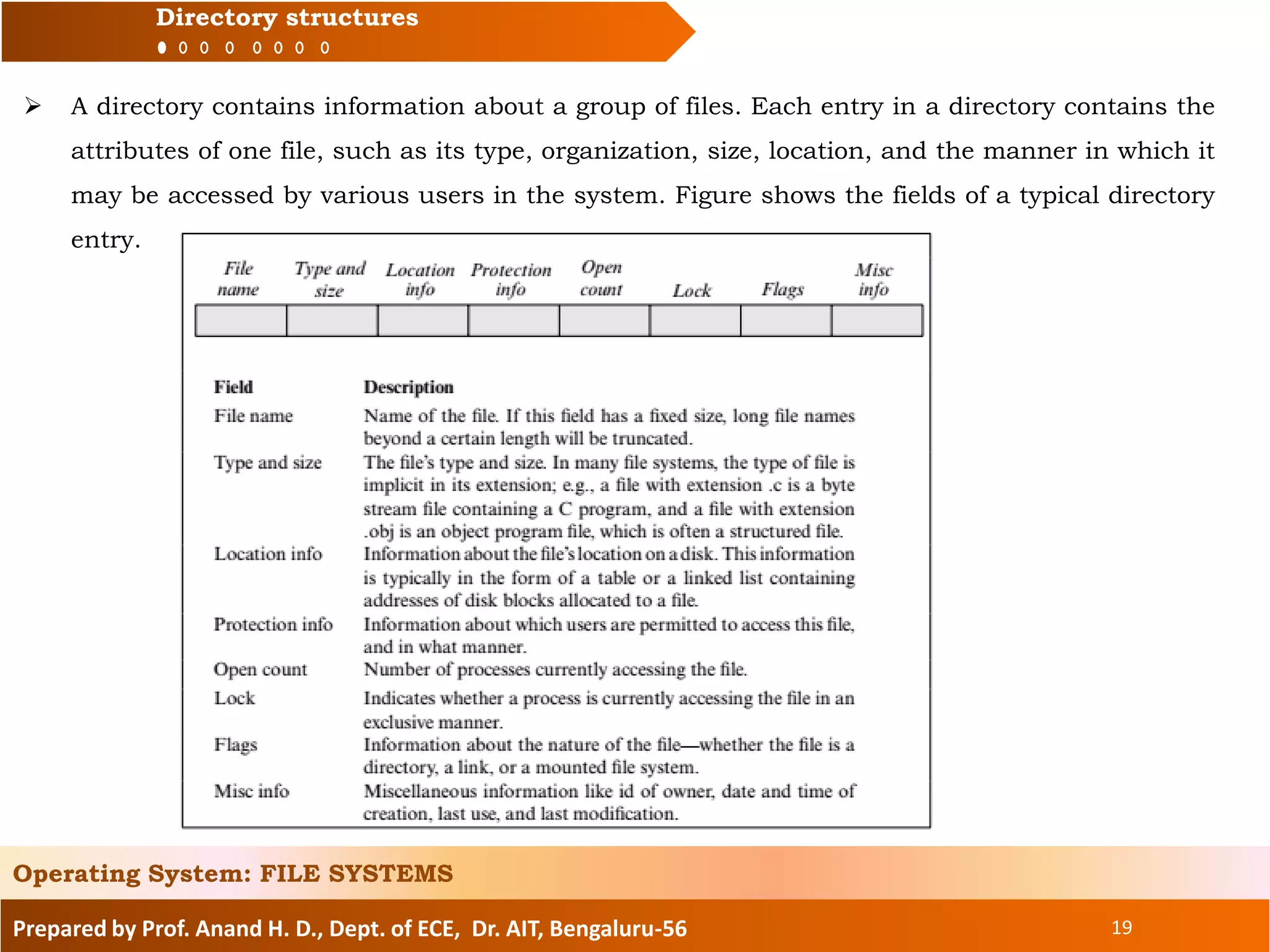
 A directory contains information about a group of files. Each entry in a directory contains the
attributes of one file, such as its type, organization, size, location, and the manner in which it
may be accessed by various users in the system. Figure shows the fields of a typical directory
entry.
Operating System: FILE SYSTEMS
Prepared by Prof. Anand H. D., Dept. of ECE, Dr. AIT, Bengaluru-56 20
Directory structures
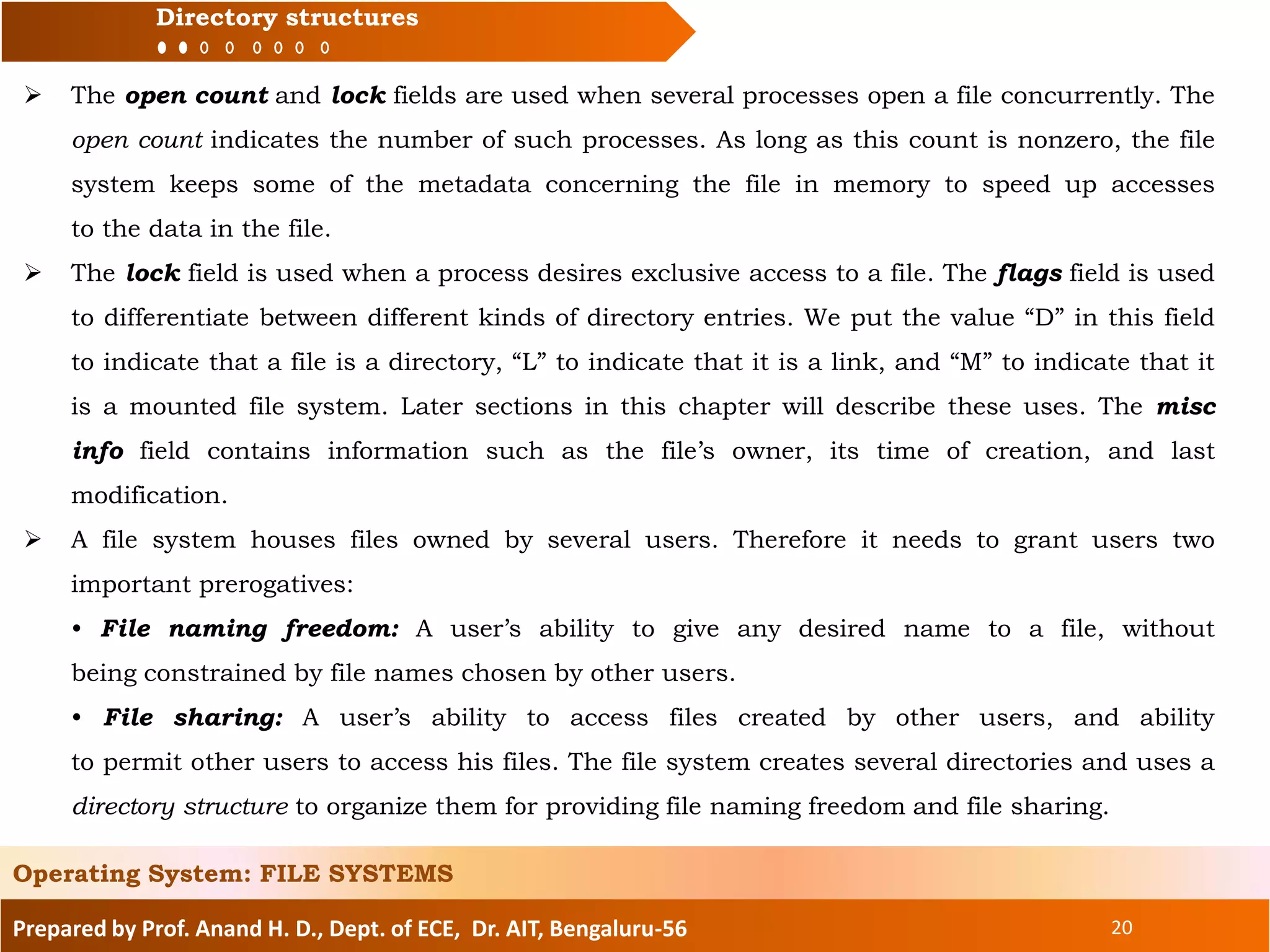
 The open count and lock fields are used when several processes open a file concurrently. The
open count indicates the number of such processes. As long as this count is nonzero, the file
system keeps some of the metadata concerning the file in memory to speed up accesses
to the data in the file.
 The lock field is used when a process desires exclusive access to a file. The flags field is used
to differentiate between different kinds of directory entries. We put the value “D” in this field
to indicate that a file is a directory, “L” to indicate that it is a link, and “M” to indicate that it
is a mounted file system. Later sections in this chapter will describe these uses. The misc
info field contains information such as the file’s owner, its time of creation, and last
modification.
 A file system houses files owned by several users. Therefore it needs to grant users two
important prerogatives:
• File naming freedom: A user’s ability to give any desired name to a file, without
being constrained by file names chosen by other users.
• File sharing: A user’s ability to access files created by other users, and ability
to permit other users to access his files. The file system creates several directories and uses a
directory structure to organize them for providing file naming freedom and file sharing.
Operating System: FILE SYSTEMS
Prepared by Prof. Anand H. D., Dept. of ECE, Dr. AIT, Bengaluru-56 21
Directory structures
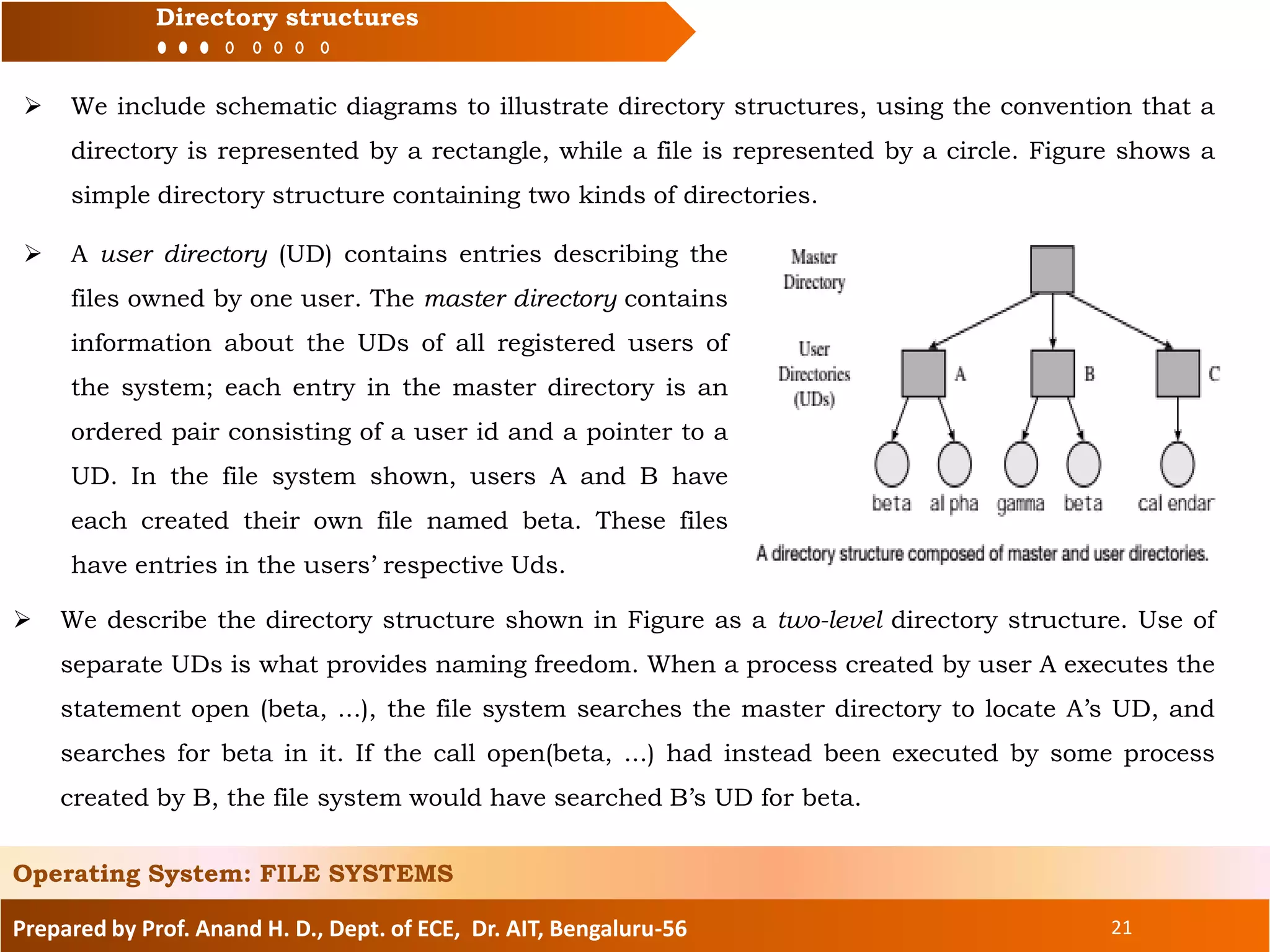
 We include schematic diagrams to illustrate directory structures, using the convention that a
directory is represented by a rectangle, while a file is represented by a circle. Figure shows a
simple directory structure containing two kinds of directories.
Operating System: FILE SYSTEMS
 A user directory (UD) contains entries describing the
files owned by one user. The master directory contains
information about the UDs of all registered users of
the system; each entry in the master directory is an
ordered pair consisting of a user id and a pointer to a
UD. In the file system shown, users A and B have
each created their own file named beta. These files
have entries in the users’ respective Uds.
 We describe the directory structure shown in Figure as a two-level directory structure. Use of
separate UDs is what provides naming freedom. When a process created by user A executes the
statement open (beta, ...), the file system searches the master directory to locate A’s UD, and
searches for beta in it. If the call open(beta, ...) had instead been executed by some process
created by B, the file system would have searched B’s UD for beta.
Prepared by Prof. Anand H. D., Dept. of ECE, Dr. AIT, Bengaluru-56 22
Directory structures
Operating System: FILE SYSTEMS
 This arrangement ensures that the correct file is accessed even if many files with identical
names exist in the system.
 Use of UDs has one drawback, however. It inhibits users from sharing their files with other
users. A special syntax may have to be provided to enable a user to refer to another user’s file.
For example, a process created by user C may execute the statement open (A→beta, ...) to open
A’s file beta. The file system can implement this simply by using A’s UD, rather than C’s UD, to
search and locate file beta.
 To implement file protection, the file system must determine whether user C is permitted to
open A’s file beta. It checks the protection info field of beta’s directory entry for this purpose.
Directory Trees
 The MULTICS file system of the 1960s contained features that allowed the user to create a
new directory, give it a name of his choice, and create files and other directories in it up to
any desired level. The resulting directory structure is a tree; we call it the directory tree. After
MULTICS, most file systems have provided directory trees.
 A user can create a file to hold data or to act as a directory. When a distinction between the
two is important, we will call these files respectively data files and directory files, or simply
directories.
Prepared by Prof. Anand H. D., Dept. of ECE, Dr. AIT, Bengaluru-56 23
Directory structures
Operating System: FILE SYSTEMS
 The file system provides a directory called root that contains the home directory for each user,
which is a directory file that typically has the same name as the user’s name. A user structures his
information by creating directory files and data files in his home directory, creating files and other
directories in a directory file, and so on. We will assume that the file system puts a “D” in the flags
field of a file’s entry if the file is a directory file. Figure shows the directory tree of the file system.
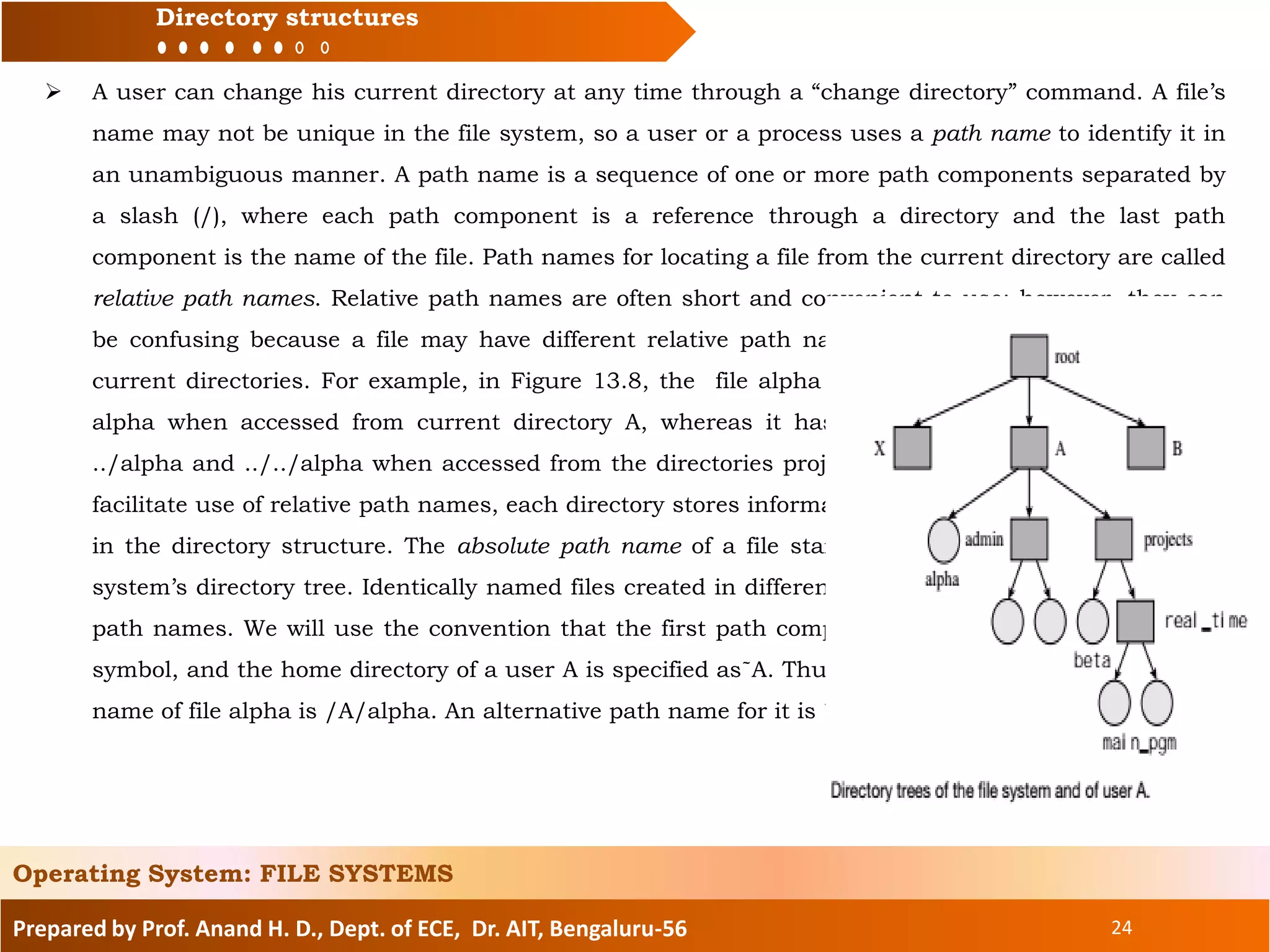
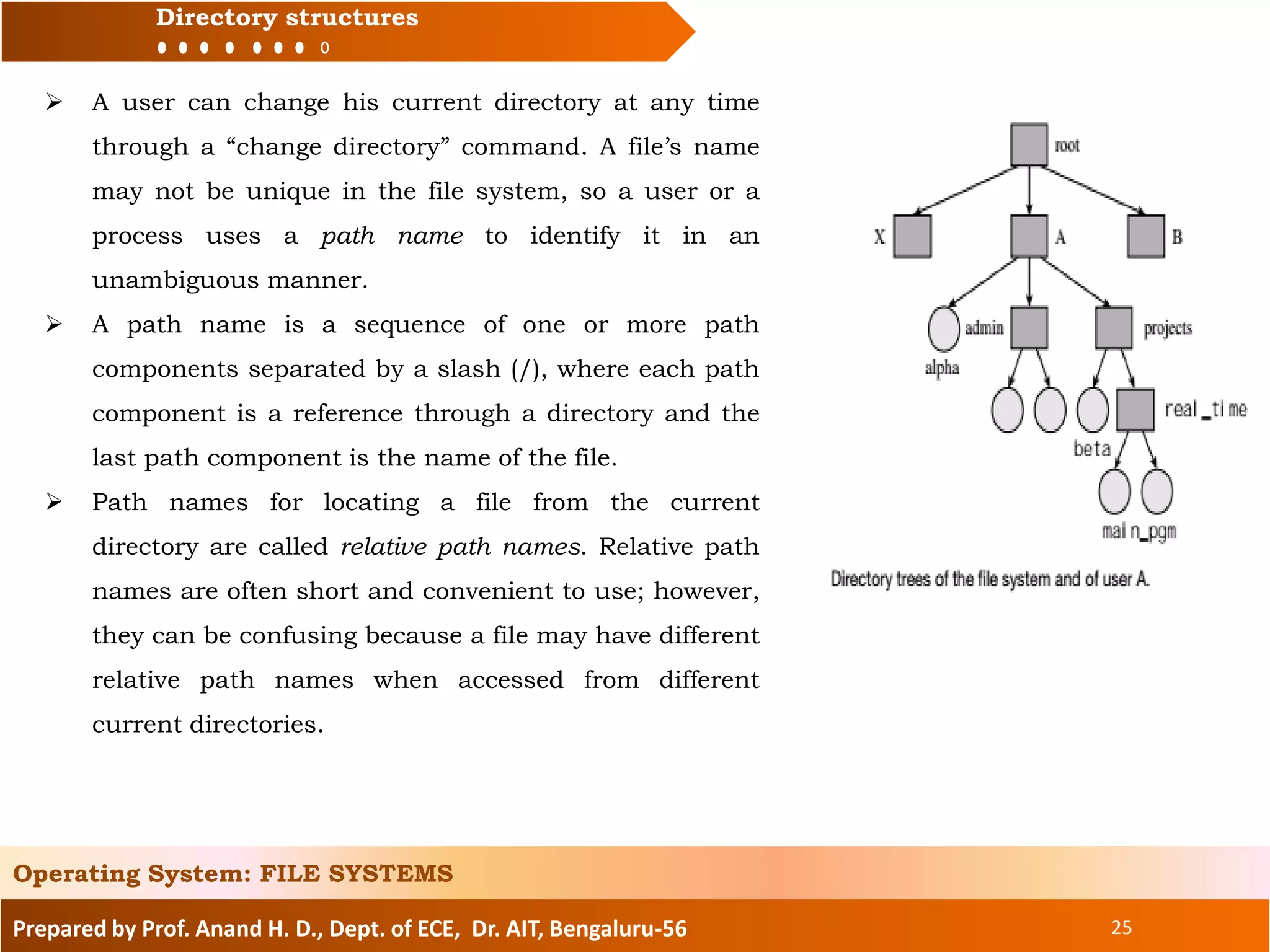
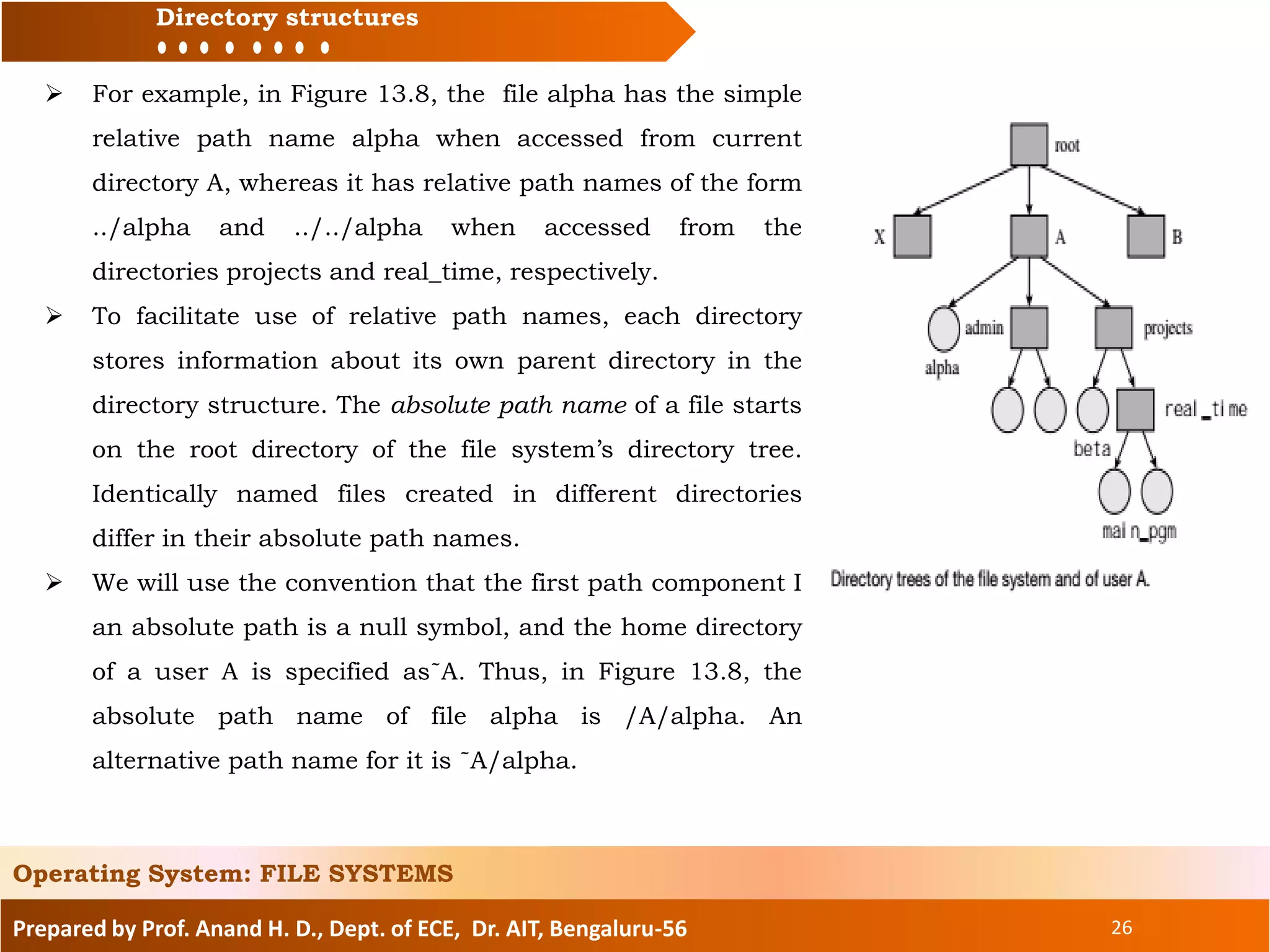
 The root of this tree is the directory root, which contains a
home directory for each user that bears the user’s name. User A
has created a file called alpha and directories called admin and
projects. The projects directory contains a directory real_time,
which contains a file main_pgm. Thus user A has a directory
tree of his own; its root is his home directory.
 At any time, a user is said to be “in” some specific directory,
which is called his current directory. When the user wishes to
open a file, the file name is searched for in this directory.
Whenever the user logs in, the OS puts him in his home
directory; the home directory is then the user’s current
directory.
Prepared by Prof. Anand H. D., Dept. of ECE, Dr. AIT, Bengaluru-56 24
Directory structures
Operating System: FILE SYSTEMS
 A user can change his current directory at any time through a “change directory” command. A file’s
name may not be unique in the file system, so a user or a process uses a path name to identify it in
an unambiguous manner. A path name is a sequence of one or more path components separated by
a slash (/), where each path component is a reference through a directory and the last path
component is the name of the file. Path names for locating a file from the current directory are called
relative path names. Relative path names are often short and convenient to use; however, they can
be confusing because a file may have different relative path names when accessed from different
current directories. For example, in Figure 13.8, the file alpha has the simple relative path name
alpha when accessed from current directory A, whereas it has relative path names of the form
../alpha and ../../alpha when accessed from the directories projects and real_time, respectively. To
facilitate use of relative path names, each directory stores information about its own parent directory
in the directory structure. The absolute path name of a file starts on the root directory of the file
system’s directory tree. Identically named files created in different directories differ in their absolute
path names. We will use the convention that the first path component I an absolute path is a null
symbol, and the home directory of a user A is specified as˜A. Thus, in Figure 13.8, the absolute path
name of file alpha is /A/alpha. An alternative path name for it is ˜A/alpha.
Prepared by Prof. Anand H. D., Dept. of ECE, Dr. AIT, Bengaluru-56 25
Directory structures
Operating System: FILE SYSTEMS
 A user can change his current directory at any time
through a “change directory” command. A file’s name
may not be unique in the file system, so a user or a
process uses a path name to identify it in an
unambiguous manner.
 A path name is a sequence of one or more path
components separated by a slash (/), where each path
component is a reference through a directory and the
last path component is the name of the file.
 Path names for locating a file from the current
directory are called relative path names. Relative path
names are often short and convenient to use; however,
they can be confusing because a file may have different
relative path names when accessed from different
current directories.
Prepared by Prof. Anand H. D., Dept. of ECE, Dr. AIT, Bengaluru-56 26
Directory structures
Operating System: FILE SYSTEMS
 For example, in Figure 13.8, the file alpha has the simple
relative path name alpha when accessed from current
directory A, whereas it has relative path names of the form
../alpha and ../../alpha when accessed from the
directories projects and real_time, respectively.
 To facilitate use of relative path names, each directory
stores information about its own parent directory in the
directory structure. The absolute path name of a file starts
on the root directory of the file system’s directory tree.
Identically named files created in different directories
differ in their absolute path names.
 We will use the convention that the first path component I
an absolute path is a null symbol, and the home directory
of a user A is specified as˜A. Thus, in Figure 13.8, the
absolute path name of file alpha is /A/alpha. An
alternative path name for it is ˜A/alpha.
Prepared by Prof. Anand H. D., Dept. of ECE, Dr. AIT, Bengaluru-56 27
Topics to be covered:
File system and IOCS
Files and file organization
Fundamentals of file organizations
Directory structures
File protection
Interface between file system and IOCS
Allocation of disk space
Implementation of file access
Operating System: FILE SYSTEMS
Prepared by Prof. Anand H. D., Dept. of ECE, Dr. AIT, Bengaluru-56 28
File protection
 A user would like to share a file with collaborators, but not with others. We call this
requirement controlled sharing of files. To implement it, the owner of a file specifies which users
can access the file in what manner. The file system stores this information in the protection info
field of the file’s directory entry, and uses it to control access to the file.
 In this section, we assume that a file’s protection information is stored in the form of an access
control list. Each element of the access control list is an access control pair of the form
(<user_name>, <list_of_access_privileges>).
 When a process executed by some user X tries to perform an operation <opn> on file alpha, the
file system searches for the pair with <user_name>= X, in the access control list of alpha and
checks whether <opn> is consistent with the <list_of_access_privileges>.
 If it is not, the attempt to access alpha fails. For example, a write attempt by X will fail if the
entry for user X in the access control list is (X, read), or if the list does not contain an entry for
X.
 The size of a file’s access control list depends on the number of users and the number of access
privileges defined in the system. To reduce the size of protection information, users can be
classified in some convenient manner and an access control pair can be specified for each user
class rather than for each individual user.
Operating System: FILE SYSTEMS
Prepared by Prof. Anand H. D., Dept. of ECE, Dr. AIT, Bengaluru-56 29
File protection
 Now an access control list has only as many pairs as the number of user classes. For example,
Unix specifies access privileges for three classes of users— the file owner, users in the same
group as the owner, and all other users of the system.
 In most file systems, access privileges are of three kinds—read, write, and execute. A write
privilege permits existing data in the file to be modified and also permits new data to be added:
 One can further differentiate between these two privileges by defining a new access privilege
called append; however, it would increase the size of the protection information. The execute
privilege permits a user to execute the program contained in a file.
 Access privileges have different meanings for directory files. The read privilege for a directory
file implies that one can obtain a listing of the directory, while the write privilege for a directory
implies that one can create new files in the directory.
 The execute privilege for a directory permits an access to be made through it—that is, it
permits a file existing in the directory to be accessed. A user can use the execute privilege of
directories to make a part of his directory structure visible to other users.
Operating System: FILE SYSTEMS
Prepared by Prof. Anand H. D., Dept. of ECE, Dr. AIT, Bengaluru-56 30
Topics to be covered:
File system and IOCS
Files and file organization
Fundamentals of file organizations
Directory structures
File protection
Interface between file system and IOCS
Allocation of disk space
Implementation of file access
Operating System: FILE SYSTEMS
Prepared by Prof. Anand H. D., Dept. of ECE, Dr. AIT, Bengaluru-56 31
Interface between file system and IOCS
 The file system uses the IOCS to perform I/O operations and the IOCS implements them
through kernel calls. The interface between the file system and the IOCS consists of three data
structures—the file map table (FMT), the file control block (FCB), and the open files
table (OFT)—and functions that perform /O operations.
Operating System: FILE SYSTEMS
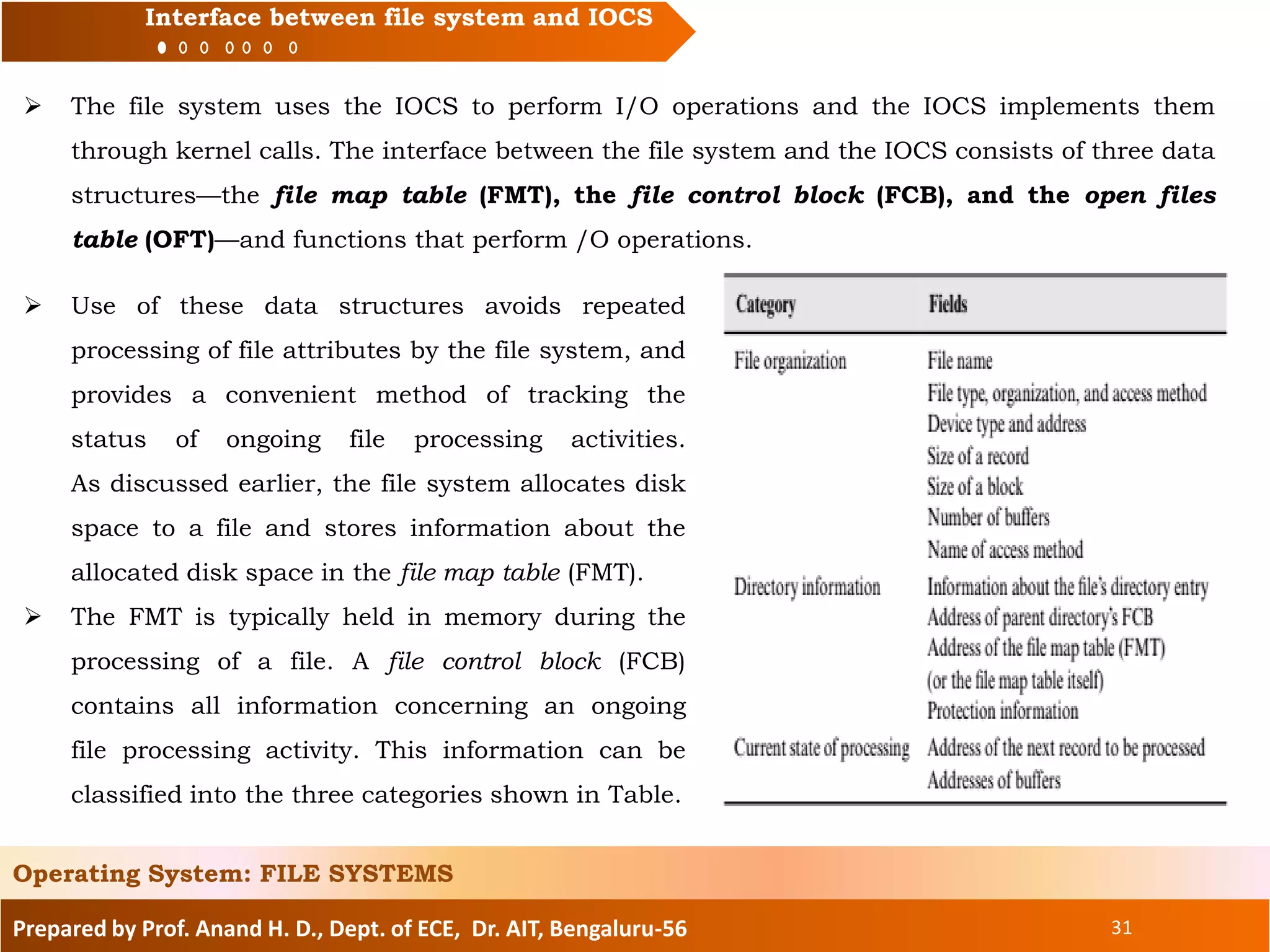
 Use of these data structures avoids repeated
processing of file attributes by the file system, and
provides a convenient method of tracking the
status of ongoing file processing activities.
As discussed earlier, the file system allocates disk
space to a file and stores information about the
allocated disk space in the file map table (FMT).
 The FMT is typically held in memory during the
processing of a file. A file control block (FCB)
contains all information concerning an ongoing
file processing activity. This information can be
classified into the three categories shown in Table.
Prepared by Prof. Anand H. D., Dept. of ECE, Dr. AIT, Bengaluru-56 32
Interface between file system and IOCS
 Information in the file organization category is either simply extracted from the file declaration
statement in an application program, or inferred from it by the compiler, e.g., information
such as the size of a record and number of buffers is extracted from a file declaration, while
the name of the access method is inferred from the type and organization of a file.
 The compiler puts this information as parameters in the open call. When the call is made
during execution of the program, the file system puts this information in the FCB. Directory
information is copied into the FCB through joint actions of the file system and the IOCS when
a new file is created. Information concerning the current state of processing is written into the
FCB by the IOCS. This information is continually updated during the processing of a file.
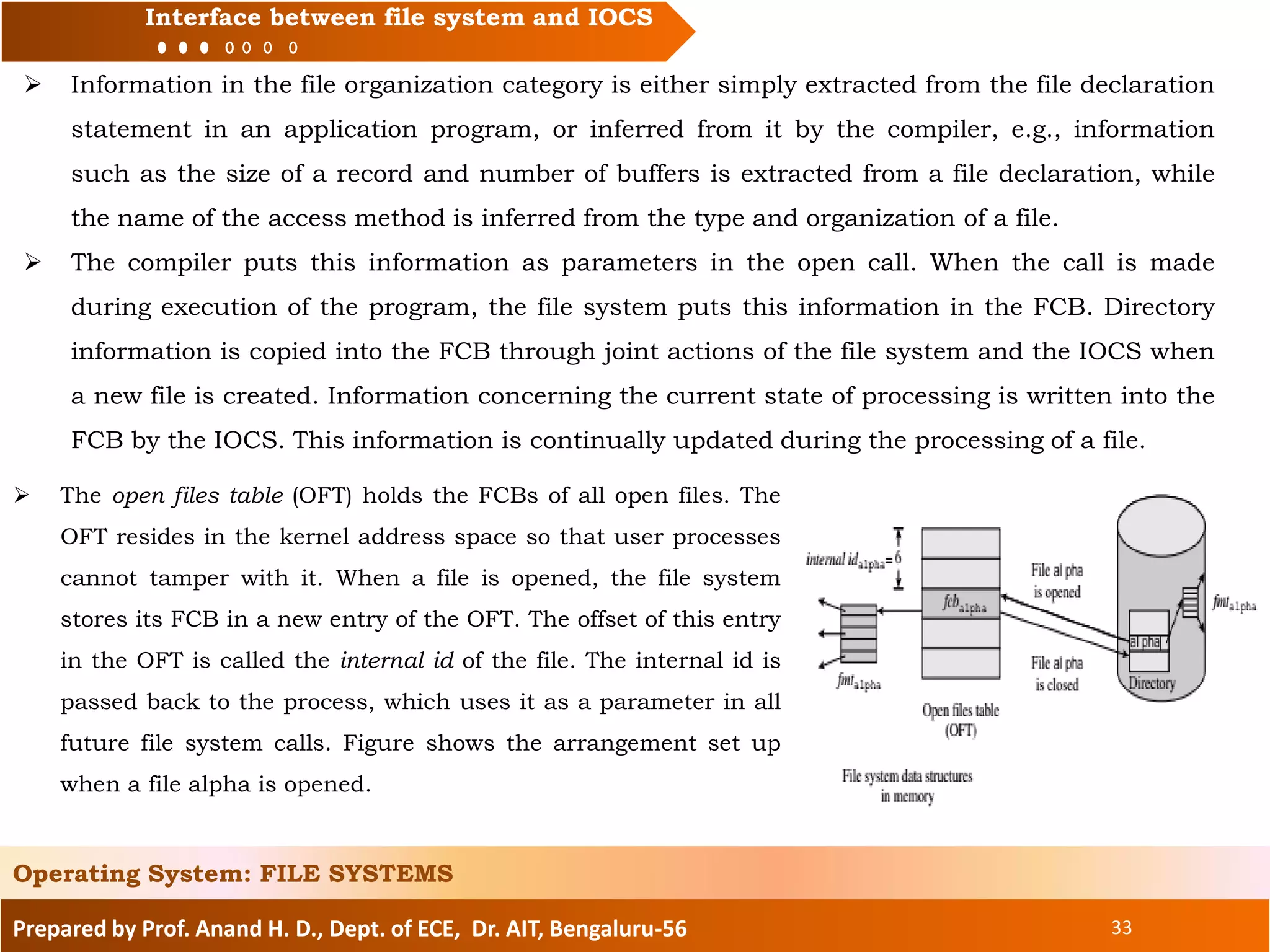
 The open files table (OFT) holds the FCBs of all open files. The OFT resides in the kernel
address space so that user processes cannot tamper with it. When a file is opened, the file
system stores its FCB in a new entry of the OFT. The offset of this entry in the OFT is called
the internal id of the file. The internal id is passed back to the process, which uses it as a
parameter in all future file system calls. Figure shows the arrangement set up when a file
alpha is opened.
Operating System: FILE SYSTEMS
Prepared by Prof. Anand H. D., Dept. of ECE, Dr. AIT, Bengaluru-56 33
Interface between file system and IOCS
 Information in the file organization category is either simply extracted from the file declaration
statement in an application program, or inferred from it by the compiler, e.g., information
such as the size of a record and number of buffers is extracted from a file declaration, while
the name of the access method is inferred from the type and organization of a file.
 The compiler puts this information as parameters in the open call. When the call is made
during execution of the program, the file system puts this information in the FCB. Directory
information is copied into the FCB through joint actions of the file system and the IOCS when
a new file is created. Information concerning the current state of processing is written into the
FCB by the IOCS. This information is continually updated during the processing of a file.
Operating System: FILE SYSTEMS
 The open files table (OFT) holds the FCBs of all open files. The
OFT resides in the kernel address space so that user processes
cannot tamper with it. When a file is opened, the file system
stores its FCB in a new entry of the OFT. The offset of this entry
in the OFT is called the internal id of the file. The internal id is
passed back to the process, which uses it as a parameter in all
future file system calls. Figure shows the arrangement set up
when a file alpha is opened.
Prepared by Prof. Anand H. D., Dept. of ECE, Dr. AIT, Bengaluru-56 34
Interface between file system and IOCS
 The file system copies fmtalpha in memory; creates fcbalpha, which is an FCB for alpha, in the
OFT; initializes its fields appropriately; and passes back its offset in OFT, which in this case is
6, to the process as internal_idalpha. The file system supports the following operations:
• open (<file_name>, <processing_mode>, <file_attributes>)
• close (<internal_id_of_file>)
• read/write (<internal_id_of_file>, <record_info>, <I/O_area_addr>)
 <file_name> is an absolute or relative path name of the file to be opened.
 <processing_mode> indicates what kind of operations will be performed on the
file—the values “input,” “create,” and “append” of it have obvious meanings, while “update”
indicates that the process intends to update existing data in place.
 <file_attributes> is a list of file attributes, such as the file’s organization, record
size, and protection information. It is relevant only when a new file is being created—
attributes from the list are copied into the directory entry of the file at this time.
 <record_info> indicates the identity of the record to be read or written if the file is being
processed in a nonsequential mode. <I/O_area addr> indicates the address of the memory
area where data from the record should be read, or the memory area that contains the data to
be written into the record.
Operating System: FILE SYSTEMS
Prepared by Prof. Anand H. D., Dept. of ECE, Dr. AIT, Bengaluru-56 35
Interface between file system and IOCS
 The IOCS interface supports the following operations:
• iocs-open (<internal_id_of_file>, <directory_entry_address>)
• iocs-close (<internal_id_of_file>, <directory_entry_address>)
• iocs-read/write (<internal_id_of_file>, <record_info>, <I/O_area_addr>)
 Each of these operations is a generic operation for the various file organizations supported by
the file system.
It works in two parts: It performs some actions that are common to all file
organizations, and invokes a module of the access method mentioned in the FCB of the file for
performing special actions required for specific file organizations.
The iocs-open and iocs-close operations are specialized read and write operations that
copy information into the FCB from the directory entry or from the FCB into the directory
entry.
 The iocs-read/write operations access the FCB to obtain information concerning the current
state of the file processing activity, such as the address of the next record to be processed.
 When a write operation requires more disk space, iocs-write invokes a function of the file
system to perform disk space allocation.
Operating System: FILE SYSTEMS
Prepared by Prof. Anand H. D., Dept. of ECE, Dr. AIT, Bengaluru-56 36
Interface between file system and IOCS
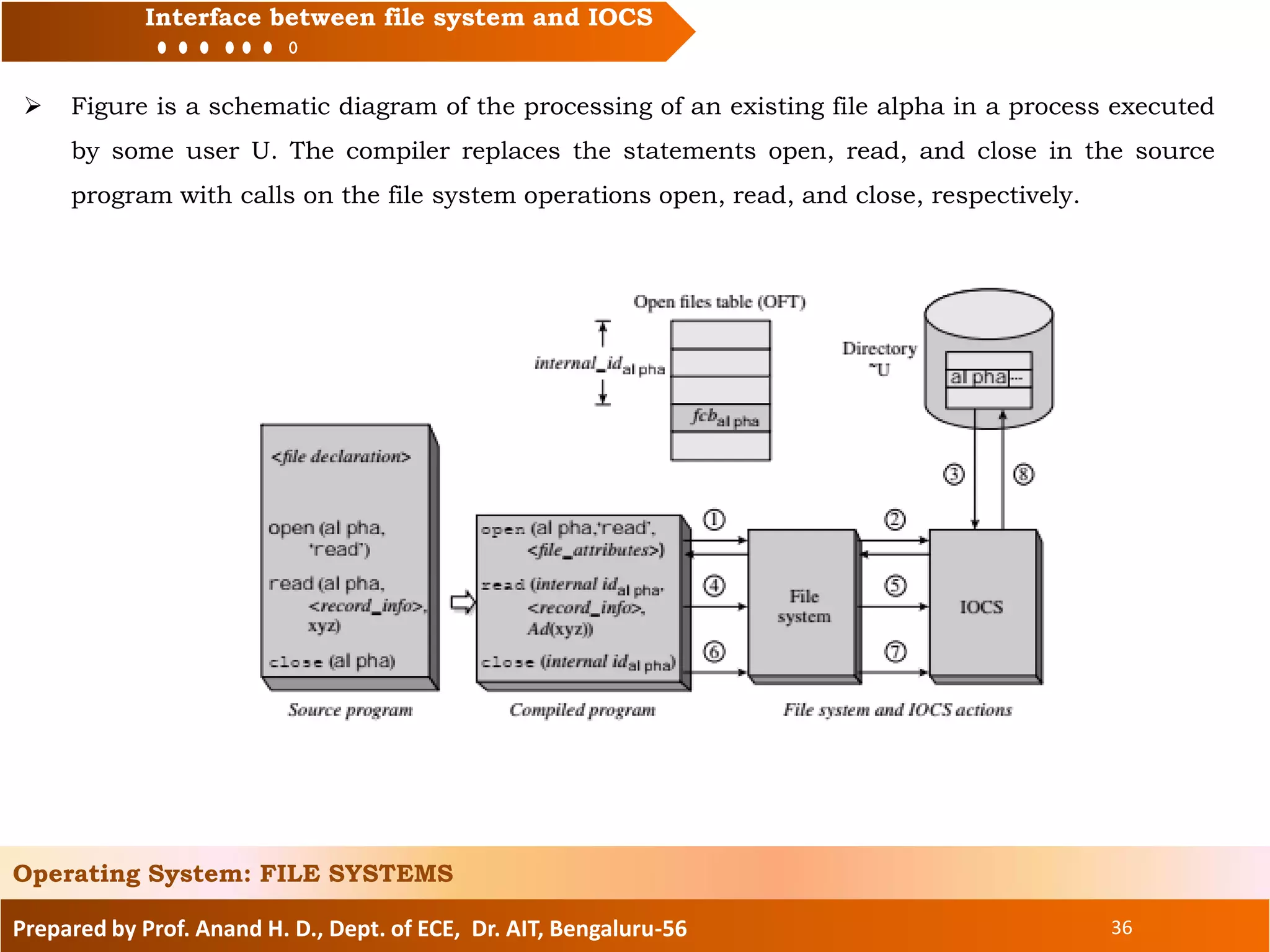
 Figure is a schematic diagram of the processing of an existing file alpha in a process executed
by some user U. The compiler replaces the statements open, read, and close in the source
program with calls on the file system operations open, read, and close, respectively.
Operating System: FILE SYSTEMS
Prepared by Prof. Anand H. D., Dept. of ECE, Dr. AIT, Bengaluru-56 37
Interface between file system and IOCS
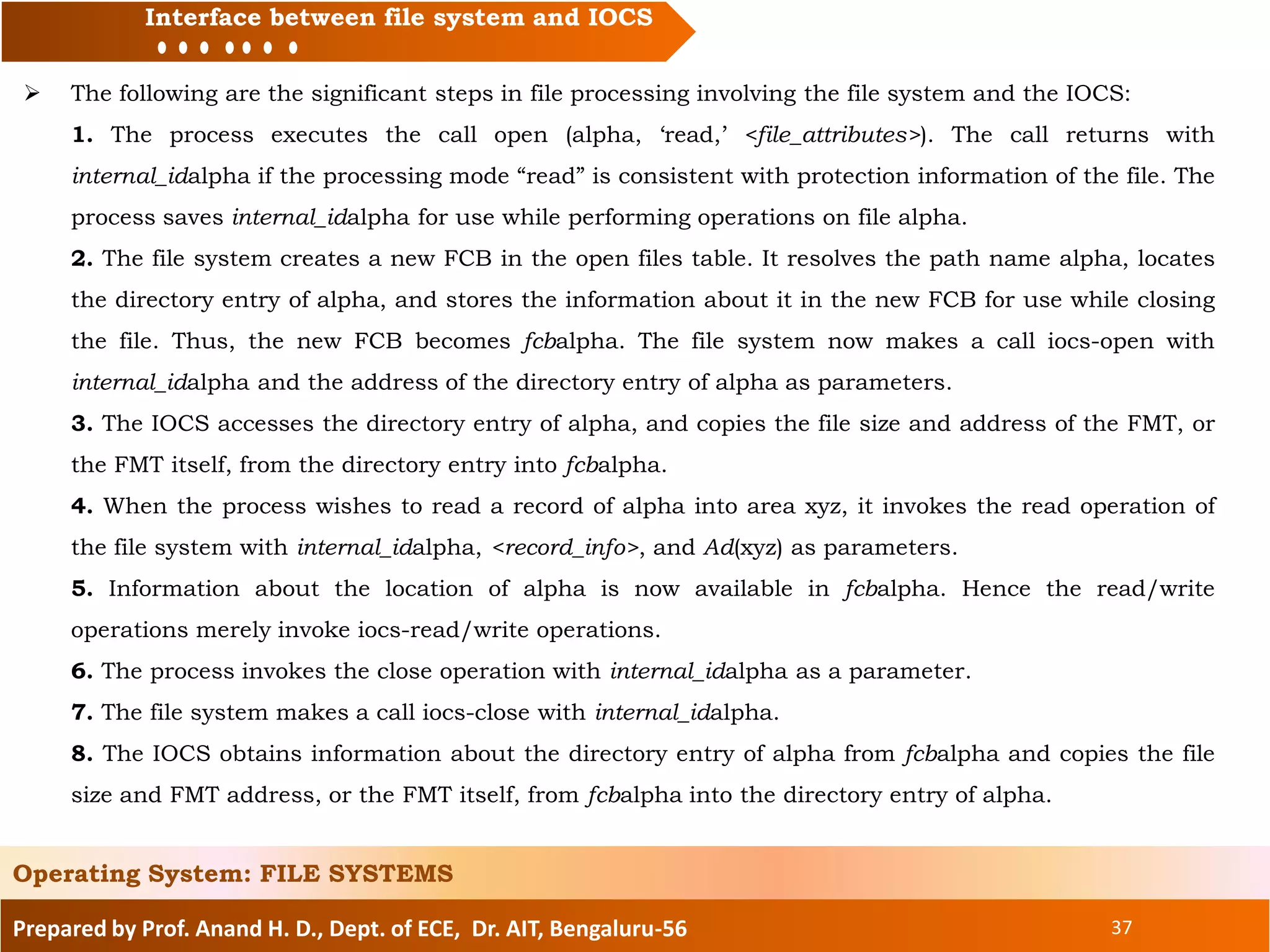
 The following are the significant steps in file processing involving the file system and the IOCS:
1. The process executes the call open (alpha, ‘read,’ <file_attributes>). The call returns with
internal_idalpha if the processing mode “read” is consistent with protection information of the file. The
process saves internal_idalpha for use while performing operations on file alpha.
2. The file system creates a new FCB in the open files table. It resolves the path name alpha, locates
the directory entry of alpha, and stores the information about it in the new FCB for use while closing
the file. Thus, the new FCB becomes fcbalpha. The file system now makes a call iocs-open with
internal_idalpha and the address of the directory entry of alpha as parameters.
3. The IOCS accesses the directory entry of alpha, and copies the file size and address of the FMT, or
the FMT itself, from the directory entry into fcbalpha.
4. When the process wishes to read a record of alpha into area xyz, it invokes the read operation of
the file system with internal_idalpha, <record_info>, and Ad(xyz) as parameters.
5. Information about the location of alpha is now available in fcbalpha. Hence the read/write
operations merely invoke iocs-read/write operations.
6. The process invokes the close operation with internal_idalpha as a parameter.
7. The file system makes a call iocs-close with internal_idalpha.
8. The IOCS obtains information about the directory entry of alpha from fcbalpha and copies the file
size and FMT address, or the FMT itself, from fcbalpha into the directory entry of alpha.
Operating System: FILE SYSTEMS
Prepared by Prof. Anand H. D., Dept. of ECE, Dr. AIT, Bengaluru-56 38
Topics to be covered:
File system and IOCS
Files and file organization
Fundamentals of file organizations
Directory structures
File protection
Interface between file system and IOCS
Allocation of disk space
Implementation of file access
Operating System: FILE SYSTEMS
Prepared by Prof. Anand H. D., Dept. of ECE, Dr. AIT, Bengaluru-56 39
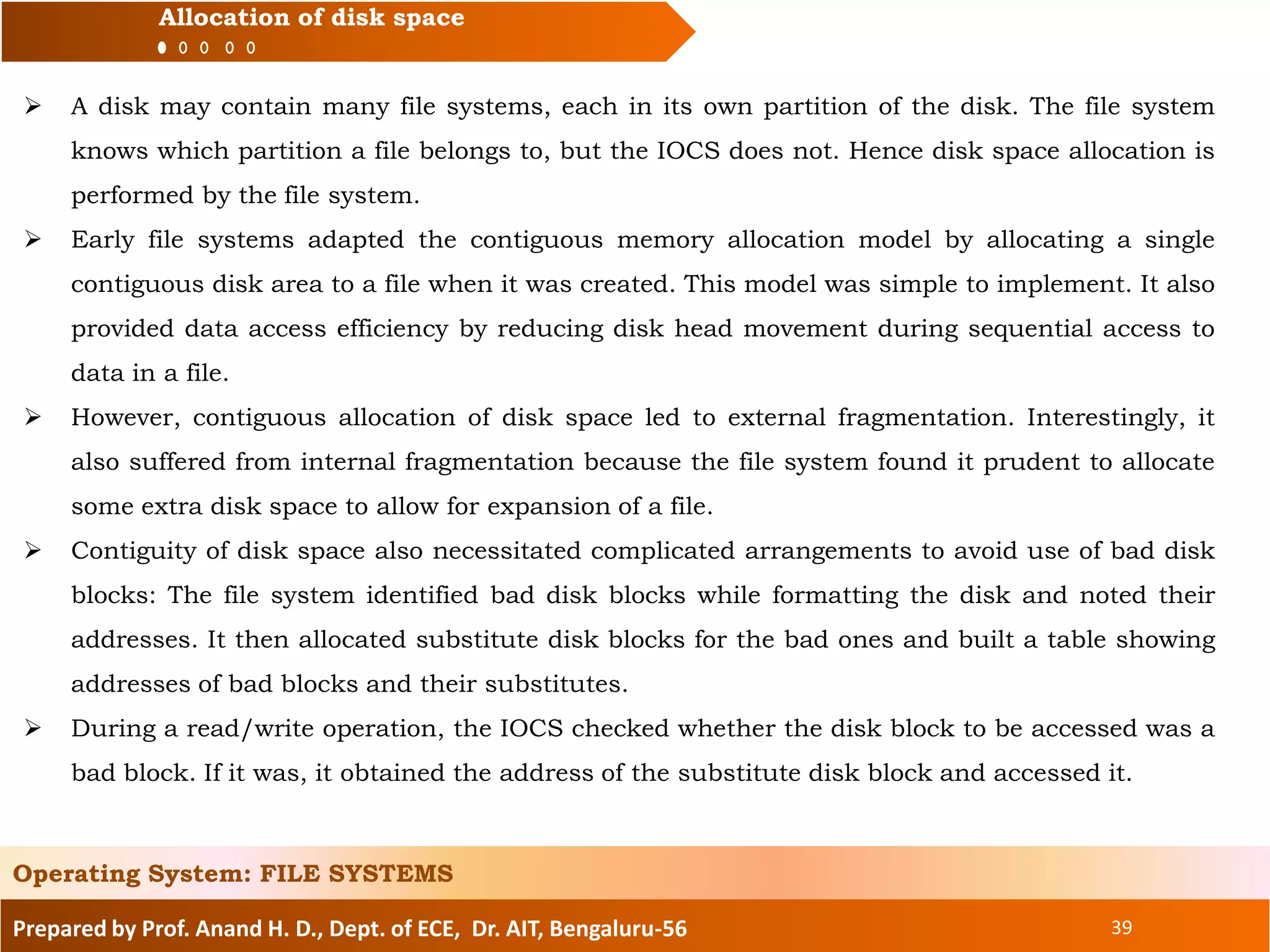
Allocation of disk space
 A disk may contain many file systems, each in its own partition of the disk. The file system
knows which partition a file belongs to, but the IOCS does not. Hence disk space allocation is
performed by the file system.
 Early file systems adapted the contiguous memory allocation model by allocating a single
contiguous disk area to a file when it was created. This model was simple to implement. It also
provided data access efficiency by reducing disk head movement during sequential access to
data in a file.
 However, contiguous allocation of disk space led to external fragmentation. Interestingly, it
also suffered from internal fragmentation because the file system found it prudent to allocate
some extra disk space to allow for expansion of a file.
 Contiguity of disk space also necessitated complicated arrangements to avoid use of bad disk
blocks: The file system identified bad disk blocks while formatting the disk and noted their
addresses. It then allocated substitute disk blocks for the bad ones and built a table showing
addresses of bad blocks and their substitutes.
 During a read/write operation, the IOCS checked whether the disk block to be accessed was a
bad block. If it was, it obtained the address of the substitute disk block and accessed it.
Operating System: FILE SYSTEMS
Prepared by Prof. Anand H. D., Dept. of ECE, Dr. AIT, Bengaluru-56 40
Allocation of disk space
 Modern file systems adapt the noncontiguous memory allocation model to disk space
allocation. In this approach, a chunk of disk space is allocated on demand, i.e., when the file
is created or when its size grows because of an update operation. The file system has to
address three issues for implementing this approach:
• Managing free disk space: Keep track of free disk space and allocate from it when a file
requires a new disk block.
• Avoiding excessive disk head movement: Ensure that data in a file is not dispersed to
different parts of a disk, as it would cause excessive movement of the disk heads during file
processing.
• Accessing file data: Maintain information about the disk space allocated to a file and use it
to find the disk block that contains required data.
 The file system can maintain a free list of disk space and allocate from it when a file requires a
new disk block. Alternatively, it can use a table called the disk status map (DSM) to indicate
the status of disk blocks. The DSM has one entry for each disk block, which indicates whether
the disk block is free or has been allocated to a file. This information can be maintained in a
single bit, and so a DSM is also called a bit map.
Operating System: FILE SYSTEMS
Prepared by Prof. Anand H. D., Dept. of ECE, Dr. AIT, Bengaluru-56 41
Allocation of disk space
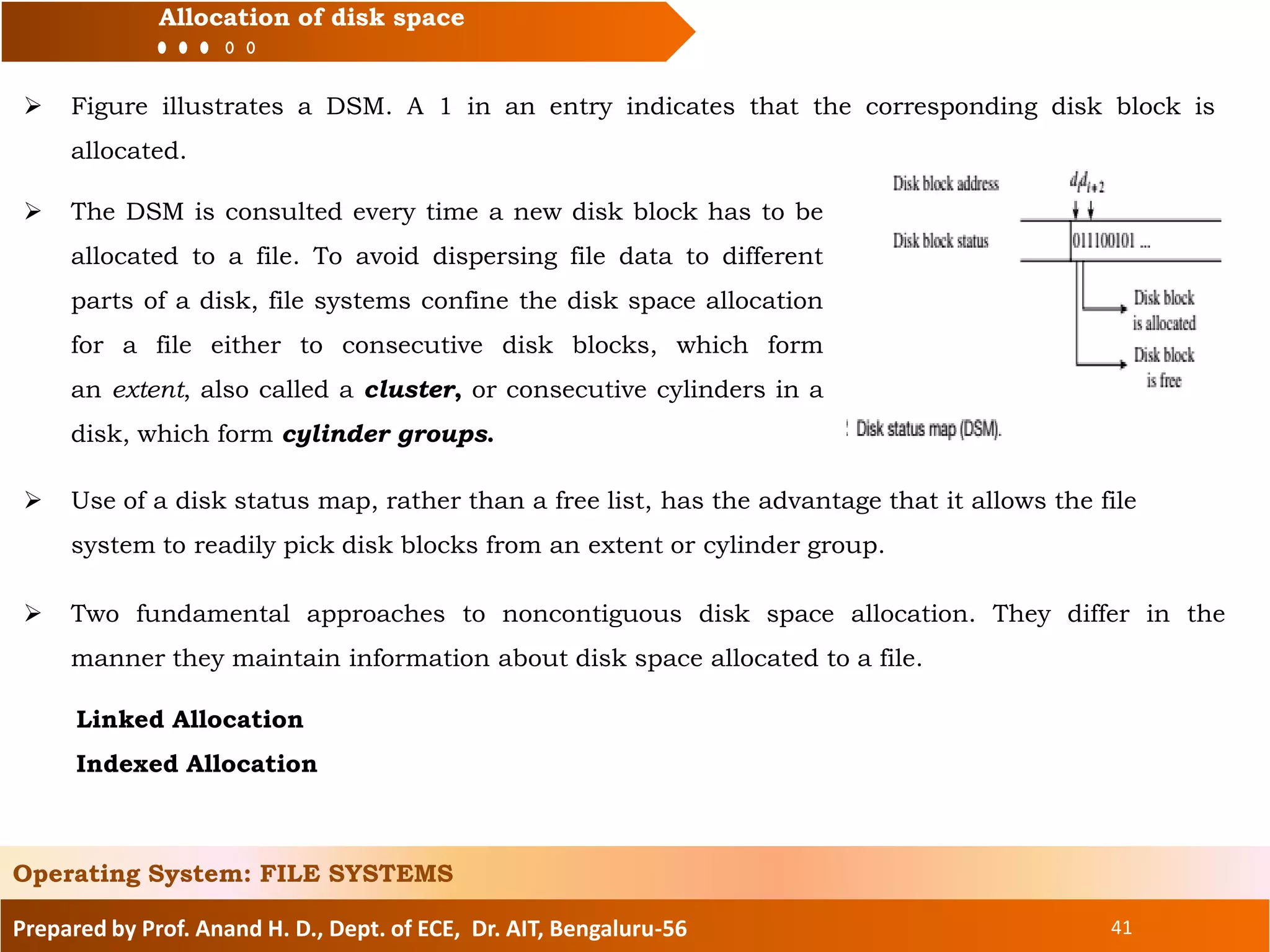
 Figure illustrates a DSM. A 1 in an entry indicates that the corresponding disk block is
allocated.
Operating System: FILE SYSTEMS
 The DSM is consulted every time a new disk block has to be
allocated to a file. To avoid dispersing file data to different
parts of a disk, file systems confine the disk space allocation
for a file either to consecutive disk blocks, which form
an extent, also called a cluster, or consecutive cylinders in a
disk, which form cylinder groups.
 Two fundamental approaches to noncontiguous disk space allocation. They differ in the
manner they maintain information about disk space allocated to a file.
Linked Allocation
Indexed Allocation
 Use of a disk status map, rather than a free list, has the advantage that it allows the file
system to readily pick disk blocks from an extent or cylinder group.
Prepared by Prof. Anand H. D., Dept. of ECE, Dr. AIT, Bengaluru-56 42
Allocation of disk space
Linked Allocation
Operating System: FILE SYSTEMS
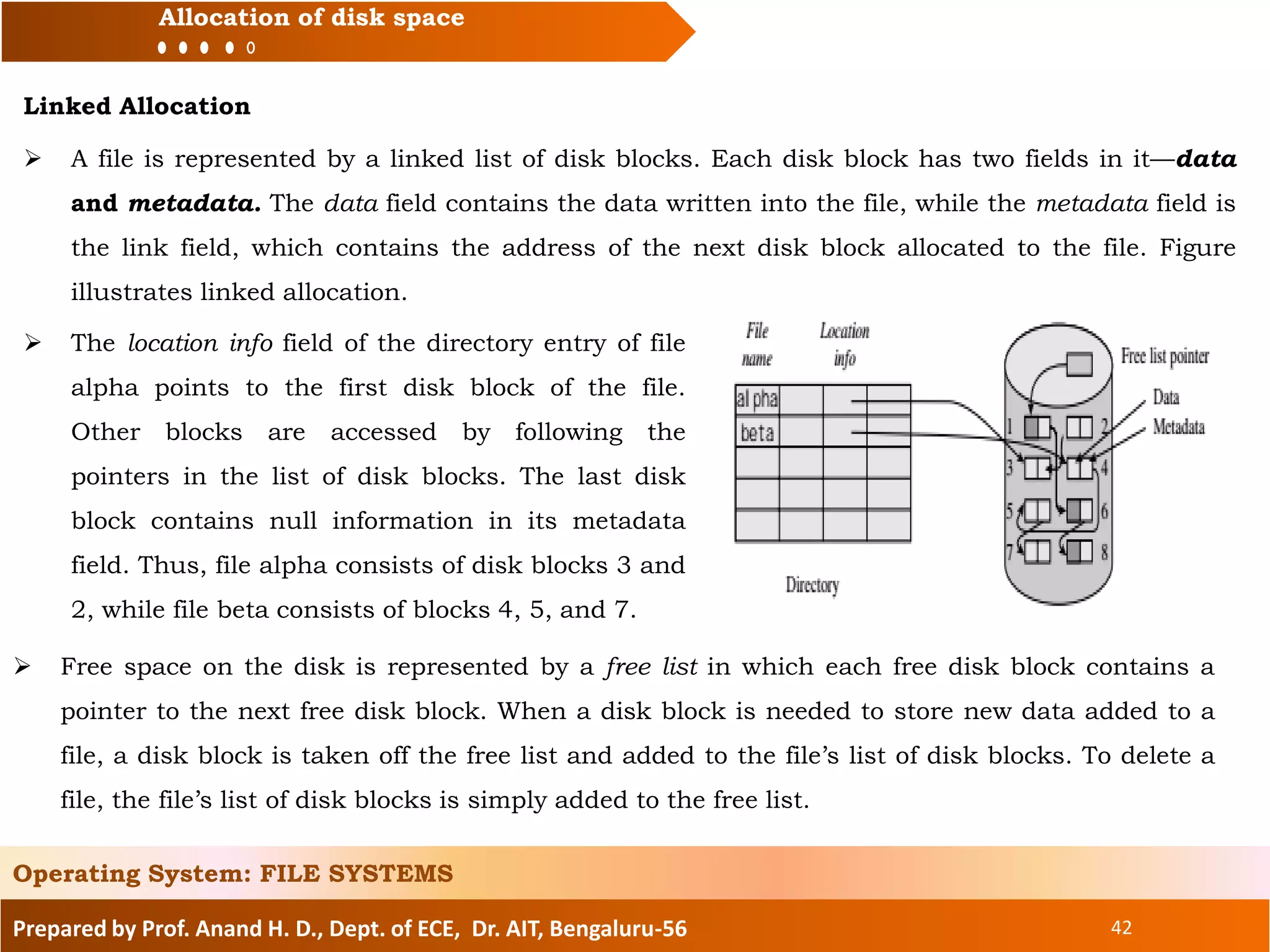
 A file is represented by a linked list of disk blocks. Each disk block has two fields in it—data
and metadata. The data field contains the data written into the file, while the metadata field is
the link field, which contains the address of the next disk block allocated to the file. Figure
illustrates linked allocation.
 The location info field of the directory entry of file
alpha points to the first disk block of the file.
Other blocks are accessed by following the
pointers in the list of disk blocks. The last disk
block contains null information in its metadata
field. Thus, file alpha consists of disk blocks 3 and
2, while file beta consists of blocks 4, 5, and 7.
 Free space on the disk is represented by a free list in which each free disk block contains a
pointer to the next free disk block. When a disk block is needed to store new data added to a
file, a disk block is taken off the free list and added to the file’s list of disk blocks. To delete a
file, the file’s list of disk blocks is simply added to the free list.
Prepared by Prof. Anand H. D., Dept. of ECE, Dr. AIT, Bengaluru-56 43
Allocation of disk space
Indexed Allocation
Operating System: FILE SYSTEMS
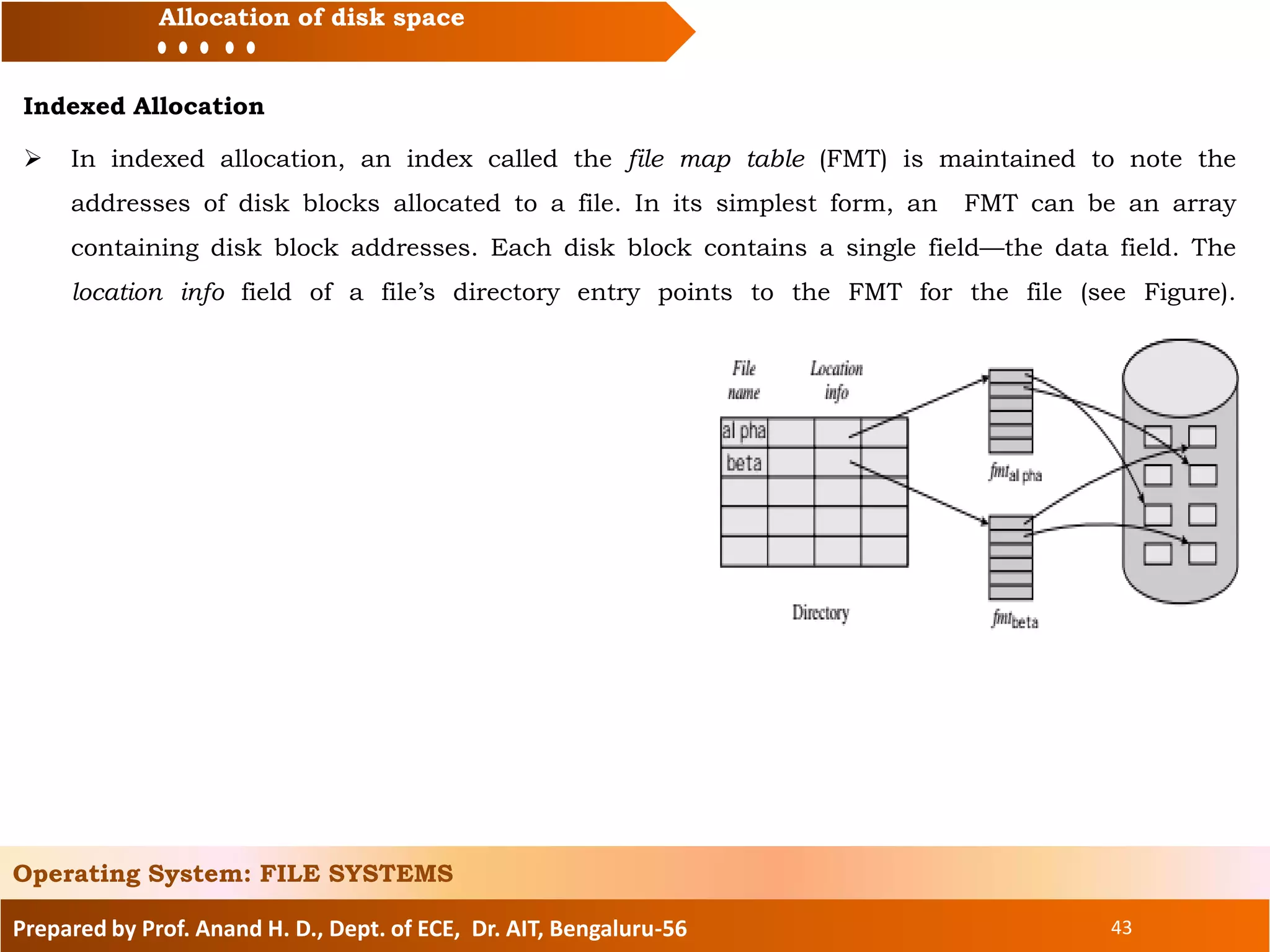
 In indexed allocation, an index called the file map table (FMT) is maintained to note the
addresses of disk blocks allocated to a file. In its simplest form, an FMT can be an array
containing disk block addresses. Each disk block contains a single field—the data field. The
location info field of a file’s directory entry points to the FMT for the file (see Figure).
Prepared by Prof. Anand H. D., Dept. of ECE, Dr. AIT, Bengaluru-56 44
Topics to be covered:
File system and IOCS
Files and file organization
Fundamentals of file organizations
Directory structures
File protection
Interface between file system and IOCS
Allocation of disk space
Implementation of file access
Operating System: FILE SYSTEMS
Prepared by Prof. Anand H. D., Dept. of ECE, Dr. AIT, Bengaluru-56 45
Implementation of file access
File System Actions at open
 The purpose of a call open (<path_name>, <processing_mode>, <file_attributes>), where <path_name> is
an absolute or relative path name for a file <file_name>, is to set up the processing of the file, open
performs the following actions:
1. It aborts the process if <processing_mode> is not consistent with the protection information for the
file. Otherwise, it creates an FCB for the file <file_name> in the OFT, and puts relevant information in
its fields. If <file_name> is a new file, it also writes <file_attributes> into its directory entry.
2. It passes the internal id of the file <file_name> back to the process for use
in file processing actions.
3. If the file <file_name> is being created or appended to, it makes provision to update the file’s
directory entry when a close call is made by the process. The procedure called path name resolution
traverses all path components in a path name and checks the validity of each component.
 It uses two pointers called the file FCB pointer and the directory FCB pointer during the traversal. It
points the file FCB pointer at the FCB of the file corresponding to the current component in the path
name, and the directory FCB pointer at the FCB of its parent directory. At the end of path name
resolution, the file FCB pointer is used to determine the internal id of the file.
Operating System: FILE SYSTEMS
Prepared by Prof. Anand H. D., Dept. of ECE, Dr. AIT, Bengaluru-56 46
Implementation of file access
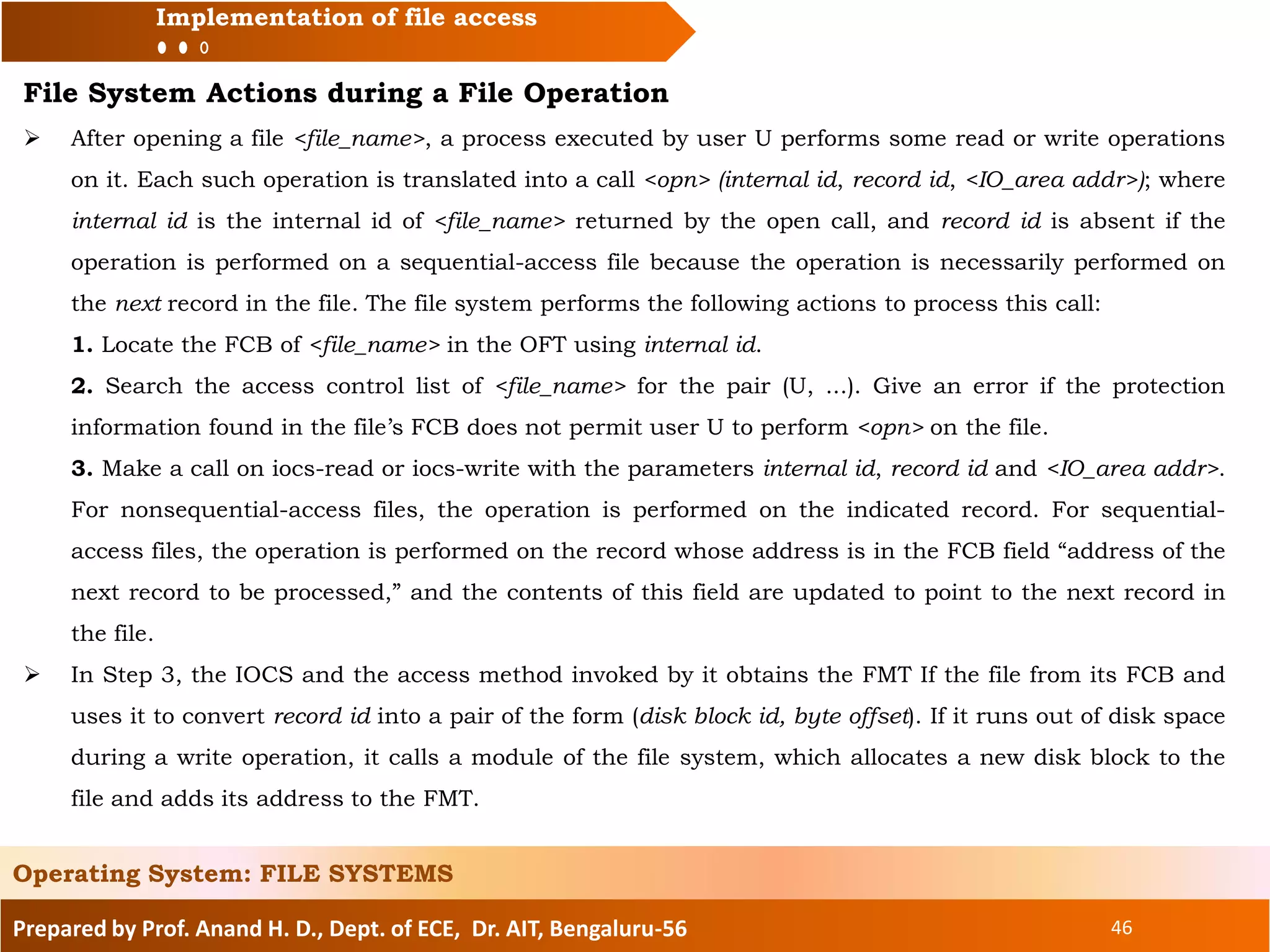
File System Actions during a File Operation
 After opening a file <file_name>, a process executed by user U performs some read or write operations
on it. Each such operation is translated into a call <opn> (internal id, record id, <IO_area addr>); where
internal id is the internal id of <file_name> returned by the open call, and record id is absent if the
operation is performed on a sequential-access file because the operation is necessarily performed on
the next record in the file. The file system performs the following actions to process this call:
1. Locate the FCB of <file_name> in the OFT using internal id.
2. Search the access control list of <file_name> for the pair (U, ...). Give an error if the protection
information found in the file’s FCB does not permit user U to perform <opn> on the file.
3. Make a call on iocs-read or iocs-write with the parameters internal id, record id and <IO_area addr>.
For nonsequential-access files, the operation is performed on the indicated record. For sequential-
access files, the operation is performed on the record whose address is in the FCB field “address of the
next record to be processed,” and the contents of this field are updated to point to the next record in
the file.
 In Step 3, the IOCS and the access method invoked by it obtains the FMT If the file from its FCB and
uses it to convert record id into a pair of the form (disk block id, byte offset). If it runs out of disk space
during a write operation, it calls a module of the file system, which allocates a new disk block to the
file and adds its address to the FMT.
Operating System: FILE SYSTEMS
Prepared by Prof. Anand H. D., Dept. of ECE, Dr. AIT, Bengaluru-56 47
Implementation of file access
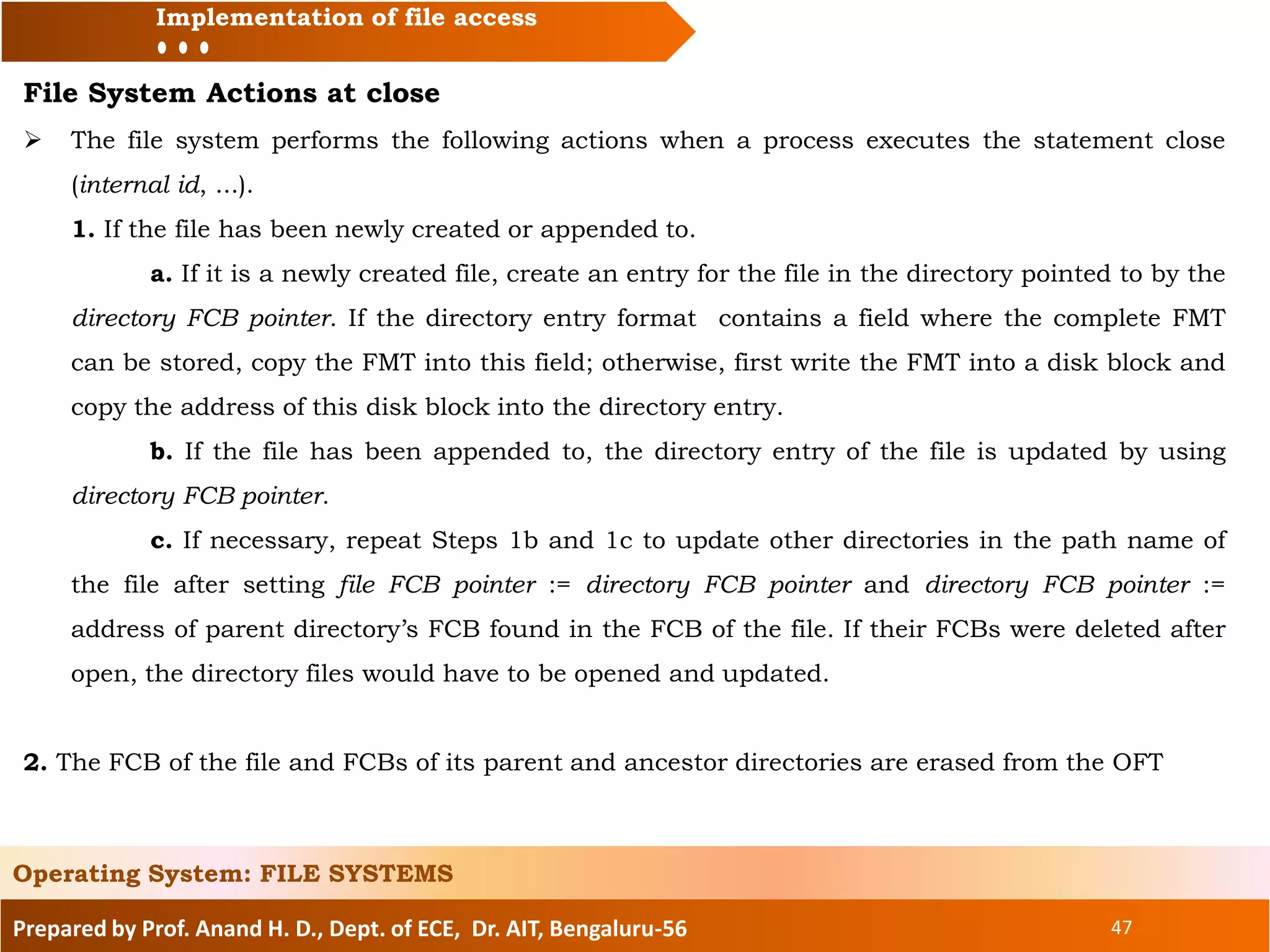
File System Actions at close
 The file system performs the following actions when a process executes the statement close
(internal id, ...).
1. If the file has been newly created or appended to.
a. If it is a newly created file, create an entry for the file in the directory pointed to by the
directory FCB pointer. If the directory entry format contains a field where the complete FMT
can be stored, copy the FMT into this field; otherwise, first write the FMT into a disk block and
copy the address of this disk block into the directory entry.
b. If the file has been appended to, the directory entry of the file is updated by using
directory FCB pointer.
c. If necessary, repeat Steps 1b and 1c to update other directories in the path name of
the file after setting file FCB pointer := directory FCB pointer and directory FCB pointer :=
address of parent directory’s FCB found in the FCB of the file. If their FCBs were deleted after
open, the directory files would have to be opened and updated.
2. The FCB of the file and FCBs of its parent and ancestor directories are erased from the OFT
Operating System: FILE SYSTEMS
Prepared by Prof. Anand H. D., Dept. of ECE, Dr. AIT, Bengaluru-56 48
Reference
1. D.M.Dhamdhare, “Operating Systems”,
Second Edition, TMH, 2008
For Further Reading
Operating System: FILE SYSTEMS
49
Prof. Anand H. D.
M. Tech.
Assistant Professor,
Department of Electronics & Communication Engineering
Dr. Ambedkar Institute of Technology, Bengaluru-56
Email: anandhdece@dr-ait.org
Phone: 9844518832

OS file systems

  • 1.
    Prepared by Prof.Anand H. D., Dept. of ECE, Dr. AIT, Bengaluru-56 OPERATING SYSTEM Mr. Anand H. D. 1 Department of Electronics & Communication Engineering Dr. Ambedkar Institute of Technology Bengaluru-56 Operating System: FILE SYSTEMS
  • 2.
    Prepared by Prof.Anand H. D., Dept. of ECE, Dr. AIT, Bengaluru-56 2 Topics to be covered: File system and IOCS Files and file organization Fundamentals of file organizations Directory structures File protection Interface between file system and IOCS Allocation of disk space implementation of file access Operating System: FILE SYSTEMS
  • 3.
    Prepared by Prof.Anand H. D., Dept. of ECE, Dr. AIT, Bengaluru-56 3 Topics to be covered: File system and IOCS Files and file organization Fundamentals of file organizations Directory structures File protection Interface between file system and IOCS Allocation of disk space Implementation of file access Operating System: FILE SYSTEMS
  • 4.
    Prepared by Prof.Anand H. D., Dept. of ECE, Dr. AIT, Bengaluru-56 4 File system and IOCS  A file system views a file as a collection of data that is owned by a user, can be shared by a set of authorized users, and has to be reliably stored over an extended period of time.  A file system gives users freedom in naming their files, as an aspect of ownership, so that a user can give a desired name to a file without worrying whether it conflicts with names of other users’ files; and it provides privacy by protecting against interference by other users.  The IOCS, on the other hand, views a file as a repository of data that need to be accessed speedily and are stored on an I/O device that needs to be used efficiently.  Table below summarizes the facilities provided by the file system and the IOCS. Operating System: FILE SYSTEMS  The file system provides directory structures that enable users to organize their data into logical groups of files, e.g., one group of files for each professional activity. The file system provides protection against illegal file accesses and ensures correct operation when processes access and update a file concurrently.
  • 5.
    Prepared by Prof.Anand H. D., Dept. of ECE, Dr. AIT, Bengaluru-56 5 File system and IOCS  It also ensures that data is reliably stored, i.e., data is not lost when system crashes occur. The file system and the IOCS form a hierarchy. Each of them has policies and provides mechanisms to implement the policies.  The IOCS and the file system provide different abstractions that lead to the following division of functions: • The file system provides an interface through which a process can perform open, read/write, and close operations on files. Its policy modules handle protection and sharing of files during open and read/write operations. Its mechanism modules assist in the implementation of open and close operations by accessing directories. They also pass on read/write requests for file data to the IOCS. • The IOCS policy modules ensure efficient operation of I/O devices and efficient file processing in each process through the IOCS mechanism modules. The mechanism modules in the IOCS, in turn, invoke the kernel through system calls to initiate I/O operations. Operating System: FILE SYSTEMS Data and Metadata: A file system houses two kinds of data—data contained within files, and data used to access files. We call the data within files file data, or simply data. The data used to access files is called control data, or metadata.
  • 6.
    Prepared by Prof.Anand H. D., Dept. of ECE, Dr. AIT, Bengaluru-56 6 Topics to be covered: File system and IOCS Files and file organization Fundamentals of file organizations Directory structures File protection Interface between file system and IOCS Allocation of disk space Implementation of file access Operating System: FILE SYSTEMS
  • 7.
    Prepared by Prof.Anand H. D., Dept. of ECE, Dr. AIT, Bengaluru-56 7 File Files and file organization  File Types A file system houses and organizes different types of files, e.g., data files, executable programs, object modules, textual information, documents, spreadsheets, photos, and video clips. Each of these file types has its own format for recording the data. These file types can be grouped into two classes: • Structured files • Byte stream files  A structured file is a collection of records, where a record is a meaningful unit for processing of data. A record is a collection of fields, and a field contains a single data item. Each record in a file is assumed to contain a key field. The value in the key field of a record is unique in a file; i.e., no two records contain an identical key. File types used by standard system software like compilers and linkers have a structure determined by the OS designer, while file types of user files depend on the applications or programs that create them.  A byte stream file is “flat.” There are no records and fields in it; it is looked upon as a sequence of bytes by the processes that use it. The next example illustrates structured and byte stream files. Operating System: FILE SYSTEMS
  • 8.
    Prepared by Prof.Anand H. D., Dept. of ECE, Dr. AIT, Bengaluru-56 8 File Files and file organization  Figure (a) shows a structured file named employee_info. Each record in the file contains information about one employee. A record contains four fields: employee id, name, designation, and age. The field containing the employee id is the key field. Figure (b) shows a byte stream file report. Operating System: FILE SYSTEMS  File Attributes: A file attribute is a characteristic of a file that is important either to its users or to the file system, or both.  Commonly used attributes of a file are: type, organization, size, location on disk, access control information, which indicates the manner in which different users can access the file; owner name, time of creation, and time of last use.  The file system stores the attributes of a file in its directory entry. During a file processing activity, the file system uses the attributes of a file to locate it, and to ensure that each operation being performed on it is consistent with its attributes. At the end of the file processing activity, the file system stores changed values of the file’s attributes, if any, in the file’s directory entry.
  • 9.
    Prepared by Prof.Anand H. D., Dept. of ECE, Dr. AIT, Bengaluru-56 9 File Files and file organization File Operations:  Table describes operations performed on files.  As mentioned earlier, operations such as open, close, rename, and delete are performed by file system modules.  Actual access of files, i.e., reading or writing of records, is implemented by the IOCS modules. Operating System: FILE SYSTEMS
  • 10.
    Prepared by Prof.Anand H. D., Dept. of ECE, Dr. AIT, Bengaluru-56 10 Topics to be covered: File system and IOCS Files and file organization Fundamentals of file organizations Directory structures File protection Interface between file system and IOCS Allocation of disk space Implementation of file access Operating System: FILE SYSTEMS
  • 11.
    Prepared by Prof.Anand H. D., Dept. of ECE, Dr. AIT, Bengaluru-56 11 Fundamentals of file organizations  We use the term “record access pattern” to describe the order in which records in a file are accessed by a process. The two fundamental record access patterns are sequential access, in which records are accessed in the order in which they fall in a file (or in the reverse of that order), and random access, in which records may be accessed in any order.  The file processing actions of a process will execute efficiently only if the process’s record access pattern can be implemented efficiently in the file system. The characteristics of an I/O device make it suitable for a specific record access pattern.  For example, a tape drive can access only the record that is placed immediately before or after the current position of its read/write head. Hence it is suitable for sequential access to records. A disk drive can directly access any record given its address. Hence it can efficiently implement both the sequential and random record access patterns Operating System: FILE SYSTEMS  A file organization is a combination of two features—a method of arranging records in a file and a procedure for accessing them.  A file organization is designed to exploit the characteristics of an I/O device for providing efficient record access for a specific record access pattern. A file system supports several file organizations so that a process can employ the one that best suits its file processing requirements and the I/O device in use.
  • 12.
    Prepared by Prof.Anand H. D., Dept. of ECE, Dr. AIT, Bengaluru-56 12 Fundamentals of file organizations  Accesses to files governed by a specific file organization are implemented by an IOCS module called an access method.  An access method is a policy module of the IOCS. While compiling a program, the compiler infers the file organization governing a file from the file’s declaration statement (or from the rules for default, if the program does not contain a file declaration statement), and identifies the correct access method to invoke for operations on the file. Operating System: FILE SYSTEMS Sequential File Organization  In sequential file organization, records are stored in an ascending or descending sequence according to the key field; the record access pattern of an application is expected to follow suit.  Hence sequential file organization supports two kinds of operations: read the next (or previous) record, and skip the next (or previous) record.  A sequential-access file is used in an application if its data can be conveniently presorted into an ascending or descending order. The sequential file organization is also used for byte stream files.
  • 13.
    Prepared by Prof.Anand H. D., Dept. of ECE, Dr. AIT, Bengaluru-56 13 Fundamentals of file organizations Direct File Organization  The direct file organization provides convenience and efficiency of file processing when records are accessed in a random order. To access a record, a read/write command needs to mention the value in its key field. We refer to such files as direct-access files.  A direct-access file is implemented as follows: When a process provides the key value of a record to be accessed, the access method module for the direct file organization applies a transformation to the key value that generates the address of the record in the storage medium.  If the file is organized on a disk, he transformation generates a (track_no, record_no) address. The disk heads are now positioned on the track track_no before a read or write command is issued on the record record_no.  Consider a file of employee information organized as a direct-access file. Let p records be written on one track of the disk. Assuming the employee numbers and the track and record numbers of the file to start from 1, the address of the record for employee number n is (track number (tn), record number (rn)) where and [. . ] indicates a rounded-up integer value. Operating System: FILE SYSTEMS
  • 14.
    Prepared by Prof.Anand H. D., Dept. of ECE, Dr. AIT, Bengaluru-56 14 Fundamentals of file organizations  Direct file organization provides access efficiency when records are processed randomly. However, it has three drawbacks compared to sequential file organization: • Record address calculation consumes CPU time. • Disks can store much more data along the outermost track than along the innermost track. However, the direct file organization stores an equal amount of data along each track. Hence some recording capacity is wasted. • The address calculation formulas work correctly only if a record exists for every possible value of the key, so dummy records have to exist for keys that are not in use. This requirement leads to poor utilization of the I/O medium.  Hence sequential processing of records in a direct-access file is less efficient than processing of records in a sequential-access file. Another practical problem is that characteristics of an I/O device are explicitly assumed and used by the address calculation formulas, which makes the file organization device dependent.  Rewriting the file on another device with different characteristics, e.g., different track capacity, will imply modifying the address calculation formulas. This requirement affects the portability of programs. Operating System: FILE SYSTEMS
  • 15.
    Prepared by Prof.Anand H. D., Dept. of ECE, Dr. AIT, Bengaluru-56 15 Fundamentals of file organizations Index Sequential File Organization  An index helps to determine the location of a record from its key value. In a pure indexed file organization, the index of a file contains an index entry with the format (key value, disk address) for each key value existing in the file.  To access a record with key k, the index entry containing k is found by searching the index, and the disk address mentioned in the entry is used to access the record. If an index is smaller than a file, this arrangement provides high access efficiency because a search in the index is more efficient than a search in the file.  The index sequential file organization is a hybrid organization that combines elements of the indexed and the sequential file organizations. To locate a desired record, the access method module for this organization searches an index to identify a section of the disk that may contain the record, and searches the records in this section of the disk sequentially to find the record.  The search succeeds if the record is present in the file; otherwise, it results in a failure. This arrangement requires a much smaller index than does a pure indexed file because the index contains entries for only some of the key values. It also provides better access efficiency than the sequential file organization while ensuring comparably efficient use of I/O media. Operating System: FILE SYSTEMS
  • 16.
    Prepared by Prof.Anand H. D., Dept. of ECE, Dr. AIT, Bengaluru-56 16 Fundamentals of file organizations  For a large file the index would still contain a large number of entries, and so the time required to search through the index would be large. A higher-level index can be used to reduce the search time. An entry in the higher-level index points to a section of the index. This section of the index is searched to find the section of the disk that may contain a desired record, and this section of the disk is searched sequentially for the desired record. The next example illustrates this arrangement. Operating System: FILE SYSTEMS Access Methods  An access method is a module of the IOCS that implements accesses to a class of files using a specific file organization. The procedure to be used for accessing records in a file, whether by a sequential search or by address calculation, is determined by the file organization. The access method module uses this procedure to access records. It may also use some advanced techniques in I/O programming to make file processing more efficient. Two such techniques are buffering and blocking of records.
  • 17.
    Prepared by Prof.Anand H. D., Dept. of ECE, Dr. AIT, Bengaluru-56 17 Fundamentals of file organizations  Buffering of Records The access method reads records of an input file ahead of the time when they are needed by a process and holds them temporarily in memory areas called buffers until they are actually used by the process. The purpose of buffering is to reduce or eliminate the wait for an I/O operation to complete; the process faces a wait only when the required record does not already exist in a buffer. The converse actions are performed for an output file. When the process performs a write operation, the data to be written into the file is copied into a buffer and the process is allowed to continue its operation. The data is written on the I/O device sometime later and the buffer is released for reuse. The process faces a wait only if a buffer is not available when it performs a write operation.  Blocking of Records The access method always reads or writes a large block of data, which contains several file records, from or to the I/O medium. This feature reduces the total number of I/O operations required for processing a file, thereby improving the file processing efficiency of a process. Blocking also improves utilization of an I/O medium and throughput of a device. Operating System: FILE SYSTEMS
  • 18.
    Prepared by Prof.Anand H. D., Dept. of ECE, Dr. AIT, Bengaluru-56 18 Topics to be covered: File system and IOCS Files and file organization Fundamentals of file organizations Directory structures File protection Interface between file system and IOCS Allocation of disk space Implementation of file access Operating System: FILE SYSTEMS
  • 19.
    Prepared by Prof.Anand H. D., Dept. of ECE, Dr. AIT, Bengaluru-56 19 Directory structures  A directory contains information about a group of files. Each entry in a directory contains the attributes of one file, such as its type, organization, size, location, and the manner in which it may be accessed by various users in the system. Figure shows the fields of a typical directory entry. Operating System: FILE SYSTEMS
  • 20.
    Prepared by Prof.Anand H. D., Dept. of ECE, Dr. AIT, Bengaluru-56 20 Directory structures  The open count and lock fields are used when several processes open a file concurrently. The open count indicates the number of such processes. As long as this count is nonzero, the file system keeps some of the metadata concerning the file in memory to speed up accesses to the data in the file.  The lock field is used when a process desires exclusive access to a file. The flags field is used to differentiate between different kinds of directory entries. We put the value “D” in this field to indicate that a file is a directory, “L” to indicate that it is a link, and “M” to indicate that it is a mounted file system. Later sections in this chapter will describe these uses. The misc info field contains information such as the file’s owner, its time of creation, and last modification.  A file system houses files owned by several users. Therefore it needs to grant users two important prerogatives: • File naming freedom: A user’s ability to give any desired name to a file, without being constrained by file names chosen by other users. • File sharing: A user’s ability to access files created by other users, and ability to permit other users to access his files. The file system creates several directories and uses a directory structure to organize them for providing file naming freedom and file sharing. Operating System: FILE SYSTEMS
  • 21.
    Prepared by Prof.Anand H. D., Dept. of ECE, Dr. AIT, Bengaluru-56 21 Directory structures  We include schematic diagrams to illustrate directory structures, using the convention that a directory is represented by a rectangle, while a file is represented by a circle. Figure shows a simple directory structure containing two kinds of directories. Operating System: FILE SYSTEMS  A user directory (UD) contains entries describing the files owned by one user. The master directory contains information about the UDs of all registered users of the system; each entry in the master directory is an ordered pair consisting of a user id and a pointer to a UD. In the file system shown, users A and B have each created their own file named beta. These files have entries in the users’ respective Uds.  We describe the directory structure shown in Figure as a two-level directory structure. Use of separate UDs is what provides naming freedom. When a process created by user A executes the statement open (beta, ...), the file system searches the master directory to locate A’s UD, and searches for beta in it. If the call open(beta, ...) had instead been executed by some process created by B, the file system would have searched B’s UD for beta.
  • 22.
    Prepared by Prof.Anand H. D., Dept. of ECE, Dr. AIT, Bengaluru-56 22 Directory structures Operating System: FILE SYSTEMS  This arrangement ensures that the correct file is accessed even if many files with identical names exist in the system.  Use of UDs has one drawback, however. It inhibits users from sharing their files with other users. A special syntax may have to be provided to enable a user to refer to another user’s file. For example, a process created by user C may execute the statement open (A→beta, ...) to open A’s file beta. The file system can implement this simply by using A’s UD, rather than C’s UD, to search and locate file beta.  To implement file protection, the file system must determine whether user C is permitted to open A’s file beta. It checks the protection info field of beta’s directory entry for this purpose. Directory Trees  The MULTICS file system of the 1960s contained features that allowed the user to create a new directory, give it a name of his choice, and create files and other directories in it up to any desired level. The resulting directory structure is a tree; we call it the directory tree. After MULTICS, most file systems have provided directory trees.  A user can create a file to hold data or to act as a directory. When a distinction between the two is important, we will call these files respectively data files and directory files, or simply directories.
  • 23.
    Prepared by Prof.Anand H. D., Dept. of ECE, Dr. AIT, Bengaluru-56 23 Directory structures Operating System: FILE SYSTEMS  The file system provides a directory called root that contains the home directory for each user, which is a directory file that typically has the same name as the user’s name. A user structures his information by creating directory files and data files in his home directory, creating files and other directories in a directory file, and so on. We will assume that the file system puts a “D” in the flags field of a file’s entry if the file is a directory file. Figure shows the directory tree of the file system.  The root of this tree is the directory root, which contains a home directory for each user that bears the user’s name. User A has created a file called alpha and directories called admin and projects. The projects directory contains a directory real_time, which contains a file main_pgm. Thus user A has a directory tree of his own; its root is his home directory.  At any time, a user is said to be “in” some specific directory, which is called his current directory. When the user wishes to open a file, the file name is searched for in this directory. Whenever the user logs in, the OS puts him in his home directory; the home directory is then the user’s current directory.
  • 24.
    Prepared by Prof.Anand H. D., Dept. of ECE, Dr. AIT, Bengaluru-56 24 Directory structures Operating System: FILE SYSTEMS  A user can change his current directory at any time through a “change directory” command. A file’s name may not be unique in the file system, so a user or a process uses a path name to identify it in an unambiguous manner. A path name is a sequence of one or more path components separated by a slash (/), where each path component is a reference through a directory and the last path component is the name of the file. Path names for locating a file from the current directory are called relative path names. Relative path names are often short and convenient to use; however, they can be confusing because a file may have different relative path names when accessed from different current directories. For example, in Figure 13.8, the file alpha has the simple relative path name alpha when accessed from current directory A, whereas it has relative path names of the form ../alpha and ../../alpha when accessed from the directories projects and real_time, respectively. To facilitate use of relative path names, each directory stores information about its own parent directory in the directory structure. The absolute path name of a file starts on the root directory of the file system’s directory tree. Identically named files created in different directories differ in their absolute path names. We will use the convention that the first path component I an absolute path is a null symbol, and the home directory of a user A is specified as˜A. Thus, in Figure 13.8, the absolute path name of file alpha is /A/alpha. An alternative path name for it is ˜A/alpha.
  • 25.
    Prepared by Prof.Anand H. D., Dept. of ECE, Dr. AIT, Bengaluru-56 25 Directory structures Operating System: FILE SYSTEMS  A user can change his current directory at any time through a “change directory” command. A file’s name may not be unique in the file system, so a user or a process uses a path name to identify it in an unambiguous manner.  A path name is a sequence of one or more path components separated by a slash (/), where each path component is a reference through a directory and the last path component is the name of the file.  Path names for locating a file from the current directory are called relative path names. Relative path names are often short and convenient to use; however, they can be confusing because a file may have different relative path names when accessed from different current directories.
  • 26.
    Prepared by Prof.Anand H. D., Dept. of ECE, Dr. AIT, Bengaluru-56 26 Directory structures Operating System: FILE SYSTEMS  For example, in Figure 13.8, the file alpha has the simple relative path name alpha when accessed from current directory A, whereas it has relative path names of the form ../alpha and ../../alpha when accessed from the directories projects and real_time, respectively.  To facilitate use of relative path names, each directory stores information about its own parent directory in the directory structure. The absolute path name of a file starts on the root directory of the file system’s directory tree. Identically named files created in different directories differ in their absolute path names.  We will use the convention that the first path component I an absolute path is a null symbol, and the home directory of a user A is specified as˜A. Thus, in Figure 13.8, the absolute path name of file alpha is /A/alpha. An alternative path name for it is ˜A/alpha.
  • 27.
    Prepared by Prof.Anand H. D., Dept. of ECE, Dr. AIT, Bengaluru-56 27 Topics to be covered: File system and IOCS Files and file organization Fundamentals of file organizations Directory structures File protection Interface between file system and IOCS Allocation of disk space Implementation of file access Operating System: FILE SYSTEMS
  • 28.
    Prepared by Prof.Anand H. D., Dept. of ECE, Dr. AIT, Bengaluru-56 28 File protection  A user would like to share a file with collaborators, but not with others. We call this requirement controlled sharing of files. To implement it, the owner of a file specifies which users can access the file in what manner. The file system stores this information in the protection info field of the file’s directory entry, and uses it to control access to the file.  In this section, we assume that a file’s protection information is stored in the form of an access control list. Each element of the access control list is an access control pair of the form (<user_name>, <list_of_access_privileges>).  When a process executed by some user X tries to perform an operation <opn> on file alpha, the file system searches for the pair with <user_name>= X, in the access control list of alpha and checks whether <opn> is consistent with the <list_of_access_privileges>.  If it is not, the attempt to access alpha fails. For example, a write attempt by X will fail if the entry for user X in the access control list is (X, read), or if the list does not contain an entry for X.  The size of a file’s access control list depends on the number of users and the number of access privileges defined in the system. To reduce the size of protection information, users can be classified in some convenient manner and an access control pair can be specified for each user class rather than for each individual user. Operating System: FILE SYSTEMS
  • 29.
    Prepared by Prof.Anand H. D., Dept. of ECE, Dr. AIT, Bengaluru-56 29 File protection  Now an access control list has only as many pairs as the number of user classes. For example, Unix specifies access privileges for three classes of users— the file owner, users in the same group as the owner, and all other users of the system.  In most file systems, access privileges are of three kinds—read, write, and execute. A write privilege permits existing data in the file to be modified and also permits new data to be added:  One can further differentiate between these two privileges by defining a new access privilege called append; however, it would increase the size of the protection information. The execute privilege permits a user to execute the program contained in a file.  Access privileges have different meanings for directory files. The read privilege for a directory file implies that one can obtain a listing of the directory, while the write privilege for a directory implies that one can create new files in the directory.  The execute privilege for a directory permits an access to be made through it—that is, it permits a file existing in the directory to be accessed. A user can use the execute privilege of directories to make a part of his directory structure visible to other users. Operating System: FILE SYSTEMS
  • 30.
    Prepared by Prof.Anand H. D., Dept. of ECE, Dr. AIT, Bengaluru-56 30 Topics to be covered: File system and IOCS Files and file organization Fundamentals of file organizations Directory structures File protection Interface between file system and IOCS Allocation of disk space Implementation of file access Operating System: FILE SYSTEMS
  • 31.
    Prepared by Prof.Anand H. D., Dept. of ECE, Dr. AIT, Bengaluru-56 31 Interface between file system and IOCS  The file system uses the IOCS to perform I/O operations and the IOCS implements them through kernel calls. The interface between the file system and the IOCS consists of three data structures—the file map table (FMT), the file control block (FCB), and the open files table (OFT)—and functions that perform /O operations. Operating System: FILE SYSTEMS  Use of these data structures avoids repeated processing of file attributes by the file system, and provides a convenient method of tracking the status of ongoing file processing activities. As discussed earlier, the file system allocates disk space to a file and stores information about the allocated disk space in the file map table (FMT).  The FMT is typically held in memory during the processing of a file. A file control block (FCB) contains all information concerning an ongoing file processing activity. This information can be classified into the three categories shown in Table.
  • 32.
    Prepared by Prof.Anand H. D., Dept. of ECE, Dr. AIT, Bengaluru-56 32 Interface between file system and IOCS  Information in the file organization category is either simply extracted from the file declaration statement in an application program, or inferred from it by the compiler, e.g., information such as the size of a record and number of buffers is extracted from a file declaration, while the name of the access method is inferred from the type and organization of a file.  The compiler puts this information as parameters in the open call. When the call is made during execution of the program, the file system puts this information in the FCB. Directory information is copied into the FCB through joint actions of the file system and the IOCS when a new file is created. Information concerning the current state of processing is written into the FCB by the IOCS. This information is continually updated during the processing of a file.  The open files table (OFT) holds the FCBs of all open files. The OFT resides in the kernel address space so that user processes cannot tamper with it. When a file is opened, the file system stores its FCB in a new entry of the OFT. The offset of this entry in the OFT is called the internal id of the file. The internal id is passed back to the process, which uses it as a parameter in all future file system calls. Figure shows the arrangement set up when a file alpha is opened. Operating System: FILE SYSTEMS
  • 33.
    Prepared by Prof.Anand H. D., Dept. of ECE, Dr. AIT, Bengaluru-56 33 Interface between file system and IOCS  Information in the file organization category is either simply extracted from the file declaration statement in an application program, or inferred from it by the compiler, e.g., information such as the size of a record and number of buffers is extracted from a file declaration, while the name of the access method is inferred from the type and organization of a file.  The compiler puts this information as parameters in the open call. When the call is made during execution of the program, the file system puts this information in the FCB. Directory information is copied into the FCB through joint actions of the file system and the IOCS when a new file is created. Information concerning the current state of processing is written into the FCB by the IOCS. This information is continually updated during the processing of a file. Operating System: FILE SYSTEMS  The open files table (OFT) holds the FCBs of all open files. The OFT resides in the kernel address space so that user processes cannot tamper with it. When a file is opened, the file system stores its FCB in a new entry of the OFT. The offset of this entry in the OFT is called the internal id of the file. The internal id is passed back to the process, which uses it as a parameter in all future file system calls. Figure shows the arrangement set up when a file alpha is opened.
  • 34.
    Prepared by Prof.Anand H. D., Dept. of ECE, Dr. AIT, Bengaluru-56 34 Interface between file system and IOCS  The file system copies fmtalpha in memory; creates fcbalpha, which is an FCB for alpha, in the OFT; initializes its fields appropriately; and passes back its offset in OFT, which in this case is 6, to the process as internal_idalpha. The file system supports the following operations: • open (<file_name>, <processing_mode>, <file_attributes>) • close (<internal_id_of_file>) • read/write (<internal_id_of_file>, <record_info>, <I/O_area_addr>)  <file_name> is an absolute or relative path name of the file to be opened.  <processing_mode> indicates what kind of operations will be performed on the file—the values “input,” “create,” and “append” of it have obvious meanings, while “update” indicates that the process intends to update existing data in place.  <file_attributes> is a list of file attributes, such as the file’s organization, record size, and protection information. It is relevant only when a new file is being created— attributes from the list are copied into the directory entry of the file at this time.  <record_info> indicates the identity of the record to be read or written if the file is being processed in a nonsequential mode. <I/O_area addr> indicates the address of the memory area where data from the record should be read, or the memory area that contains the data to be written into the record. Operating System: FILE SYSTEMS
  • 35.
    Prepared by Prof.Anand H. D., Dept. of ECE, Dr. AIT, Bengaluru-56 35 Interface between file system and IOCS  The IOCS interface supports the following operations: • iocs-open (<internal_id_of_file>, <directory_entry_address>) • iocs-close (<internal_id_of_file>, <directory_entry_address>) • iocs-read/write (<internal_id_of_file>, <record_info>, <I/O_area_addr>)  Each of these operations is a generic operation for the various file organizations supported by the file system. It works in two parts: It performs some actions that are common to all file organizations, and invokes a module of the access method mentioned in the FCB of the file for performing special actions required for specific file organizations. The iocs-open and iocs-close operations are specialized read and write operations that copy information into the FCB from the directory entry or from the FCB into the directory entry.  The iocs-read/write operations access the FCB to obtain information concerning the current state of the file processing activity, such as the address of the next record to be processed.  When a write operation requires more disk space, iocs-write invokes a function of the file system to perform disk space allocation. Operating System: FILE SYSTEMS
  • 36.
    Prepared by Prof.Anand H. D., Dept. of ECE, Dr. AIT, Bengaluru-56 36 Interface between file system and IOCS  Figure is a schematic diagram of the processing of an existing file alpha in a process executed by some user U. The compiler replaces the statements open, read, and close in the source program with calls on the file system operations open, read, and close, respectively. Operating System: FILE SYSTEMS
  • 37.
    Prepared by Prof.Anand H. D., Dept. of ECE, Dr. AIT, Bengaluru-56 37 Interface between file system and IOCS  The following are the significant steps in file processing involving the file system and the IOCS: 1. The process executes the call open (alpha, ‘read,’ <file_attributes>). The call returns with internal_idalpha if the processing mode “read” is consistent with protection information of the file. The process saves internal_idalpha for use while performing operations on file alpha. 2. The file system creates a new FCB in the open files table. It resolves the path name alpha, locates the directory entry of alpha, and stores the information about it in the new FCB for use while closing the file. Thus, the new FCB becomes fcbalpha. The file system now makes a call iocs-open with internal_idalpha and the address of the directory entry of alpha as parameters. 3. The IOCS accesses the directory entry of alpha, and copies the file size and address of the FMT, or the FMT itself, from the directory entry into fcbalpha. 4. When the process wishes to read a record of alpha into area xyz, it invokes the read operation of the file system with internal_idalpha, <record_info>, and Ad(xyz) as parameters. 5. Information about the location of alpha is now available in fcbalpha. Hence the read/write operations merely invoke iocs-read/write operations. 6. The process invokes the close operation with internal_idalpha as a parameter. 7. The file system makes a call iocs-close with internal_idalpha. 8. The IOCS obtains information about the directory entry of alpha from fcbalpha and copies the file size and FMT address, or the FMT itself, from fcbalpha into the directory entry of alpha. Operating System: FILE SYSTEMS
  • 38.
    Prepared by Prof.Anand H. D., Dept. of ECE, Dr. AIT, Bengaluru-56 38 Topics to be covered: File system and IOCS Files and file organization Fundamentals of file organizations Directory structures File protection Interface between file system and IOCS Allocation of disk space Implementation of file access Operating System: FILE SYSTEMS
  • 39.
    Prepared by Prof.Anand H. D., Dept. of ECE, Dr. AIT, Bengaluru-56 39 Allocation of disk space  A disk may contain many file systems, each in its own partition of the disk. The file system knows which partition a file belongs to, but the IOCS does not. Hence disk space allocation is performed by the file system.  Early file systems adapted the contiguous memory allocation model by allocating a single contiguous disk area to a file when it was created. This model was simple to implement. It also provided data access efficiency by reducing disk head movement during sequential access to data in a file.  However, contiguous allocation of disk space led to external fragmentation. Interestingly, it also suffered from internal fragmentation because the file system found it prudent to allocate some extra disk space to allow for expansion of a file.  Contiguity of disk space also necessitated complicated arrangements to avoid use of bad disk blocks: The file system identified bad disk blocks while formatting the disk and noted their addresses. It then allocated substitute disk blocks for the bad ones and built a table showing addresses of bad blocks and their substitutes.  During a read/write operation, the IOCS checked whether the disk block to be accessed was a bad block. If it was, it obtained the address of the substitute disk block and accessed it. Operating System: FILE SYSTEMS
  • 40.
    Prepared by Prof.Anand H. D., Dept. of ECE, Dr. AIT, Bengaluru-56 40 Allocation of disk space  Modern file systems adapt the noncontiguous memory allocation model to disk space allocation. In this approach, a chunk of disk space is allocated on demand, i.e., when the file is created or when its size grows because of an update operation. The file system has to address three issues for implementing this approach: • Managing free disk space: Keep track of free disk space and allocate from it when a file requires a new disk block. • Avoiding excessive disk head movement: Ensure that data in a file is not dispersed to different parts of a disk, as it would cause excessive movement of the disk heads during file processing. • Accessing file data: Maintain information about the disk space allocated to a file and use it to find the disk block that contains required data.  The file system can maintain a free list of disk space and allocate from it when a file requires a new disk block. Alternatively, it can use a table called the disk status map (DSM) to indicate the status of disk blocks. The DSM has one entry for each disk block, which indicates whether the disk block is free or has been allocated to a file. This information can be maintained in a single bit, and so a DSM is also called a bit map. Operating System: FILE SYSTEMS
  • 41.
    Prepared by Prof.Anand H. D., Dept. of ECE, Dr. AIT, Bengaluru-56 41 Allocation of disk space  Figure illustrates a DSM. A 1 in an entry indicates that the corresponding disk block is allocated. Operating System: FILE SYSTEMS  The DSM is consulted every time a new disk block has to be allocated to a file. To avoid dispersing file data to different parts of a disk, file systems confine the disk space allocation for a file either to consecutive disk blocks, which form an extent, also called a cluster, or consecutive cylinders in a disk, which form cylinder groups.  Two fundamental approaches to noncontiguous disk space allocation. They differ in the manner they maintain information about disk space allocated to a file. Linked Allocation Indexed Allocation  Use of a disk status map, rather than a free list, has the advantage that it allows the file system to readily pick disk blocks from an extent or cylinder group.
  • 42.
    Prepared by Prof.Anand H. D., Dept. of ECE, Dr. AIT, Bengaluru-56 42 Allocation of disk space Linked Allocation Operating System: FILE SYSTEMS  A file is represented by a linked list of disk blocks. Each disk block has two fields in it—data and metadata. The data field contains the data written into the file, while the metadata field is the link field, which contains the address of the next disk block allocated to the file. Figure illustrates linked allocation.  The location info field of the directory entry of file alpha points to the first disk block of the file. Other blocks are accessed by following the pointers in the list of disk blocks. The last disk block contains null information in its metadata field. Thus, file alpha consists of disk blocks 3 and 2, while file beta consists of blocks 4, 5, and 7.  Free space on the disk is represented by a free list in which each free disk block contains a pointer to the next free disk block. When a disk block is needed to store new data added to a file, a disk block is taken off the free list and added to the file’s list of disk blocks. To delete a file, the file’s list of disk blocks is simply added to the free list.
  • 43.
    Prepared by Prof.Anand H. D., Dept. of ECE, Dr. AIT, Bengaluru-56 43 Allocation of disk space Indexed Allocation Operating System: FILE SYSTEMS  In indexed allocation, an index called the file map table (FMT) is maintained to note the addresses of disk blocks allocated to a file. In its simplest form, an FMT can be an array containing disk block addresses. Each disk block contains a single field—the data field. The location info field of a file’s directory entry points to the FMT for the file (see Figure).
  • 44.
    Prepared by Prof.Anand H. D., Dept. of ECE, Dr. AIT, Bengaluru-56 44 Topics to be covered: File system and IOCS Files and file organization Fundamentals of file organizations Directory structures File protection Interface between file system and IOCS Allocation of disk space Implementation of file access Operating System: FILE SYSTEMS
  • 45.
    Prepared by Prof.Anand H. D., Dept. of ECE, Dr. AIT, Bengaluru-56 45 Implementation of file access File System Actions at open  The purpose of a call open (<path_name>, <processing_mode>, <file_attributes>), where <path_name> is an absolute or relative path name for a file <file_name>, is to set up the processing of the file, open performs the following actions: 1. It aborts the process if <processing_mode> is not consistent with the protection information for the file. Otherwise, it creates an FCB for the file <file_name> in the OFT, and puts relevant information in its fields. If <file_name> is a new file, it also writes <file_attributes> into its directory entry. 2. It passes the internal id of the file <file_name> back to the process for use in file processing actions. 3. If the file <file_name> is being created or appended to, it makes provision to update the file’s directory entry when a close call is made by the process. The procedure called path name resolution traverses all path components in a path name and checks the validity of each component.  It uses two pointers called the file FCB pointer and the directory FCB pointer during the traversal. It points the file FCB pointer at the FCB of the file corresponding to the current component in the path name, and the directory FCB pointer at the FCB of its parent directory. At the end of path name resolution, the file FCB pointer is used to determine the internal id of the file. Operating System: FILE SYSTEMS
  • 46.
    Prepared by Prof.Anand H. D., Dept. of ECE, Dr. AIT, Bengaluru-56 46 Implementation of file access File System Actions during a File Operation  After opening a file <file_name>, a process executed by user U performs some read or write operations on it. Each such operation is translated into a call <opn> (internal id, record id, <IO_area addr>); where internal id is the internal id of <file_name> returned by the open call, and record id is absent if the operation is performed on a sequential-access file because the operation is necessarily performed on the next record in the file. The file system performs the following actions to process this call: 1. Locate the FCB of <file_name> in the OFT using internal id. 2. Search the access control list of <file_name> for the pair (U, ...). Give an error if the protection information found in the file’s FCB does not permit user U to perform <opn> on the file. 3. Make a call on iocs-read or iocs-write with the parameters internal id, record id and <IO_area addr>. For nonsequential-access files, the operation is performed on the indicated record. For sequential- access files, the operation is performed on the record whose address is in the FCB field “address of the next record to be processed,” and the contents of this field are updated to point to the next record in the file.  In Step 3, the IOCS and the access method invoked by it obtains the FMT If the file from its FCB and uses it to convert record id into a pair of the form (disk block id, byte offset). If it runs out of disk space during a write operation, it calls a module of the file system, which allocates a new disk block to the file and adds its address to the FMT. Operating System: FILE SYSTEMS
  • 47.
    Prepared by Prof.Anand H. D., Dept. of ECE, Dr. AIT, Bengaluru-56 47 Implementation of file access File System Actions at close  The file system performs the following actions when a process executes the statement close (internal id, ...). 1. If the file has been newly created or appended to. a. If it is a newly created file, create an entry for the file in the directory pointed to by the directory FCB pointer. If the directory entry format contains a field where the complete FMT can be stored, copy the FMT into this field; otherwise, first write the FMT into a disk block and copy the address of this disk block into the directory entry. b. If the file has been appended to, the directory entry of the file is updated by using directory FCB pointer. c. If necessary, repeat Steps 1b and 1c to update other directories in the path name of the file after setting file FCB pointer := directory FCB pointer and directory FCB pointer := address of parent directory’s FCB found in the FCB of the file. If their FCBs were deleted after open, the directory files would have to be opened and updated. 2. The FCB of the file and FCBs of its parent and ancestor directories are erased from the OFT Operating System: FILE SYSTEMS
  • 48.
    Prepared by Prof.Anand H. D., Dept. of ECE, Dr. AIT, Bengaluru-56 48 Reference 1. D.M.Dhamdhare, “Operating Systems”, Second Edition, TMH, 2008 For Further Reading Operating System: FILE SYSTEMS
  • 49.
    49 Prof. Anand H.D. M. Tech. Assistant Professor, Department of Electronics & Communication Engineering Dr. Ambedkar Institute of Technology, Bengaluru-56 Email: anandhdece@dr-ait.org Phone: 9844518832