1The New File system API:FileContext & AbstractFileSystemSanjay RadiaCloud ComputingYahoo Inc.
AgendaOverview – old vs newMotivationThe New APIsWhat is next
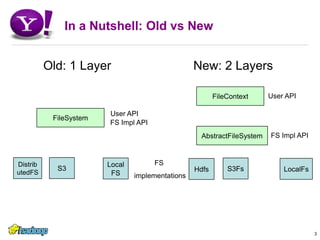
In a Nutshell: Old vs New       Old: 1 Layer        New: 2 Layers3FileContextUser APIUser APIFileSystemFS Impl APIAbstractFileSystemFS Impl APIFS implementationsS3DistributedFSS3FsLocalFSLocalFsHdfs
Motivation (1):   1st class URI file system namespaceFirst class URI file system namespaceOld: Shell offers a URI namespace view: e.g. cp uri1  uri2But at user-API layer, Create a FileSystem instance for each target scheme-authorityIncorrect:FileSystem.create(uriPath..) must take path in the FileSystem instanceCorrect:Fs = FileSystem.get(Uri1, …)Fs.create(pathInUri1, …)Original patch for symbolic link depicts the problemFileSystem.open(UriPath, … ) is invalid if UriPath is foreignBut one can fool the FileSystem into following a symlink to the same UriPath.Need a layer that provides first class URI file namespace4
Motivation (2) : Separate LayersTwo layers are merged in old FileSystemUser Api which provides notion of default file system and working dirImplementation Api for implementers of the file systemsWhy separate?Simpler to implement file systems an API for implementing file systems (like VFS in Unix).It does not need to deal with Slash, wd, umask, etcEach file system instance is limited to its namespaceUser Api layer provides a natural place forThe context: Slash, wd, umask, ….Uri namespace – cuts across the namespace of all file system instances.Hence a natural place to implement symbolic links to foreign namespaces5
Motivation (3): Cleanup API and SemanticsFileSystem API & some semantics are not very goodWe should have adapted Unix Apis where appropriateAsk yourself: are you smarter than Ritche & Thompson and understand the issues well enough to be differentSemantics: the recursive parent creationThis convenience can cause accidental creation of parentsE.g. A problem for speculative executionsSemantics: Rename method, etcToo many overloaded methods … (eg. Create)The cache has leaked through: FileSystem.getNewInstance()Ugliness: e.g. copyLocal() copy(), …FileSystem leaked into PathAdding InterruptedExceptionSome could have been fixed in the FileSystem class, but was getting messy to provide compatibility in the transitionA clean break made things much easier6
Motivation (4): The ConfigThe client-side config is too complex:Client should only need: Slash, wd, umask; that’s it nothing more.But Hadoop needs server-side defaults in client-side config An unnecessary burden on the client and adminCluster admin cannot be expected to copy the config to the desktopsDoes not work for a federated environment where a client connects to many file systems each with its own defaultsSolution: client grabs/uses needed properties from target serverA transition to this solution from the current config is challenging if one needs to maintain compatibility within the existing APIsA common complaint is that Hadoop config is way too complicated7
8The New File System APIsHADOOP-4952, HADOOP-6223
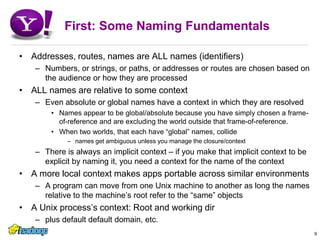
First: Some Naming FundamentalsAddresses, routes, names are ALL names (identifiers)Numbers, or strings, or paths, or addresses or routes are chosen based on the audience or how they are processedALL names are relative to some contextEven absolute or global names have a context in which they are resolvedNames appear to be global/absolute because you have simply chosen a frame-of-reference and are excluding the world outside that frame-of-reference. When two worlds, that each have “global” names, collidenames get ambiguous unless you manage the closure/contextThere is always an implicit context – if you make that implicit context to be explicit by naming it, you need a context for the name of the contextA more local context makes apps portable across similar environmentsA program can move from one Unix machine to another as long the names relative to the machine’s root refer to the “same” objectsA Unix process’s context: Root and working dirplus default default domain, etc.9
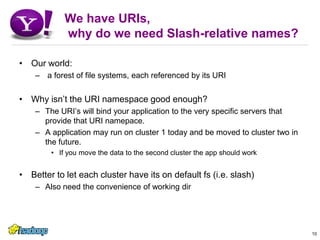
We have URIs, why do we need Slash-relative names?Our world: a forest of file systems, each referenced by its URIWhy isn’t the URI namespace good enough?The URI’s will bind your application to the very specific servers that provide that URI namepace.A application may run on cluster 1 today and be moved to cluster two in the future.If you move the data to the second cluster the app should workBetter to let each cluster have its on default fs (i.e. slash)Also need the convenience of working dir10
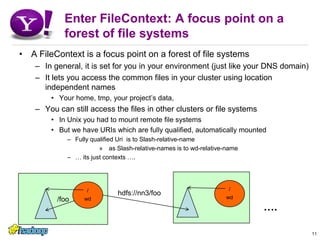
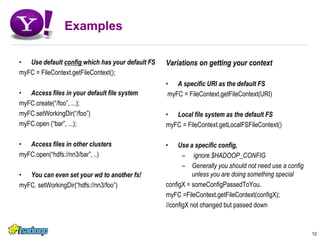
Enter FileContext: A focus point on a forest of file systemsA FileContext is a focus point on a forest of file systemsIn general, it is set for you in your environment (just like your DNS domain)It lets you access the common files in your cluster using location independent namesYour home, tmp, your project’s data,You can still access the files in other clusters or file systemsIn Unix you had to mount remote file systemsBut we have URIs which are fully qualified, automatically mountedFully qualified Uri  is to Slash-relative-name as Slash-relative-names is to wd-relative-name… its just contexts ….11/foo/wd/wdhdfs://nn3/foo….
ExamplesUse default config which has your default FSmyFC = FileContext.getFileContext();Access files in your default file systemmyFC.create(“/foo”, ...);myFC.setWorkingDir(“/foo”)myFC.open (“bar”, ...); Access files in other clustersmyFC.open(“hdfs://nn3/bar”, ..)You can even set your wd to another fs!myFC. setWorkingDir(“hdfs://nn3/foo”)Variations on getting your contextA specific URI as the default FS myFC = FileContext.getFileContext(URI)Local file system as the default FSmyFC = FileContext.getLocalFSFileContext()Use a specific config, ignore $HADOOP_CONFIGGenerally you should not need use a config unless you are doing something specialconfigX = someConfigPassedToYou.myFC =FileContext.getFileContext(configX);//configX not changed but passed down12
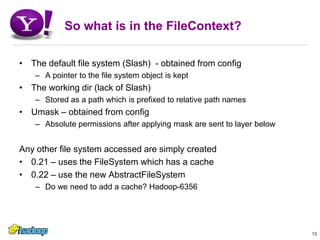
So what is in the FileContext?The default file system (Slash)  - obtained from configA pointer to the file system object is keptThe working dir (lack of Slash) Stored as a path which is prefixed to relative path namesUmask – obtained from configAbsolute permissions after applying mask are sent to layer belowAny other file system accessed are simply created0.21 – uses the FileSystem which has a cache0.22 – use the new AbstractFileSystemDo we need to add a cache? Hadoop-635613
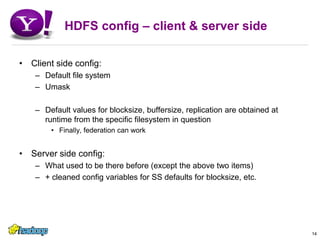
HDFS config – client & server sideClient side config:Default file systemUmaskDefault values for blocksize, buffersize, replication are obtained at runtime from the specific filesystem in questionFinally, federation can workServer side config:What used to be there before (except the above two items)+ cleaned config variables for SS defaults for blocksize, etc.14
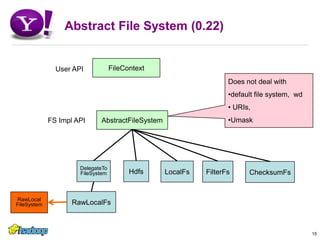
Abstract File System (0.22)15FileContextUser APIDoes not deal withdefault file system,  wd
 URIs,
UmaskAbstractFileSystemFS Impl API  DelegateTo FileSystemHdfsLocalFsFilterFsChecksumFsRawLocalFsRawLocal FileSystem

File Context

  • 1.
    1The New Filesystem API:FileContext & AbstractFileSystemSanjay RadiaCloud ComputingYahoo Inc.
  • 2.
    AgendaOverview – oldvs newMotivationThe New APIsWhat is next
  • 3.
    In a Nutshell:Old vs New Old: 1 Layer New: 2 Layers3FileContextUser APIUser APIFileSystemFS Impl APIAbstractFileSystemFS Impl APIFS implementationsS3DistributedFSS3FsLocalFSLocalFsHdfs
  • 4.
    Motivation (1): 1st class URI file system namespaceFirst class URI file system namespaceOld: Shell offers a URI namespace view: e.g. cp uri1 uri2But at user-API layer, Create a FileSystem instance for each target scheme-authorityIncorrect:FileSystem.create(uriPath..) must take path in the FileSystem instanceCorrect:Fs = FileSystem.get(Uri1, …)Fs.create(pathInUri1, …)Original patch for symbolic link depicts the problemFileSystem.open(UriPath, … ) is invalid if UriPath is foreignBut one can fool the FileSystem into following a symlink to the same UriPath.Need a layer that provides first class URI file namespace4
  • 5.
    Motivation (2) :Separate LayersTwo layers are merged in old FileSystemUser Api which provides notion of default file system and working dirImplementation Api for implementers of the file systemsWhy separate?Simpler to implement file systems an API for implementing file systems (like VFS in Unix).It does not need to deal with Slash, wd, umask, etcEach file system instance is limited to its namespaceUser Api layer provides a natural place forThe context: Slash, wd, umask, ….Uri namespace – cuts across the namespace of all file system instances.Hence a natural place to implement symbolic links to foreign namespaces5
  • 6.
    Motivation (3): CleanupAPI and SemanticsFileSystem API & some semantics are not very goodWe should have adapted Unix Apis where appropriateAsk yourself: are you smarter than Ritche & Thompson and understand the issues well enough to be differentSemantics: the recursive parent creationThis convenience can cause accidental creation of parentsE.g. A problem for speculative executionsSemantics: Rename method, etcToo many overloaded methods … (eg. Create)The cache has leaked through: FileSystem.getNewInstance()Ugliness: e.g. copyLocal() copy(), …FileSystem leaked into PathAdding InterruptedExceptionSome could have been fixed in the FileSystem class, but was getting messy to provide compatibility in the transitionA clean break made things much easier6
  • 7.
    Motivation (4): TheConfigThe client-side config is too complex:Client should only need: Slash, wd, umask; that’s it nothing more.But Hadoop needs server-side defaults in client-side config An unnecessary burden on the client and adminCluster admin cannot be expected to copy the config to the desktopsDoes not work for a federated environment where a client connects to many file systems each with its own defaultsSolution: client grabs/uses needed properties from target serverA transition to this solution from the current config is challenging if one needs to maintain compatibility within the existing APIsA common complaint is that Hadoop config is way too complicated7
  • 8.
    8The New FileSystem APIsHADOOP-4952, HADOOP-6223
  • 9.
    First: Some NamingFundamentalsAddresses, routes, names are ALL names (identifiers)Numbers, or strings, or paths, or addresses or routes are chosen based on the audience or how they are processedALL names are relative to some contextEven absolute or global names have a context in which they are resolvedNames appear to be global/absolute because you have simply chosen a frame-of-reference and are excluding the world outside that frame-of-reference. When two worlds, that each have “global” names, collidenames get ambiguous unless you manage the closure/contextThere is always an implicit context – if you make that implicit context to be explicit by naming it, you need a context for the name of the contextA more local context makes apps portable across similar environmentsA program can move from one Unix machine to another as long the names relative to the machine’s root refer to the “same” objectsA Unix process’s context: Root and working dirplus default default domain, etc.9
  • 10.
    We have URIs,why do we need Slash-relative names?Our world: a forest of file systems, each referenced by its URIWhy isn’t the URI namespace good enough?The URI’s will bind your application to the very specific servers that provide that URI namepace.A application may run on cluster 1 today and be moved to cluster two in the future.If you move the data to the second cluster the app should workBetter to let each cluster have its on default fs (i.e. slash)Also need the convenience of working dir10
  • 11.
    Enter FileContext: Afocus point on a forest of file systemsA FileContext is a focus point on a forest of file systemsIn general, it is set for you in your environment (just like your DNS domain)It lets you access the common files in your cluster using location independent namesYour home, tmp, your project’s data,You can still access the files in other clusters or file systemsIn Unix you had to mount remote file systemsBut we have URIs which are fully qualified, automatically mountedFully qualified Uri is to Slash-relative-name as Slash-relative-names is to wd-relative-name… its just contexts ….11/foo/wd/wdhdfs://nn3/foo….
  • 12.
    ExamplesUse default configwhich has your default FSmyFC = FileContext.getFileContext();Access files in your default file systemmyFC.create(“/foo”, ...);myFC.setWorkingDir(“/foo”)myFC.open (“bar”, ...); Access files in other clustersmyFC.open(“hdfs://nn3/bar”, ..)You can even set your wd to another fs!myFC. setWorkingDir(“hdfs://nn3/foo”)Variations on getting your contextA specific URI as the default FS myFC = FileContext.getFileContext(URI)Local file system as the default FSmyFC = FileContext.getLocalFSFileContext()Use a specific config, ignore $HADOOP_CONFIGGenerally you should not need use a config unless you are doing something specialconfigX = someConfigPassedToYou.myFC =FileContext.getFileContext(configX);//configX not changed but passed down12
  • 13.
    So what isin the FileContext?The default file system (Slash) - obtained from configA pointer to the file system object is keptThe working dir (lack of Slash) Stored as a path which is prefixed to relative path namesUmask – obtained from configAbsolute permissions after applying mask are sent to layer belowAny other file system accessed are simply created0.21 – uses the FileSystem which has a cache0.22 – use the new AbstractFileSystemDo we need to add a cache? Hadoop-635613
  • 14.
    HDFS config –client & server sideClient side config:Default file systemUmaskDefault values for blocksize, buffersize, replication are obtained at runtime from the specific filesystem in questionFinally, federation can workServer side config:What used to be there before (except the above two items)+ cleaned config variables for SS defaults for blocksize, etc.14
  • 15.
    Abstract File System(0.22)15FileContextUser APIDoes not deal withdefault file system, wd
  • 16.
  • 17.
    UmaskAbstractFileSystemFS Impl API DelegateTo FileSystemHdfsLocalFsFilterFsChecksumFsRawLocalFsRawLocal FileSystem