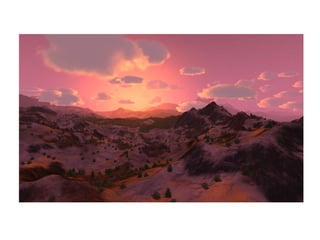
Felwyrld


   Alex Nankervis
anankervis@gmail.com
Overview
• Graphical MUD tech-demo
  – Targets 256 players per server machine
• Large world (50km x 50km)
  – Static and dynamically placed content
  – Lots of work for the renderer
• OpenGL, OpenAL + Ogg/Vorbis,
  OpenSSL, zlib, WinSock/enet, DirectInput
Server
• AI, player records, world state, chat system
• Low bandwidth
   – Client side prediction (extrapolation)
   – Server side prediction of client’s predicted state
       • Updates clients only when potentially out of sync
   – Client views
   – Compression
   – Quantization
       • Coordinate system relative to client view
• CPU usage
   – Dynamic spawning around clients
       • Unpopulated areas inactive
• Encrypted login
Render Overview
• Z pre-pass
   – Draw only to depth buffer, no color output
   – Reduces overdraw, used for occlusion queries
• Issue occlusion queries
• CPU rendering work
   – Kill time while waiting on occlusion queries
   – Visibility, detail meshes, clouds, animation
• Retrieve occlusion queries
   – Finish visibility testing
• Draw models, trees, terrain, sky dome, particles
• Post processing
   – Lighting
• UI and overlays
Visibility Testing
• Quad tree
   – Rejects large groups of trees and terrain quickly
   – Cached to disk
       • Load time and memory allocation optimization
• Occlusion queries
   – Reject hidden objects
       • Quad tree blocks
       • Terrain blocks
       • Tree bounding boxes
           – Full detail trees, only
   – A win under heavy loads
       • Requires careful scheduling to maintain pipelining of GPU
           – Mix CPU/GPU work, retrieve query results after some time
           – Or, delay reading the query result until a later frame
Trees
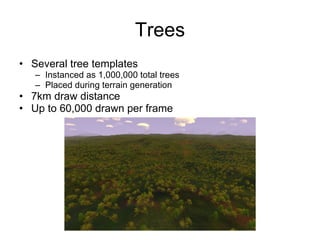
• Several tree templates
   – Instanced as 1,000,000 total trees
   – Placed during terrain generation
• 7km draw distance
• Up to 60,000 drawn per frame
Tree Generation
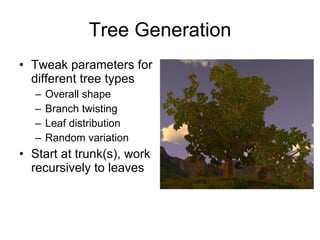
• Tweak parameters for
  different tree types
   –   Overall shape
   –   Branch twisting
   –   Leaf distribution
   –   Random variation
• Start at trunk(s), work
  recursively to leaves
Tree Rendering
• Branches
  – One vertex buffer
      • Stored in order of importance
      • LOD by truncating index list
  – Wind animation
      • Branches bend and sway in the wind
• Leaves
  – One vertex buffer, no index buffer
      • Stored in shuffled random order
      • LOD by truncating removes random leaves
  – Camera-aligned quads
  – Wind animation
      • Quads rotated in vertex program
  – Static shadowing and color variation
      • Darker near center and bottom of tree
Tree LOD
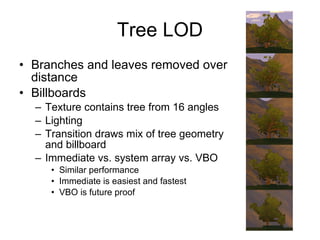
• Branches and leaves removed over
  distance
• Billboards
  – Texture contains tree from 16 angles
  – Lighting
  – Transition draws mix of tree geometry
    and billboard
  – Immediate vs. system array vs. VBO
     • Similar performance
     • Immediate is easiest and fastest
     • VBO is future proof
Terrain
• 50km x 50km at ~12 meter resolution
  – 4097x4097 heightfield
  – Unlimited draw distance
• Hierarchy of 33x33 patches
  – Matches quad tree layout
  – Vertices, texture list, two blend textures
  – Topology same for every block
     • One set of indices
Terrain Creation
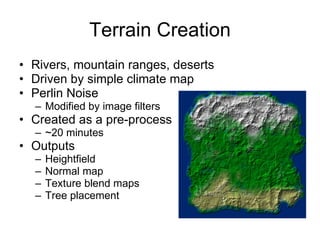
• Rivers, mountain ranges, deserts
• Driven by simple climate map
• Perlin Noise
  – Modified by image filters
• Created as a pre-process
  – ~20 minutes
• Outputs
  –   Heightfield
  –   Normal map
  –   Texture blend maps
  –   Tree placement
Terrain Paging
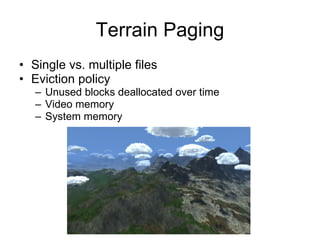
• Single vs. multiple files
• Eviction policy
   – Unused blocks deallocated over time
   – Video memory
   – System memory
Terrain Coordinates
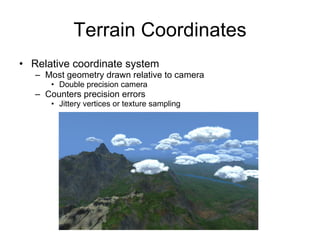
• Relative coordinate system
   – Most geometry drawn relative to camera
      • Double precision camera
   – Counters precision errors
      • Jittery vertices or texture sampling
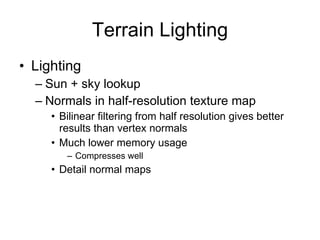
Terrain Lighting
• Lighting
  – Sun + sky lookup
  – Normals in half-resolution texture map
     • Bilinear filtering from half resolution gives better
       results than vertex normals
     • Much lower memory usage
        – Compresses well
     • Detail normal maps
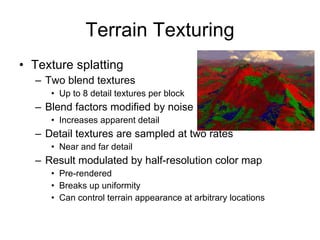
Terrain Texturing
• Texture splatting
  – Two blend textures
     • Up to 8 detail textures per block
  – Blend factors modified by noise
     • Increases apparent detail
  – Detail textures are sampled at two rates
     • Near and far detail
  – Result modulated by half-resolution color map
     • Pre-rendered
     • Breaks up uniformity
     • Can control terrain appearance at arbitrary locations
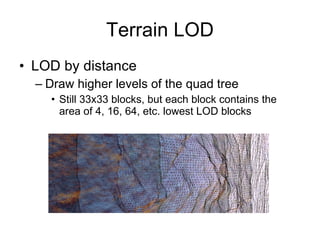
Terrain LOD
• LOD by distance
  – Draw higher levels of the quad tree
    • Still 33x33 blocks, but each block contains the
      area of 4, 16, 64, etc. lowest LOD blocks
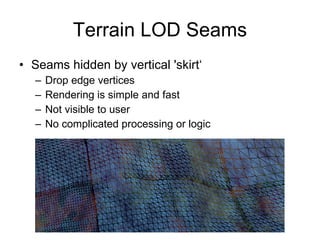
Terrain LOD Seams
• Seams hidden by vertical 'skirt‘
  –   Drop edge vertices
  –   Rendering is simple and fast
  –   Not visible to user
  –   No complicated processing or logic
Bushes, Grass, Rocks
• Uniform grid of blocks around the camera
  – Each block contains ~1000 detail meshes
  – Meshes batched together into a single VBO
  – Blocks generated from a seed number
    • Created as needed
    • Revisited blocks will be the same
    • Evicted similar to terrain blocks
• Wind sway through vertex program
• Frustum culling at block level
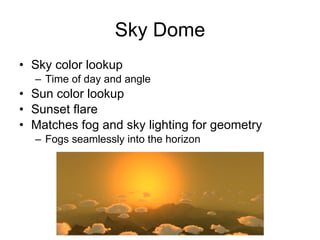
Sky Dome
• Sky color lookup
  – Time of day and angle
• Sun color lookup
• Sunset flare
• Matches fog and sky lighting for geometry
  – Fogs seamlessly into the horizon
Clouds
• 32 unique clouds
   – Instanced 8 times each
   – Based on work by Mark Harris
   – Lit particle system
• Lighting calculation
   – Fast pre-process
      • Once per unique cloud when light changes
      • Spread over multiple frames
   – Handles any number of lights plus ambient
      • Felwyrld uses just one, the sun
   – GPU vs. CPU
      • Fast, special purpose CPU rasterizer best
          – Improvement over original approach
          – Allows real-time lighting updates
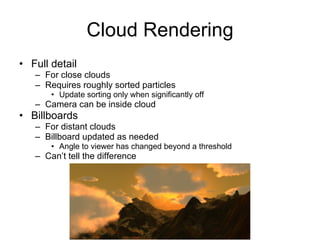
Cloud Rendering
• Full detail
   – For close clouds
   – Requires roughly sorted particles
       • Update sorting only when significantly off
   – Camera can be inside cloud
• Billboards
   – For distant clouds
   – Billboard updated as needed
       • Angle to viewer has changed beyond a threshold
   – Can’t tell the difference
Water
• Basic bump / specular
  – Multiple detail normal maps based on
    distance
• Water fogging
  – Fades out around shoreline and objects
  – Uses scene depth texture
    • Distance to nearest object along view vector
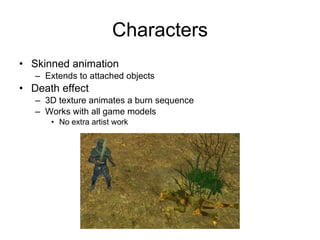
Characters
• Skinned animation
   – Extends to attached objects
• Death effect
   – 3D texture animates a burn sequence
   – Works with all game models
      • No extra artist work
Particles
• Simple particle system
  – Designed for speed
  – Only moderate flexibility
• Particle rotation uses vertex program
  – Less CPU work
UI
• Basic UI
  – Controls inherit from template interfaces
    • Basic element, value control
  – Container, Text Box, List Box, Slider, Spin,
    Button, Check Box, Icon, Tool-tip
  – Maintains hierarchy of elements
    • Draw order
    • Input and updates
Deferred Rendering
• Lighting and fogging done as a post process
  – Objects output color, normal, and depth (implicit)
  – Full screen pass processes each stored pixel
  – Fog color matches sky color
• Works well with unified lighting model
  – One place to adjust lighting, easier to maintain
  – All objects fit together
  – Unique lighting models per-object harder
• ~15% speed up due to less overdraw
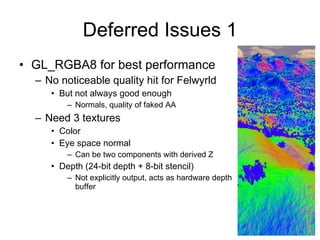
Deferred Issues 1
• GL_RGBA8 for best performance
  – No noticeable quality hit for Felwyrld
     • But not always good enough
         – Normals, quality of faked AA
  – Need 3 textures
     • Color
     • Eye space normal
         – Can be two components with derived Z
     • Depth (24-bit depth + 8-bit stencil)
         – Not explicitly output, acts as hardware depth
           buffer
Deferred Issues 2
• MRT best with smaller, same-width
  formats
  – Bandwidth
  – Repeat fragment program execution
  – Smaller formats also faster to sample
• MSAA issues
  – Many potential solutions
     • Involve tradeoffs in speed, simplicity, and
       quality
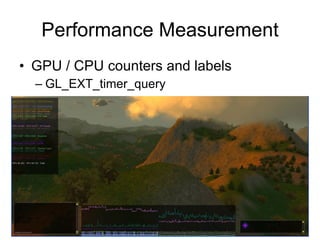
Performance Measurement
• GPU / CPU counters and labels
  – GL_EXT_timer_query

Felwyrld Tech

  • 1.
    Felwyrld Alex Nankervis anankervis@gmail.com
  • 2.
    Overview • Graphical MUDtech-demo – Targets 256 players per server machine • Large world (50km x 50km) – Static and dynamically placed content – Lots of work for the renderer • OpenGL, OpenAL + Ogg/Vorbis, OpenSSL, zlib, WinSock/enet, DirectInput
  • 5.
    Server • AI, playerrecords, world state, chat system • Low bandwidth – Client side prediction (extrapolation) – Server side prediction of client’s predicted state • Updates clients only when potentially out of sync – Client views – Compression – Quantization • Coordinate system relative to client view • CPU usage – Dynamic spawning around clients • Unpopulated areas inactive • Encrypted login
  • 6.
    Render Overview • Zpre-pass – Draw only to depth buffer, no color output – Reduces overdraw, used for occlusion queries • Issue occlusion queries • CPU rendering work – Kill time while waiting on occlusion queries – Visibility, detail meshes, clouds, animation • Retrieve occlusion queries – Finish visibility testing • Draw models, trees, terrain, sky dome, particles • Post processing – Lighting • UI and overlays
  • 7.
    Visibility Testing • Quadtree – Rejects large groups of trees and terrain quickly – Cached to disk • Load time and memory allocation optimization • Occlusion queries – Reject hidden objects • Quad tree blocks • Terrain blocks • Tree bounding boxes – Full detail trees, only – A win under heavy loads • Requires careful scheduling to maintain pipelining of GPU – Mix CPU/GPU work, retrieve query results after some time – Or, delay reading the query result until a later frame
  • 8.
    Trees • Several treetemplates – Instanced as 1,000,000 total trees – Placed during terrain generation • 7km draw distance • Up to 60,000 drawn per frame
  • 9.
    Tree Generation • Tweakparameters for different tree types – Overall shape – Branch twisting – Leaf distribution – Random variation • Start at trunk(s), work recursively to leaves
  • 10.
    Tree Rendering • Branches – One vertex buffer • Stored in order of importance • LOD by truncating index list – Wind animation • Branches bend and sway in the wind • Leaves – One vertex buffer, no index buffer • Stored in shuffled random order • LOD by truncating removes random leaves – Camera-aligned quads – Wind animation • Quads rotated in vertex program – Static shadowing and color variation • Darker near center and bottom of tree
  • 11.
    Tree LOD • Branchesand leaves removed over distance • Billboards – Texture contains tree from 16 angles – Lighting – Transition draws mix of tree geometry and billboard – Immediate vs. system array vs. VBO • Similar performance • Immediate is easiest and fastest • VBO is future proof
  • 12.
    Terrain • 50km x50km at ~12 meter resolution – 4097x4097 heightfield – Unlimited draw distance • Hierarchy of 33x33 patches – Matches quad tree layout – Vertices, texture list, two blend textures – Topology same for every block • One set of indices
  • 13.
    Terrain Creation • Rivers,mountain ranges, deserts • Driven by simple climate map • Perlin Noise – Modified by image filters • Created as a pre-process – ~20 minutes • Outputs – Heightfield – Normal map – Texture blend maps – Tree placement
  • 14.
    Terrain Paging • Singlevs. multiple files • Eviction policy – Unused blocks deallocated over time – Video memory – System memory
  • 15.
    Terrain Coordinates • Relativecoordinate system – Most geometry drawn relative to camera • Double precision camera – Counters precision errors • Jittery vertices or texture sampling
  • 16.
    Terrain Lighting • Lighting – Sun + sky lookup – Normals in half-resolution texture map • Bilinear filtering from half resolution gives better results than vertex normals • Much lower memory usage – Compresses well • Detail normal maps
  • 17.
    Terrain Texturing • Texturesplatting – Two blend textures • Up to 8 detail textures per block – Blend factors modified by noise • Increases apparent detail – Detail textures are sampled at two rates • Near and far detail – Result modulated by half-resolution color map • Pre-rendered • Breaks up uniformity • Can control terrain appearance at arbitrary locations
  • 18.
    Terrain LOD • LODby distance – Draw higher levels of the quad tree • Still 33x33 blocks, but each block contains the area of 4, 16, 64, etc. lowest LOD blocks
  • 19.
    Terrain LOD Seams •Seams hidden by vertical 'skirt‘ – Drop edge vertices – Rendering is simple and fast – Not visible to user – No complicated processing or logic
  • 20.
    Bushes, Grass, Rocks •Uniform grid of blocks around the camera – Each block contains ~1000 detail meshes – Meshes batched together into a single VBO – Blocks generated from a seed number • Created as needed • Revisited blocks will be the same • Evicted similar to terrain blocks • Wind sway through vertex program • Frustum culling at block level
  • 21.
    Sky Dome • Skycolor lookup – Time of day and angle • Sun color lookup • Sunset flare • Matches fog and sky lighting for geometry – Fogs seamlessly into the horizon
  • 22.
    Clouds • 32 uniqueclouds – Instanced 8 times each – Based on work by Mark Harris – Lit particle system • Lighting calculation – Fast pre-process • Once per unique cloud when light changes • Spread over multiple frames – Handles any number of lights plus ambient • Felwyrld uses just one, the sun – GPU vs. CPU • Fast, special purpose CPU rasterizer best – Improvement over original approach – Allows real-time lighting updates
  • 23.
    Cloud Rendering • Fulldetail – For close clouds – Requires roughly sorted particles • Update sorting only when significantly off – Camera can be inside cloud • Billboards – For distant clouds – Billboard updated as needed • Angle to viewer has changed beyond a threshold – Can’t tell the difference
  • 24.
    Water • Basic bump/ specular – Multiple detail normal maps based on distance • Water fogging – Fades out around shoreline and objects – Uses scene depth texture • Distance to nearest object along view vector
  • 25.
    Characters • Skinned animation – Extends to attached objects • Death effect – 3D texture animates a burn sequence – Works with all game models • No extra artist work
  • 26.
    Particles • Simple particlesystem – Designed for speed – Only moderate flexibility • Particle rotation uses vertex program – Less CPU work
  • 27.
    UI • Basic UI – Controls inherit from template interfaces • Basic element, value control – Container, Text Box, List Box, Slider, Spin, Button, Check Box, Icon, Tool-tip – Maintains hierarchy of elements • Draw order • Input and updates
  • 28.
    Deferred Rendering • Lightingand fogging done as a post process – Objects output color, normal, and depth (implicit) – Full screen pass processes each stored pixel – Fog color matches sky color • Works well with unified lighting model – One place to adjust lighting, easier to maintain – All objects fit together – Unique lighting models per-object harder • ~15% speed up due to less overdraw
  • 29.
    Deferred Issues 1 •GL_RGBA8 for best performance – No noticeable quality hit for Felwyrld • But not always good enough – Normals, quality of faked AA – Need 3 textures • Color • Eye space normal – Can be two components with derived Z • Depth (24-bit depth + 8-bit stencil) – Not explicitly output, acts as hardware depth buffer
  • 30.
    Deferred Issues 2 •MRT best with smaller, same-width formats – Bandwidth – Repeat fragment program execution – Smaller formats also faster to sample • MSAA issues – Many potential solutions • Involve tradeoffs in speed, simplicity, and quality
  • 31.
    Performance Measurement • GPU/ CPU counters and labels – GL_EXT_timer_query