Calibrating Lighting and Materials in
              Far Cry 3
    Stephen McAuley, Ubisoft Montréal
         stephen.mcauley@ubisoft.com
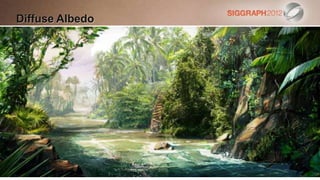
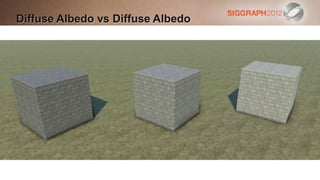
Diffuse Albedo
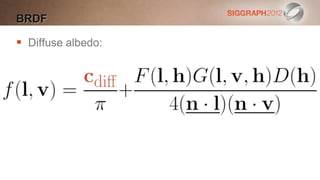
BRDF

 Diffuse albedo:
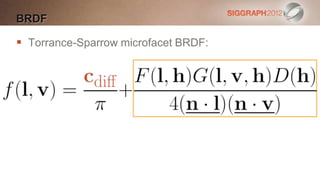
BRDF

 Torrance-Sparrow microfacet BRDF:
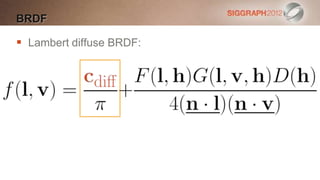
BRDF

 Lambert diffuse BRDF:
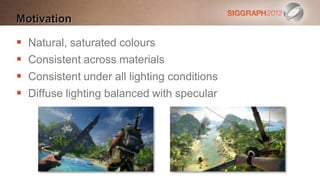
Motivation

   Natural, saturated colours
   Consistent across materials
   Consistent under all lighting conditions
   Diffuse lighting balanced with specular
Diffuse Albedo vs Diffuse Albedo
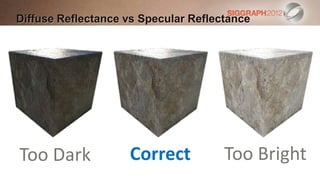
Diffuse Reflectance vs Specular Reflectance


Too Dark            Correct           Too Bright
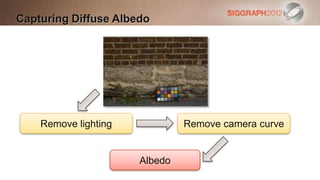
Capturing Diffuse Albedo


    Remove lighting            Remove camera curve


                      Albedo
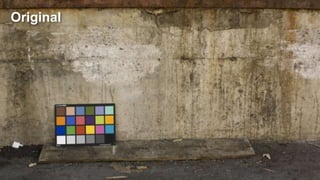
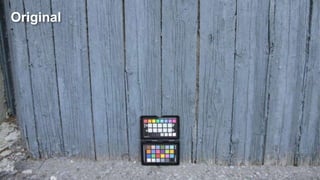
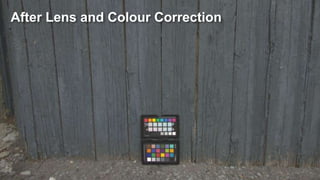
Original
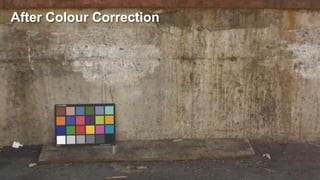
After Colour Correction
Capturing Diffuse Albedo

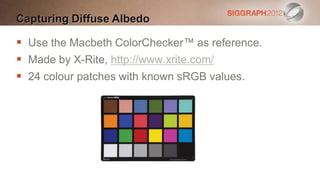
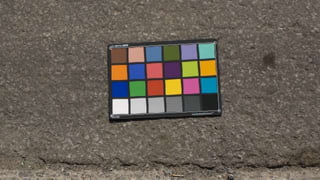
 Use the Macbeth ColorChecker™ as reference.
 Made by X-Rite, http://www.xrite.com/
 24 colour patches with known sRGB values.
Capturing Diffuse Albedo

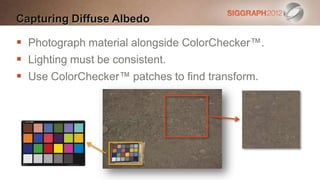
 Photograph material alongside ColorChecker™.
 Lighting must be consistent.
 Use ColorChecker™ patches to find transform.
Affine Transform [Malin11]

 Pro: removes cross-talk between channels
 Con: linear transform
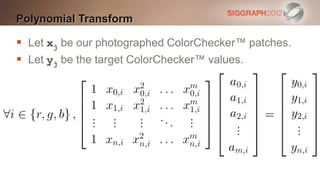
Polynomial Transform [Malin11]

 Pro: accurately adjusts levels
 Con: channel independent
Linear Least Squares

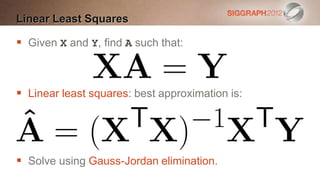
 Given X and Y, find A such that:


 Linear least squares: best approximation is:


 Solve using Gauss-Jordan elimination.
Affine Transform

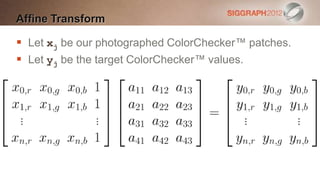
 Let xj be our photographed ColorChecker™ patches.
 Let yj be the target ColorChecker™ values.
Polynomial Transform

 Let xj be our photographed ColorChecker™ patches.
 Let yj be the target ColorChecker™ values.
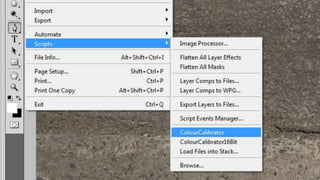
Colour Correction Tool

   Command line tool.
   Launched by a Photoshop script.
   Operates in xyY colour space.
   Applies the following transforms
    [Malin11]:

    Affine            Polynomial       Affine
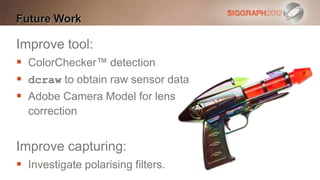
Future Work

Improve tool:
 ColorChecker™ detection
 dcraw to obtain raw sensor data
 Adobe Camera Model for lens
  correction


Improve capturing:
 Investigate polarising filters.
Original
After Lens and Colour Correction
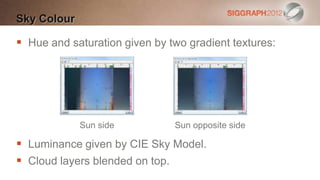
Sky Colour

 Hue and saturation given by two gradient textures:


             Sun side          Sun opposite side

 Luminance given by CIE Sky Model.
 Cloud layers blended on top.
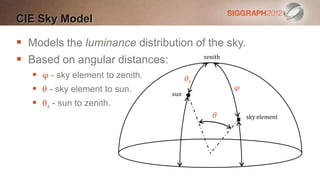
CIE Sky Model

 Models the luminance distribution of the sky.
 Based on angular distances:        zenith


    φ - sky element to zenith.         θz
    θ - sky element to sun.                     φ
                                  sun
    θz - sun to zenith.
                                             θ       sky element
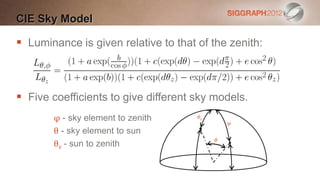
CIE Sky Model

 Luminance is given relative to that of the zenith:


 Five coefficients to give different sky models.
       φ - sky element to zenith      θz
                                               φ
       θ - sky element to sun
                                           θ
       θz - sun to zenith
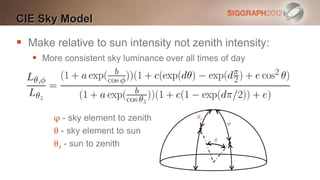
CIE Sky Model

 Make relative to sun intensity not zenith intensity:
    More consistent sky luminance over all times of day


        φ - sky element to zenith           θz
                                                     φ
        θ - sky element to sun
                                                 θ
        θz - sun to zenith
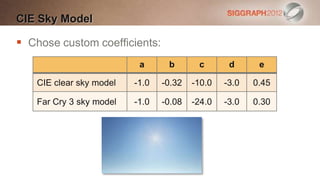
CIE Sky Model

 Chose custom coefficients:
                           a      b       c       d      e

    CIE clear sky model   -1.0   -0.32   -10.0   -3.0   0.45

    Far Cry 3 sky model   -1.0   -0.08   -24.0   -3.0   0.30
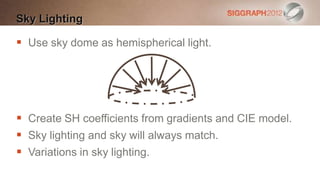
Sky Lighting

 Use sky dome as hemispherical light.


 Create SH coefficients from gradients and CIE model.
 Sky lighting and sky will always match.
 Variations in sky lighting.
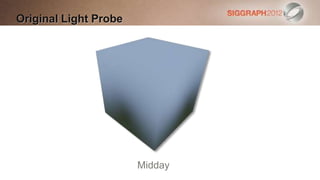
Original Light Probe


                       Midday
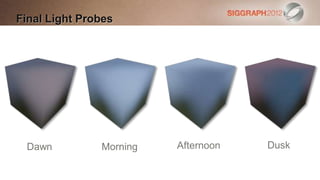
Final Light Probes


 Dawn          Morning   Afternoon   Dusk
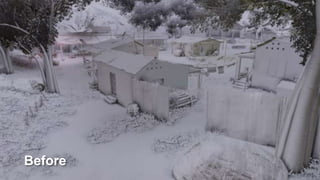
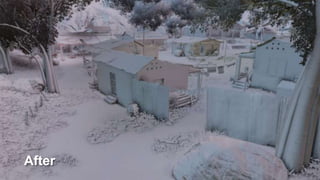
Before
After
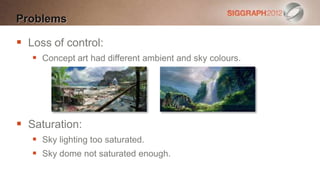
Problems

 Loss of control:
    Concept art had different ambient and sky colours.


 Saturation:
    Sky lighting too saturated.
    Sky dome not saturated enough.
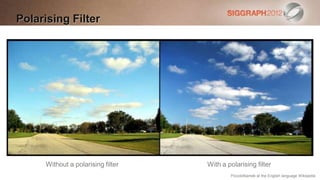
Polarising Filter


      Without a polarising filter   With a polarising filter
                                            PiccoloNamek at the English language Wikipedia
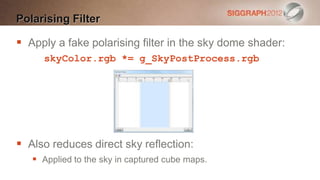
Polarising Filter

 Apply a fake polarising filter in the sky dome shader:
     skyColor.rgb *= g_SkyPostProcess.rgb


 Also reduces direct sky reflection:
    Applied to the sky in captured cube maps.
Microfacet BRDF

 Torrance-Sparrow microfacet BRDF: [Lazarov11]
Distribution Function

 Use normalised Blinn-Phong:


 Specular power m in range [1, 8192]
 Encoded as glossiness g in [0, 1] where:
Fresnel Term

 Schlick’s approximation for Fresnel:


 Spherical gaussian approximation: [Lagarde12]
Visibility Term

 Call the remaining terms the visibility term:


 Many games have V(l, v, h) = 1 making specular too
  dark. [Hoffman10] [Lazarov11]
Visibility Term

 Schlick-Smith:
    Roughness dependent.


 Calculate a from Beckmann roughness k or Blinn-
  Phong specular power m: [Lazarov11]
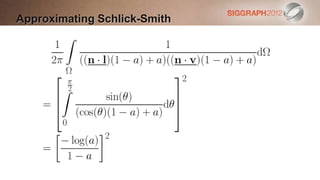
Approximating Schlick-Smith

 Cost of Schlick-Smith is 8 instructions per
  light. [Lazarov2011]
 Too expensive for our budget:
   Especially when applied to every light.
 Approximate by integrating Schlick-Smith
  over the hemisphere.
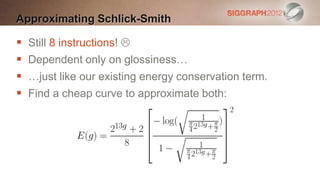
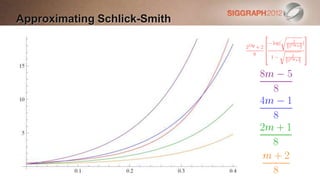
Approximating Schlick-Smith

   Still 8 instructions! 
   Dependent only on glossiness…
   …just like our existing energy conservation term.
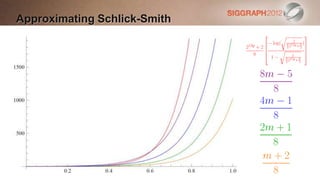
   Find a cheap curve to approximate both:
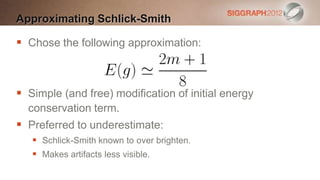
Approximating Schlick-Smith

 Chose the following approximation:


 Simple (and free) modification of initial energy
  conservation term.
 Preferred to underestimate:
    Schlick-Smith known to over brighten.
    Makes artifacts less visible.
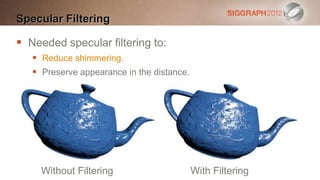
Specular Filtering

 Needed specular filtering to:
    Reduce shimmering.
    Preserve appearance in the distance.


     Without Filtering                      With Filtering
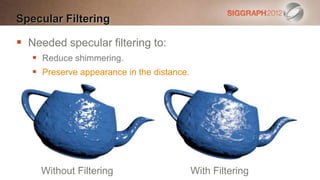
Specular Filtering

 Needed specular filtering to:
    Reduce shimmering.
    Preserve appearance in the distance.


     Without Filtering                      With Filtering
Specular Filtering

 Use Toksvig’s formula to scale the specular power,
  using the length of the filtered normal: [Hill11]


 Store these scales in a texture.
 Ideally use to adjust gloss map.
Specular Filtering

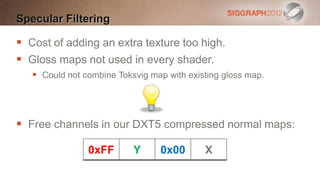
 Cost of adding an extra texture too high.
 Gloss maps not used in every shader.
    Could not combine Toksvig map with existing gloss map.


 Free channels in our DXT5 compressed normal maps:

                0xFF       Y     0x00       X
Specular Filtering

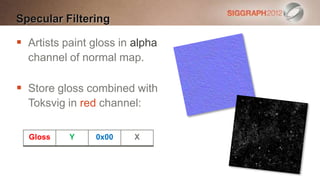
 Artists paint gloss in alpha
  channel of normal map.

 Store gloss combined with
  Toksvig in red channel:

  Gloss    Y    0x00     X
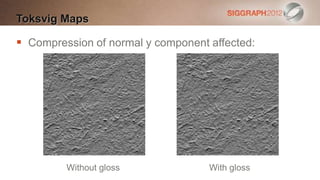
Toksvig Maps

 Compression of normal y component affected:


         Without gloss              With gloss
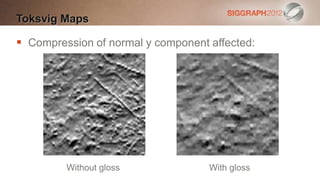
Toksvig Maps

 Compression of normal y component affected:


         Without gloss              With gloss
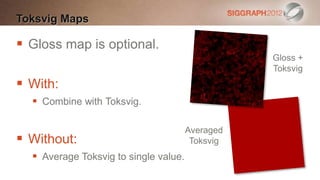
Toksvig Maps

 Gloss map is optional.
                                                  Gloss +
                                                  Toksvig
 With:
   Combine with Toksvig.

                                       Averaged
 Without:                              Toksvig
   Average Toksvig to single value.
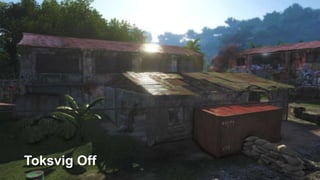
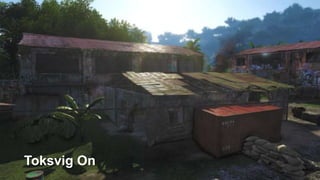
Toksvig Off
Toksvig On
Conclusions

 Calibrate your materials!
 Physically-based is a great starting point:
   Tweaking is needed.
   Not everything is simulated.
   Good tools are essential.
 Can make the change late in a project.
 Possible on current-generation consoles.
References
   [Darula02] Stanislav Darula and Richard Kittler, CIE General Sky Standard Defining
    Luminance Distributions, eSim 2002, http://mathinfo.univ-reims.fr/IMG/pdf/other2.pdf
   [Hill11] Stephen Hill, Specular Showdown in the Wild West,
    http://blog.selfshadow.com/2011/07/22/specular-showdown/
   [Hoffman10] Naty Hoffman, Crafting Physically Motivated Shading Models for Game
    Development, SIGGRAPH 2010, http://renderwonk.com/publications/s2010-shading-
    course/
   [Lagarde12] Sébastien Lagarde, Spherical Gaussian Approximation for Blinn-Phong,
    Phong and Fresnel, 2012, http://http://seblagarde.wordpress.com/2012/06/03/spherical-
    gaussien-approximation-for-blinn-phong-phong-and-fresnel/
   [Lazarov11] Dimitar Lazarov, Physically Based Lighting in Call of Duty: Black Ops,
    SIGGRAPH 2011, http://advances.realtimerendering.com/s2011/index.html
   [Malin11], Paul Malin, personal communication
Thanks

   Naty Hoffman, 2K Games (@renderwonk)
   Paul Malin, Activision Central Tech (@p_malin)
   Stephen Hill, Ubisoft Montréal (@self_shadow)
   Philippe Gagnon, Ubisoft Montréal
   Mickael Gilabert, Ubisoft Montréal (@mickaelgilabert)
   Vincent Jean, Ubisoft Montréal
   Minjie Wu, Ubisoft Montréal
   Derek Nowrouzezahrai, Université de Montréal
Any Questions?
 stephen.mcauley@ubisoft.com
 @stevemcauley
 http://blog.stevemcauley.com/
Calibrating Lighting and Materials in Far Cry 3

Calibrating Lighting and Materials in Far Cry 3

  • 2.
    Calibrating Lighting andMaterials in Far Cry 3 Stephen McAuley, Ubisoft Montréal stephen.mcauley@ubisoft.com
  • 4.
  • 5.
  • 6.
  • 7.
  • 8.
    Motivation  Natural, saturated colours  Consistent across materials  Consistent under all lighting conditions  Diffuse lighting balanced with specular
  • 9.
    Diffuse Albedo vsDiffuse Albedo
  • 10.
    Diffuse Reflectance vsSpecular Reflectance Too Dark Correct Too Bright
  • 11.
    Capturing Diffuse Albedo Remove lighting Remove camera curve Albedo
  • 12.
  • 13.
  • 14.
    Capturing Diffuse Albedo Use the Macbeth ColorChecker™ as reference.  Made by X-Rite, http://www.xrite.com/  24 colour patches with known sRGB values.
  • 15.
    Capturing Diffuse Albedo Photograph material alongside ColorChecker™.  Lighting must be consistent.  Use ColorChecker™ patches to find transform.
  • 16.
    Affine Transform [Malin11] Pro: removes cross-talk between channels  Con: linear transform
  • 17.
    Polynomial Transform [Malin11] Pro: accurately adjusts levels  Con: channel independent
  • 18.
    Linear Least Squares Given X and Y, find A such that:  Linear least squares: best approximation is:  Solve using Gauss-Jordan elimination.
  • 19.
    Affine Transform  Letxj be our photographed ColorChecker™ patches.  Let yj be the target ColorChecker™ values.
  • 20.
    Polynomial Transform  Letxj be our photographed ColorChecker™ patches.  Let yj be the target ColorChecker™ values.
  • 21.
    Colour Correction Tool  Command line tool.  Launched by a Photoshop script.  Operates in xyY colour space.  Applies the following transforms [Malin11]: Affine Polynomial Affine
  • 24.
    Future Work Improve tool: ColorChecker™ detection  dcraw to obtain raw sensor data  Adobe Camera Model for lens correction Improve capturing:  Investigate polarising filters.
  • 25.
  • 26.
    After Lens andColour Correction
  • 28.
    Sky Colour  Hueand saturation given by two gradient textures: Sun side Sun opposite side  Luminance given by CIE Sky Model.  Cloud layers blended on top.
  • 29.
    CIE Sky Model Models the luminance distribution of the sky.  Based on angular distances: zenith  φ - sky element to zenith. θz  θ - sky element to sun. φ sun  θz - sun to zenith. θ sky element
  • 30.
    CIE Sky Model Luminance is given relative to that of the zenith:  Five coefficients to give different sky models. φ - sky element to zenith θz φ θ - sky element to sun θ θz - sun to zenith
  • 31.
    CIE Sky Model Make relative to sun intensity not zenith intensity:  More consistent sky luminance over all times of day φ - sky element to zenith θz φ θ - sky element to sun θ θz - sun to zenith
  • 32.
    CIE Sky Model Chose custom coefficients: a b c d e CIE clear sky model -1.0 -0.32 -10.0 -3.0 0.45 Far Cry 3 sky model -1.0 -0.08 -24.0 -3.0 0.30
  • 33.
    Sky Lighting  Usesky dome as hemispherical light.  Create SH coefficients from gradients and CIE model.  Sky lighting and sky will always match.  Variations in sky lighting.
  • 34.
  • 35.
    Final Light Probes Dawn Morning Afternoon Dusk
  • 36.
  • 37.
  • 38.
    Problems  Loss ofcontrol:  Concept art had different ambient and sky colours.  Saturation:  Sky lighting too saturated.  Sky dome not saturated enough.
  • 39.
    Polarising Filter Without a polarising filter With a polarising filter PiccoloNamek at the English language Wikipedia
  • 40.
    Polarising Filter  Applya fake polarising filter in the sky dome shader: skyColor.rgb *= g_SkyPostProcess.rgb  Also reduces direct sky reflection:  Applied to the sky in captured cube maps.
  • 42.
    Microfacet BRDF  Torrance-Sparrowmicrofacet BRDF: [Lazarov11]
  • 43.
    Distribution Function  Usenormalised Blinn-Phong:  Specular power m in range [1, 8192]  Encoded as glossiness g in [0, 1] where:
  • 44.
    Fresnel Term  Schlick’sapproximation for Fresnel:  Spherical gaussian approximation: [Lagarde12]
  • 45.
    Visibility Term  Callthe remaining terms the visibility term:  Many games have V(l, v, h) = 1 making specular too dark. [Hoffman10] [Lazarov11]
  • 46.
    Visibility Term  Schlick-Smith:  Roughness dependent.  Calculate a from Beckmann roughness k or Blinn- Phong specular power m: [Lazarov11]
  • 47.
    Approximating Schlick-Smith  Costof Schlick-Smith is 8 instructions per light. [Lazarov2011]  Too expensive for our budget:  Especially when applied to every light.  Approximate by integrating Schlick-Smith over the hemisphere.
  • 48.
  • 49.
    Approximating Schlick-Smith  Still 8 instructions!   Dependent only on glossiness…  …just like our existing energy conservation term.  Find a cheap curve to approximate both:
  • 50.
  • 51.
  • 52.
    Approximating Schlick-Smith  Chosethe following approximation:  Simple (and free) modification of initial energy conservation term.  Preferred to underestimate:  Schlick-Smith known to over brighten.  Makes artifacts less visible.
  • 53.
    Specular Filtering  Neededspecular filtering to:  Reduce shimmering.  Preserve appearance in the distance. Without Filtering With Filtering
  • 54.
    Specular Filtering  Neededspecular filtering to:  Reduce shimmering.  Preserve appearance in the distance. Without Filtering With Filtering
  • 55.
    Specular Filtering  UseToksvig’s formula to scale the specular power, using the length of the filtered normal: [Hill11]  Store these scales in a texture.  Ideally use to adjust gloss map.
  • 56.
    Specular Filtering  Costof adding an extra texture too high.  Gloss maps not used in every shader.  Could not combine Toksvig map with existing gloss map.  Free channels in our DXT5 compressed normal maps: 0xFF Y 0x00 X
  • 57.
    Specular Filtering  Artistspaint gloss in alpha channel of normal map.  Store gloss combined with Toksvig in red channel: Gloss Y 0x00 X
  • 58.
    Toksvig Maps  Compressionof normal y component affected: Without gloss With gloss
  • 59.
    Toksvig Maps  Compressionof normal y component affected: Without gloss With gloss
  • 60.
    Toksvig Maps  Glossmap is optional. Gloss + Toksvig  With:  Combine with Toksvig. Averaged  Without: Toksvig  Average Toksvig to single value.
  • 61.
  • 62.
  • 63.
    Conclusions  Calibrate yourmaterials!  Physically-based is a great starting point:  Tweaking is needed.  Not everything is simulated.  Good tools are essential.  Can make the change late in a project.  Possible on current-generation consoles.
  • 64.
    References  [Darula02] Stanislav Darula and Richard Kittler, CIE General Sky Standard Defining Luminance Distributions, eSim 2002, http://mathinfo.univ-reims.fr/IMG/pdf/other2.pdf  [Hill11] Stephen Hill, Specular Showdown in the Wild West, http://blog.selfshadow.com/2011/07/22/specular-showdown/  [Hoffman10] Naty Hoffman, Crafting Physically Motivated Shading Models for Game Development, SIGGRAPH 2010, http://renderwonk.com/publications/s2010-shading- course/  [Lagarde12] Sébastien Lagarde, Spherical Gaussian Approximation for Blinn-Phong, Phong and Fresnel, 2012, http://http://seblagarde.wordpress.com/2012/06/03/spherical- gaussien-approximation-for-blinn-phong-phong-and-fresnel/  [Lazarov11] Dimitar Lazarov, Physically Based Lighting in Call of Duty: Black Ops, SIGGRAPH 2011, http://advances.realtimerendering.com/s2011/index.html  [Malin11], Paul Malin, personal communication
  • 65.
    Thanks  Naty Hoffman, 2K Games (@renderwonk)  Paul Malin, Activision Central Tech (@p_malin)  Stephen Hill, Ubisoft Montréal (@self_shadow)  Philippe Gagnon, Ubisoft Montréal  Mickael Gilabert, Ubisoft Montréal (@mickaelgilabert)  Vincent Jean, Ubisoft Montréal  Minjie Wu, Ubisoft Montréal  Derek Nowrouzezahrai, Université de Montréal
  • 66.
    Any Questions? stephen.mcauley@ubisoft.com @stevemcauley http://blog.stevemcauley.com/

Editor's Notes

  • #4 On Far Cry 3, we began to make these changes to help our artists create high quality visuals, looking at our shading, our lighting but also our materials.
  • #23 In Photoshop we first have to click around the ColorChecker to tell the tool where to find it.
  • #24 Then we can run the colour calibration script.
  • #63 This is just using the average Toksvig factor.