/* * SPU Assisted Rendering. */Steven Tovey & Stephen McAuleyGraphics Programmers, Bizarre Creations Ltd.steven.tovey@bizarrecreations.comstephen.mcauley@bizarrecreations.comhttp://www.bizarrecreations.com
/* Welcome! */We have some copies of Blur to give away, stick around and fill out your evaluation sheets! Part I (w/ Steven Tovey):What is SPU Assisted Rendering?Case StudiesCar Damage
Car Lighting
Part II (w/ Stephen McAuley):Fragment ShadingParallelisationCase StudyPre-pass Lighting on SPUsQuestions/* Agenda */
/* * Part I w/ Steven Tovey */SPU Acceleration of Car Rendering in Blur
Assisting RSX™ with the SPUs (der!)
Why do this?Free up RSX™ to do other things.Enable otherwise unfeasible techniques.Optimise rendering./* What is SPU AR? I */
Problems involved?
Synchronisation.
Optimising SPU modules.
Memory considerations:
Local store
Resource allocation
Etc./* What is SPU AR? II */
Original Xenon implementation:
Totally GPU-based.
2xVTF (volume & 2D) for damage.
Large amount of work in vertex shader, making cars in Blur heavily vertex-bound.
All lighting in pixel shader./* Case Study: Cars I */
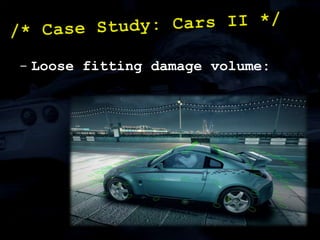
Loose fitting damage volume:/* Case Study: Cars II */
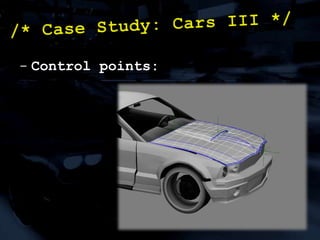
Control points:/* Case Study: Cars III */
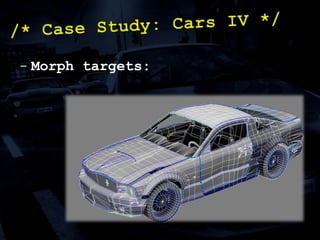
Morph targets:/* Case Study: Cars IV */
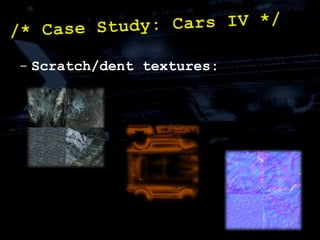
Scratch/dent textures:/* Case Study: Cars IV */
Challenges:
Increase rendering speed of cars.
Maintain same quality./* Case Study: Cars VI */
Our solution:
Large parts are SPU based.
On demand.
Sync-free.
Deferred.
Work split between GPU/SPU./* Damage: Solution */
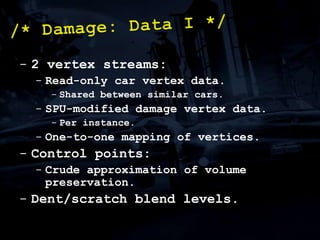
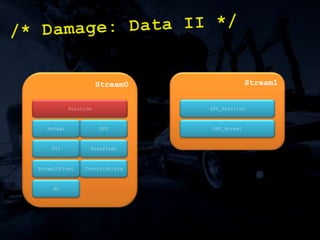
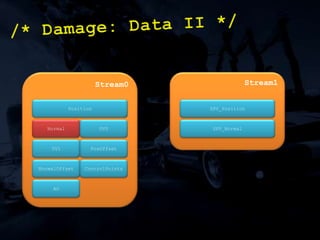
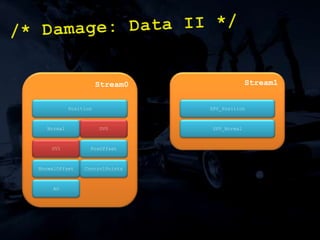
2 vertex streams:
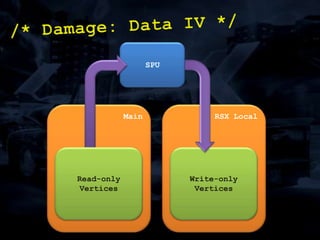
Read-only car vertex data.
Shared between similar cars.
SPU-modified damage vertex data.
Per instance.
One-to-one mapping of vertices.
Control points:
Crude approximation of volume preservation.
Dent/scratch blend levels./* Damage: Data I */
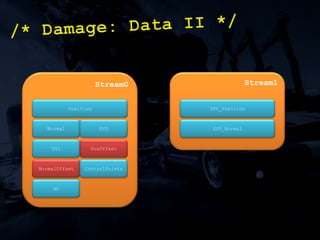
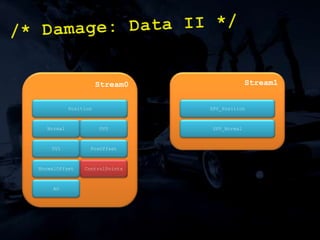
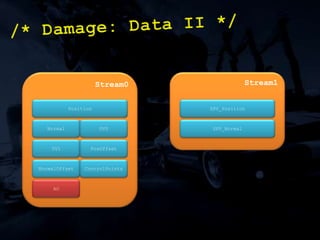
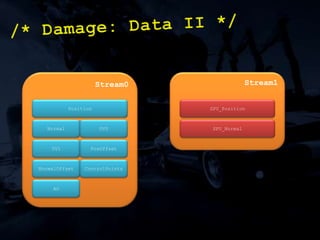
/* Damage: Data II */Stream0Stream1PositionSPU_PositionNormalUV0SPU_NormalUV1PosOffsetNormalOffsetControlPointsAO
MFC writes data atomically in 16 byte chunks...
If vertex format is 16 bytes exactly can atomically change a vertex from SPU.
If you can live with the odd vertex being wrong for a frame, this could be a huge win!/* Damage: Data III */
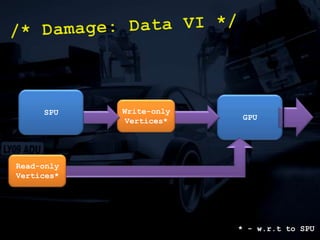
/* Damage: Data IV */SPURSX LocalMainWrite-only VerticesRead-only Vertices
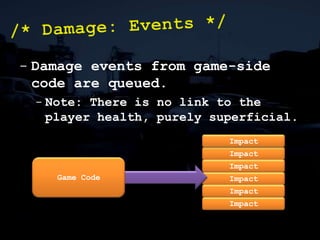
Damage events from game-side code are queued.
Note: There is no link to the player health, purely superficial./* Damage: Events */ImpactImpactGame CodeImpactImpactImpactImpact
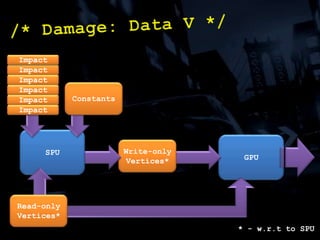
/* Damage: Data V */ImpactImpactImpactConstantsImpactImpactImpactSPUGPUWrite-only Vertices*Read-only Vertices** - w.r.t to SPU
/* Damage: Data VI */SPUGPUWrite-only Vertices*Read-only Vertices** - w.r.t to SPU
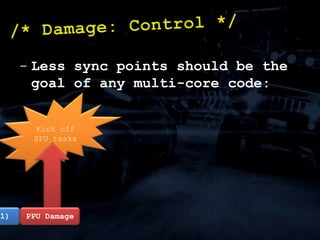
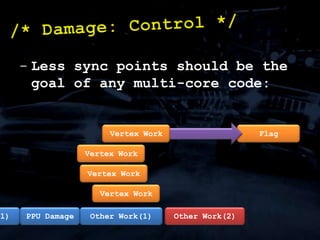
Kick off SPU tasksLess sync points should be the goal of any multi-core code:/* Damage: Control */Other Work(1)PPU Damage
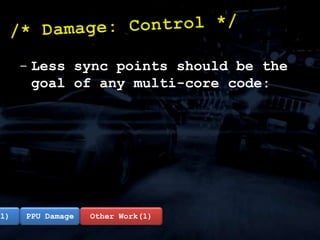
Less sync points should be the goal of any multi-core code:/* Damage: Control */Other Work(1)Other Work(1)PPU Damage
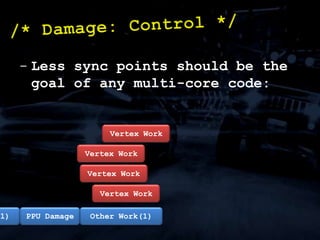
Less sync points should be the goal of any multi-core code:/* Damage: Control */Vertex WorkVertex WorkVertex WorkVertex WorkOther Work(1)Other Work(1)PPU Damage
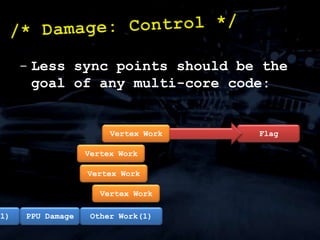
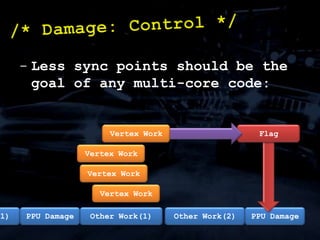
Less sync points should be the goal of any multi-core code:/* Damage: Control */FlagVertex WorkVertex WorkVertex WorkVertex WorkOther Work(1)Other Work(1)PPU Damage
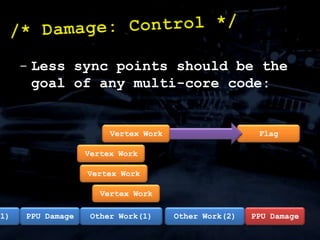
Less sync points should be the goal of any multi-core code:/* Damage: Control */FlagVertex WorkVertex WorkVertex WorkVertex WorkOther Work(1)Other Work(2)Other Work(1)PPU Damage
Less sync points should be the goal of any multi-core code:/* Damage: Control */FlagVertex WorkVertex WorkVertex WorkVertex WorkOther Work(1)Other Work(2)Other Work(1)PPU DamagePPU Damage
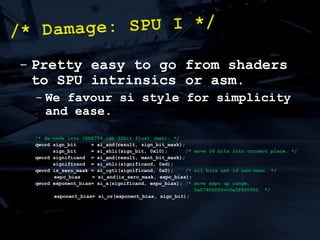
Pretty easy to go from shaders to SPU intrinsics or asm.
We favour si style for simplicity and ease./* de-code into IEEE754-ish 32bit float (meh): */qword sign_bit     = si_and(result, sign_bit_mask);sign_bit     = si_shli(sign_bit, 0x10);      /* move 16 bits into correct place. */qword significand  = si_and(result, mant_bit_mask);significand  = si_shli(significand, 0xd);qword is_zero_mask = si_cgti(significand, 0x0);    /* all bits set if non-zero. */expo_bias	   = si_and(is_zero_mask, expo_bias);qword exponent_bias= si_a(significand, expo_bias); /* move expo up range,						     0x07800000=>0x3f800000. */exponent_bias= si_or(exponent_bias, sign_bit);/* Damage: SPU I */
Problems:
GPU version relied on bilinear filtering of volume texture to smooth damage.
Filtering on SPU is a bit of a pain.
Working out which events affect which vertices?/* Damage: SPU II */
Simplest solution:
Two-stage x-form:
1. Get data in volume texture-ish format.
2. Apply x-form to all vertices./* Damage: SPU III */
Filtering:
Software bilinear filtering.
Some interesting instructions in ISA will help here./* Damage: SPU IV */
Data flow through SPU program is paramount to performance.Process in 16KB chunks.Multi-buffer input and output.If your system isn’t ‘mission critical’, align and lose double buffer./* Damage: Lessons I */
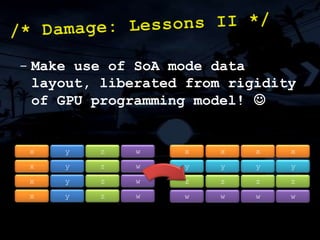
Make use of SoA mode data layout, liberated from rigidity of GPU programming model! /* Damage: Lessons II */xyzwxxxxxyzwyyyyxyzwzzzzxyzwwwww
Add value to your SPU program for relatively small computational effort:
We added some of the per-vertex lighting calculations for brake lights, for example./* Damage: Lessons III */
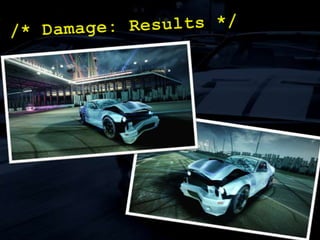
/* Damage: Results */
Our solution:
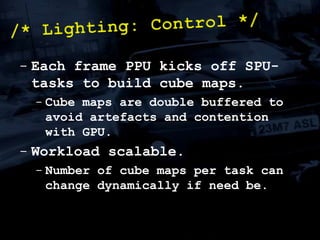
SPU-generated cube maps.
40 in total (accounting for double buffer).
8x8 per face.
Deferred.
Work split between GPU/SPU.
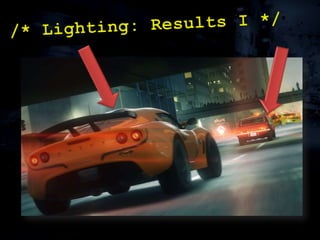
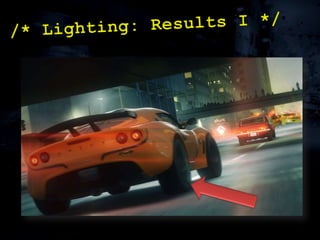
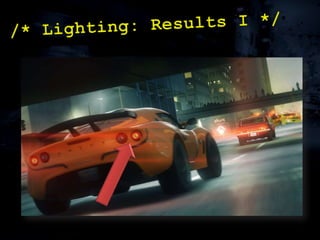
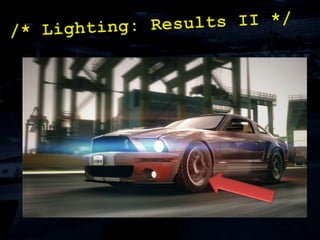
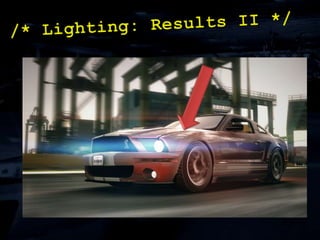
Cars are lit with a mixture of things:
SH (world + dynamic)
Cube map lighting

SPU Assisted Rendering

  • 1.
    /* * SPUAssisted Rendering. */Steven Tovey & Stephen McAuleyGraphics Programmers, Bizarre Creations Ltd.steven.tovey@bizarrecreations.comstephen.mcauley@bizarrecreations.comhttp://www.bizarrecreations.com
  • 2.
    /* Welcome! */Wehave some copies of Blur to give away, stick around and fill out your evaluation sheets! Part I (w/ Steven Tovey):What is SPU Assisted Rendering?Case StudiesCar Damage
  • 3.
  • 4.
    Part II (w/Stephen McAuley):Fragment ShadingParallelisationCase StudyPre-pass Lighting on SPUsQuestions/* Agenda */
  • 5.
    /* * PartI w/ Steven Tovey */SPU Acceleration of Car Rendering in Blur
  • 6.
    Assisting RSX™ withthe SPUs (der!)
  • 7.
    Why do this?Freeup RSX™ to do other things.Enable otherwise unfeasible techniques.Optimise rendering./* What is SPU AR? I */
  • 8.
  • 9.
  • 10.
  • 11.
  • 12.
  • 13.
  • 14.
    Etc./* What isSPU AR? II */
  • 15.
  • 16.
  • 17.
    2xVTF (volume &2D) for damage.
  • 18.
    Large amount ofwork in vertex shader, making cars in Blur heavily vertex-bound.
  • 19.
    All lighting inpixel shader./* Case Study: Cars I */
  • 20.
    Loose fitting damagevolume:/* Case Study: Cars II */
  • 21.
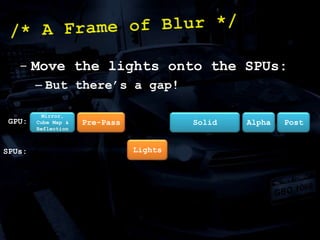
    Control points:/* CaseStudy: Cars III */
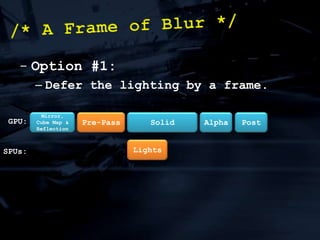
  • 22.
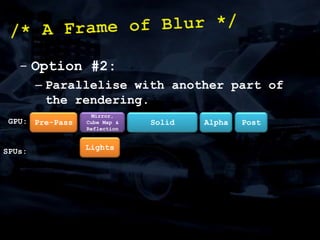
    Morph targets:/* CaseStudy: Cars IV */
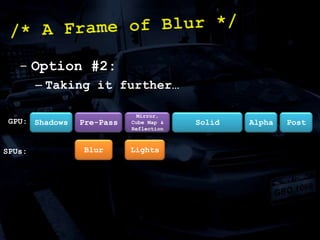
  • 23.
  • 24.
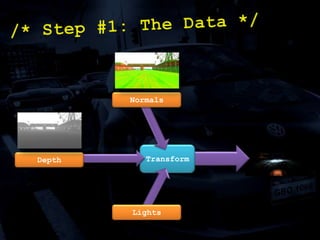
  • 25.
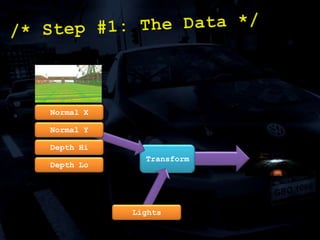
  • 26.
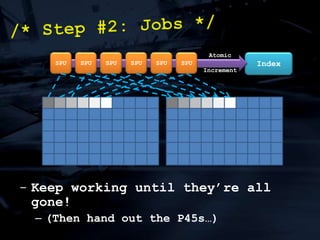
    Maintain same quality./*Case Study: Cars VI */
  • 27.
  • 28.
    Large parts areSPU based.
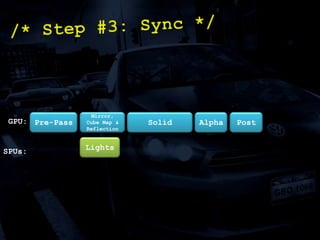
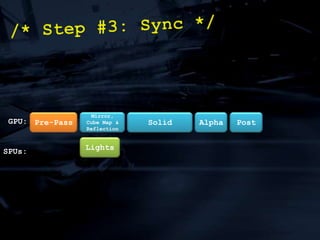
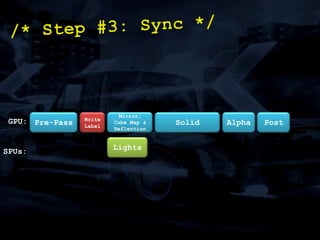
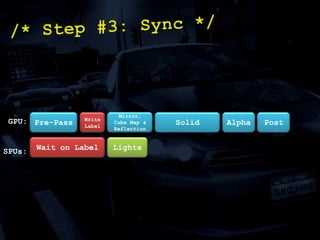
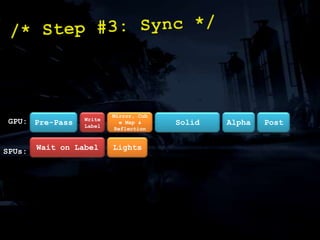
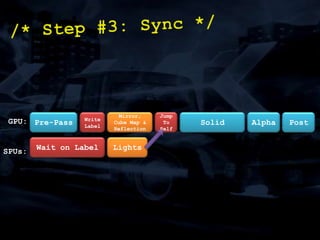
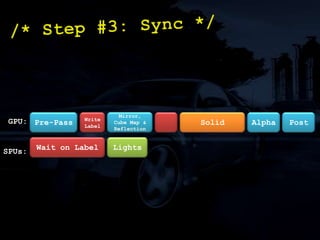
  • 29.
  • 30.
  • 31.
  • 32.
    Work split betweenGPU/SPU./* Damage: Solution */
  • 33.
  • 34.
  • 35.
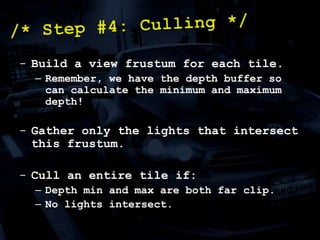
  • 36.
  • 37.
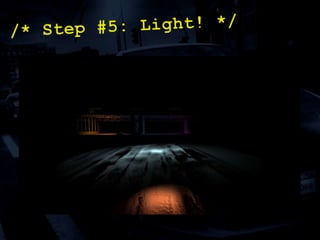
  • 38.
  • 39.
  • 40.
    Crude approximation ofvolume preservation.
  • 41.
  • 42.
    /* Damage: DataII */Stream0Stream1PositionSPU_PositionNormalUV0SPU_NormalUV1PosOffsetNormalOffsetControlPointsAO
  • 43.
    /* Damage: DataII */Stream0Stream1PositionSPU_PositionNormalUV0SPU_NormalUV1PosOffsetNormalOffsetControlPointsAO
  • 44.
    /* Damage: DataII */Stream0Stream1PositionSPU_PositionNormalUV0SPU_NormalUV1PosOffsetNormalOffsetControlPointsAO
  • 45.
    /* Damage: DataII */Stream0Stream1PositionSPU_PositionNormalUV0SPU_NormalUV1PosOffsetNormalOffsetControlPointsAO
  • 46.
    /* Damage: DataII */Stream0Stream1PositionSPU_PositionNormalUV0SPU_NormalUV1PosOffsetNormalOffsetControlPointsAO
  • 47.
    /* Damage: DataII */Stream0Stream1PositionSPU_PositionNormalUV0SPU_NormalUV1PosOffsetNormalOffsetControlPointsAO
  • 48.
    /* Damage: DataII */Stream0Stream1PositionSPU_PositionNormalUV0SPU_NormalUV1PosOffsetNormalOffsetControlPointsAO
  • 49.
    MFC writes dataatomically in 16 byte chunks...
  • 50.
    If vertex formatis 16 bytes exactly can atomically change a vertex from SPU.
  • 51.
    If you canlive with the odd vertex being wrong for a frame, this could be a huge win!/* Damage: Data III */
  • 52.
    /* Damage: DataIV */SPURSX LocalMainWrite-only VerticesRead-only Vertices
  • 53.
    Damage events fromgame-side code are queued.
  • 54.
    Note: There isno link to the player health, purely superficial./* Damage: Events */ImpactImpactGame CodeImpactImpactImpactImpact
  • 55.
    /* Damage: DataV */ImpactImpactImpactConstantsImpactImpactImpactSPUGPUWrite-only Vertices*Read-only Vertices** - w.r.t to SPU
  • 56.
    /* Damage: DataVI */SPUGPUWrite-only Vertices*Read-only Vertices** - w.r.t to SPU
  • 57.
    Kick off SPUtasksLess sync points should be the goal of any multi-core code:/* Damage: Control */Other Work(1)PPU Damage
  • 58.
    Less sync pointsshould be the goal of any multi-core code:/* Damage: Control */Other Work(1)Other Work(1)PPU Damage
  • 59.
    Less sync pointsshould be the goal of any multi-core code:/* Damage: Control */Vertex WorkVertex WorkVertex WorkVertex WorkOther Work(1)Other Work(1)PPU Damage
  • 60.
    Less sync pointsshould be the goal of any multi-core code:/* Damage: Control */FlagVertex WorkVertex WorkVertex WorkVertex WorkOther Work(1)Other Work(1)PPU Damage
  • 61.
    Less sync pointsshould be the goal of any multi-core code:/* Damage: Control */FlagVertex WorkVertex WorkVertex WorkVertex WorkOther Work(1)Other Work(2)Other Work(1)PPU Damage
  • 62.
    Less sync pointsshould be the goal of any multi-core code:/* Damage: Control */FlagVertex WorkVertex WorkVertex WorkVertex WorkOther Work(1)Other Work(2)Other Work(1)PPU DamagePPU Damage
  • 63.
    Less sync pointsshould be the goal of any multi-core code:/* Damage: Control */FlagVertex WorkVertex WorkVertex WorkVertex WorkOther Work(1)Other Work(2)Other Work(1)PPU DamagePPU Damage
  • 64.
    Pretty easy togo from shaders to SPU intrinsics or asm.
  • 65.
    We favour sistyle for simplicity and ease./* de-code into IEEE754-ish 32bit float (meh): */qword sign_bit = si_and(result, sign_bit_mask);sign_bit = si_shli(sign_bit, 0x10); /* move 16 bits into correct place. */qword significand = si_and(result, mant_bit_mask);significand = si_shli(significand, 0xd);qword is_zero_mask = si_cgti(significand, 0x0); /* all bits set if non-zero. */expo_bias = si_and(is_zero_mask, expo_bias);qword exponent_bias= si_a(significand, expo_bias); /* move expo up range, 0x07800000=>0x3f800000. */exponent_bias= si_or(exponent_bias, sign_bit);/* Damage: SPU I */
  • 66.
  • 67.
    GPU version reliedon bilinear filtering of volume texture to smooth damage.
  • 68.
    Filtering on SPUis a bit of a pain.
  • 69.
    Working out whichevents affect which vertices?/* Damage: SPU II */
  • 70.
  • 71.
  • 72.
    1. Get datain volume texture-ish format.
  • 73.
    2. Apply x-formto all vertices./* Damage: SPU III */
  • 74.
  • 75.
  • 76.
    Some interesting instructionsin ISA will help here./* Damage: SPU IV */
  • 77.
    Data flow throughSPU program is paramount to performance.Process in 16KB chunks.Multi-buffer input and output.If your system isn’t ‘mission critical’, align and lose double buffer./* Damage: Lessons I */
  • 78.
    Make use ofSoA mode data layout, liberated from rigidity of GPU programming model! /* Damage: Lessons II */xyzwxxxxxyzwyyyyxyzwzzzzxyzwwwww
  • 79.
    Add value toyour SPU program for relatively small computational effort:
  • 80.
    We added someof the per-vertex lighting calculations for brake lights, for example./* Damage: Lessons III */
  • 81.
  • 82.
  • 83.
  • 84.
    40 in total(accounting for double buffer).
  • 85.
  • 86.
  • 87.
  • 88.
    Cars are litwith a mixture of things:
  • 89.
    SH (world +dynamic)
  • 90.
  • 91.
  • 92.
  • 93.
  • 94.
  • 95.
  • 96.
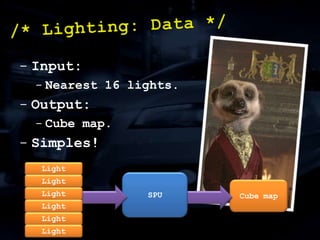
    Simples!/* Lighting: Data*/LightSPULightCube mapLightLightLightLight
  • 97.
    Each frame PPUkicks off SPU-tasks to build cube maps.
  • 98.
    Cube maps aredouble buffered to avoid artefacts and contention with GPU.
  • 99.
  • 100.
    Number of cubemaps per task can change dynamically if need be./* Lighting: Control */
  • 101.
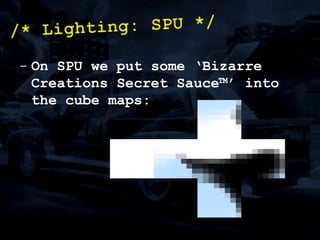
    On SPU weput some ‘Bizarre Creations Secret Sauce™’ into the cube maps:/* Lighting: SPU */
  • 102.
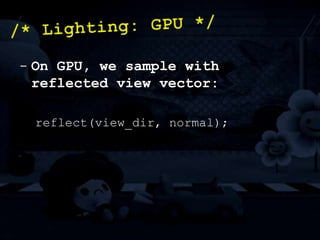
    On GPU, wesample with reflected view vector:reflect(view_dir, normal);/* Lighting: GPU */
  • 103.
  • 104.
  • 105.
  • 106.
  • 107.
  • 108.
    /* * PartII w/ Steve McAuley */SPU Acceleration of Fragment Shading
  • 109.
    Problem:Our fragment programsare expensive.Solution:Let’s use the SPUs to help./* The Problem */
  • 110.
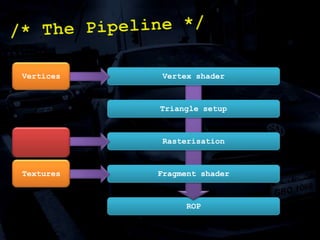
    /* The Pipeline*/VerticesVertex shaderTriangle setupRasterisationTexturesFragment shaderROP
  • 111.
    Solution:Make look-up textureson the SPUs to speed up our fragment programs.What could we look up?LightingShadowsAmbient occlusionFogSounds like deferred rendering!/* Look It Up! */
  • 112.
  • 113.
    Goal:Move dynamic lightinginto a look-up texture.Solution:Sounds like deferred rendering!In Blur, we used a light pre-pass renderer./* Case Study: Lighting */
  • 114.
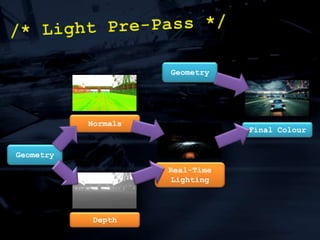
    /* Light Pre-Pass*/GeometryNormalsFinal ColourGeometryReal-Time LightingDepth
  • 115.
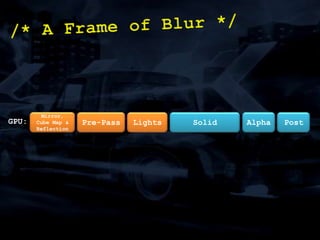
    /* A Frameof Blur */Solid AlphaPostPre-PassLightsMirror, Cube Map & ReflectionGPU:
  • 116.
    Move the lightsonto the SPUs:But there’s a gap!/* A Frame of Blur */Solid AlphaPostPre-PassMirror, Cube Map & ReflectionGPU:LightsSPUs:
  • 117.
    Option #1:Defer thelighting by a frame./* A Frame of Blur */Solid AlphaPostPre-PassMirror, Cube Map & ReflectionGPU:LightsSPUs:
  • 118.
    Option #2:Parallelise withanother part of the rendering./* A Frame of Blur */Solid AlphaPostPre-PassMirror, Cube Map & ReflectionGPU:LightsSPUs:
  • 119.
    Option #2:Taking itfurther…/* A Frame of Blur */Solid AlphaPostPre-PassMirror, Cube Map & ReflectionShadowsGPU:LightsBlurSPUs:
  • 120.
    - Key point:youmust find something to parallelise with!Design your engine accordingly!Otherwise you risk a frame of latency.This is true multi-GPU.Two graphics processors, working on separate tasks, in parallel./* Parallelism */
  • 121.
    /* Case Study:Lighting */Goal:Move the lighting stage of the light pre-pass onto the SPUs.There are just six easy steps to enlightenment…/* Step #1: The Data */NormalsTransformDepthLights
  • 122.
    /* Step #1:The Data */Normal XNormal YDepth HiTransformDepth LoLights
  • 123.
    We have sixSPUs, and each of them wants a lighting job…
  • 124.
    Divide the framebuffer into tiles.
  • 125.
    Each tile isa unit of work./* Step #2: Jobs */
  • 126.
    /* Step #2:Jobs */AtomicIncrementIndexKeep working until they’re all gone!(Then hand out the P45s…)SPUSPUSPUSPUSPUSPU
  • 127.
    Can be atime sink if you’re not careful!Expect to find your worst bugs here.Best to get it right first time!/* Step #3: Sync */
  • 128.
    /* Step #3:Sync */Solid AlphaPostPre-PassMirror, Cube Map & ReflectionGPU:LightsSPUs:
  • 129.
    /* Step #3:Sync */Solid AlphaPostPre-PassMirror, Cube Map & ReflectionGPU:LightsSPUs:
  • 130.
    /* Step #3:Sync */Solid AlphaPostPre-PassMirror, Cube Map & ReflectionWriteLabelGPU:LightsSPUs:
  • 131.
    /* Step #3:Sync */Solid AlphaPostPre-PassMirror, Cube Map & ReflectionWriteLabelGPU:LightsWait on LabelSPUs:
  • 132.
    /* Step #3:Sync */Solid AlphaPostPre-PassMirror, Cube Map & ReflectionWriteLabelGPU:LightsWait on LabelSPUs:
  • 133.
    /* Step #3:Sync */Solid AlphaPostPre-PassMirror, Cube Map & ReflectionWriteLabelJump To SelfGPU:LightsWait on LabelSPUs:
  • 134.
    /* Step #3:Sync */Solid AlphaPostPre-PassMirror, Cube Map & ReflectionWriteLabelGPU:LightsWait on LabelSPUs:
  • 135.
    Build a viewfrustum for each tile.Remember, we have the depth buffer so can calculate the minimum and maximum depth!Gather only the lights that intersect this frustum.
  • 136.
    Cull an entiretile if:Depth min and max are both far clip.No lights intersect./* Step #4: Culling */
  • 137.
    /* Step #5:Light! */
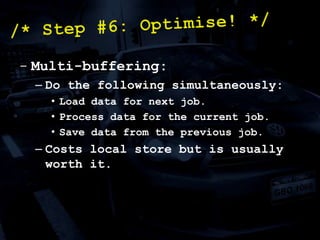
  • 138.
    Multi-buffering:Do the followingsimultaneously:Load data for next job.Process data for the current job.Save data from the previous job.Costs local store but is usually worth it./* Step #6: Optimise! */
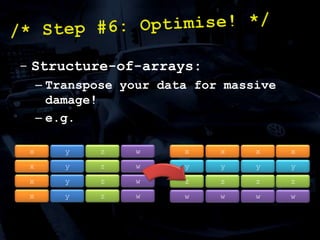
  • 139.
    Structure-of-arrays:Transpose your datafor massive damage!e.g./* Step #6: Optimise! */xyzwxxxxxyzwyyyyxyzwzzzzxyzwwwww
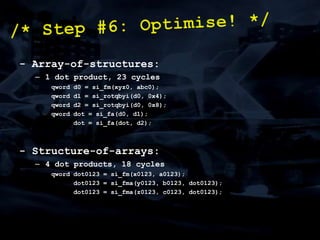
  • 140.
    - Array-of-structures:1 dotproduct, 23 cyclesqword d0 = si_fm(xyz0, abc0);qword d1 = si_rotqbyi(d0, 0x4);qword d2 = si_rotqbyi(d0, 0x8);qword dot = si_fa(d0, d1); dot = si_fa(dot, d2);- Structure-of-arrays:4 dot products, 18 cyclesqword dot0123 = si_fm(x0123, a0123); dot0123 = si_fma(y0123, b0123, dot0123); dot0123 = si_fma(z0123, c0123, dot0123);/* Step #6: Optimise! */
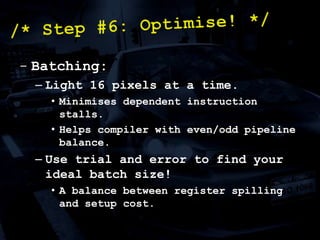
  • 141.
    Batching:Light 16 pixelsat a time.Minimises dependent instruction stalls.Helps compiler with even/odd pipeline balance.Use trial and error to find your ideal batch size!A balance between register spilling and setup cost./* Step #6: Optimise! */
  • 142.
  • 143.
  • 144.
    An optimisation evenif you have nothing to parallelise with!/* Case Study: Lighting */
  • 145.
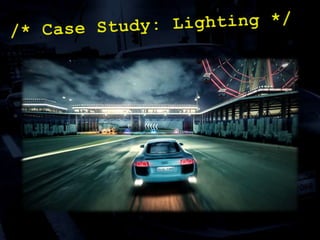
    /* Case Study:Lighting */
  • 146.
  • 147.
    Use the SPUsto accelerate your rendering!Think about the data.Design your engine appropriately.Avoid frames of latency.Keep synchronisation simple.Add value.It’s actually really easy, try it!/* Conclusion */
  • 148.
    /* Further Reading*/- Steven Tovey & Stephen McAuley, “Parallelized Light Pre-Pass Rendering with the Cell Broadband Engine”, GPU Pro- Stephen McAuley & Steven Tovey, “A Bizarre Way to do Real-Time Lighting”, Develop in Liverpool 2009
  • 149.
    If you’re talented,then we’re hiring ;)jobs@bizarrecreations.com
  • 150.
    lqd $r1,question_countstopd $r0,$r0,0x1; thanks for listening! ;)brnz $r1,questions

Editor's Notes

  • #16 Local space position of vertex
  • #17 Normal
  • #18 Couple of sets of Uvs.
  • #19 Morph-targets.
  • #20 Control point index into an array of curves.
  • #21 Spherical Harmonic
  • #22 Damage data... Position offset, Normal offset, scratch and dent levels.
  • #39 Explain why 16KB chunks, MFC max per transfer.
  • #45 Don’t want lumpiness if parallel read/write.
  • #46 Don’t want lumpiness if parallel read/write.
  • #48 Rim lighting here.
  • #49 Tyres use low-power specular.
  • #50 Brake lights.
  • #51 Used on alloys for low-power specular.
  • #52 Used for the scratch lighting, again for low-power specular.
  • #55 We need to look at the pipeline of the graphics card to work out how we can move more of our GPU work onto the SPUs. Two main areas we can insert data – either through vertices at the top, or textures at the fragment stage. Sadly, we can’t hook into the rasteriser, which would be ace.
  • #56 Of course, these look-up textures end up being screen-space look-up textures, which means some sort of deferred rendering…
  • #57 I have a problem with forward rendering. I think most people traditionally design their engine this way, especially on 360 and PC. But all the work is done in the fragment shader, so when you port to the PS3 with a slower fragment shader unit, your whole game runs slower. Although you can use EDGE to speed up your vertex processing and your post processing, they both only step around the core of the issue that you’re fragment shader bound and there’s no easy way of solving it.
  • #58 We found a light pre-pass renderer suited our goals pretty well. It’s a halfway house between traditional and deferred rendering.
  • #60 We render a rear-view mirror, cube map reflections for the cars and planar reflections for the road and water in addition to the pre-pass and main views. Multi-threaded rendering helps a lot!
  • #62 Deferring by a frame isn’t ideal. Either you just use the previous frame’s lighting buffer for the next frame, with obvious artefacts (especially if you’re doing a racing game like us), or you have to add a frame of latency.I don’t think adding frames of latency is ideal, especially for cross-platform games. If you add a frame of latency on the PS3, are you going to do the same on the 360? If you’re not, then game play could be different between both platforms.I’m not saying this is something I’d never do, I think in lots of circumstances you’ll have to. But avoid it where you can, and this is one instance.
  • #64 If we wanted to take this further for future projects, we could add shadow maps in at the start of our pipeline, then do an exponential blur on the SPUs whilst we’re rendering the pre-pass geometry…
  • #65 This is real multi-threaded graphics processing, with multiple processors doing different jobs at the same time. Therefore, architect your engine accordingly!Having small graphics jobs allows you to spread the workload. Obviously, not everything can be done like this. Some things will most likely have to be deferred a frame, adding a frame of latency, such as post-processing or MLAA. But there’s lots of tasks, smaller tasks, that don’t have to be, from SSAO to blurring exponential shadow maps. You have to find things to parallelise with!Think about the data again! Rendering has lots of stages, each with its own inputs and outputs. What could sync with what?
  • #68 We combine the normals and depth into one 32-bit buffer. This is an optimisation as it halves the inputs into the SPU program, but also allows us to keep the depth buffer in local memory which is good for performance.
  • #71 The first step, but the biggest stumbling block!
  • #75 No blocking! Our jobs are optionally dependent on a label.
  • #77 To be accurate, we have a jump-to-self per SPU.
  • #79 When we load in a tile, we quickly iterate over every pixel and calculate minimum and maximum depth.No need to use a stencil buffer to cull out the sky as depth min and max will do it for us. (Remember, we don’t have the stencil buffer as we’re not using the depth buffer!)This technique is really useful for a variety of things, including depth of field (check out Matt Swoboda’s optimisation in PhyreEngine).
  • #80 This is actually the easiest bit. Just write the lighting equations in intrinsics! However, they really have to be fast otherwise performance just won’t be good enough. Next is some helpful tips for optimisation.
  • #81 So we triple buffer. It ends up that we have plenty of local store left as it’s simple job and our job size was relatively small. Another reason to write in siintrinsics though as it keeps the code size down!
  • #82 Just like Ste said earlier, this is a big win. Probably a good rule of thumb for most SPU jobs!
  • #83 Just like Ste said earlier, this is a big win. Probably a good rule of thumb for most SPU jobs!
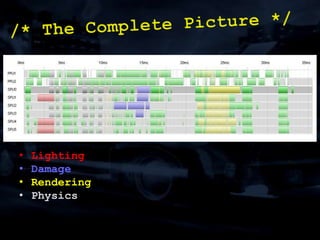
  • #87 When kicking SPU jobs off on the RSX, you have to be careful as you can interfere with jobs the PPU is running. This is where sync-free systems are a win! We’re lucky as we just avoided the physics, but also, running only on 3 SPUs was a good idea so we had 3 free for other tasks. See how quick the rendering is even though we’re rendering so many views!
  • #89 Apologies for the shameless self-promotion!