Fake IT, until you make IT
Bas Meijer, GOTO Amsterdam 2015
Fake IT, until you make IT
• Simple idea, but very powerful
• VM`s on laptop model production environment
• Reproducible workflows
• Automation with Ansible, Vagrant & Packer
• And yes, you can use Docker too
Why are we doing this?
• Delivery is painful
• Fear of the unknown
• Take out boring drudgery
• Humans bad at for loops
• Kill your darlings
• Snowflakes are unique
• run, Run! RUN!!
Ansible
• Easiest IT automation to use, ever.
• Minimal learning curve
• Easy audit/review/rewrite of content
• Minimal requirements: SSH & python
• No daemons, no master, no agents
• Secure, fast, scalable
• Pluggable and extensible
What do you need?
• 8Gb Ram or more, SSD
• SSH client, git client
• I use brew to get:
• Vagrant
• VirtualBox
• Python
• Let`s get brewing!
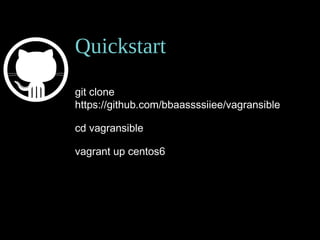
Quickstart
git clone
https://github.com/bbaassssiiee/vagransible
cd vagransible
vagrant up centos6
Vagrant is provider agnostic
• VirtualBox
• VMWare
• Amazon Web Service
• Docker
• Microsoft Hyper-V
• …
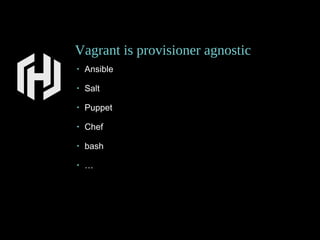
Vagrant is provisioner agnostic
• Ansible
• Salt
• Puppet
• Chef
• bash
• …
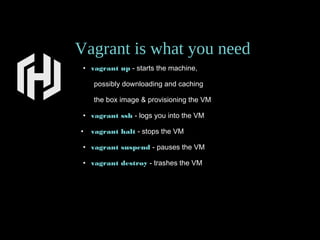
Vagrant is what you need
• vagrant up - starts the machine,
possibly downloading and caching
the box image & provisioning the VM
• vagrant ssh - logs you into the VM
• vagrant halt - stops the VM
• vagrant suspend - pauses the VM
• vagrant destroy - trashes the VM
200
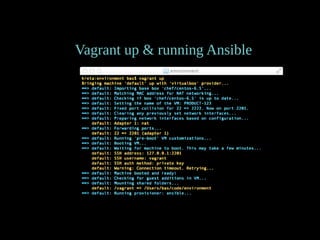
Vagrant up & running Ansible
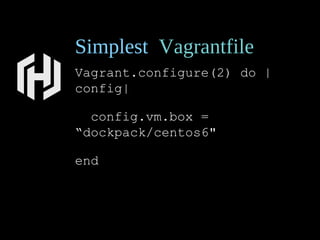
Simplest Vagrantfile
Vagrant.configure(2) do |
config|
config.vm.box =
“dockpack/centos6"
end
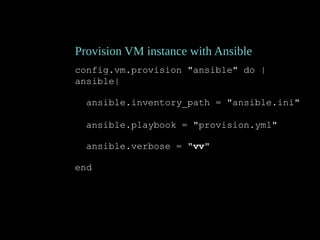
Provision VM instance with Ansible
config.vm.provision "ansible" do |
ansible|
ansible.inventory_path = "ansible.ini"
ansible.playbook = "provision.yml"
ansible.verbose = "vv"
end
Provider VirtualBox
config.vm.provider "virtualbox" do |vb|
vb.gui = false
vb.customize ["modifyvm",:id,"--memory",2048]
vb.name = "centos6"
end
Free, runs on most laptops
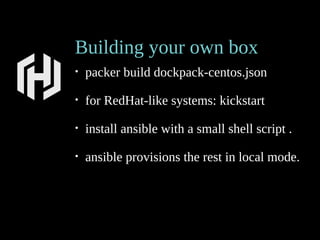
Building your own box
• packer build dockpack-centos.json
• for RedHat-like systems: kickstart
• install ansible with a small shell script .
• ansible provisions the rest in local mode.
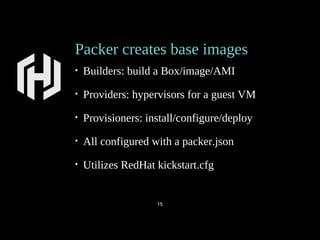
Packer creates base images
• Builders: build a Box/image/AMI
• Providers: hypervisors for a guest VM
• Provisioners: install/configure/deploy
• All configured with a packer.json
• Utilizes RedHat kickstart.cfg
15
provisioning in packer json
"provisioners": [
{
"type": "shell",
"execute_command": "echo 'vagrant' | {{.Vars}} sudo -S -E bash '{{.Path}}'",
"override": {
"virtualbox-iso": {
"scripts": [
"scripts/ansible.sh"
]
}
}
},
{
"type": "ansible-local",
"playbook_file": "packer.yml",
"role_paths": [
"roles/bbaassssiiee.commoncentos",
"roles/RHEL6-STIG"
]
}
Resources
@bbaassssiiee
https://github.com/bbaassssiiee/vagransible
http://www.meetup.com/Ansible-Benelux
https://galaxy.ansible.com
http://www.vagrantup.com
Abstract
Before launching your new app, you would better be
in control of your environments:
• develop & test in a production-like environment
• automate the whole enchilada with Ansible
Bassie will show how to set up a disposable development
environment that mimics your production servers in
a re-usable way with minimal maintenance.
BBas Meijer @bbaassssiiee 2015-06-19
Amsterdam
GOTO Amsterdam
DevOpsDays Amsterdam
Bas Meijer
Bassie is a software developer & system engineer
with decades wasted on late-night hacking.
While born before the epoch he has a keen eye for
new technologies.
At the moment he is engaged with a major Dutch
bank and an established European identity & access
management cloud service.
Fake IT, until you make IT

Fake IT, until you make IT

  • 1.
    Fake IT, untilyou make IT Bas Meijer, GOTO Amsterdam 2015
  • 2.
    Fake IT, untilyou make IT • Simple idea, but very powerful • VM`s on laptop model production environment • Reproducible workflows • Automation with Ansible, Vagrant & Packer • And yes, you can use Docker too
  • 3.
    Why are wedoing this? • Delivery is painful • Fear of the unknown • Take out boring drudgery • Humans bad at for loops • Kill your darlings • Snowflakes are unique • run, Run! RUN!!
  • 4.
    Ansible • Easiest ITautomation to use, ever. • Minimal learning curve • Easy audit/review/rewrite of content • Minimal requirements: SSH & python • No daemons, no master, no agents • Secure, fast, scalable • Pluggable and extensible
  • 5.
    What do youneed? • 8Gb Ram or more, SSD • SSH client, git client • I use brew to get: • Vagrant • VirtualBox • Python • Let`s get brewing!
  • 6.
  • 7.
    Vagrant is provideragnostic • VirtualBox • VMWare • Amazon Web Service • Docker • Microsoft Hyper-V • …
  • 8.
    Vagrant is provisioneragnostic • Ansible • Salt • Puppet • Chef • bash • …
  • 9.
    Vagrant is whatyou need • vagrant up - starts the machine, possibly downloading and caching the box image & provisioning the VM • vagrant ssh - logs you into the VM • vagrant halt - stops the VM • vagrant suspend - pauses the VM • vagrant destroy - trashes the VM 200
  • 10.
    Vagrant up &running Ansible
  • 11.
    Simplest Vagrantfile Vagrant.configure(2) do| config| config.vm.box = “dockpack/centos6" end
  • 12.
    Provision VM instancewith Ansible config.vm.provision "ansible" do | ansible| ansible.inventory_path = "ansible.ini" ansible.playbook = "provision.yml" ansible.verbose = "vv" end
  • 13.
    Provider VirtualBox config.vm.provider "virtualbox"do |vb| vb.gui = false vb.customize ["modifyvm",:id,"--memory",2048] vb.name = "centos6" end Free, runs on most laptops
  • 14.
    Building your ownbox • packer build dockpack-centos.json • for RedHat-like systems: kickstart • install ansible with a small shell script . • ansible provisions the rest in local mode.
  • 15.
    Packer creates baseimages • Builders: build a Box/image/AMI • Providers: hypervisors for a guest VM • Provisioners: install/configure/deploy • All configured with a packer.json • Utilizes RedHat kickstart.cfg 15
  • 16.
    provisioning in packerjson "provisioners": [ { "type": "shell", "execute_command": "echo 'vagrant' | {{.Vars}} sudo -S -E bash '{{.Path}}'", "override": { "virtualbox-iso": { "scripts": [ "scripts/ansible.sh" ] } } }, { "type": "ansible-local", "playbook_file": "packer.yml", "role_paths": [ "roles/bbaassssiiee.commoncentos", "roles/RHEL6-STIG" ] }
  • 17.
  • 18.
    Abstract Before launching yournew app, you would better be in control of your environments: • develop & test in a production-like environment • automate the whole enchilada with Ansible Bassie will show how to set up a disposable development environment that mimics your production servers in a re-usable way with minimal maintenance.
  • 19.
    BBas Meijer @bbaassssiiee2015-06-19 Amsterdam GOTO Amsterdam DevOpsDays Amsterdam
  • 20.
    Bas Meijer Bassie isa software developer & system engineer with decades wasted on late-night hacking. While born before the epoch he has a keen eye for new technologies. At the moment he is engaged with a major Dutch bank and an established European identity & access management cloud service.