Local Development
Environments
Vagrant, VirtualBox, and Ansible

Jeff Geerling
Prepackaged environments
•

Traditional prepackaged development stacks:
•

Apache, MySQL, PHP (WAMP/MAMP)

•

Java/Tomcat

•

Ruby/Rails
Prepackaged environments
•

Difficulties:
•

Real-world environments are more complex

•

Single stack for multiple/different projects

•

Prod server differences cause bugs

•

Hard to configure

•

“Snowflakes”
WAMP/MAMP/non-VM
“But it works on my
machine!”
(we’re going to solve this problem)
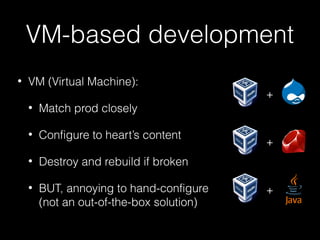
VM-based development
•

VM (Virtual Machine):
•

Match prod closely

•

Configure to heart’s content

•

Destroy and rebuild if broken

•

BUT, annoying to hand-configure
(not an out-of-the-box solution)

+

+

+
Vagrant
•

Created to solve difficulties of VM-based
development

•

Bring up, destroy, rebuild VMs with ease

•

Simple Ruby configuration file (Vagrantfile)

•

Can define single-server or multi-server
production-like environments
Ansible
•

Born out of frustration with complexities and
limitations of existing CM solutions like Puppet

•

“A powerful automation engine that makes
systems and apps simple to deploy. No more
scripting. No custom code. No agents required.
Just get in and get it done.”

•

Easy idempotence <— I like!
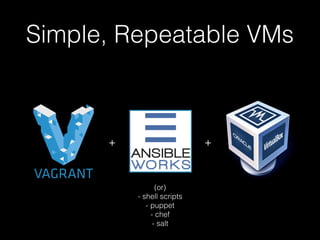
Simple, Repeatable VMs

+

+

(or)
- shell scripts
- puppet
- chef
- salt
Let’s see how this works
•

We’re going to:
•

Create a 64-bit CentOS 6.4 VM with Vagrant

•

Configure the VM with Ansible

•

Run the VM inside VirtualBox
(all free and open source, by the way…)
Notes on Windows
•

Preference for POSIX-based systems (OS X, Linux,
etc.)… since that’s where everything is deployed
anyways

•

Windows sometimes often requires hand-holding

•

Example: Ansible doesn’t run (easily) on Windows,
so it’s run from within VM.

•

Shared folders are slow. Might need to us
CIFS/Samba on Windows (similar to NFS on
Mac/Linux).
Getting Started
•

Install VirtualBox

•

Install Vagrant

•

Install Ansible:
$ sudo pip install ansible

(like I said, difficult on Windows, even with Cygwin)
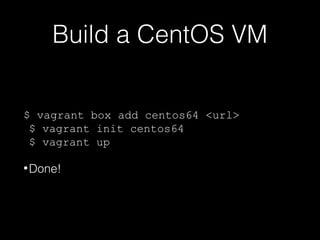
Build a CentOS VM
$ vagrant box add centos64 <url>
$ vagrant init centos64
$ vagrant up
• Done!
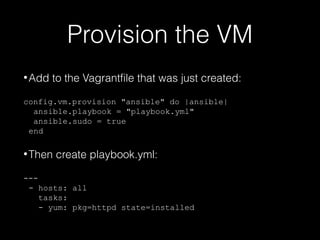
Provision the VM
• Add

to the Vagrantfile that was just created:

config.vm.provision "ansible" do |ansible|
ansible.playbook = "playbook.yml"
ansible.sudo = true
end

• Then

create playbook.yml:

--- hosts: all
tasks:
- yum: pkg=httpd state=installed
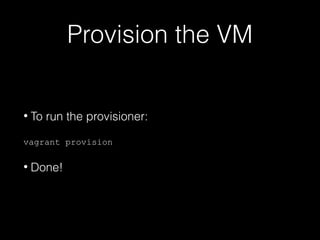
Provision the VM
•

To run the provisioner:

vagrant provision

•

Done!
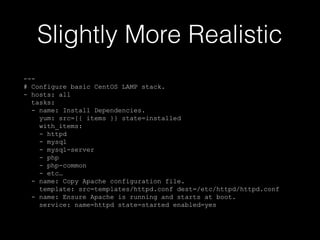
Slightly More Realistic
--# Configure basic CentOS LAMP stack.
- hosts: all
tasks:
- name: Install Dependencies.
yum: src={{ items }} state=installed
with_items:
- httpd
- mysql
- mysql-server
- php
- php-common
- etc…
- name: Copy Apache configuration file.
template: src=templates/httpd.conf dest=/etc/httpd/httpd.conf
- name: Ensure Apache is running and starts at boot.
service: name=httpd state=started enabled=yes
Provisioning on Windows
•

Shell script provisioning works on Windows

•

Use shell script to set up Ansible dependencies,
then run Ansible playbook from within VM:

config.vm.provision "shell" do |sh|
sh.path = "windows.sh"
sh.args = "playbook.yml inventory"
end
•

Since it’s Ruby, you can use ruby if/else for which
provisioner to use, with RbConfig::CONFIG['host_os']
Provisioning on Windows

•

See: Running Ansible within Windows

•

See: JJG-Ansible-Windows
Resources
•

Ansible documentation

•

Vagrant documentation

•

Ansible for Devops (book in progress)

Local Dev on Virtual Machines - Vagrant, VirtualBox and Ansible

  • 1.
  • 2.
    Prepackaged environments • Traditional prepackageddevelopment stacks: • Apache, MySQL, PHP (WAMP/MAMP) • Java/Tomcat • Ruby/Rails
  • 3.
    Prepackaged environments • Difficulties: • Real-world environmentsare more complex • Single stack for multiple/different projects • Prod server differences cause bugs • Hard to configure • “Snowflakes”
  • 4.
    WAMP/MAMP/non-VM “But it workson my machine!” (we’re going to solve this problem)
  • 5.
    VM-based development • VM (VirtualMachine): • Match prod closely • Configure to heart’s content • Destroy and rebuild if broken • BUT, annoying to hand-configure (not an out-of-the-box solution) + + +
  • 7.
    Vagrant • Created to solvedifficulties of VM-based development • Bring up, destroy, rebuild VMs with ease • Simple Ruby configuration file (Vagrantfile) • Can define single-server or multi-server production-like environments
  • 9.
    Ansible • Born out offrustration with complexities and limitations of existing CM solutions like Puppet • “A powerful automation engine that makes systems and apps simple to deploy. No more scripting. No custom code. No agents required. Just get in and get it done.” • Easy idempotence <— I like!
  • 10.
    Simple, Repeatable VMs + + (or) -shell scripts - puppet - chef - salt
  • 11.
    Let’s see howthis works • We’re going to: • Create a 64-bit CentOS 6.4 VM with Vagrant • Configure the VM with Ansible • Run the VM inside VirtualBox (all free and open source, by the way…)
  • 12.
    Notes on Windows • Preferencefor POSIX-based systems (OS X, Linux, etc.)… since that’s where everything is deployed anyways • Windows sometimes often requires hand-holding • Example: Ansible doesn’t run (easily) on Windows, so it’s run from within VM. • Shared folders are slow. Might need to us CIFS/Samba on Windows (similar to NFS on Mac/Linux).
  • 13.
    Getting Started • Install VirtualBox • InstallVagrant • Install Ansible: $ sudo pip install ansible (like I said, difficult on Windows, even with Cygwin)
  • 14.
    Build a CentOSVM $ vagrant box add centos64 <url> $ vagrant init centos64 $ vagrant up • Done!
  • 15.
    Provision the VM •Add to the Vagrantfile that was just created: config.vm.provision "ansible" do |ansible| ansible.playbook = "playbook.yml" ansible.sudo = true end • Then create playbook.yml: --- hosts: all tasks: - yum: pkg=httpd state=installed
  • 16.
    Provision the VM • Torun the provisioner: vagrant provision • Done!
  • 18.
    Slightly More Realistic --#Configure basic CentOS LAMP stack. - hosts: all tasks: - name: Install Dependencies. yum: src={{ items }} state=installed with_items: - httpd - mysql - mysql-server - php - php-common - etc… - name: Copy Apache configuration file. template: src=templates/httpd.conf dest=/etc/httpd/httpd.conf - name: Ensure Apache is running and starts at boot. service: name=httpd state=started enabled=yes
  • 19.
    Provisioning on Windows • Shellscript provisioning works on Windows • Use shell script to set up Ansible dependencies, then run Ansible playbook from within VM: config.vm.provision "shell" do |sh| sh.path = "windows.sh" sh.args = "playbook.yml inventory" end • Since it’s Ruby, you can use ruby if/else for which provisioner to use, with RbConfig::CONFIG['host_os']
  • 20.
    Provisioning on Windows • See:Running Ansible within Windows • See: JJG-Ansible-Windows
  • 21.