Failure Mode
Effects & Analysis
Mohammad Mehdi Rezvani
Supervisor:
Dr. Rafiee
1
Agenda
• History.
• A review on FMEA.
• FMEA Processes.
• Example.
• Advantages & Benefits.
2
A review on FMEA History
• This type of thinking has been around for
hundreds of years. It was first formalized
in the aerospace industry during the
Apollo program in the 1960’s.
• Initial automotive adoption in the 1970’s.
• Required by QS-9000 & Advanced
Product Quality Planning Process in 1994
for all automotive suppliers.
3
FMEA
• WIKIPEDIA: The FMEA is a design tool used to systematically analyze
postulated component failures and identify the resultant effects on system
operations.
• ASQ: FMEA is a step-by-step approach for identifying all possible failures in a
design, a manufacturing or assembly process, or a product or service.
• IHI: FMEA is a systematic, proactive method for evaluating a process to
identify where and how it might fail and to assess the relative impact of
different failures, in order to identify the parts of the process that are most
in need of change.
4
• FMEA is a design tool for assessing risk
associated with the different ways (modes) in
which a part or system can fail, identifies the
effects of those failures, and provides a structure
for revising the design to mitigate risk where
necessary.
5
What it can do?!
• Inductive process, asks question ‘If this failure occurred,
then what could happen?’
• Provides a method for quantitative analysis of risk.
• Identifies design or process related failure modes before
they happen.
• Determines the effect & severity of these failure modes.
• Identifies the causes and probability of occurrence of the
failure modes.
6
Process Steps
1: Identify modes of failure (e.g.: car won’t stop)
2: Identify consequences & related systems for each mode.
3: Rate the Severity (S) of each effect.
4: Identify potential root causes for each failure mode.
5: Rate the Probability of Occurrence (O) of each root cause .
6: Identify process controls and indicators (e.g.: brake squeal).
7: Rate Detectability (D) of each mode/root cause.
8: Calculate risk priority (S*O*D).
9: Use design to mitigate high-risk or highly critical failures, and
re-assess to ensure goals have been achieved.
7
Severity
Severity of Effect Rating
Extreme
May endanger machine or operator. Hazardous without warning. 10
May endanger machine or operator. Hazardous with warning. 9
High
Major disruption to production line. Loss of primary functions. Possible jig
lock and major loss of Takt Time.
8
Reduced primary function performance. Product requires repair or major
variance. Noticeable loss of takt time.
7
Moderate
Medium disruption of production. Possible scrap. Noticeable loss of takt time.
Loss of secondary function performance. Requires repair or minor variance.
6
Minor disruption to production. Product must be repaired.
Reduced secondary function performance.
5
Minor defect, product repaired or "Use-As-Is" disposition. 4
Low
Fit & Finish item. Minor defect, may be reprocessed on-line. 3
Minor Nonconformance, may be reprocessed on-line. 2
None No effect 1
8
Occurrence
Likelihood of occurrence F. Rate Rating
Very High Failure is almost inevitable.
1in2 10
1in3 9
High
Process is not in statistical control.
Similar Processes have experiences problems.
1in8 8
1in20 7
Moderate
Process is in statistical control but with isolated failures.
Previous processes have experienced occasional failures or out of control conditions.
1in80 6
1in400 5
1in2K 4
Low
Process is in statistical control. 1in15K 3
Process is in statistical control. Only isolated failures associated with almost identical processes. 1in150K 2
Remote Failure is unlikely. No known failures associated with almost identical processes. 1in1.5M 1
9
Detect
Likelihood that control will detect failure Rating
Very Low No known controls available to detect failure mode. 10
Low Controls have a remote chance of detecting the failure.
9
8
Moderate Controls may detect the existence of a failure.
7
6
5
High Controls have a good chance of detecting the existence of a failure.
4
3
Very High
The process automatically detects failure.
Controls will almost certainly detect the existence of a failure.
2
1
10
Risk Priority Number(RPN)
Severity x Occurrence x Detect
11
Example:
Battery Headlight
Switch
Possible Failure Modes:
• Light doesn’t turn on
• Light doesn’t turn off
Possible Consequences:
• Light doesn’t turn on
• Driver can’t see obstacles
• Car inoperable at night (8)
• Light doesn’t turn off
• Battery dies
• Car won’t start (10)
Possible Root Causes:
• Light doesn’t turn on
• Battery dead (8)
• Broken wire (3)
• Headlight out (10)
• Switch corroded (2)
• Switch broken (3)
12
Example:
Battery Headlight
Switch
Possible Failure Modes:
• Light doesn’t turn on
• Light doesn’t turn off
Possible Consequences:
• Light doesn’t turn on
• Driver can’t see obstacles
• Car inoperable at night (8)
• Light doesn’t turn off
• Battery dies
• Car won’t start (10)
Possible Root Causes:
• Light doesn’t turn off
• Short circuit in switch (2)
• Operator error (left on) (8)
13
Example:
Battery Headlight
Switch
Controls/indicators:
• Light doesn’t turn on
• User notices lights on in dark
• Light doesn’t turn off
• User notices lights on in dark
Detectability:
• Light doesn’t turn on (6)
• User notices lights on in dark
• User doesn’t notice lights not
on during day
• Light doesn’t turn off (6)
• User notices lights on in
dark
• User doesn’t notice lights
not on during day
14
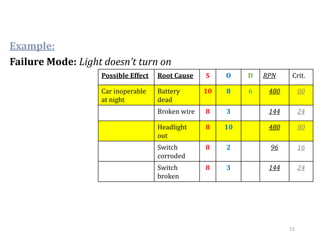
Example:
Possible Effect Root Cause S O D RPN Crit.
Car inoperable
at night
Battery
dead
10 8 6 480 80
Broken wire 8 3 144 24
Headlight
out
8 10 480 80
Switch
corroded
8 2 96 16
Switch
broken
8 3 144 24
Failure Mode: Light doesn’t turn on
15
Example:
Possible Effect Root Cause S O D RPN Crit.
Car inoperable
at night
Battery
dead
10 8 2 160 80
Broken wire 8 3 60 30
Headlight
out
6 10 120 60
Switch
corroded
8 2 40 20
Switch
broken
8 3 60 30
Failure Mode: Light doesn’t turn on
Redesign: Use two
headlights instead of
one, add visual lights-
on display in console.
16
Example:
Possible
Effect
Root
Cause
S O D RPN Crit.
Car won’t
start
Short
circuit in
switch
10 2 7 140 20
Operator
error
8 560 80
Failure Mode: Light doesn’t turn off
17
Example:
Possible
Effect
Root
Cause
S O D RPN Crit.
Car won’t
start
Short
circuit in
switch
10 2 2 40 20
Operator
error
8 160 80
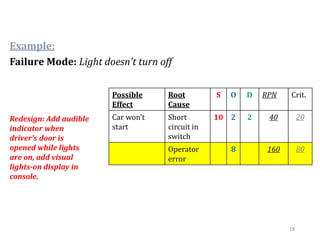
Failure Mode: Light doesn’t turn off
Redesign: Add audible
indicator when
driver’s door is
opened while lights
are on, add visual
lights-on display in
console.
18
Benefits
• Improve the quality, reliability and safety of a
product/process
• Improve company image and competitiveness
• Increase user satisfaction
• Reduce system development time and cost
• Collect information to reduce future failures, capture
engineering knowledge
• Reduce the potential for warranty concerns
• Reduce the possibility of same kind of failure in
future
19
Refrences
• The basics of FMEA, 2nd Edition, Robbin E.
McDermott, CRC Press.
• Understanding & Applying the Fundamentals of
FMEAs, Carl S. Carlson, Tuscon.
• http://www.fmea.co.uk/
• http://asq.org/
20
‫ش‬‫عا‬‫هک‬‫یااهن‬‫گ‬‫حال‬‫هب‬‫وشا‬‫خ‬‫ورند‬‫ن‬‫ق‬
‫ت‬‫س‬‫اه‬‫آن‬‫ی‬‫شاهن‬‫روی‬‫ور‬‫ن‬‫ط‬‫س‬‫ب‬‫ن‬‫م‬‫ت‬‫س‬‫د‬‫و‬...
21

Failure Mode Effects & Analysis

  • 1.
    Failure Mode Effects &Analysis Mohammad Mehdi Rezvani Supervisor: Dr. Rafiee 1
  • 2.
    Agenda • History. • Areview on FMEA. • FMEA Processes. • Example. • Advantages & Benefits. 2
  • 3.
    A review onFMEA History • This type of thinking has been around for hundreds of years. It was first formalized in the aerospace industry during the Apollo program in the 1960’s. • Initial automotive adoption in the 1970’s. • Required by QS-9000 & Advanced Product Quality Planning Process in 1994 for all automotive suppliers. 3
  • 4.
    FMEA • WIKIPEDIA: TheFMEA is a design tool used to systematically analyze postulated component failures and identify the resultant effects on system operations. • ASQ: FMEA is a step-by-step approach for identifying all possible failures in a design, a manufacturing or assembly process, or a product or service. • IHI: FMEA is a systematic, proactive method for evaluating a process to identify where and how it might fail and to assess the relative impact of different failures, in order to identify the parts of the process that are most in need of change. 4
  • 5.
    • FMEA isa design tool for assessing risk associated with the different ways (modes) in which a part or system can fail, identifies the effects of those failures, and provides a structure for revising the design to mitigate risk where necessary. 5
  • 6.
    What it cando?! • Inductive process, asks question ‘If this failure occurred, then what could happen?’ • Provides a method for quantitative analysis of risk. • Identifies design or process related failure modes before they happen. • Determines the effect & severity of these failure modes. • Identifies the causes and probability of occurrence of the failure modes. 6
  • 7.
    Process Steps 1: Identifymodes of failure (e.g.: car won’t stop) 2: Identify consequences & related systems for each mode. 3: Rate the Severity (S) of each effect. 4: Identify potential root causes for each failure mode. 5: Rate the Probability of Occurrence (O) of each root cause . 6: Identify process controls and indicators (e.g.: brake squeal). 7: Rate Detectability (D) of each mode/root cause. 8: Calculate risk priority (S*O*D). 9: Use design to mitigate high-risk or highly critical failures, and re-assess to ensure goals have been achieved. 7
  • 8.
    Severity Severity of EffectRating Extreme May endanger machine or operator. Hazardous without warning. 10 May endanger machine or operator. Hazardous with warning. 9 High Major disruption to production line. Loss of primary functions. Possible jig lock and major loss of Takt Time. 8 Reduced primary function performance. Product requires repair or major variance. Noticeable loss of takt time. 7 Moderate Medium disruption of production. Possible scrap. Noticeable loss of takt time. Loss of secondary function performance. Requires repair or minor variance. 6 Minor disruption to production. Product must be repaired. Reduced secondary function performance. 5 Minor defect, product repaired or "Use-As-Is" disposition. 4 Low Fit & Finish item. Minor defect, may be reprocessed on-line. 3 Minor Nonconformance, may be reprocessed on-line. 2 None No effect 1 8
  • 9.
    Occurrence Likelihood of occurrenceF. Rate Rating Very High Failure is almost inevitable. 1in2 10 1in3 9 High Process is not in statistical control. Similar Processes have experiences problems. 1in8 8 1in20 7 Moderate Process is in statistical control but with isolated failures. Previous processes have experienced occasional failures or out of control conditions. 1in80 6 1in400 5 1in2K 4 Low Process is in statistical control. 1in15K 3 Process is in statistical control. Only isolated failures associated with almost identical processes. 1in150K 2 Remote Failure is unlikely. No known failures associated with almost identical processes. 1in1.5M 1 9
  • 10.
    Detect Likelihood that controlwill detect failure Rating Very Low No known controls available to detect failure mode. 10 Low Controls have a remote chance of detecting the failure. 9 8 Moderate Controls may detect the existence of a failure. 7 6 5 High Controls have a good chance of detecting the existence of a failure. 4 3 Very High The process automatically detects failure. Controls will almost certainly detect the existence of a failure. 2 1 10
  • 11.
    Risk Priority Number(RPN) Severityx Occurrence x Detect 11
  • 12.
    Example: Battery Headlight Switch Possible FailureModes: • Light doesn’t turn on • Light doesn’t turn off Possible Consequences: • Light doesn’t turn on • Driver can’t see obstacles • Car inoperable at night (8) • Light doesn’t turn off • Battery dies • Car won’t start (10) Possible Root Causes: • Light doesn’t turn on • Battery dead (8) • Broken wire (3) • Headlight out (10) • Switch corroded (2) • Switch broken (3) 12
  • 13.
    Example: Battery Headlight Switch Possible FailureModes: • Light doesn’t turn on • Light doesn’t turn off Possible Consequences: • Light doesn’t turn on • Driver can’t see obstacles • Car inoperable at night (8) • Light doesn’t turn off • Battery dies • Car won’t start (10) Possible Root Causes: • Light doesn’t turn off • Short circuit in switch (2) • Operator error (left on) (8) 13
  • 14.
    Example: Battery Headlight Switch Controls/indicators: • Lightdoesn’t turn on • User notices lights on in dark • Light doesn’t turn off • User notices lights on in dark Detectability: • Light doesn’t turn on (6) • User notices lights on in dark • User doesn’t notice lights not on during day • Light doesn’t turn off (6) • User notices lights on in dark • User doesn’t notice lights not on during day 14
  • 15.
    Example: Possible Effect RootCause S O D RPN Crit. Car inoperable at night Battery dead 10 8 6 480 80 Broken wire 8 3 144 24 Headlight out 8 10 480 80 Switch corroded 8 2 96 16 Switch broken 8 3 144 24 Failure Mode: Light doesn’t turn on 15
  • 16.
    Example: Possible Effect RootCause S O D RPN Crit. Car inoperable at night Battery dead 10 8 2 160 80 Broken wire 8 3 60 30 Headlight out 6 10 120 60 Switch corroded 8 2 40 20 Switch broken 8 3 60 30 Failure Mode: Light doesn’t turn on Redesign: Use two headlights instead of one, add visual lights- on display in console. 16
  • 17.
    Example: Possible Effect Root Cause S O DRPN Crit. Car won’t start Short circuit in switch 10 2 7 140 20 Operator error 8 560 80 Failure Mode: Light doesn’t turn off 17
  • 18.
    Example: Possible Effect Root Cause S O DRPN Crit. Car won’t start Short circuit in switch 10 2 2 40 20 Operator error 8 160 80 Failure Mode: Light doesn’t turn off Redesign: Add audible indicator when driver’s door is opened while lights are on, add visual lights-on display in console. 18
  • 19.
    Benefits • Improve thequality, reliability and safety of a product/process • Improve company image and competitiveness • Increase user satisfaction • Reduce system development time and cost • Collect information to reduce future failures, capture engineering knowledge • Reduce the potential for warranty concerns • Reduce the possibility of same kind of failure in future 19
  • 20.
    Refrences • The basicsof FMEA, 2nd Edition, Robbin E. McDermott, CRC Press. • Understanding & Applying the Fundamentals of FMEAs, Carl S. Carlson, Tuscon. • http://www.fmea.co.uk/ • http://asq.org/ 20
  • 21.

Editor's Notes

  • #5 System - focuses on global system functions Design - focuses on components and subsystems Process - focuses on manufacturing and assembly processes Service - focuses on service functions Software - focuses on software functions
  • #6 System - focuses on global system functions Design - focuses on components and subsystems Process - focuses on manufacturing and assembly processes Service - focuses on service functions Software - focuses on software functions