FACTUAL PRODUCTION
Chloe Ross
Process
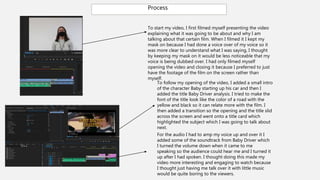
To start my video, I first filmed myself presenting the video
explaining what it was going to be about and why I am
talking about that certain film. When I filmed it I kept my
mask on because I had done a voice over of my voice so it
was more clear to understand what I was saying, I thought
by keeping my mask on it would be less noticeable that my
voice is being dubbed over. I had only filmed myself
opening the video and closing it because I preferred to just
have the footage of the film on the screen rather than
myself.
To follow my opening of the video, I added a small intro
of the character Baby starting up his car and then I
added the title Baby Driver analysis. I tried to make the
font of the title look like the color of a road with the
yellow and black so it can relate more with the film. I
then added a transition so the opening and the title slid
across the screen and went onto a title card which
highlighted the subject which I was going to talk about
next.
For the audio I had to amp my voice up and over it I
added some of the soundtrack from Baby Driver which
I turned the volume down when it came to me
speaking so the audience could hear me and I turned it
up after I had spoken. I thought doing this made my
video more interesting and engaging to watch because
I thought just having me talk over it with little music
would be quite boring to the viewers.
Process
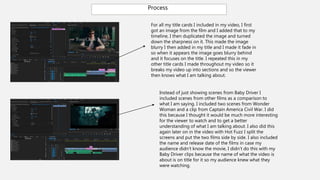
For all my title cards I included in my video, I first
got an image from the film and I added that to my
timeline, I then duplicated the image and turned
down the sharpness on it. This made the image
blurry I then added in my title and I made it fade in
so when it appears the image goes blurry behind
and it focuses on the title. I repeated this in my
other title cards I made throughout my video so it
breaks my video up into sections and so the viewer
then knows what I am talking about.
Instead of just showing scenes from Baby Driver I
included scenes from other films as a comparison to
what I am saying. I included two scenes from Wonder
Woman and a clip from Captain America Civil War. I did
this because I thought it would be much more interesting
for the viewer to watch and to get a better
understanding of what I am talking about. I also did this
again later on in the video with Hot Fuzz I split the
screens and put the two films side by side. I also included
the name and release date of the films in case my
audience didn’t know the movie, I didn’t do this with my
Baby Driver clips because the name of what the video is
about is on title for it so my audience knew what they
were watching.
PROCESS
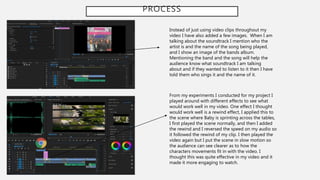
Instead of just using video clips throughout my
video I have also added a few images. When I am
talking about the soundtrack I mention who the
artist is and the name of the song being played,
and I show an image of the bands album.
Mentioning the band and the song will help the
audience know what soundtrack I am talking
about and if they wanted to listen to it then I have
told them who sings it and the name of it.
From my experiments I conducted for my project I
played around with different effects to see what
would work well in my video. One effect I thought
would work well is a rewind effect, I applied this to
the scene where Baby is sprinting across the tables,
I first played the scene normally, and then I added
the rewind and I reversed the speed on my audio so
it followed the rewind of my clip. I then played the
video again but I put the scene in slow motion so
the audience can see clearer as to how the
characters movements fit in with the video. I
thought this was quite effective in my video and it
made it more engaging to watch.
PROCESS
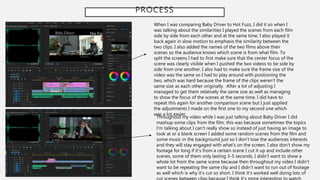
When I was comparing Baby Driver to Hot Fuzz, I did it so when I
was talking about the similarities I played the scenes from each film
side by side from each other and at the same time. I also played it
back again in slow motion to emphasis the similarity between the
two clips. I also added the names of the two films above their
scenes so the audience knows which scene is from what film. To
split the screens I had to first make sure that the center focus of the
scene was clearly visible when I pushed the two videos to be side by
side from one another. I also had to make sure the frame size of the
video was the same so I had to play around with positioning the
two, which was hard because the frame of the clips weren’t the
same size as each other originally. After a lot of adjusting I
managed to get them relatively the same size as well as managing
to show the focus of the scenes at the same time. I did have to
repeat this again for another comparison scene but I just applied
the adjustments I made on the first one to my second one which
was a lot easier.
Throughout my video while I was just talking about Baby Driver I did
mashup some clips from the film, this was because sometimes the topics
I’m talking about I can’t really show so instead of just having an image to
look at or a blank screen I added some random scenes from the film and
some music in the background just so I don’t lose the audiences interests
and they will stay engaged with what's on the screen. I also don’t show my
footage for long if it’s from a certain scene I cut it up and include other
scenes, some of them only lasting 3-5 seconds. I didn’t want to show a
whole lot from the same scene because then throughout my video I didn’t
want to be repeating the same clip and I didn’t want to run out of footage
as well which is why it’s cut so short. I think it’s worked well doing lots of
PROCESS
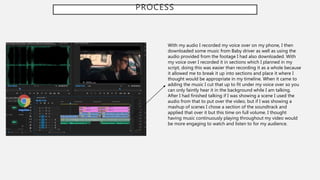
With my audio I recorded my voice over on my phone, I then
downloaded some music from Baby driver as well as using the
audio provided from the footage I had also downloaded. With
my voice over I recorded it in sections which I planned in my
script, doing this was easier than recording it as a whole because
it allowed me to break it up into sections and place it where I
thought would be appropriate in my timeline. When it came to
adding the music I cut that up to fit under my voice over so you
can only faintly hear it in the background while I am talking.
After I had finished talking if I was showing a scene I used the
audio from that to put over the video, but if I was showing a
mashup of scenes I chose a section of the soundtrack and
applied that over it but this time on full volume. I thought
having music continuously playing throughout my video would
be more engaging to watch and listen to for my audience.

Factual production

  • 1.
  • 2.
    Process To start myvideo, I first filmed myself presenting the video explaining what it was going to be about and why I am talking about that certain film. When I filmed it I kept my mask on because I had done a voice over of my voice so it was more clear to understand what I was saying, I thought by keeping my mask on it would be less noticeable that my voice is being dubbed over. I had only filmed myself opening the video and closing it because I preferred to just have the footage of the film on the screen rather than myself. To follow my opening of the video, I added a small intro of the character Baby starting up his car and then I added the title Baby Driver analysis. I tried to make the font of the title look like the color of a road with the yellow and black so it can relate more with the film. I then added a transition so the opening and the title slid across the screen and went onto a title card which highlighted the subject which I was going to talk about next. For the audio I had to amp my voice up and over it I added some of the soundtrack from Baby Driver which I turned the volume down when it came to me speaking so the audience could hear me and I turned it up after I had spoken. I thought doing this made my video more interesting and engaging to watch because I thought just having me talk over it with little music would be quite boring to the viewers.
  • 3.
    Process For all mytitle cards I included in my video, I first got an image from the film and I added that to my timeline, I then duplicated the image and turned down the sharpness on it. This made the image blurry I then added in my title and I made it fade in so when it appears the image goes blurry behind and it focuses on the title. I repeated this in my other title cards I made throughout my video so it breaks my video up into sections and so the viewer then knows what I am talking about. Instead of just showing scenes from Baby Driver I included scenes from other films as a comparison to what I am saying. I included two scenes from Wonder Woman and a clip from Captain America Civil War. I did this because I thought it would be much more interesting for the viewer to watch and to get a better understanding of what I am talking about. I also did this again later on in the video with Hot Fuzz I split the screens and put the two films side by side. I also included the name and release date of the films in case my audience didn’t know the movie, I didn’t do this with my Baby Driver clips because the name of what the video is about is on title for it so my audience knew what they were watching.
  • 4.
    PROCESS Instead of justusing video clips throughout my video I have also added a few images. When I am talking about the soundtrack I mention who the artist is and the name of the song being played, and I show an image of the bands album. Mentioning the band and the song will help the audience know what soundtrack I am talking about and if they wanted to listen to it then I have told them who sings it and the name of it. From my experiments I conducted for my project I played around with different effects to see what would work well in my video. One effect I thought would work well is a rewind effect, I applied this to the scene where Baby is sprinting across the tables, I first played the scene normally, and then I added the rewind and I reversed the speed on my audio so it followed the rewind of my clip. I then played the video again but I put the scene in slow motion so the audience can see clearer as to how the characters movements fit in with the video. I thought this was quite effective in my video and it made it more engaging to watch.
  • 5.
    PROCESS When I wascomparing Baby Driver to Hot Fuzz, I did it so when I was talking about the similarities I played the scenes from each film side by side from each other and at the same time. I also played it back again in slow motion to emphasis the similarity between the two clips. I also added the names of the two films above their scenes so the audience knows which scene is from what film. To split the screens I had to first make sure that the center focus of the scene was clearly visible when I pushed the two videos to be side by side from one another. I also had to make sure the frame size of the video was the same so I had to play around with positioning the two, which was hard because the frame of the clips weren’t the same size as each other originally. After a lot of adjusting I managed to get them relatively the same size as well as managing to show the focus of the scenes at the same time. I did have to repeat this again for another comparison scene but I just applied the adjustments I made on the first one to my second one which was a lot easier. Throughout my video while I was just talking about Baby Driver I did mashup some clips from the film, this was because sometimes the topics I’m talking about I can’t really show so instead of just having an image to look at or a blank screen I added some random scenes from the film and some music in the background just so I don’t lose the audiences interests and they will stay engaged with what's on the screen. I also don’t show my footage for long if it’s from a certain scene I cut it up and include other scenes, some of them only lasting 3-5 seconds. I didn’t want to show a whole lot from the same scene because then throughout my video I didn’t want to be repeating the same clip and I didn’t want to run out of footage as well which is why it’s cut so short. I think it’s worked well doing lots of
  • 6.
    PROCESS With my audioI recorded my voice over on my phone, I then downloaded some music from Baby driver as well as using the audio provided from the footage I had also downloaded. With my voice over I recorded it in sections which I planned in my script, doing this was easier than recording it as a whole because it allowed me to break it up into sections and place it where I thought would be appropriate in my timeline. When it came to adding the music I cut that up to fit under my voice over so you can only faintly hear it in the background while I am talking. After I had finished talking if I was showing a scene I used the audio from that to put over the video, but if I was showing a mashup of scenes I chose a section of the soundtrack and applied that over it but this time on full volume. I thought having music continuously playing throughout my video would be more engaging to watch and listen to for my audience.