Face Recognition Application
Outline
1. Introduction
2. Biometrics
3. Facial Recognition
4. Implementation
5. How it works
6. System Requirement
7. Applications
8. Screenshots
9. Conclusion
10. References
Introduction
 Everyday actions are increasingly being handled electronically, instead of pencil
and paper or face to face.
 This growth in electronic transactions results in great demand for fast and
accurate user identification and authentication.
 Access codes for buildings, banks accounts and computer systems often use
PIN's for identification and security clearances. Using the proper PIN gains access,
but the user of the PIN is not verified.
 When credit and ATM cards are lost or stolen, an unauthorized user can often
come up with the correct personal codes.
 Face recognition technology may solve this problem since a face is undeniably
connected to its owner expect in the case of identical twins.
Biometric
A biometric is a unique, measurable characteristic of human being that can
be used to automatically recognize an individual or verify an individual's identity.
Biometrics can measure both physiological and behavioral characteristics.
Physiological biometrics : - This biometrics is based on measurements and
data derived from direct measurement of a part of the human body.
Behavioral biometrics : - This biometrics is based on measurements and
data derived from an action.
Type Of Biometric
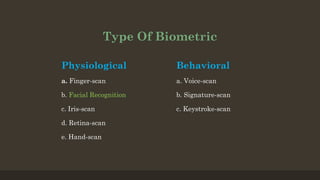
Physiological
a. Finger-scan
b. Facial Recognition
c. Iris-scan
d. Retina-scan
e. Hand-scan
Behavioral
a. Voice-scan
b. Signature-scan
c. Keystroke-scan
Face Recognition
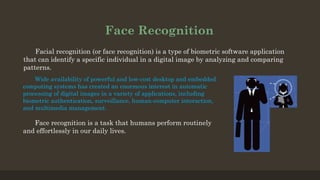
Facial recognition (or face recognition) is a type of biometric software application
that can identify a specific individual in a digital image by analyzing and comparing
patterns.
Wide availability of powerful and low-cost desktop and embedded
computing systems has created an enormous interest in automatic
processing of digital images in a variety of applications, including
biometric authentication, surveillance, human-computer interaction,
and multimedia management.
Face recognition is a task that humans perform routinely
and effortlessly in our daily lives.
Implementation
The implementation of face recognition technology includes the following stages :
 Image acquisition
 Image processing
 Distinctive characteristic location
 Template matching
 Template creation
These nodal points are measured creating a numerical code, called a face print,
representing the face in the database.
How Face Recognition Work
Face recognition software is based on the ability to first recognize faces, which
is a technological feat in itself. If you look at the mirror, we can see that your face has
certain distinguishable landmarks. These are the peaks and valleys that make up the
different facial features.
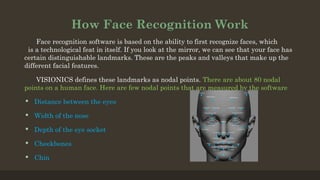
VISIONICS defines these landmarks as nodal points. There are about 80 nodal
points on a human face. Here are few nodal points that are measured by the software
 Distance between the eyes
 Width of the nose
 Depth of the eye socket
 Cheekbones
 Chin
Model Description
 Add Image
In this we add Image by capturing from web camera and store them in our system. During
registration four images are captured.
 Image Capture Module
This module is used to capture image using web camera. This is written as a separate thread
to avoid system hanging. This module is used to capture image in login module and registration
module.
 Eigenface Computation
This module is used to compute the "face space" used for face recognition. The recognition is
actually being carried out in the Face Bundle object, but the preparation of such object requires
doing lots of computations.
 Identification
This module contains the functionality to take the image from above module and it compares or
searches with the images already there in the database. If any image is matched then a success`
message is shown to the user.
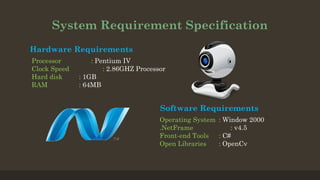
System Requirement Specification
Hardware Requirements
Processor : Pentium IV
Clock Speed : 2.86GHZ Processor
Hard disk : 1GB
RAM : 64MB
Software Requirements
Operating System : Window 2000
.NetFrame : v4.5
Front-end Tools : C#
Open Libraries : OpenCv
About OpenCv
OpenCv is an Image Processing library created by Intel
and maintained by Willow Garage.
Available for C, C++, Python and for also another
languages.
It was Open Source and Free.
It is a collection of C functions and a few C++ classes
that implement some popular Image Processing and
Computer Vision algorithms.
Cross-Platform API of C functions FREE for commercial
and non-commercial uses
Basic OpenCv Structure
1. Point, Point2f - 2D Point
2. Size - 2D size structure
3. Rect - 2D rectangle object
4. RotatedRect - Rect object with angle
5. Mat - image object
OpenCv
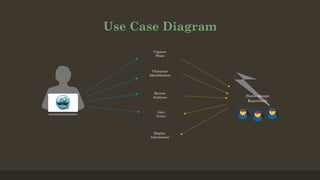
Use Case Diagram
Capture
Photo
Character
Identification
Display
Information
Alert
Notice
Alert
Notice
Review
Analyses Static Image
Repository
Static Image
Repository
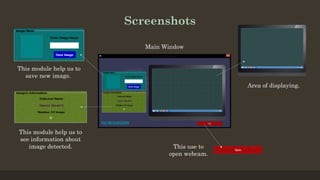
Screenshots
This module help us to
save new image.
This module help us to
see information about
image detected. This use to
open webcam.
Area of displaying.
Main Window
Conclusion
Factors such as environmental changes and mild changes in appearance impact the
technology to a greater degree than many expect.
For implementations where the biometric system must verify and identify users
reliably over time, facial scan can be a very difficult, but not impossible, technology to
implement successfully.
Reference
1. http://www.opencv.org/
2. https://msdn.microsoft.com/en-us/library/67ef8sbd.aspx
3. http://www.tutorialspoint.com/csharp/
Thank You

Face recognition application

  • 1.
  • 2.
    Outline 1. Introduction 2. Biometrics 3.Facial Recognition 4. Implementation 5. How it works 6. System Requirement 7. Applications 8. Screenshots 9. Conclusion 10. References
  • 3.
    Introduction  Everyday actionsare increasingly being handled electronically, instead of pencil and paper or face to face.  This growth in electronic transactions results in great demand for fast and accurate user identification and authentication.  Access codes for buildings, banks accounts and computer systems often use PIN's for identification and security clearances. Using the proper PIN gains access, but the user of the PIN is not verified.  When credit and ATM cards are lost or stolen, an unauthorized user can often come up with the correct personal codes.  Face recognition technology may solve this problem since a face is undeniably connected to its owner expect in the case of identical twins.
  • 4.
    Biometric A biometric isa unique, measurable characteristic of human being that can be used to automatically recognize an individual or verify an individual's identity. Biometrics can measure both physiological and behavioral characteristics. Physiological biometrics : - This biometrics is based on measurements and data derived from direct measurement of a part of the human body. Behavioral biometrics : - This biometrics is based on measurements and data derived from an action.
  • 5.
    Type Of Biometric Physiological a.Finger-scan b. Facial Recognition c. Iris-scan d. Retina-scan e. Hand-scan Behavioral a. Voice-scan b. Signature-scan c. Keystroke-scan
  • 6.
    Face Recognition Facial recognition(or face recognition) is a type of biometric software application that can identify a specific individual in a digital image by analyzing and comparing patterns. Wide availability of powerful and low-cost desktop and embedded computing systems has created an enormous interest in automatic processing of digital images in a variety of applications, including biometric authentication, surveillance, human-computer interaction, and multimedia management. Face recognition is a task that humans perform routinely and effortlessly in our daily lives.
  • 7.
    Implementation The implementation offace recognition technology includes the following stages :  Image acquisition  Image processing  Distinctive characteristic location  Template matching  Template creation These nodal points are measured creating a numerical code, called a face print, representing the face in the database.
  • 8.
    How Face RecognitionWork Face recognition software is based on the ability to first recognize faces, which is a technological feat in itself. If you look at the mirror, we can see that your face has certain distinguishable landmarks. These are the peaks and valleys that make up the different facial features. VISIONICS defines these landmarks as nodal points. There are about 80 nodal points on a human face. Here are few nodal points that are measured by the software  Distance between the eyes  Width of the nose  Depth of the eye socket  Cheekbones  Chin
  • 9.
    Model Description  AddImage In this we add Image by capturing from web camera and store them in our system. During registration four images are captured.  Image Capture Module This module is used to capture image using web camera. This is written as a separate thread to avoid system hanging. This module is used to capture image in login module and registration module.  Eigenface Computation This module is used to compute the "face space" used for face recognition. The recognition is actually being carried out in the Face Bundle object, but the preparation of such object requires doing lots of computations.  Identification This module contains the functionality to take the image from above module and it compares or searches with the images already there in the database. If any image is matched then a success` message is shown to the user.
  • 10.
    System Requirement Specification HardwareRequirements Processor : Pentium IV Clock Speed : 2.86GHZ Processor Hard disk : 1GB RAM : 64MB Software Requirements Operating System : Window 2000 .NetFrame : v4.5 Front-end Tools : C# Open Libraries : OpenCv
  • 11.
    About OpenCv OpenCv isan Image Processing library created by Intel and maintained by Willow Garage. Available for C, C++, Python and for also another languages. It was Open Source and Free. It is a collection of C functions and a few C++ classes that implement some popular Image Processing and Computer Vision algorithms. Cross-Platform API of C functions FREE for commercial and non-commercial uses Basic OpenCv Structure 1. Point, Point2f - 2D Point 2. Size - 2D size structure 3. Rect - 2D rectangle object 4. RotatedRect - Rect object with angle 5. Mat - image object OpenCv
  • 12.
  • 13.
    Screenshots This module helpus to save new image. This module help us to see information about image detected. This use to open webcam. Area of displaying. Main Window
  • 14.
    Conclusion Factors such asenvironmental changes and mild changes in appearance impact the technology to a greater degree than many expect. For implementations where the biometric system must verify and identify users reliably over time, facial scan can be a very difficult, but not impossible, technology to implement successfully.
  • 15.
  • 16.