Presented at MACUL The Michigan Association for Computer Users in Learning  March 6, 2008 Gayle Underwood Technology Integration Consultant Allegan Area Education Service Agency Michigan Integrated Technology Supports Darryl Robbins State Improvement Grant Partner Educator Office of Special Education and Early Intervention Services Educational Consultant Michigan Integrated Technology Supports
Thanks for coming! Get this power point online at: http://protopage.com/gunderwood#My_public_category/Macul_08   Or search for it at slideshare.net  Dee’s email:  [email_address]   Gayle’s email:  [email_address]
Teachers must deliver instruction to diverse groups of students who come from a variety of cultures with varying languages, learning styles, abilities and disabilities. These students are included in the General Education classroom. Educational demands are on the rise Shift from acquiring knowledge to integrating knowledge Higher curriculum standards All students are held to the same standards
No Child Left Behind (NCLB) state assessment participation rate. Adequate Yearly Progress (AYP) disaggregate subgroups, 1% participation cap. Individuals with Disabilities Education Act of 2004  (IDEA 2004)  Match state benchmark and standards  Access for every student Response to Intervention (RtI) E quity  I n  E very  I nstructional  O pportunity (EIEIO)
with good curriculum, flexible materials, engaging assignments and built in universal access features
All  students need to be able to: Recognize information, ideas, and concepts, Apply effective strategies to process the information and Be engaged in the process. Vygotsky
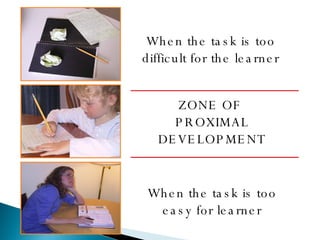
When the task is too difficult for the learner When the task is too easy for learner ZONE OF  PROXIMAL DEVELOPMENT
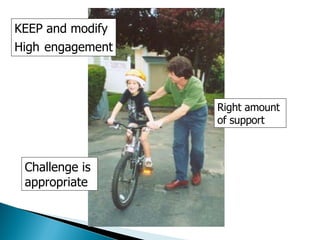
Right amount  of support KEEP and modify High   engagement Challenge is  appropriate
Universal Design for Learning (UDL) is a  framework for designing curricula  that enable all individuals to gain  knowledge ,  skills , and  enthusiasm  for learning.   UDL calls for the design of curricula with the needs of all students in mind, so that methods, materials, and assessment are usable by all.  UDL provides rich supports for learning and reduces barriers to the curriculum while maintaining high achievement standards for all.
Universal does NOT suggest that there is a single solution that works for everyone. Employs Flexibility Includes Alternatives Sets Appropriate Goals Separates the Goal from the Methods Fixes the Curriculum NOT the Learner
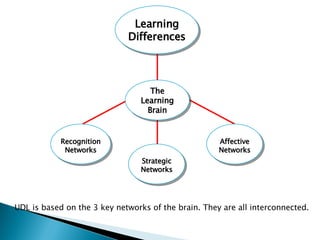
UDL is based on the 3 key networks of the brain. They are all interconnected.  Learning Differences The Learning Brain Recognition Networks Strategic Networks Affective Networks
KEEP Recognition networks Gathering facts. How we identify and categorize what we see, hear, and read. Identifying letters, words, or an author's style are recognition tasks—the "what" of learning. Strategic networks Planning and performing tasks. How we organize and express our ideas. Writing an essay or solving a math problem are strategic tasks—the "how" of learning. Affective networks How students are engaged and motivated. How they are challenged, excited, or interested. These are affective dimensions—the "why" of learning. Center for Applied Special Technologies, CAST www.cast.org
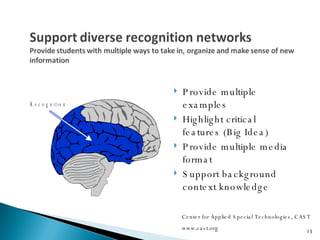
Provide multiple examples  Highlight critical features (Big Idea) Provide multiple media format  Support background context knowledge Center for Applied Special Technologies, CAST www.cast.org
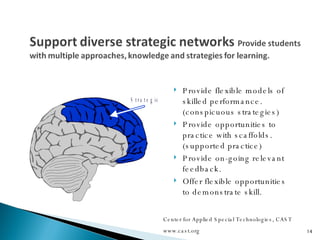
Provide flexible models of skilled performance. (conspicuous strategies) Provide opportunities to practice with scaffolds. (supported practice) Provide on-going relevant feedback. Offer flexible opportunities to demonstrate skill. Center for Applied Special Technologies, CAST www.cast.org
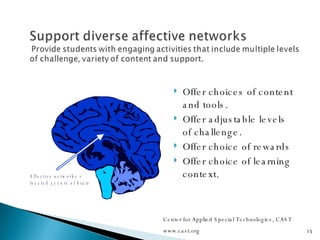
Offer choices of content and tools. Offer adjustable levels of challenge. Offer choice of rewards Offer choice of learning context. Center for Applied Special Technologies, CAST www.cast.org
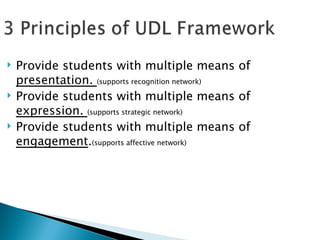
Provide students with multiple means of  presentation.  (supports recognition network) Provide students with multiple means of  expression.  (supports strategic network) Provide students with multiple means of  engagement . (supports affective network)
UDL promotes the use of new technologies to help students, but there are many ‘UDL’ strategies that don’t use technology.
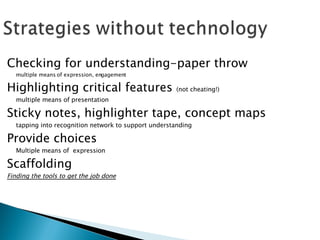
Checking for understanding-paper throw multiple means of expression, engagement Highlighting critical features  (not cheating!) multiple means of presentation Sticky notes, highlighter tape, concept maps tapping into recognition network to support understanding Provide choices Multiple means of  expression Scaffolding Finding the tools to get the job done
 
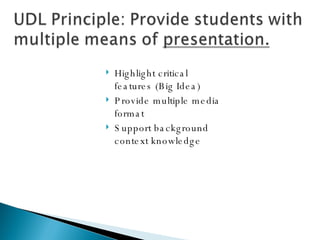
Highlight critical features (Big Idea) Provide multiple media format  Support background context knowledge
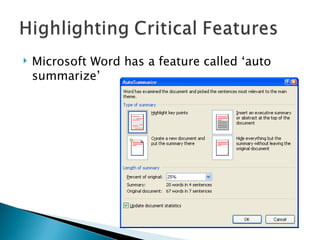
Microsoft Word has a feature called ‘auto summarize’
Used inexpensive MP3’s—still cool; much easier to manage than Ipods! Student’s are in charge! Activities: audio book, teacher’s grade papers, students projects (study guide with visual support)
I, ___________________________________, do solemnly swear to take good care of the MP3 player assigned to me.  I promise to return it in perfect shape to Mrs. Laughlin by ___________________________.  I also promise to use my own headphones for this MP3.  In addition, if I should somehow damage this MP3, I promise I will pay the replacement fee of $35.00 to Mrs. Laughlin.  I have checked out number _______________ MP3.
“…I enjoyed listening to the mp3 player while I was getting ready for bed, looking for clothes to pack…I would love to use one for review for another class anytime” “…it was a lot easier than reading the whole book” “…the mp3 player makes it easier to comprehend.” “These mp3 were very useful when using these I was able to also clean my room and do laundry.”
"I liked it because it helped me understand what I did wrong.  It was easier than reading comments by the teacher.“ "amazing” "I thought it was one of the best experiences in my English classes.  It made it fun to learn.“ "It was easy for me to know what I did wrong."                
One way to help support background knowledge is to show video clips of familiar activities and relate it to the concept you are trying to teach.  For example, if you are teaching Force As you recall….Newton stated that  change of motion is caused by forces .  In other words  force is  “something” which can change the state of motion.   A video on tug of war would be a great discussion starter.  http:// www.youtube.com/watch?v = ApORwKIQYAM
Academic videos are on TeacherTube –finding the right video is easier Google video and TeacherTube get most of their videos from YouTube—will still be blocked Zamzar will convert videos from google and Youtube but  NOT  Teacher tube. Bottom line is, you will have to be able to work from a computer that isn’t blocked.
Included in a 5 th  class Working at a 1-2 grade level Every student in class goes to lab and works on their Districts software for DI.  Software is to high for her. Created her own protopage so she is doing similar activities as her peers. http:// protopage.com/gunderwood#My_public_category/Lorna
Provide flexible models of skilled performance. (conspicuous strategies) Provide opportunities to practice with scaffolds. (supported practice) Provide on-going relevant feedback. Offer flexible opportunities to demonstrate skill.
Provide flexible models of skilled performance. (conspicuous strategies) http://protopage.com/gunderwood#My_public_category/Math http://protopage.com/gunderwood#My_public_category/Science
Provide on-going relevant feedback. Using Wiki’s and Blogs teachers can easily provide feedback to students’ projects http://spfractions.wikispaces.com/  (Math Wiki) http://blogs.oaisd.org/wiki/doku.php?id=myrmel:student_pages  (3 rd  Graders Wiki) http://gayleincyprus.blogspot.com/  (My blog during my trip to Cyprus)
Offer flexible opportunities to demonstrate skill. Students should be able to use their technology skills creatively!  www.voicethread.com   (ppt on steroids) www.YouTube.com   (create your own video right from the YouTube site or use cheap, so-easy-to-use-even-a-teacher-can-use-it video camera)
Students love technology so it’s easy to get them engaged!  Third Grade Fluency Site Words  ppt . Offer choices of content and tools Offer adjustable levels of challenge
Offer choices of content and tools. Check out the difference between these 2 sites:  www.CNN.com   vs  http://Current.com   Which site do you think students would rather get their current events??? Audacity- http://audacity.sourceforge.net/download/ Free software to create and edit audio files http://www.edhsonline.org/other/audacity/  tutorial Students just need a microphone.
Offer adjustable levels of challenge Moodle-”a course management system (CMS) - a free,  Open Source  software package designed using sound  pedagogical principles , to help educators create effective online learning communities” The ‘group’ feature in Moodle allows you to provide different activities (including tests) to different students.  http://docs.moodle.org/en/Groups
Thanks for coming! Get this power point online at: http://protopage.com/gunderwood#My_public_category/Macul_08   Or search for it at slideshare.net  Dee’s email:  [email_address]   Gayle’s email:  [email_address]

Extreme Makeover 3 6 08

  • 1.
    Presented at MACULThe Michigan Association for Computer Users in Learning March 6, 2008 Gayle Underwood Technology Integration Consultant Allegan Area Education Service Agency Michigan Integrated Technology Supports Darryl Robbins State Improvement Grant Partner Educator Office of Special Education and Early Intervention Services Educational Consultant Michigan Integrated Technology Supports
  • 2.
    Thanks for coming!Get this power point online at: http://protopage.com/gunderwood#My_public_category/Macul_08 Or search for it at slideshare.net Dee’s email: [email_address] Gayle’s email: [email_address]
  • 3.
    Teachers must deliverinstruction to diverse groups of students who come from a variety of cultures with varying languages, learning styles, abilities and disabilities. These students are included in the General Education classroom. Educational demands are on the rise Shift from acquiring knowledge to integrating knowledge Higher curriculum standards All students are held to the same standards
  • 4.
    No Child LeftBehind (NCLB) state assessment participation rate. Adequate Yearly Progress (AYP) disaggregate subgroups, 1% participation cap. Individuals with Disabilities Education Act of 2004 (IDEA 2004) Match state benchmark and standards Access for every student Response to Intervention (RtI) E quity I n E very I nstructional O pportunity (EIEIO)
  • 5.
    with good curriculum,flexible materials, engaging assignments and built in universal access features
  • 6.
    All studentsneed to be able to: Recognize information, ideas, and concepts, Apply effective strategies to process the information and Be engaged in the process. Vygotsky
  • 7.
    When the taskis too difficult for the learner When the task is too easy for learner ZONE OF PROXIMAL DEVELOPMENT
  • 8.
    Right amount of support KEEP and modify High engagement Challenge is appropriate
  • 9.
    Universal Design forLearning (UDL) is a framework for designing curricula that enable all individuals to gain knowledge , skills , and enthusiasm for learning. UDL calls for the design of curricula with the needs of all students in mind, so that methods, materials, and assessment are usable by all. UDL provides rich supports for learning and reduces barriers to the curriculum while maintaining high achievement standards for all.
  • 10.
    Universal does NOTsuggest that there is a single solution that works for everyone. Employs Flexibility Includes Alternatives Sets Appropriate Goals Separates the Goal from the Methods Fixes the Curriculum NOT the Learner
  • 11.
    UDL is basedon the 3 key networks of the brain. They are all interconnected. Learning Differences The Learning Brain Recognition Networks Strategic Networks Affective Networks
  • 12.
    KEEP Recognition networksGathering facts. How we identify and categorize what we see, hear, and read. Identifying letters, words, or an author's style are recognition tasks—the "what" of learning. Strategic networks Planning and performing tasks. How we organize and express our ideas. Writing an essay or solving a math problem are strategic tasks—the "how" of learning. Affective networks How students are engaged and motivated. How they are challenged, excited, or interested. These are affective dimensions—the "why" of learning. Center for Applied Special Technologies, CAST www.cast.org
  • 13.
    Provide multiple examples Highlight critical features (Big Idea) Provide multiple media format Support background context knowledge Center for Applied Special Technologies, CAST www.cast.org
  • 14.
    Provide flexible modelsof skilled performance. (conspicuous strategies) Provide opportunities to practice with scaffolds. (supported practice) Provide on-going relevant feedback. Offer flexible opportunities to demonstrate skill. Center for Applied Special Technologies, CAST www.cast.org
  • 15.
    Offer choices ofcontent and tools. Offer adjustable levels of challenge. Offer choice of rewards Offer choice of learning context. Center for Applied Special Technologies, CAST www.cast.org
  • 16.
    Provide students withmultiple means of presentation. (supports recognition network) Provide students with multiple means of expression. (supports strategic network) Provide students with multiple means of engagement . (supports affective network)
  • 17.
    UDL promotes theuse of new technologies to help students, but there are many ‘UDL’ strategies that don’t use technology.
  • 18.
    Checking for understanding-paperthrow multiple means of expression, engagement Highlighting critical features (not cheating!) multiple means of presentation Sticky notes, highlighter tape, concept maps tapping into recognition network to support understanding Provide choices Multiple means of expression Scaffolding Finding the tools to get the job done
  • 19.
  • 20.
    Highlight critical features(Big Idea) Provide multiple media format Support background context knowledge
  • 21.
    Microsoft Word hasa feature called ‘auto summarize’
  • 22.
    Used inexpensive MP3’s—stillcool; much easier to manage than Ipods! Student’s are in charge! Activities: audio book, teacher’s grade papers, students projects (study guide with visual support)
  • 23.
    I, ___________________________________, dosolemnly swear to take good care of the MP3 player assigned to me. I promise to return it in perfect shape to Mrs. Laughlin by ___________________________. I also promise to use my own headphones for this MP3. In addition, if I should somehow damage this MP3, I promise I will pay the replacement fee of $35.00 to Mrs. Laughlin. I have checked out number _______________ MP3.
  • 24.
    “…I enjoyed listeningto the mp3 player while I was getting ready for bed, looking for clothes to pack…I would love to use one for review for another class anytime” “…it was a lot easier than reading the whole book” “…the mp3 player makes it easier to comprehend.” “These mp3 were very useful when using these I was able to also clean my room and do laundry.”
  • 25.
    "I liked itbecause it helped me understand what I did wrong.  It was easier than reading comments by the teacher.“ "amazing” "I thought it was one of the best experiences in my English classes.  It made it fun to learn.“ "It was easy for me to know what I did wrong."                
  • 26.
    One way tohelp support background knowledge is to show video clips of familiar activities and relate it to the concept you are trying to teach. For example, if you are teaching Force As you recall….Newton stated that change of motion is caused by forces . In other words force is “something” which can change the state of motion. A video on tug of war would be a great discussion starter. http:// www.youtube.com/watch?v = ApORwKIQYAM
  • 27.
    Academic videos areon TeacherTube –finding the right video is easier Google video and TeacherTube get most of their videos from YouTube—will still be blocked Zamzar will convert videos from google and Youtube but NOT Teacher tube. Bottom line is, you will have to be able to work from a computer that isn’t blocked.
  • 28.
    Included in a5 th class Working at a 1-2 grade level Every student in class goes to lab and works on their Districts software for DI. Software is to high for her. Created her own protopage so she is doing similar activities as her peers. http:// protopage.com/gunderwood#My_public_category/Lorna
  • 29.
    Provide flexible modelsof skilled performance. (conspicuous strategies) Provide opportunities to practice with scaffolds. (supported practice) Provide on-going relevant feedback. Offer flexible opportunities to demonstrate skill.
  • 30.
    Provide flexible modelsof skilled performance. (conspicuous strategies) http://protopage.com/gunderwood#My_public_category/Math http://protopage.com/gunderwood#My_public_category/Science
  • 31.
    Provide on-going relevantfeedback. Using Wiki’s and Blogs teachers can easily provide feedback to students’ projects http://spfractions.wikispaces.com/ (Math Wiki) http://blogs.oaisd.org/wiki/doku.php?id=myrmel:student_pages (3 rd Graders Wiki) http://gayleincyprus.blogspot.com/ (My blog during my trip to Cyprus)
  • 32.
    Offer flexible opportunitiesto demonstrate skill. Students should be able to use their technology skills creatively! www.voicethread.com (ppt on steroids) www.YouTube.com (create your own video right from the YouTube site or use cheap, so-easy-to-use-even-a-teacher-can-use-it video camera)
  • 33.
    Students love technologyso it’s easy to get them engaged! Third Grade Fluency Site Words ppt . Offer choices of content and tools Offer adjustable levels of challenge
  • 34.
    Offer choices ofcontent and tools. Check out the difference between these 2 sites: www.CNN.com vs http://Current.com Which site do you think students would rather get their current events??? Audacity- http://audacity.sourceforge.net/download/ Free software to create and edit audio files http://www.edhsonline.org/other/audacity/ tutorial Students just need a microphone.
  • 35.
    Offer adjustable levelsof challenge Moodle-”a course management system (CMS) - a free, Open Source software package designed using sound pedagogical principles , to help educators create effective online learning communities” The ‘group’ feature in Moodle allows you to provide different activities (including tests) to different students. http://docs.moodle.org/en/Groups
  • 36.
    Thanks for coming!Get this power point online at: http://protopage.com/gunderwood#My_public_category/Macul_08 Or search for it at slideshare.net Dee’s email: [email_address] Gayle’s email: [email_address]