Universal Design For
     Learning
       (UDL)
   Produced By: Debra Morris
    Walden University Student
           July 2012
Purpose of this presentation

 The purpose of this presentation is to
 provide an overview and information on the
 principals of Universal Design for
 Learning (UDL). The information provided
 in the overview can be found on the CAST
 site along with the other sites listed in this
 presentation.

http://www.cast.org/teachingeverystudent/
What is UDL?
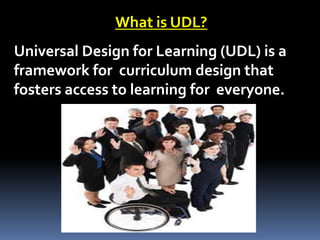
Universal Design for Learning (UDL) is a
framework for curriculum design that
fosters access to learning for everyone.
Audience:
This presentation has been designed for educators
k-12 who are interested in gaining a knowledge of
UDL and enhance their student’s instruction.
Educators who have a strong desire to make the
curriculum and learning accessible for all learners
will benefit from this presentation.
Timeline for this
presentation:
 Welcome and agenda (3 min.)
 Background of UDL (3 min.)
 Graphics for PAL and a UDL lesson Plan (3 min.)
 Handouts and Links (5 min.)
 Diversity (3 min.)
 Brain Research (3 min.)
 What can you do with UDL and how it affects
  student learning (5 min.)
 Technology (5 min.)
Handouts:
Handouts are provided in your
packets and can be located digitally
on the following website.

http://www.cast.org/teachingeverystudent/tools/curriculum
barrierstemplate.cfm


Handouts:
Curriculum Barriers
Goal Setter
Profile Maker
Links For Activities

 http://www.cast.org/teachingeverystudent
  /tools/main.cfm?t_id=10


Great link from a teachers wiki!!!!
 http://udltechtoolkit.wikispaces.com/
What does UDL do?

 UDL helps identify and remove barriers from
  teaching methods and curriculum
  materials, enabling each student to engage
  with learning and to progress.

 UDL addresses each learners unique
 needs, background and interests by
 supporting customized
  methods, materials, and assessments.
Where did the concept of universal
        design stem from?
Universal design in architecture
recognized the importance of building
environments that were more in line
with the needs of an aging population
and the requirements of those persons
with disabilities who were being
welcomed into the general buildings.
Difference between UDL and UD

Universal Design in architecture
 aims to make the physical world
 accessible to all people.


Universal Design for Learning aims
 to make learning accessible to all
 students.
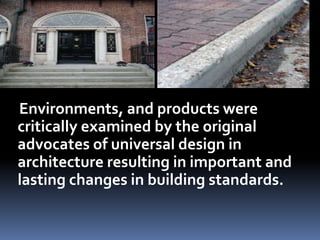
Environments, and products were
critically examined by the original
advocates of universal design in
architecture resulting in important and
lasting changes in building standards.
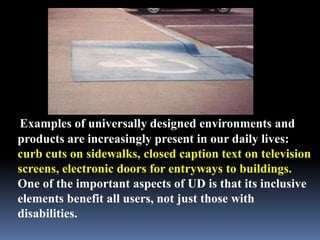
Examples of universally designed environments and
products are increasingly present in our daily lives:
curb cuts on sidewalks, closed caption text on television
screens, electronic doors for entryways to buildings.
One of the important aspects of UD is that its inclusive
elements benefit all users, not just those with
disabilities.
It all has to do with
  diversity and diverse
           needs
It is vital that we consider diversity and
plan for it. We have to consider a variety
of needs, ages, abilities and disabilities.

 Our population today is very diverse. It
is diverse in
culture, abilities, disabilities, language, so
cioeconomics and family makeup.
Teachers have opportunities
to enhance instructional
accessibility. Teachers must
prepare for a broad range of
learners.
Diversity
Many barriers exist that hinder
students from being successful.
Students come to the classroom
with cultural, ethnic, language
and academic differences. UDL
allows the teacher to make
learning accessible for ALL
students.
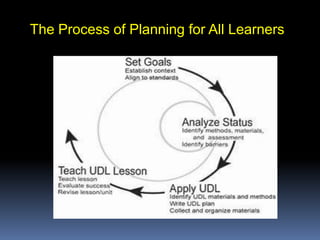
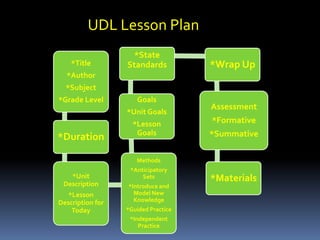
The Process of Planning for All Learners
UDL Lesson Plan
                    *State
    *Title        Standards          *Wrap Up
  *Author
  *Subject
*Grade Level         Goals
                                     Assessment
                  *Unit Goals
                    *Lesson          *Formative
                     Goals           *Summative
*Duration

                     Methods
                   *Anticipatory
   *Unit               Sets          *Materials
 Description      *Introduce and
   *Lesson          Model New
Description for     Knowledge
    Today         *Guided Practice
                   *Independent
                      Practice
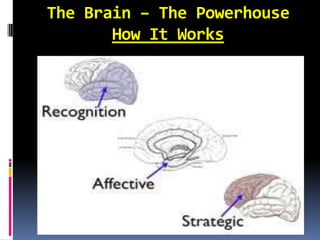
The Brain – The Powerhouse
       How It Works
.
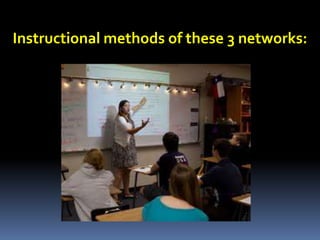
Instructional methods of these 3 networks:
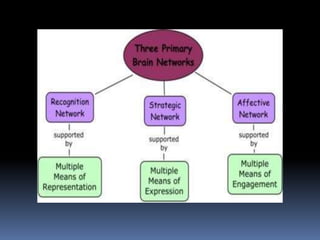
How we gather facts and categorize what we see, hear, and read. Identifying letters, words, or an author's style are recognition tasks.


                  Recognition Network
                  (The “what” of Learning)


                   Deals with how we gather facts and categorize
                    what we see, hear, and read. Identifying
                         letters, words, or an author's style are
                         recognition tasks.

                   It is important to present information and
                    content in different ways.
The recognition network is in the back
area of the head and involves the
ears, eyes, nose and throat. This area
allows us to identify and interpret
sound, light, taste, smell, and touch. It is
important to provide background
knowledge for students, use videos and
allow them to explore the
material, provide alternative means using
visuals, highlighting.
Strategic Network
(the “how” of learning)

 Planning and performing tasks. How we
  organize and express our ideas. Writing an
  essay or solving a math problem are strategic
  tasks.

 Differentiate the ways that students can
  express what they know
Strategic Network
This part of the brain allows you to move and do skills with
movement. It allows you to make plans and how to activate
those plans. This area plans, monitors and executes. Some
students have difficulty organizing their thoughts. Teachers
can use technology to help with this weakness. Digital
graphical organizers are a great resource. Teachers can also use
scaffolding strategies in their instruction. Teachers can provide
alternative ways for students to communicate and respond.
They can use oral, visual, multimedia and assistive technology
tools. Since students use different strategies for organizing
and activating plans, it is important for teachers to provide
choices in tools.
Affective Network
(the “why” of learning)

 How learners get engaged and stay
  motivated. How they are
  challenged, excited, or interested. These are
  affective dimensions.

 Stimulate interest and motivation for
  learning
The affective network is found at the core of
the brain and is responsible for engagement
and motivation. It has to do with emotion and
allows us to evaluate what is important.
Students should be allowed choices in what
tools to use to gather information such as
cameras and computers
All of these networks work
together in allowing us to
engage and interact in the
learning process.
Role of Technology & 3 Examples
 Research tells us that there is no one “model” of student.
  They are all unique and learn in various ways. They all
  have various ways of organizing, engaging and
  recognizing information.

 These differences give students strengths and
  weaknesses. Technology is a critical tool in working with
  these weaknesses and strengths.. Digital media provides
  for flexibility in the instruction and expands access to
  resources that benefit these learners.
 Examples of Technology may include:
  Smart Boards, Software programs that read for students
  (including various languages) such as Kurzweill, graphic
  organizer programs such as Mindview
Impact Of UDL On Learning

UDL’s 3 principals parallel with
the 3 brain networks. Students
learning is enriched and
tailored for success. Teachers
use flexible materials and
media. The are able to assess
students accurately.
Incorporating these principles
and methods in the
classroom, allows
opportunities to address the
diverse needs of ALL students
in classroom.
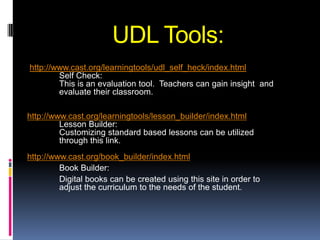
UDL Tools:
http://www.cast.org/learningtools/udl_self_heck/index.html
        Self Check:
        This is an evaluation tool. Teachers can gain insight and
        evaluate their classroom.

http://www.cast.org/learningtools/lesson_builder/index.html
         Lesson Builder:
         Customizing standard based lessons can be utilized
         through this link.
http://www.cast.org/book_builder/index.html
         Book Builder:
         Digital books can be created using this site in order to
         adjust the curriculum to the needs of the student.
 Universal Design does not mean
  “one size of learning fits all”. The focus is to
  accommodate a wide spectrum of students
  needs.

 The word “universal” refers to a flexible
  design that is specifically created to be used
  in diverse ways.
 UDL provides a blue print
  for creating instructional
  goals, methods, material
 s, and assessments that
 work for everyone!
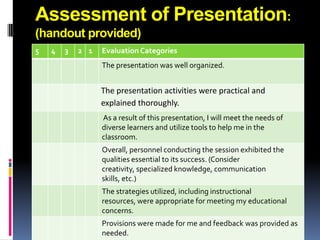
Assessment of Presentation:
(handout provided)
5   4   3   2 1   Evaluation Categories
                  The presentation was well organized.


                  The presentation activities were practical and
                  explained thoroughly.
                  As a result of this presentation, I will meet the needs of
                  diverse learners and utilize tools to help me in the
                  classroom.
                  Overall, personnel conducting the session exhibited the
                  qualities essential to its success. (Consider
                  creativity, specialized knowledge, communication
                  skills, etc.)
                  The strategies utilized, including instructional
                  resources, were appropriate for meeting my educational
                  concerns.
                  Provisions were made for me and feedback was provided as
                  needed.
Assessment continued:
             (handout provided)
 List one favorite even/aspect of the
  presentation:


 List one area of the presentation that could
  be improved:

Debramorrispresentationudl

  • 1.
    Universal Design For Learning (UDL) Produced By: Debra Morris Walden University Student July 2012
  • 2.
    Purpose of thispresentation The purpose of this presentation is to provide an overview and information on the principals of Universal Design for Learning (UDL). The information provided in the overview can be found on the CAST site along with the other sites listed in this presentation. http://www.cast.org/teachingeverystudent/
  • 3.
    What is UDL? UniversalDesign for Learning (UDL) is a framework for curriculum design that fosters access to learning for everyone.
  • 4.
    Audience: This presentation hasbeen designed for educators k-12 who are interested in gaining a knowledge of UDL and enhance their student’s instruction. Educators who have a strong desire to make the curriculum and learning accessible for all learners will benefit from this presentation.
  • 5.
    Timeline for this presentation: Welcome and agenda (3 min.)  Background of UDL (3 min.)  Graphics for PAL and a UDL lesson Plan (3 min.)  Handouts and Links (5 min.)  Diversity (3 min.)  Brain Research (3 min.)  What can you do with UDL and how it affects student learning (5 min.)  Technology (5 min.)
  • 6.
    Handouts: Handouts are providedin your packets and can be located digitally on the following website. http://www.cast.org/teachingeverystudent/tools/curriculum barrierstemplate.cfm Handouts: Curriculum Barriers Goal Setter Profile Maker
  • 7.
    Links For Activities http://www.cast.org/teachingeverystudent /tools/main.cfm?t_id=10 Great link from a teachers wiki!!!!  http://udltechtoolkit.wikispaces.com/
  • 8.
    What does UDLdo?  UDL helps identify and remove barriers from teaching methods and curriculum materials, enabling each student to engage with learning and to progress.  UDL addresses each learners unique needs, background and interests by supporting customized methods, materials, and assessments.
  • 9.
    Where did theconcept of universal design stem from? Universal design in architecture recognized the importance of building environments that were more in line with the needs of an aging population and the requirements of those persons with disabilities who were being welcomed into the general buildings.
  • 10.
    Difference between UDLand UD Universal Design in architecture aims to make the physical world accessible to all people. Universal Design for Learning aims to make learning accessible to all students.
  • 11.
    Environments, and productswere critically examined by the original advocates of universal design in architecture resulting in important and lasting changes in building standards.
  • 12.
    Examples of universallydesigned environments and products are increasingly present in our daily lives: curb cuts on sidewalks, closed caption text on television screens, electronic doors for entryways to buildings. One of the important aspects of UD is that its inclusive elements benefit all users, not just those with disabilities.
  • 13.
    It all hasto do with diversity and diverse needs It is vital that we consider diversity and plan for it. We have to consider a variety of needs, ages, abilities and disabilities. Our population today is very diverse. It is diverse in culture, abilities, disabilities, language, so cioeconomics and family makeup.
  • 14.
    Teachers have opportunities toenhance instructional accessibility. Teachers must prepare for a broad range of learners.
  • 15.
    Diversity Many barriers existthat hinder students from being successful. Students come to the classroom with cultural, ethnic, language and academic differences. UDL allows the teacher to make learning accessible for ALL students.
  • 16.
    The Process ofPlanning for All Learners
  • 17.
    UDL Lesson Plan *State *Title Standards *Wrap Up *Author *Subject *Grade Level Goals Assessment *Unit Goals *Lesson *Formative Goals *Summative *Duration Methods *Anticipatory *Unit Sets *Materials Description *Introduce and *Lesson Model New Description for Knowledge Today *Guided Practice *Independent Practice
  • 18.
    The Brain –The Powerhouse How It Works
  • 19.
  • 20.
    Instructional methods ofthese 3 networks:
  • 21.
    How we gatherfacts and categorize what we see, hear, and read. Identifying letters, words, or an author's style are recognition tasks. Recognition Network (The “what” of Learning)  Deals with how we gather facts and categorize what we see, hear, and read. Identifying letters, words, or an author's style are recognition tasks.  It is important to present information and content in different ways.
  • 22.
    The recognition networkis in the back area of the head and involves the ears, eyes, nose and throat. This area allows us to identify and interpret sound, light, taste, smell, and touch. It is important to provide background knowledge for students, use videos and allow them to explore the material, provide alternative means using visuals, highlighting.
  • 23.
    Strategic Network (the “how”of learning)  Planning and performing tasks. How we organize and express our ideas. Writing an essay or solving a math problem are strategic tasks.  Differentiate the ways that students can express what they know
  • 24.
    Strategic Network This partof the brain allows you to move and do skills with movement. It allows you to make plans and how to activate those plans. This area plans, monitors and executes. Some students have difficulty organizing their thoughts. Teachers can use technology to help with this weakness. Digital graphical organizers are a great resource. Teachers can also use scaffolding strategies in their instruction. Teachers can provide alternative ways for students to communicate and respond. They can use oral, visual, multimedia and assistive technology tools. Since students use different strategies for organizing and activating plans, it is important for teachers to provide choices in tools.
  • 25.
    Affective Network (the “why”of learning)  How learners get engaged and stay motivated. How they are challenged, excited, or interested. These are affective dimensions.  Stimulate interest and motivation for learning
  • 26.
    The affective networkis found at the core of the brain and is responsible for engagement and motivation. It has to do with emotion and allows us to evaluate what is important. Students should be allowed choices in what tools to use to gather information such as cameras and computers
  • 27.
    All of thesenetworks work together in allowing us to engage and interact in the learning process.
  • 28.
    Role of Technology& 3 Examples  Research tells us that there is no one “model” of student. They are all unique and learn in various ways. They all have various ways of organizing, engaging and recognizing information.  These differences give students strengths and weaknesses. Technology is a critical tool in working with these weaknesses and strengths.. Digital media provides for flexibility in the instruction and expands access to resources that benefit these learners.  Examples of Technology may include: Smart Boards, Software programs that read for students (including various languages) such as Kurzweill, graphic organizer programs such as Mindview
  • 29.
    Impact Of UDLOn Learning UDL’s 3 principals parallel with the 3 brain networks. Students learning is enriched and tailored for success. Teachers use flexible materials and media. The are able to assess students accurately.
  • 30.
    Incorporating these principles andmethods in the classroom, allows opportunities to address the diverse needs of ALL students in classroom.
  • 31.
    UDL Tools: http://www.cast.org/learningtools/udl_self_heck/index.html Self Check: This is an evaluation tool. Teachers can gain insight and evaluate their classroom. http://www.cast.org/learningtools/lesson_builder/index.html Lesson Builder: Customizing standard based lessons can be utilized through this link. http://www.cast.org/book_builder/index.html Book Builder: Digital books can be created using this site in order to adjust the curriculum to the needs of the student.
  • 32.
     Universal Designdoes not mean “one size of learning fits all”. The focus is to accommodate a wide spectrum of students needs.  The word “universal” refers to a flexible design that is specifically created to be used in diverse ways.
  • 33.
     UDL providesa blue print for creating instructional goals, methods, material s, and assessments that work for everyone!
  • 34.
    Assessment of Presentation: (handoutprovided) 5 4 3 2 1 Evaluation Categories The presentation was well organized. The presentation activities were practical and explained thoroughly. As a result of this presentation, I will meet the needs of diverse learners and utilize tools to help me in the classroom. Overall, personnel conducting the session exhibited the qualities essential to its success. (Consider creativity, specialized knowledge, communication skills, etc.) The strategies utilized, including instructional resources, were appropriate for meeting my educational concerns. Provisions were made for me and feedback was provided as needed.
  • 35.
    Assessment continued: (handout provided)  List one favorite even/aspect of the presentation:  List one area of the presentation that could be improved: