Google Drive
www.drive.google.com
Students can use Google Drive, formerly Google docs, to
collaborate, edit, revise, comment and share projects,
documents, PowerPoints, spreadsheets and more.
All a student needs is a Gmail address to access Google
Drive.
Google Drive can be created and shared among Gmail
users.
This resource helps assist students to socially collaborate
with their peers.
Intro to google docs
Sharing and collaborating on google docs
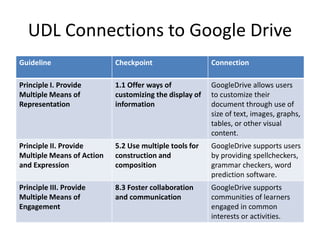
UDL Connections to Google Drive
Guideline Checkpoint Connection
Principle I. Provide
Multiple Means of
Representation
1.1 Offer ways of
customizing the display of
information
GoogleDrive allows users
to customize their
document through use of
size of text, images, graphs,
tables, or other visual
content.
Principle II. Provide
Multiple Means of Action
and Expression
5.2 Use multiple tools for
construction and
composition
GoogleDrive supports users
by providing spellcheckers,
grammar checkers, word
prediction software.
Principle III. Provide
Multiple Means of
Engagement
8.3 Foster collaboration
and communication
GoogleDrive supports
communities of learners
engaged in common
interests or activities.
Brain Pop
www.brainpop.com
Brain Pop is an educational website where students can watch videos
ranging from the human body to the use of commas.
Brain Pop videos are also paired with activity sheets and critical thinking
questions for further practice.
Teachers can use Brain Pop during a lesson, or encourage students to
watch a Brain Pop video as an independent or homework assignment.
Lessons are all aligned with State, subject, and grade level standards. A
quick and easy search will help you find the appropriate topic for your class
or student.
About Brain Pop
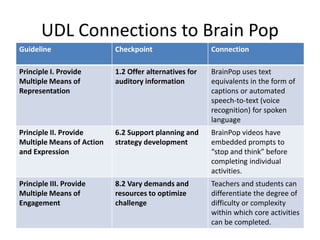
UDL Connections to Brain Pop
Guideline Checkpoint Connection
Principle I. Provide
Multiple Means of
Representation
1.2 Offer alternatives for
auditory information
BrainPop uses text
equivalents in the form of
captions or automated
speech-to-text (voice
recognition) for spoken
language
Principle II. Provide
Multiple Means of Action
and Expression
6.2 Support planning and
strategy development
BrainPop videos have
embedded prompts to
“stop and think” before
completing individual
activities.
Principle III. Provide
Multiple Means of
Engagement
8.2 Vary demands and
resources to optimize
challenge
Teachers and students can
differentiate the degree of
difficulty or complexity
within which core activities
can be completed.
Quizlet
www.quizlet.com
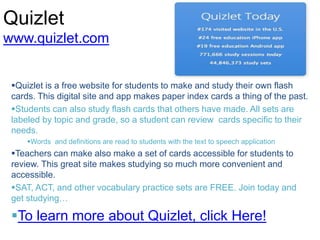
Quizlet is a free website for students to make and study their own flash
cards. This digital site and app makes paper index cards a thing of the past.
Students can also study flash cards that others have made. All sets are
labeled by topic and grade, so a student can review cards specific to their
needs.
Words and definitions are read to students with the text to speech application
Teachers can make also make a set of cards accessible for students to
review. This great site makes studying so much more convenient and
accessible.
SAT, ACT, and other vocabulary practice sets are FREE. Join today and
get studying…
To learn more about Quizlet, click Here!
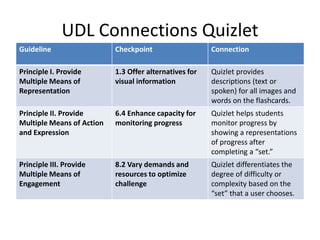
UDL Connections Quizlet
Guideline Checkpoint Connection
Principle I. Provide
Multiple Means of
Representation
1.3 Offer alternatives for
visual information
Quizlet provides
descriptions (text or
spoken) for all images and
words on the flashcards.
Principle II. Provide
Multiple Means of Action
and Expression
6.4 Enhance capacity for
monitoring progress
Quizlet helps students
monitor progress by
showing a representations
of progress after
completing a “set.”
Principle III. Provide
Multiple Means of
Engagement
8.2 Vary demands and
resources to optimize
challenge
Quizlet differentiates the
degree of difficulty or
complexity based on the
“set” that a user chooses.
Read, Write, Think
www.readwritethink.org
Read,Write,Think is an excellent website for English teachers to find
resources to find topic specific material to integrate into their lessons, or
find a NCTE approved English lesson
The website allows teachers to search by unit, topic and grade level.
There are also video models of teacher instruction.
By clicking on the “student interactive tab,” a number of digitally interactive
programs are shown. These education programs are great for student
exploration and learning.
“Afterschool Resources” provides a list of hands-on exciting activities that
help students practice their English skills…
Read,Write,Think also has a You Tube channel. click here to view.
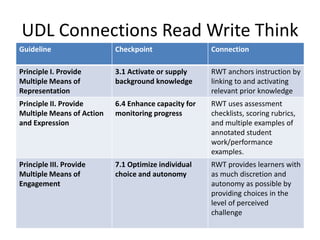
UDL Connections Read Write Think
Guideline Checkpoint Connection
Principle I. Provide
Multiple Means of
Representation
3.1 Activate or supply
background knowledge
RWT anchors instruction by
linking to and activating
relevant prior knowledge
Principle II. Provide
Multiple Means of Action
and Expression
6.4 Enhance capacity for
monitoring progress
RWT uses assessment
checklists, scoring rubrics,
and multiple examples of
annotated student
work/performance
examples.
Principle III. Provide
Multiple Means of
Engagement
7.1 Optimize individual
choice and autonomy
RWT provides learners with
as much discretion and
autonomy as possible by
providing choices in the
level of perceived
challenge
Grammar Gorillas
www.funbrain.com/grammar/
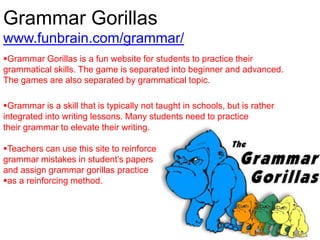
Grammar Gorillas is a fun website for students to practice their
grammatical skills. The game is separated into beginner and advanced.
The games are also separated by grammatical topic.
Grammar is a skill that is typically not taught in schools, but is rather
integrated into writing lessons. Many students need to practice
their grammar to elevate their writing.
Teachers can use this site to reinforce
grammar mistakes in student’s papers
and assign grammar gorillas practice
as a reinforcing method.
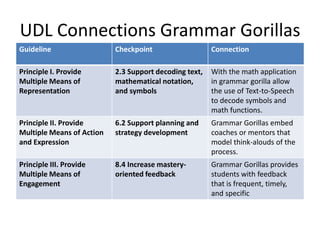
UDL Connections Grammar Gorillas
Guideline Checkpoint Connection
Principle I. Provide
Multiple Means of
Representation
2.3 Support decoding text,
mathematical notation,
and symbols
With the math application
in grammar gorilla allow
the use of Text-to-Speech
to decode symbols and
math functions.
Principle II. Provide
Multiple Means of Action
and Expression
6.2 Support planning and
strategy development
Grammar Gorillas embed
coaches or mentors that
model think-alouds of the
process.
Principle III. Provide
Multiple Means of
Engagement
8.4 Increase mastery-
oriented feedback
Grammar Gorillas provides
students with feedback
that is frequent, timely,
and specific
PBS Learning Media
• PBS Learning Media is a website that is available and beneficial for
teachers and students. There is a search engine that is categorized
by grade level, subject, media type, and language. Some of the
media types include video, webpage, document, interactive, image,
audio, and lesson plans. Having so many different media types
available helps meet the variety of needs of students who may have
a disability. PBS Learning Media provides the National Standards,
the learning objective, and state standards. The different
interactives also provide discussion questions, tips, and student
handouts. Since the implementation of the Common Core
Standards, more informational texts are required inside the
classroom. PBS Learning Media provides informational texts as well.
• PBS Learning Media
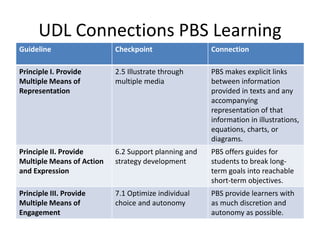
UDL Connections PBS Learning
Guideline Checkpoint Connection
Principle I. Provide
Multiple Means of
Representation
2.5 Illustrate through
multiple media
PBS makes explicit links
between information
provided in texts and any
accompanying
representation of that
information in illustrations,
equations, charts, or
diagrams.
Principle II. Provide
Multiple Means of Action
and Expression
6.2 Support planning and
strategy development
PBS offers guides for
students to break long-
term goals into reachable
short-term objectives.
Principle III. Provide
Multiple Means of
Engagement
7.1 Optimize individual
choice and autonomy
PBS provide learners with
as much discretion and
autonomy as possible.
Grammar Bytes
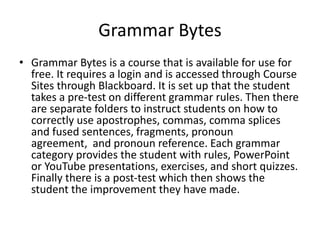
• Grammar Bytes is a course that is available for use for
free. It requires a login and is accessed through Course
Sites through Blackboard. It is set up that the student
takes a pre-test on different grammar rules. Then there
are separate folders to instruct students on how to
correctly use apostrophes, commas, comma splices
and fused sentences, fragments, pronoun
agreement, and pronoun reference. Each grammar
category provides the student with rules, PowerPoint
or YouTube presentations, exercises, and short quizzes.
Finally there is a post-test which then shows the
student the improvement they have made.
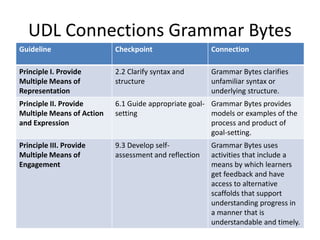
UDL Connections Grammar Bytes
Guideline Checkpoint Connection
Principle I. Provide
Multiple Means of
Representation
2.2 Clarify syntax and
structure
Grammar Bytes clarifies
unfamiliar syntax or
underlying structure.
Principle II. Provide
Multiple Means of Action
and Expression
6.1 Guide appropriate goal-
setting
Grammar Bytes provides
models or examples of the
process and product of
goal-setting.
Principle III. Provide
Multiple Means of
Engagement
9.3 Develop self-
assessment and reflection
Grammar Bytes uses
activities that include a
means by which learners
get feedback and have
access to alternative
scaffolds that support
understanding progress in
a manner that is
understandable and timely.
Voki
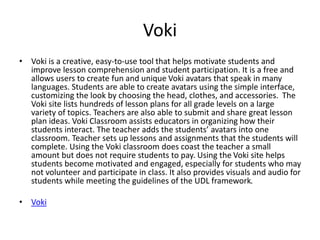
• Voki is a creative, easy-to-use tool that helps motivate students and
improve lesson comprehension and student participation. It is a free and
allows users to create fun and unique Voki avatars that speak in many
languages. Students are able to create avatars using the simple interface,
customizing the look by choosing the head, clothes, and accessories. The
Voki site lists hundreds of lesson plans for all grade levels on a large
variety of topics. Teachers are also able to submit and share great lesson
plan ideas. Voki Classroom assists educators in organizing how their
students interact. The teacher adds the students’ avatars into one
classroom. Teacher sets up lessons and assignments that the students will
complete. Using the Voki classroom does coast the teacher a small
amount but does not require students to pay. Using the Voki site helps
students become motivated and engaged, especially for students who may
not volunteer and participate in class. It also provides visuals and audio for
students while meeting the guidelines of the UDL framework.
• Voki
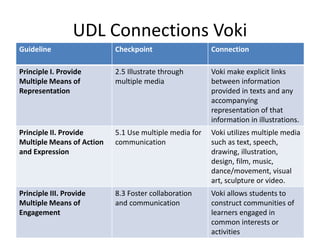
UDL Connections Voki
Guideline Checkpoint Connection
Principle I. Provide
Multiple Means of
Representation
2.5 Illustrate through
multiple media
Voki make explicit links
between information
provided in texts and any
accompanying
representation of that
information in illustrations.
Principle II. Provide
Multiple Means of Action
and Expression
5.1 Use multiple media for
communication
Voki utilizes multiple media
such as text, speech,
drawing, illustration,
design, film, music,
dance/movement, visual
art, sculpture or video.
Principle III. Provide
Multiple Means of
Engagement
8.3 Foster collaboration
and communication
Voki allows students to
construct communities of
learners engaged in
common interests or
activities
GoAnimate
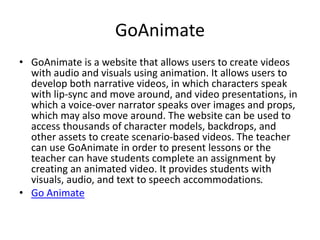
• GoAnimate is a website that allows users to create videos
with audio and visuals using animation. It allows users to
develop both narrative videos, in which characters speak
with lip-sync and move around, and video presentations, in
which a voice-over narrator speaks over images and props,
which may also move around. The website can be used to
access thousands of character models, backdrops, and
other assets to create scenario-based videos. The teacher
can use GoAnimate in order to present lessons or the
teacher can have students complete an assignment by
creating an animated video. It provides students with
visuals, audio, and text to speech accommodations.
• Go Animate
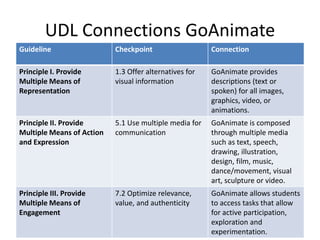
UDL Connections GoAnimate
Guideline Checkpoint Connection
Principle I. Provide
Multiple Means of
Representation
1.3 Offer alternatives for
visual information
GoAnimate provides
descriptions (text or
spoken) for all images,
graphics, video, or
animations.
Principle II. Provide
Multiple Means of Action
and Expression
5.1 Use multiple media for
communication
GoAnimate is composed
through multiple media
such as text, speech,
drawing, illustration,
design, film, music,
dance/movement, visual
art, sculpture or video.
Principle III. Provide
Multiple Means of
Engagement
7.2 Optimize relevance,
value, and authenticity
GoAnimate allows students
to access tasks that allow
for active participation,
exploration and
experimentation.
Glogster EDU
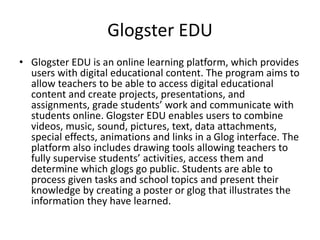
• Glogster EDU is an online learning platform, which provides
users with digital educational content. The program aims to
allow teachers to be able to access digital educational
content and create projects, presentations, and
assignments, grade students’ work and communicate with
students online. Glogster EDU enables users to combine
videos, music, sound, pictures, text, data attachments,
special effects, animations and links in a Glog interface. The
platform also includes drawing tools allowing teachers to
fully supervise students’ activities, access them and
determine which glogs go public. Students are able to
process given tasks and school topics and present their
knowledge by creating a poster or glog that illustrates the
information they have learned.
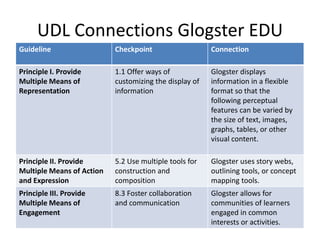
UDL Connections Glogster EDU
Guideline Checkpoint Connection
Principle I. Provide
Multiple Means of
Representation
1.1 Offer ways of
customizing the display of
information
Glogster displays
information in a flexible
format so that the
following perceptual
features can be varied by
the size of text, images,
graphs, tables, or other
visual content.
Principle II. Provide
Multiple Means of Action
and Expression
5.2 Use multiple tools for
construction and
composition
Glogster uses story webs,
outlining tools, or concept
mapping tools.
Principle III. Provide
Multiple Means of
Engagement
8.3 Foster collaboration
and communication
Glogster allows for
communities of learners
engaged in common
interests or activities.
Connection to
Common Core State Standards
• CCSS.ELA-Literacy.WHST.11-12.5
Develop and strengthen writing as needed by planning, revising, editing, rewriting, or trying a
new approach, focusing on addressing what is most significant for a specific purpose and
audience.
• CCSS.ELA-Literacy.WHST.11-12.6
Use technology, including the Internet, to produce, publish, and update individual or shared
writing products in response to ongoing feedback, including new arguments or information.
• CCSS.RH.11-12.7
Integrate and evaluate multiple sources of information presented in diverse formats and
media (e.g. visually, quantitatively, as well as in words) in order to address a question or
solve a problem.
• CCSS.ELA-Lit.CCRA.W.2
Write informative/explanatory texts to examine and convey complex ideas and information
clearly and accurately through the effective selection, organization, and analysis of content.

Sped277 final project

  • 1.
    Google Drive www.drive.google.com Students canuse Google Drive, formerly Google docs, to collaborate, edit, revise, comment and share projects, documents, PowerPoints, spreadsheets and more. All a student needs is a Gmail address to access Google Drive. Google Drive can be created and shared among Gmail users. This resource helps assist students to socially collaborate with their peers. Intro to google docs Sharing and collaborating on google docs
  • 2.
    UDL Connections toGoogle Drive Guideline Checkpoint Connection Principle I. Provide Multiple Means of Representation 1.1 Offer ways of customizing the display of information GoogleDrive allows users to customize their document through use of size of text, images, graphs, tables, or other visual content. Principle II. Provide Multiple Means of Action and Expression 5.2 Use multiple tools for construction and composition GoogleDrive supports users by providing spellcheckers, grammar checkers, word prediction software. Principle III. Provide Multiple Means of Engagement 8.3 Foster collaboration and communication GoogleDrive supports communities of learners engaged in common interests or activities.
  • 3.
    Brain Pop www.brainpop.com Brain Popis an educational website where students can watch videos ranging from the human body to the use of commas. Brain Pop videos are also paired with activity sheets and critical thinking questions for further practice. Teachers can use Brain Pop during a lesson, or encourage students to watch a Brain Pop video as an independent or homework assignment. Lessons are all aligned with State, subject, and grade level standards. A quick and easy search will help you find the appropriate topic for your class or student. About Brain Pop
  • 4.
    UDL Connections toBrain Pop Guideline Checkpoint Connection Principle I. Provide Multiple Means of Representation 1.2 Offer alternatives for auditory information BrainPop uses text equivalents in the form of captions or automated speech-to-text (voice recognition) for spoken language Principle II. Provide Multiple Means of Action and Expression 6.2 Support planning and strategy development BrainPop videos have embedded prompts to “stop and think” before completing individual activities. Principle III. Provide Multiple Means of Engagement 8.2 Vary demands and resources to optimize challenge Teachers and students can differentiate the degree of difficulty or complexity within which core activities can be completed.
  • 5.
    Quizlet www.quizlet.com Quizlet is afree website for students to make and study their own flash cards. This digital site and app makes paper index cards a thing of the past. Students can also study flash cards that others have made. All sets are labeled by topic and grade, so a student can review cards specific to their needs. Words and definitions are read to students with the text to speech application Teachers can make also make a set of cards accessible for students to review. This great site makes studying so much more convenient and accessible. SAT, ACT, and other vocabulary practice sets are FREE. Join today and get studying… To learn more about Quizlet, click Here!
  • 6.
    UDL Connections Quizlet GuidelineCheckpoint Connection Principle I. Provide Multiple Means of Representation 1.3 Offer alternatives for visual information Quizlet provides descriptions (text or spoken) for all images and words on the flashcards. Principle II. Provide Multiple Means of Action and Expression 6.4 Enhance capacity for monitoring progress Quizlet helps students monitor progress by showing a representations of progress after completing a “set.” Principle III. Provide Multiple Means of Engagement 8.2 Vary demands and resources to optimize challenge Quizlet differentiates the degree of difficulty or complexity based on the “set” that a user chooses.
  • 7.
    Read, Write, Think www.readwritethink.org Read,Write,Thinkis an excellent website for English teachers to find resources to find topic specific material to integrate into their lessons, or find a NCTE approved English lesson The website allows teachers to search by unit, topic and grade level. There are also video models of teacher instruction. By clicking on the “student interactive tab,” a number of digitally interactive programs are shown. These education programs are great for student exploration and learning. “Afterschool Resources” provides a list of hands-on exciting activities that help students practice their English skills… Read,Write,Think also has a You Tube channel. click here to view.
  • 8.
    UDL Connections ReadWrite Think Guideline Checkpoint Connection Principle I. Provide Multiple Means of Representation 3.1 Activate or supply background knowledge RWT anchors instruction by linking to and activating relevant prior knowledge Principle II. Provide Multiple Means of Action and Expression 6.4 Enhance capacity for monitoring progress RWT uses assessment checklists, scoring rubrics, and multiple examples of annotated student work/performance examples. Principle III. Provide Multiple Means of Engagement 7.1 Optimize individual choice and autonomy RWT provides learners with as much discretion and autonomy as possible by providing choices in the level of perceived challenge
  • 9.
    Grammar Gorillas www.funbrain.com/grammar/ Grammar Gorillasis a fun website for students to practice their grammatical skills. The game is separated into beginner and advanced. The games are also separated by grammatical topic. Grammar is a skill that is typically not taught in schools, but is rather integrated into writing lessons. Many students need to practice their grammar to elevate their writing. Teachers can use this site to reinforce grammar mistakes in student’s papers and assign grammar gorillas practice as a reinforcing method.
  • 10.
    UDL Connections GrammarGorillas Guideline Checkpoint Connection Principle I. Provide Multiple Means of Representation 2.3 Support decoding text, mathematical notation, and symbols With the math application in grammar gorilla allow the use of Text-to-Speech to decode symbols and math functions. Principle II. Provide Multiple Means of Action and Expression 6.2 Support planning and strategy development Grammar Gorillas embed coaches or mentors that model think-alouds of the process. Principle III. Provide Multiple Means of Engagement 8.4 Increase mastery- oriented feedback Grammar Gorillas provides students with feedback that is frequent, timely, and specific
  • 11.
    PBS Learning Media •PBS Learning Media is a website that is available and beneficial for teachers and students. There is a search engine that is categorized by grade level, subject, media type, and language. Some of the media types include video, webpage, document, interactive, image, audio, and lesson plans. Having so many different media types available helps meet the variety of needs of students who may have a disability. PBS Learning Media provides the National Standards, the learning objective, and state standards. The different interactives also provide discussion questions, tips, and student handouts. Since the implementation of the Common Core Standards, more informational texts are required inside the classroom. PBS Learning Media provides informational texts as well. • PBS Learning Media
  • 12.
    UDL Connections PBSLearning Guideline Checkpoint Connection Principle I. Provide Multiple Means of Representation 2.5 Illustrate through multiple media PBS makes explicit links between information provided in texts and any accompanying representation of that information in illustrations, equations, charts, or diagrams. Principle II. Provide Multiple Means of Action and Expression 6.2 Support planning and strategy development PBS offers guides for students to break long- term goals into reachable short-term objectives. Principle III. Provide Multiple Means of Engagement 7.1 Optimize individual choice and autonomy PBS provide learners with as much discretion and autonomy as possible.
  • 13.
    Grammar Bytes • GrammarBytes is a course that is available for use for free. It requires a login and is accessed through Course Sites through Blackboard. It is set up that the student takes a pre-test on different grammar rules. Then there are separate folders to instruct students on how to correctly use apostrophes, commas, comma splices and fused sentences, fragments, pronoun agreement, and pronoun reference. Each grammar category provides the student with rules, PowerPoint or YouTube presentations, exercises, and short quizzes. Finally there is a post-test which then shows the student the improvement they have made.
  • 14.
    UDL Connections GrammarBytes Guideline Checkpoint Connection Principle I. Provide Multiple Means of Representation 2.2 Clarify syntax and structure Grammar Bytes clarifies unfamiliar syntax or underlying structure. Principle II. Provide Multiple Means of Action and Expression 6.1 Guide appropriate goal- setting Grammar Bytes provides models or examples of the process and product of goal-setting. Principle III. Provide Multiple Means of Engagement 9.3 Develop self- assessment and reflection Grammar Bytes uses activities that include a means by which learners get feedback and have access to alternative scaffolds that support understanding progress in a manner that is understandable and timely.
  • 15.
    Voki • Voki isa creative, easy-to-use tool that helps motivate students and improve lesson comprehension and student participation. It is a free and allows users to create fun and unique Voki avatars that speak in many languages. Students are able to create avatars using the simple interface, customizing the look by choosing the head, clothes, and accessories. The Voki site lists hundreds of lesson plans for all grade levels on a large variety of topics. Teachers are also able to submit and share great lesson plan ideas. Voki Classroom assists educators in organizing how their students interact. The teacher adds the students’ avatars into one classroom. Teacher sets up lessons and assignments that the students will complete. Using the Voki classroom does coast the teacher a small amount but does not require students to pay. Using the Voki site helps students become motivated and engaged, especially for students who may not volunteer and participate in class. It also provides visuals and audio for students while meeting the guidelines of the UDL framework. • Voki
  • 16.
    UDL Connections Voki GuidelineCheckpoint Connection Principle I. Provide Multiple Means of Representation 2.5 Illustrate through multiple media Voki make explicit links between information provided in texts and any accompanying representation of that information in illustrations. Principle II. Provide Multiple Means of Action and Expression 5.1 Use multiple media for communication Voki utilizes multiple media such as text, speech, drawing, illustration, design, film, music, dance/movement, visual art, sculpture or video. Principle III. Provide Multiple Means of Engagement 8.3 Foster collaboration and communication Voki allows students to construct communities of learners engaged in common interests or activities
  • 17.
    GoAnimate • GoAnimate isa website that allows users to create videos with audio and visuals using animation. It allows users to develop both narrative videos, in which characters speak with lip-sync and move around, and video presentations, in which a voice-over narrator speaks over images and props, which may also move around. The website can be used to access thousands of character models, backdrops, and other assets to create scenario-based videos. The teacher can use GoAnimate in order to present lessons or the teacher can have students complete an assignment by creating an animated video. It provides students with visuals, audio, and text to speech accommodations. • Go Animate
  • 18.
    UDL Connections GoAnimate GuidelineCheckpoint Connection Principle I. Provide Multiple Means of Representation 1.3 Offer alternatives for visual information GoAnimate provides descriptions (text or spoken) for all images, graphics, video, or animations. Principle II. Provide Multiple Means of Action and Expression 5.1 Use multiple media for communication GoAnimate is composed through multiple media such as text, speech, drawing, illustration, design, film, music, dance/movement, visual art, sculpture or video. Principle III. Provide Multiple Means of Engagement 7.2 Optimize relevance, value, and authenticity GoAnimate allows students to access tasks that allow for active participation, exploration and experimentation.
  • 19.
    Glogster EDU • GlogsterEDU is an online learning platform, which provides users with digital educational content. The program aims to allow teachers to be able to access digital educational content and create projects, presentations, and assignments, grade students’ work and communicate with students online. Glogster EDU enables users to combine videos, music, sound, pictures, text, data attachments, special effects, animations and links in a Glog interface. The platform also includes drawing tools allowing teachers to fully supervise students’ activities, access them and determine which glogs go public. Students are able to process given tasks and school topics and present their knowledge by creating a poster or glog that illustrates the information they have learned.
  • 20.
    UDL Connections GlogsterEDU Guideline Checkpoint Connection Principle I. Provide Multiple Means of Representation 1.1 Offer ways of customizing the display of information Glogster displays information in a flexible format so that the following perceptual features can be varied by the size of text, images, graphs, tables, or other visual content. Principle II. Provide Multiple Means of Action and Expression 5.2 Use multiple tools for construction and composition Glogster uses story webs, outlining tools, or concept mapping tools. Principle III. Provide Multiple Means of Engagement 8.3 Foster collaboration and communication Glogster allows for communities of learners engaged in common interests or activities.
  • 21.
    Connection to Common CoreState Standards • CCSS.ELA-Literacy.WHST.11-12.5 Develop and strengthen writing as needed by planning, revising, editing, rewriting, or trying a new approach, focusing on addressing what is most significant for a specific purpose and audience. • CCSS.ELA-Literacy.WHST.11-12.6 Use technology, including the Internet, to produce, publish, and update individual or shared writing products in response to ongoing feedback, including new arguments or information. • CCSS.RH.11-12.7 Integrate and evaluate multiple sources of information presented in diverse formats and media (e.g. visually, quantitatively, as well as in words) in order to address a question or solve a problem. • CCSS.ELA-Lit.CCRA.W.2 Write informative/explanatory texts to examine and convey complex ideas and information clearly and accurately through the effective selection, organization, and analysis of content.