r-squared
Slide 1 www.r-squared.in/rprogramming
R Programming
Learn the fundamentals of data analysis with R.
r-squared
Slide 2
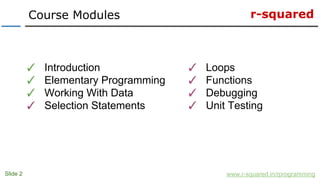
Course Modules
www.r-squared.in/rprogramming
✓ Introduction
✓ Elementary Programming
✓ Working With Data
✓ Selection Statements
✓ Loops
✓ Functions
✓ Debugging
✓ Unit Testing
r-squared
Slide 3
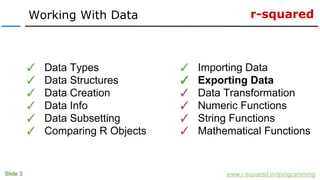
Working With Data
www.r-squared.in/rprogramming
✓ Data Types
✓ Data Structures
✓ Data Creation
✓ Data Info
✓ Data Subsetting
✓ Comparing R Objects
✓ Importing Data
✓ Exporting Data
✓ Data Transformation
✓ Numeric Functions
✓ String Functions
✓ Mathematical Functions
r-squared
Slide 4
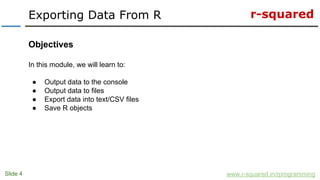
Exporting Data From R
www.r-squared.in/rprogramming
Objectives
In this module, we will learn to:
● Output data to the console
● Output data to files
● Export data into text/CSV files
● Save R objects
r-squared
Slide 5
Output Data To Console
www.r-squared.in/rprogramming
In this section, we will learn to output data to the console using the following functions:
✓ print
✓ cat
✓ paste
✓ paste0
✓ sprintf
r-squared
Slide 6
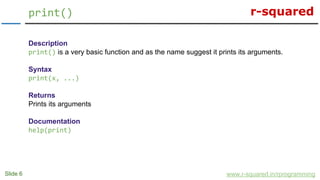
print()
www.r-squared.in/rprogramming
Description
print() is a very basic function and as the name suggest it prints its arguments.
Syntax
print(x, ...)
Returns
Prints its arguments
Documentation
help(print)
r-squared
Slide 7
print()
www.r-squared.in/rprogramming
Examples
> # example 1
> x <- 3
> print(x)
[1] 3
> x
[1] 3
> # example 2
> name <- "Jovial"
> lname <- "Mann"
> print(name, lname)
Error in print.default(name, lname) : invalid 'digits' argument
> print(c(name, lname))
[1] "Jovial" "Mann"
r-squared
Slide 8
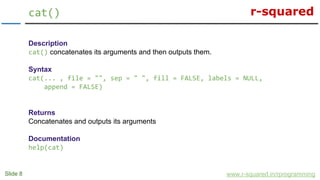
cat()
www.r-squared.in/rprogramming
Description
cat() concatenates its arguments and then outputs them.
Syntax
cat(... , file = "", sep = " ", fill = FALSE, labels = NULL,
append = FALSE)
Returns
Concatenates and outputs its arguments
Documentation
help(cat)
r-squared
Slide 9
cat()
www.r-squared.in/rprogramming
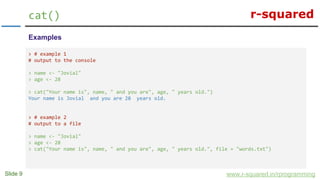
Examples
> # example 1
# output to the console
> name <- "Jovial"
> age <- 28
> cat("Your name is", name, " and you are", age, " years old.")
Your name is Jovial and you are 28 years old.
> # example 2
# output to a file
> name <- "Jovial"
> age <- 28
> cat("Your name is", name, " and you are", age, " years old.", file = "words.txt")
r-squared
Slide 10
cat()
www.r-squared.in/rprogramming
Examples
> # example 3
# difference between print and cat
> fname <- "Jovial"
> lname <- "Mann"
> print(c(fname, lname)) # throws an error
[1] "Jovial" "Mann"
> name <- c(fname, lname)
> name
[1] "Jovial" "Mann"
> name <- "Jovial Mann"
> print(name)
[1] "Jovial Mann"
> cat(fname, lname)
Jovial Mann
r-squared
Slide 11
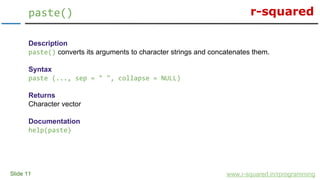
paste()
www.r-squared.in/rprogramming
Description
paste() converts its arguments to character strings and concatenates them.
Syntax
paste (..., sep = " ", collapse = NULL)
Returns
Character vector
Documentation
help(paste)
r-squared
Slide 12
paste()
www.r-squared.in/rprogramming
Examples
> # example 1
> x <- 1:10
> paste(x)
[1] "1" "2" "3" "4" "5" "6" "7" "8" "9" "10"
> paste(x, collapse = "")
[1] "12345678910"
> # example 2
> x <- LETTERS
> x
[1] "A" "B" "C" "D" "E" "F" "G" "H" "I" "J" "K" "L" "M" "N" "O" "P" "Q" "R" "S" "T" "U" "V"
[23] "W" "X" "Y" "Z"
> paste(x)
[1] "A" "B" "C" "D" "E" "F" "G" "H" "I" "J" "K" "L" "M" "N" "O" "P" "Q" "R" "S" "T" "U" "V"
[23] "W" "X" "Y" "Z"
> paste(x, collapse = "")
[1] "ABCDEFGHIJKLMNOPQRSTUVWXYZ"
r-squared
Slide 13
paste()
www.r-squared.in/rprogramming
Examples
> # example 3
> name <- "Jovial"
> age <- 28
> paste(name, age)
[1] "Jovial 28"
> paste(name, age, sep = ",")
[1] "Jovial,28"
> paste(name, age, sep = "")
[1] "Jovial28"
r-squared
Slide 14
paste()
www.r-squared.in/rprogramming
Examples
> # example 4
> alpha <- LETTERS[1:4]
> numeric <- 1:4
> alpha_numeric <- paste(alpha, numeric)
> alpha_numeric
[1] "A 1" "B 2" "C 3" "D 4"
> alpha_numeric <- paste(alpha, numeric, sep = "")
> alpha_numeric
[1] "A1" "B2" "C3" "D4"
r-squared
Slide 15
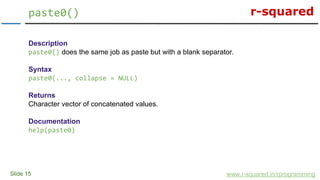
paste0()
www.r-squared.in/rprogramming
Description
paste0() does the same job as paste but with a blank separator.
Syntax
paste0(..., collapse = NULL)
Returns
Character vector of concatenated values.
Documentation
help(paste0)
r-squared
Slide 16
paste0()
www.r-squared.in/rprogramming
Examples
> # example 1
> alpha <- LETTERS[1:4]
> numeric <- 1:4
> paste0(alpha, numeric)
[1] "A1" "B2" "C3" "D4"
> paste(alpha, numeric, sep = "")
[1] "A1" "B2" "C3" "D4"
> # example 2
> name <- "Jovial"
> age <- 28
> paste0(name, age)
[1] "Jovial28"
> paste(name, age, sep = "")
[1] "Jovial28"
r-squared
Slide 17
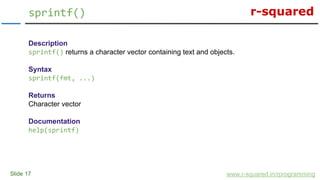
sprintf()
www.r-squared.in/rprogramming
Description
sprintf() returns a character vector containing text and objects.
Syntax
sprintf(fmt, ...)
Returns
Character vector
Documentation
help(sprintf)
r-squared
Slide 18
sprintf()
www.r-squared.in/rprogramming
Examples
> # example 1
> name <- "Jovial"
> age <- 28
> sprintf("Your name is %s and you are %d years old", name, age)
[1] "Your name is Jovial and you are 28 years old"
# %s is replaced by the value in name and %d is replaced by value in age. s indicates string
type and d indicates integer type.
r-squared
Slide 19
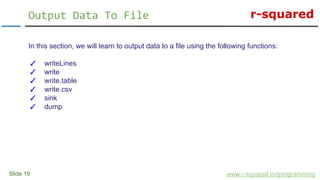
Output Data To File
www.r-squared.in/rprogramming
In this section, we will learn to output data to a file using the following functions:
✓ writeLines
✓ write
✓ write.table
✓ write.csv
✓ sink
✓ dump
r-squared
Slide 20
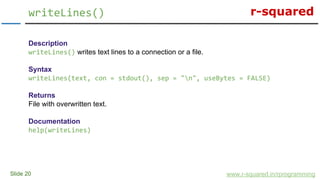
writeLines()
www.r-squared.in/rprogramming
Description
writeLines() writes text lines to a connection or a file.
Syntax
writeLines(text, con = stdout(), sep = "n", useBytes = FALSE)
Returns
File with overwritten text.
Documentation
help(writeLines)
r-squared
Slide 21
writeLines()
www.r-squared.in/rprogramming
Examples
> # example 1
> details <- "My name is Jovial."
> writeLines(details, "write.txt")
> readLines("write.txt")
[1] "My name is Jovial."
> # example 2
> details_2 <- "I am 28 years old."
> writeLines(details_2, "write.txt")
> readLines("write.txt")
[1] "I am 28 years old."
# As you might have observed, writeLines overwrites the contents of a file. To append text to
a file, we will use the write function.
r-squared
Slide 22
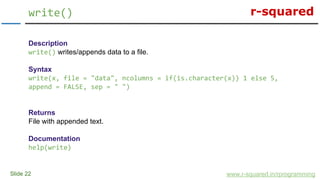
write()
www.r-squared.in/rprogramming
Description
write() writes/appends data to a file.
Syntax
write(x, file = "data", ncolumns = if(is.character(x)) 1 else 5,
append = FALSE, sep = " ")
Returns
File with appended text.
Documentation
help(write)
r-squared
Slide 23
write()
www.r-squared.in/rprogramming
Examples
> # example 1
> name <- "My name is Jovial."
> write(name, file = "write.txt")
> readLines("write.txt")
[1] "My name is Jovial."
> age <- "I am 28 years old."
> write(age, file = "write.txt", append = TRUE)
> readLines("write.txt")
[1] "My name is Jovial." "I am 28 years old."
r-squared
Slide 24
write()
www.r-squared.in/rprogramming
Examples
> # example 2
> x <- 1:5
> x
[1] 1 2 3 4 5
> write(x, file = "write.txt", append = TRUE)
> readLines("write.txt")
[1] "My name is Jovial." "I am 28 years old." "1 2 3 4 5"
> write(x, file = "write.txt", append = TRUE)
> readLines("write.txt")
[1] "My name is Jovial." "I am 28 years old." "1 2 3 4 5" "1 2 3 4 5"
> write(x, file = "write.txt", append = TRUE, sep = "-")
> readLines("write.txt")
[1] "My name is Jovial." "I am 28 years old." "1 2 3 4 5" "1 2 3 4 5"
[5] "1-2-3-4-5"
r-squared
Slide 25
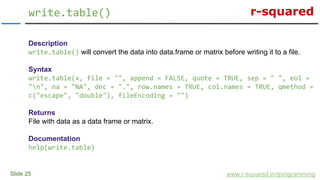
write.table()
www.r-squared.in/rprogramming
Description
write.table() will convert the data into data.frame or matrix before writing it to a file.
Syntax
write.table(x, file = "", append = FALSE, quote = TRUE, sep = " ", eol =
"n", na = "NA", dec = ".", row.names = TRUE, col.names = TRUE, qmethod =
c("escape", "double"), fileEncoding = "")
Returns
File with data as a data frame or matrix.
Documentation
help(write.table)
r-squared
Slide 26
write.table()
www.r-squared.in/rprogramming
Examples
> # example 1
> m <- matrix(1:9, nrow = 3)
> m
[,1] [,2] [,3]
[1,] 1 4 7
[2,] 2 5 8
[3,] 3 6 9
> # write to a text file
> write.table(m, file = "table.txt")
> readLines("table.txt")
[1] ""V1" "V2" "V3"" ""1" 1 4 7" ""2" 2 5 8"
[4] ""3" 3 6 9"
r-squared
Slide 27
write.table()
www.r-squared.in/rprogramming
Examples
> # example 2
> # write to a csv file
> write.table(m, file = "table.csv")
> readLines("table.csv")
[1] ""V1" "V2" "V3"" ""1" 1 4 7" ""2" 2 5 8"
[4] ""3" 3 6 9"
> # example 3
> # append the transpose of the matrix
> write.table(t(m), file = "table.txt", append = TRUE)
> readLines("table.txt")
[1] ""V1" "V2" "V3"" ""1" 1 4 7" ""2" 2 5 8"
[4] ""3" 3 6 9" ""V1" "V2" "V3"" ""1" 1 2 3"
[7] ""2" 4 5 6" ""3" 7 8 9"
r-squared
Slide 28
write.table()
www.r-squared.in/rprogramming
> # example 4
> # use comma as a separator
> write.table(t(m), file = "table.txt", append = TRUE, sep = ",")
> readLines("table.txt")
[1] ""V1" "V2" "V3"" ""1" 1 4 7" ""2" 2 5 8"
[4] ""3" 3 6 9" ""V1" "V2" "V3"" ""1" 1 2 3"
[7] ""2" 4 5 6" ""3" 7 8 9" ""V1","V2","V3""
[10] ""1",1,2,3" ""2",4,5,6" ""3",7,8,9"
> # example 5
> # without row and column names
> write.table(t(m), file = "table.txt", append = TRUE, row.names = FALSE,
+ col.names = FALSE)
> readLines("table.txt")
[1] ""V1" "V2" "V3"" ""1" 1 4 7" ""2" 2 5 8"
[4] ""3" 3 6 9" ""V1" "V2" "V3"" ""1" 1 2 3"
[7] ""2" 4 5 6" ""3" 7 8 9" ""V1","V2","V3""
[10] ""1",1,2,3" ""2",4,5,6" ""3",7,8,9"
[13] "1 2 3" "4 5 6" "7 8 9"
r-squared
Slide 29
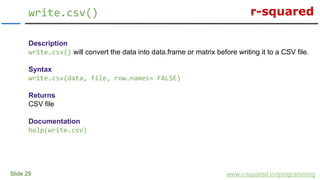
write.csv()
www.r-squared.in/rprogramming
Description
write.csv() will convert the data into data.frame or matrix before writing it to a CSV file.
Syntax
write.csv(data, file, row.names= FALSE)
Returns
CSV file
Documentation
help(write.csv)
r-squared
Slide 30
write.csv()
www.r-squared.in/rprogramming
Examples
> # example 1
> write.csv(mtcars, "mt.csv")
> readLines("mt.csv")
[1]""","mpg","cyl","disp","hp","drat","wt","qsec","vs","am","gear","carb""
[2] ""Mazda RX4",21,6,160,110,3.9,2.62,16.46,0,1,4,4"
[3] ""Mazda RX4 Wag",21,6,160,110,3.9,2.875,17.02,0,1,4,4"
[4] ""Datsun 710",22.8,4,108,93,3.85,2.32,18.61,1,1,4,1"
> # example 2
> # without row names
> write.csv(mtcars, "mt.csv", row.names = FALSE)
> readLines("mt.csv")
[1] ""mpg","cyl","disp","hp","drat","wt","qsec","vs","am","gear","carb""
[2] "21,6,160,110,3.9,2.62,16.46,0,1,4,4"
[3] "21,6,160,110,3.9,2.875,17.02,0,1,4,4"
r-squared
Slide 31
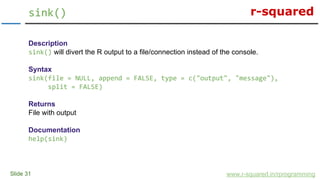
sink()
www.r-squared.in/rprogramming
Description
sink() will divert the R output to a file/connection instead of the console.
Syntax
sink(file = NULL, append = FALSE, type = c("output", "message"),
split = FALSE)
Returns
File with output
Documentation
help(sink)
r-squared
Slide 32
sink()
www.r-squared.in/rprogramming
Examples
> # example 1
> sink(file = "write.txt", append = TRUE, type = "output")
> x <- 1:5
> x * 2
> readLines("write.txt") # nothing is printed on console
> sink() # stop diverting output to file
> readLines("write.txt")
[1] "[1] 2 4 6 8 10"
[2] "[1] "[1] 2 4 6 8 10""
[3] "[1] 2 4 6 8 10"
[4] "[1] "[1] 2 4 6 8 10" "[1] "[1] 2 4 6 8 10"""
[5] "[3] "[1] 2 4 6 8 10" "
r-squared
Slide 33
sink()
www.r-squared.in/rprogramming
Examples
> # example 2
> sink("example.txt") # start writing to example.txt file
> x <- sample(1:10)
> y <- sample(1:10)
> cat("===============================n")
> cat(" T-test between x and y n")
> cat("===============================n")
> t.test(x, y)
> sink() # stop writing to the file
> readLines("example.txt")
[1] " [1] 2 5 4 6 9 3 10 1 7 8"
[2] " [1] 6 10 5 1 4 2 9 7 3 8"
[3] "==============================="
[4] " T-test between x and y "
[5] "==============================="
[6] ""
[7] "tWelch Two Sample t-test"
[8] ""
[9] "data: x and y"
[10] "t = 0, df = 18, p-value = 1"
[11] "alternative hypothesis: true difference in means is not equal to 0"
[12] "95 percent confidence interval:"
[13] " -2.844662 2.844662"
[14] "sample estimates:"
[15] "mean of x mean of y "
[16] " 5.5 5.5 "
[17] ""
r-squared
Slide 34
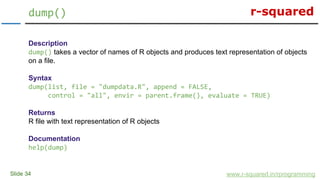
dump()
www.r-squared.in/rprogramming
Description
dump() takes a vector of names of R objects and produces text representation of objects
on a file.
Syntax
dump(list, file = "dumpdata.R", append = FALSE,
control = "all", envir = parent.frame(), evaluate = TRUE)
Returns
R file with text representation of R objects
Documentation
help(dump)
r-squared
Slide 35
dump()
www.r-squared.in/rprogramming
Examples
> # example 1
> x <- sample(1:10)
> y <- sample(1:10)
> xy <- list(x = x, y = y) # create a list
> dump("xy", file = "dump.Rdmped") # write xy to dump.R file
> unlink("dump.R") # close connection to dump.R file
> rm("x", "y", "xy") # remove objects x, y and xy from the workspace
> x # x is not available in the workspace
Error: object 'x' not found
> source("dump.Rdmped") # source dump.R file
> xy
$x
[1] 6 4 9 10 2 8 5 3 7 1
$y
[1] 8 7 6 9 3 1 5 2 4 10
r-squared
Slide 36
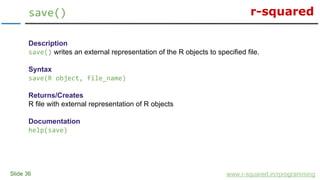
save()
www.r-squared.in/rprogramming
Description
save() writes an external representation of the R objects to specified file.
Syntax
save(R object, file_name)
Returns/Creates
R file with external representation of R objects
Documentation
help(save)
r-squared
Slide 37
save()
www.r-squared.in/rprogramming
Examples
> # example 1
> # save the following data in a R data file
> x <- 1:10
> save(x, file = "x.RData")
> # remove x from the workspace
> rm(x)
> # load x into workspace
> load("x.RData") # we will look at this function in a file
> # view the data
> x
[1] 1 2 3 4 5 6 7 8 9 10
r-squared
Slide 38
Next Steps...
www.r-squared.in/rprogramming
In the next unit, we will learn to transform/reshape data in R:
● Reorder Data
● Subset/Filter Data
● Combine Data
● Transform Data
r-squared
Slide 39
Connect With Us
www.r-squared.in/rprogramming
Visit r-squared for tutorials
on:
● R Programming
● Business Analytics
● Data Visualization
● Web Applications
● Package Development
● Git & GitHub

R Programming: Export/Output Data In R

  • 1.
    r-squared Slide 1 www.r-squared.in/rprogramming RProgramming Learn the fundamentals of data analysis with R.
  • 2.
    r-squared Slide 2 Course Modules www.r-squared.in/rprogramming ✓Introduction ✓ Elementary Programming ✓ Working With Data ✓ Selection Statements ✓ Loops ✓ Functions ✓ Debugging ✓ Unit Testing
  • 3.
    r-squared Slide 3 Working WithData www.r-squared.in/rprogramming ✓ Data Types ✓ Data Structures ✓ Data Creation ✓ Data Info ✓ Data Subsetting ✓ Comparing R Objects ✓ Importing Data ✓ Exporting Data ✓ Data Transformation ✓ Numeric Functions ✓ String Functions ✓ Mathematical Functions
  • 4.
    r-squared Slide 4 Exporting DataFrom R www.r-squared.in/rprogramming Objectives In this module, we will learn to: ● Output data to the console ● Output data to files ● Export data into text/CSV files ● Save R objects
  • 5.
    r-squared Slide 5 Output DataTo Console www.r-squared.in/rprogramming In this section, we will learn to output data to the console using the following functions: ✓ print ✓ cat ✓ paste ✓ paste0 ✓ sprintf
  • 6.
    r-squared Slide 6 print() www.r-squared.in/rprogramming Description print() isa very basic function and as the name suggest it prints its arguments. Syntax print(x, ...) Returns Prints its arguments Documentation help(print)
  • 7.
    r-squared Slide 7 print() www.r-squared.in/rprogramming Examples > #example 1 > x <- 3 > print(x) [1] 3 > x [1] 3 > # example 2 > name <- "Jovial" > lname <- "Mann" > print(name, lname) Error in print.default(name, lname) : invalid 'digits' argument > print(c(name, lname)) [1] "Jovial" "Mann"
  • 8.
    r-squared Slide 8 cat() www.r-squared.in/rprogramming Description cat() concatenatesits arguments and then outputs them. Syntax cat(... , file = "", sep = " ", fill = FALSE, labels = NULL, append = FALSE) Returns Concatenates and outputs its arguments Documentation help(cat)
  • 9.
    r-squared Slide 9 cat() www.r-squared.in/rprogramming Examples > #example 1 # output to the console > name <- "Jovial" > age <- 28 > cat("Your name is", name, " and you are", age, " years old.") Your name is Jovial and you are 28 years old. > # example 2 # output to a file > name <- "Jovial" > age <- 28 > cat("Your name is", name, " and you are", age, " years old.", file = "words.txt")
  • 10.
    r-squared Slide 10 cat() www.r-squared.in/rprogramming Examples > #example 3 # difference between print and cat > fname <- "Jovial" > lname <- "Mann" > print(c(fname, lname)) # throws an error [1] "Jovial" "Mann" > name <- c(fname, lname) > name [1] "Jovial" "Mann" > name <- "Jovial Mann" > print(name) [1] "Jovial Mann" > cat(fname, lname) Jovial Mann
  • 11.
    r-squared Slide 11 paste() www.r-squared.in/rprogramming Description paste() convertsits arguments to character strings and concatenates them. Syntax paste (..., sep = " ", collapse = NULL) Returns Character vector Documentation help(paste)
  • 12.
    r-squared Slide 12 paste() www.r-squared.in/rprogramming Examples > #example 1 > x <- 1:10 > paste(x) [1] "1" "2" "3" "4" "5" "6" "7" "8" "9" "10" > paste(x, collapse = "") [1] "12345678910" > # example 2 > x <- LETTERS > x [1] "A" "B" "C" "D" "E" "F" "G" "H" "I" "J" "K" "L" "M" "N" "O" "P" "Q" "R" "S" "T" "U" "V" [23] "W" "X" "Y" "Z" > paste(x) [1] "A" "B" "C" "D" "E" "F" "G" "H" "I" "J" "K" "L" "M" "N" "O" "P" "Q" "R" "S" "T" "U" "V" [23] "W" "X" "Y" "Z" > paste(x, collapse = "") [1] "ABCDEFGHIJKLMNOPQRSTUVWXYZ"
  • 13.
    r-squared Slide 13 paste() www.r-squared.in/rprogramming Examples > #example 3 > name <- "Jovial" > age <- 28 > paste(name, age) [1] "Jovial 28" > paste(name, age, sep = ",") [1] "Jovial,28" > paste(name, age, sep = "") [1] "Jovial28"
  • 14.
    r-squared Slide 14 paste() www.r-squared.in/rprogramming Examples > #example 4 > alpha <- LETTERS[1:4] > numeric <- 1:4 > alpha_numeric <- paste(alpha, numeric) > alpha_numeric [1] "A 1" "B 2" "C 3" "D 4" > alpha_numeric <- paste(alpha, numeric, sep = "") > alpha_numeric [1] "A1" "B2" "C3" "D4"
  • 15.
    r-squared Slide 15 paste0() www.r-squared.in/rprogramming Description paste0() doesthe same job as paste but with a blank separator. Syntax paste0(..., collapse = NULL) Returns Character vector of concatenated values. Documentation help(paste0)
  • 16.
    r-squared Slide 16 paste0() www.r-squared.in/rprogramming Examples > #example 1 > alpha <- LETTERS[1:4] > numeric <- 1:4 > paste0(alpha, numeric) [1] "A1" "B2" "C3" "D4" > paste(alpha, numeric, sep = "") [1] "A1" "B2" "C3" "D4" > # example 2 > name <- "Jovial" > age <- 28 > paste0(name, age) [1] "Jovial28" > paste(name, age, sep = "") [1] "Jovial28"
  • 17.
    r-squared Slide 17 sprintf() www.r-squared.in/rprogramming Description sprintf() returnsa character vector containing text and objects. Syntax sprintf(fmt, ...) Returns Character vector Documentation help(sprintf)
  • 18.
    r-squared Slide 18 sprintf() www.r-squared.in/rprogramming Examples > #example 1 > name <- "Jovial" > age <- 28 > sprintf("Your name is %s and you are %d years old", name, age) [1] "Your name is Jovial and you are 28 years old" # %s is replaced by the value in name and %d is replaced by value in age. s indicates string type and d indicates integer type.
  • 19.
    r-squared Slide 19 Output DataTo File www.r-squared.in/rprogramming In this section, we will learn to output data to a file using the following functions: ✓ writeLines ✓ write ✓ write.table ✓ write.csv ✓ sink ✓ dump
  • 20.
    r-squared Slide 20 writeLines() www.r-squared.in/rprogramming Description writeLines() writestext lines to a connection or a file. Syntax writeLines(text, con = stdout(), sep = "n", useBytes = FALSE) Returns File with overwritten text. Documentation help(writeLines)
  • 21.
    r-squared Slide 21 writeLines() www.r-squared.in/rprogramming Examples > #example 1 > details <- "My name is Jovial." > writeLines(details, "write.txt") > readLines("write.txt") [1] "My name is Jovial." > # example 2 > details_2 <- "I am 28 years old." > writeLines(details_2, "write.txt") > readLines("write.txt") [1] "I am 28 years old." # As you might have observed, writeLines overwrites the contents of a file. To append text to a file, we will use the write function.
  • 22.
    r-squared Slide 22 write() www.r-squared.in/rprogramming Description write() writes/appendsdata to a file. Syntax write(x, file = "data", ncolumns = if(is.character(x)) 1 else 5, append = FALSE, sep = " ") Returns File with appended text. Documentation help(write)
  • 23.
    r-squared Slide 23 write() www.r-squared.in/rprogramming Examples > #example 1 > name <- "My name is Jovial." > write(name, file = "write.txt") > readLines("write.txt") [1] "My name is Jovial." > age <- "I am 28 years old." > write(age, file = "write.txt", append = TRUE) > readLines("write.txt") [1] "My name is Jovial." "I am 28 years old."
  • 24.
    r-squared Slide 24 write() www.r-squared.in/rprogramming Examples > #example 2 > x <- 1:5 > x [1] 1 2 3 4 5 > write(x, file = "write.txt", append = TRUE) > readLines("write.txt") [1] "My name is Jovial." "I am 28 years old." "1 2 3 4 5" > write(x, file = "write.txt", append = TRUE) > readLines("write.txt") [1] "My name is Jovial." "I am 28 years old." "1 2 3 4 5" "1 2 3 4 5" > write(x, file = "write.txt", append = TRUE, sep = "-") > readLines("write.txt") [1] "My name is Jovial." "I am 28 years old." "1 2 3 4 5" "1 2 3 4 5" [5] "1-2-3-4-5"
  • 25.
    r-squared Slide 25 write.table() www.r-squared.in/rprogramming Description write.table() willconvert the data into data.frame or matrix before writing it to a file. Syntax write.table(x, file = "", append = FALSE, quote = TRUE, sep = " ", eol = "n", na = "NA", dec = ".", row.names = TRUE, col.names = TRUE, qmethod = c("escape", "double"), fileEncoding = "") Returns File with data as a data frame or matrix. Documentation help(write.table)
  • 26.
    r-squared Slide 26 write.table() www.r-squared.in/rprogramming Examples > #example 1 > m <- matrix(1:9, nrow = 3) > m [,1] [,2] [,3] [1,] 1 4 7 [2,] 2 5 8 [3,] 3 6 9 > # write to a text file > write.table(m, file = "table.txt") > readLines("table.txt") [1] ""V1" "V2" "V3"" ""1" 1 4 7" ""2" 2 5 8" [4] ""3" 3 6 9"
  • 27.
    r-squared Slide 27 write.table() www.r-squared.in/rprogramming Examples > #example 2 > # write to a csv file > write.table(m, file = "table.csv") > readLines("table.csv") [1] ""V1" "V2" "V3"" ""1" 1 4 7" ""2" 2 5 8" [4] ""3" 3 6 9" > # example 3 > # append the transpose of the matrix > write.table(t(m), file = "table.txt", append = TRUE) > readLines("table.txt") [1] ""V1" "V2" "V3"" ""1" 1 4 7" ""2" 2 5 8" [4] ""3" 3 6 9" ""V1" "V2" "V3"" ""1" 1 2 3" [7] ""2" 4 5 6" ""3" 7 8 9"
  • 28.
    r-squared Slide 28 write.table() www.r-squared.in/rprogramming > #example 4 > # use comma as a separator > write.table(t(m), file = "table.txt", append = TRUE, sep = ",") > readLines("table.txt") [1] ""V1" "V2" "V3"" ""1" 1 4 7" ""2" 2 5 8" [4] ""3" 3 6 9" ""V1" "V2" "V3"" ""1" 1 2 3" [7] ""2" 4 5 6" ""3" 7 8 9" ""V1","V2","V3"" [10] ""1",1,2,3" ""2",4,5,6" ""3",7,8,9" > # example 5 > # without row and column names > write.table(t(m), file = "table.txt", append = TRUE, row.names = FALSE, + col.names = FALSE) > readLines("table.txt") [1] ""V1" "V2" "V3"" ""1" 1 4 7" ""2" 2 5 8" [4] ""3" 3 6 9" ""V1" "V2" "V3"" ""1" 1 2 3" [7] ""2" 4 5 6" ""3" 7 8 9" ""V1","V2","V3"" [10] ""1",1,2,3" ""2",4,5,6" ""3",7,8,9" [13] "1 2 3" "4 5 6" "7 8 9"
  • 29.
    r-squared Slide 29 write.csv() www.r-squared.in/rprogramming Description write.csv() willconvert the data into data.frame or matrix before writing it to a CSV file. Syntax write.csv(data, file, row.names= FALSE) Returns CSV file Documentation help(write.csv)
  • 30.
    r-squared Slide 30 write.csv() www.r-squared.in/rprogramming Examples > #example 1 > write.csv(mtcars, "mt.csv") > readLines("mt.csv") [1]""","mpg","cyl","disp","hp","drat","wt","qsec","vs","am","gear","carb"" [2] ""Mazda RX4",21,6,160,110,3.9,2.62,16.46,0,1,4,4" [3] ""Mazda RX4 Wag",21,6,160,110,3.9,2.875,17.02,0,1,4,4" [4] ""Datsun 710",22.8,4,108,93,3.85,2.32,18.61,1,1,4,1" > # example 2 > # without row names > write.csv(mtcars, "mt.csv", row.names = FALSE) > readLines("mt.csv") [1] ""mpg","cyl","disp","hp","drat","wt","qsec","vs","am","gear","carb"" [2] "21,6,160,110,3.9,2.62,16.46,0,1,4,4" [3] "21,6,160,110,3.9,2.875,17.02,0,1,4,4"
  • 31.
    r-squared Slide 31 sink() www.r-squared.in/rprogramming Description sink() willdivert the R output to a file/connection instead of the console. Syntax sink(file = NULL, append = FALSE, type = c("output", "message"), split = FALSE) Returns File with output Documentation help(sink)
  • 32.
    r-squared Slide 32 sink() www.r-squared.in/rprogramming Examples > #example 1 > sink(file = "write.txt", append = TRUE, type = "output") > x <- 1:5 > x * 2 > readLines("write.txt") # nothing is printed on console > sink() # stop diverting output to file > readLines("write.txt") [1] "[1] 2 4 6 8 10" [2] "[1] "[1] 2 4 6 8 10"" [3] "[1] 2 4 6 8 10" [4] "[1] "[1] 2 4 6 8 10" "[1] "[1] 2 4 6 8 10""" [5] "[3] "[1] 2 4 6 8 10" "
  • 33.
    r-squared Slide 33 sink() www.r-squared.in/rprogramming Examples > #example 2 > sink("example.txt") # start writing to example.txt file > x <- sample(1:10) > y <- sample(1:10) > cat("===============================n") > cat(" T-test between x and y n") > cat("===============================n") > t.test(x, y) > sink() # stop writing to the file > readLines("example.txt") [1] " [1] 2 5 4 6 9 3 10 1 7 8" [2] " [1] 6 10 5 1 4 2 9 7 3 8" [3] "===============================" [4] " T-test between x and y " [5] "===============================" [6] "" [7] "tWelch Two Sample t-test" [8] "" [9] "data: x and y" [10] "t = 0, df = 18, p-value = 1" [11] "alternative hypothesis: true difference in means is not equal to 0" [12] "95 percent confidence interval:" [13] " -2.844662 2.844662" [14] "sample estimates:" [15] "mean of x mean of y " [16] " 5.5 5.5 " [17] ""
  • 34.
    r-squared Slide 34 dump() www.r-squared.in/rprogramming Description dump() takesa vector of names of R objects and produces text representation of objects on a file. Syntax dump(list, file = "dumpdata.R", append = FALSE, control = "all", envir = parent.frame(), evaluate = TRUE) Returns R file with text representation of R objects Documentation help(dump)
  • 35.
    r-squared Slide 35 dump() www.r-squared.in/rprogramming Examples > #example 1 > x <- sample(1:10) > y <- sample(1:10) > xy <- list(x = x, y = y) # create a list > dump("xy", file = "dump.Rdmped") # write xy to dump.R file > unlink("dump.R") # close connection to dump.R file > rm("x", "y", "xy") # remove objects x, y and xy from the workspace > x # x is not available in the workspace Error: object 'x' not found > source("dump.Rdmped") # source dump.R file > xy $x [1] 6 4 9 10 2 8 5 3 7 1 $y [1] 8 7 6 9 3 1 5 2 4 10
  • 36.
    r-squared Slide 36 save() www.r-squared.in/rprogramming Description save() writesan external representation of the R objects to specified file. Syntax save(R object, file_name) Returns/Creates R file with external representation of R objects Documentation help(save)
  • 37.
    r-squared Slide 37 save() www.r-squared.in/rprogramming Examples > #example 1 > # save the following data in a R data file > x <- 1:10 > save(x, file = "x.RData") > # remove x from the workspace > rm(x) > # load x into workspace > load("x.RData") # we will look at this function in a file > # view the data > x [1] 1 2 3 4 5 6 7 8 9 10
  • 38.
    r-squared Slide 38 Next Steps... www.r-squared.in/rprogramming Inthe next unit, we will learn to transform/reshape data in R: ● Reorder Data ● Subset/Filter Data ● Combine Data ● Transform Data
  • 39.
    r-squared Slide 39 Connect WithUs www.r-squared.in/rprogramming Visit r-squared for tutorials on: ● R Programming ● Business Analytics ● Data Visualization ● Web Applications ● Package Development ● Git & GitHub