Manipulating Dates
Using as.Date, difftime(), as.POSIXct(), as.POSIXlt(),
lubridate()
Rupak Roy
#load the data
>datedata<-read.csv(file.choose(),header = TRUE)
>str(datedata)
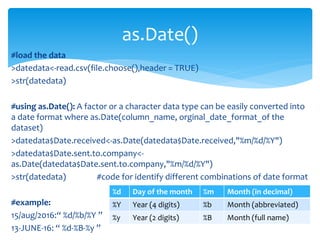
#using as.Date(): A factor or a character data type can be easily converted into
a date format where as.Date(column_name, orginal_date_format_of the
dataset)
>datedata$Date.received<-as.Date(datedata$Date.received,"%m/%d/%Y")
>datedata$Date.sent.to.company<-
as.Date(datedata$Date.sent.to.company,"%m/%d/%Y")
>str(datedata) #code for identify different combinations of date format
#example:
15/aug/2016:“ %d/%b/%Y ”
13-JUNE-16: “ %d-%B-%y ”
as.Date()
%d Day of the month %m Month (in decimal)
%Y Year (4 digits) %b Month (abbreviated)
%y Year (2 digits) %B Month (full name)
#once the data is in date format we can easily extract the months and the
weeks.
>months(datedata$Date.received)
>weekdays(datedata$Date.received)
#even we can filter the data using months() and weekdays()
#sub-setting using base R package
>datadate2<-datedata[(weekdays(datedata$Date.received)=="Sunday"),]
as.Date()
Rupak Roy
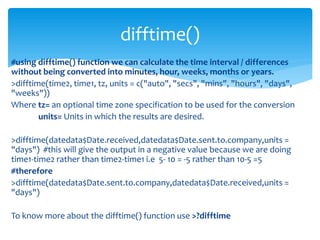
#using difftime() function we can calculate the time interval / differences
without being converted into minutes, hour, weeks, months or years.
>difftime(time2, time1, tz, units = c("auto", "secs", "mins", "hours", "days",
"weeks"))
Where tz= an optional time zone specification to be used for the conversion
units= Units in which the results are desired.
>difftime(datedata$Date.received,datedata$Date.sent.to.company,units =
"days") #this will give the output in a negative value because we are doing
time1-time2 rather than time2-time1 i.e 5- 10 = -5 rather than 10-5 =5
#therefore
>difftime(datedata$Date.sent.to.company,datedata$Date.received,units =
"days")
To know more about the difftime() function use >?difftime
difftime()
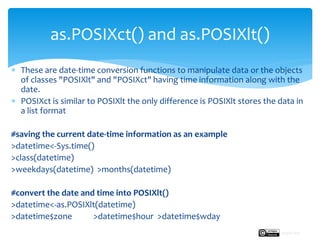
 These are date-time conversion functions to manipulate data or the objects
of classes "POSIXlt" and "POSIXct" having time information along with the
date.
 POSIXct is similar to POSIXlt the only difference is POSIXlt stores the data in
a list format
#saving the current date-time information as an example
>datetime<-Sys.time()
>class(datetime)
>weekdays(datetime) >months(datetime)
#convert the date and time into POSIXlt()
>datetime<-as.POSIXlt(datetime)
>datetime$zone >datetime$hour >datetime$wday
as.POSIXct() and as.POSIXlt()
Rupak Roy
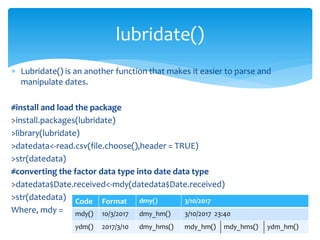
 Lubridate() is an another function that makes it easier to parse and
manipulate dates.
#install and load the package
>install.packages(lubridate)
>library(lubridate)
>datedata<-read.csv(file.choose(),header = TRUE)
>str(datedata)
#converting the factor data type into date data type
>datedata$Date.received<-mdy(datedata$Date.received)
>str(datedata)
Where, mdy =
lubridate()
Code Format dmy() 3/10/2017
mdy() 10/3/2017 dmy_hm() 3/10/2017 23:40
ydm() 2017/3/10 dmy_hms() mdy_hm() mdy_hms() ydm_hm()
Next:
We will learn an another important function that is combining two
or more data sets using merge().
Manipulating Dates
Rupak Roy

Manipulating data with dates

  • 1.
    Manipulating Dates Using as.Date,difftime(), as.POSIXct(), as.POSIXlt(), lubridate() Rupak Roy
  • 2.
    #load the data >datedata<-read.csv(file.choose(),header= TRUE) >str(datedata) #using as.Date(): A factor or a character data type can be easily converted into a date format where as.Date(column_name, orginal_date_format_of the dataset) >datedata$Date.received<-as.Date(datedata$Date.received,"%m/%d/%Y") >datedata$Date.sent.to.company<- as.Date(datedata$Date.sent.to.company,"%m/%d/%Y") >str(datedata) #code for identify different combinations of date format #example: 15/aug/2016:“ %d/%b/%Y ” 13-JUNE-16: “ %d-%B-%y ” as.Date() %d Day of the month %m Month (in decimal) %Y Year (4 digits) %b Month (abbreviated) %y Year (2 digits) %B Month (full name)
  • 3.
    #once the datais in date format we can easily extract the months and the weeks. >months(datedata$Date.received) >weekdays(datedata$Date.received) #even we can filter the data using months() and weekdays() #sub-setting using base R package >datadate2<-datedata[(weekdays(datedata$Date.received)=="Sunday"),] as.Date() Rupak Roy
  • 4.
    #using difftime() functionwe can calculate the time interval / differences without being converted into minutes, hour, weeks, months or years. >difftime(time2, time1, tz, units = c("auto", "secs", "mins", "hours", "days", "weeks")) Where tz= an optional time zone specification to be used for the conversion units= Units in which the results are desired. >difftime(datedata$Date.received,datedata$Date.sent.to.company,units = "days") #this will give the output in a negative value because we are doing time1-time2 rather than time2-time1 i.e 5- 10 = -5 rather than 10-5 =5 #therefore >difftime(datedata$Date.sent.to.company,datedata$Date.received,units = "days") To know more about the difftime() function use >?difftime difftime()
  • 5.
     These aredate-time conversion functions to manipulate data or the objects of classes "POSIXlt" and "POSIXct" having time information along with the date.  POSIXct is similar to POSIXlt the only difference is POSIXlt stores the data in a list format #saving the current date-time information as an example >datetime<-Sys.time() >class(datetime) >weekdays(datetime) >months(datetime) #convert the date and time into POSIXlt() >datetime<-as.POSIXlt(datetime) >datetime$zone >datetime$hour >datetime$wday as.POSIXct() and as.POSIXlt() Rupak Roy
  • 6.
     Lubridate() isan another function that makes it easier to parse and manipulate dates. #install and load the package >install.packages(lubridate) >library(lubridate) >datedata<-read.csv(file.choose(),header = TRUE) >str(datedata) #converting the factor data type into date data type >datedata$Date.received<-mdy(datedata$Date.received) >str(datedata) Where, mdy = lubridate() Code Format dmy() 3/10/2017 mdy() 10/3/2017 dmy_hm() 3/10/2017 23:40 ydm() 2017/3/10 dmy_hms() mdy_hm() mdy_hms() ydm_hm()
  • 7.
    Next: We will learnan another important function that is combining two or more data sets using merge(). Manipulating Dates Rupak Roy