
Understanding WordPress Multisite
and WP Ultimo
wpultimo
Guide
WP Ultimo is a WordPress Multisite plugin that enables you
to offer a WaaS or Websites as a Service to customers. Before
we dive in and learn how WP Ultimo can help your business
and customers there is some foundational knowledge that
we need to acquire.
by Wendy Permana
CONTENTS
The Network 6
Subdomain vs. Subdirectory 6
Plugins and Themes 8
Users and Administrators 9
Permalinks 10
Static Pages 12
Registration 13
Domains and SSL 15
WP Ultimo 17
Introduction 17
Case 1: An Agency 17
Case 2: Niche Provider 20
Case 3: WordPress Web Hosting 21
Architecture Considerations 22
Shared vs. Dedicated Hosting 22
Performance Considerations 23
Backups 25
Snapshots 25
External Scripts 26
Plugins 26
Domains and SSL 28
Plugins 30
| 5
THE WORDPRESS MULTISITE
Most of us are familiar with the stock-standard WordPress installation. You
either create it via the control panel of your hosting provider or, for the brave,
set up a new web server and database, download the core files and begin the
installation process.
This works for millions of WordPress sites all over the world but from the per-
spective of an agency or hosting provider let’s discuss volumes for a minute.
Whilst it is a synch to create one WordPress site or even a hundred via an
automated control panel problems soon start to show themselves when it
falls to the management of these sites. Left unmanaged you’re a prime tar-
get for malware. To manage means an exercise of effort and resources and
although there are external tools and plugins available to help streamline
the management and administration of WordPress sites the fact that cus-
tomers maintain administrative access means that these efforts could easily
be defeated.
Within its core, WordPress provides a feature simply titled ‘Multisite’ which
traces its origins back to 2010 at the launch of WordPress 3.0. Since then it
has received a number of revisions aimed at introducing new features and
tightening security.
In essence, a WordPress multisite can be thought of as this: A University
maintains a single installation of WordPress but each faculty maintains their
own WordPress site.
To break down this statement let’s take a look at some of the basic termi-
nology present not only in WP Ultimo’s documentation but also across the
WordPress community.
In terms of WordPress, a
multisite network is where
a number of subsites can
be managed from a single
dashboard. Although creating
a multisite network differs
between hosting providers,
the end result is usually a few
additional directives in the
wp-config.php file to let Word-
Press know that it is operating
in this specific mode.
There are a number of dis-
tinct differences between a
multisite network and a stand-
alone WordPress installation
which we shall briefly discuss.
SUBDOMAIN VS. SUBDIRECTORY
One of the most immediate decisions you will need to make is whether the
multisite installation will operate with subdirectories or subdomains. WP Ul-
timo works equally well with both choices but there are some architectural
differences between the two configurations.
In subdirectory configuration, network sites inherit a path based upon the
main domain name. For example a network site labelled ‘site1’ will have it’s
full URL as http://domain.com/site1. In subdomain configuration, the net-
work site will have its own subdomain derived from the main domain name.
Thus a site labelled ‘site1’ will have its full URL as http://site1.domain.com/.
Whilst both options are perfectly valid choices, the use of subdomains does
offer a number of advantages but also requires more thought and planning
in its architecture.
The
Network
6 |
| 7
In terms of DNS the use of subdirectories presents a relatively simple chal-
lenge. As network sites are simply children of the parent path, only a sin-
gle domain name entry needs to exist for the main domain name. For sub-
domains the challenge is a little more complex requiring either a separate
CNAME entry for each network site or a wildcard (*) entry in the DNS records.
A further area of consideration is that of SSL and the issuance and use of SSL
certificates. In subdirectory configuration a single domain certificate can be
used as the network sites are simply paths of the main domain name. Thus
a certificate for domain.com will adequately provide SSL for https://domain.
com/site1, https://domain.com/site2 and so on.
In subdomain configuration the use of a wildcard SSL certificate is one of
the most common options. This type of SSL certificate provides encryption
for a domain and its subdomains. Therefore a wildcard SSL certificate will
provide encryption for https://site1.domain.com, https://site2.domain.com
and https://domain.com itself.
Although other options exist, these are often limited in scope and applica-
tion and require additional configuration and consideration with regards to
suitability.
PLUGINS AND THEMES
What WordPress giveth it taketh away as well, at least from the perspective
of the customer. In a stand-alone WordPress installation if the site admin-
istrator installs a bad plugin or fails to keep their installation up to date the
only victim and casualty of this act is themselves. However, a site adminis-
trator installing a bad plugin on a multisite installation creates a victim of
every site installed in the network.
For this reason when configured as a multisite WordPress removes the ca-
pability from site administrators to install plugins and themes and instead
moves this capability to a newly created network administrator or ‘super
8 |
| 9
admin’ role. This privileged role can then decide whether to allow adminis-
trators of network sites to see or access the plugins menu in their dashboard
and, if so, whether such permissions extend to activating or deactivating
plugins.
To this extent the network administrator is responsible for installing plugins
and themes into the network and delegates permissions to make use of these
plugins and themes to network sites. Site administrators cannot install pl-
ugins and themes or access plugins and themes not assigned to their site.
USERS AND ADMINISTRATORS
In a WordPress Multisite, all network sites share the same database and
therefore share the same users, roles and capabilities. The most apt way to
think of it is that all users are members of the network and not a particular
site.
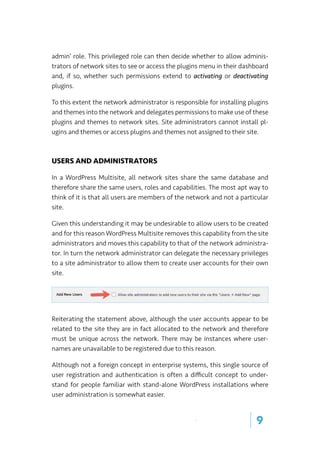
Given this understanding it may be undesirable to allow users to be created
and for this reason WordPress Multisite removes this capability from the site
administrators and moves this capability to that of the network administra-
tor. In turn the network administrator can delegate the necessary privileges
to a site administrator to allow them to create user accounts for their own
site.
Reiterating the statement above, although the user accounts appear to be
related to the site they are in fact allocated to the network and therefore
must be unique across the network. There may be instances where user-
names are unavailable to be registered due to this reason.
Although not a foreign concept in enterprise systems, this single source of
user registration and authentication is often a difficult concept to under-
stand for people familiar with stand-alone WordPress installations where
user administration is somewhat easier.
MEDIA
Where network sites share a single database in a WordPress Multisite, they
maintain separate paths on the filesystem for media files.
The standard WordPress location (wp-content/uploads) remains; however,
its path is altered to reflect the network site’s unique ID. Consequently me-
dia files for a network site appear as wp-contents/uploads/site/[id].
PERMALINKS
We mentioned before that there are distinctive advantages of subdomain
over subdirectory configuration and here it is: paths.
In a subdirectory configuration, the main site (the first site created when
the network is established) and network subsites must share the same path
leading from the domain name. This has the potential for a great number of
conflicts.
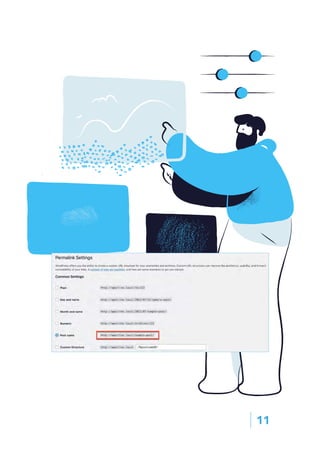
For posts, a mandatory /blog/ path is added to the main site to prevent
clashes with network sites. This means that pretty permalinks such as ‘Post
name’ will be presented as domain.name/blog/post-name/
In a subdomain configuration this action is not necessary because each net-
work site benefits from complete domain separation and thus need not rely
on a single path. They instead maintain their own distinct paths based on
their subdomain.
10 |
| 11
STATIC PAGES
In subdirectory configuration the potential for naming conflicts extends to
static pages as the main site and network sites share the same path.
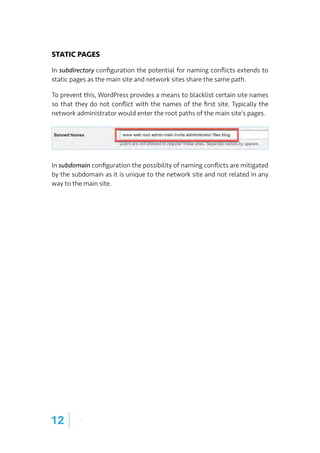
To prevent this, WordPress provides a means to blacklist certain site names
so that they do not conflict with the names of the first site. Typically the
network administrator would enter the root paths of the main site’s pages.
In subdomain configuration the possibility of naming conflicts are mitigated
by the subdomain as it is unique to the network site and not related in any
way to the main site.
12 |
| 13
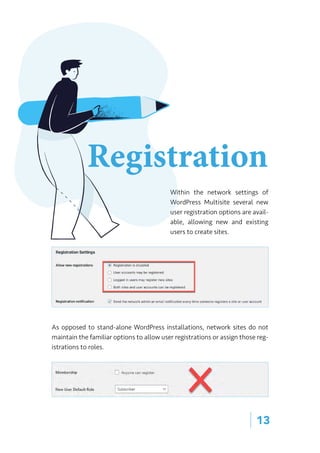
Within the network settings of
WordPress Multisite several new
user registration options are avail-
able, allowing new and existing
users to create sites.
As opposed to stand-alone WordPress installations, network sites do not
maintain the familiar options to allow user registrations or assign those reg-
istrations to roles.
Registration
wpultimo
14 |
When user accounts are created those accounts are generated at the net-
work level. Thus instead of belonging to any one particular site they instead
belong to the network. This has some distinctive advantages and disadvan-
tages.
For example, assume your WordPress Multisite was in the business of news
and information. You would establish the multisite and then create network
sites for finance, technology, entertainment and other areas of interest whilst
maintaining overall control of plugins and themes. Each network site would
in turn have a far greater level of control over the look and feel and user ex-
perience of their network site than would custom post types or regular post
categories.
To this extent when a user logs in they log in to the network and ultimately
are logged in to each network site as well to provide a seamless experience.
If your new site was subscription based this would be the ideal solution and
outcome.
If, however, the intended nature and purpose of the multisite was to offer
disparate network sites who have no relationship to each other it is almost
always the case that external or additional plugins be required to manipulate
the user roles.
| 15
Let’s talk about a WordPress Multisite installation that almost escapes our
attention - Wordpress.com. This is by far the most extensive example of a
Wordpress multisite and demonstrates its extensive abilities to be custom-
ized and moulded to fulfil a purpose.
These days on the modern internet the use of SSL is almost mandatory and
network administrators of WordPress multisites are soon presented with
these challenges.
In subdomain configuration sites are created based on the root domain name.
Thus a site labelled ‘site1’ would be created as ‘site1.domain.com’. Making
use of a wildcard SSL certificate, a network administrator can successfully
address this challenge and provide SSL encryption abilities for the network.
WordPress Multisite contains a domain mapping function that allows for
network sites to be associated with custom domain names or domain names
different from the network’s root domain.
Domains
and SSL
For network administrators this presents an additional layer of complexity
both in domain name configuration as well as the issuance and maintenance
of SSL certificates.
To this extent whilst WordPress Multisite provides a means to allow www.
anotherdomain.com to be mapped to ‘site1’ the network administrator is
left with the challenge of externally managing the DNS entries and the im-
plementation of SSL certificates.
16 |
| 17
WP ULTIMO
With the differences between a stand-alone WordPress installation and a
Multisite installation understood, let’s take a look at how WP Ultimo is the
ultimate arsenal for providing Websites as a Service.
INTRODUCTION
WP Ultimo is your Swiss Army knife when it comes to creating a Website as
a Service (WaaS). Think of Wix.com, Squarespace, WordPress.com and then
think of owning your own service.
Under the hood WP Ultimo makes use of WordPress Multisite but it does so
in a way that not only solves the myriad of challenges network administra-
tors face with multisite installations but enhances the capabilities allowing
for a wide variety of use cases to be supported.
In the following sections we will take a look at some common use cases and
considerations required to support those cases.
USE CASES
CASE 1: AN AGENCY
Typically the core skills of an agency lie in the design of websites with aspects
such as their hosting or marketing being listed as additional services.
For agencies WP Ultimo presents an incredible value proposition in its abili-
ties to host and manage multiple websites on a single platform. Even more
so for agencies who standardize their designs on particular themes such as
GeneratePress, Astra, OceanWP or others can leverage WP Ultimo’s abilities
to automatically activate these themes for each new site.
Similarly with the abundance of deals for agency pricing to common and
popular plugins, the use of WP Ultimo allows agencies to leverage existing
investments by providing a common platform from which plugins can be in-
stalled, maintained and made use of.
Most likely the use of a subdomain configuration would be desired and for-
tunately WP Ultimo makes it incredibly easy to facilitate domain mapping
and SSL certificates with its integrations for a number of popular hosting
providers as well as services such as Cloudflare and cPanel.
Thus by leveraging one of these providers or by placing WP Ultimo behind
Cloudflare aspects such as the management of domains and SSL certificates
become somewhat trivial.
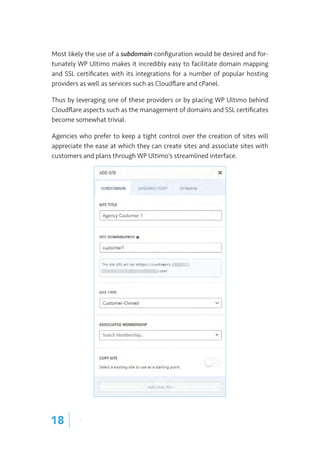
Agencies who prefer to keep a tight control over the creation of sites will
appreciate the ease at which they can create sites and associate sites with
customers and plans through WP Ultimo’s streamlined interface.
18 |
| 19
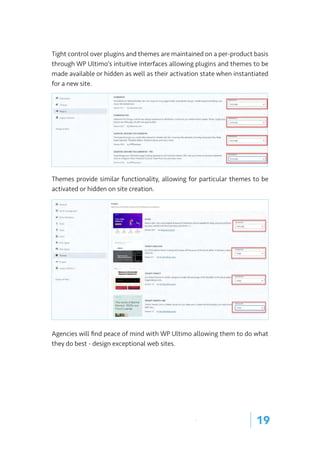
Tight control over plugins and themes are maintained on a per-product basis
through WP Ultimo’s intuitive interfaces allowing plugins and themes to be
made available or hidden as well as their activation state when instantiated
for a new site.
Themes provide similar functionality, allowing for particular themes to be
activated or hidden on site creation.
Agencies will find peace of mind with WP Ultimo allowing them to do what
they do best - design exceptional web sites.
CASE 2: NICHE PROVIDER
There is an old saying which says, “do one thing and do it well”. For many
specialists this means creating a product or service around a single core idea.
Perhaps you are an avid golfer promoting websites to clubs or you might be
an avid esports gamer providing websites to clans. An individual promoting a
booking service to restaurants perhaps?
For many reasons you would want to provide services based on a common
framework and platform. It could be that you have designed or invested in
bespoke plugins to provide the required functionality or it may be the case
that industry best practices require some form of standardized approach to
design.
One of WP Ultimo’s innovative features is the use of template sites. A tem-
plate site is one where the theme has been installed and activated, necessary
plugins installed and activated and sample posts or pages created. When a
customer creates a new site based upon the template, the contents and set-
tings of the template are copied to the newly created site.
For a provider of niche sites and services this provides an unparalleled advan-
tage in the ability to instantly create a site ready to go with custom plugins
and design. The customer need only provide the most minimal input to com-
plete the service.
Depending on the requirements both subdirectory or subdomain configura-
tions may suit, in which case the architecture choices would be between a
simple SSL certificate for subdirectories or a wildcard SSL certificate for sub-
domains.
20 |
| 21
CASE 3: WORDPRESS WEB HOSTING
There are a myriad of ways to host WordPress sites but rarely is it as simple
as providing web space to a customer with a pre-installed version of Word-
Press. This is because a number of decisions and considerations need to
come together to provide a meaningful service.
WP Ultimo excels in this area by providing a comprehensive turnkey solu-
tion for the hosting of WordPress sites. Included in the solution are the core
mechanisms to provide subscription services, payment collection, checkout
forms, discount vouchers and customer communications.
Much of the integral work required to correctly install, configure and main-
tain a WordPress Multisite is facilitated by WP Ultimo to the extent that net-
work administrators need only consider aspects as it relates to their service
or niche such as product tiers, pricing and service offers.
For developers wishing to integrate with WP Ultimo, the solution also offers
a comprehensive RESTful API and Webhooks for event notification.
Without reliance on a myriad of external plugins and licenses, WP Ultimo
provides a feature rich and comparable solution to that of Wix, Squarespace,
WordPress.com and others.
ARCHITECTURE CONSIDERATIONS
Whilst not a comprehensive guide, the following items should serve as guid-
ance to the correct selection of technologies to support a WP Ultimo instal-
lation.
SHARED VS. DEDICATED HOSTING
Unfortunately not all hosting providers are equal and some practice extreme
server densities. Low-cost providers typically generate revenue by maximiz-
ing server density. As such your WP Ultimo installation may only be one of
several hundred sites on the same server.
Without appropriate safeguards in place from the provider, sites on a shared
server experience the ‘noisy neighbour’ problem. That is, a site on the same
server consuming that many resources that other sites have to compete for
the remaining resources. Often this presents itself as sites that are slow or
fail to respond in a timely manner.
As a provider of web hosting yourself the flow on effects will mean that your
customers experience poor speeds, low page rank and high bounce rates of-
ten resulting in customer churn as they seek services elsewhere.
In short, cheap does not mean good.
WP Ultimo is known to work with a number of good hosting providers and
integrates well with their environment to provide functions such as domain
mapping and automatic SSL. These providers value performance and provide
a higher grade service than shared hosting.
For a list of compatible providers and complete set-up instructions for each
please check the documentation of Compatible Providers.
22 |
| 23
PERFORMANCE CONSIDERATIONS
WP Ultimo is not a slow application, rather, it is remarkably fast. It does,
however, perform only as good as the underlying application and infrastruc-
ture and can leverage only that which it has access to.
Consider this: You’re the network administrator of a WP Ultimo installation
with 100 sites. Some of those sites are doing well and attract a number of
website visitors each day.
This scenario would be different on a smaller scale of say one to five sites but
before long problems of scale would be evident.
Left unattended, the single WP Ultimo site would be responsible for fulfilling
the requests of all visitors to the sites. These requests could be for dynam-
ic PHP pages or static assets such as stylesheets, javascript or media files.
Whether one or a hundred sites, these tasks become repetitive, monotonous
and wasteful. It is unnecessary to use CPU power and memory to process a
PHP file when the output is the same static information for every request.
Similarly one request for a PHP or HTML page in turn generates multiple suc-
ceeding requests for scripts, stylesheets and image files. Those requests are
targeted directly to your WP Ultimo server.
One could easily solve this problem by upgrading the server but it does not
fix a secondary problem - geographic latencies. Only multiple servers in mul-
tiple locations could properly address this problem.
For this reason most network administrators make use of front-end caching
solutions and content distribution networks (CDN) to fulfill the requests for
static pages. Fulfilling these requests and serving assets before the request
reaches the server saves processing resources, eliminates delays, avoids un-
necessary upgrades and maximizes technology investments.
WP Ultimo includes a sophisticated Cloudflare add-on enabling network ad-
ministrators to place their installations behind Cloudflare and make use of
not only its caching capabilities but DNS hosting, SSL certificates and secu-
rity mechanisms as well.
24 |
| 25
BACKUPS
One could ask 50 people for advice on backups and receive 50 different opin-
ions on backup strategies. The answer is, it depends.
What is not disputed is that backups are required and that it is almost in-
conceivable that these are not managed by the provider, specifically one that
offers a managed service. Consequently customers will look to the network
administrator to provide and manage this service. Who the network admin-
istrator looks to is an entirely different problem.
For the purposes of this section let us agree that a backup is a point-in-time
copy of the system state at the time the backup was initiated. Simply put,
whatever the state of the system is at the time of the backup that state is
captured and locked away in the backup.
With this understanding the answer as to how to achieve the backups and
what is best for your environment will largely depend on your requirements
and the hosting provider’s ability to satisfy those requirements. However,
in the order of most opinionated to least opinionated, the below options
should provide some guidance.
Snapshots
Snapshots are the silver bullets to backups because they are easy, uncompli-
cated (until you want to restore) and ‘just work’. It does require some help
from your provider though and mostly applies only if you have a VPS (Virtual
Private Server) or similar. Several providers listed in our ‘Compatible Provid-
ers’ documentation offer backups requiring no further intervention or con-
sideration by the network administrator.
Where traditional backups target files and databases, a snapshot targets the
entire disk. This means not only is the site’s data captured in the snapshot
but the operating system and configuration as well. For many this is a distinct
advantage as a new system can be spawned nearly instantly from a snapshot
and be brought into operation to replace an ailing instance. Similarly, the
recovery process to retrieve files only requires attaching the snapshot image
as a disk to an existing instance so that the files can be accessed and copied.
Snapshots may attract an additional cost with the hosting provider but it is
an insurance policy against accidents.
External Scripts
There appears to be no shortage of external scripts and solutions to backup
WordPress and MySQL resources and these would work well for WP Ultimo
as it is a WordPress plugin making use of the WordPress filesystem and data-
base. Thus a solution that backs up WordPress sites would adequately cover
WP Ultimo’s needs.
We cannot recommend any one script over another but our general advice is to
run several backup and restore tests to ensure that the results are desired and
to ‘be sure to be sure’ by continuously evaluating the script and its function-
ality specifically where some form of differential backup strategy is applied.
It should be noted these scripts, whilst running, will increase system load
which should be taken into account.
Plugins
There is almost no problem in WordPress that cannot be solved with a plugin
and if managing external scripts is not your cup of java then perhaps a plugin
is the next best option.
Whilst plugins vary in options and features they mostly perform the same
function and that is to make a copy of the WordPress files and database con-
tents. Thereafter functionalities differ as some plugins can ship the back-
ups to external services such as Google Drive or Dropbox or to some sort of
compatible object storage service such as S3, Wasabi or others. The more
comprehensive plugins provide differential backups or some sort of strategy
to backup only data that has been changed to save external storage costs.
26 | o
| 27
In selecting your plugin, do take care to verify that it is multisite aware. Due
to its nature of operation whilst the backup is running you can expect tem-
porary load on the server until the process has been completed.
DOMAINS AND SSL
Much has been discussed already regarding domain names in multisite sub-
domain mode. An almost universal solution for network administrators is to
make use of wildcard DNS entries.
domain.com. 1800 IN A 1.2.3.4
*.domain.com. 1800 IN CNAME domain.com.
This type of DNS entry will successfully resolve subdomains such as ‘site1.
domain.com’ and ‘site2.domain.com’ to an IP address of 1.2.3.4 thus support-
ing WP Ultimo and to a larger extent WordPress Multisite using subdomain
mode.
This may work perfectly well for HTTP because the target host is read from
the HTTP headers but rarely is the web so simple these days where secure
HTTPS transactions are almost mandatory.
Fortunately there are easy options for SSL certificates. In subdirectory mode
a regular domain certificate can be used. These are readily and freely availa-
ble from hosting providers who might use the free LetsEncrypt service or an-
other source. Otherwise these are commercially available from authorities if
you are able to generate the certificate signing request.
For subdomain mode the use of a wildcard SSL certificate will pair perfectly
with a wildcard domain and allow the certificate to be authoritative for the
root domain and all subdomains without extraneous configuration.
However, it should be noted that wildcard SSL certificates may not work with
services such as Cloudflare unless you are on an enterprise plan or set the
entry to DNS only in which case all caching and optimization is bypassed.
Out-of-the-box WP Ultimo provides a solution to this problem demonstrat-
ing our extensive experience with the needs of WordPress multisites. Acti-
vating this simple add-on will have WP Ultimo make use of your Cloudflare
credentials to automatically add DNS entries for network sites in Cloudflare
and set their mode to ‘proxied’. In this manner each network subsite, when
created, will have the full protection and benefits of Cloudflare including SSL.
28 |
| 29
Depending on the nature and purpose of your WP Ultimo installation there
may be a need for customers to use their own domains. In this case the net-
work administrator is charged with solving two problems. One, the hosting
of the domain name and two, SSL certificates for the domain.
For many, the use of Cloudflare is an easy option. The customer need only
place their domain on Cloudflare, point a CNAME to the root domain of WP
Ultimo and map their domain in WP Ultimo to begin taking advantage of
their custom domain name.
Outside of this, alternative solutions need to be sought which is why WP Ul-
timo recommends a list of Compatible Providers. This is because the process
of setting up DNS and SSL can be a non-trivial process. However, with WP
Ultimo’s integration with these providers the complexity is much removed
and the procedure is automated.
PLUGINS
It is highly likely that you would need additional plugins to provide function-
ality to your customers or network sites. Do all plugins work with WordPress
Multisite and WP Ultimo? Well, it depends.
Whilst most plugins are installable in a WordPress Multisite their activation
and licensing varies from author to author.
The challenge lies in how licensing is applied with some plugins requiring
licensing on a per-domain basis. This would mean that for some plugins the
network administrator needs to manually activate the license for each pl-
ugin on each new site.
Therefore it might be best to check with the plugin author as to how their
plugin would work with a WordPress Multisite and any special requirements
or procedures required to license it.
30 |

WP-Ultimo Guide

  • 1.
    Understanding WordPress Multisite andWP Ultimo wpultimo Guide
  • 2.
    WP Ultimo isa WordPress Multisite plugin that enables you to offer a WaaS or Websites as a Service to customers. Before we dive in and learn how WP Ultimo can help your business and customers there is some foundational knowledge that we need to acquire. by Wendy Permana
  • 3.
    CONTENTS The Network 6 Subdomainvs. Subdirectory 6 Plugins and Themes 8 Users and Administrators 9 Permalinks 10 Static Pages 12 Registration 13 Domains and SSL 15 WP Ultimo 17 Introduction 17 Case 1: An Agency 17 Case 2: Niche Provider 20 Case 3: WordPress Web Hosting 21 Architecture Considerations 22 Shared vs. Dedicated Hosting 22 Performance Considerations 23 Backups 25 Snapshots 25 External Scripts 26 Plugins 26 Domains and SSL 28 Plugins 30
  • 5.
    | 5 THE WORDPRESSMULTISITE Most of us are familiar with the stock-standard WordPress installation. You either create it via the control panel of your hosting provider or, for the brave, set up a new web server and database, download the core files and begin the installation process. This works for millions of WordPress sites all over the world but from the per- spective of an agency or hosting provider let’s discuss volumes for a minute. Whilst it is a synch to create one WordPress site or even a hundred via an automated control panel problems soon start to show themselves when it falls to the management of these sites. Left unmanaged you’re a prime tar- get for malware. To manage means an exercise of effort and resources and although there are external tools and plugins available to help streamline the management and administration of WordPress sites the fact that cus- tomers maintain administrative access means that these efforts could easily be defeated. Within its core, WordPress provides a feature simply titled ‘Multisite’ which traces its origins back to 2010 at the launch of WordPress 3.0. Since then it has received a number of revisions aimed at introducing new features and tightening security. In essence, a WordPress multisite can be thought of as this: A University maintains a single installation of WordPress but each faculty maintains their own WordPress site. To break down this statement let’s take a look at some of the basic termi- nology present not only in WP Ultimo’s documentation but also across the WordPress community.
  • 6.
    In terms ofWordPress, a multisite network is where a number of subsites can be managed from a single dashboard. Although creating a multisite network differs between hosting providers, the end result is usually a few additional directives in the wp-config.php file to let Word- Press know that it is operating in this specific mode. There are a number of dis- tinct differences between a multisite network and a stand- alone WordPress installation which we shall briefly discuss. SUBDOMAIN VS. SUBDIRECTORY One of the most immediate decisions you will need to make is whether the multisite installation will operate with subdirectories or subdomains. WP Ul- timo works equally well with both choices but there are some architectural differences between the two configurations. In subdirectory configuration, network sites inherit a path based upon the main domain name. For example a network site labelled ‘site1’ will have it’s full URL as http://domain.com/site1. In subdomain configuration, the net- work site will have its own subdomain derived from the main domain name. Thus a site labelled ‘site1’ will have its full URL as http://site1.domain.com/. Whilst both options are perfectly valid choices, the use of subdomains does offer a number of advantages but also requires more thought and planning in its architecture. The Network 6 |
  • 7.
    | 7 In termsof DNS the use of subdirectories presents a relatively simple chal- lenge. As network sites are simply children of the parent path, only a sin- gle domain name entry needs to exist for the main domain name. For sub- domains the challenge is a little more complex requiring either a separate CNAME entry for each network site or a wildcard (*) entry in the DNS records. A further area of consideration is that of SSL and the issuance and use of SSL certificates. In subdirectory configuration a single domain certificate can be used as the network sites are simply paths of the main domain name. Thus a certificate for domain.com will adequately provide SSL for https://domain. com/site1, https://domain.com/site2 and so on. In subdomain configuration the use of a wildcard SSL certificate is one of the most common options. This type of SSL certificate provides encryption for a domain and its subdomains. Therefore a wildcard SSL certificate will provide encryption for https://site1.domain.com, https://site2.domain.com and https://domain.com itself. Although other options exist, these are often limited in scope and applica- tion and require additional configuration and consideration with regards to suitability.
  • 8.
    PLUGINS AND THEMES WhatWordPress giveth it taketh away as well, at least from the perspective of the customer. In a stand-alone WordPress installation if the site admin- istrator installs a bad plugin or fails to keep their installation up to date the only victim and casualty of this act is themselves. However, a site adminis- trator installing a bad plugin on a multisite installation creates a victim of every site installed in the network. For this reason when configured as a multisite WordPress removes the ca- pability from site administrators to install plugins and themes and instead moves this capability to a newly created network administrator or ‘super 8 |
  • 9.
    | 9 admin’ role.This privileged role can then decide whether to allow adminis- trators of network sites to see or access the plugins menu in their dashboard and, if so, whether such permissions extend to activating or deactivating plugins. To this extent the network administrator is responsible for installing plugins and themes into the network and delegates permissions to make use of these plugins and themes to network sites. Site administrators cannot install pl- ugins and themes or access plugins and themes not assigned to their site. USERS AND ADMINISTRATORS In a WordPress Multisite, all network sites share the same database and therefore share the same users, roles and capabilities. The most apt way to think of it is that all users are members of the network and not a particular site. Given this understanding it may be undesirable to allow users to be created and for this reason WordPress Multisite removes this capability from the site administrators and moves this capability to that of the network administra- tor. In turn the network administrator can delegate the necessary privileges to a site administrator to allow them to create user accounts for their own site. Reiterating the statement above, although the user accounts appear to be related to the site they are in fact allocated to the network and therefore must be unique across the network. There may be instances where user- names are unavailable to be registered due to this reason. Although not a foreign concept in enterprise systems, this single source of user registration and authentication is often a difficult concept to under- stand for people familiar with stand-alone WordPress installations where user administration is somewhat easier.
  • 10.
    MEDIA Where network sitesshare a single database in a WordPress Multisite, they maintain separate paths on the filesystem for media files. The standard WordPress location (wp-content/uploads) remains; however, its path is altered to reflect the network site’s unique ID. Consequently me- dia files for a network site appear as wp-contents/uploads/site/[id]. PERMALINKS We mentioned before that there are distinctive advantages of subdomain over subdirectory configuration and here it is: paths. In a subdirectory configuration, the main site (the first site created when the network is established) and network subsites must share the same path leading from the domain name. This has the potential for a great number of conflicts. For posts, a mandatory /blog/ path is added to the main site to prevent clashes with network sites. This means that pretty permalinks such as ‘Post name’ will be presented as domain.name/blog/post-name/ In a subdomain configuration this action is not necessary because each net- work site benefits from complete domain separation and thus need not rely on a single path. They instead maintain their own distinct paths based on their subdomain. 10 |
  • 11.
  • 12.
    STATIC PAGES In subdirectoryconfiguration the potential for naming conflicts extends to static pages as the main site and network sites share the same path. To prevent this, WordPress provides a means to blacklist certain site names so that they do not conflict with the names of the first site. Typically the network administrator would enter the root paths of the main site’s pages. In subdomain configuration the possibility of naming conflicts are mitigated by the subdomain as it is unique to the network site and not related in any way to the main site. 12 |
  • 13.
    | 13 Within thenetwork settings of WordPress Multisite several new user registration options are avail- able, allowing new and existing users to create sites. As opposed to stand-alone WordPress installations, network sites do not maintain the familiar options to allow user registrations or assign those reg- istrations to roles. Registration
  • 14.
    wpultimo 14 | When useraccounts are created those accounts are generated at the net- work level. Thus instead of belonging to any one particular site they instead belong to the network. This has some distinctive advantages and disadvan- tages. For example, assume your WordPress Multisite was in the business of news and information. You would establish the multisite and then create network sites for finance, technology, entertainment and other areas of interest whilst maintaining overall control of plugins and themes. Each network site would in turn have a far greater level of control over the look and feel and user ex- perience of their network site than would custom post types or regular post categories. To this extent when a user logs in they log in to the network and ultimately are logged in to each network site as well to provide a seamless experience. If your new site was subscription based this would be the ideal solution and outcome. If, however, the intended nature and purpose of the multisite was to offer disparate network sites who have no relationship to each other it is almost always the case that external or additional plugins be required to manipulate the user roles.
  • 15.
    | 15 Let’s talkabout a WordPress Multisite installation that almost escapes our attention - Wordpress.com. This is by far the most extensive example of a Wordpress multisite and demonstrates its extensive abilities to be custom- ized and moulded to fulfil a purpose. These days on the modern internet the use of SSL is almost mandatory and network administrators of WordPress multisites are soon presented with these challenges. In subdomain configuration sites are created based on the root domain name. Thus a site labelled ‘site1’ would be created as ‘site1.domain.com’. Making use of a wildcard SSL certificate, a network administrator can successfully address this challenge and provide SSL encryption abilities for the network. WordPress Multisite contains a domain mapping function that allows for network sites to be associated with custom domain names or domain names different from the network’s root domain. Domains and SSL
  • 16.
    For network administratorsthis presents an additional layer of complexity both in domain name configuration as well as the issuance and maintenance of SSL certificates. To this extent whilst WordPress Multisite provides a means to allow www. anotherdomain.com to be mapped to ‘site1’ the network administrator is left with the challenge of externally managing the DNS entries and the im- plementation of SSL certificates. 16 |
  • 17.
    | 17 WP ULTIMO Withthe differences between a stand-alone WordPress installation and a Multisite installation understood, let’s take a look at how WP Ultimo is the ultimate arsenal for providing Websites as a Service. INTRODUCTION WP Ultimo is your Swiss Army knife when it comes to creating a Website as a Service (WaaS). Think of Wix.com, Squarespace, WordPress.com and then think of owning your own service. Under the hood WP Ultimo makes use of WordPress Multisite but it does so in a way that not only solves the myriad of challenges network administra- tors face with multisite installations but enhances the capabilities allowing for a wide variety of use cases to be supported. In the following sections we will take a look at some common use cases and considerations required to support those cases. USE CASES CASE 1: AN AGENCY Typically the core skills of an agency lie in the design of websites with aspects such as their hosting or marketing being listed as additional services. For agencies WP Ultimo presents an incredible value proposition in its abili- ties to host and manage multiple websites on a single platform. Even more so for agencies who standardize their designs on particular themes such as GeneratePress, Astra, OceanWP or others can leverage WP Ultimo’s abilities to automatically activate these themes for each new site. Similarly with the abundance of deals for agency pricing to common and popular plugins, the use of WP Ultimo allows agencies to leverage existing investments by providing a common platform from which plugins can be in- stalled, maintained and made use of.
  • 18.
    Most likely theuse of a subdomain configuration would be desired and for- tunately WP Ultimo makes it incredibly easy to facilitate domain mapping and SSL certificates with its integrations for a number of popular hosting providers as well as services such as Cloudflare and cPanel. Thus by leveraging one of these providers or by placing WP Ultimo behind Cloudflare aspects such as the management of domains and SSL certificates become somewhat trivial. Agencies who prefer to keep a tight control over the creation of sites will appreciate the ease at which they can create sites and associate sites with customers and plans through WP Ultimo’s streamlined interface. 18 |
  • 19.
    | 19 Tight controlover plugins and themes are maintained on a per-product basis through WP Ultimo’s intuitive interfaces allowing plugins and themes to be made available or hidden as well as their activation state when instantiated for a new site. Themes provide similar functionality, allowing for particular themes to be activated or hidden on site creation. Agencies will find peace of mind with WP Ultimo allowing them to do what they do best - design exceptional web sites.
  • 20.
    CASE 2: NICHEPROVIDER There is an old saying which says, “do one thing and do it well”. For many specialists this means creating a product or service around a single core idea. Perhaps you are an avid golfer promoting websites to clubs or you might be an avid esports gamer providing websites to clans. An individual promoting a booking service to restaurants perhaps? For many reasons you would want to provide services based on a common framework and platform. It could be that you have designed or invested in bespoke plugins to provide the required functionality or it may be the case that industry best practices require some form of standardized approach to design. One of WP Ultimo’s innovative features is the use of template sites. A tem- plate site is one where the theme has been installed and activated, necessary plugins installed and activated and sample posts or pages created. When a customer creates a new site based upon the template, the contents and set- tings of the template are copied to the newly created site. For a provider of niche sites and services this provides an unparalleled advan- tage in the ability to instantly create a site ready to go with custom plugins and design. The customer need only provide the most minimal input to com- plete the service. Depending on the requirements both subdirectory or subdomain configura- tions may suit, in which case the architecture choices would be between a simple SSL certificate for subdirectories or a wildcard SSL certificate for sub- domains. 20 |
  • 21.
    | 21 CASE 3:WORDPRESS WEB HOSTING There are a myriad of ways to host WordPress sites but rarely is it as simple as providing web space to a customer with a pre-installed version of Word- Press. This is because a number of decisions and considerations need to come together to provide a meaningful service. WP Ultimo excels in this area by providing a comprehensive turnkey solu- tion for the hosting of WordPress sites. Included in the solution are the core mechanisms to provide subscription services, payment collection, checkout forms, discount vouchers and customer communications. Much of the integral work required to correctly install, configure and main- tain a WordPress Multisite is facilitated by WP Ultimo to the extent that net- work administrators need only consider aspects as it relates to their service or niche such as product tiers, pricing and service offers. For developers wishing to integrate with WP Ultimo, the solution also offers a comprehensive RESTful API and Webhooks for event notification. Without reliance on a myriad of external plugins and licenses, WP Ultimo provides a feature rich and comparable solution to that of Wix, Squarespace, WordPress.com and others.
  • 22.
    ARCHITECTURE CONSIDERATIONS Whilst nota comprehensive guide, the following items should serve as guid- ance to the correct selection of technologies to support a WP Ultimo instal- lation. SHARED VS. DEDICATED HOSTING Unfortunately not all hosting providers are equal and some practice extreme server densities. Low-cost providers typically generate revenue by maximiz- ing server density. As such your WP Ultimo installation may only be one of several hundred sites on the same server. Without appropriate safeguards in place from the provider, sites on a shared server experience the ‘noisy neighbour’ problem. That is, a site on the same server consuming that many resources that other sites have to compete for the remaining resources. Often this presents itself as sites that are slow or fail to respond in a timely manner. As a provider of web hosting yourself the flow on effects will mean that your customers experience poor speeds, low page rank and high bounce rates of- ten resulting in customer churn as they seek services elsewhere. In short, cheap does not mean good. WP Ultimo is known to work with a number of good hosting providers and integrates well with their environment to provide functions such as domain mapping and automatic SSL. These providers value performance and provide a higher grade service than shared hosting. For a list of compatible providers and complete set-up instructions for each please check the documentation of Compatible Providers. 22 |
  • 23.
    | 23 PERFORMANCE CONSIDERATIONS WPUltimo is not a slow application, rather, it is remarkably fast. It does, however, perform only as good as the underlying application and infrastruc- ture and can leverage only that which it has access to. Consider this: You’re the network administrator of a WP Ultimo installation with 100 sites. Some of those sites are doing well and attract a number of website visitors each day. This scenario would be different on a smaller scale of say one to five sites but before long problems of scale would be evident. Left unattended, the single WP Ultimo site would be responsible for fulfilling the requests of all visitors to the sites. These requests could be for dynam- ic PHP pages or static assets such as stylesheets, javascript or media files. Whether one or a hundred sites, these tasks become repetitive, monotonous
  • 24.
    and wasteful. Itis unnecessary to use CPU power and memory to process a PHP file when the output is the same static information for every request. Similarly one request for a PHP or HTML page in turn generates multiple suc- ceeding requests for scripts, stylesheets and image files. Those requests are targeted directly to your WP Ultimo server. One could easily solve this problem by upgrading the server but it does not fix a secondary problem - geographic latencies. Only multiple servers in mul- tiple locations could properly address this problem. For this reason most network administrators make use of front-end caching solutions and content distribution networks (CDN) to fulfill the requests for static pages. Fulfilling these requests and serving assets before the request reaches the server saves processing resources, eliminates delays, avoids un- necessary upgrades and maximizes technology investments. WP Ultimo includes a sophisticated Cloudflare add-on enabling network ad- ministrators to place their installations behind Cloudflare and make use of not only its caching capabilities but DNS hosting, SSL certificates and secu- rity mechanisms as well. 24 |
  • 25.
    | 25 BACKUPS One couldask 50 people for advice on backups and receive 50 different opin- ions on backup strategies. The answer is, it depends. What is not disputed is that backups are required and that it is almost in- conceivable that these are not managed by the provider, specifically one that offers a managed service. Consequently customers will look to the network administrator to provide and manage this service. Who the network admin- istrator looks to is an entirely different problem. For the purposes of this section let us agree that a backup is a point-in-time copy of the system state at the time the backup was initiated. Simply put, whatever the state of the system is at the time of the backup that state is captured and locked away in the backup. With this understanding the answer as to how to achieve the backups and what is best for your environment will largely depend on your requirements and the hosting provider’s ability to satisfy those requirements. However, in the order of most opinionated to least opinionated, the below options should provide some guidance. Snapshots Snapshots are the silver bullets to backups because they are easy, uncompli- cated (until you want to restore) and ‘just work’. It does require some help from your provider though and mostly applies only if you have a VPS (Virtual Private Server) or similar. Several providers listed in our ‘Compatible Provid- ers’ documentation offer backups requiring no further intervention or con- sideration by the network administrator. Where traditional backups target files and databases, a snapshot targets the entire disk. This means not only is the site’s data captured in the snapshot but the operating system and configuration as well. For many this is a distinct advantage as a new system can be spawned nearly instantly from a snapshot and be brought into operation to replace an ailing instance. Similarly, the
  • 26.
    recovery process toretrieve files only requires attaching the snapshot image as a disk to an existing instance so that the files can be accessed and copied. Snapshots may attract an additional cost with the hosting provider but it is an insurance policy against accidents. External Scripts There appears to be no shortage of external scripts and solutions to backup WordPress and MySQL resources and these would work well for WP Ultimo as it is a WordPress plugin making use of the WordPress filesystem and data- base. Thus a solution that backs up WordPress sites would adequately cover WP Ultimo’s needs. We cannot recommend any one script over another but our general advice is to run several backup and restore tests to ensure that the results are desired and to ‘be sure to be sure’ by continuously evaluating the script and its function- ality specifically where some form of differential backup strategy is applied. It should be noted these scripts, whilst running, will increase system load which should be taken into account. Plugins There is almost no problem in WordPress that cannot be solved with a plugin and if managing external scripts is not your cup of java then perhaps a plugin is the next best option. Whilst plugins vary in options and features they mostly perform the same function and that is to make a copy of the WordPress files and database con- tents. Thereafter functionalities differ as some plugins can ship the back- ups to external services such as Google Drive or Dropbox or to some sort of compatible object storage service such as S3, Wasabi or others. The more comprehensive plugins provide differential backups or some sort of strategy to backup only data that has been changed to save external storage costs. 26 | o
  • 27.
    | 27 In selectingyour plugin, do take care to verify that it is multisite aware. Due to its nature of operation whilst the backup is running you can expect tem- porary load on the server until the process has been completed.
  • 28.
    DOMAINS AND SSL Muchhas been discussed already regarding domain names in multisite sub- domain mode. An almost universal solution for network administrators is to make use of wildcard DNS entries. domain.com. 1800 IN A 1.2.3.4 *.domain.com. 1800 IN CNAME domain.com. This type of DNS entry will successfully resolve subdomains such as ‘site1. domain.com’ and ‘site2.domain.com’ to an IP address of 1.2.3.4 thus support- ing WP Ultimo and to a larger extent WordPress Multisite using subdomain mode. This may work perfectly well for HTTP because the target host is read from the HTTP headers but rarely is the web so simple these days where secure HTTPS transactions are almost mandatory. Fortunately there are easy options for SSL certificates. In subdirectory mode a regular domain certificate can be used. These are readily and freely availa- ble from hosting providers who might use the free LetsEncrypt service or an- other source. Otherwise these are commercially available from authorities if you are able to generate the certificate signing request. For subdomain mode the use of a wildcard SSL certificate will pair perfectly with a wildcard domain and allow the certificate to be authoritative for the root domain and all subdomains without extraneous configuration. However, it should be noted that wildcard SSL certificates may not work with services such as Cloudflare unless you are on an enterprise plan or set the entry to DNS only in which case all caching and optimization is bypassed. Out-of-the-box WP Ultimo provides a solution to this problem demonstrat- ing our extensive experience with the needs of WordPress multisites. Acti- vating this simple add-on will have WP Ultimo make use of your Cloudflare credentials to automatically add DNS entries for network sites in Cloudflare and set their mode to ‘proxied’. In this manner each network subsite, when created, will have the full protection and benefits of Cloudflare including SSL. 28 |
  • 29.
    | 29 Depending onthe nature and purpose of your WP Ultimo installation there may be a need for customers to use their own domains. In this case the net- work administrator is charged with solving two problems. One, the hosting of the domain name and two, SSL certificates for the domain. For many, the use of Cloudflare is an easy option. The customer need only place their domain on Cloudflare, point a CNAME to the root domain of WP Ultimo and map their domain in WP Ultimo to begin taking advantage of their custom domain name. Outside of this, alternative solutions need to be sought which is why WP Ul- timo recommends a list of Compatible Providers. This is because the process of setting up DNS and SSL can be a non-trivial process. However, with WP Ultimo’s integration with these providers the complexity is much removed and the procedure is automated.
  • 30.
    PLUGINS It is highlylikely that you would need additional plugins to provide function- ality to your customers or network sites. Do all plugins work with WordPress Multisite and WP Ultimo? Well, it depends. Whilst most plugins are installable in a WordPress Multisite their activation and licensing varies from author to author. The challenge lies in how licensing is applied with some plugins requiring licensing on a per-domain basis. This would mean that for some plugins the network administrator needs to manually activate the license for each pl- ugin on each new site. Therefore it might be best to check with the plugin author as to how their plugin would work with a WordPress Multisite and any special requirements or procedures required to license it. 30 |