Azure Site Recovery Overview
PRESENTER NAME
(Updated 8/2022)
Azure Site Recovery
• Azure Site Recovery Use Cases
• General Terminology
• Azure Primitives Review
• Azure Site Recovery General Overview
• Azure Site Recovery Azure-to-Azure Overview
• Azure Site Recovery VMWare-to-Azure Overview
• Design Considerations and Recommendations
Azure Site Recovery Use Cases
• Replicate Azure VMs from one region to another
• Replicate Azure VMs between availability zones
• Migrate Azure VMs not within an availability zone to an availability zone
• Migrate Azure VMs from one subscription to another
• Replicate on-premises VMWare VMs to Azure
• Replicate on-premises Hyper-V VMs to Azure
• Replicate on-premises physical services to Azure
• Replicate on-premises VMWare VMs, Hyper-V VMs, and physical servers between customer
data centers
General Terminology
• Business Continuity
o How an organization maintains critical business operations during and after a disaster
• Disaster Recovery
o Component of business continuity that is focused on restoration of critical IT applications and data after a catastrophe
• Backup
o Process of making a copy of data in order to protect it against accidental or malicious deletion or corruption
• High Availability
o Process of eliminating single points of failure to ensure components are continuously available
• Recovery Time Objective (RTO)
o Maximum length of time it should take to restore normal operations following an outage
• Recovery Point Objective (RPO)
o Maximum amount of data the organization can tolerate losing
Azure Primitives
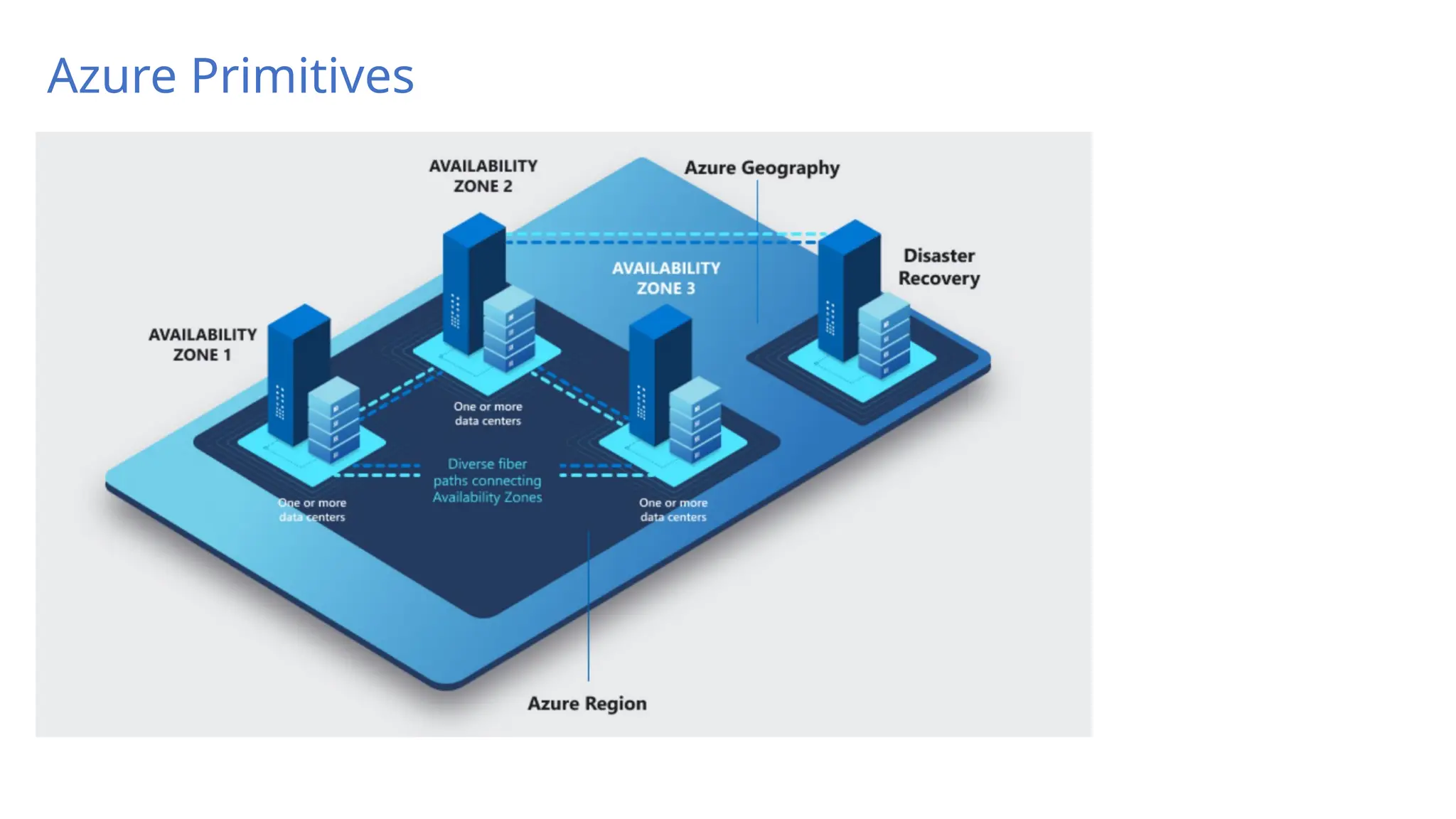
• Geography (AKA geopolitical region)
o Collection of one or more regions that are grouped for the purposes of specific data residency and compliance requirements
• Region
o Collection of datacenters within a latency-defined perimeter
• Paired Regions
o Set of Azure regions that provide out-of-the-box cross-region replication or recovery capabilities for services like Azure Storage, Azure Key
Vault, and others
o No SLA provided for cross-region replication
• Availability Zone
o Physically separate locations that are fault tolerant to local failures
o Round-trip latency of less than 2ms
o Composed of one or more datacenters equipped with independent power, cooling, and networking
o Not available in all regions
Azure Primitives
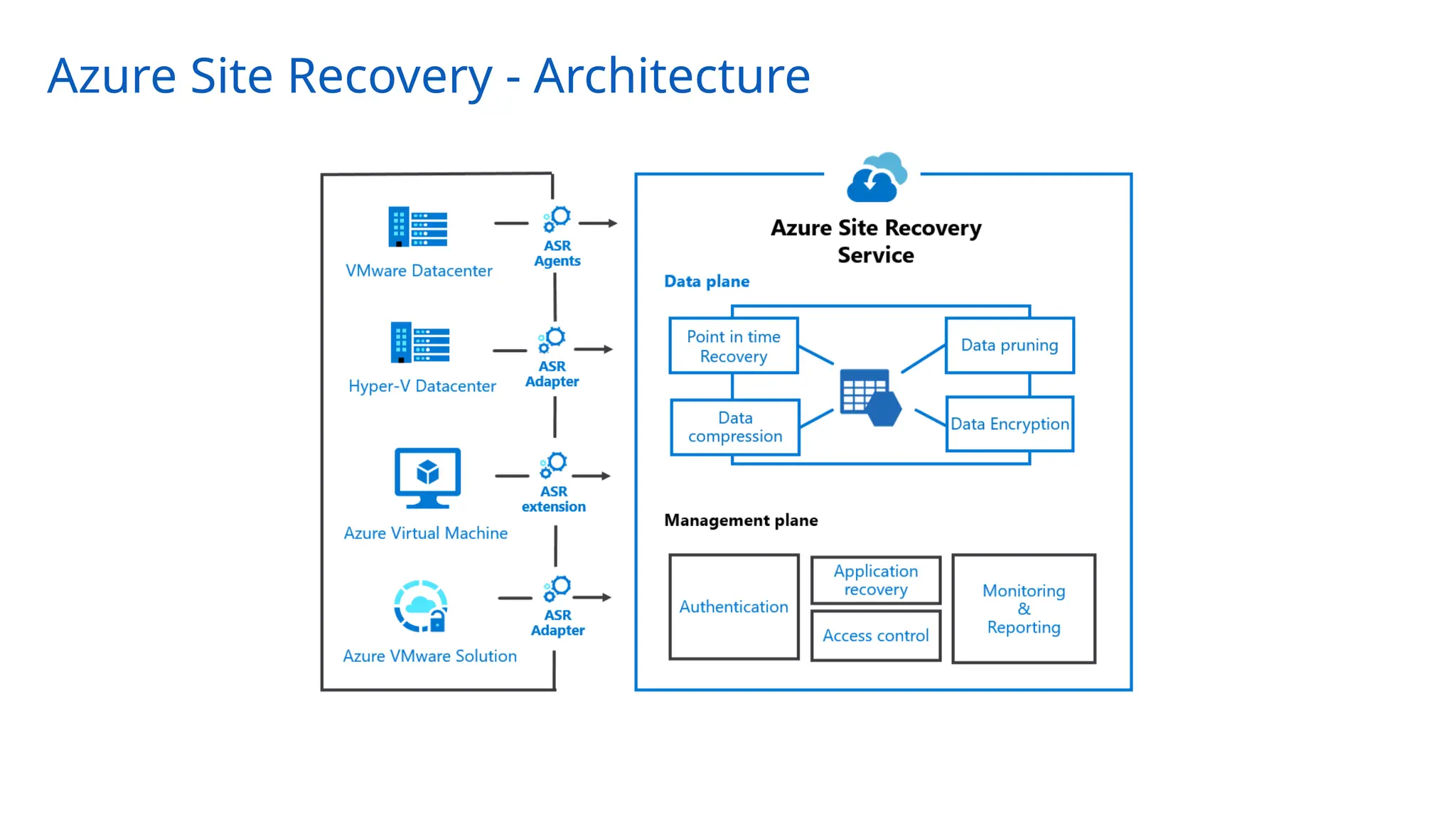
Azure Site Recovery - Architecture
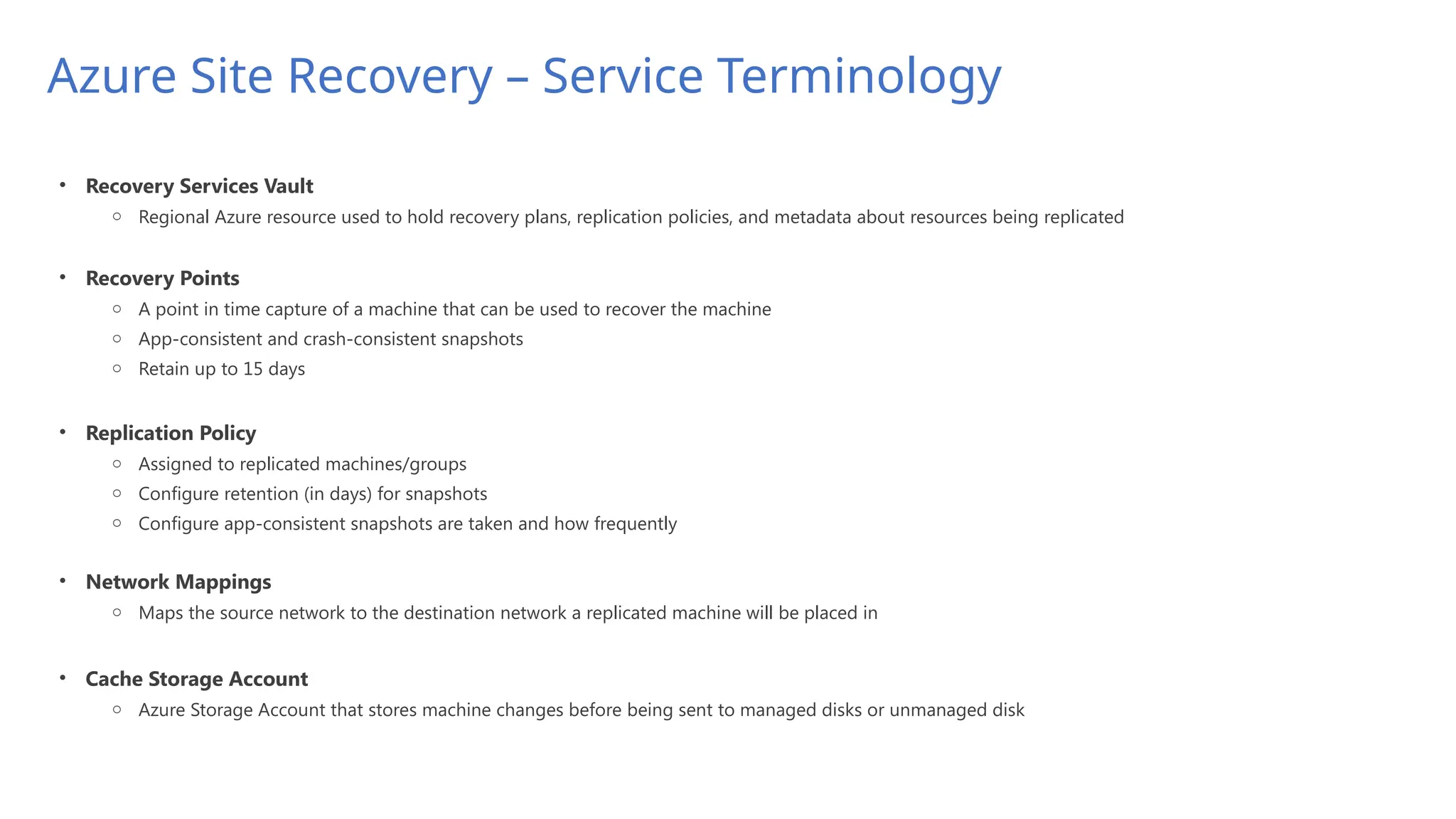
Azure Site Recovery – Service Terminology
• Recovery Services Vault
o Regional Azure resource used to hold recovery plans, replication policies, and metadata about resources being replicated
• Recovery Points
o A point in time capture of a machine that can be used to recover the machine
o App-consistent and crash-consistent snapshots
o Retain up to 15 days
• Replication Policy
o Assigned to replicated machines/groups
o Configure retention (in days) for snapshots
o Configure app-consistent snapshots are taken and how frequently
• Network Mappings
o Maps the source network to the destination network a replicated machine will be placed in
Azure Site Recovery – Service Terminology
• Recovery Services Vault
o Regional Azure resource used to hold recovery plans, replication policies, and metadata about resources being replicated
• Recovery Points
o A point in time capture of a machine that can be used to recover the machine
o App-consistent and crash-consistent snapshots
o Retain up to 15 days
• Replication Policy
o Assigned to replicated machines/groups
o Configure retention (in days) for snapshots
o Configure app-consistent snapshots are taken and how frequently
• Network Mappings
o Maps the source network to the destination network a replicated machine will be placed in
• Cache Storage Account
o Azure Storage Account that stores machine changes before being sent to managed disks or unmanaged disk
Azure Site Recovery – Service Terminology
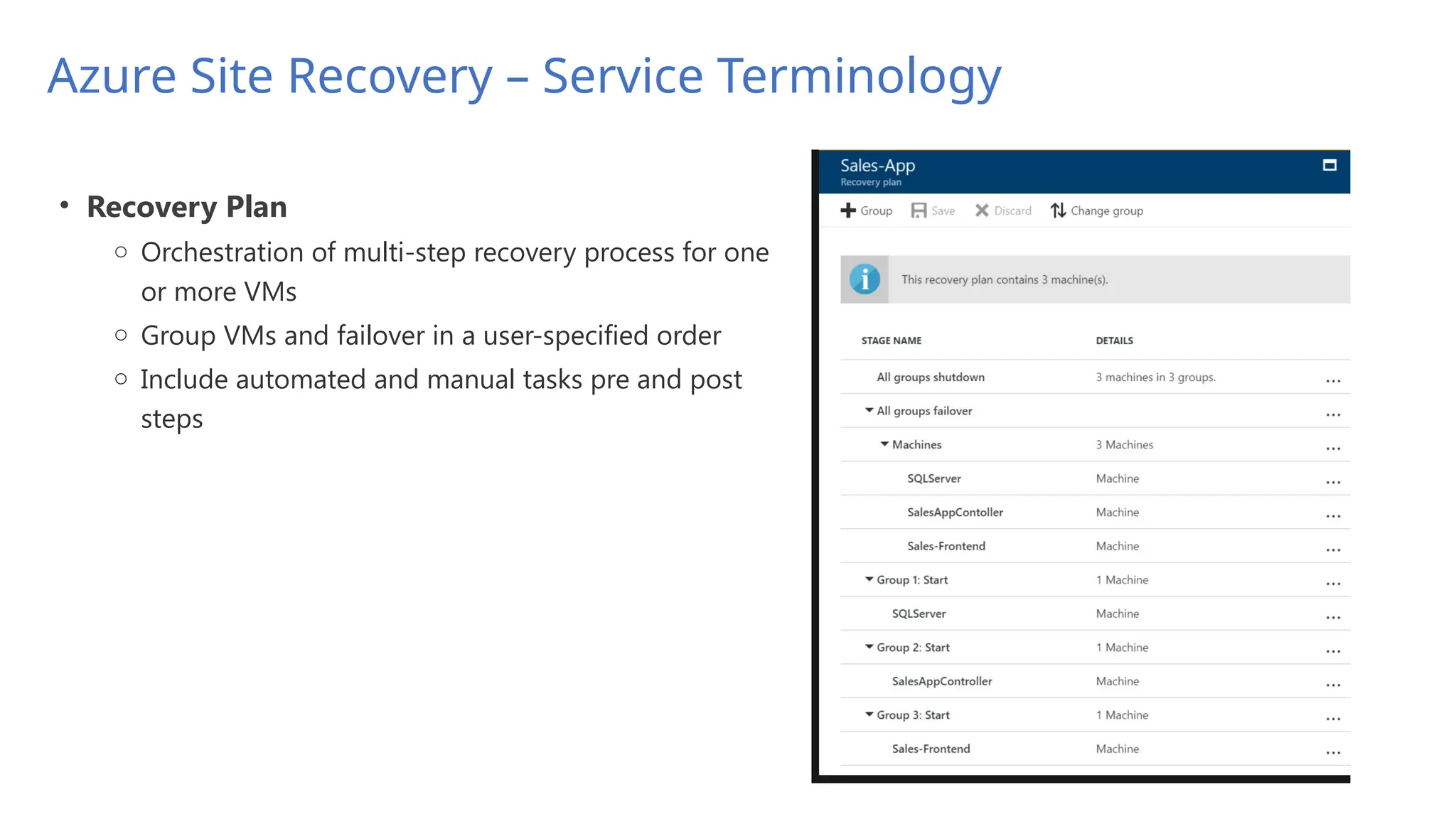
• Recovery Plan
o Orchestration of multi-step recovery process for one
or more VMs
o Group VMs and failover in a user-specified order
o Include automated and manual tasks pre and post
steps
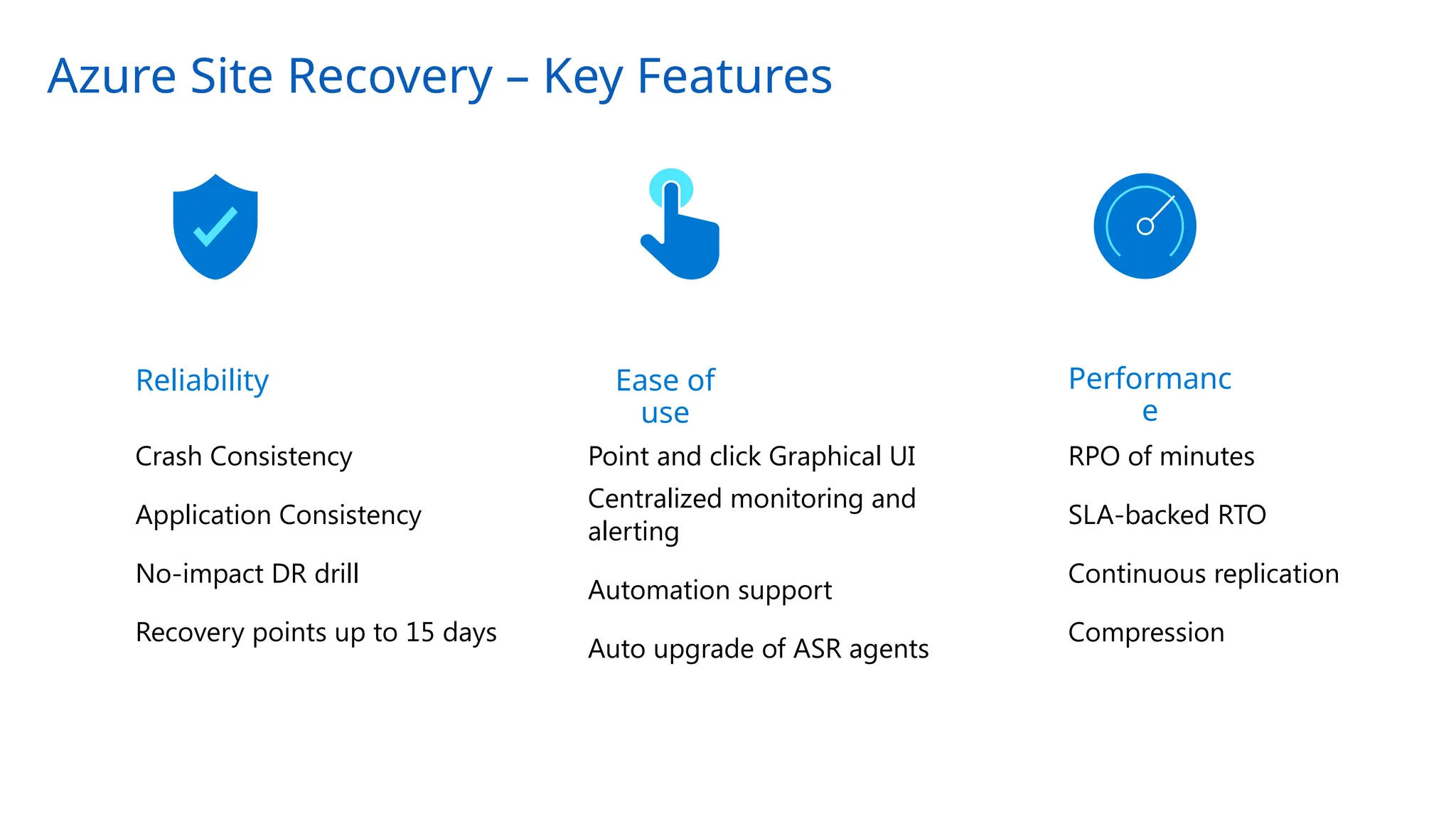
Azure Site Recovery – Key Features
Reliability Ease of
use
Performanc
e
Crash Consistency
Application Consistency
No-impact DR drill
Recovery points up to 15 days
Point and click Graphical UI
Centralized monitoring and
alerting
Automation support
Auto upgrade of ASR agents
RPO of minutes
SLA-backed RTO
Continuous replication
Compression
Azure Site Recovery – Consistency Options
• Application Consistent
• Captures memory content and pending writes are captures as part of the backup (think databases)
• Application is informed a backup is occurring so changes in memory are written to disk
• Windows – Volume Shadow Copy Service (VSS) and Linux – Customer scripted
• Optional and can be taken every 1 hour (with 1 day retention) and every 2 hours with <1 day retention
and retained one per hour or two hours for up to 15 days
• Crash-Consistent
• Snapshot taken of all files at the same time (think of a system being suddenly powered off)
• Application data still in memory is not captured
• Taken every 5 minutes and retained for up to 15 days*
• Multi-VM Consistency
• Site Recovery orchestrates a group of machines to ensure crash-consistent and app-consistent recovery
points are created at the same time
• Machines require a communication channel between each other
• CPU intensive and can affect performance of machine so only enable where necessary
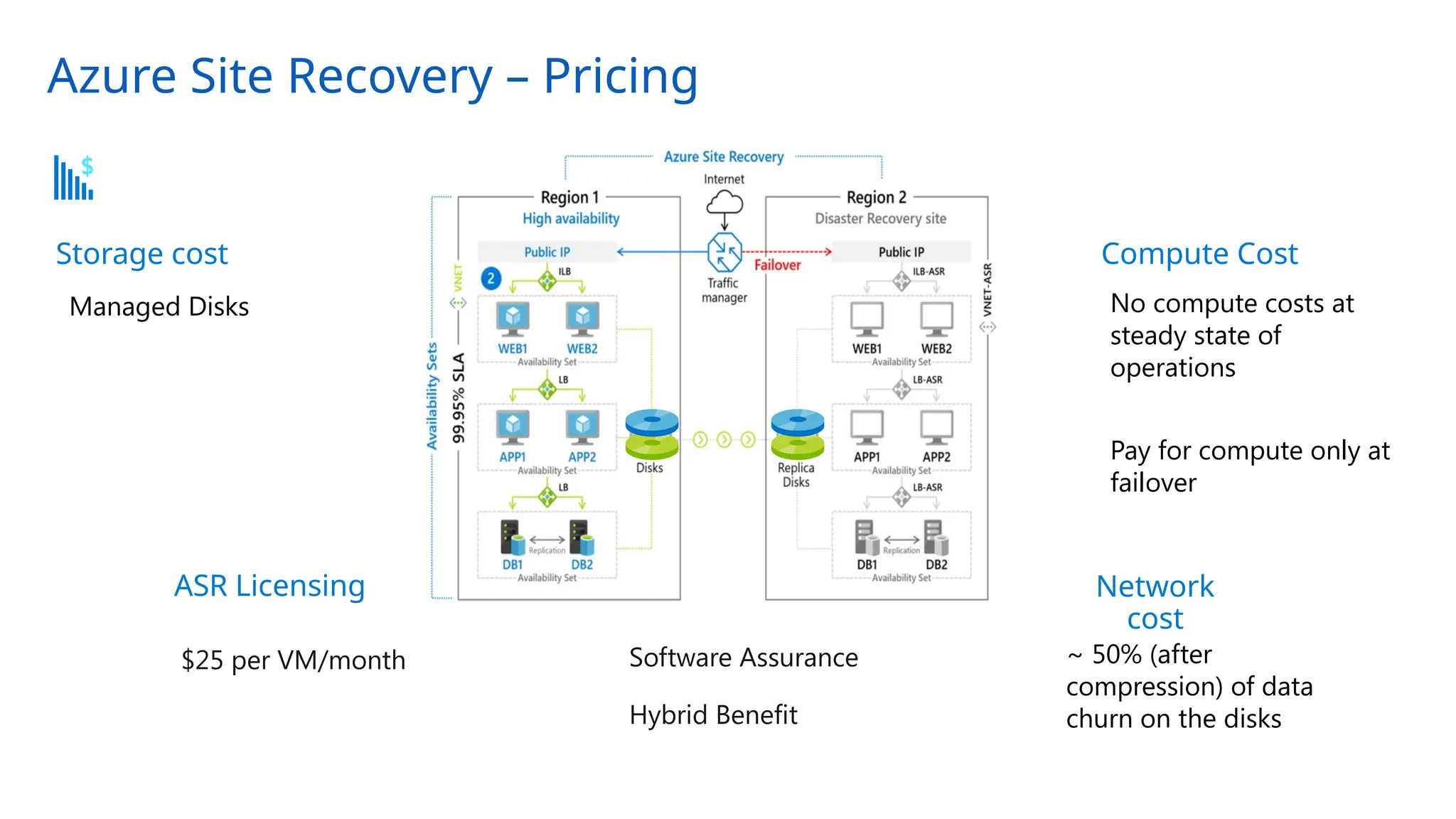
Azure Site Recovery – Pricing
~ 50% (after
compression) of data
churn on the disks
Managed Disks No compute costs at
steady state of
operations
Pay for compute only at
failover
Network
cost
Compute Cost
Pricing benefits
Software Assurance
Hybrid Benefit
$25 per VM/month
ASR Licensing
Storage cost
Azure Site Recovery - Security
• Encryption-in-transit and encryption-at-rest
• Communication channels support TLS
• Support for VMs encrypted with Managed Disk encrypted with SSE-CMK (server-side encryption with
customer managed key) and machines encrypted with ADE (Azure Disk Encryption)
• Vaults are encrypted with PMK and can optionally be encrypted with CMK
• Network Security
• Support for Private Endpoints
• Support for ExpressRoute connectivity using Private Peering and Private Endpoints
• IAM
• Secured via AAD (Azure Active Directory) authentication and Azure RBAC roles
• Support for user-assigned and system-assigned managed identity of the vault
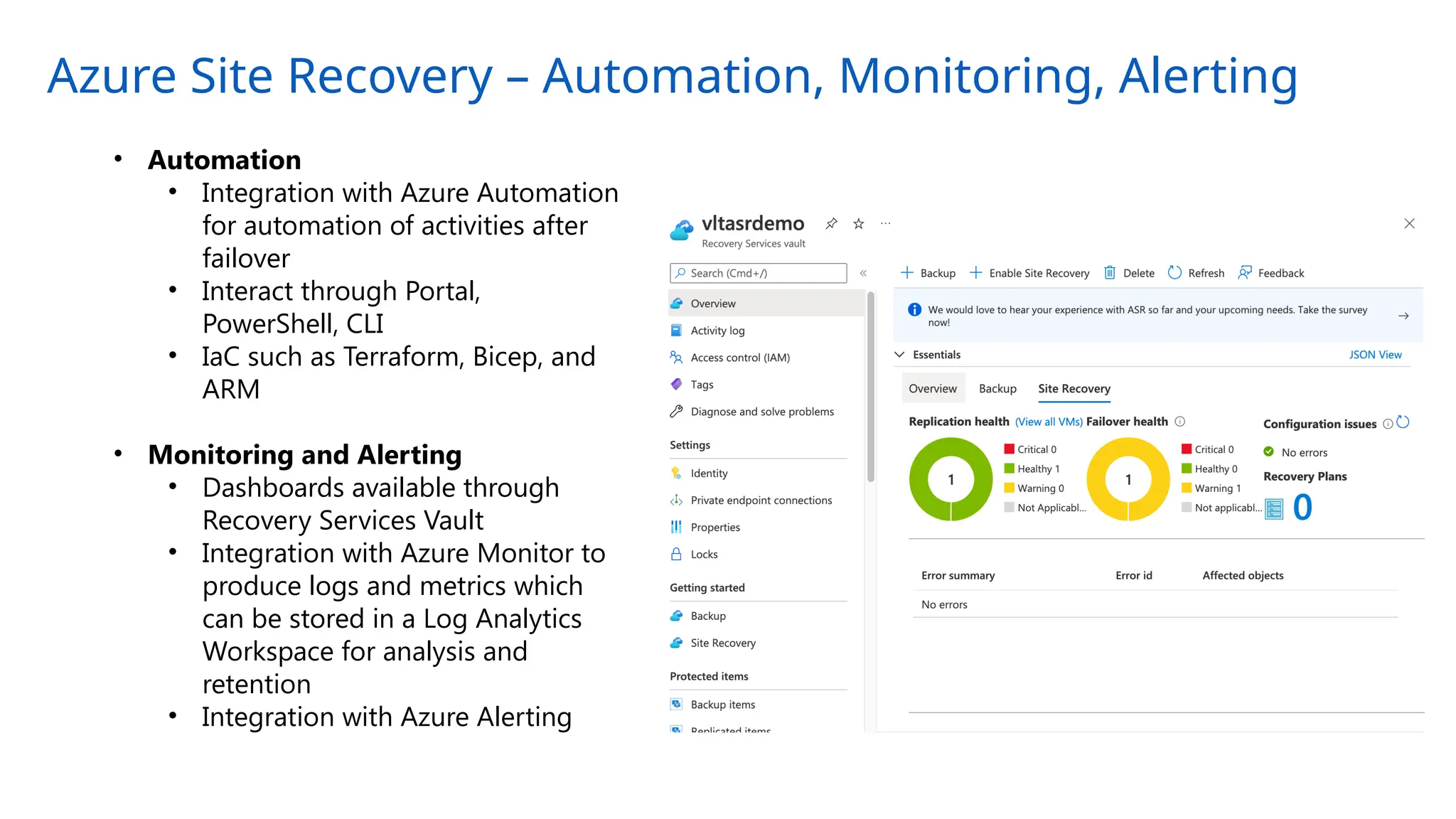
Azure Site Recovery – Automation, Monitoring, Alerting
• Automation
• Integration with Azure Automation
for automation of activities after
failover
• Interact through Portal,
PowerShell, CLI
• IaC such as Terraform, Bicep, and
ARM
• Monitoring and Alerting
• Dashboards available through
Recovery Services Vault
• Integration with Azure Monitor to
produce logs and metrics which
can be stored in a Log Analytics
Workspace for analysis and
retention
• Integration with Azure Alerting
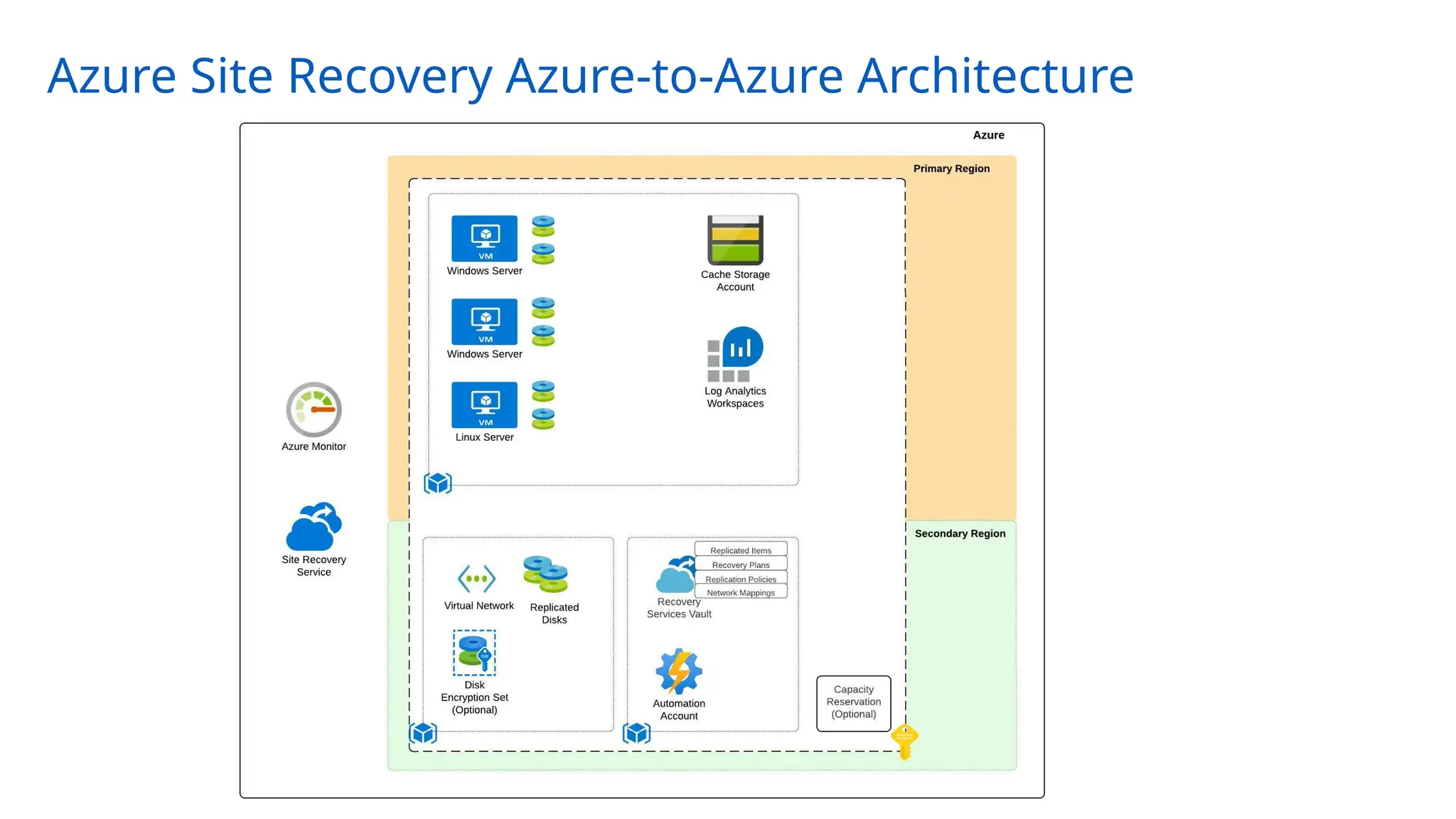
Azure Site Recovery Azure-to-Azure Architecture
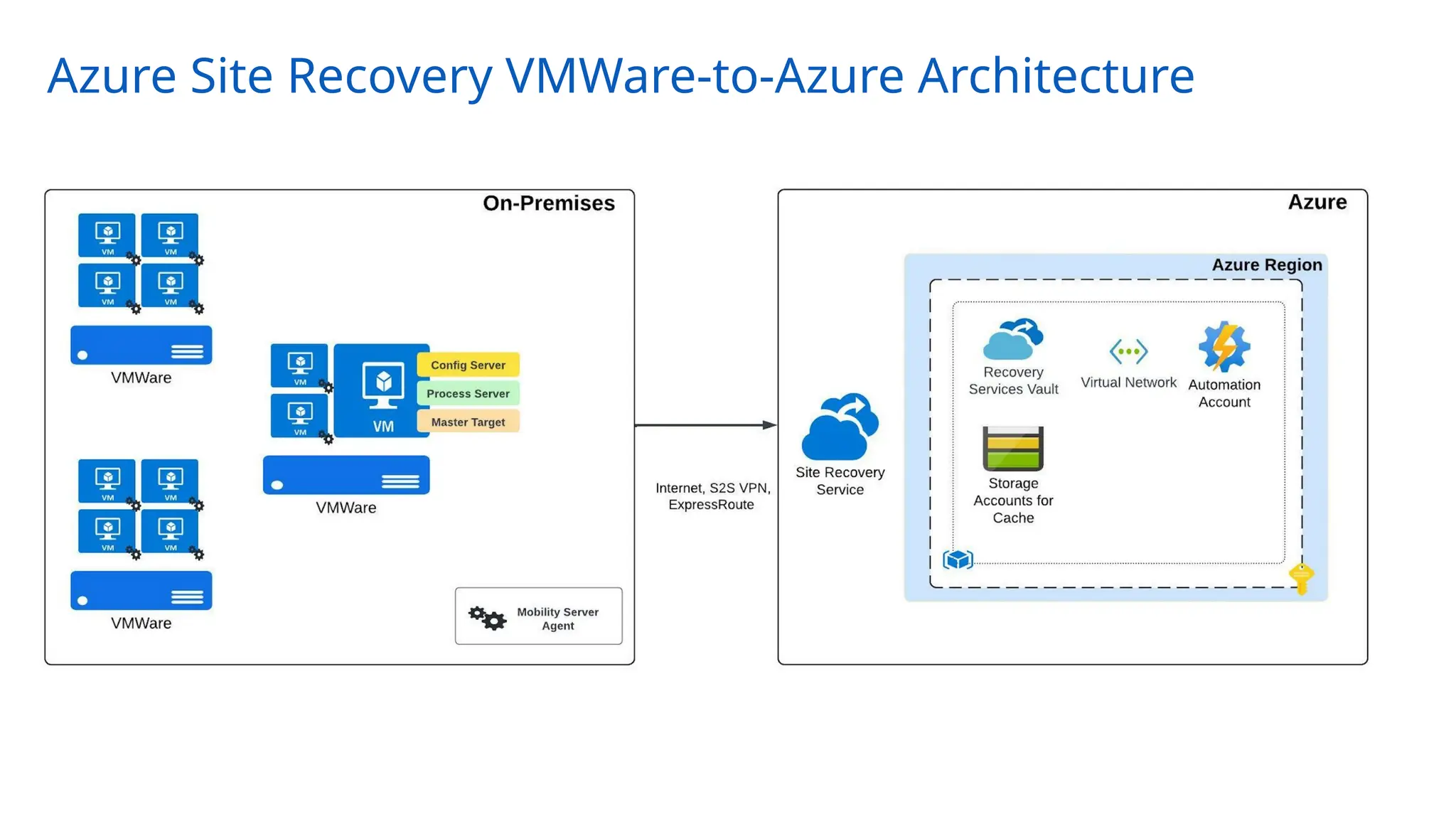
Azure Site Recovery VMWare-to-Azure Architecture
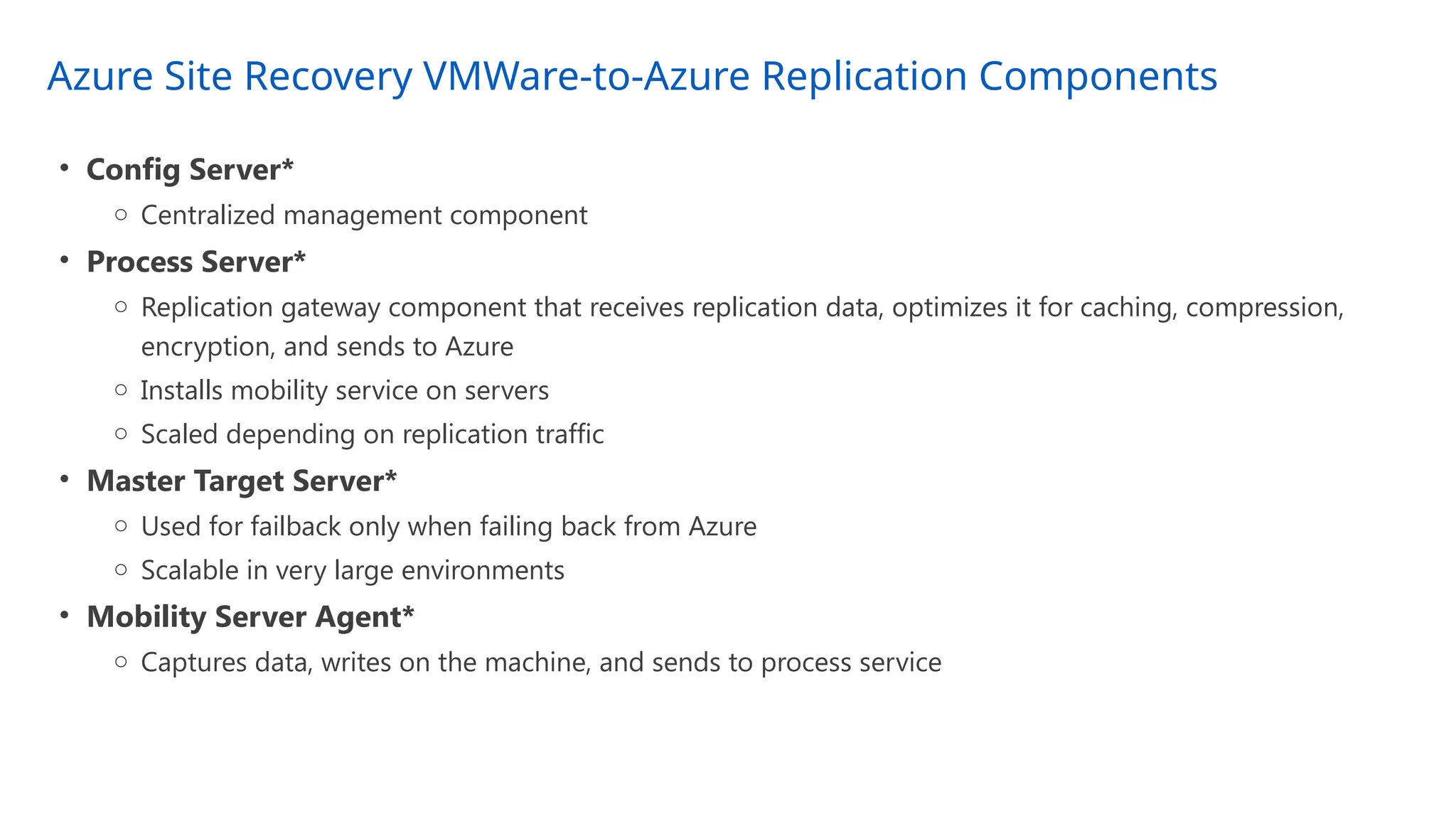
Azure Site Recovery VMWare-to-Azure Replication Components
• Config Server*
o Centralized management component
• Process Server*
o Replication gateway component that receives replication data, optimizes it for caching, compression,
encryption, and sends to Azure
o Installs mobility service on servers
o Scaled depending on replication traffic
• Master Target Server*
o Used for failback only when failing back from Azure
o Scalable in very large environments
• Mobility Server Agent*
o Captures data, writes on the machine, and sends to process service
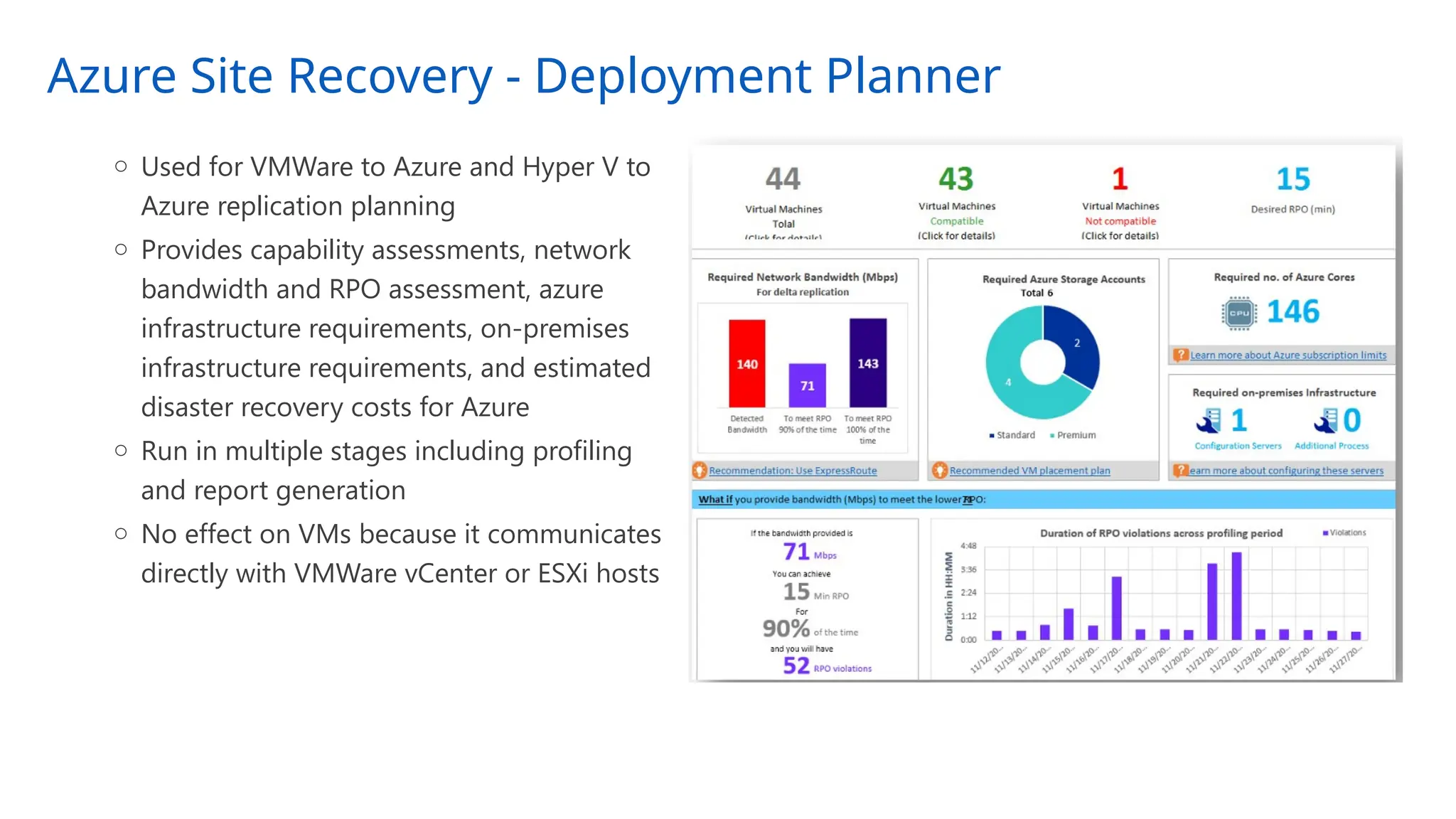
Azure Site Recovery - Deployment Planner
o Used for VMWare to Azure and Hyper V to
Azure replication planning
o Provides capability assessments, network
bandwidth and RPO assessment, azure
infrastructure requirements, on-premises
infrastructure requirements, and estimated
disaster recovery costs for Azure
o Run in multiple stages including profiling
and report generation
o No effect on VMs because it communicates
directly with VMWare vCenter or ESXi hosts
Azure Site Recovery – Design Considerations and Recommendations
20
• Know whether you require an application-consistent backup or crash-consistent recovery points
• Evaluate the solution to ensure it aligns with your RPO/RTO
• Recovery Services Vault must be created in the destination region you wish to replicate the
machines to (unless doing zonal replication)
• This is a DR solution, not a high availability solution, if you need high availability use a
hot-hot/active-active configuration
• When using private endpoints be aware that some traffic (such as Azure AD) will continue to
flow over the Internet egress path
• Pre-create core infrastructure components such as virtual network, disk encryption sets, Key
Vault, and load balancers
• Azure Site Recovery makes best effort to ensure capacity is available so use capacity
reservations if best effort isn’t enough
Azure Site Recovery – Design Considerations and Recommendations
21
• Use the Test Failover feature to validate your failover will work when you need it
• Use Recovery Service plans for all deployments even if it’s a single VM
• Ensure your subscriptions have the relevant resources available in the destination region
• For VMWare to Azure deployments, use the deployment planner to understand storage and
network requirements
• Using Azure Automation for management-plane (interact with Azure) activities and be aware
using it for data-plane (interact with VM OS) activities can be challenging
Appendix – Useful Links
22
• Azure Recovery Services Best Practices and Guidance -
https://docs.microsoft.com/en-us/azure/cloud-adoption-framework/manage/azure-manageme
nt-guide/protect-recover?tabs=AzureBackup%2Csiterecovery
• Azure CAF BCDR -
https://docs.microsoft.com/en-us/azure/cloud-adoption-framework/ready/landing-zone/design
-area/management-business-continuity-disaster-recovery
• VMWare-to-Azure Prerequisites -
https://docs.microsoft.com/en-us/azure/site-recovery/vmware-azure-tutorial-prepare-on-premi
ses

Microsoft Azure Site Recovery Overview and use cases

  • 1.
    Azure Site RecoveryOverview PRESENTER NAME (Updated 8/2022)
  • 2.
    Azure Site Recovery •Azure Site Recovery Use Cases • General Terminology • Azure Primitives Review • Azure Site Recovery General Overview • Azure Site Recovery Azure-to-Azure Overview • Azure Site Recovery VMWare-to-Azure Overview • Design Considerations and Recommendations
  • 3.
    Azure Site RecoveryUse Cases • Replicate Azure VMs from one region to another • Replicate Azure VMs between availability zones • Migrate Azure VMs not within an availability zone to an availability zone • Migrate Azure VMs from one subscription to another • Replicate on-premises VMWare VMs to Azure • Replicate on-premises Hyper-V VMs to Azure • Replicate on-premises physical services to Azure • Replicate on-premises VMWare VMs, Hyper-V VMs, and physical servers between customer data centers
  • 4.
    General Terminology • BusinessContinuity o How an organization maintains critical business operations during and after a disaster • Disaster Recovery o Component of business continuity that is focused on restoration of critical IT applications and data after a catastrophe • Backup o Process of making a copy of data in order to protect it against accidental or malicious deletion or corruption • High Availability o Process of eliminating single points of failure to ensure components are continuously available • Recovery Time Objective (RTO) o Maximum length of time it should take to restore normal operations following an outage • Recovery Point Objective (RPO) o Maximum amount of data the organization can tolerate losing
  • 5.
    Azure Primitives • Geography(AKA geopolitical region) o Collection of one or more regions that are grouped for the purposes of specific data residency and compliance requirements • Region o Collection of datacenters within a latency-defined perimeter • Paired Regions o Set of Azure regions that provide out-of-the-box cross-region replication or recovery capabilities for services like Azure Storage, Azure Key Vault, and others o No SLA provided for cross-region replication • Availability Zone o Physically separate locations that are fault tolerant to local failures o Round-trip latency of less than 2ms o Composed of one or more datacenters equipped with independent power, cooling, and networking o Not available in all regions
  • 6.
  • 7.
    Azure Site Recovery- Architecture
  • 8.
    Azure Site Recovery– Service Terminology • Recovery Services Vault o Regional Azure resource used to hold recovery plans, replication policies, and metadata about resources being replicated • Recovery Points o A point in time capture of a machine that can be used to recover the machine o App-consistent and crash-consistent snapshots o Retain up to 15 days • Replication Policy o Assigned to replicated machines/groups o Configure retention (in days) for snapshots o Configure app-consistent snapshots are taken and how frequently • Network Mappings o Maps the source network to the destination network a replicated machine will be placed in
  • 9.
    Azure Site Recovery– Service Terminology • Recovery Services Vault o Regional Azure resource used to hold recovery plans, replication policies, and metadata about resources being replicated • Recovery Points o A point in time capture of a machine that can be used to recover the machine o App-consistent and crash-consistent snapshots o Retain up to 15 days • Replication Policy o Assigned to replicated machines/groups o Configure retention (in days) for snapshots o Configure app-consistent snapshots are taken and how frequently • Network Mappings o Maps the source network to the destination network a replicated machine will be placed in • Cache Storage Account o Azure Storage Account that stores machine changes before being sent to managed disks or unmanaged disk
  • 10.
    Azure Site Recovery– Service Terminology • Recovery Plan o Orchestration of multi-step recovery process for one or more VMs o Group VMs and failover in a user-specified order o Include automated and manual tasks pre and post steps
  • 11.
    Azure Site Recovery– Key Features Reliability Ease of use Performanc e Crash Consistency Application Consistency No-impact DR drill Recovery points up to 15 days Point and click Graphical UI Centralized monitoring and alerting Automation support Auto upgrade of ASR agents RPO of minutes SLA-backed RTO Continuous replication Compression
  • 12.
    Azure Site Recovery– Consistency Options • Application Consistent • Captures memory content and pending writes are captures as part of the backup (think databases) • Application is informed a backup is occurring so changes in memory are written to disk • Windows – Volume Shadow Copy Service (VSS) and Linux – Customer scripted • Optional and can be taken every 1 hour (with 1 day retention) and every 2 hours with <1 day retention and retained one per hour or two hours for up to 15 days • Crash-Consistent • Snapshot taken of all files at the same time (think of a system being suddenly powered off) • Application data still in memory is not captured • Taken every 5 minutes and retained for up to 15 days* • Multi-VM Consistency • Site Recovery orchestrates a group of machines to ensure crash-consistent and app-consistent recovery points are created at the same time • Machines require a communication channel between each other • CPU intensive and can affect performance of machine so only enable where necessary
  • 13.
    Azure Site Recovery– Pricing ~ 50% (after compression) of data churn on the disks Managed Disks No compute costs at steady state of operations Pay for compute only at failover Network cost Compute Cost Pricing benefits Software Assurance Hybrid Benefit $25 per VM/month ASR Licensing Storage cost
  • 14.
    Azure Site Recovery- Security • Encryption-in-transit and encryption-at-rest • Communication channels support TLS • Support for VMs encrypted with Managed Disk encrypted with SSE-CMK (server-side encryption with customer managed key) and machines encrypted with ADE (Azure Disk Encryption) • Vaults are encrypted with PMK and can optionally be encrypted with CMK • Network Security • Support for Private Endpoints • Support for ExpressRoute connectivity using Private Peering and Private Endpoints • IAM • Secured via AAD (Azure Active Directory) authentication and Azure RBAC roles • Support for user-assigned and system-assigned managed identity of the vault
  • 15.
    Azure Site Recovery– Automation, Monitoring, Alerting • Automation • Integration with Azure Automation for automation of activities after failover • Interact through Portal, PowerShell, CLI • IaC such as Terraform, Bicep, and ARM • Monitoring and Alerting • Dashboards available through Recovery Services Vault • Integration with Azure Monitor to produce logs and metrics which can be stored in a Log Analytics Workspace for analysis and retention • Integration with Azure Alerting
  • 16.
    Azure Site RecoveryAzure-to-Azure Architecture
  • 17.
    Azure Site RecoveryVMWare-to-Azure Architecture
  • 18.
    Azure Site RecoveryVMWare-to-Azure Replication Components • Config Server* o Centralized management component • Process Server* o Replication gateway component that receives replication data, optimizes it for caching, compression, encryption, and sends to Azure o Installs mobility service on servers o Scaled depending on replication traffic • Master Target Server* o Used for failback only when failing back from Azure o Scalable in very large environments • Mobility Server Agent* o Captures data, writes on the machine, and sends to process service
  • 19.
    Azure Site Recovery- Deployment Planner o Used for VMWare to Azure and Hyper V to Azure replication planning o Provides capability assessments, network bandwidth and RPO assessment, azure infrastructure requirements, on-premises infrastructure requirements, and estimated disaster recovery costs for Azure o Run in multiple stages including profiling and report generation o No effect on VMs because it communicates directly with VMWare vCenter or ESXi hosts
  • 20.
    Azure Site Recovery– Design Considerations and Recommendations 20 • Know whether you require an application-consistent backup or crash-consistent recovery points • Evaluate the solution to ensure it aligns with your RPO/RTO • Recovery Services Vault must be created in the destination region you wish to replicate the machines to (unless doing zonal replication) • This is a DR solution, not a high availability solution, if you need high availability use a hot-hot/active-active configuration • When using private endpoints be aware that some traffic (such as Azure AD) will continue to flow over the Internet egress path • Pre-create core infrastructure components such as virtual network, disk encryption sets, Key Vault, and load balancers • Azure Site Recovery makes best effort to ensure capacity is available so use capacity reservations if best effort isn’t enough
  • 21.
    Azure Site Recovery– Design Considerations and Recommendations 21 • Use the Test Failover feature to validate your failover will work when you need it • Use Recovery Service plans for all deployments even if it’s a single VM • Ensure your subscriptions have the relevant resources available in the destination region • For VMWare to Azure deployments, use the deployment planner to understand storage and network requirements • Using Azure Automation for management-plane (interact with Azure) activities and be aware using it for data-plane (interact with VM OS) activities can be challenging
  • 22.
    Appendix – UsefulLinks 22 • Azure Recovery Services Best Practices and Guidance - https://docs.microsoft.com/en-us/azure/cloud-adoption-framework/manage/azure-manageme nt-guide/protect-recover?tabs=AzureBackup%2Csiterecovery • Azure CAF BCDR - https://docs.microsoft.com/en-us/azure/cloud-adoption-framework/ready/landing-zone/design -area/management-business-continuity-disaster-recovery • VMWare-to-Azure Prerequisites - https://docs.microsoft.com/en-us/azure/site-recovery/vmware-azure-tutorial-prepare-on-premi ses

Editor's Notes

  • #10 Automated tasks are performed using Azure Automation Up to 100 instances per recovery plan
  • #11 No-impact DR drill with test failover functionality SLA backed RTO - https://azure.microsoft.com/en-us/support/legal/sla/site-recovery/v1_2/
  • #12 If app-consistent snapshots are taken as well, then crash consistent snapshots are completely pruned after >2 hours and only application consistent is maintained Frequency of crash-consistent snapshots cannot be changed
  • #14 Vault is configured with Private Endpoint and cache storage account is configured with Private Endpoint Note there are some flows for connectivity over ExpressRoute (such as Azure AD) which will egress the machine’s standard Internet path
  • #15 Azure Automation works great for management-plane operations but not so much data-plane operations
  • #16 Log Analytics Workspace used to store signals generated from Site Recovery’s integration with Azure Monitor Pre-configure Disk Encryption Set, Virtual Network, Azure Automation account
  • #18 Recovery Replication components support stand-alone deployment, OVA (recommended), or appliance (As of 8/22/2022 the Azure Site Recovery Replication appliance is in public preview (https://docs.microsoft.com/en-us/azure/site-recovery/vmware-azure-set-up-replication-tutorial-preview) VMWare vCenter or ESXi permissions are required for replication components (https://docs.microsoft.com/en-us/azure/site-recovery/vmware-azure-tutorial-prepare-on-premises#vmware-account-permissions) Mobility Server Agent supports manual, automated (configuration manage), and push installation
  • #19 Compatibility assessment VM eligibility (disks, IOPS, churn, OS version) Network bandwidth and RPO assessment Bandwidth required for replication, number of VMs to batch, RPO that can be achieved given bandwidth, impact on desired RPO if lower bandwidth is provisioned Azure infra requirements Storage type (std/prm), number of azure cores for test failover, recommended VM size) On-premises infra requirements Required number of config servers and process servers Estimated disaster recovery cost for Azure Estimated disaster recovery (broken down by VM)