



Soyez le maître du PRA
avec Azure Site Recovery
Marius Zaharia @lecampusazure
Aymeric Weinbach @aymericw
(Peter de Tender @pdtit)
Vos speakers
Marius ZAHARIA
Senior Cloud Architect chez Cellenza
MVP Azure
@lecampusazure
Aymeric Weinbach
ZeCloud
MVP Azure
@aymericw
• Disaster Recovery solutions available today on Microsoft
technologies
• Azure Site Recovery for complex workloads infrastructure
• Hyper-V to Azure
• VMWare / Physical / AWS / Azure to Azure
• Failover & Failback Strategy
• Recovery Plans
Architect to
Architect
- Monthly scheduled reboots “aka maintenance plan”
- Backup or long term data solution
(but having a backup already helps… )
- “I can blame it on the IT guy anyway”
Disaster Recovery does not mean…
• Backup is all about Data Availability
• Disaster Recovery is all about Application Availability
Architect to
Architect
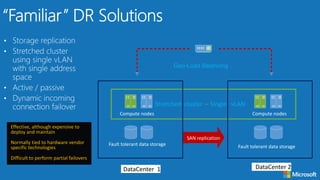
Effective, although expensive to
deploy and maintain
Normally tied to hardware vendor
specific technologies
Difficult to perform partial failovers
Stretched cluster – Single vLAN
DataCenter 1
Fault tolerant data storage
Compute nodes
SAN replication
DataCenter 2
Compute nodes
Geo-Load Balancing
Fault tolerant data storage
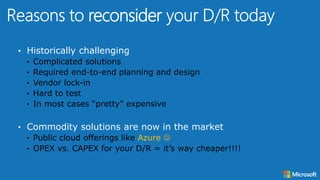
• Historically challenging
• Complicated solutions
• Required end-to-end planning and design
• Vendor lock-in
• Hard to test
• In most cases “pretty” expensive
• Commodity solutions are now in the market
• Public cloud offerings like Azure 
• OPEX vs. CAPEX for your D/R = it’s way cheaper!!!!
reconsider
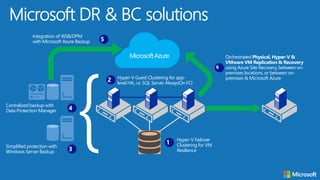
Microsoft DR & BC solutions
Hyper-V Failover
Clustering for VM
Resilience
1
Hyper-V Guest Clustering for app-
level HA, i.e. SQL Server AlwaysOn FCI
2
Centralized backup with
Data Protection Manager 4
Simplified protection with
Windows Server Backup 3
Integration of WSB/DPM
with Microsoft Azure Backup 5
Orchestrated Physical, Hyper-V &
VMware VM Replication & Recovery
using Azure Site Recovery, between on-
premises locations, or between on-
premises & Microsoft Azure
6
MicrosoftAzure
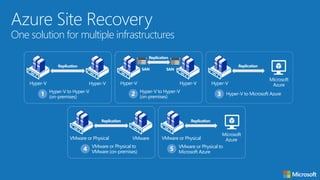
Azure Site Recovery
One solution for multiple infrastructures
Hyper-V to Hyper-V
(on-premises)1
Hyper-V Hyper-V
Replication
Hyper-V to Microsoft Azure3
Hyper-V
Microsoft
Azure
Replication
VMware or Physical to
VMware (on-premises)4
VMware or Physical VMware
Replication
VMware or Physical to
Microsoft Azure
5
VMware or Physical
Microsoft
Azure
Replication
Hyper-V to Hyper-V
(on-premises)2
Hyper-V Hyper-V
Replication
SAN SAN
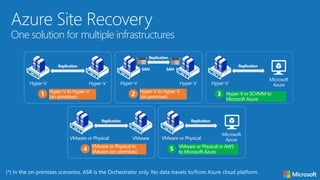
Azure Site Recovery
One solution for multiple infrastructures
Hyper-V to Hyper-V
(on-premises)1
Hyper-V Hyper-V
Replication
Hyper-V or SCVMM to
Microsoft Azure
3
Hyper-V
Microsoft
Azure
Replication
VMware or Physical to
VMware (on-premises)4
VMware or Physical VMware
Replication
VMware or Physical or AWS
to Microsoft Azure
5
VMware or Physical
Microsoft
Azure
Replication
Hyper-V to Hyper-V
(on-premises)2
Hyper-V Hyper-V
Replication
SAN SAN
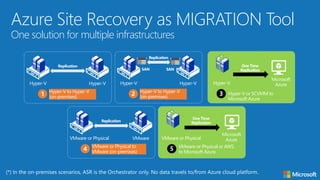
Azure Site Recovery as MIGRATION Tool
One solution for multiple infrastructures
Hyper-V to Hyper-V
(on-premises)1
Hyper-V Hyper-V
Replication
Hyper-V or SCVMM to
Microsoft Azure
3
Hyper-V
Microsoft
Azure
One Time
Replication
VMware or Physical to
VMware (on-premises)4
VMware or Physical VMware
Replication
VMware or Physical or AWS
to Microsoft Azure
5
VMware or Physical
Microsoft
Azure
One Time
Replication
Hyper-V to Hyper-V
(on-premises)2
Hyper-V Hyper-V
Replication
SAN SAN










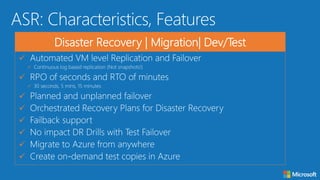
Disaster Recovery | Migration| Dev/Test
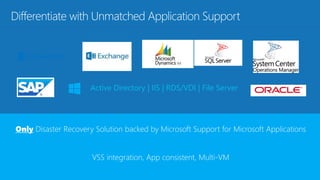
Active Directory | IIS | RDS/VDI | File Server
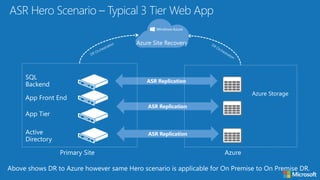
ASR Replication
Azure Site Recovery
ASR Replication
ASR Replication
ASR Replication
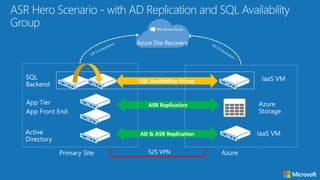
Azure Site Recovery
SQL Availability Group
AD & ASR Replication
Architect to
Architect
Azure Datacenter IP Ranges
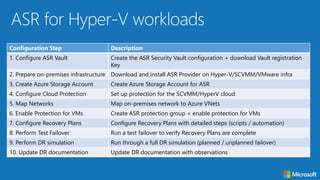
Configuration Step Description
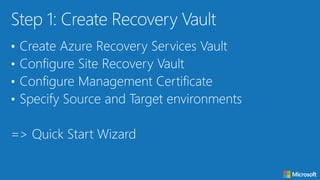
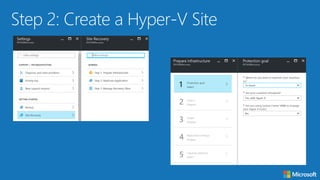
1. Configure ASR Vault Create the ASR Security Vault configuration + download Vault registration
Key
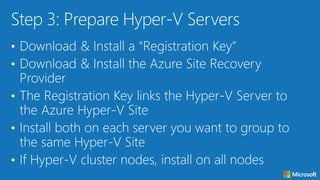
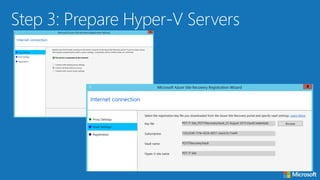
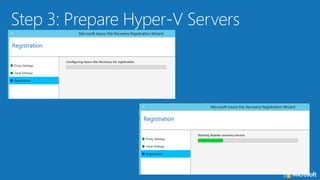
2. Prepare on-premises infrastructure Download and install ASR Provider on Hyper-V/SCVMM/VMware infra
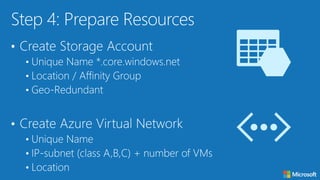
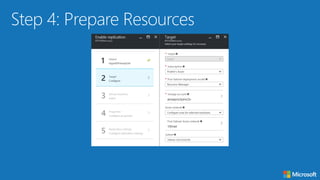
3. Create Azure Storage Account Create Azure Storage Account for ASR
4. Configure Cloud Protection Set up protection for the SCVMM/HyperV cloud
5. Map Networks Map on-premises network to Azure VNets
6. Enable Protection for VMs Create ASR protection group + enable protection for VMs
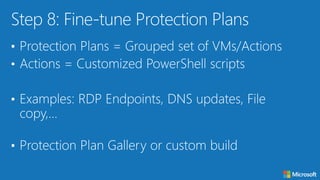
7. Configure Recovery Plans Configure Recovery Plans with detailed steps (scripts / automation)
8. Perform Test Failover Run a test failover to verify Recovery Plans are complete
9. Perform DR simulation Run through a full DR simulation (planned / unplanned failover)
10. Update DR documentation Update DR documentation with observations
Architect to
Architect
Architect to
Architect
Architect to
Architect
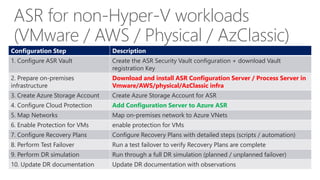
ASR for non-Hyper-V workloads
(VMware / AWS / Physical / AzClassic)
Configuration Step Description
1. Configure ASR Vault Create the ASR Security Vault configuration + download Vault
registration Key
2. Prepare on-premises
infrastructure
Download and install ASR Configuration Server / Process Server in
Vmware/AWS/physical/AzClassic infra
3. Create Azure Storage Account Create Azure Storage Account for ASR
4. Configure Cloud Protection Add Configuration Server to Azure ASR
5. Map Networks Map on-premises network to Azure VNets
6. Enable Protection for VMs enable protection for VMs
7. Configure Recovery Plans Configure Recovery Plans with detailed steps (scripts / automation)
8. Perform Test Failover Run a test failover to verify Recovery Plans are complete
9. Perform DR simulation Run through a full DR simulation (planned / unplanned failover)
10. Update DR documentation Update DR documentation with observations
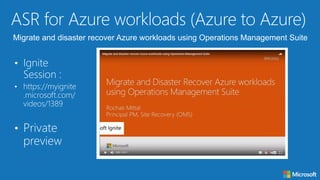
Migrate and disaster recover Azure workloads using Operations Management Suite
Architect to
Architect
Architect to
Architect
Architect to
Architect
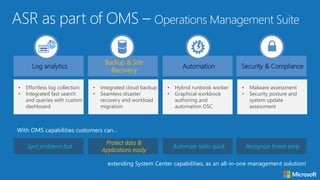
Log analytics Automation
Backup & Site
Recovery
Security & Compliance
• Effortless log collection
• Integrated fast search
and queries with custom
dashboard
• Integrated cloud backup
• Seamless disaster
recovery and workload
migration
• Hybrid runbook worker
• Graphical workbook
authoring and
automation DSC
• Malware assessment
• Security posture and
system update
assessment
Spot problems fast Automate tasks quick
Protect data &
Applications easily
Recognize threat early
With OMS capabilities customers can…
extending System Center capabilities, as an all-in-one management solution!
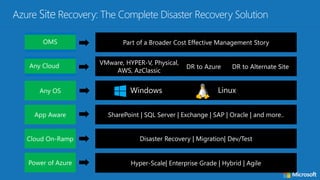
+Windows LinuxAny OS
App Aware SharePoint | SQL Server | Exchange | SAP | Oracle | and more..
Cloud On-Ramp Disaster Recovery | Migration| Dev/Test
Power of Azure Hyper-Scale| Enterprise Grade | Hybrid | Agile
VMware, HYPER-V, Physical,
AWS, AzClassic
Any Cloud DR to Azure DR to Alternate Site
Part of a Broader Cost Effective Management StoryOMS
QUESTIONS ?
Merci beaucoup à nos sponsors!
Thank you to all our sponsors!
Join the conversation
#MSCloudSummit
@MSCloudSummit
http://bit.ly/MSCSevalJ1
Evaluez les sessions…
…et tentez de gagner une
Surface Pro 4
Merci Beaucoup! Thank you!
Join the conversation
#MSCloudSummit
@MSCloudSummit

Soyez le maître du PRA - MS Cloud Summit Paris 2017

  • 1.
    Soyez le maîtredu PRA avec Azure Site Recovery Marius Zaharia @lecampusazure Aymeric Weinbach @aymericw (Peter de Tender @pdtit)
  • 2.
    Vos speakers Marius ZAHARIA SeniorCloud Architect chez Cellenza MVP Azure @lecampusazure Aymeric Weinbach ZeCloud MVP Azure @aymericw
  • 3.
    • Disaster Recoverysolutions available today on Microsoft technologies • Azure Site Recovery for complex workloads infrastructure • Hyper-V to Azure • VMWare / Physical / AWS / Azure to Azure • Failover & Failback Strategy • Recovery Plans
  • 4.
  • 7.
    - Monthly scheduledreboots “aka maintenance plan” - Backup or long term data solution (but having a backup already helps… ) - “I can blame it on the IT guy anyway” Disaster Recovery does not mean…
  • 8.
    • Backup isall about Data Availability • Disaster Recovery is all about Application Availability
  • 9.
  • 10.
    Effective, although expensiveto deploy and maintain Normally tied to hardware vendor specific technologies Difficult to perform partial failovers Stretched cluster – Single vLAN DataCenter 1 Fault tolerant data storage Compute nodes SAN replication DataCenter 2 Compute nodes Geo-Load Balancing Fault tolerant data storage
  • 12.
    • Historically challenging •Complicated solutions • Required end-to-end planning and design • Vendor lock-in • Hard to test • In most cases “pretty” expensive • Commodity solutions are now in the market • Public cloud offerings like Azure  • OPEX vs. CAPEX for your D/R = it’s way cheaper!!!! reconsider
  • 13.
    Microsoft DR &BC solutions Hyper-V Failover Clustering for VM Resilience 1 Hyper-V Guest Clustering for app- level HA, i.e. SQL Server AlwaysOn FCI 2 Centralized backup with Data Protection Manager 4 Simplified protection with Windows Server Backup 3 Integration of WSB/DPM with Microsoft Azure Backup 5 Orchestrated Physical, Hyper-V & VMware VM Replication & Recovery using Azure Site Recovery, between on- premises locations, or between on- premises & Microsoft Azure 6 MicrosoftAzure
  • 14.
    Azure Site Recovery Onesolution for multiple infrastructures Hyper-V to Hyper-V (on-premises)1 Hyper-V Hyper-V Replication Hyper-V to Microsoft Azure3 Hyper-V Microsoft Azure Replication VMware or Physical to VMware (on-premises)4 VMware or Physical VMware Replication VMware or Physical to Microsoft Azure 5 VMware or Physical Microsoft Azure Replication Hyper-V to Hyper-V (on-premises)2 Hyper-V Hyper-V Replication SAN SAN
  • 15.
    Azure Site Recovery Onesolution for multiple infrastructures Hyper-V to Hyper-V (on-premises)1 Hyper-V Hyper-V Replication Hyper-V or SCVMM to Microsoft Azure 3 Hyper-V Microsoft Azure Replication VMware or Physical to VMware (on-premises)4 VMware or Physical VMware Replication VMware or Physical or AWS to Microsoft Azure 5 VMware or Physical Microsoft Azure Replication Hyper-V to Hyper-V (on-premises)2 Hyper-V Hyper-V Replication SAN SAN
  • 16.
    Azure Site Recoveryas MIGRATION Tool One solution for multiple infrastructures Hyper-V to Hyper-V (on-premises)1 Hyper-V Hyper-V Replication Hyper-V or SCVMM to Microsoft Azure 3 Hyper-V Microsoft Azure One Time Replication VMware or Physical to VMware (on-premises)4 VMware or Physical VMware Replication VMware or Physical or AWS to Microsoft Azure 5 VMware or Physical Microsoft Azure One Time Replication Hyper-V to Hyper-V (on-premises)2 Hyper-V Hyper-V Replication SAN SAN
  • 17.
  • 18.
    Active Directory |IIS | RDS/VDI | File Server
  • 19.
    ASR Replication Azure SiteRecovery ASR Replication ASR Replication
  • 20.
    ASR Replication Azure SiteRecovery SQL Availability Group AD & ASR Replication
  • 21.
  • 22.
  • 23.
    Configuration Step Description 1.Configure ASR Vault Create the ASR Security Vault configuration + download Vault registration Key 2. Prepare on-premises infrastructure Download and install ASR Provider on Hyper-V/SCVMM/VMware infra 3. Create Azure Storage Account Create Azure Storage Account for ASR 4. Configure Cloud Protection Set up protection for the SCVMM/HyperV cloud 5. Map Networks Map on-premises network to Azure VNets 6. Enable Protection for VMs Create ASR protection group + enable protection for VMs 7. Configure Recovery Plans Configure Recovery Plans with detailed steps (scripts / automation) 8. Perform Test Failover Run a test failover to verify Recovery Plans are complete 9. Perform DR simulation Run through a full DR simulation (planned / unplanned failover) 10. Update DR documentation Update DR documentation with observations
  • 24.
  • 41.
  • 42.
  • 44.
    ASR for non-Hyper-Vworkloads (VMware / AWS / Physical / AzClassic) Configuration Step Description 1. Configure ASR Vault Create the ASR Security Vault configuration + download Vault registration Key 2. Prepare on-premises infrastructure Download and install ASR Configuration Server / Process Server in Vmware/AWS/physical/AzClassic infra 3. Create Azure Storage Account Create Azure Storage Account for ASR 4. Configure Cloud Protection Add Configuration Server to Azure ASR 5. Map Networks Map on-premises network to Azure VNets 6. Enable Protection for VMs enable protection for VMs 7. Configure Recovery Plans Configure Recovery Plans with detailed steps (scripts / automation) 8. Perform Test Failover Run a test failover to verify Recovery Plans are complete 9. Perform DR simulation Run through a full DR simulation (planned / unplanned failover) 10. Update DR documentation Update DR documentation with observations
  • 45.
    Migrate and disasterrecover Azure workloads using Operations Management Suite
  • 46.
  • 47.
  • 49.
  • 52.
    Log analytics Automation Backup& Site Recovery Security & Compliance • Effortless log collection • Integrated fast search and queries with custom dashboard • Integrated cloud backup • Seamless disaster recovery and workload migration • Hybrid runbook worker • Graphical workbook authoring and automation DSC • Malware assessment • Security posture and system update assessment Spot problems fast Automate tasks quick Protect data & Applications easily Recognize threat early With OMS capabilities customers can… extending System Center capabilities, as an all-in-one management solution!
  • 53.
    +Windows LinuxAny OS AppAware SharePoint | SQL Server | Exchange | SAP | Oracle | and more.. Cloud On-Ramp Disaster Recovery | Migration| Dev/Test Power of Azure Hyper-Scale| Enterprise Grade | Hybrid | Agile VMware, HYPER-V, Physical, AWS, AzClassic Any Cloud DR to Azure DR to Alternate Site Part of a Broader Cost Effective Management StoryOMS
  • 54.
  • 55.
    Merci beaucoup ànos sponsors! Thank you to all our sponsors! Join the conversation #MSCloudSummit @MSCloudSummit
  • 56.
  • 57.
    Merci Beaucoup! Thankyou! Join the conversation #MSCloudSummit @MSCloudSummit