Virtualize Your Disaster! Remove the Disaster from “Disaster Recovery”
Agenda  Challenges of Traditional Disaster Recovery Improving Disaster Recovery with VMware Virtualization Impact of VMware Virtualization on Disaster Recovery
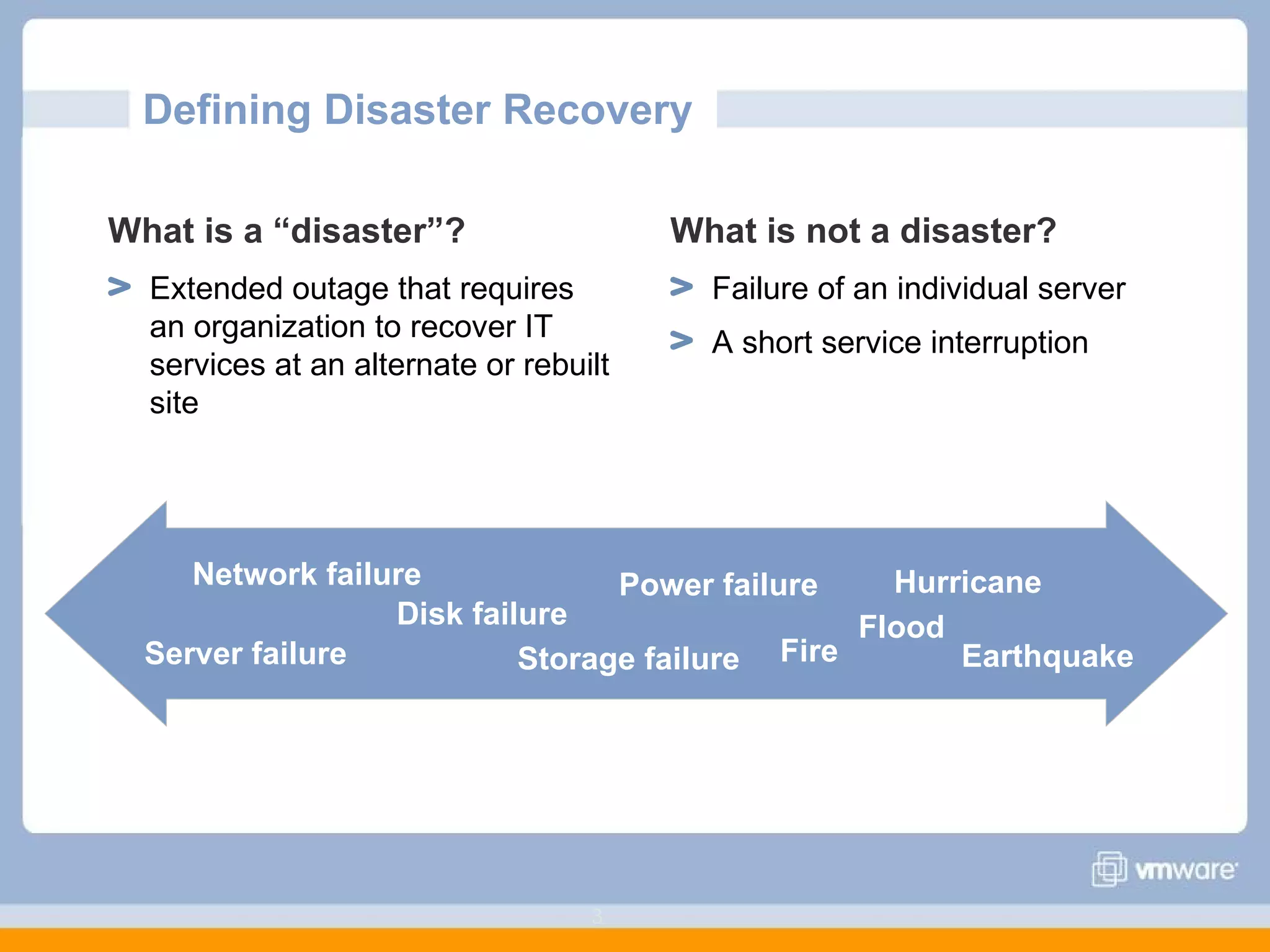
Defining Disaster Recovery  What is a “disaster”? Extended outage that requires an organization to recover IT services at an alternate or rebuilt site What is not a disaster? Failure of an individual server A short service interruption Power failure Server failure Disk failure Fire Hurricane Storage failure Flood Network failure Earthquake
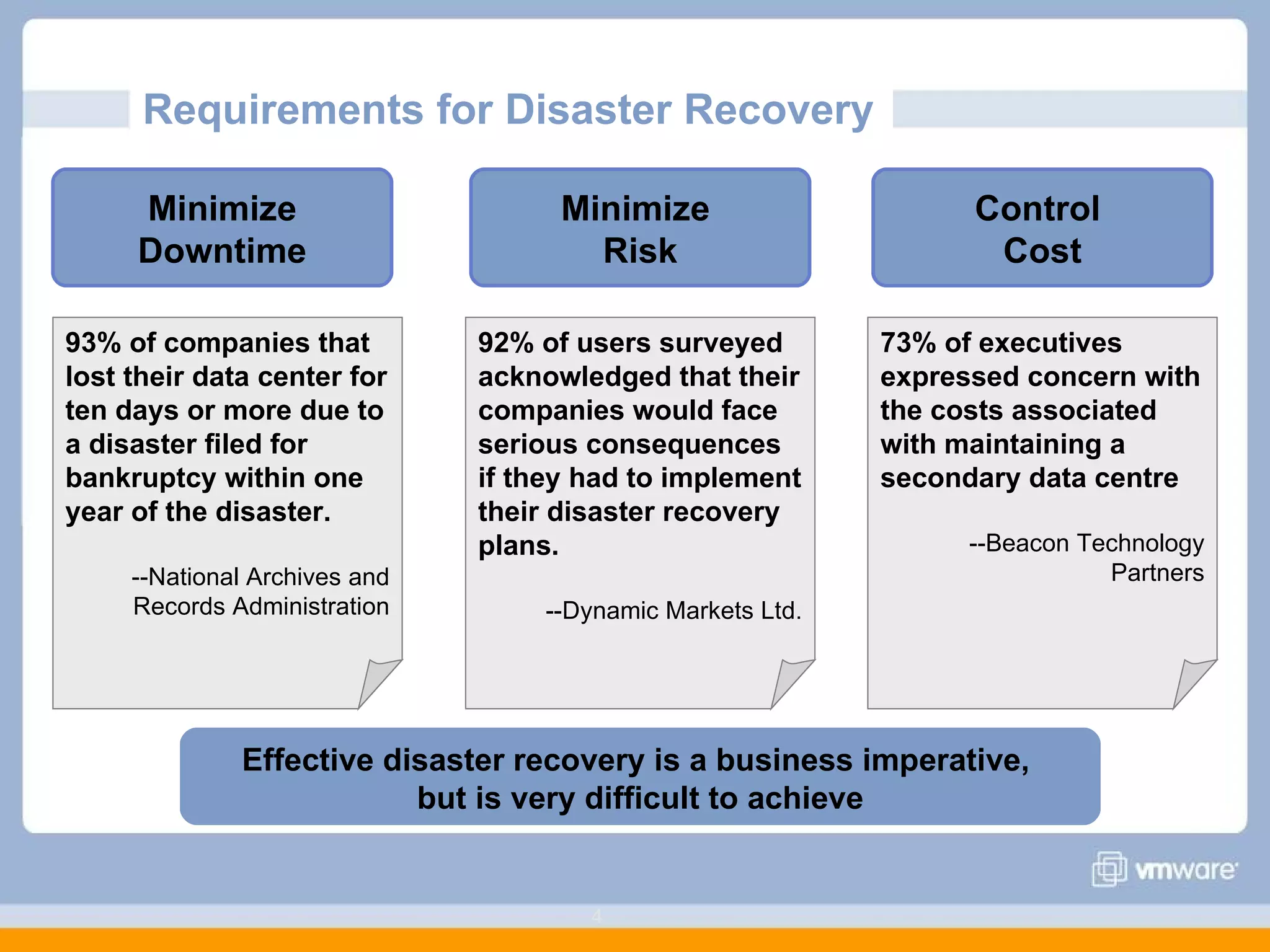
Requirements for Disaster Recovery  Minimize Downtime 93% of companies that lost their data center for ten days or more due to a disaster filed for bankruptcy within one year of the disaster.  --National Archives and Records Administration Control  Cost Minimize  Risk 73% of executives expressed concern with the costs associated with maintaining a secondary data centre  --Beacon Technology Partners 92% of users surveyed acknowledged that their companies would face serious consequences if they had to implement their disaster recovery plans.  --Dynamic Markets Ltd. Effective disaster recovery is a business imperative,  but is very difficult to achieve
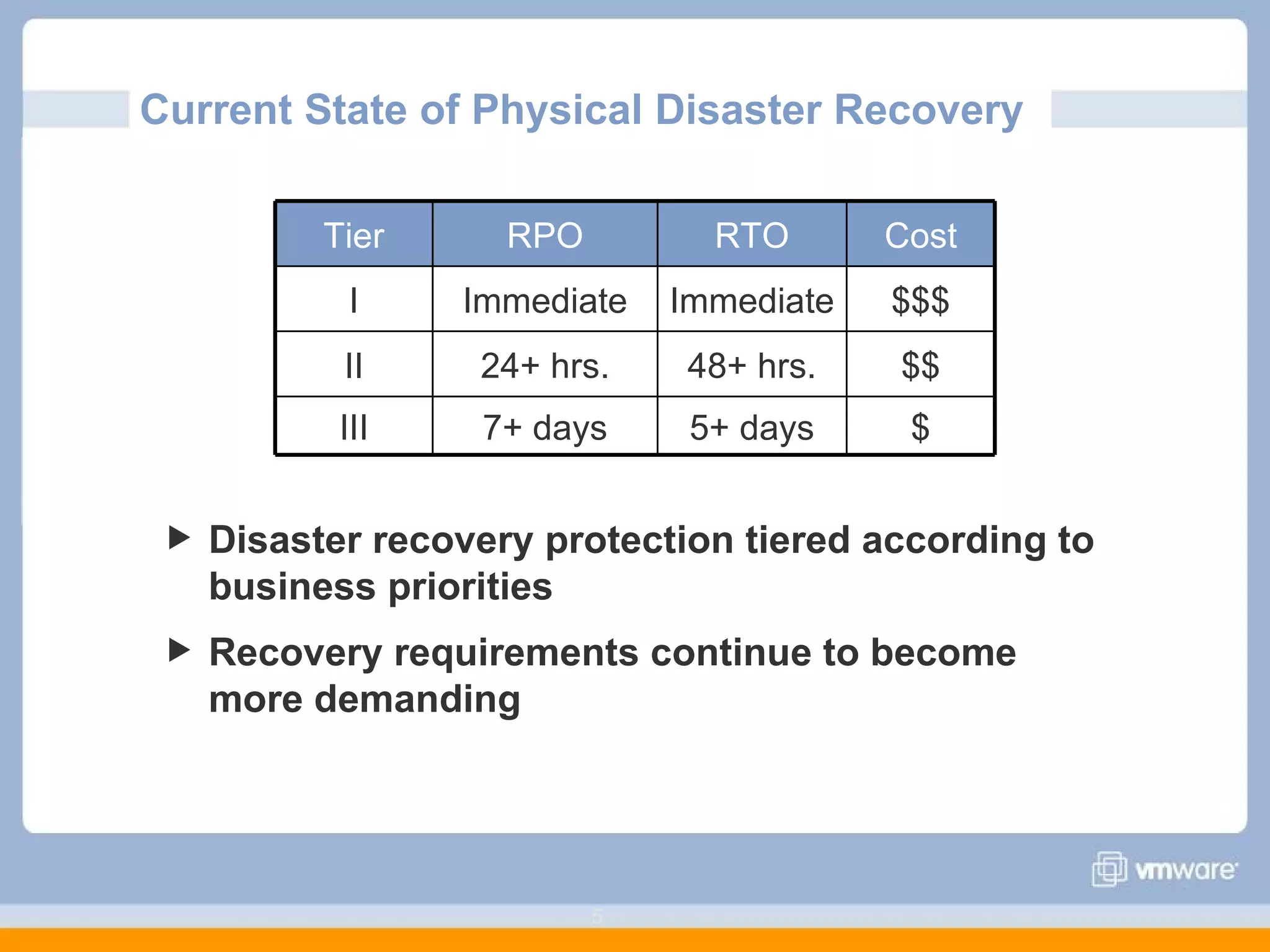
Current State of Physical Disaster Recovery  Disaster recovery protection tiered according to business priorities Recovery requirements continue to become more demanding Tier RPO RTO Cost I Immediate Immediate $$$ II 24+ hrs. 48+ hrs. $$ III 7+ days 5+ days $
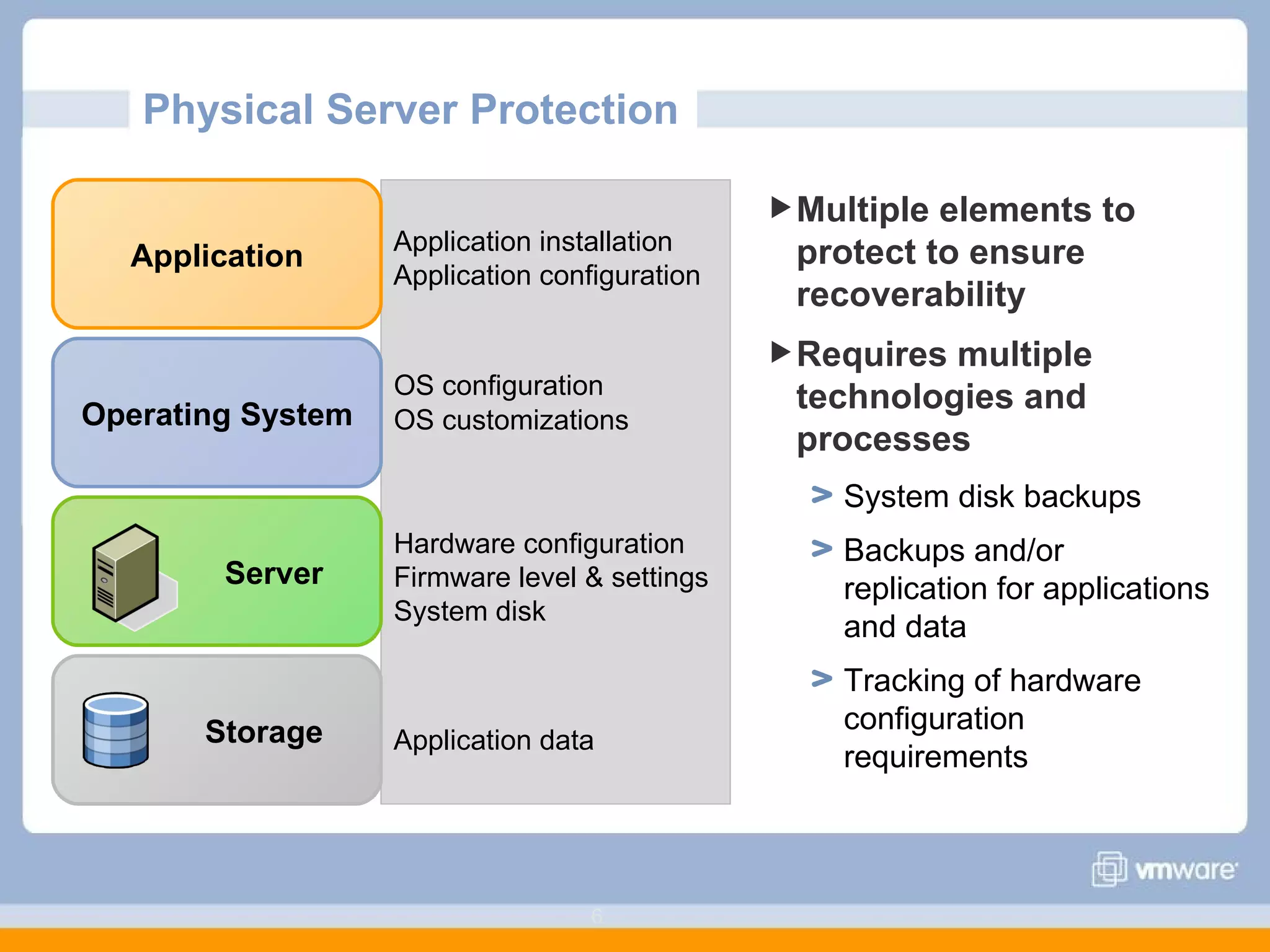
Physical Server Protection  Multiple elements to protect to ensure recoverability Requires multiple technologies and processes System disk backups Backups and/or replication for applications and data Tracking of hardware configuration requirements Storage Server Operating System Application Application installation Application configuration OS configuration   OS customizations Hardware configuration Firmware level & settings System disk Application data
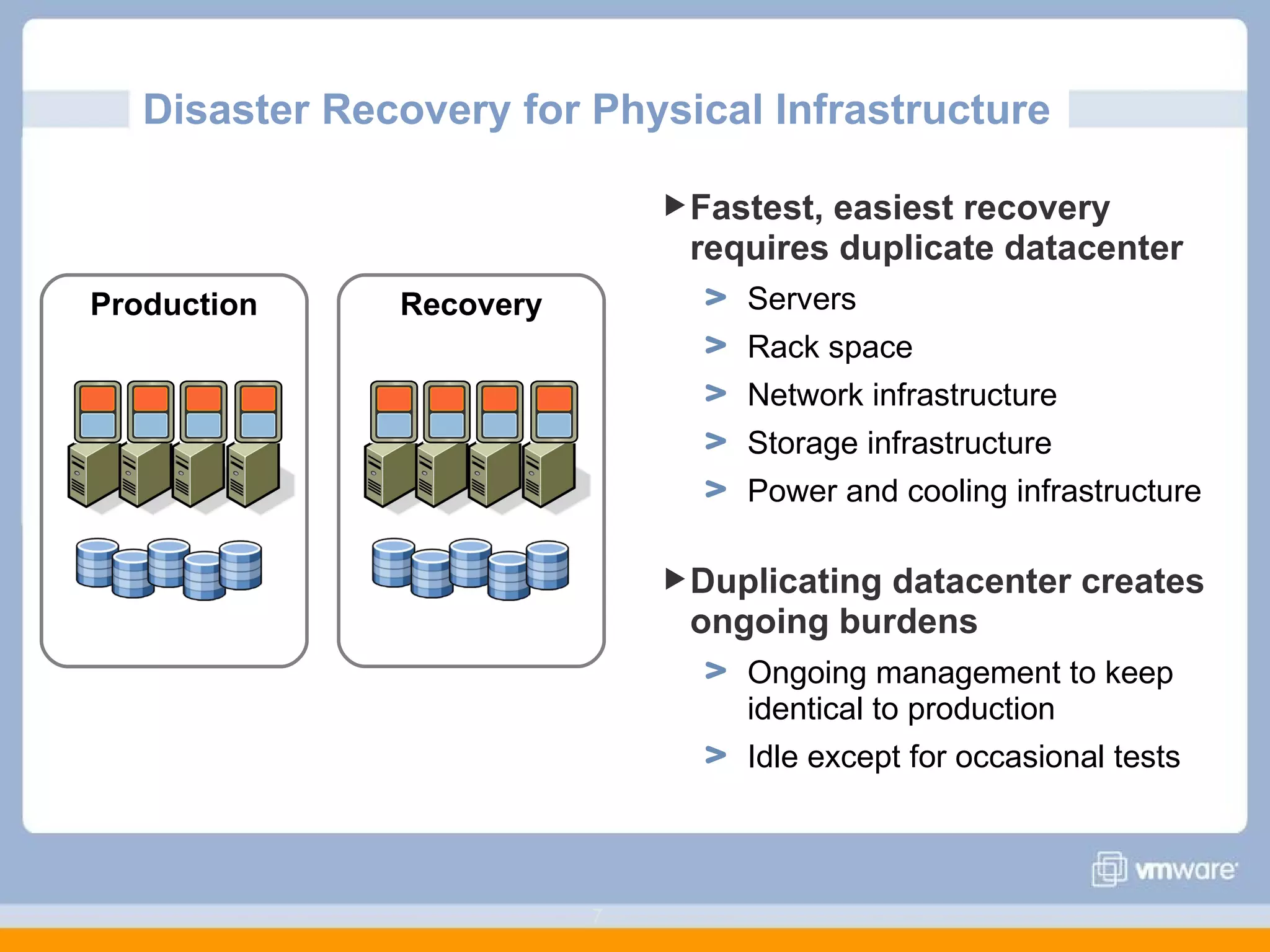
Disaster Recovery for Physical Infrastructure Fastest, easiest recovery requires duplicate datacenter Servers Rack space Network infrastructure Storage infrastructure Power and cooling infrastructure Duplicating datacenter creates ongoing burdens Ongoing management to keep identical to production Idle except for occasional tests Production Recovery
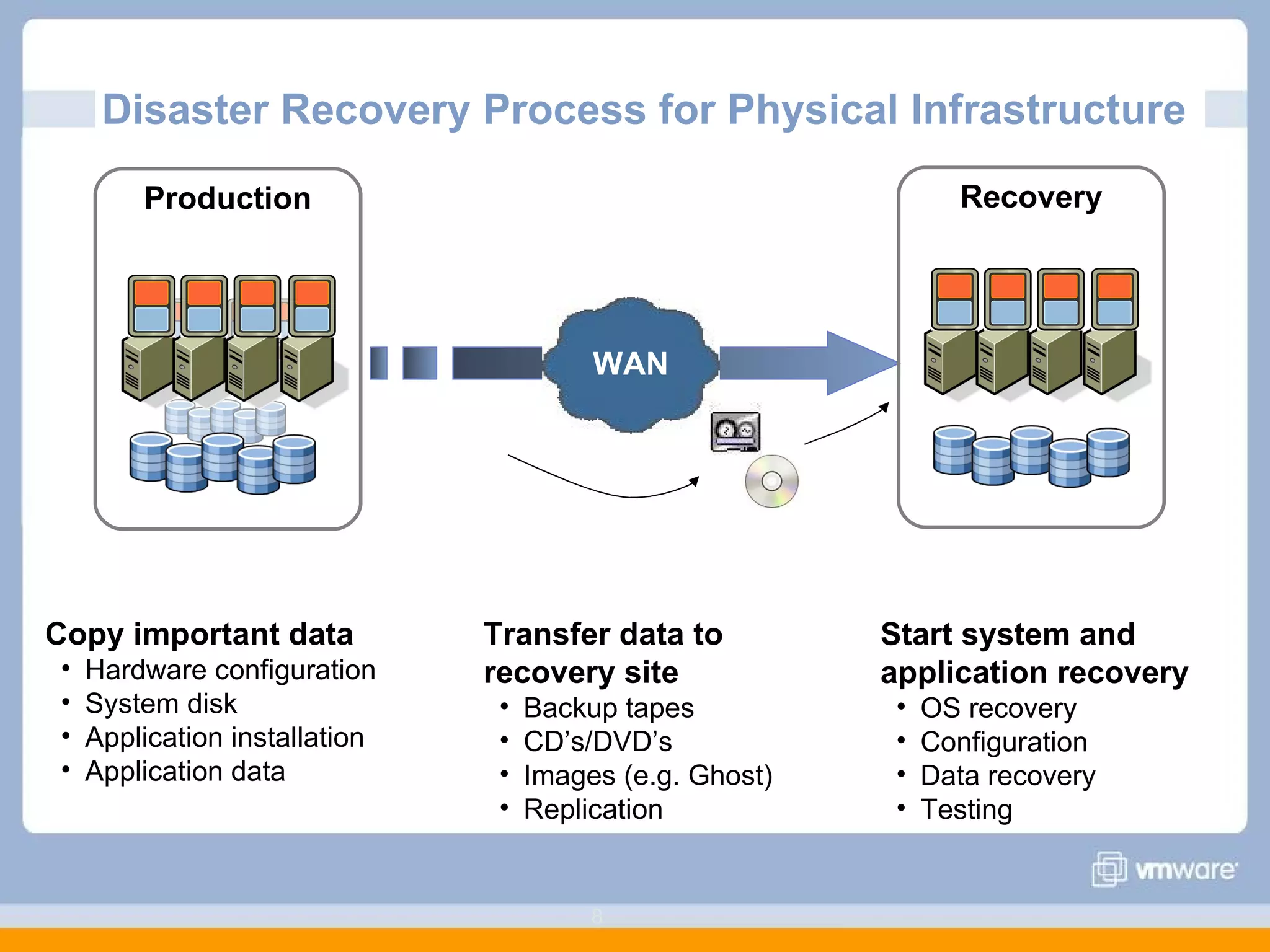
Disaster Recovery Process for Physical Infrastructure  Production Recovery Copy important data Hardware configuration System disk Application installation Application data Transfer data to  recovery site Backup tapes CD’s/DVD’s Images (e.g. Ghost)  Replication Start system and application recovery OS recovery Configuration Data recovery Testing WAN
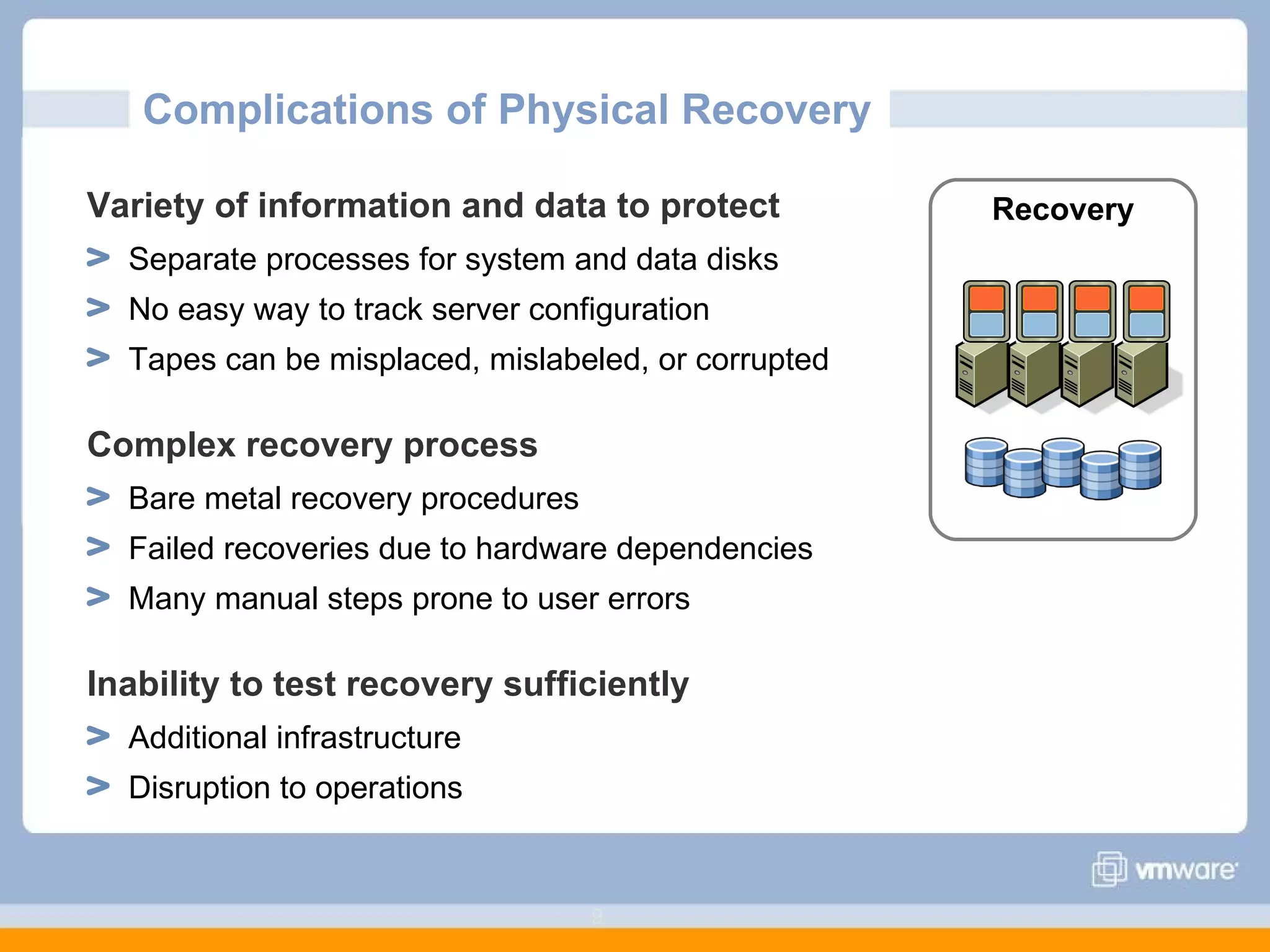
Complications of Physical Recovery  Variety of information and data to protect Separate processes for system and data disks No easy way to track server configuration Tapes can be misplaced, mislabeled, or corrupted Complex recovery process Bare metal recovery procedures Failed recoveries due to hardware dependencies Many manual steps prone to user errors Inability to test recovery sufficiently Additional infrastructure Disruption to operations Recovery
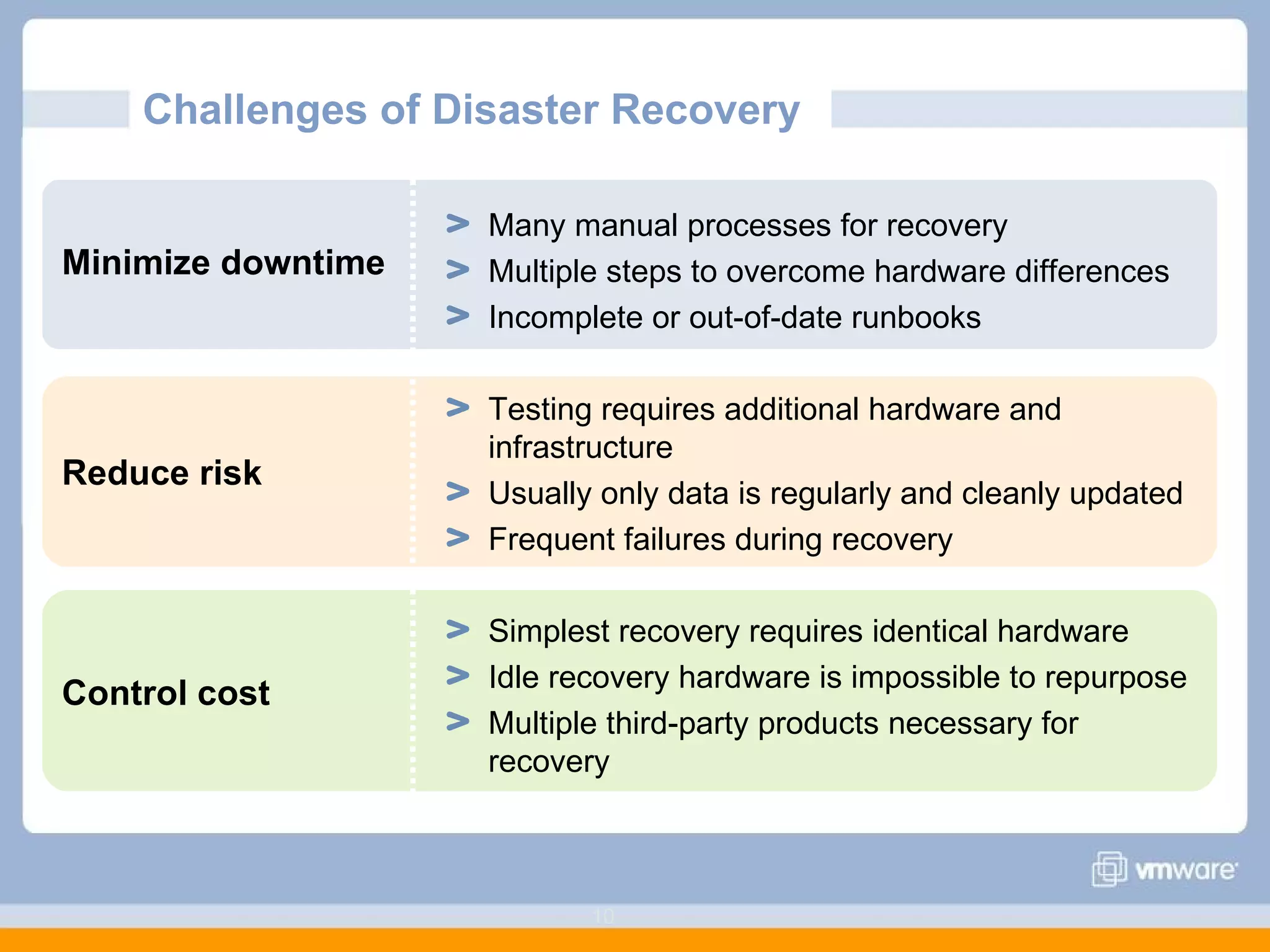
Challenges of Disaster Recovery  Minimize downtime Reduce risk Control cost Many manual processes for recovery Multiple steps to overcome hardware differences Incomplete or out-of-date runbooks Testing requires additional hardware and infrastructure Usually only data is regularly and cleanly updated Frequent failures during recovery Simplest recovery requires identical hardware Idle recovery hardware is impossible to repurpose Multiple third-party products necessary for recovery
Agenda  Challenges of Traditional Disaster Recovery Improving Disaster Recovery with VMware Virtualization Properties of virtualization Data protection with virtualization Disaster recovery automation Impact of VMware Virtualization on Disaster Recovery
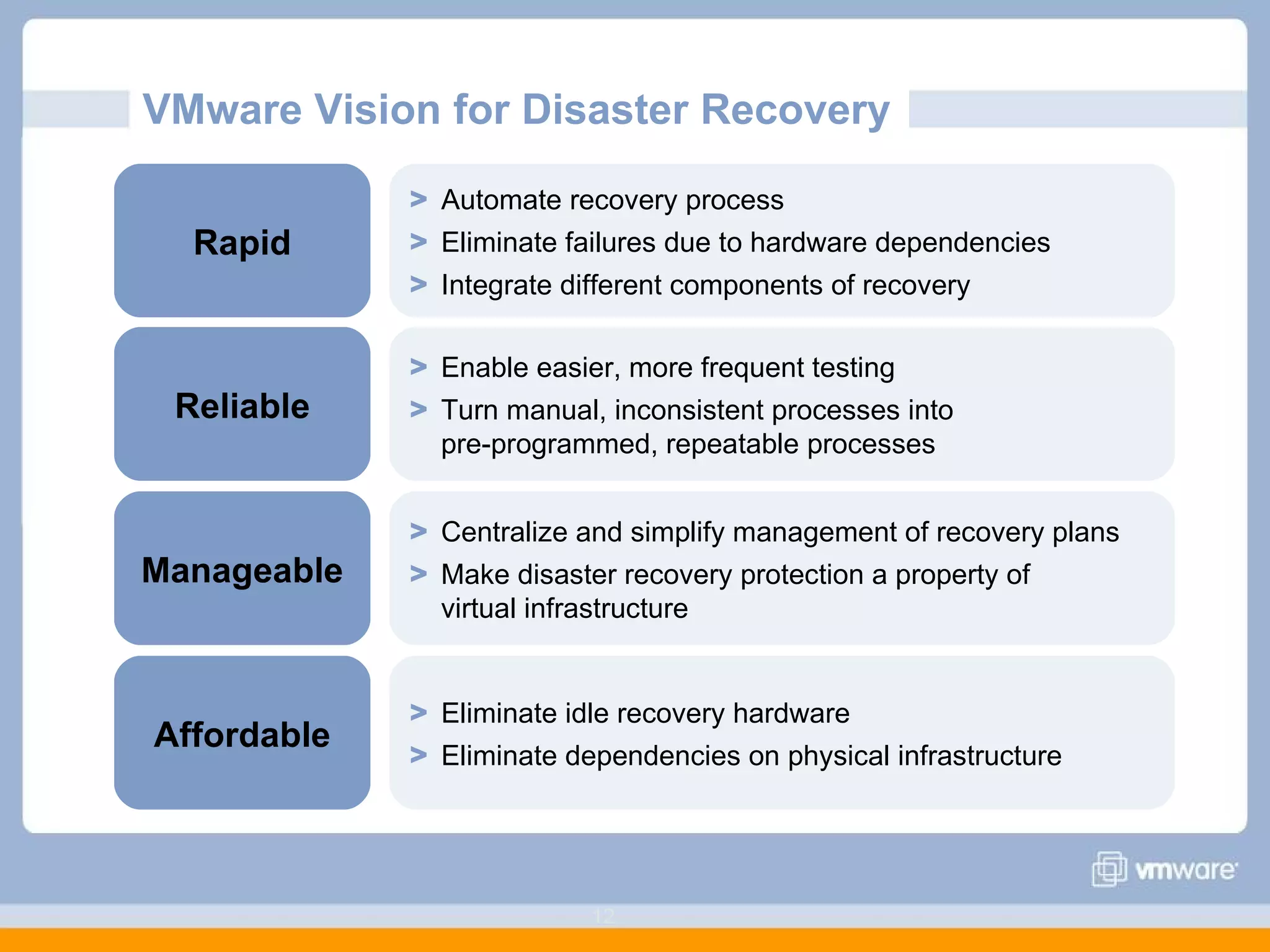
VMware Vision for Disaster Recovery  Rapid Automate recovery process Eliminate failures due to hardware dependencies Integrate different components of recovery  Reliable Enable easier, more frequent testing Turn manual, inconsistent processes into  pre-programmed, repeatable processes Manageable Centralize and simplify management of recovery plans Make disaster recovery protection a property of  virtual infrastructure Affordable Eliminate idle recovery hardware Eliminate dependencies on physical infrastructure
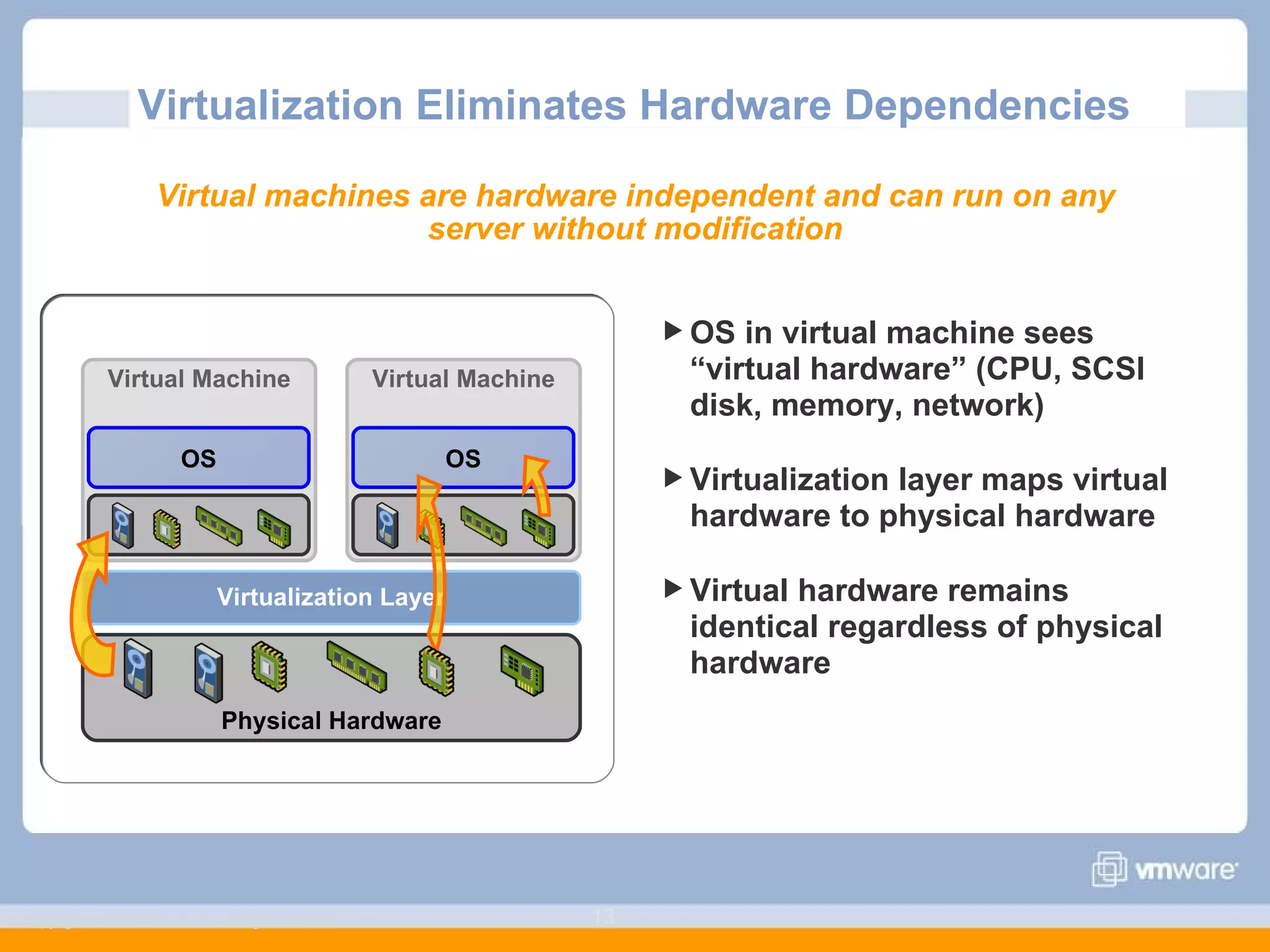
Virtualization Eliminates Hardware Dependencies Copyright © 2006 VMware, Inc. All rights reserved. OS in virtual machine sees “virtual hardware” (CPU, SCSI disk, memory, network) Virtualization layer maps virtual hardware to physical hardware Virtual hardware remains identical regardless of physical hardware Virtual machines are hardware independent and can run on any server without modification Physical Hardware Virtual Machine Virtualization Layer OS Virtual Machine OS
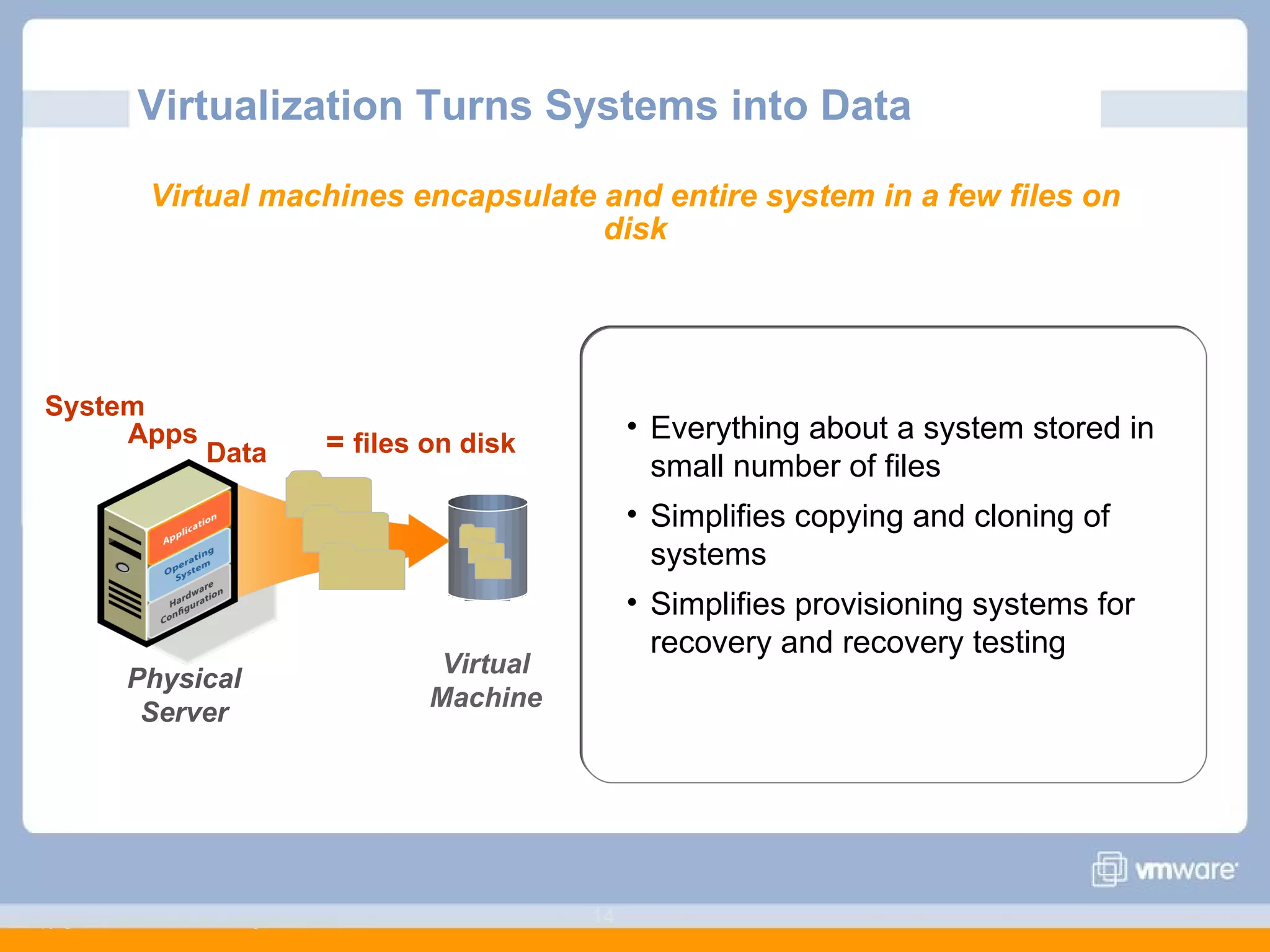
Virtualization Turns Systems into Data Copyright © 2006 VMware, Inc. All rights reserved. Everything about a system stored in small number of files Simplifies copying and cloning of systems Simplifies provisioning systems for recovery and recovery testing Virtual machines encapsulate and entire system in a few files on disk System Apps =  files on disk Data Virtual Machine Physical Server
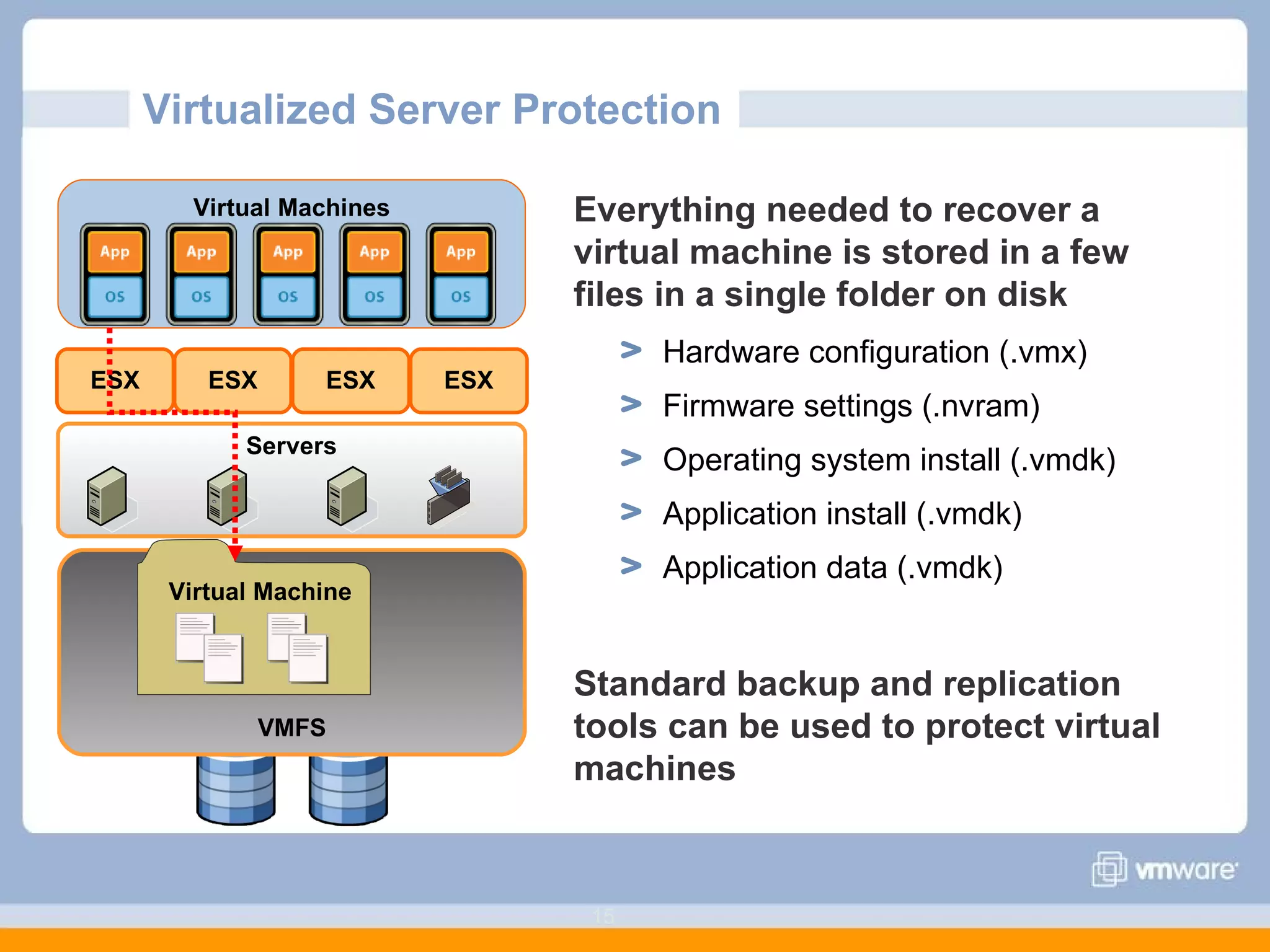
Virtualized Server Protection  Everything needed to recover a virtual machine is stored in a few files in a single folder on disk Hardware configuration (.vmx) Firmware settings (.nvram) Operating system install (.vmdk) Application install (.vmdk) Application data (.vmdk) Standard backup and replication tools can be used to protect virtual machines Virtual Machines VMFS Virtual Machine Servers ESX ESX ESX ESX
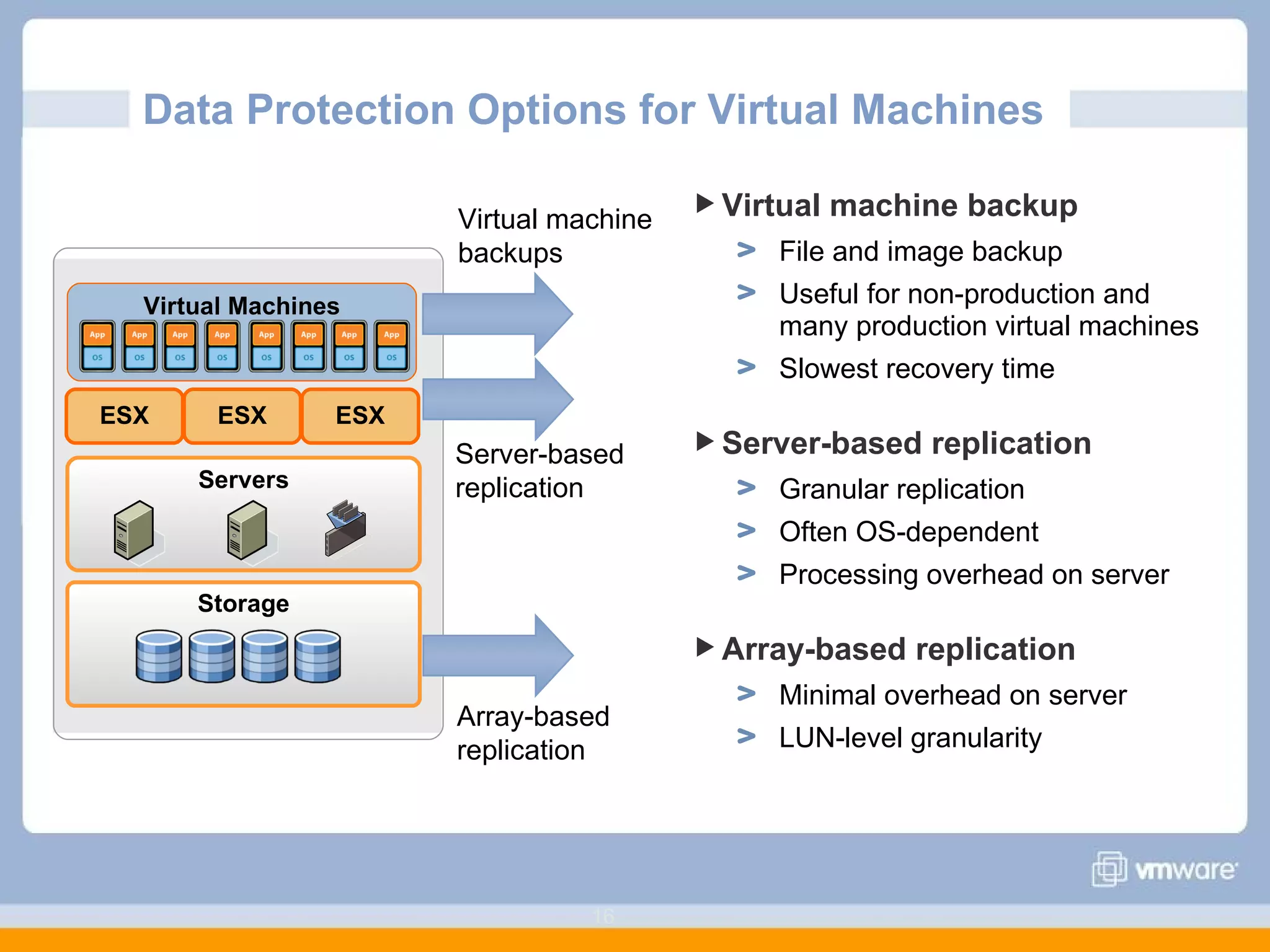
Data Protection Options for Virtual Machines  Virtual machine backup File and image backup Useful for non-production and many production virtual machines Slowest recovery time Server-based replication Granular replication Often OS-dependent Processing overhead on server Array-based replication Minimal overhead on server LUN-level granularity Storage Servers Virtual Machines ESX ESX ESX Server-based replication Array-based replication Virtual machine backups
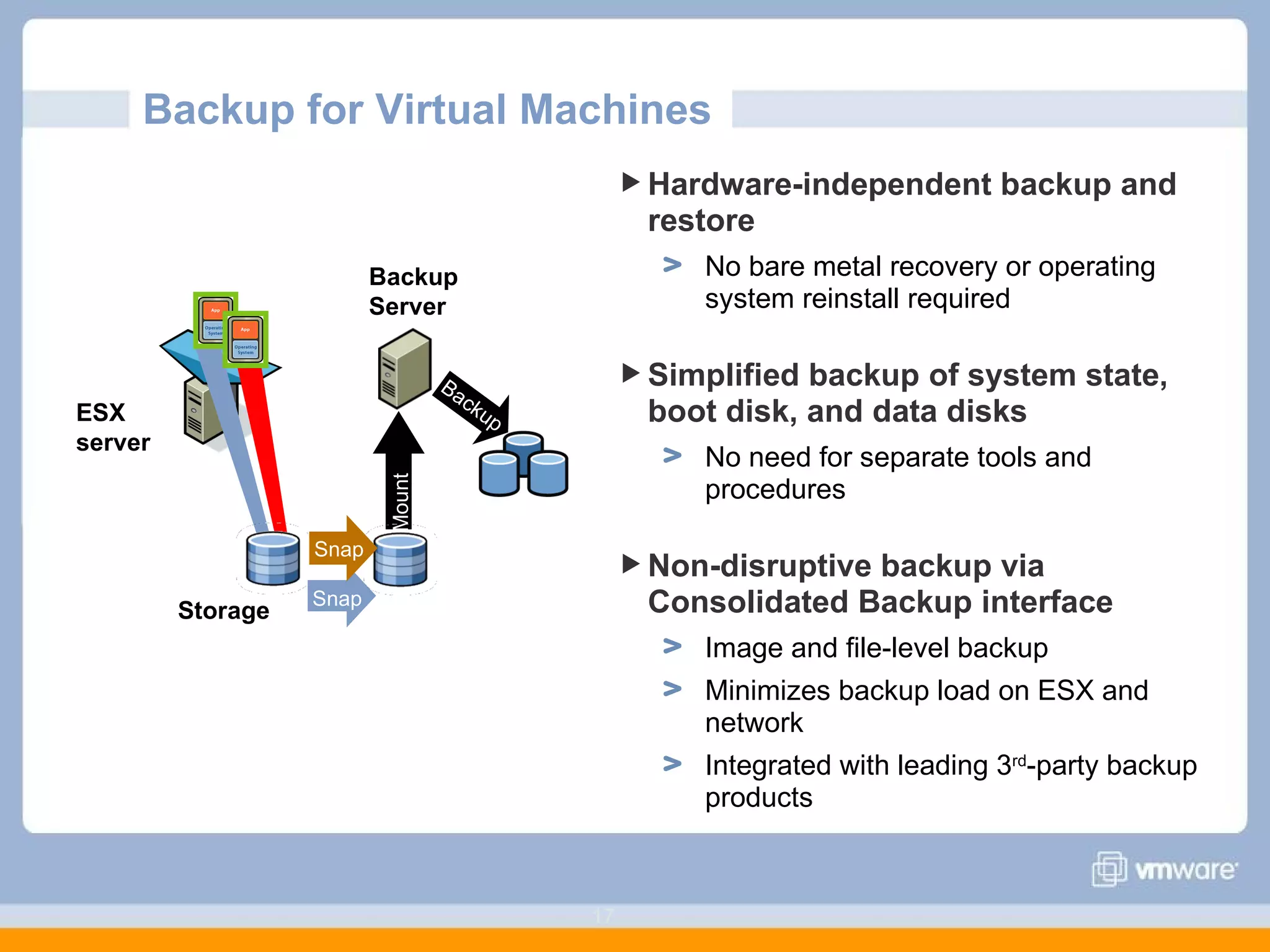
Backup for Virtual Machines Hardware-independent backup and restore No bare metal recovery or operating system reinstall required Simplified backup of system state, boot disk, and data disks No need for separate tools and procedures Non-disruptive backup via Consolidated Backup interface Image and file-level backup Minimizes backup load on ESX and network Integrated with leading 3 rd -party backup products Backup Mount Snap Snap Storage ESX server Backup Server
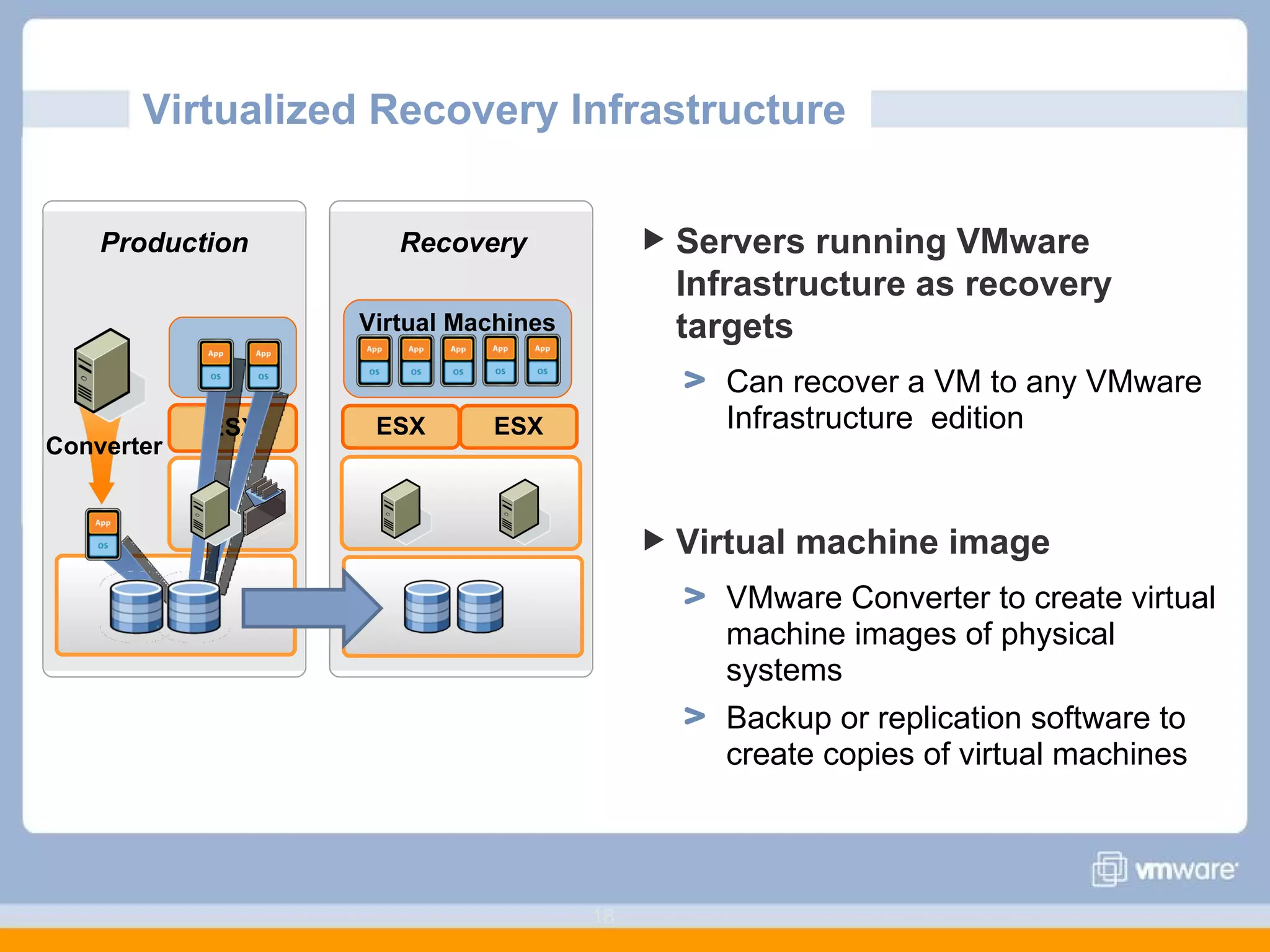
Virtualized Recovery Infrastructure  Servers running VMware Infrastructure as recovery targets Can recover a VM to any VMware Infrastructure  edition Virtual machine image  VMware Converter to create virtual machine images of physical systems Backup or replication software to create copies of virtual machines Virtual Machines ESX ESX Recovery Production Converter ESX
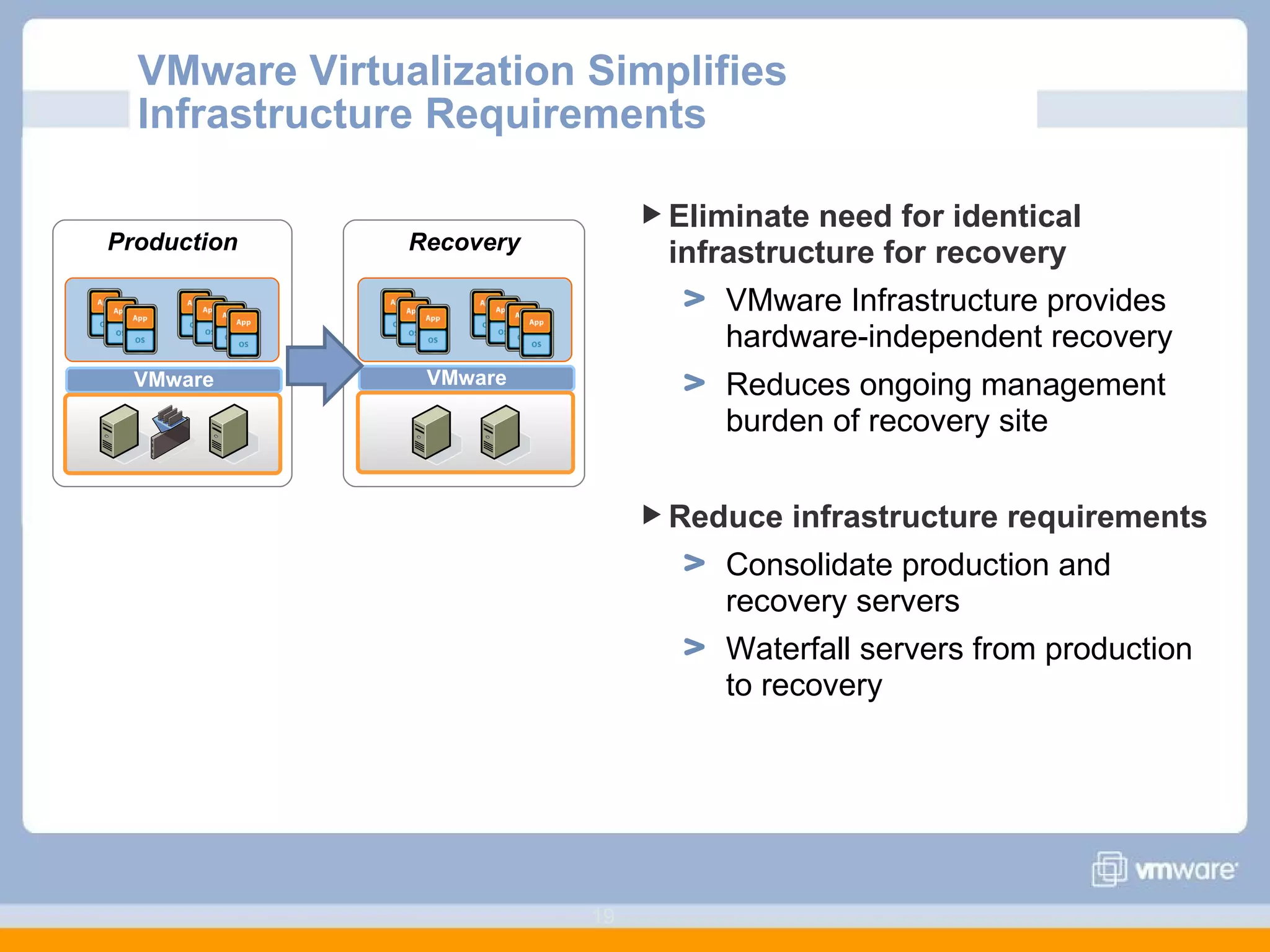
VMware Virtualization Simplifies Infrastructure Requirements Eliminate need for identical infrastructure for recovery VMware Infrastructure provides hardware-independent recovery Reduces ongoing management burden of recovery site Reduce infrastructure requirements Consolidate production and  recovery servers Waterfall servers from production  to recovery VMware Production VMware Recovery
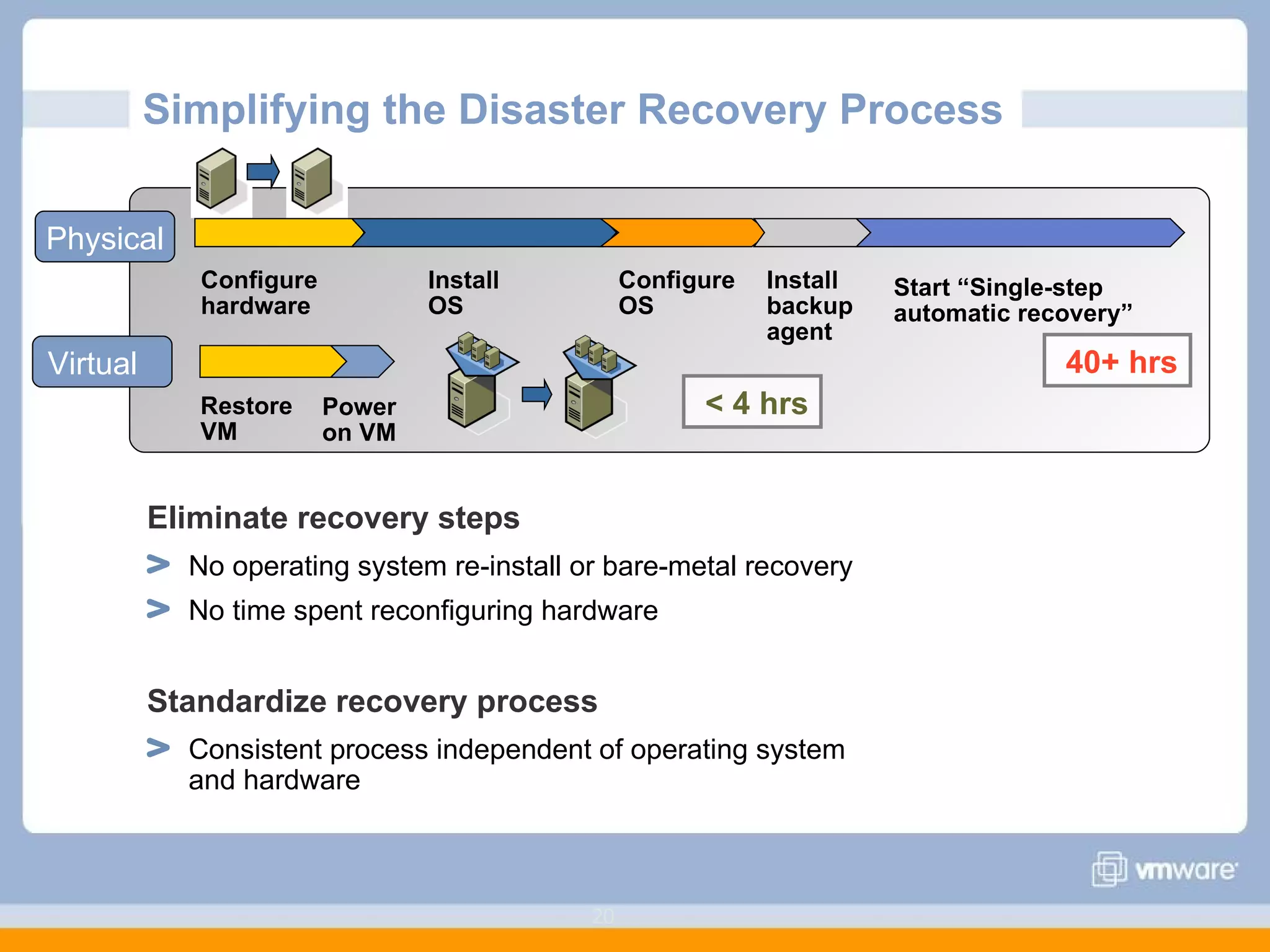
Simplifying the Disaster Recovery Process  Eliminate recovery steps No operating system re-install or bare-metal recovery No time spent reconfiguring hardware Standardize recovery process Consistent process independent of operating system  and hardware Configure hardware Install OS Configure OS Install backup agent Start “Single-step automatic recovery” Restore VM Physical Virtual 40+ hrs < 4 hrs Power on VM
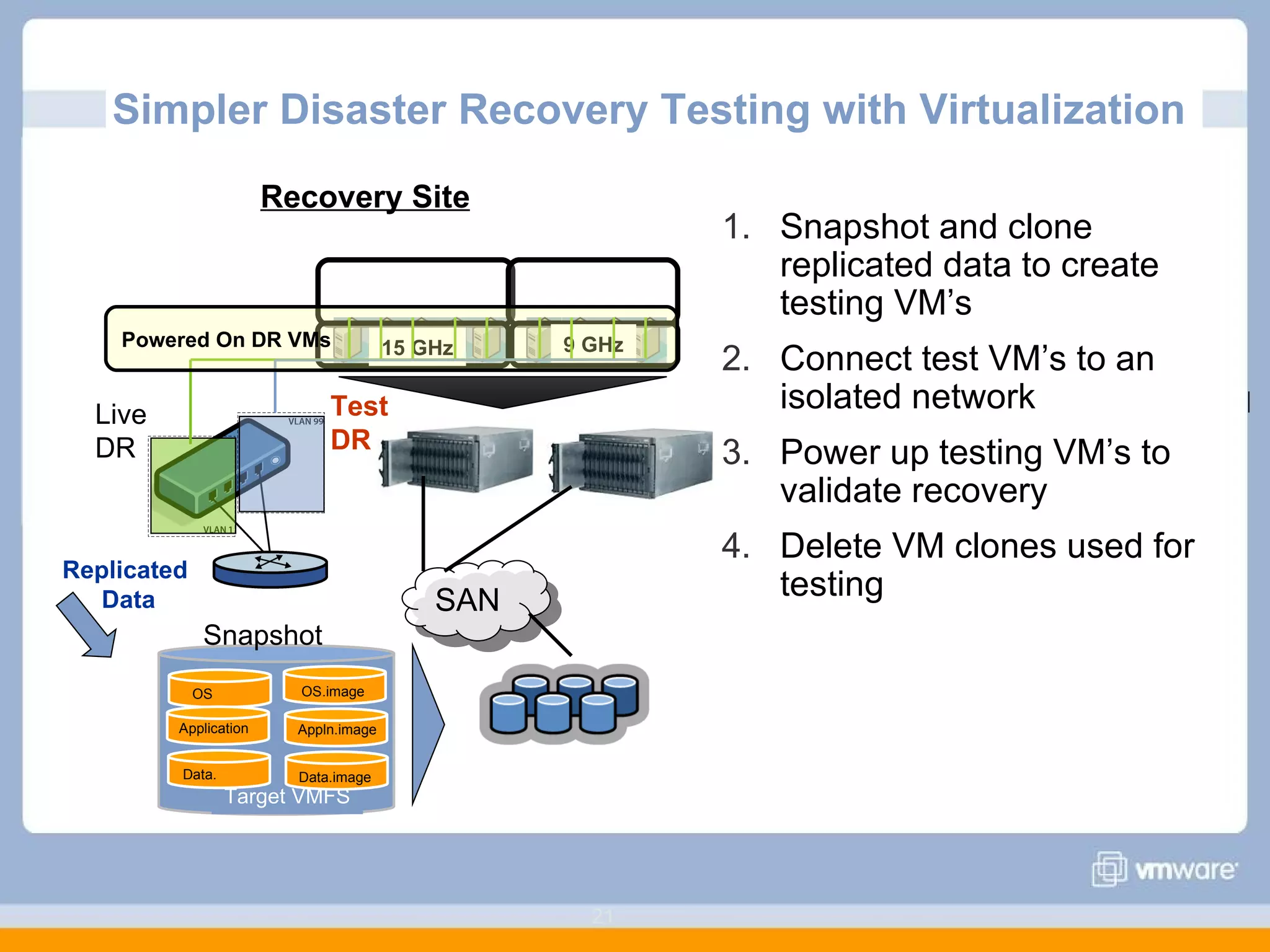
Simpler Disaster Recovery Testing with Virtualization  Snapshot and clone replicated data to create testing VM’s Connect test VM’s to an isolated network Power up testing VM’s to validate recovery Delete VM clones used for testing SAN Recovery Site Data. OS Application Powered On DR VMs Live DR Test DR Replicated  Data Snapshot Target VMFS OS.image Appln.image Data.image 15 GHz 9 GHz
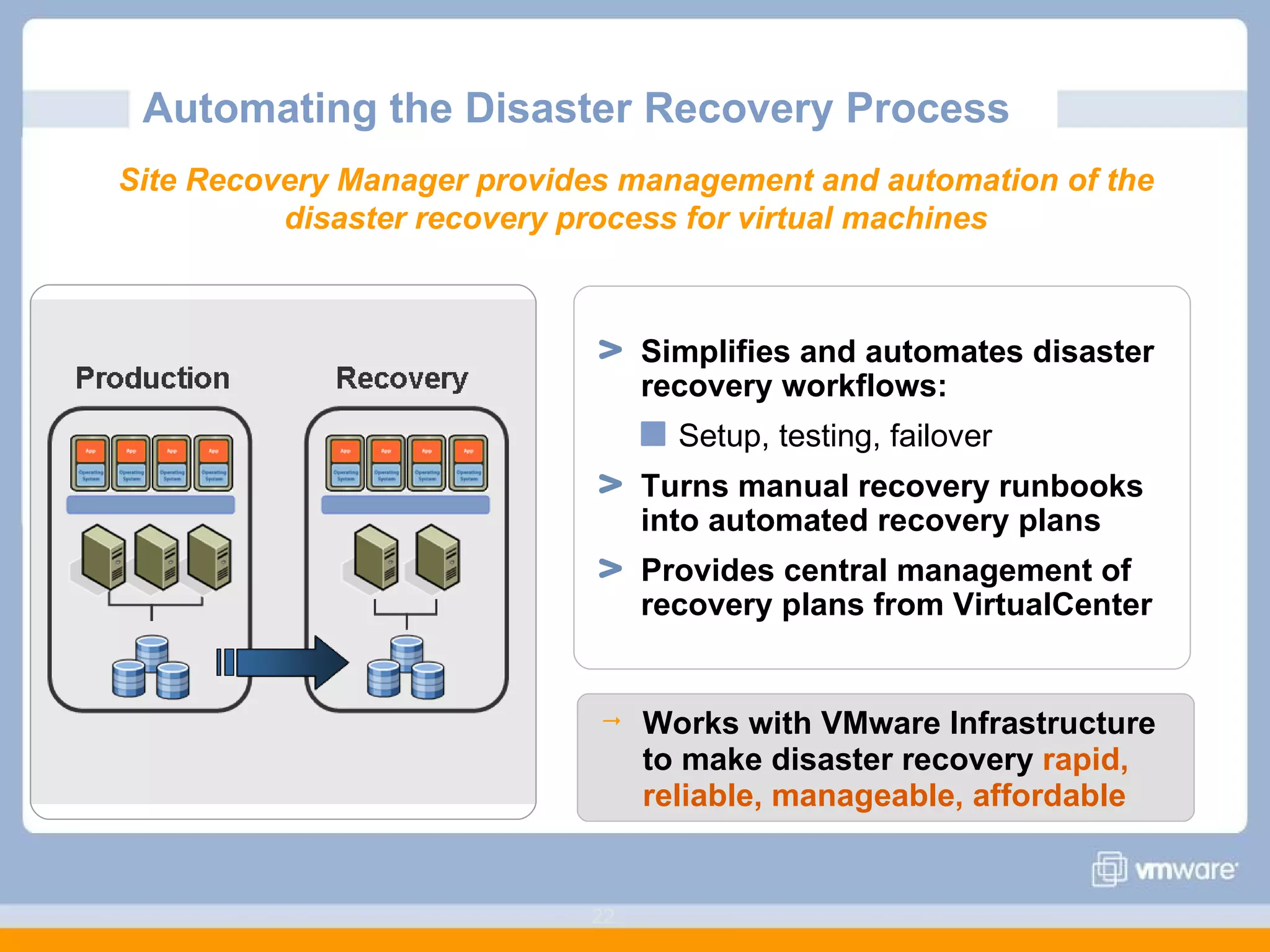
Simplifies and automates disaster recovery workflows: Setup, testing, failover Turns manual recovery runbooks into automated recovery plans Provides central management of recovery plans from VirtualCenter Automating the Disaster Recovery Process Works with VMware Infrastructure to make disaster recovery  rapid, reliable, manageable, affordable Site Recovery Manager provides management and automation of the disaster recovery process for virtual machines
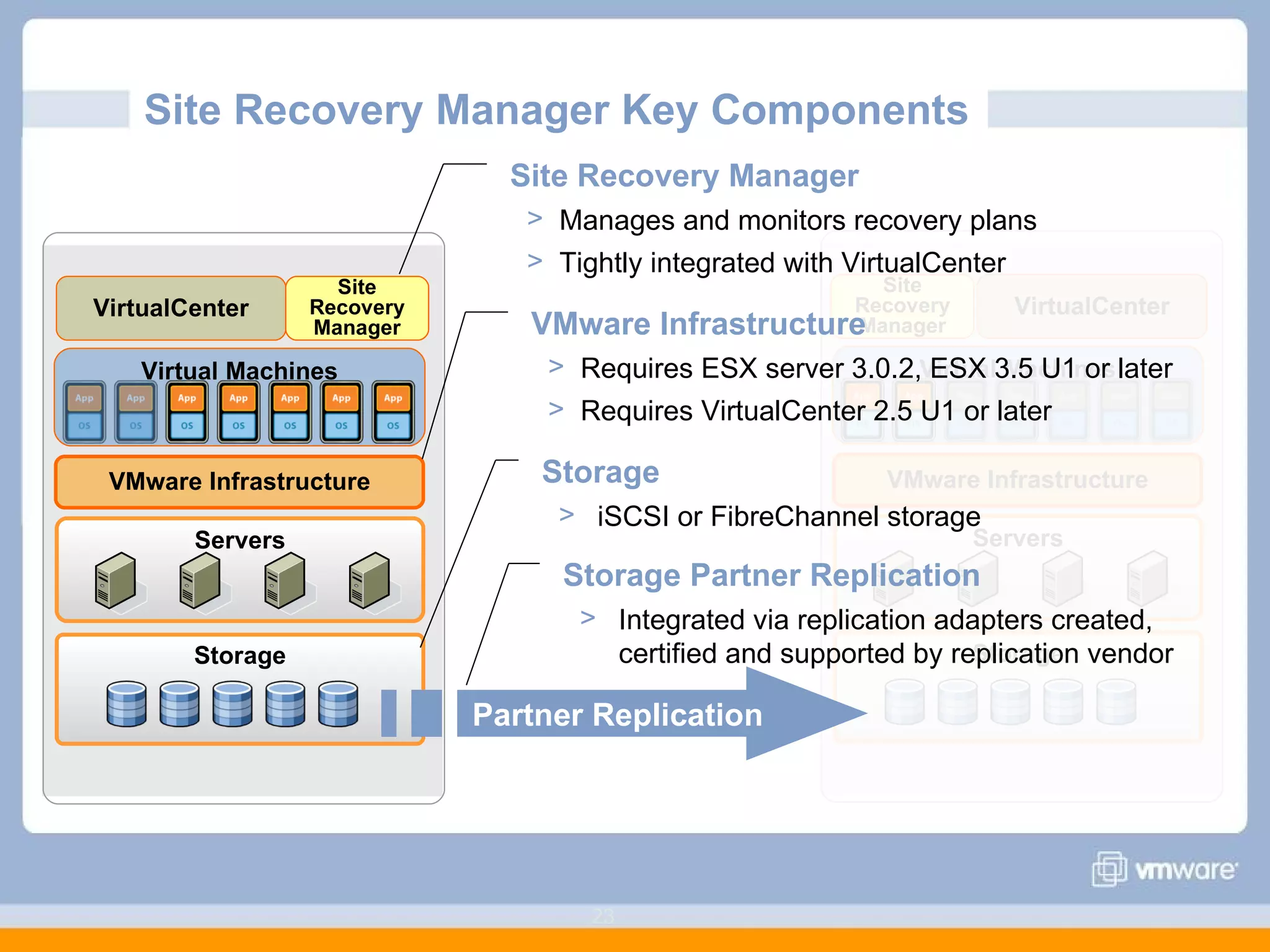
Site Recovery Manager Key Components  Storage Servers VMware Infrastructure Virtual Machines VirtualCenter Site Recovery Manager Storage Servers VMware Infrastructure Virtual Machines VirtualCenter Site Recovery Manager Site Recovery Manager Manages and monitors recovery plans Tightly integrated with VirtualCenter Storage Partner Replication Integrated via replication adapters created, certified and supported by replication vendor Partner Replication VMware Infrastructure Requires ESX server 3.0.2, ESX 3.5 U1 or later Requires VirtualCenter 2.5 U1 or later Storage iSCSI or FibreChannel storage
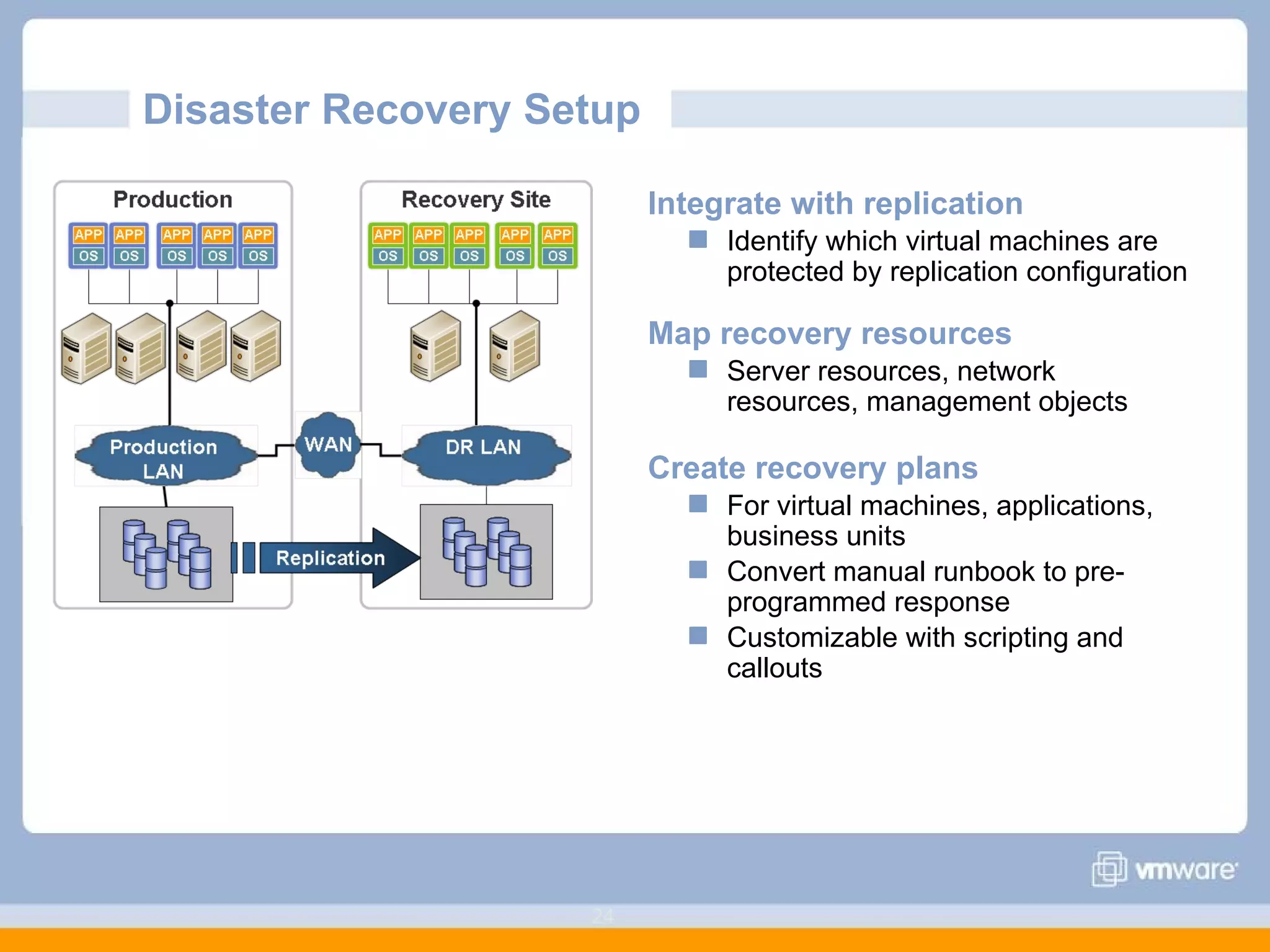
Disaster Recovery Setup  Integrate with replication Identify which virtual machines are protected by replication configuration Map recovery resources Server resources, network resources, management objects Create recovery plans  For virtual machines, applications, business units Convert manual runbook to pre-programmed response Customizable with scripting and callouts
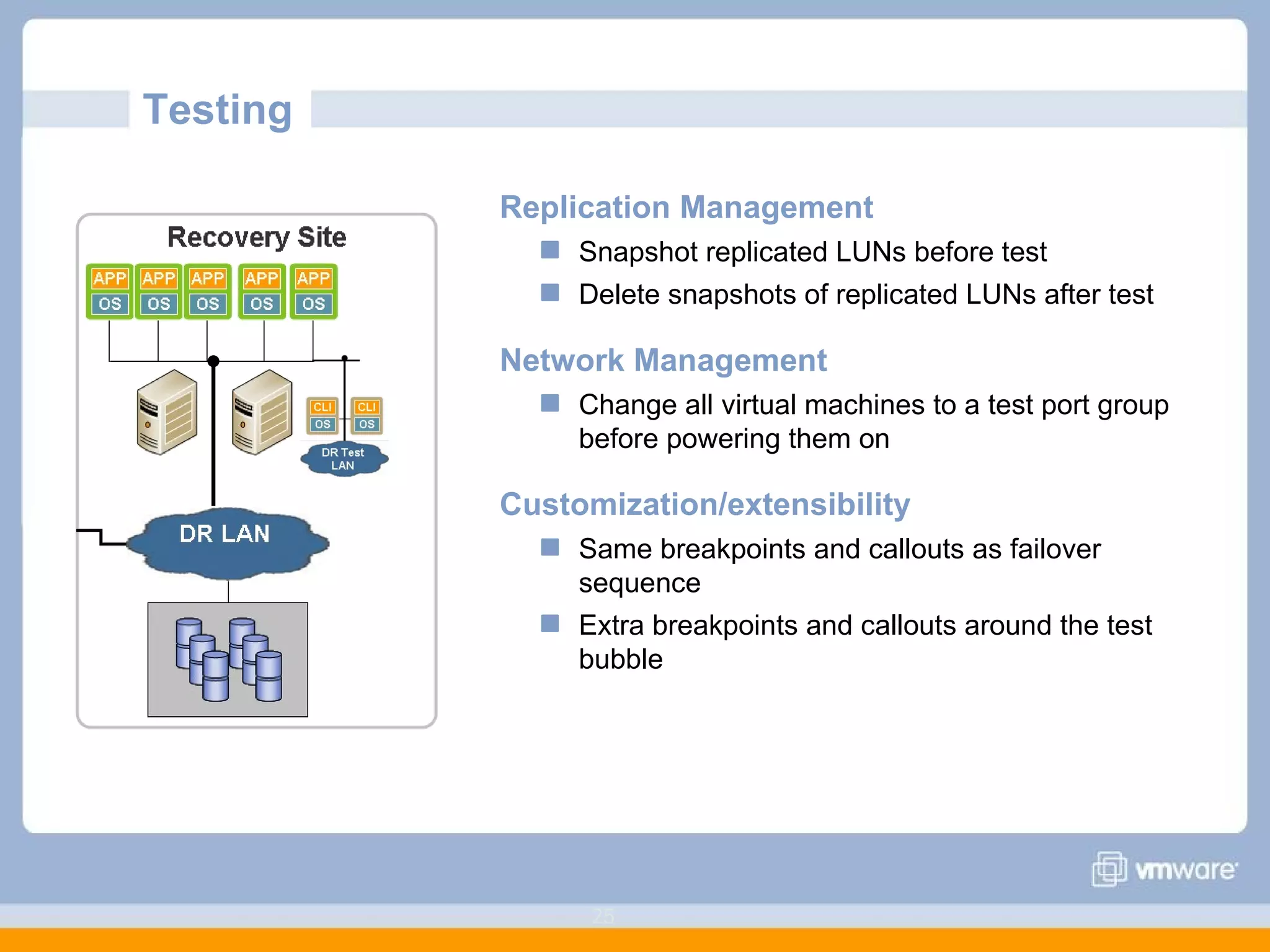
Testing  Replication Management Snapshot replicated LUNs before test Delete snapshots of replicated LUNs after test Network Management Change all virtual machines to a test port group before powering them on Customization/extensibility Same breakpoints and callouts as failover sequence Extra breakpoints and callouts around the test bubble
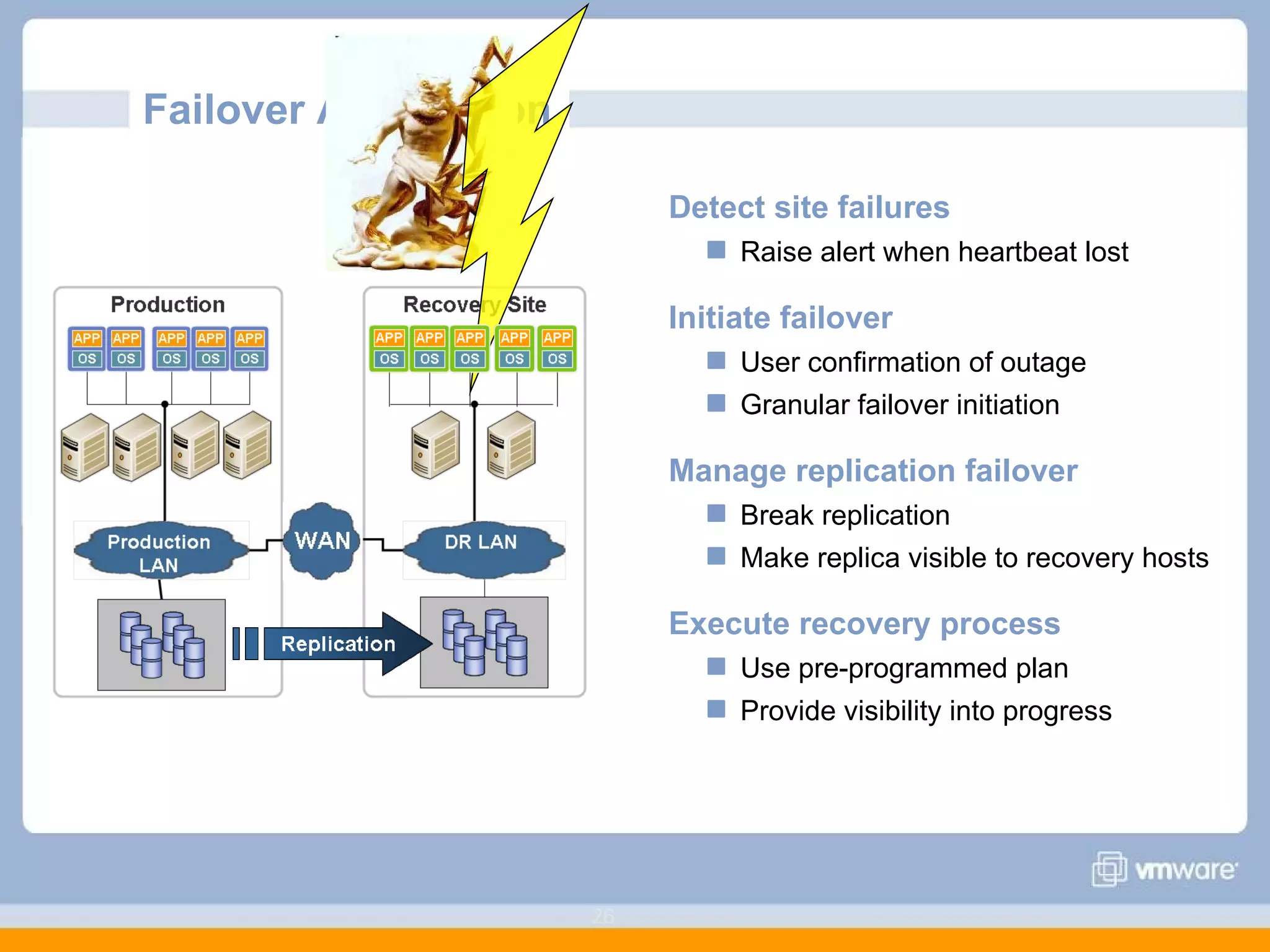
Failover Automation  Detect site failures Raise alert when heartbeat lost Initiate failover User confirmation of outage Granular failover initiation Manage replication failover Break replication Make replica visible to recovery hosts Execute recovery process Use pre-programmed plan Provide visibility into progress
Agenda  Challenges of Traditional Disaster Recovery Improving Disaster Recovery with VMware Virtualization Impact of VMware Virtualization on Disaster Recovery
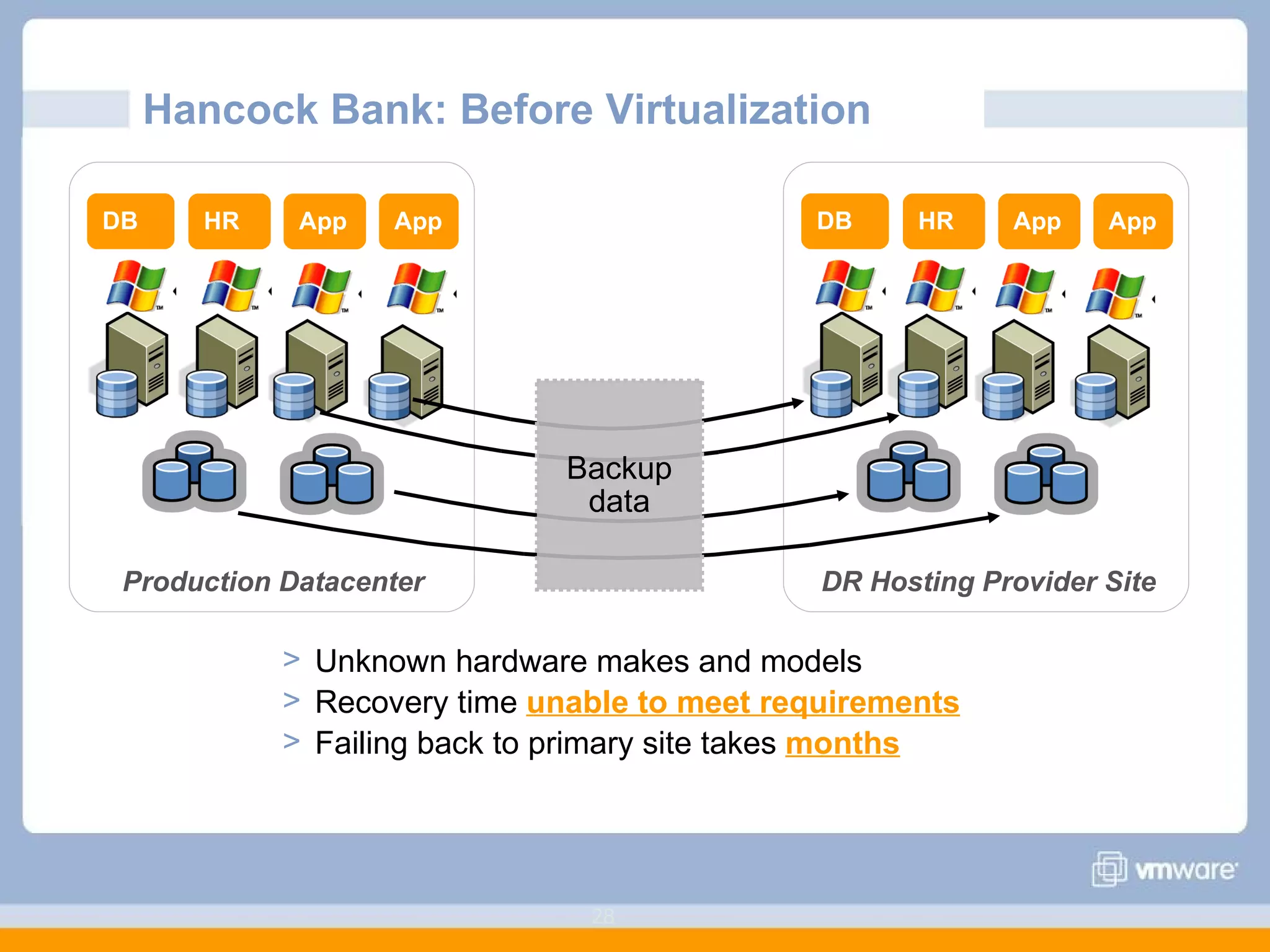
Hancock Bank: Before Virtualization Production Datacenter DB HR App App DR Hosting Provider Site DB HR App App Backup data Unknown hardware makes and models Recovery time  unable to meet requirements Failing back to primary site takes  months
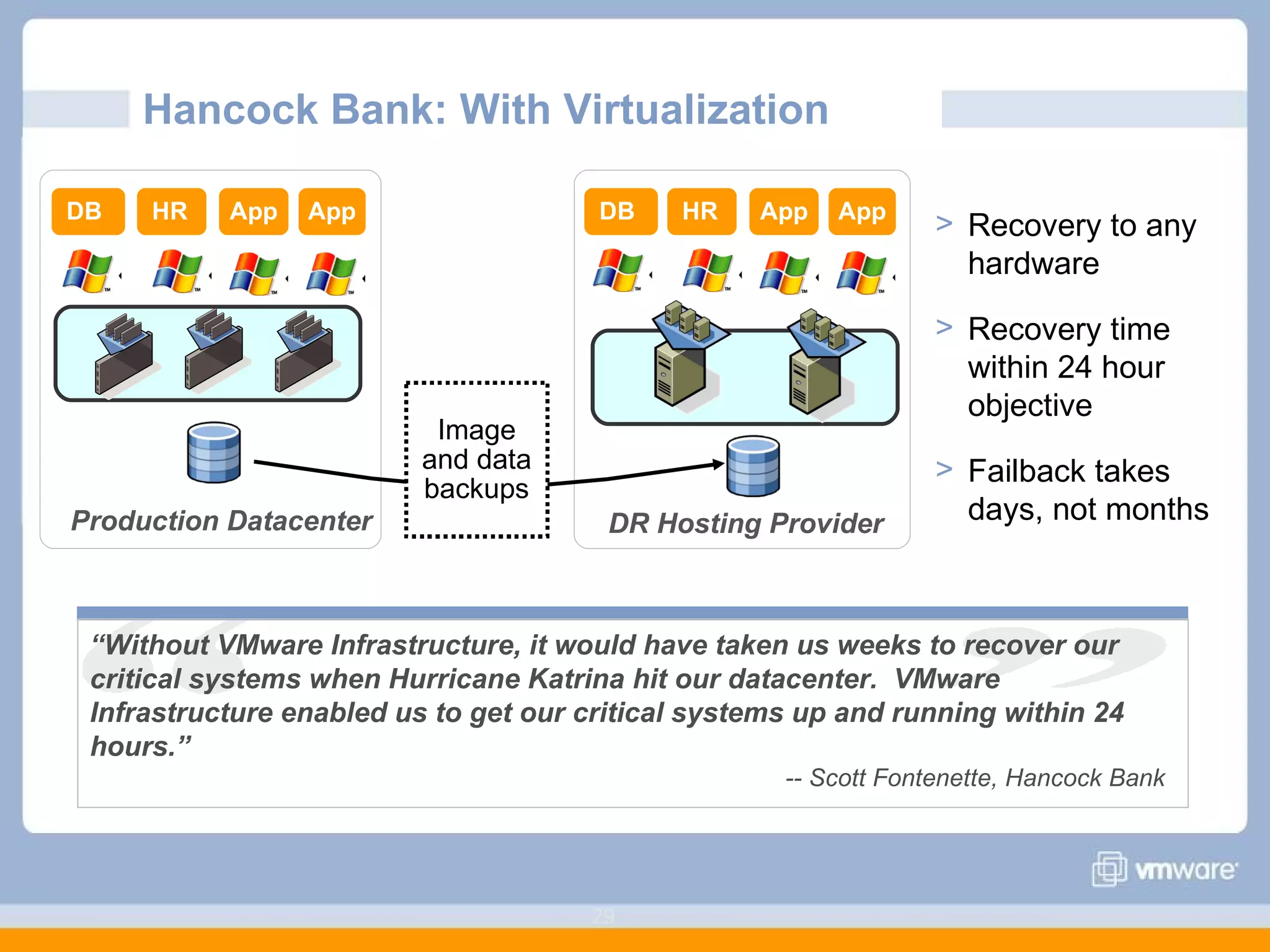
Hancock Bank: With Virtualization Production Datacenter DR Hosting Provider DB HR App App Recovery to any hardware  Recovery time within 24 hour objective Failback takes days, not months Image and data backups DB HR App App “ Without VMware Infrastructure, it would have taken us weeks to recover our critical systems when Hurricane Katrina hit our datacenter.  VMware Infrastructure enabled us to get our critical systems up and running within 24 hours.” -- Scott Fontenette, Hancock Bank
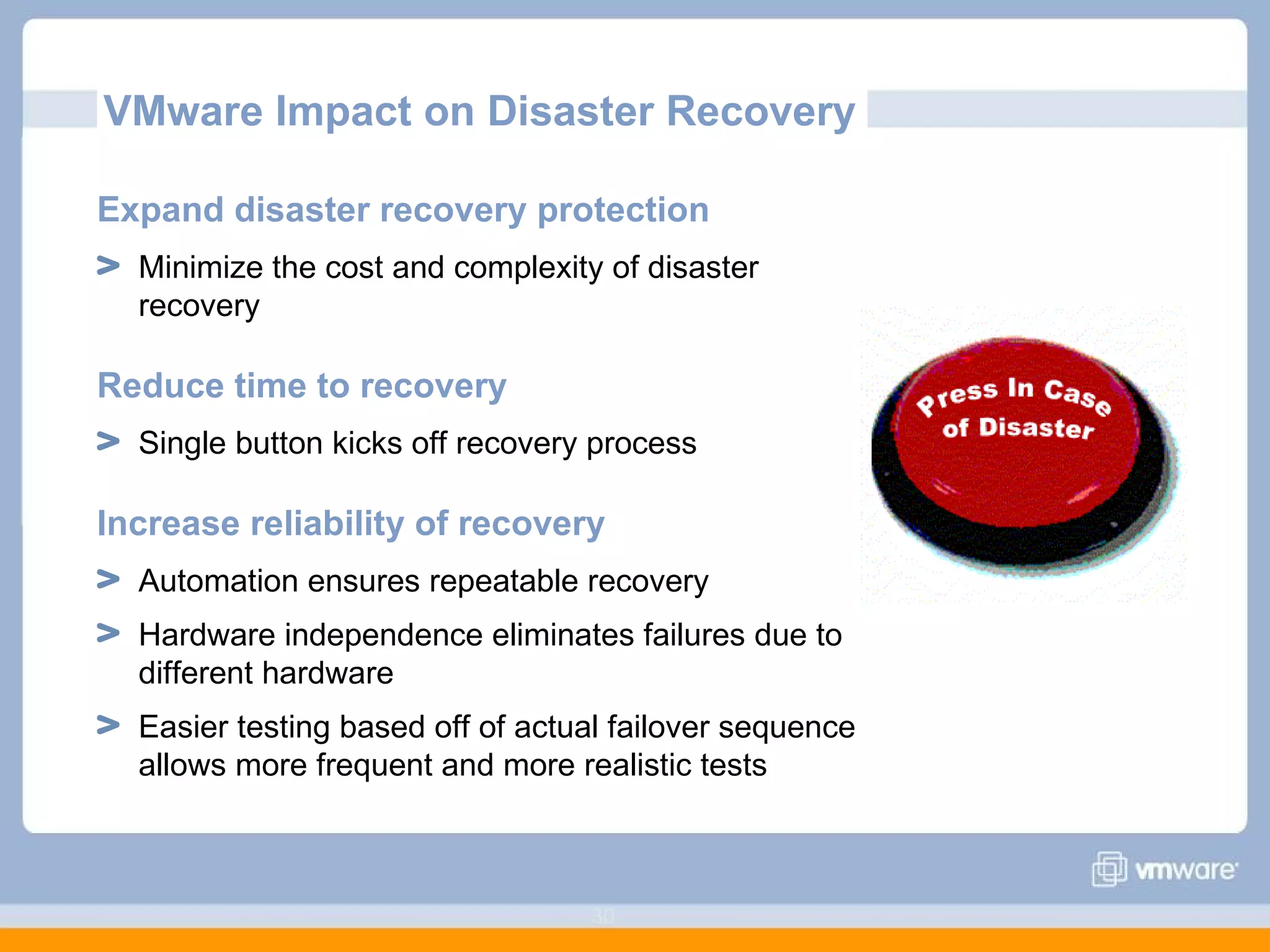
VMware Impact on Disaster Recovery Expand disaster recovery protection Minimize the cost and complexity of disaster recovery  Reduce time to recovery Single button kicks off recovery process Increase reliability of recovery Automation ensures repeatable recovery Hardware independence eliminates failures due to different hardware Easier testing based off of actual failover sequence allows more frequent and more realistic tests
Next Steps Learn more   Read more about VMware Business Continuity Solutions at  http:// www.vmware.com /solutions/continuity/ Find more business continuity customer case studies at  http:// www.vmware.com/customers/stories/index_continuity.html Start your evaluation VMware and partners can help you evaluate VMware software

Virtualize Your Disaster! Remove the Disaster from “Disaster Recovery”

  • 1.
    Virtualize Your Disaster!Remove the Disaster from “Disaster Recovery”
  • 2.
    Agenda Challengesof Traditional Disaster Recovery Improving Disaster Recovery with VMware Virtualization Impact of VMware Virtualization on Disaster Recovery
  • 3.
    Defining Disaster Recovery What is a “disaster”? Extended outage that requires an organization to recover IT services at an alternate or rebuilt site What is not a disaster? Failure of an individual server A short service interruption Power failure Server failure Disk failure Fire Hurricane Storage failure Flood Network failure Earthquake
  • 4.
    Requirements for DisasterRecovery Minimize Downtime 93% of companies that lost their data center for ten days or more due to a disaster filed for bankruptcy within one year of the disaster. --National Archives and Records Administration Control Cost Minimize Risk 73% of executives expressed concern with the costs associated with maintaining a secondary data centre --Beacon Technology Partners 92% of users surveyed acknowledged that their companies would face serious consequences if they had to implement their disaster recovery plans. --Dynamic Markets Ltd. Effective disaster recovery is a business imperative, but is very difficult to achieve
  • 5.
    Current State ofPhysical Disaster Recovery Disaster recovery protection tiered according to business priorities Recovery requirements continue to become more demanding Tier RPO RTO Cost I Immediate Immediate $$$ II 24+ hrs. 48+ hrs. $$ III 7+ days 5+ days $
  • 6.
    Physical Server Protection Multiple elements to protect to ensure recoverability Requires multiple technologies and processes System disk backups Backups and/or replication for applications and data Tracking of hardware configuration requirements Storage Server Operating System Application Application installation Application configuration OS configuration OS customizations Hardware configuration Firmware level & settings System disk Application data
  • 7.
    Disaster Recovery forPhysical Infrastructure Fastest, easiest recovery requires duplicate datacenter Servers Rack space Network infrastructure Storage infrastructure Power and cooling infrastructure Duplicating datacenter creates ongoing burdens Ongoing management to keep identical to production Idle except for occasional tests Production Recovery
  • 8.
    Disaster Recovery Processfor Physical Infrastructure Production Recovery Copy important data Hardware configuration System disk Application installation Application data Transfer data to recovery site Backup tapes CD’s/DVD’s Images (e.g. Ghost) Replication Start system and application recovery OS recovery Configuration Data recovery Testing WAN
  • 9.
    Complications of PhysicalRecovery Variety of information and data to protect Separate processes for system and data disks No easy way to track server configuration Tapes can be misplaced, mislabeled, or corrupted Complex recovery process Bare metal recovery procedures Failed recoveries due to hardware dependencies Many manual steps prone to user errors Inability to test recovery sufficiently Additional infrastructure Disruption to operations Recovery
  • 10.
    Challenges of DisasterRecovery Minimize downtime Reduce risk Control cost Many manual processes for recovery Multiple steps to overcome hardware differences Incomplete or out-of-date runbooks Testing requires additional hardware and infrastructure Usually only data is regularly and cleanly updated Frequent failures during recovery Simplest recovery requires identical hardware Idle recovery hardware is impossible to repurpose Multiple third-party products necessary for recovery
  • 11.
    Agenda Challengesof Traditional Disaster Recovery Improving Disaster Recovery with VMware Virtualization Properties of virtualization Data protection with virtualization Disaster recovery automation Impact of VMware Virtualization on Disaster Recovery
  • 12.
    VMware Vision forDisaster Recovery Rapid Automate recovery process Eliminate failures due to hardware dependencies Integrate different components of recovery Reliable Enable easier, more frequent testing Turn manual, inconsistent processes into pre-programmed, repeatable processes Manageable Centralize and simplify management of recovery plans Make disaster recovery protection a property of virtual infrastructure Affordable Eliminate idle recovery hardware Eliminate dependencies on physical infrastructure
  • 13.
    Virtualization Eliminates HardwareDependencies Copyright © 2006 VMware, Inc. All rights reserved. OS in virtual machine sees “virtual hardware” (CPU, SCSI disk, memory, network) Virtualization layer maps virtual hardware to physical hardware Virtual hardware remains identical regardless of physical hardware Virtual machines are hardware independent and can run on any server without modification Physical Hardware Virtual Machine Virtualization Layer OS Virtual Machine OS
  • 14.
    Virtualization Turns Systemsinto Data Copyright © 2006 VMware, Inc. All rights reserved. Everything about a system stored in small number of files Simplifies copying and cloning of systems Simplifies provisioning systems for recovery and recovery testing Virtual machines encapsulate and entire system in a few files on disk System Apps = files on disk Data Virtual Machine Physical Server
  • 15.
    Virtualized Server Protection Everything needed to recover a virtual machine is stored in a few files in a single folder on disk Hardware configuration (.vmx) Firmware settings (.nvram) Operating system install (.vmdk) Application install (.vmdk) Application data (.vmdk) Standard backup and replication tools can be used to protect virtual machines Virtual Machines VMFS Virtual Machine Servers ESX ESX ESX ESX
  • 16.
    Data Protection Optionsfor Virtual Machines Virtual machine backup File and image backup Useful for non-production and many production virtual machines Slowest recovery time Server-based replication Granular replication Often OS-dependent Processing overhead on server Array-based replication Minimal overhead on server LUN-level granularity Storage Servers Virtual Machines ESX ESX ESX Server-based replication Array-based replication Virtual machine backups
  • 17.
    Backup for VirtualMachines Hardware-independent backup and restore No bare metal recovery or operating system reinstall required Simplified backup of system state, boot disk, and data disks No need for separate tools and procedures Non-disruptive backup via Consolidated Backup interface Image and file-level backup Minimizes backup load on ESX and network Integrated with leading 3 rd -party backup products Backup Mount Snap Snap Storage ESX server Backup Server
  • 18.
    Virtualized Recovery Infrastructure Servers running VMware Infrastructure as recovery targets Can recover a VM to any VMware Infrastructure edition Virtual machine image VMware Converter to create virtual machine images of physical systems Backup or replication software to create copies of virtual machines Virtual Machines ESX ESX Recovery Production Converter ESX
  • 19.
    VMware Virtualization SimplifiesInfrastructure Requirements Eliminate need for identical infrastructure for recovery VMware Infrastructure provides hardware-independent recovery Reduces ongoing management burden of recovery site Reduce infrastructure requirements Consolidate production and recovery servers Waterfall servers from production to recovery VMware Production VMware Recovery
  • 20.
    Simplifying the DisasterRecovery Process Eliminate recovery steps No operating system re-install or bare-metal recovery No time spent reconfiguring hardware Standardize recovery process Consistent process independent of operating system and hardware Configure hardware Install OS Configure OS Install backup agent Start “Single-step automatic recovery” Restore VM Physical Virtual 40+ hrs < 4 hrs Power on VM
  • 21.
    Simpler Disaster RecoveryTesting with Virtualization Snapshot and clone replicated data to create testing VM’s Connect test VM’s to an isolated network Power up testing VM’s to validate recovery Delete VM clones used for testing SAN Recovery Site Data. OS Application Powered On DR VMs Live DR Test DR Replicated Data Snapshot Target VMFS OS.image Appln.image Data.image 15 GHz 9 GHz
  • 22.
    Simplifies and automatesdisaster recovery workflows: Setup, testing, failover Turns manual recovery runbooks into automated recovery plans Provides central management of recovery plans from VirtualCenter Automating the Disaster Recovery Process Works with VMware Infrastructure to make disaster recovery rapid, reliable, manageable, affordable Site Recovery Manager provides management and automation of the disaster recovery process for virtual machines
  • 23.
    Site Recovery ManagerKey Components Storage Servers VMware Infrastructure Virtual Machines VirtualCenter Site Recovery Manager Storage Servers VMware Infrastructure Virtual Machines VirtualCenter Site Recovery Manager Site Recovery Manager Manages and monitors recovery plans Tightly integrated with VirtualCenter Storage Partner Replication Integrated via replication adapters created, certified and supported by replication vendor Partner Replication VMware Infrastructure Requires ESX server 3.0.2, ESX 3.5 U1 or later Requires VirtualCenter 2.5 U1 or later Storage iSCSI or FibreChannel storage
  • 24.
    Disaster Recovery Setup Integrate with replication Identify which virtual machines are protected by replication configuration Map recovery resources Server resources, network resources, management objects Create recovery plans For virtual machines, applications, business units Convert manual runbook to pre-programmed response Customizable with scripting and callouts
  • 25.
    Testing ReplicationManagement Snapshot replicated LUNs before test Delete snapshots of replicated LUNs after test Network Management Change all virtual machines to a test port group before powering them on Customization/extensibility Same breakpoints and callouts as failover sequence Extra breakpoints and callouts around the test bubble
  • 26.
    Failover Automation Detect site failures Raise alert when heartbeat lost Initiate failover User confirmation of outage Granular failover initiation Manage replication failover Break replication Make replica visible to recovery hosts Execute recovery process Use pre-programmed plan Provide visibility into progress
  • 27.
    Agenda Challengesof Traditional Disaster Recovery Improving Disaster Recovery with VMware Virtualization Impact of VMware Virtualization on Disaster Recovery
  • 28.
    Hancock Bank: BeforeVirtualization Production Datacenter DB HR App App DR Hosting Provider Site DB HR App App Backup data Unknown hardware makes and models Recovery time unable to meet requirements Failing back to primary site takes months
  • 29.
    Hancock Bank: WithVirtualization Production Datacenter DR Hosting Provider DB HR App App Recovery to any hardware Recovery time within 24 hour objective Failback takes days, not months Image and data backups DB HR App App “ Without VMware Infrastructure, it would have taken us weeks to recover our critical systems when Hurricane Katrina hit our datacenter. VMware Infrastructure enabled us to get our critical systems up and running within 24 hours.” -- Scott Fontenette, Hancock Bank
  • 30.
    VMware Impact onDisaster Recovery Expand disaster recovery protection Minimize the cost and complexity of disaster recovery Reduce time to recovery Single button kicks off recovery process Increase reliability of recovery Automation ensures repeatable recovery Hardware independence eliminates failures due to different hardware Easier testing based off of actual failover sequence allows more frequent and more realistic tests
  • 31.
    Next Steps Learnmore Read more about VMware Business Continuity Solutions at http:// www.vmware.com /solutions/continuity/ Find more business continuity customer case studies at http:// www.vmware.com/customers/stories/index_continuity.html Start your evaluation VMware and partners can help you evaluate VMware software