

#evolverocks
Introduction to AEM
VARUN MITRA
August 30th, 2016
#evolverocks 2
1. Demo
2. Technologies
3. Terminology
4. Q & A
INTRODUCTION TO AEM
AGENDA
#evolverocks 4
WHAT IS ADOBE EXPERIENCE MANAGER?
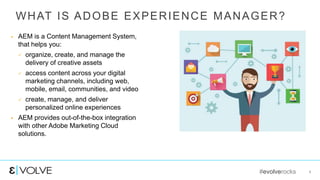
 AEM is a Content Management System,
that helps you:
 organize, create, and manage the
delivery of creative assets
 access content across your digital
marketing channels, including web,
mobile, email, communities, and video
 create, manage, and deliver
personalized online experiences
 AEM provides out-of-the-box integration
with other Adobe Marketing Cloud
solutions.
5
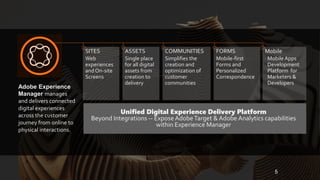
SITES
Web
experiences
and On-site
Screens
ASSETS
Single place
for all digital
assets from
creation to
delivery
COMMUNITIES
Simplifies the
creation and
optimization of
customer
communities
FORMS
Mobile-first
Forms and
Personalized
Correspondence
Mobile
Mobile Apps
Development
Platform for
Marketers &
Developers
Unified Digital Experience Delivery Platform
Beyond Integrations -- ExposeAdobeTarget & Adobe Analytics capabilities
within Experience Manager
Adobe Experience
Manager manages
and delivers connected
digital experiences
across the customer
journey from online to
physical interactions.
#evolverocks 6
KEY PRINCIPLES – STANDARDS AND OPEN
SOURCE
 100% Java
 JSR-283 – a JCR
 Apache Felix – an OSGi framework
 Apache Sling – a web framework for the Java
platform designed to create content-centric
applications on top of a Java Specification
Request (JSR)
 Apache Tika – a toolkit for detecting and extracting
metadata and structured text content
283
#evolverocks 7
KEY PRINCIPLES – EVERYTHING IS
CONTENT
 Everything is content!
 Hyper Text Markup Language (HTML)
 Cascading Style Sheets (CSS)
 Java Server Pages (JSP)
 Java Servlet
 Image
 Video
#evolverocks 10
AUTHORING INTERFACE
 Two author interfaces
 Touch-optimized UI
 Classic UI
 Web 2.0/Ajax
 Direct client-side JavaScript access to JCR
content
#evolverocks 11
ADMIN INTERFACES
 Apache Felix Console
 Content Repository eXtreme (CRX) interfaces
 CRXDE Lite
 Content Explorer
#evolverocks 12
CRXDE LITE
 Embedded into AEM/CRX
 Enables standard development tasks in a web browser
 Create and edit files (for example JSP, Java, and HTML), folders, templates, components, dialog
boxes, nodes, properties, and bundles
 Log messages
 Integration with Apache Subversion (SVN)
 Recommended when:
 No direct access to the AEM/CRX server
 Developing an application by extending or modifying the out-of-the-box components and Java
bundles
 No need for dedicated debugger or code completion
#evolverocks
THANK YOU!

EVOLVE'16 | Deploy | Varun Mitra | Introduction to AEM

  • 1.
  • 2.
    #evolverocks 2 1. Demo 2.Technologies 3. Terminology 4. Q & A INTRODUCTION TO AEM AGENDA
  • 3.
    #evolverocks 4 WHAT ISADOBE EXPERIENCE MANAGER?  AEM is a Content Management System, that helps you:  organize, create, and manage the delivery of creative assets  access content across your digital marketing channels, including web, mobile, email, communities, and video  create, manage, and deliver personalized online experiences  AEM provides out-of-the-box integration with other Adobe Marketing Cloud solutions.
  • 4.
    5 SITES Web experiences and On-site Screens ASSETS Single place forall digital assets from creation to delivery COMMUNITIES Simplifies the creation and optimization of customer communities FORMS Mobile-first Forms and Personalized Correspondence Mobile Mobile Apps Development Platform for Marketers & Developers Unified Digital Experience Delivery Platform Beyond Integrations -- ExposeAdobeTarget & Adobe Analytics capabilities within Experience Manager Adobe Experience Manager manages and delivers connected digital experiences across the customer journey from online to physical interactions.
  • 5.
    #evolverocks 6 KEY PRINCIPLES– STANDARDS AND OPEN SOURCE  100% Java  JSR-283 – a JCR  Apache Felix – an OSGi framework  Apache Sling – a web framework for the Java platform designed to create content-centric applications on top of a Java Specification Request (JSR)  Apache Tika – a toolkit for detecting and extracting metadata and structured text content 283
  • 6.
    #evolverocks 7 KEY PRINCIPLES– EVERYTHING IS CONTENT  Everything is content!  Hyper Text Markup Language (HTML)  Cascading Style Sheets (CSS)  Java Server Pages (JSP)  Java Servlet  Image  Video
  • 7.
    #evolverocks 10 AUTHORING INTERFACE Two author interfaces  Touch-optimized UI  Classic UI  Web 2.0/Ajax  Direct client-side JavaScript access to JCR content
  • 8.
    #evolverocks 11 ADMIN INTERFACES Apache Felix Console  Content Repository eXtreme (CRX) interfaces  CRXDE Lite  Content Explorer
  • 9.
    #evolverocks 12 CRXDE LITE Embedded into AEM/CRX  Enables standard development tasks in a web browser  Create and edit files (for example JSP, Java, and HTML), folders, templates, components, dialog boxes, nodes, properties, and bundles  Log messages  Integration with Apache Subversion (SVN)  Recommended when:  No direct access to the AEM/CRX server  Developing an application by extending or modifying the out-of-the-box components and Java bundles  No need for dedicated debugger or code completion
  • 10.