#evolve19
LET’S DIG INTO
REQUIREMENTS
Gina Petruccelli
August 6, 2019
#evolve19 2
SO YOU WANT TO START AN AEM PROJECT?
#evolve19 3
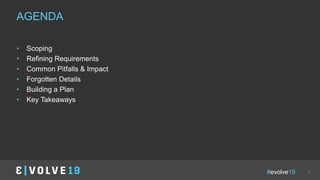
• Scoping
• Refining Requirements
• Common Pitfalls & Impact
• Forgotten Details
• Building a Plan
• Key Takeaways
AGENDA
#evolve19 4
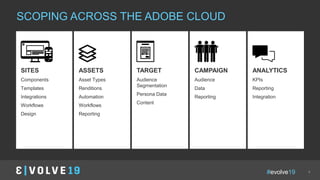
SCOPING ACROSS THE ADOBE CLOUD
TARGET
Audience
Segmentation
Persona Data
Content
SITES
Components
Templates
Integrations
Workflows
Design
ASSETS
Asset Types
Renditions
Automation
Workflows
Reporting
CAMPAIGN
Audience
Data
Reporting
ANALYTICS
KPIs
Reporting
Integration
#evolve19 5
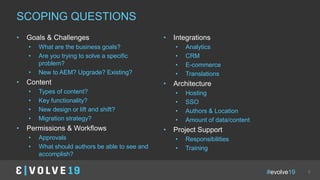
SCOPING QUESTIONS
• Goals & Challenges
• What are the business goals?
• Are you trying to solve a specific
problem?
• New to AEM? Upgrade? Existing?
• Content
• Types of content?
• Key functionality?
• New design or lift and shift?
• Migration strategy?
• Permissions & Workflows
• Approvals
• What should authors be able to see and
accomplish?
• Integrations
• Analytics
• CRM
• E-commerce
• Translations
• Architecture
• Hosting
• SSO
• Authors & Location
• Amount of data/content
• Project Support
• Responsibilities
• Training
#evolve19
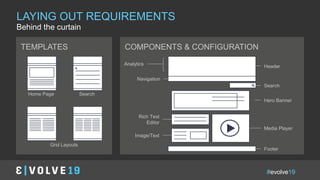
COMPONENTS & CONFIGURATIONTEMPLATES
Header
Footer
Rich Text
Editor
Media Player
Image/Text
Hero Banner
Navigation
Search
SearchHome Page
Grid Layouts
Analytics
Behind the curtain
LAYING OUT REQUIREMENTS
#evolve19
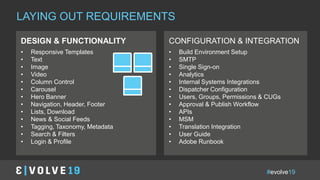
CONFIGURATION & INTEGRATION
• Build Environment Setup
• SMTP
• Single Sign-on
• Analytics
• Internal Systems Integrations
• Dispatcher Configuration
• Users, Groups, Permissions & CUGs
• Approval & Publish Workflow
• APIs
• MSM
• Translation Integration
• User Guide
• Adobe Runbook
DESIGN & FUNCTIONALITY
• Responsive Templates
• Text
• Image
• Video
• Column Control
• Carousel
• Hero Banner
• Navigation, Header, Footer
• Lists, Download
• News & Social Feeds
• Tagging, Taxonomy, Metadata
• Search & Filters
• Login & Profile
LAYING OUT REQUIREMENTS
#evolve19 8
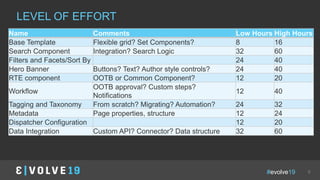
LEVEL OF EFFORT
Name Comments Low Hours High Hours
Base Template Flexible grid? Set Components? 8 16
Search Component Integration? Search Logic 32 60
Filters and Facets/Sort By 24 40
Hero Banner Buttons? Text? Author style controls? 24 40
RTE component OOTB or Common Component? 12 20
Workflow
OOTB approval? Custom steps?
Notifications
12 40
Tagging and Taxonomy From scratch? Migrating? Automation? 24 32
Metadata Page properties, structure 12 24
Dispatcher Configuration 12 20
Data Integration Custom API? Connector? Data structure 32 60
#evolve19 9
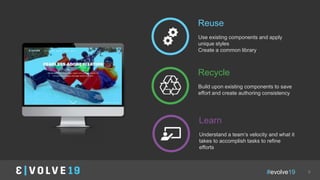
Reuse
Use existing components and apply
unique styles
Create a common library
Recycle
Build upon existing components to save
effort and create authoring consistency
Learn
Understand a team’s velocity and what it
takes to accomplish tasks to refine
efforts
image
#evolve19
Changes to Scope
Unclear Requirements
IN A NUTSHELL
Incomplete Design
Last Minute Additions
COMMON PITFALLS
Scope Creep
Roles & ResponsibilitiesDependencies
#evolve19
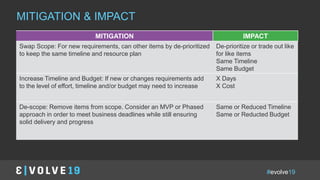
IN A NUTSHELLMITIGATION & IMPACT
MITIGATION IMPACT
Swap Scope: For new requirements, can other items by de-prioritized
to keep the same timeline and resource plan
De-prioritize or trade out like
for like items
Same Timeline
Same Budget
Increase Timeline and Budget: If new or changes requirements add
to the level of effort, timeline and/or budget may need to increase
X Days
X Cost
De-scope: Remove items from scope. Consider an MVP or Phased
approach in order to meet business deadlines while still ensuring
solid delivery and progress
Same or Reduced Timeline
Same or Reducted Budget
#evolve19
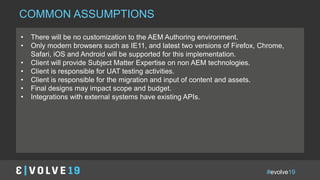
COMMON ASSUMPTIONS
• There will be no customization to the AEM Authoring environment.
• Only modern browsers such as IE11, and latest two versions of Firefox, Chrome,
Safari, iOS and Android will be supported for this implementation.
• Client will provide Subject Matter Expertise on non AEM technologies.
• Client is responsible for UAT testing activities.
• Client is responsible for the migration and input of content and assets.
• Final designs may impact scope and budget.
• Integrations with external systems have existing APIs.
#evolve19
Code Reviews Meetings
Documentation
IN A NUTSHELL
Testing
WHAT EVERYONE FORGETS
#evolve19
IN A NUTSHELLWHAT EVERYONE FORGETS
Documentation
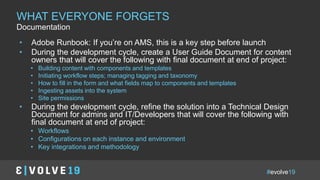
• Adobe Runbook: If you’re on AMS, this is a key step before launch
• During the development cycle, create a User Guide Document for content
owners that will cover the following with final document at end of project:
• Building content with components and templates
• Initiating workflow steps; managing tagging and taxonomy
• How to fill in the form and what fields map to components and templates
• Ingesting assets into the system
• Site permissions
• During the development cycle, refine the solution into a Technical Design
Document for admins and IT/Developers that will cover the following with
final document at end of project:
• Workflows
• Configurations on each instance and environment
• Key integrations and methodology
#evolve19
IN A NUTSHELLWHAT EVERYONE FORGETS
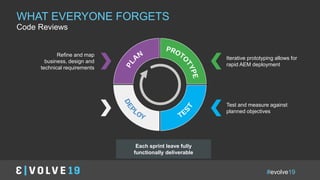
Code Reviews
Iterative prototyping allows for
rapid AEM deployment
Test and measure against
planned objectives
Refine and map
business, design and
technical requirements
Each sprint leave fully
functionally deliverable
#evolve19
IN A NUTSHELLWHAT EVERYONE FORGETS
Testing
#evolve19
IN A NUTSHELLWHAT EVERYONE FORGETS
Meetings
• DSUs
• Weekly Status Meetings
• Grooming and Greening Sessions
• Demos
• Solution Discussions
• Testing and Handoffs
#evolve19 18
THE RIGHT FORMULA
Total Hours Rate Cost
Engagement
Manager
60 5 5 5 5 5 5 5 5 5 5 5 5 60 $160 $9,600
Project
Manager
240 20 20 20 20 20 20 20 20 20 20 20 20 240 $160 $38,400
AEM Architect 480 40 40 40 40 40 40 40 40 40 40 40 40 480 $160 $76,800
Developer 320 0 0 40 40 40 40 40 40 40 40 0 0 320 $160 $51,200
FE Developer 320 0 0 40 40 40 40 40 40 40 40 0 0 320 $160 $51,200
Discover
y
Sprint 1 Sprint 2 Sprint 3 UAT
Launc
h
Post-
Launch
Total 1420 Total $227,200
Total Development Hours 720
TA oversight 60
Estimated Development
Hours during sprint
612
Difference in hours 48
#evolve19
PROJECT TIMELINE PHASE 1 MILESTONES
Discovery / Solution
Architecture
Weeks 1-4
AEM Development
Sprint Weeks 2-12
Final Testing | UAT |
Launch Readiness
Week 10-14
Go Live/Deploy/
Short-Term Post Launch
Weeks 12-16
 Kick-off
 Validation of
Requirements
 UX & UI review
 Planning & scheduling
 Architecture and
Directional design
 Environment build out
 Project set up and
onboarding
 X Development Sprints (2-3
weeks each)
 Sprint Demo at end of sprint
 Functionality delivered in
each sprint defined in
Solution Design
 Environment build-out
 QA can start after Sprint 1
 Weekly Status Calls
 Daily Stand Ups
 Content Migration
 Knowledge Transfer
sessions
 Final testing
including UAT
 Deployment
preparation
 Enablement
preparation
 User Guide
Development
 Go-Live Activities
 Knowledge Transfer
cont.
 Short Term Post Launch
Support
 Hand-off Documentation
PROJECT MILESTONES
#evolve19 20
MVP Timeline
Full ProjectTimeline
MVP VS POST MVP
#evolve19
IN A NUTSHELLPROJECT PLAN HAND-OFF & POST-PROJECT
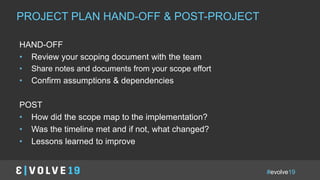
HAND-OFF
• Review your scoping document with the team
• Share notes and documents from your scope effort
• Confirm assumptions & dependencies
POST
• How did the scope map to the implementation?
• Was the timeline met and if not, what changed?
• Lessons learned to improve
#evolve19
IN A NUTSHELLKEY TAKE-AWAYS
• Pick Your Flavor
• Dig Into the Scope
• Define Your Requirements
• Understand Impacts
• Create a Plan
• Hand-Off to Your Team
#evolve19 23
ABOUT
Twitter
twitter.com/3SHARE
Linkledin
linkedin.com/in/gpetruccelli
Photo placeholder
Gina Petruccelli
Client Services Solutions Director
3|SHARE
gina.petruccelli@3sharecorp.com
850-803-2149
#evolve19
QUESTIONS?
NOPE, WELL
THANK YOU!

Evolve 19 | Gina Petruccelli | Let’s Dig Into Requirements

  • 1.
  • 2.
    #evolve19 2 SO YOUWANT TO START AN AEM PROJECT?
  • 3.
    #evolve19 3 • Scoping •Refining Requirements • Common Pitfalls & Impact • Forgotten Details • Building a Plan • Key Takeaways AGENDA
  • 4.
    #evolve19 4 SCOPING ACROSSTHE ADOBE CLOUD TARGET Audience Segmentation Persona Data Content SITES Components Templates Integrations Workflows Design ASSETS Asset Types Renditions Automation Workflows Reporting CAMPAIGN Audience Data Reporting ANALYTICS KPIs Reporting Integration
  • 5.
    #evolve19 5 SCOPING QUESTIONS •Goals & Challenges • What are the business goals? • Are you trying to solve a specific problem? • New to AEM? Upgrade? Existing? • Content • Types of content? • Key functionality? • New design or lift and shift? • Migration strategy? • Permissions & Workflows • Approvals • What should authors be able to see and accomplish? • Integrations • Analytics • CRM • E-commerce • Translations • Architecture • Hosting • SSO • Authors & Location • Amount of data/content • Project Support • Responsibilities • Training
  • 6.
    #evolve19 COMPONENTS & CONFIGURATIONTEMPLATES Header Footer RichText Editor Media Player Image/Text Hero Banner Navigation Search SearchHome Page Grid Layouts Analytics Behind the curtain LAYING OUT REQUIREMENTS
  • 7.
    #evolve19 CONFIGURATION & INTEGRATION •Build Environment Setup • SMTP • Single Sign-on • Analytics • Internal Systems Integrations • Dispatcher Configuration • Users, Groups, Permissions & CUGs • Approval & Publish Workflow • APIs • MSM • Translation Integration • User Guide • Adobe Runbook DESIGN & FUNCTIONALITY • Responsive Templates • Text • Image • Video • Column Control • Carousel • Hero Banner • Navigation, Header, Footer • Lists, Download • News & Social Feeds • Tagging, Taxonomy, Metadata • Search & Filters • Login & Profile LAYING OUT REQUIREMENTS
  • 8.
    #evolve19 8 LEVEL OFEFFORT Name Comments Low Hours High Hours Base Template Flexible grid? Set Components? 8 16 Search Component Integration? Search Logic 32 60 Filters and Facets/Sort By 24 40 Hero Banner Buttons? Text? Author style controls? 24 40 RTE component OOTB or Common Component? 12 20 Workflow OOTB approval? Custom steps? Notifications 12 40 Tagging and Taxonomy From scratch? Migrating? Automation? 24 32 Metadata Page properties, structure 12 24 Dispatcher Configuration 12 20 Data Integration Custom API? Connector? Data structure 32 60
  • 9.
    #evolve19 9 Reuse Use existingcomponents and apply unique styles Create a common library Recycle Build upon existing components to save effort and create authoring consistency Learn Understand a team’s velocity and what it takes to accomplish tasks to refine efforts image
  • 10.
    #evolve19 Changes to Scope UnclearRequirements IN A NUTSHELL Incomplete Design Last Minute Additions COMMON PITFALLS Scope Creep Roles & ResponsibilitiesDependencies
  • 11.
    #evolve19 IN A NUTSHELLMITIGATION& IMPACT MITIGATION IMPACT Swap Scope: For new requirements, can other items by de-prioritized to keep the same timeline and resource plan De-prioritize or trade out like for like items Same Timeline Same Budget Increase Timeline and Budget: If new or changes requirements add to the level of effort, timeline and/or budget may need to increase X Days X Cost De-scope: Remove items from scope. Consider an MVP or Phased approach in order to meet business deadlines while still ensuring solid delivery and progress Same or Reduced Timeline Same or Reducted Budget
  • 12.
    #evolve19 COMMON ASSUMPTIONS • Therewill be no customization to the AEM Authoring environment. • Only modern browsers such as IE11, and latest two versions of Firefox, Chrome, Safari, iOS and Android will be supported for this implementation. • Client will provide Subject Matter Expertise on non AEM technologies. • Client is responsible for UAT testing activities. • Client is responsible for the migration and input of content and assets. • Final designs may impact scope and budget. • Integrations with external systems have existing APIs.
  • 13.
    #evolve19 Code Reviews Meetings Documentation INA NUTSHELL Testing WHAT EVERYONE FORGETS
  • 14.
    #evolve19 IN A NUTSHELLWHATEVERYONE FORGETS Documentation • Adobe Runbook: If you’re on AMS, this is a key step before launch • During the development cycle, create a User Guide Document for content owners that will cover the following with final document at end of project: • Building content with components and templates • Initiating workflow steps; managing tagging and taxonomy • How to fill in the form and what fields map to components and templates • Ingesting assets into the system • Site permissions • During the development cycle, refine the solution into a Technical Design Document for admins and IT/Developers that will cover the following with final document at end of project: • Workflows • Configurations on each instance and environment • Key integrations and methodology
  • 15.
    #evolve19 IN A NUTSHELLWHATEVERYONE FORGETS Code Reviews Iterative prototyping allows for rapid AEM deployment Test and measure against planned objectives Refine and map business, design and technical requirements Each sprint leave fully functionally deliverable
  • 16.
    #evolve19 IN A NUTSHELLWHATEVERYONE FORGETS Testing
  • 17.
    #evolve19 IN A NUTSHELLWHATEVERYONE FORGETS Meetings • DSUs • Weekly Status Meetings • Grooming and Greening Sessions • Demos • Solution Discussions • Testing and Handoffs
  • 18.
    #evolve19 18 THE RIGHTFORMULA Total Hours Rate Cost Engagement Manager 60 5 5 5 5 5 5 5 5 5 5 5 5 60 $160 $9,600 Project Manager 240 20 20 20 20 20 20 20 20 20 20 20 20 240 $160 $38,400 AEM Architect 480 40 40 40 40 40 40 40 40 40 40 40 40 480 $160 $76,800 Developer 320 0 0 40 40 40 40 40 40 40 40 0 0 320 $160 $51,200 FE Developer 320 0 0 40 40 40 40 40 40 40 40 0 0 320 $160 $51,200 Discover y Sprint 1 Sprint 2 Sprint 3 UAT Launc h Post- Launch Total 1420 Total $227,200 Total Development Hours 720 TA oversight 60 Estimated Development Hours during sprint 612 Difference in hours 48
  • 19.
    #evolve19 PROJECT TIMELINE PHASE1 MILESTONES Discovery / Solution Architecture Weeks 1-4 AEM Development Sprint Weeks 2-12 Final Testing | UAT | Launch Readiness Week 10-14 Go Live/Deploy/ Short-Term Post Launch Weeks 12-16  Kick-off  Validation of Requirements  UX & UI review  Planning & scheduling  Architecture and Directional design  Environment build out  Project set up and onboarding  X Development Sprints (2-3 weeks each)  Sprint Demo at end of sprint  Functionality delivered in each sprint defined in Solution Design  Environment build-out  QA can start after Sprint 1  Weekly Status Calls  Daily Stand Ups  Content Migration  Knowledge Transfer sessions  Final testing including UAT  Deployment preparation  Enablement preparation  User Guide Development  Go-Live Activities  Knowledge Transfer cont.  Short Term Post Launch Support  Hand-off Documentation PROJECT MILESTONES
  • 20.
    #evolve19 20 MVP Timeline FullProjectTimeline MVP VS POST MVP
  • 21.
    #evolve19 IN A NUTSHELLPROJECTPLAN HAND-OFF & POST-PROJECT HAND-OFF • Review your scoping document with the team • Share notes and documents from your scope effort • Confirm assumptions & dependencies POST • How did the scope map to the implementation? • Was the timeline met and if not, what changed? • Lessons learned to improve
  • 22.
    #evolve19 IN A NUTSHELLKEYTAKE-AWAYS • Pick Your Flavor • Dig Into the Scope • Define Your Requirements • Understand Impacts • Create a Plan • Hand-Off to Your Team
  • 23.
    #evolve19 23 ABOUT Twitter twitter.com/3SHARE Linkledin linkedin.com/in/gpetruccelli Photo placeholder GinaPetruccelli Client Services Solutions Director 3|SHARE gina.petruccelli@3sharecorp.com 850-803-2149
  • 24.

Editor's Notes

  • #5 Focus primarlily on sites and assets but some topics overlap
  • #8 Does something need to be done in a certain order? Dependencies like an API: who’s writing it? Does the system have an out of the box connector? Do you need to plan with client’s IT?
  • #10  Look for ways to reuse, recycle and learn your team’s velocity on similar items Tracking how a project has gone
  • #11 Scope Creep Changes Additions No designs What do I even want?
  • #12 Scope Creep Changes Additions No designs What do I even want?
  • #14 Documentation: Adobe Runbook, Technical design, user guides, User acceptance test scripts Technical Oversight/Code Review ALL THE MEETINGS from grooming and greening to sprint planning, dsus, solutioning Accounting for testing: do your estimates include time for unit tests, do you have a qa analyst? Have you thought about sprint demos and handing off to QA? UAT time based on scope of work
  • #15 Documentation: Adobe Runbook, Technical design, user guides, User acceptance test scripts Technical Oversight/Code Review ALL THE MEETINGS from grooming and greening to sprint planning, dsus, solutioning Accounting for testing: do your estimates include time for unit tests, do you have a qa analyst? Have you thought about sprint demos and handing off to QA? UAT time based on scope of work
  • #16 Documentation: Adobe Runbook, Technical design, user guides, User acceptance test scripts Technical Oversight/Code Review ALL THE MEETINGS from grooming and greening to sprint planning, dsus, solutioning Accounting for testing: do your estimates include time for unit tests, do you have a qa analyst? Have you thought about sprint demos and handing off to QA? UAT time based on scope of work
  • #17 Documentation: Adobe Runbook, Technical design, user guides, User acceptance test scripts Technical Oversight/Code Review ALL THE MEETINGS from grooming and greening to sprint planning, dsus, solutioning Accounting for testing: do your estimates include time for unit tests, do you have a qa analyst? Have you thought about sprint demos and handing off to QA? UAT time based on scope of work
  • #18 Documentation: Adobe Runbook, Technical design, user guides, User acceptance test scripts Technical Oversight/Code Review ALL THE MEETINGS from grooming and greening to sprint planning, dsus, solutioning Accounting for testing: do your estimates include time for unit tests, do you have a qa analyst? Have you thought about sprint demos and handing off to QA? UAT time based on scope of work
  • #19 Building a Plan Low/high and taking median Full project vs MVP Handing Off to a Team
  • #22 Gap between project kickoff and not
  • #23 Documentation: Adobe Runbook, Technical design, user guides, User acceptance test scripts Technical Oversight/Code Review ALL THE MEETINGS from grooming and greening to sprint planning, dsus, solutioning Accounting for testing: do your estimates include time for unit tests, do you have a qa analyst? Have you thought about sprint demos and handing off to QA? UAT time based on scope of work