Mini Project
Hemant Sarthak
A41895516040
E-Commerce Website
We developed a basic ecommerce website focused on
smartphones and created all the related pages to it for our mini
project.
The work was divided among team members like:
▪ Coding done by Hemant
▪ UI Designing done by Ayush and Ayushman
▪ Testing done by Ujjwal
Coding was done by me using various tools, techniques and
components which are described in the upcoming slides.
2
Components
A basic overview of the various
Components used in the Mini Project.
Tools and Software Used
These are some of the various tools and software used to develop the
Mini Project:
4
JavaScript
It is used to create basic logic
processes used to perform
various tasks on the user side
while reducing lag.
Bootstrap
Bootstrap is a free and open-
source CSS framework
directed at responsive,
mobile-first front-end web
development.
Adobe
Dreamweaver
It is editor used to edit HTML,
PHP, Javascript, CSS and
related files and can also be
used to upload them to one's
Web server.
Atom
Atom is a free and open-
source text and source code
editor for with support for
plug-ins written in Node.js,
and embedded Git Control,
developed by GitHub.
Browser
DevTools
DevTools can help you edit
pages on-the-fly and
diagnose problems quickly,
which ultimately helps you
build better websites, faster
VS Code
Visual Studio Code is a
source-code editor developed
by Microsoft for Windows,
Linux and macOS. It also
includes embedded Git
support.
Adobe XD
Adobe XD is a vector-based
user experience design tool
for web apps and mobile
apps, developed and
published by Adobe Inc.
Front End Components
These are some of the various front end components used to develop
the Mini Project:
5
JavaScript
It is used to create basic logic
processes used to perform
various tasks on the user side
while reducing lag.
Bootstrap
Bootstrap is a free and open-
source CSS framework
directed at responsive,
mobile-first front-end web
development.
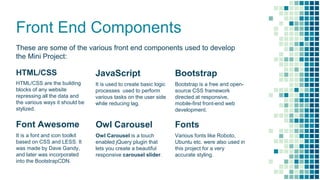
HTML/CSS
HTML/CSS are the building
blocks of any website
repressing all the data and
the various ways it should be
stylized.
JavaScript
It is used to create basic logic
processes used to perform
various tasks on the user side
while reducing lag.
Bootstrap
Bootstrap is a free and open-
source CSS framework
directed at responsive,
mobile-first front-end web
development.
Owl Carousel
Owl Carousel is a touch
enabled jQuery plugin that
lets you create a beautiful
responsive carousel slider.
Fonts
Various fonts like Roboto,
Ubuntu etc. were also used in
this project for a very
accurate styling.
Font Awesome
It is a font and icon toolkit
based on CSS and LESS. It
was made by Dave Gandy,
and later was incorporated
into the BootstrapCDN.
E-commerce
Website
Few Snippets & Summary of Various
Pages created for the Mini Project.
Coding Tasks
The various coding tasks I completed based on input from my
team members:
▪ Developing the various Website Pages.
▪ Adding Sliders
▪ Mobile Optimizations
▪ Image Optimizations
▪ Instagram Feed
▪ Google Maps Integration etc.
These were some of the various tasks I was able to complete in
a very user friendly manner without and bugs courtesy of my
team members valuable insights and feedback in UI and
Testing.
7
Place your screenshot here
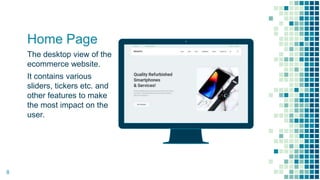
Home Page
The desktop view of the
ecommerce website.
It contains various
sliders, tickers etc. and
other features to make
the most impact on the
user.
8
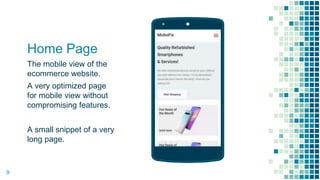
Home Page
The mobile view of the
ecommerce website.
A very optimized page
for mobile view without
compromising features.
A small snippet of a very
long page.
Place your screenshot here
9
Place your screenshot here
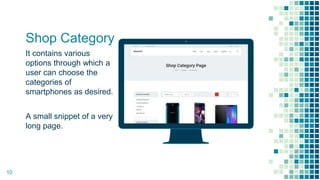
Shop Category
It contains various
options through which a
user can choose the
categories of
smartphones as desired.
A small snippet of a very
long page.
10
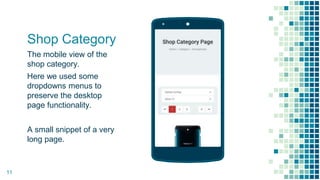
Shop Category
The mobile view of the
shop category.
Here we used some
dropdowns menus to
preserve the desktop
page functionality.
A small snippet of a very
long page.
Place your screenshot here
11
Place your screenshot here
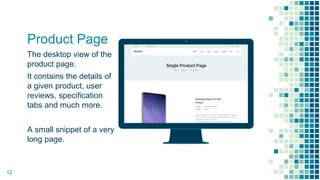
Product Page
The desktop view of the
product page.
It contains the details of
a given product, user
reviews, specification
tabs and much more.
A small snippet of a very
long page.
12
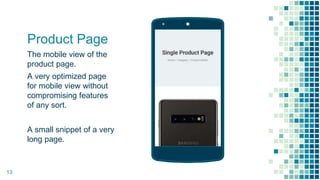
Product Page
The mobile view of the
product page.
A very optimized page
for mobile view without
compromising features
of any sort.
A small snippet of a very
long page.
Place your screenshot here
13
Place your screenshot here
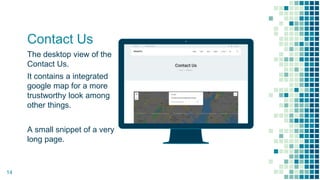
Contact Us
The desktop view of the
Contact Us.
It contains a integrated
google map for a more
trustworthy look among
other things.
A small snippet of a very
long page.
14
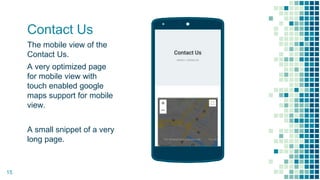
Contact Us
The mobile view of the
Contact Us.
A very optimized page
for mobile view with
touch enabled google
maps support for mobile
view.
A small snippet of a very
long page.
Place your screenshot here
15
Conclusion
Some of the pages we created for the E-commerce website are
shown here, the various pages I coded allowed me to learn:
▪ Adding Sliders
▪ Mobile Responsive Optimizations
▪ Lazy Image Loading
▪ Timers and Range Bars
▪ Google Maps Integration etc.
In conclusion, this mini project helped us learn various new
design, coding, testing and maintenance techniques which will
surely help us in the long run.
16
THANK YOU
17
Hemant Sarthak
A41895516040

Ecommerce Mini Project / Group Project Coding

  • 1.
  • 2.
    E-Commerce Website We developeda basic ecommerce website focused on smartphones and created all the related pages to it for our mini project. The work was divided among team members like: ▪ Coding done by Hemant ▪ UI Designing done by Ayush and Ayushman ▪ Testing done by Ujjwal Coding was done by me using various tools, techniques and components which are described in the upcoming slides. 2
  • 3.
    Components A basic overviewof the various Components used in the Mini Project.
  • 4.
    Tools and SoftwareUsed These are some of the various tools and software used to develop the Mini Project: 4 JavaScript It is used to create basic logic processes used to perform various tasks on the user side while reducing lag. Bootstrap Bootstrap is a free and open- source CSS framework directed at responsive, mobile-first front-end web development. Adobe Dreamweaver It is editor used to edit HTML, PHP, Javascript, CSS and related files and can also be used to upload them to one's Web server. Atom Atom is a free and open- source text and source code editor for with support for plug-ins written in Node.js, and embedded Git Control, developed by GitHub. Browser DevTools DevTools can help you edit pages on-the-fly and diagnose problems quickly, which ultimately helps you build better websites, faster VS Code Visual Studio Code is a source-code editor developed by Microsoft for Windows, Linux and macOS. It also includes embedded Git support. Adobe XD Adobe XD is a vector-based user experience design tool for web apps and mobile apps, developed and published by Adobe Inc.
  • 5.
    Front End Components Theseare some of the various front end components used to develop the Mini Project: 5 JavaScript It is used to create basic logic processes used to perform various tasks on the user side while reducing lag. Bootstrap Bootstrap is a free and open- source CSS framework directed at responsive, mobile-first front-end web development. HTML/CSS HTML/CSS are the building blocks of any website repressing all the data and the various ways it should be stylized. JavaScript It is used to create basic logic processes used to perform various tasks on the user side while reducing lag. Bootstrap Bootstrap is a free and open- source CSS framework directed at responsive, mobile-first front-end web development. Owl Carousel Owl Carousel is a touch enabled jQuery plugin that lets you create a beautiful responsive carousel slider. Fonts Various fonts like Roboto, Ubuntu etc. were also used in this project for a very accurate styling. Font Awesome It is a font and icon toolkit based on CSS and LESS. It was made by Dave Gandy, and later was incorporated into the BootstrapCDN.
  • 6.
    E-commerce Website Few Snippets &Summary of Various Pages created for the Mini Project.
  • 7.
    Coding Tasks The variouscoding tasks I completed based on input from my team members: ▪ Developing the various Website Pages. ▪ Adding Sliders ▪ Mobile Optimizations ▪ Image Optimizations ▪ Instagram Feed ▪ Google Maps Integration etc. These were some of the various tasks I was able to complete in a very user friendly manner without and bugs courtesy of my team members valuable insights and feedback in UI and Testing. 7
  • 8.
    Place your screenshothere Home Page The desktop view of the ecommerce website. It contains various sliders, tickers etc. and other features to make the most impact on the user. 8
  • 9.
    Home Page The mobileview of the ecommerce website. A very optimized page for mobile view without compromising features. A small snippet of a very long page. Place your screenshot here 9
  • 10.
    Place your screenshothere Shop Category It contains various options through which a user can choose the categories of smartphones as desired. A small snippet of a very long page. 10
  • 11.
    Shop Category The mobileview of the shop category. Here we used some dropdowns menus to preserve the desktop page functionality. A small snippet of a very long page. Place your screenshot here 11
  • 12.
    Place your screenshothere Product Page The desktop view of the product page. It contains the details of a given product, user reviews, specification tabs and much more. A small snippet of a very long page. 12
  • 13.
    Product Page The mobileview of the product page. A very optimized page for mobile view without compromising features of any sort. A small snippet of a very long page. Place your screenshot here 13
  • 14.
    Place your screenshothere Contact Us The desktop view of the Contact Us. It contains a integrated google map for a more trustworthy look among other things. A small snippet of a very long page. 14
  • 15.
    Contact Us The mobileview of the Contact Us. A very optimized page for mobile view with touch enabled google maps support for mobile view. A small snippet of a very long page. Place your screenshot here 15
  • 16.
    Conclusion Some of thepages we created for the E-commerce website are shown here, the various pages I coded allowed me to learn: ▪ Adding Sliders ▪ Mobile Responsive Optimizations ▪ Lazy Image Loading ▪ Timers and Range Bars ▪ Google Maps Integration etc. In conclusion, this mini project helped us learn various new design, coding, testing and maintenance techniques which will surely help us in the long run. 16
  • 17.