EVOLUTION OF LAPTOPS
A BRIEF INTRODUCTION.
CONTENTS
 Introduction
 History
 Advantages
 Disadvantages
 Usage to society and people
 conclusions
INTRODUCTION
A laptop, often called a notebook or "notebook computer", is a small, portable personal computer with a
"clamshell" form factor, an alphanumeric keyboard on the lower part of the "clamshell" and a thin LCD
or LED computer screen on the upper portion, which is opened up to use the computer. Laptops are
folded shut for transportation, and thus are suitable for mobile use. Although originally there was a
distinction between laptops and notebooks, the former being bigger and heavier than the latter, as of
2014, there is often no longer any difference. Laptops are commonly used in a variety of settings, such as
at work, in education, and for personal multimedia and home computer use.
A laptop combines the components, inputs, outputs, and capabilities of a desktop computer, including the
display screen, small speakers, a keyboard, pointing devices (such as a touchpad or trackpad), a processor, and
memory into a single unit. Most 2016-era laptops also have integrated webcams and built-in microphones. Some
2016-era laptops have touchscreens. Laptops can be powered either from an internal battery or by an external
power supply from an AC adapter. Hardware specifications, such as the processor speed and memory capacity,
significantly vary between different types, makes, models and price points.
As the personal computer (PC) became feasible in 1971, the idea of a
portable personal computer soon followed. A "personal, portable
information manipulator" was imagined by Alan Kay at Xerox PARC
in 1968, and described in his 1972 paper as the "Dynabook". The
IBM Special Computer APL Machine Portable (SCAMP) was
demonstrated in 1973. This prototype was based on the IBM PALM
processor. The IBM 5100, the first commercially available portable
computer, appeared in September 1975, and was based on the
SCAMP prototype.
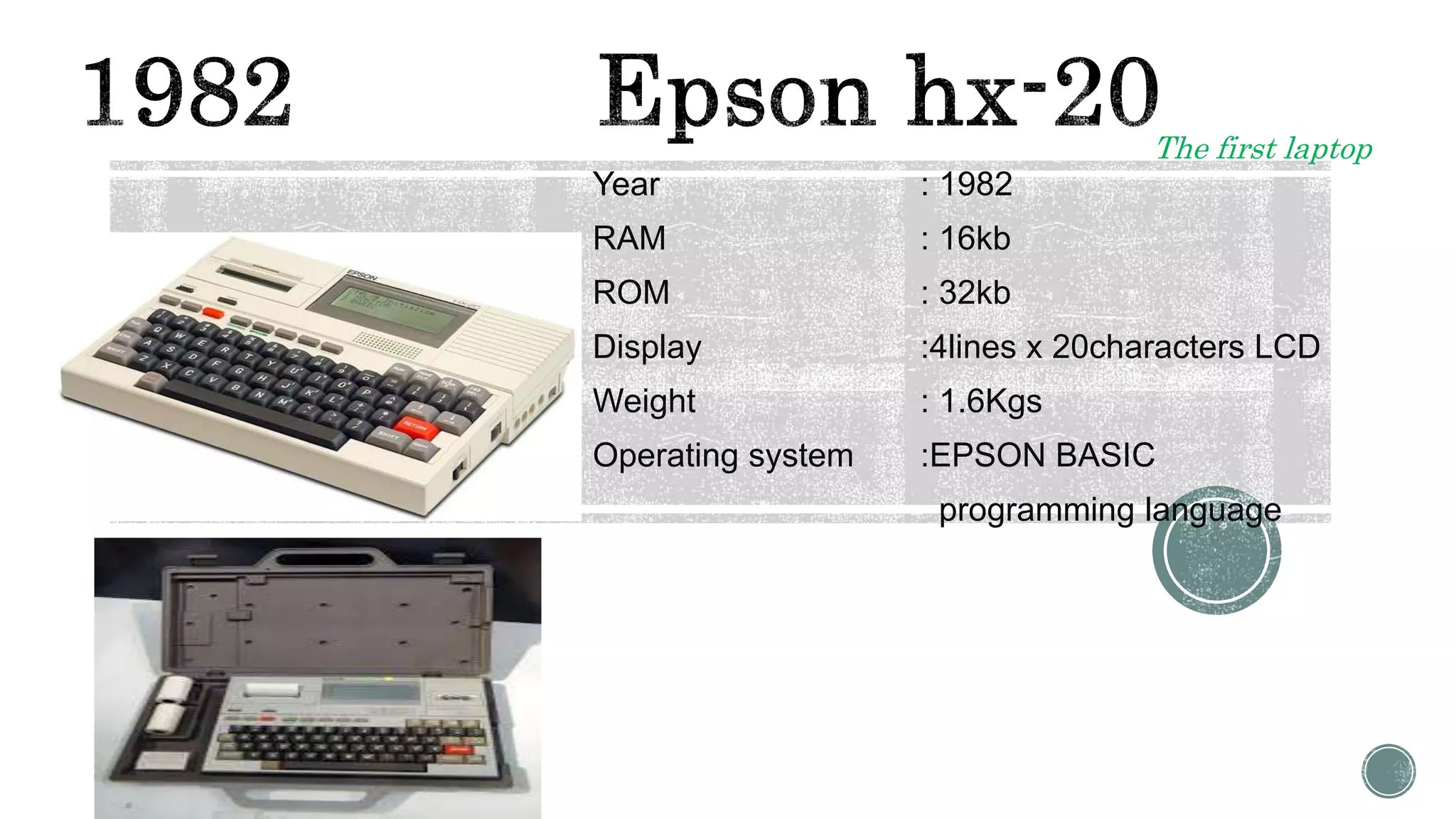
Year : 1982
RAM : 16kb
ROM : 32kb
Display :4lines x 20characters LCD
Weight : 1.6Kgs
Operating system :EPSON BASIC
programming language
The first laptop
Year : 1983
RAM : 32kb
ROM : 32kb
CPU : 2.4-MHz Intel 80C85
Display : 8 lines, 40 characters LCD
Weight : 1.4Kgs
Operating system : Custom dedicated runtime
in firmware
1984 IBM 5155
Year : 1984
RAM : 256kb
ROM : 360kb
CPU :Intel 8088 @ 4.77MHz
Display : 9inch monochrome
Weight : 13.6Kgs
Operating system : IBM PC DOS Version 2.10
1985 TRS Model 200
Year : 1985
RAM : 24kb
ROM : 72kb
CPU : 2.4-MHz Intel 80C85
Display :16 x 40 Liquid Crystal
Display
Weight : 4.5 lbs
Operating system : Ms Dos
1988 Compaq slt-286
Year : 1988
RAM : 640kb
ROM : 20mb
CPU : 12Mhz Intel processor
Display : display with VGA graphics
Weight : 14 lbs
Operating system : Ms Dos
The first laptop with VGA Tech
1989 NEC Ultralite
Year : 1989
RAM : 640kb
ROM : 2mb
CPU : NEC V30 at 4.92Mhz and
8.14 MHz
Display : backlit 8.25x4.25 LCD screen
Weight : 4.4 lbs
Operating system : Ms Dos 3.3
Year : 1989
RAM : 1mb
ROM : 40mb
CPU :
Display : 9.8 black and
white active matrix LCD
Weight : 7.2kgs
Operating system : System 6.0.4
Year : 1989
RAM : 640kb
ROM : 20mb
CPU :
Display : Backlit grayscale CGA 640
x200 display
Weight : 3.5kgs
Operating system : Windows 98SE
1991 Apple powerbook 100
Year : 1991
RAM : 2mb
ROM : 20mb
CPU : Motorola 68000 16 MHz
Display : Built in display 9’
Weight : 3.5kgs
Operating system : System 6.0.8l
1992 IBM Thinkpad 770
Year : 1992
RAM : 4mb
ROM : 80mb
CPU : 25-MHz CPU
Display : Built in display 9.5 inch
Weight : 3.5kgs
Operating system : Ms Dos 5.0
Windows 3.1
The first Business series laptop
1994 APPLE POWERBOOK 500
Year : 1994
RAM : 40mb
ROM : 500mb
CPU : Motorola 68LC040
Display : 9.5 inch display
Operating system : System 7.1.1
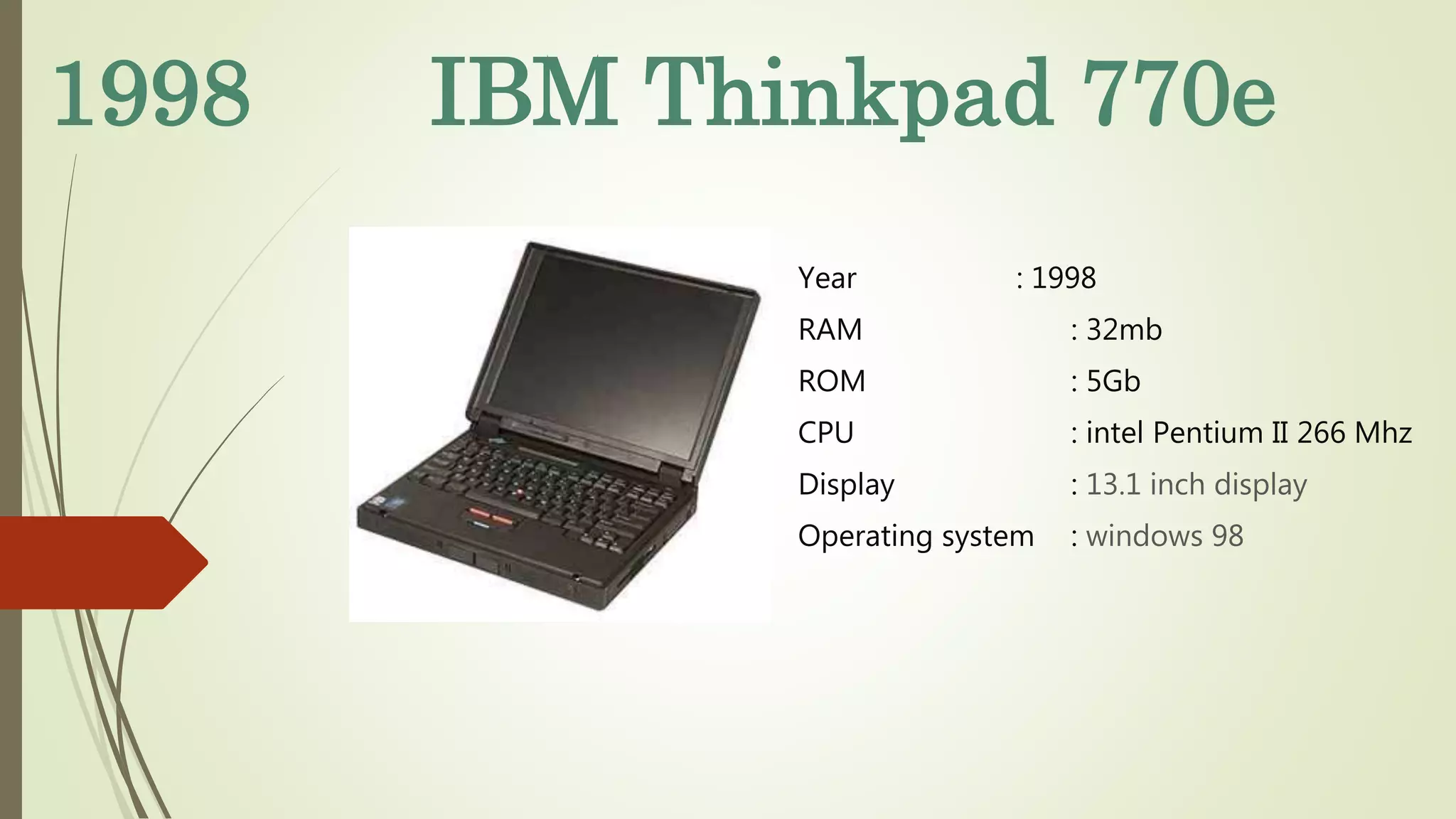
1998 IBM Thinkpad 770e
Year : 1998
RAM : 32mb
ROM : 5Gb
CPU : intel Pentium II 266 Mhz
Display : 13.1 inch display
Operating system : windows 98
ADVANTAGES
SIZE: LAPTOPS ARE SMALLER THAN DESKTOP PCS. THIS IS BENEFICIAL WHEN SPACE IS AT A PREMIUM, FOR EXAMPLE IN SMALL
APARTMENTS AND STUDENT DORMS. WHEN NOT IN USE, A LAPTOP CAN BE CLOSED AND PUT AWAY IN A DESK DRAWER.
LOW POWER CONSUMPTION: LAPTOPS ARE SEVERAL TIMES MORE POWER-EFFICIENT THAN DESKTOPS. A TYPICAL LAPTOP USES 20–
120 W, COMPARED TO 100–800 W FOR DESKTOPS. THIS COULD BE PARTICULARLY BENEFICIAL FOR LARGE BUSINESSES, WHICH RUN
HUNDREDS OF PERSONAL COMPUTERS THUS MULTIPLYING THE POTENTIAL SAVINGS, AND HOMES WHERE THERE IS A COMPUTER
RUNNING 24/7 (SUCH AS A HOME MEDIA SERVER, PRINT SERVER, ETC.).
QUIET: LAPTOPS ARE TYPICALLY MUCH QUIETER THAN DESKTOPS, DUE BOTH TO THE COMPONENTS (QUIETER, SLOWER 2.5-INCH
HARD DRIVES) AND TO LESS HEAT PRODUCTION LEADING TO USE OF FEWER AND SLOWER COOLING FANS.
BATTERY: A CHARGED LAPTOP CAN CONTINUE TO BE USED IN CASE OF A POWER OUTAGE AND IS NOT AFFECTED BY SHORT POWER
INTERRUPTIONS AND BLACKOUTS. A DESKTOP PC NEEDS AN UNINTERRUPTIBLE POWER SUPPLY (UPS) TO HANDLE SHORT
INTERRUPTIONS, BLACKOUTS, AND SPIKES; ACHIEVING ON-BATTERY TIME OF MORE THAN 20–30 MINUTES FOR A DESKTOP PC
REQUIRES A LARGE AND EXPENSIVE UPS.
ALL-IN-ONE: DESIGNED TO BE PORTABLE, MOST 2010-ERA LAPTOPS HAVE ALL COMPONENTS INTEGRATED INTO THE CHASSIS
(HOWEVER, SOME SMALL LAPTOPS MAY NOT HAVE AN INTERNAL CD/CDR/DVD DRIVE, SO AN EXTERNAL DRIVE NEEDS TO BE USED).
FOR DESKTOPS (EXCLUDING ALL-IN-ONES) THIS IS DIVIDED INTO THE DESKTOP "TOWER" (THE UNIT WITH THE CPU, HARD DRIVE,
POWER SUPPLY, ETC.), KEYBOARD, MOUSE, DISPLAY SCREEN, AND OPTIONAL PERIPHERALS SUCH AS SPEAKERS.
DISADVANTAGES
Performance:
 While the performance of mainstream desktops and laptop is comparable, and the
cost of laptops has fallen less rapidly than desktops, laptops remain more expensive
than desktop PCs at the same performance level.
 For Internet browsing and typical office applications, where the computer spends the
majority of its time waiting for the next user input, even relatively low-end laptops
(such as Netbooks) can be fast enough for some users.
 Most higher-end laptops are sufficiently powerful for high-resolution movie playback,
some 3D gaming and video editing and encoding. However, laptop processors can be
disadvantaged when dealing with higher-end database, maths, engineering,
financial software, virtualization, etc.
USES FOR THE PEOPLE AND SOCIETY
1. THROUGH THE LAPTOP, YOU CAN DO YOUR WORK ANYWHERE YOU WANT. DUE TO THE WI-FI
FACILITIES, PEOPLE CAN USE THE INTERNET FOR COMMUNICATING WITH THE PEOPLE AROUND THE
WORK.
2. THROUGH THE LAPTOP, YOU CAN CHECK YOUR EMAIL; CAN COMMUNICATE WITH THE PEOPLE
AROUND THE WORLD, AND EVEN YOU ARE TRAVELLING TO ANOTHER COUNTRY OR OTHER CITY OF
THE COUNTRY. YOU CAN USE THE LAPTOP.
3. YOU CAN USE THE LAPTOP WITHOUT ELECTRICITY AT HOME. EVEN YOU CANNOT USE THE
COMPUTER WITHOUT THE ELECTRICITY. HOWEVER, IT IS THE GREATEST BENEFITS OF THE LAPTOP.
4.YOU CAN USE HIGH RESOLUTION OR HIGH CONFIGURATION REQUIRED SOFTWARE ON YOUR
LAPTOP.
5. YOU CAN CARRY YOUR FILE ALONG WITH THE LAPTOP IN THE MEETING AROUND THE WORLD. IT IS
THE EXCEPTIONAL BENEFITS THAT YOU CAN CARRY YOUR PERSONAL OR CONFIDENTIAL
INFORMATION ALONG WITH YOU.
6. THE COMPUTER IS PERFECT THING TO USE BECAUSE IN THE OFFICES PEOPLE USE THE COMPUTER THROUGH WHICH
COMPANIES GET PROGRESS. IT IS VERY IMPORTANT TO UTILIZE THE COMPUTER IN THE OFFICE FOR THE PROGRESS OF THE
COMPANY.
7. COMPUTER HELPS TO DO THE WORK OF GRAPHIC AND OPERATE THE HIGH-RESOLUTION SOFTWARE THAT ARE NOT
COMPATIBLE WITH THE LAPTOP CONFIGURATION.
8. THE COMPUTER IS THE BASIC THING THROUGH WHICH CHILDREN AND PEOPLE STARTED TO LEARN THIS PROCESS OF THE
COMPUTER AND LEARN ABOUT THE BASIC THING ON THE COMPUTER. YOU CAN ALSO USE THE DVD ROOM IN THE
COMPUTER FOR WATCHING THE FILMS AND HEARING THE SONGS.
9. BY USING THE COMPUTER, YOU CAN DO ONLINE SHOPPING BY SITTING AT YOUR HOME. THOSE WERE THE DAYS, WHEN
PEOPLE USE TO GO ON THE MARKET FOR PURCHASING EACH AND EVERYTHING. HOWEVER, DUE TO THE ONLINE SHOPPING
SYSTEM, IT HAS BECOME VERY EASY FOR THE PEOPLE TO PURCHASE THE ANY KIND OF PRODUCT FROM THE DIFFERENT
WEBSITE FROM AROUND THE WORLD. IN A FEW DAYS, THOSE THINGS WILL BE AT YOUR DOOR. PEOPLE ARE USING THIS
ONLINE SECURE SHOPPING SYSTEM EVEN FOR PURCHASING THE VEGETABLE AND FRUITS AS WELL.
10. BY USING THE COMPUTER, YOU CAN GET THE INFORMATION ABOUT ANYTHING AROUND THE WORLD. YOU CAN WATCH
THE VIDEOS OF DIFFERENT COUNTRIES. HERE ARE THE MANY WEBSITES AVAILABLE WHO IS PROVIDING THE DIFFERENT
DRAMAS, FILM AND EVENT VIDEOS OF THE WORLD. EACH THING IS AWAY FROM ONE CLICK JUST. HOWEVER, YOU CAN
REACH IT BY USING THE COMPUTER.
CONCLUSION
Even though some disadvantages and problems are there
advantages are more than disadvantages.
So there are many uses with laptops in various fields .
We can welcome laptops for future development.
THANK YOUFROM B.ABHILASH

Evolution of laptops

  • 1.
    EVOLUTION OF LAPTOPS ABRIEF INTRODUCTION.
  • 2.
    CONTENTS  Introduction  History Advantages  Disadvantages  Usage to society and people  conclusions
  • 3.
    INTRODUCTION A laptop, oftencalled a notebook or "notebook computer", is a small, portable personal computer with a "clamshell" form factor, an alphanumeric keyboard on the lower part of the "clamshell" and a thin LCD or LED computer screen on the upper portion, which is opened up to use the computer. Laptops are folded shut for transportation, and thus are suitable for mobile use. Although originally there was a distinction between laptops and notebooks, the former being bigger and heavier than the latter, as of 2014, there is often no longer any difference. Laptops are commonly used in a variety of settings, such as at work, in education, and for personal multimedia and home computer use. A laptop combines the components, inputs, outputs, and capabilities of a desktop computer, including the display screen, small speakers, a keyboard, pointing devices (such as a touchpad or trackpad), a processor, and memory into a single unit. Most 2016-era laptops also have integrated webcams and built-in microphones. Some 2016-era laptops have touchscreens. Laptops can be powered either from an internal battery or by an external power supply from an AC adapter. Hardware specifications, such as the processor speed and memory capacity, significantly vary between different types, makes, models and price points.
  • 4.
    As the personalcomputer (PC) became feasible in 1971, the idea of a portable personal computer soon followed. A "personal, portable information manipulator" was imagined by Alan Kay at Xerox PARC in 1968, and described in his 1972 paper as the "Dynabook". The IBM Special Computer APL Machine Portable (SCAMP) was demonstrated in 1973. This prototype was based on the IBM PALM processor. The IBM 5100, the first commercially available portable computer, appeared in September 1975, and was based on the SCAMP prototype.
  • 5.
    Year : 1982 RAM: 16kb ROM : 32kb Display :4lines x 20characters LCD Weight : 1.6Kgs Operating system :EPSON BASIC programming language The first laptop
  • 6.
    Year : 1983 RAM: 32kb ROM : 32kb CPU : 2.4-MHz Intel 80C85 Display : 8 lines, 40 characters LCD Weight : 1.4Kgs Operating system : Custom dedicated runtime in firmware
  • 7.
    1984 IBM 5155 Year: 1984 RAM : 256kb ROM : 360kb CPU :Intel 8088 @ 4.77MHz Display : 9inch monochrome Weight : 13.6Kgs Operating system : IBM PC DOS Version 2.10
  • 8.
    1985 TRS Model200 Year : 1985 RAM : 24kb ROM : 72kb CPU : 2.4-MHz Intel 80C85 Display :16 x 40 Liquid Crystal Display Weight : 4.5 lbs Operating system : Ms Dos
  • 9.
    1988 Compaq slt-286 Year: 1988 RAM : 640kb ROM : 20mb CPU : 12Mhz Intel processor Display : display with VGA graphics Weight : 14 lbs Operating system : Ms Dos The first laptop with VGA Tech
  • 10.
    1989 NEC Ultralite Year: 1989 RAM : 640kb ROM : 2mb CPU : NEC V30 at 4.92Mhz and 8.14 MHz Display : backlit 8.25x4.25 LCD screen Weight : 4.4 lbs Operating system : Ms Dos 3.3
  • 11.
    Year : 1989 RAM: 1mb ROM : 40mb CPU : Display : 9.8 black and white active matrix LCD Weight : 7.2kgs Operating system : System 6.0.4
  • 12.
    Year : 1989 RAM: 640kb ROM : 20mb CPU : Display : Backlit grayscale CGA 640 x200 display Weight : 3.5kgs Operating system : Windows 98SE
  • 13.
    1991 Apple powerbook100 Year : 1991 RAM : 2mb ROM : 20mb CPU : Motorola 68000 16 MHz Display : Built in display 9’ Weight : 3.5kgs Operating system : System 6.0.8l
  • 14.
    1992 IBM Thinkpad770 Year : 1992 RAM : 4mb ROM : 80mb CPU : 25-MHz CPU Display : Built in display 9.5 inch Weight : 3.5kgs Operating system : Ms Dos 5.0 Windows 3.1 The first Business series laptop
  • 15.
    1994 APPLE POWERBOOK500 Year : 1994 RAM : 40mb ROM : 500mb CPU : Motorola 68LC040 Display : 9.5 inch display Operating system : System 7.1.1
  • 16.
    1998 IBM Thinkpad770e Year : 1998 RAM : 32mb ROM : 5Gb CPU : intel Pentium II 266 Mhz Display : 13.1 inch display Operating system : windows 98
  • 17.
    ADVANTAGES SIZE: LAPTOPS ARESMALLER THAN DESKTOP PCS. THIS IS BENEFICIAL WHEN SPACE IS AT A PREMIUM, FOR EXAMPLE IN SMALL APARTMENTS AND STUDENT DORMS. WHEN NOT IN USE, A LAPTOP CAN BE CLOSED AND PUT AWAY IN A DESK DRAWER. LOW POWER CONSUMPTION: LAPTOPS ARE SEVERAL TIMES MORE POWER-EFFICIENT THAN DESKTOPS. A TYPICAL LAPTOP USES 20– 120 W, COMPARED TO 100–800 W FOR DESKTOPS. THIS COULD BE PARTICULARLY BENEFICIAL FOR LARGE BUSINESSES, WHICH RUN HUNDREDS OF PERSONAL COMPUTERS THUS MULTIPLYING THE POTENTIAL SAVINGS, AND HOMES WHERE THERE IS A COMPUTER RUNNING 24/7 (SUCH AS A HOME MEDIA SERVER, PRINT SERVER, ETC.). QUIET: LAPTOPS ARE TYPICALLY MUCH QUIETER THAN DESKTOPS, DUE BOTH TO THE COMPONENTS (QUIETER, SLOWER 2.5-INCH HARD DRIVES) AND TO LESS HEAT PRODUCTION LEADING TO USE OF FEWER AND SLOWER COOLING FANS. BATTERY: A CHARGED LAPTOP CAN CONTINUE TO BE USED IN CASE OF A POWER OUTAGE AND IS NOT AFFECTED BY SHORT POWER INTERRUPTIONS AND BLACKOUTS. A DESKTOP PC NEEDS AN UNINTERRUPTIBLE POWER SUPPLY (UPS) TO HANDLE SHORT INTERRUPTIONS, BLACKOUTS, AND SPIKES; ACHIEVING ON-BATTERY TIME OF MORE THAN 20–30 MINUTES FOR A DESKTOP PC REQUIRES A LARGE AND EXPENSIVE UPS. ALL-IN-ONE: DESIGNED TO BE PORTABLE, MOST 2010-ERA LAPTOPS HAVE ALL COMPONENTS INTEGRATED INTO THE CHASSIS (HOWEVER, SOME SMALL LAPTOPS MAY NOT HAVE AN INTERNAL CD/CDR/DVD DRIVE, SO AN EXTERNAL DRIVE NEEDS TO BE USED). FOR DESKTOPS (EXCLUDING ALL-IN-ONES) THIS IS DIVIDED INTO THE DESKTOP "TOWER" (THE UNIT WITH THE CPU, HARD DRIVE, POWER SUPPLY, ETC.), KEYBOARD, MOUSE, DISPLAY SCREEN, AND OPTIONAL PERIPHERALS SUCH AS SPEAKERS.
  • 18.
    DISADVANTAGES Performance:  While theperformance of mainstream desktops and laptop is comparable, and the cost of laptops has fallen less rapidly than desktops, laptops remain more expensive than desktop PCs at the same performance level.  For Internet browsing and typical office applications, where the computer spends the majority of its time waiting for the next user input, even relatively low-end laptops (such as Netbooks) can be fast enough for some users.  Most higher-end laptops are sufficiently powerful for high-resolution movie playback, some 3D gaming and video editing and encoding. However, laptop processors can be disadvantaged when dealing with higher-end database, maths, engineering, financial software, virtualization, etc.
  • 19.
    USES FOR THEPEOPLE AND SOCIETY 1. THROUGH THE LAPTOP, YOU CAN DO YOUR WORK ANYWHERE YOU WANT. DUE TO THE WI-FI FACILITIES, PEOPLE CAN USE THE INTERNET FOR COMMUNICATING WITH THE PEOPLE AROUND THE WORK. 2. THROUGH THE LAPTOP, YOU CAN CHECK YOUR EMAIL; CAN COMMUNICATE WITH THE PEOPLE AROUND THE WORLD, AND EVEN YOU ARE TRAVELLING TO ANOTHER COUNTRY OR OTHER CITY OF THE COUNTRY. YOU CAN USE THE LAPTOP. 3. YOU CAN USE THE LAPTOP WITHOUT ELECTRICITY AT HOME. EVEN YOU CANNOT USE THE COMPUTER WITHOUT THE ELECTRICITY. HOWEVER, IT IS THE GREATEST BENEFITS OF THE LAPTOP. 4.YOU CAN USE HIGH RESOLUTION OR HIGH CONFIGURATION REQUIRED SOFTWARE ON YOUR LAPTOP. 5. YOU CAN CARRY YOUR FILE ALONG WITH THE LAPTOP IN THE MEETING AROUND THE WORLD. IT IS THE EXCEPTIONAL BENEFITS THAT YOU CAN CARRY YOUR PERSONAL OR CONFIDENTIAL INFORMATION ALONG WITH YOU.
  • 20.
    6. THE COMPUTERIS PERFECT THING TO USE BECAUSE IN THE OFFICES PEOPLE USE THE COMPUTER THROUGH WHICH COMPANIES GET PROGRESS. IT IS VERY IMPORTANT TO UTILIZE THE COMPUTER IN THE OFFICE FOR THE PROGRESS OF THE COMPANY. 7. COMPUTER HELPS TO DO THE WORK OF GRAPHIC AND OPERATE THE HIGH-RESOLUTION SOFTWARE THAT ARE NOT COMPATIBLE WITH THE LAPTOP CONFIGURATION. 8. THE COMPUTER IS THE BASIC THING THROUGH WHICH CHILDREN AND PEOPLE STARTED TO LEARN THIS PROCESS OF THE COMPUTER AND LEARN ABOUT THE BASIC THING ON THE COMPUTER. YOU CAN ALSO USE THE DVD ROOM IN THE COMPUTER FOR WATCHING THE FILMS AND HEARING THE SONGS. 9. BY USING THE COMPUTER, YOU CAN DO ONLINE SHOPPING BY SITTING AT YOUR HOME. THOSE WERE THE DAYS, WHEN PEOPLE USE TO GO ON THE MARKET FOR PURCHASING EACH AND EVERYTHING. HOWEVER, DUE TO THE ONLINE SHOPPING SYSTEM, IT HAS BECOME VERY EASY FOR THE PEOPLE TO PURCHASE THE ANY KIND OF PRODUCT FROM THE DIFFERENT WEBSITE FROM AROUND THE WORLD. IN A FEW DAYS, THOSE THINGS WILL BE AT YOUR DOOR. PEOPLE ARE USING THIS ONLINE SECURE SHOPPING SYSTEM EVEN FOR PURCHASING THE VEGETABLE AND FRUITS AS WELL. 10. BY USING THE COMPUTER, YOU CAN GET THE INFORMATION ABOUT ANYTHING AROUND THE WORLD. YOU CAN WATCH THE VIDEOS OF DIFFERENT COUNTRIES. HERE ARE THE MANY WEBSITES AVAILABLE WHO IS PROVIDING THE DIFFERENT DRAMAS, FILM AND EVENT VIDEOS OF THE WORLD. EACH THING IS AWAY FROM ONE CLICK JUST. HOWEVER, YOU CAN REACH IT BY USING THE COMPUTER.
  • 21.
    CONCLUSION Even though somedisadvantages and problems are there advantages are more than disadvantages. So there are many uses with laptops in various fields . We can welcome laptops for future development.
  • 22.