SUBCATEGORY OF MICRO-
COMPUTERS/PERSONAL
COMPUTERS,
PARTICULARLY ON:
GROUP 2
FACILITATOR – CASIPONG, JHON ROD
ASST. FACILITATOR – LABUS, EARL JHON
SECRETARY/MUSE – GURA, QUENNIE
ASS.SEC./MUSE – GABUTAN, DAISY
MODERATOR – LABOS, LEANDRO
DESKTOP COMPUTERS
• Desktop-A desktop computer is a personal computer designed for regular use at a single
location on or near a desk due to its size and power requirements. The most common
configuration has a case that houses the power supply, motherboard (a printed circuit board
with a microprocessor as the central processing unit, memory, bus, certain peripherals and
other electronic components), disk storage (usually one or more hard disk drives, solid state
drives, optical disc drives, and in early models a floppy disk drive); a keyboard and mouse for
input; and a computer monitor, speakers, and, often, a printer for output. The case may be
oriented horizontally or vertically and placed either underneath, beside, or on top of a desk.
When did the first desktops appear?
The first desktop computer was the Hewlett Packard 9100A, introduced in 1968. Since then, there were many
millions of desktop computers released and used throughout the world.
Where should I place my desktop computer?
Most users put their computer on the floor next to or under their desk. However, as long as your monitor and other
devices can communicate with the computer, it can go anywhere. Below is a list of the pros and cons of different
desktop computer placement locations.
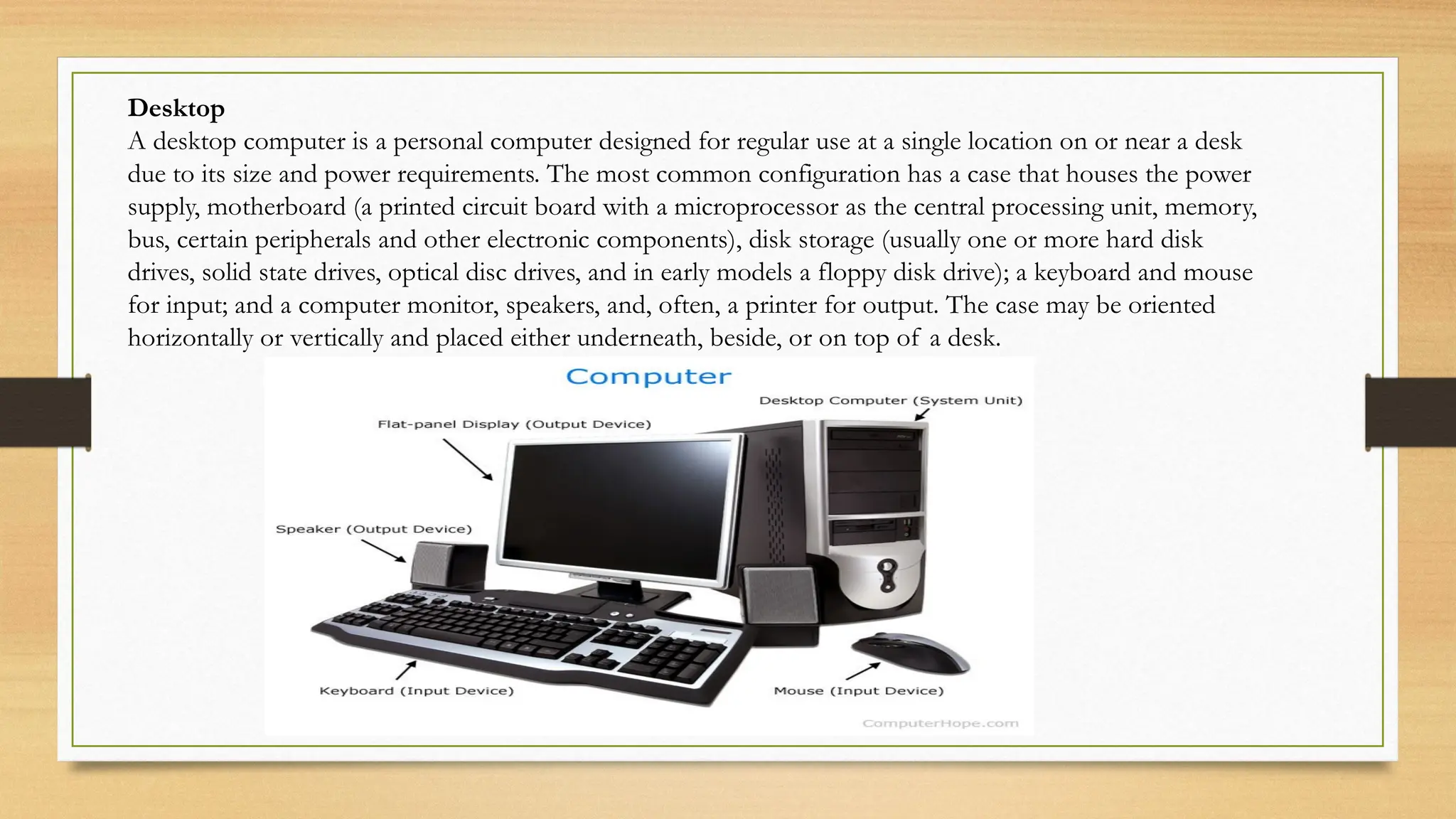
Desktop
A desktop computer is a personal computer designed for regular use at a single location on or near a desk
due to its size and power requirements. The most common configuration has a case that houses the power
supply, motherboard (a printed circuit board with a microprocessor as the central processing unit, memory,
bus, certain peripherals and other electronic components), disk storage (usually one or more hard disk
drives, solid state drives, optical disc drives, and in early models a floppy disk drive); a keyboard and mouse
for input; and a computer monitor, speakers, and, often, a printer for output. The case may be oriented
horizontally or vertically and placed either underneath, beside, or on top of a desk.
Desktop computer on the floor Advantages
Keeps the computer desk clean with more space available. Usually cooler on the floor, which helps keep the computer
cooler. Disadvantages More difficult to connect cables and drives, and insert discs into the computer. Easier to
mistakenly kick and access by children. Cables may not be long enough for you to place the computer where you want
on the floor. More dust and hair on the floor can get into the computer. Desktop computer on the desk Advantages
Easier to connect cables and drives, and insert discs into the computer. Harder to access by small children. Allows you
to show off a computer.
There is also a reason why the average person no longer owns a desktop computer. These heavy-duty
Personal Computers (PCs) accompany a lot of advantages and disadvantages.
Advantage: Upgradable Disadvantage: Movability
Advantage: Cost Disadvantage: Space
Advantage: High-performance Disadvantage: Access to power
LAPTOP
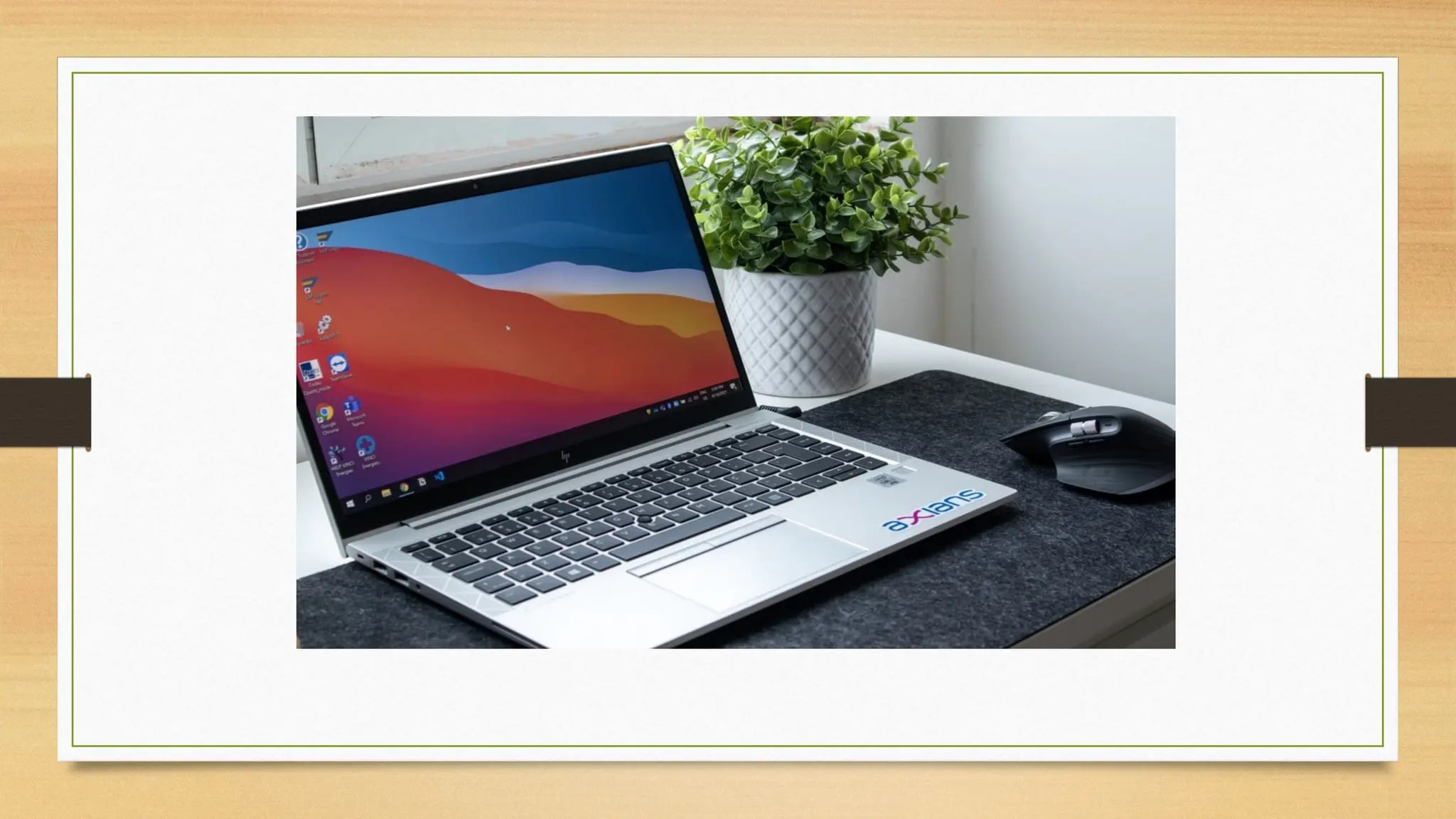
• A laptop computer, or notebook computer is a small, portable personal computer (PC) with a screen
and alphanumeric keyboard. These typically have a clam shell form factor, typically having the screen
mounted on the inside of the upper lid and the keyboard on the inside of the lower lid, although 2-in-
1 PCs with a detachable keyboard are often marketed as laptops or as having a laptop mode. Laptops
are folded shut for transportation, and thus are suitable for mobile use.[1] Its name comes from lap, as
it was deemed practical to be placed on a person's lap when being used. Today, laptops are used in a
variety of settings, such as at work, in education, for playing games, web browsing, for personal
multimedia, and general home computer use. Laptops combine all the input/output components and
capabilities of a desktop computer, including the display screen, small speakers, a keyboard, data
storage device, sometimes an optical disc drive, pointing devices (such as a touch pad or pointing
stick), with an operating system, a processor and memory into a single unit. Most modern laptops
feature integrated webcams and built-in microphones, while many also have touchscreens. Laptops can
be powered either from an internal battery or by an external power supply from an AC adapter.
Hardware specifications, such as the processor speed and memory capacity, significantly vary between
different types, models and price points.
What Is a Laptop Computer?
A laptop computer is smaller than a desktop computer, generally less than three inches thick, and weigh less than
desktop computers. The laptop's size makes it convenient for transportation in briefcases, backpacks, and other
bags.The device derives its name from being able to be used by resting on a person's lap without the need for a desk
or other surface. Laptop computers may also be referred to as notebook computers, though a notebook computer
usually describes a computer that is smaller and lighter than a laptop computer.
How Does a Laptop Computer Work?
Similar to personal computers, laptops require a power source—they can be plugged into an outlet or operate on
their internal battery. Laptop computers can be used at a desk by themselves, or as a desktop-style computer by
connecting a separate monitor, keyboard, and mouse. These factors should be considered when choosing a laptop for
your business or professional needs. Size, necessary performance, the operating system, and price are all aspects to
consider when looking for the right computer. The right one for you depends on how you are going to use it.
Types of Laptop Computers
While there are no specific types of laptops, retailers generally give them categories for consumers to help them
find one for their needs. Some of the labels you might find at a retailer are:
Value
Everyday
Gaming
Professional
Ultraportable or notebook
Value laptops
usually have lower price tags, with lower-performing hardware, and less storage and memory for people that only
do basic computing such as a few hours of internet browsing, playing a movie, or writing some papers.
Everyday laptops
might have slightly higher performance with more storage and memory for people that use computers more than
a value-user would. This might be someone who uses the laptop for work or school but doesn't require significant
processing power and storage for 3D applications like 3d Max or gaming. Some manufacturers design their
laptops to be upgradeable. When choosing one, look to see if you can get more memory or storage put in. This
can help lower-end laptops perform better at a lower cost than purchasing a higher-performing one..
Gaming laptops
have mid-to-high-end mobile 3D graphics cards and processors designed to play graphically intensive games
while being able to do all the other tasks expected of computers.
Professional targeted laptops will have graphics cards designed for studio uses such as 3D graphics creation
and rendering, analyzing large amounts of data, or other professionally intensive uses. They will have high-end
processors, more memory, and more storage to handle demanding workloads.
Ultraportables and notebooks are even smaller than laptops. They generally sacrifice capabilities, peripheral
ports, and performance for their size and price. Peripherals Laptops have ports and other interfaces similar to
desktop computers, such as USB ports, network interface cards, audio speakers, digital media drives, and
memory card slots (such as SD card readers), which are often built into the laptop computer by the
manufacturer. Additional peripherals may be connected to a laptop computer through available expansion
slots, through USB or serial ports or wirelessly via a Bluetooth connection.
Difference between Desktop and Laptop
1.Desktop is a physical computer unit that consists of a monitor, CPU, key-board and a mouse. It is a
graphical user work space on a software operating system. It is designed for regular use at one location. It
requires main power supply so that it can not be portable.
2.Laptop is an all-in-one computer that uses batteries or AC power that can last for several hours. It can be
easily transported. It is also called as Notebook. It has basically a LED or LCD screen. It can e operated by
battery or AC supply that makes it portable.
What Is the Purpose of a Laptop?
• Less Weight
• Laptops weigh significantly less than that of desktop machines. Laptops are made into a single unit and they have the ability to fold in half for
easy transport. Throughout the years, hardware manufacturers have been able to shrink the weight and dimensions of laptops. With the
introduction of Ultrabooks, computer companies have created laptops weighing around three pounds. On the other hand, a desktop computer
is often enclosed in a large, bulky shell, making its portability severely limited.
• More Desk Space
• Anyone who has owned a desktop computer is familiar with the work space problem these machines create. The computer itself will often
take up a good percentage of your limited desk space, and its weight and awkward dimensions make it a chore to move around. A laptop will
take up much less of your work space due to its smaller size. Laptops can also run on battery power, without the need for a power cable or
separate power adapter.
• Fewer Peripherals
• Traditional desktop computers need a stand-alone monitor, keyboard, mouse, speakers and wires to be fully functional. Laptop computers
combine all of these separate peripherals into one device. The keyboard, monitor and speakers are built in to the computer itself and the
trackpad acts as the mouse. A major advantage to no separate peripherals is the issue of complexity. With laptops, you only need a power
source to operate.
• Travel and Portability
• Laptops are made for portability due to their slim design and light weight. They can securely fit into almost any backpack and can be carried
without much fatigue. Thus, you can easily take a laptop to locations most convenient to you, such as classrooms, coffee shops and hotels.
Laptops also have a built-in Wi-Fi adapter that lets you connect to the Internet in places with a wireless network.
SMARTBOOK
• A smart bookwas a class of mobile device that combined certain features of both a smartphone and
netbook computer, produced between 2009 and 2010. Also a smart book was a class of mobile device
that combined certain features of both a smartphone and netbook computer, produced between 2009
and 2010. Smart books were advertised with features such as always on, all-day battery life, 3G, or Wi-Fi
connectivity and GPS (all typically found in smartphones) in a laptop or tablet-style body with a screen
size of 5 to 10 inches and a physical or soft touchscreen keyboard. A German company sold laptops
under the brand Smart book and held a trademark for the word in many countries (not including some
big markets like United States, China, Japan, or India). It acted to preempt others from using the term
smart book to describe their products Smart books tended to be designed more for entertainment
purposes than for productivity and typically targeted to work with online applications. They were
projected to be sold subsidized through mobile network operators, like mobile phones, along with a
wireless data plan. The advent of much more popular tablets like Android tablets and the iPad, coupled
with the prevailing popularity of conventional desktop computers and laptops have displaced the smart
book.
What use is a smartbook?
The smartbook, its promoters suggest, will fill a gap in the market between smartphones and netbooks. But does
such a gap exist? The smartbook makers are betting that netbooks – small laptops optimised for mobile internet
browsing – are still too large and too slow to boot up for users to carry everywhere they go, whereas existing
smartphones are too small to run rich media satisfactorily and not powerful enough for serious applications.
However, judging by the Cambrian explosion of devices tagged as smartbooks at CES, there is little agreement
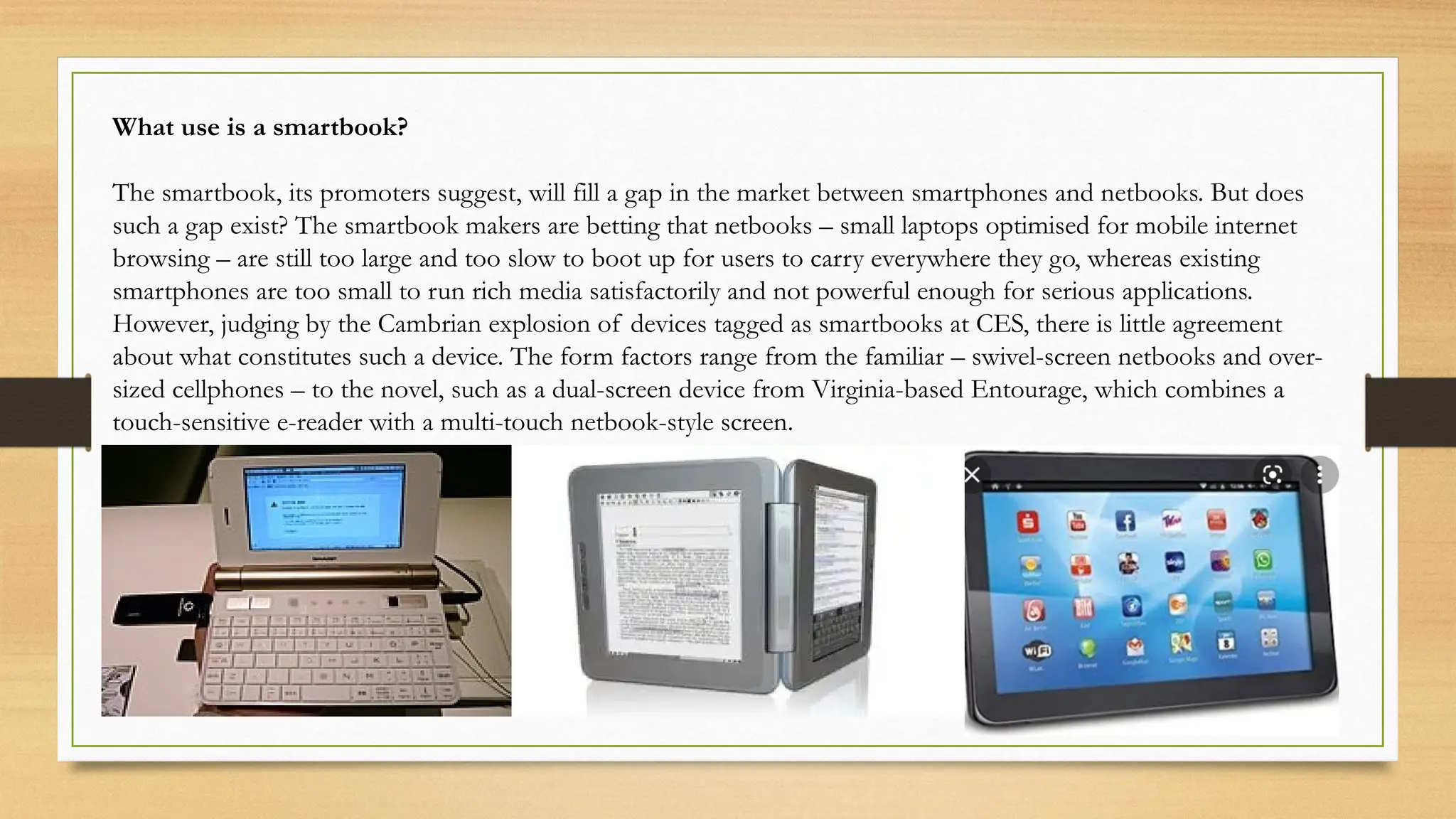
about what constitutes such a device. The form factors range from the familiar – swivel-screen netbooks and over-
sized cellphones – to the novel, such as a dual-screen device from Virginia-based Entourage, which combines a
touch-sensitive e-reader with a multi-touch netbook-style screen.
Palmtop computer
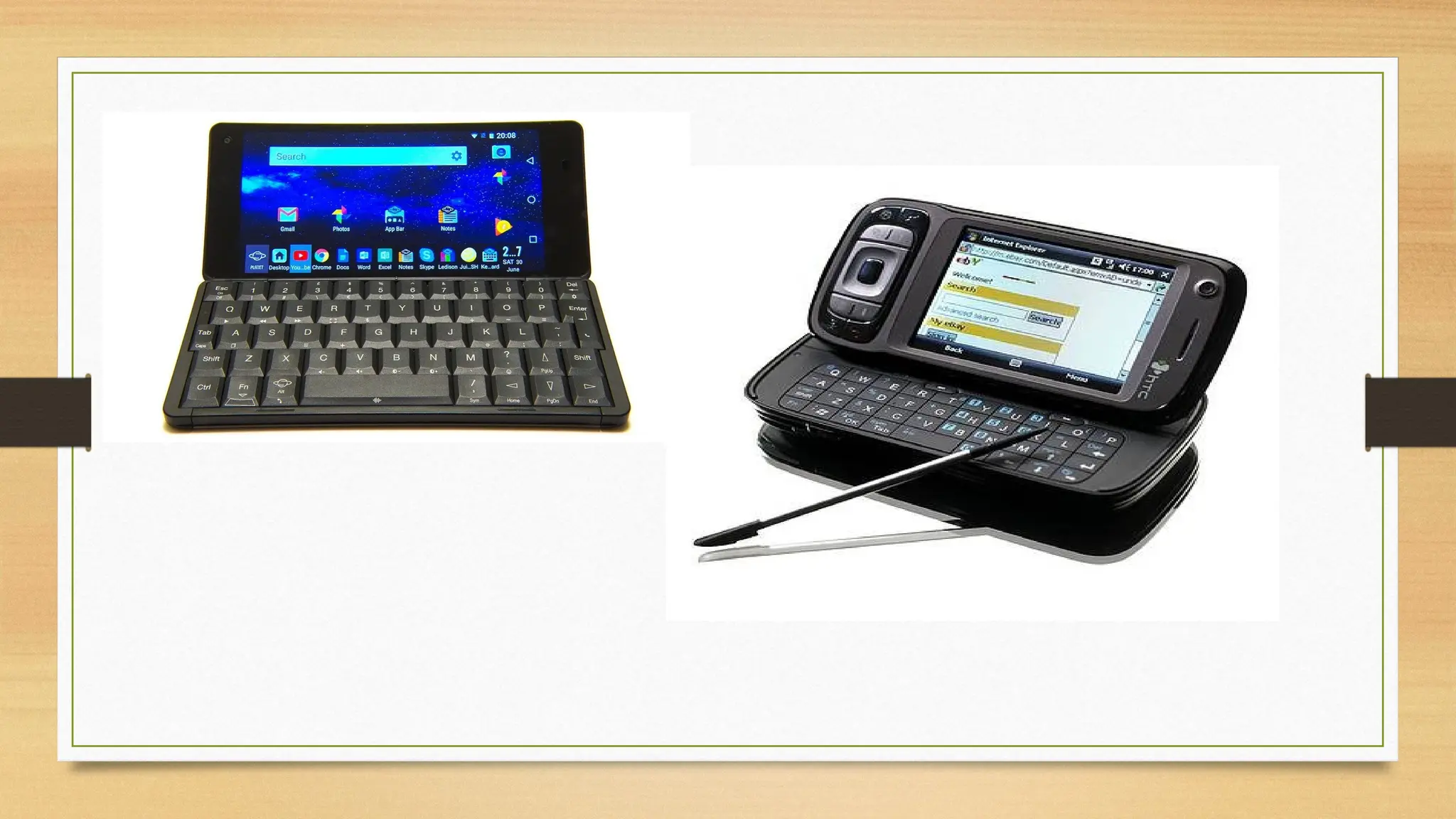
small computer that literally fits in your palm. Compared to full-size computers, palmtops are
severely limited, but they are practical for certain functions such as phone books and calendars.
Palmtops that use a pen rather than a keyboard for input are often called hand-held computers or
PDAs. Because of their small size, most palmtop computers do not include disk drives. However,
many contain PCMCIA slots in which you can insert disk drives, modems, memory, and other
devices. Palmtops are also called PDAs, hand-held computers and pocket computers. A Palmtop PC
was an approximately pocket calculator-sized, battery-powered computer compatible with the IBM
Personal Computer in a horizontal clamshell design with integrated keyboard and display. It could be
used like a subnotebook, but was light enough to be comfortably used handheld as well. Most
Palmtop PCs were small enough to be stored in a user's shirt or jacket pocket. Palmtop PCs
distinguish from other palmtop computers by using a mostly IBM-compatible PC architecture and
BIOS as well as an Intel-compatible x86 processor. All such devices were DOS-based, with DOS
stored in ROM. While many Palmtop PCs came with a number of PDA and office applications pre-
installed in ROM, most of them could also run generic, off-the-shelf PC software with no or little
modifications. Some could also run other operating systems such as GEOS, Windows 1.0-3.0 (in
Real mode only), or MINIX 2.0.
Most Palmtop PCs were based on a static hardware design for low power consumption and instant-on/off
without the need to reboot. Depending on the model, the battery could power the device for a period ranging
from several hours up to several days while running, or between a week and a year in standby mode. Combined
with the instant-on/off feature, a battery would typically last from a week up to several months in practical use as
PDA.The first Palmtop PC was the DIP Pocket PC (aka Atari Portfolio) in 1989.
WHAT IS PALMTOP COMPUTER USED FOR?
The main reasons given for using palmtop computers for learning are that they assist students' motivation, help
organisational skills, encourage a sense of responsibility, help both independent and collaborative learning, act as
reference tools, and can be used to help track students' progress and for assessment.
WHY IT IS CALLED PALMTOP COMPUTER?
Base on my research in Browse Encyclopedia An earlier computer small enough to hold in one hand and operate
with the other. Also called a "handtop," palmtops had small keyboards or specialized keypads tailored to specific
industries.
WHAT IS THE DIFFERENCES BETWEEN LAPTOP AND PALMTOP?
A palmtop has very limited functionality compared to a laptop and the device is usely used as a personal
organizer. A laptop can perform more powerful task, support more memory and is compatible with a wider
range of products. Both laptops and palmtops are portable computer.
Smartphone
smartphone is a portable device that combines mobile telephone and computing functions into one unit. They are
distinguished from feature phones by their stronger hardware capabilities and extensive mobile operating systems,
which facilitate wider software, internet (including web browsing over mobile broadband), and multimedia
functionality (including music, video, cameras, and gaming), alongside core phone functions such as voice calls and
text messaging. Smartphones typically contain a number of metal–oxide–semiconductor (MOS) integrated circuit
(IC) chips, include various sensors that can be leveraged by pre-included and third-party software (such as a
magnetometer, proximity sensors, barometer, gyroscope, accelerometer and more), and support wireless
communications protocols (such as Bluetooth, Wi-Fi, or satellite navigation). Early smartphones were marketed
primarily towards the enterprise market, attempting to bridge the functionality of standalone personal digital
assistant (PDA) devices with support for cellular telephony, but were limited by their bulky form, short battery life,
slow analog cellular networks, and the immaturity of wireless data services. These issues were eventually resolved
with the exponential scaling and miniaturization of MOS transistors down to sub-micron levels (Moore's law), the
improved lithium-ion battery, faster digital mobile data networks (Edholm's law), and more mature software
platforms that allowed mobile device ecosystems to develop independently of data providers
What is special about smartphones?
A smartphone has more advanced features, including web browsing, software applications and a mobile OS. In
turn, a smartphone also offers capabilities such as support for biometrics, video chatting, digital assistants and much
more.
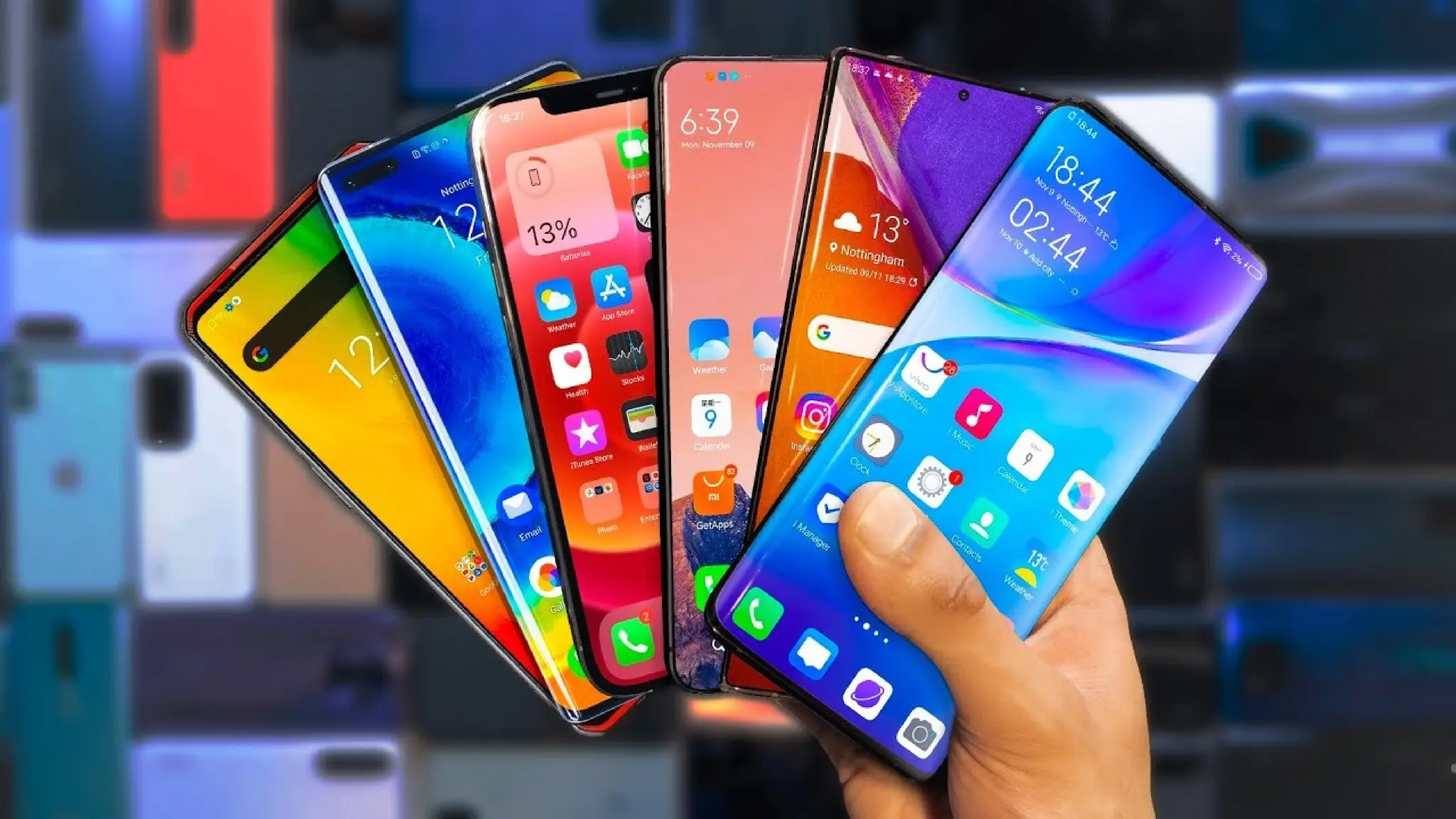
A smartphone is a cell phone that allows you to do more than make phone calls and send text
messages. Smartphones can browse the Internet and run software programs like a computer.
Smartphones use a touch screen to allow users to interact with them. There are thousands of
smartphone apps including games, personal-use, and business-use programs that all run on the phone.
The picture is an example of the Apple iPhone, one of the most popular smartphones available today.
why smartphones is important?
Smartphones provide an opportunity to look up information, do researchers, which save people's time
and money. Smartphones also, helping people to be social active by providing many apps and social
media, such as Twitter, Facebook and etc. Nowadays technology plays a vital role in people’s lives.
People use technologies everywhere: work, education , social life and etc. One of the biggest
technology advancement is smartphone technologies, which have brought out a massive impact in
people’s lives. People around the globe can easily get connected with each other through phone, text
messages, email and other services. Smartphones provide an opportunity to look up information, do
researchers, which save people’s time and money. Smartphones also, helping people to be social active
by providing many apps and social media, such as Twitter, Facebook and etc. Built- in Global
Positioning System (GPS) gives direction, pinpoint your location and provide all necessary
information.
COMPUTERS PERSONAL COMPUTERS PARTICULARY ON:

COMPUTERS PERSONAL COMPUTERS PARTICULARY ON:

  • 1.
  • 2.
    GROUP 2 FACILITATOR –CASIPONG, JHON ROD ASST. FACILITATOR – LABUS, EARL JHON SECRETARY/MUSE – GURA, QUENNIE ASS.SEC./MUSE – GABUTAN, DAISY MODERATOR – LABOS, LEANDRO
  • 3.
    DESKTOP COMPUTERS • Desktop-Adesktop computer is a personal computer designed for regular use at a single location on or near a desk due to its size and power requirements. The most common configuration has a case that houses the power supply, motherboard (a printed circuit board with a microprocessor as the central processing unit, memory, bus, certain peripherals and other electronic components), disk storage (usually one or more hard disk drives, solid state drives, optical disc drives, and in early models a floppy disk drive); a keyboard and mouse for input; and a computer monitor, speakers, and, often, a printer for output. The case may be oriented horizontally or vertically and placed either underneath, beside, or on top of a desk. When did the first desktops appear? The first desktop computer was the Hewlett Packard 9100A, introduced in 1968. Since then, there were many millions of desktop computers released and used throughout the world. Where should I place my desktop computer? Most users put their computer on the floor next to or under their desk. However, as long as your monitor and other devices can communicate with the computer, it can go anywhere. Below is a list of the pros and cons of different desktop computer placement locations.
  • 4.
    Desktop A desktop computeris a personal computer designed for regular use at a single location on or near a desk due to its size and power requirements. The most common configuration has a case that houses the power supply, motherboard (a printed circuit board with a microprocessor as the central processing unit, memory, bus, certain peripherals and other electronic components), disk storage (usually one or more hard disk drives, solid state drives, optical disc drives, and in early models a floppy disk drive); a keyboard and mouse for input; and a computer monitor, speakers, and, often, a printer for output. The case may be oriented horizontally or vertically and placed either underneath, beside, or on top of a desk.
  • 5.
    Desktop computer onthe floor Advantages Keeps the computer desk clean with more space available. Usually cooler on the floor, which helps keep the computer cooler. Disadvantages More difficult to connect cables and drives, and insert discs into the computer. Easier to mistakenly kick and access by children. Cables may not be long enough for you to place the computer where you want on the floor. More dust and hair on the floor can get into the computer. Desktop computer on the desk Advantages Easier to connect cables and drives, and insert discs into the computer. Harder to access by small children. Allows you to show off a computer. There is also a reason why the average person no longer owns a desktop computer. These heavy-duty Personal Computers (PCs) accompany a lot of advantages and disadvantages. Advantage: Upgradable Disadvantage: Movability Advantage: Cost Disadvantage: Space Advantage: High-performance Disadvantage: Access to power
  • 6.
    LAPTOP • A laptopcomputer, or notebook computer is a small, portable personal computer (PC) with a screen and alphanumeric keyboard. These typically have a clam shell form factor, typically having the screen mounted on the inside of the upper lid and the keyboard on the inside of the lower lid, although 2-in- 1 PCs with a detachable keyboard are often marketed as laptops or as having a laptop mode. Laptops are folded shut for transportation, and thus are suitable for mobile use.[1] Its name comes from lap, as it was deemed practical to be placed on a person's lap when being used. Today, laptops are used in a variety of settings, such as at work, in education, for playing games, web browsing, for personal multimedia, and general home computer use. Laptops combine all the input/output components and capabilities of a desktop computer, including the display screen, small speakers, a keyboard, data storage device, sometimes an optical disc drive, pointing devices (such as a touch pad or pointing stick), with an operating system, a processor and memory into a single unit. Most modern laptops feature integrated webcams and built-in microphones, while many also have touchscreens. Laptops can be powered either from an internal battery or by an external power supply from an AC adapter. Hardware specifications, such as the processor speed and memory capacity, significantly vary between different types, models and price points.
  • 7.
    What Is aLaptop Computer? A laptop computer is smaller than a desktop computer, generally less than three inches thick, and weigh less than desktop computers. The laptop's size makes it convenient for transportation in briefcases, backpacks, and other bags.The device derives its name from being able to be used by resting on a person's lap without the need for a desk or other surface. Laptop computers may also be referred to as notebook computers, though a notebook computer usually describes a computer that is smaller and lighter than a laptop computer. How Does a Laptop Computer Work? Similar to personal computers, laptops require a power source—they can be plugged into an outlet or operate on their internal battery. Laptop computers can be used at a desk by themselves, or as a desktop-style computer by connecting a separate monitor, keyboard, and mouse. These factors should be considered when choosing a laptop for your business or professional needs. Size, necessary performance, the operating system, and price are all aspects to consider when looking for the right computer. The right one for you depends on how you are going to use it.
  • 8.
    Types of LaptopComputers While there are no specific types of laptops, retailers generally give them categories for consumers to help them find one for their needs. Some of the labels you might find at a retailer are: Value Everyday Gaming Professional Ultraportable or notebook Value laptops usually have lower price tags, with lower-performing hardware, and less storage and memory for people that only do basic computing such as a few hours of internet browsing, playing a movie, or writing some papers. Everyday laptops might have slightly higher performance with more storage and memory for people that use computers more than a value-user would. This might be someone who uses the laptop for work or school but doesn't require significant processing power and storage for 3D applications like 3d Max or gaming. Some manufacturers design their laptops to be upgradeable. When choosing one, look to see if you can get more memory or storage put in. This can help lower-end laptops perform better at a lower cost than purchasing a higher-performing one..
  • 9.
    Gaming laptops have mid-to-high-endmobile 3D graphics cards and processors designed to play graphically intensive games while being able to do all the other tasks expected of computers. Professional targeted laptops will have graphics cards designed for studio uses such as 3D graphics creation and rendering, analyzing large amounts of data, or other professionally intensive uses. They will have high-end processors, more memory, and more storage to handle demanding workloads. Ultraportables and notebooks are even smaller than laptops. They generally sacrifice capabilities, peripheral ports, and performance for their size and price. Peripherals Laptops have ports and other interfaces similar to desktop computers, such as USB ports, network interface cards, audio speakers, digital media drives, and memory card slots (such as SD card readers), which are often built into the laptop computer by the manufacturer. Additional peripherals may be connected to a laptop computer through available expansion slots, through USB or serial ports or wirelessly via a Bluetooth connection. Difference between Desktop and Laptop 1.Desktop is a physical computer unit that consists of a monitor, CPU, key-board and a mouse. It is a graphical user work space on a software operating system. It is designed for regular use at one location. It requires main power supply so that it can not be portable. 2.Laptop is an all-in-one computer that uses batteries or AC power that can last for several hours. It can be easily transported. It is also called as Notebook. It has basically a LED or LCD screen. It can e operated by battery or AC supply that makes it portable.
  • 10.
    What Is thePurpose of a Laptop? • Less Weight • Laptops weigh significantly less than that of desktop machines. Laptops are made into a single unit and they have the ability to fold in half for easy transport. Throughout the years, hardware manufacturers have been able to shrink the weight and dimensions of laptops. With the introduction of Ultrabooks, computer companies have created laptops weighing around three pounds. On the other hand, a desktop computer is often enclosed in a large, bulky shell, making its portability severely limited. • More Desk Space • Anyone who has owned a desktop computer is familiar with the work space problem these machines create. The computer itself will often take up a good percentage of your limited desk space, and its weight and awkward dimensions make it a chore to move around. A laptop will take up much less of your work space due to its smaller size. Laptops can also run on battery power, without the need for a power cable or separate power adapter. • Fewer Peripherals • Traditional desktop computers need a stand-alone monitor, keyboard, mouse, speakers and wires to be fully functional. Laptop computers combine all of these separate peripherals into one device. The keyboard, monitor and speakers are built in to the computer itself and the trackpad acts as the mouse. A major advantage to no separate peripherals is the issue of complexity. With laptops, you only need a power source to operate. • Travel and Portability • Laptops are made for portability due to their slim design and light weight. They can securely fit into almost any backpack and can be carried without much fatigue. Thus, you can easily take a laptop to locations most convenient to you, such as classrooms, coffee shops and hotels. Laptops also have a built-in Wi-Fi adapter that lets you connect to the Internet in places with a wireless network.
  • 12.
    SMARTBOOK • A smartbookwas a class of mobile device that combined certain features of both a smartphone and netbook computer, produced between 2009 and 2010. Also a smart book was a class of mobile device that combined certain features of both a smartphone and netbook computer, produced between 2009 and 2010. Smart books were advertised with features such as always on, all-day battery life, 3G, or Wi-Fi connectivity and GPS (all typically found in smartphones) in a laptop or tablet-style body with a screen size of 5 to 10 inches and a physical or soft touchscreen keyboard. A German company sold laptops under the brand Smart book and held a trademark for the word in many countries (not including some big markets like United States, China, Japan, or India). It acted to preempt others from using the term smart book to describe their products Smart books tended to be designed more for entertainment purposes than for productivity and typically targeted to work with online applications. They were projected to be sold subsidized through mobile network operators, like mobile phones, along with a wireless data plan. The advent of much more popular tablets like Android tablets and the iPad, coupled with the prevailing popularity of conventional desktop computers and laptops have displaced the smart book.
  • 13.
    What use isa smartbook? The smartbook, its promoters suggest, will fill a gap in the market between smartphones and netbooks. But does such a gap exist? The smartbook makers are betting that netbooks – small laptops optimised for mobile internet browsing – are still too large and too slow to boot up for users to carry everywhere they go, whereas existing smartphones are too small to run rich media satisfactorily and not powerful enough for serious applications. However, judging by the Cambrian explosion of devices tagged as smartbooks at CES, there is little agreement about what constitutes such a device. The form factors range from the familiar – swivel-screen netbooks and over- sized cellphones – to the novel, such as a dual-screen device from Virginia-based Entourage, which combines a touch-sensitive e-reader with a multi-touch netbook-style screen.
  • 14.
    Palmtop computer small computerthat literally fits in your palm. Compared to full-size computers, palmtops are severely limited, but they are practical for certain functions such as phone books and calendars. Palmtops that use a pen rather than a keyboard for input are often called hand-held computers or PDAs. Because of their small size, most palmtop computers do not include disk drives. However, many contain PCMCIA slots in which you can insert disk drives, modems, memory, and other devices. Palmtops are also called PDAs, hand-held computers and pocket computers. A Palmtop PC was an approximately pocket calculator-sized, battery-powered computer compatible with the IBM Personal Computer in a horizontal clamshell design with integrated keyboard and display. It could be used like a subnotebook, but was light enough to be comfortably used handheld as well. Most Palmtop PCs were small enough to be stored in a user's shirt or jacket pocket. Palmtop PCs distinguish from other palmtop computers by using a mostly IBM-compatible PC architecture and BIOS as well as an Intel-compatible x86 processor. All such devices were DOS-based, with DOS stored in ROM. While many Palmtop PCs came with a number of PDA and office applications pre- installed in ROM, most of them could also run generic, off-the-shelf PC software with no or little modifications. Some could also run other operating systems such as GEOS, Windows 1.0-3.0 (in Real mode only), or MINIX 2.0.
  • 15.
    Most Palmtop PCswere based on a static hardware design for low power consumption and instant-on/off without the need to reboot. Depending on the model, the battery could power the device for a period ranging from several hours up to several days while running, or between a week and a year in standby mode. Combined with the instant-on/off feature, a battery would typically last from a week up to several months in practical use as PDA.The first Palmtop PC was the DIP Pocket PC (aka Atari Portfolio) in 1989. WHAT IS PALMTOP COMPUTER USED FOR? The main reasons given for using palmtop computers for learning are that they assist students' motivation, help organisational skills, encourage a sense of responsibility, help both independent and collaborative learning, act as reference tools, and can be used to help track students' progress and for assessment. WHY IT IS CALLED PALMTOP COMPUTER? Base on my research in Browse Encyclopedia An earlier computer small enough to hold in one hand and operate with the other. Also called a "handtop," palmtops had small keyboards or specialized keypads tailored to specific industries. WHAT IS THE DIFFERENCES BETWEEN LAPTOP AND PALMTOP? A palmtop has very limited functionality compared to a laptop and the device is usely used as a personal organizer. A laptop can perform more powerful task, support more memory and is compatible with a wider range of products. Both laptops and palmtops are portable computer.
  • 17.
    Smartphone smartphone is aportable device that combines mobile telephone and computing functions into one unit. They are distinguished from feature phones by their stronger hardware capabilities and extensive mobile operating systems, which facilitate wider software, internet (including web browsing over mobile broadband), and multimedia functionality (including music, video, cameras, and gaming), alongside core phone functions such as voice calls and text messaging. Smartphones typically contain a number of metal–oxide–semiconductor (MOS) integrated circuit (IC) chips, include various sensors that can be leveraged by pre-included and third-party software (such as a magnetometer, proximity sensors, barometer, gyroscope, accelerometer and more), and support wireless communications protocols (such as Bluetooth, Wi-Fi, or satellite navigation). Early smartphones were marketed primarily towards the enterprise market, attempting to bridge the functionality of standalone personal digital assistant (PDA) devices with support for cellular telephony, but were limited by their bulky form, short battery life, slow analog cellular networks, and the immaturity of wireless data services. These issues were eventually resolved with the exponential scaling and miniaturization of MOS transistors down to sub-micron levels (Moore's law), the improved lithium-ion battery, faster digital mobile data networks (Edholm's law), and more mature software platforms that allowed mobile device ecosystems to develop independently of data providers What is special about smartphones? A smartphone has more advanced features, including web browsing, software applications and a mobile OS. In turn, a smartphone also offers capabilities such as support for biometrics, video chatting, digital assistants and much more.
  • 18.
    A smartphone isa cell phone that allows you to do more than make phone calls and send text messages. Smartphones can browse the Internet and run software programs like a computer. Smartphones use a touch screen to allow users to interact with them. There are thousands of smartphone apps including games, personal-use, and business-use programs that all run on the phone. The picture is an example of the Apple iPhone, one of the most popular smartphones available today. why smartphones is important? Smartphones provide an opportunity to look up information, do researchers, which save people's time and money. Smartphones also, helping people to be social active by providing many apps and social media, such as Twitter, Facebook and etc. Nowadays technology plays a vital role in people’s lives. People use technologies everywhere: work, education , social life and etc. One of the biggest technology advancement is smartphone technologies, which have brought out a massive impact in people’s lives. People around the globe can easily get connected with each other through phone, text messages, email and other services. Smartphones provide an opportunity to look up information, do researchers, which save people’s time and money. Smartphones also, helping people to be social active by providing many apps and social media, such as Twitter, Facebook and etc. Built- in Global Positioning System (GPS) gives direction, pinpoint your location and provide all necessary information.