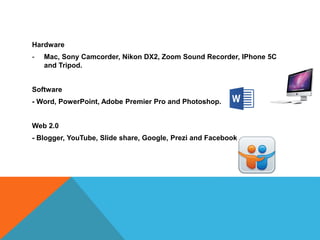
Hardware
- Mac, Sony Camcorder, Nikon DX2, Zoom Sound Recorder, IPhone 5C
and Tripod.
Software
- Word, PowerPoint, Adobe Premier Pro and Photoshop.
Web 2.0
- Blogger, YouTube, Slide share, Google, Prezi and Facebook.
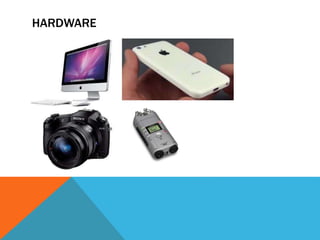
HARDWARE
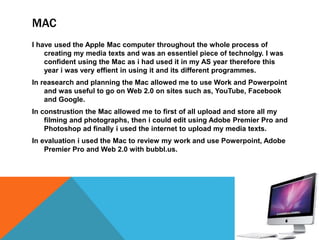
MAC
I have used the Apple Mac computer throughout the whole process of
creating my media texts and was an essentiel piece of technolgy. I was
confident using the Mac as i had used it in my AS year therefore this
year i was very effient in using it and its different programmes.
In reasearch and planning the Mac allowed me to use Work and Powerpoint
and was useful to go on Web 2.0 on sites such as, YouTube, Facebook
and Google.
In construstion the Mac allowed me to first of all upload and store all my
filming and photographs, then i could edit using Adobe Premier Pro and
Photoshop ad finally i used the internet to upload my media texts.
In evaluation i used the Mac to review my work and use Powerpoint, Adobe
Premier Pro and Web 2.0 with bubbl.us.
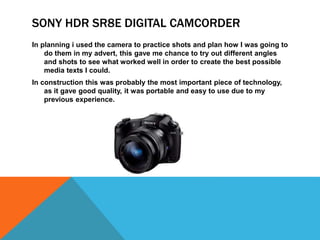
SONY HDR SR8E DIGITAL CAMCORDER
In planning i used the camera to practice shots and plan how I was going to
do them in my advert, this gave me chance to try out different angles
and shots to see what worked well in order to create the best possible
media texts I could.
In construction this was probably the most important piece of technology,
as it gave good quality, it was portable and easy to use due to my
previous experience.
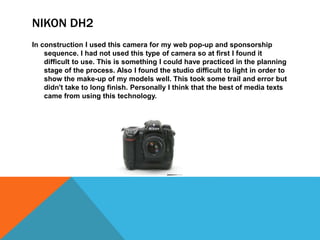
NIKON DH2
In construction I used this camera for my web pop-up and sponsorship
sequence. I had not used this type of camera so at first I found it
difficult to use. This is something I could have practiced in the planning
stage of the process. Also I found the studio difficult to light in order to
show the make-up of my models well. This took some trail and error but
didn't take to long finish. Personally I think that the best of media texts
came from using this technology.
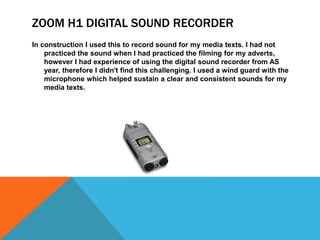
ZOOM H1 DIGITAL SOUND RECORDER
In construction I used this to record sound for my media texts. I had not
practiced the sound when I had practiced the filming for my adverts,
however I had experience of using the digital sound recorder from AS
year, therefore I didn't find this challenging. I used a wind guard with the
microphone which helped sustain a clear and consistent sounds for my
media texts.
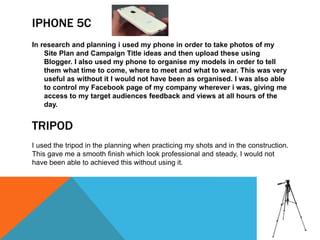
IPHONE 5C
In research and planning i used my phone in order to take photos of my
Site Plan and Campaign Title ideas and then upload these using
Blogger. I also used my phone to organise my models in order to tell
them what time to come, where to meet and what to wear. This was very
useful as without it I would not have been as organised. I was also able
to control my Facebook page of my company wherever i was, giving me
access to my target audiences feedback and views at all hours of the
day.
I used the tripod in the planning when practicing my shots and in the construction.
This gave me a smooth finish which look professional and steady, I would not
have been able to achieved this without using it.
TRIPOD
SOFTWARE
WORD
In planning I used word to create documents such as Location Release
Forms, Talent Release Forms and Risk Assessment. This allowed me to
create a clear document which looked professional.
I used word in construction to make my Edit Decision List, I used a table in
order to show each shot number, the duration of the shot, the quality
and whether I used it or not.
In research, planning and evaluation I used this this to present information. I am
very confortable using PowerPoint as I have used it throughout most my school
life. In research it was good to refer back to my work in this format.
POWERPOINT
ADOBE PREMIER PRO
In research and planning I used Adobe Premier Pro to edit the practice
shots I had taken, I didn't do this to a high standard or use any effects
when doing this as my main focus was on the actual shots themselves.
In construction I used Premier pro to create both my adverts. From using
Premier Pro in AS year i was comfortable with the edits, cutting and
how to use the software. I was also able to progress my knowledge and
used different edits to create fast paced high impact adverts. For
example, i reversed images, changed the speed, and put more than on
shot up on the screen at the same time, my cropping and changing the
position of the image.
In evaluation i also used Adobe Premier Pro to present information in a
more advanced way which is more interesting and requires a lot more
creativity.
PHOTOSHOP
In planning I used Photoshop to create my company logo, I
created a fairly simple logo for my company which didn't
require me to use many effects or tools therefore I was able
to make my logo quickly and fairly easily.
In construction I used Photoshop to edit the images for my web
pop-up and sponsorship sequence. As I had not used
Photoshop this was something I found very challenging to
use. Photoshop allowed me to change and edit the pictures
of the models. This meant that I could make the make-up look
as appealing as possible to the audience, I used edits on the
models face using a tool to airbrush the face, and make the
eyes and lips bigger and making the nose smaller. I also used
Photoshop for the Edit Decision List to create contact sheets
which showed all the photos I had taken for both my web
pop-up and sponsorship sequence.
In evaluation I used Photoshop to annotate screen shots of my
media texts so I could comment and write about the
conventions used, developed and challenged in my media
texts.
WEB 2.0
BLOGGER
I have used Blogger throughout the whole process as this is how I have been
able to show the work I have done. From using blogger in AS year I am
comfortable with using it, for example, labeling posts, creating pages and
embedding videos.
In research and planning i uploaded my work which I had done on PowerPoint or
word, to slide share and embedded this on to blogger. I also took photos of
my Site Plan and campaign Title Ideas and uploaded them on to blogger.
In construction i uploaded my work to YouTube and then embedded this on to
blogger. I was able to keep all my work together and sorted it out by labeling
it.
In evaluation i uploaded my work and embedded it on to blogger. I also used
blogger to view all my work so i could evaluate it effectively.
YOUTUBE
In research and planning I used this to look at other make-up adverts to
look at there conventions and codes. This was really helpful as I used a
lot of the same aspects to make my adverts look as professional as
possible.
In construction I used YouTube to help me with using Photoshop as there
are lots of tutorials showing how to use the different tools. I also got my
music off YouTube using royalty free music.
In research and planning I used Slide share to upload PowerPoint and word
documents in order to post these on Blogger.
In evaluation I used Slide share to upload
SLIDE SHARE
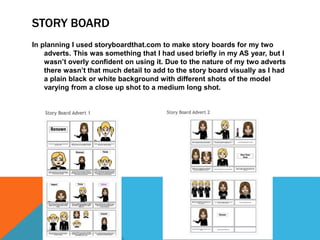
STORY BOARD
In planning I used storyboardthat.com to make story boards for my two
adverts. This was something that I had used briefly in my AS year, but I
wasn’t overly confident on using it. Due to the nature of my two adverts
there wasn’t that much detail to add to the story board visually as I had
a plain black or white background with different shots of the model
varying from a close up shot to a medium long shot.
GOOGLE
In research and planning Google allowed me to find lots of information
surrounding make-up adverts. When I was researching logos for my
company, I could see the variety of different existing company logos
and was able to compare these and see the similarities between them.
In research and planning I used Prezi to show information, I found that this was a
different and more interesting way to do this instead of PowerPoint. I was not as
confortable with Prezi as I was with PowerPoint so it prolonged the process for
me when doing work in this format.
PREZI
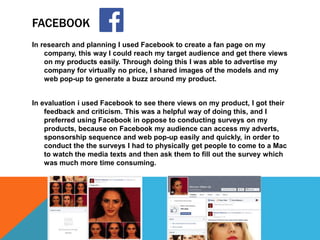
FACEBOOK
In research and planning I used Facebook to create a fan page on my
company, this way I could reach my target audience and get there views
on my products easily. Through doing this I was able to advertise my
company for virtually no price, I shared images of the models and my
web pop-up to generate a buzz around my product.
In evaluation i used Facebook to see there views on my product, I got their
feedback and criticism. This was a helpful way of doing this, and I
preferred using Facebook in oppose to conducting surveys on my
products, because on Facebook my audience can access my adverts,
sponsorship sequence and web pop-up easily and quickly, in order to
conduct the the surveys I had to physically get people to come to a Mac
to watch the media texts and then ask them to fill out the survey which
was much more time consuming.

Evaluation question 4

  • 2.
    Hardware - Mac, SonyCamcorder, Nikon DX2, Zoom Sound Recorder, IPhone 5C and Tripod. Software - Word, PowerPoint, Adobe Premier Pro and Photoshop. Web 2.0 - Blogger, YouTube, Slide share, Google, Prezi and Facebook.
  • 3.
  • 4.
    MAC I have usedthe Apple Mac computer throughout the whole process of creating my media texts and was an essentiel piece of technolgy. I was confident using the Mac as i had used it in my AS year therefore this year i was very effient in using it and its different programmes. In reasearch and planning the Mac allowed me to use Work and Powerpoint and was useful to go on Web 2.0 on sites such as, YouTube, Facebook and Google. In construstion the Mac allowed me to first of all upload and store all my filming and photographs, then i could edit using Adobe Premier Pro and Photoshop ad finally i used the internet to upload my media texts. In evaluation i used the Mac to review my work and use Powerpoint, Adobe Premier Pro and Web 2.0 with bubbl.us.
  • 5.
    SONY HDR SR8EDIGITAL CAMCORDER In planning i used the camera to practice shots and plan how I was going to do them in my advert, this gave me chance to try out different angles and shots to see what worked well in order to create the best possible media texts I could. In construction this was probably the most important piece of technology, as it gave good quality, it was portable and easy to use due to my previous experience.
  • 6.
    NIKON DH2 In constructionI used this camera for my web pop-up and sponsorship sequence. I had not used this type of camera so at first I found it difficult to use. This is something I could have practiced in the planning stage of the process. Also I found the studio difficult to light in order to show the make-up of my models well. This took some trail and error but didn't take to long finish. Personally I think that the best of media texts came from using this technology.
  • 7.
    ZOOM H1 DIGITALSOUND RECORDER In construction I used this to record sound for my media texts. I had not practiced the sound when I had practiced the filming for my adverts, however I had experience of using the digital sound recorder from AS year, therefore I didn't find this challenging. I used a wind guard with the microphone which helped sustain a clear and consistent sounds for my media texts.
  • 8.
    IPHONE 5C In researchand planning i used my phone in order to take photos of my Site Plan and Campaign Title ideas and then upload these using Blogger. I also used my phone to organise my models in order to tell them what time to come, where to meet and what to wear. This was very useful as without it I would not have been as organised. I was also able to control my Facebook page of my company wherever i was, giving me access to my target audiences feedback and views at all hours of the day. I used the tripod in the planning when practicing my shots and in the construction. This gave me a smooth finish which look professional and steady, I would not have been able to achieved this without using it. TRIPOD
  • 9.
  • 10.
    WORD In planning Iused word to create documents such as Location Release Forms, Talent Release Forms and Risk Assessment. This allowed me to create a clear document which looked professional. I used word in construction to make my Edit Decision List, I used a table in order to show each shot number, the duration of the shot, the quality and whether I used it or not. In research, planning and evaluation I used this this to present information. I am very confortable using PowerPoint as I have used it throughout most my school life. In research it was good to refer back to my work in this format. POWERPOINT
  • 11.
    ADOBE PREMIER PRO Inresearch and planning I used Adobe Premier Pro to edit the practice shots I had taken, I didn't do this to a high standard or use any effects when doing this as my main focus was on the actual shots themselves. In construction I used Premier pro to create both my adverts. From using Premier Pro in AS year i was comfortable with the edits, cutting and how to use the software. I was also able to progress my knowledge and used different edits to create fast paced high impact adverts. For example, i reversed images, changed the speed, and put more than on shot up on the screen at the same time, my cropping and changing the position of the image. In evaluation i also used Adobe Premier Pro to present information in a more advanced way which is more interesting and requires a lot more creativity.
  • 12.
    PHOTOSHOP In planning Iused Photoshop to create my company logo, I created a fairly simple logo for my company which didn't require me to use many effects or tools therefore I was able to make my logo quickly and fairly easily. In construction I used Photoshop to edit the images for my web pop-up and sponsorship sequence. As I had not used Photoshop this was something I found very challenging to use. Photoshop allowed me to change and edit the pictures of the models. This meant that I could make the make-up look as appealing as possible to the audience, I used edits on the models face using a tool to airbrush the face, and make the eyes and lips bigger and making the nose smaller. I also used Photoshop for the Edit Decision List to create contact sheets which showed all the photos I had taken for both my web pop-up and sponsorship sequence. In evaluation I used Photoshop to annotate screen shots of my media texts so I could comment and write about the conventions used, developed and challenged in my media texts.
  • 13.
  • 14.
    BLOGGER I have usedBlogger throughout the whole process as this is how I have been able to show the work I have done. From using blogger in AS year I am comfortable with using it, for example, labeling posts, creating pages and embedding videos. In research and planning i uploaded my work which I had done on PowerPoint or word, to slide share and embedded this on to blogger. I also took photos of my Site Plan and campaign Title Ideas and uploaded them on to blogger. In construction i uploaded my work to YouTube and then embedded this on to blogger. I was able to keep all my work together and sorted it out by labeling it. In evaluation i uploaded my work and embedded it on to blogger. I also used blogger to view all my work so i could evaluate it effectively.
  • 15.
    YOUTUBE In research andplanning I used this to look at other make-up adverts to look at there conventions and codes. This was really helpful as I used a lot of the same aspects to make my adverts look as professional as possible. In construction I used YouTube to help me with using Photoshop as there are lots of tutorials showing how to use the different tools. I also got my music off YouTube using royalty free music. In research and planning I used Slide share to upload PowerPoint and word documents in order to post these on Blogger. In evaluation I used Slide share to upload SLIDE SHARE
  • 16.
    STORY BOARD In planningI used storyboardthat.com to make story boards for my two adverts. This was something that I had used briefly in my AS year, but I wasn’t overly confident on using it. Due to the nature of my two adverts there wasn’t that much detail to add to the story board visually as I had a plain black or white background with different shots of the model varying from a close up shot to a medium long shot.
  • 17.
    GOOGLE In research andplanning Google allowed me to find lots of information surrounding make-up adverts. When I was researching logos for my company, I could see the variety of different existing company logos and was able to compare these and see the similarities between them. In research and planning I used Prezi to show information, I found that this was a different and more interesting way to do this instead of PowerPoint. I was not as confortable with Prezi as I was with PowerPoint so it prolonged the process for me when doing work in this format. PREZI
  • 18.
    FACEBOOK In research andplanning I used Facebook to create a fan page on my company, this way I could reach my target audience and get there views on my products easily. Through doing this I was able to advertise my company for virtually no price, I shared images of the models and my web pop-up to generate a buzz around my product. In evaluation i used Facebook to see there views on my product, I got their feedback and criticism. This was a helpful way of doing this, and I preferred using Facebook in oppose to conducting surveys on my products, because on Facebook my audience can access my adverts, sponsorship sequence and web pop-up easily and quickly, in order to conduct the the surveys I had to physically get people to come to a Mac to watch the media texts and then ask them to fill out the survey which was much more time consuming.