Evaluation Methods for Mobile Learning   Mike Sharples Learning Sciences Research Institute University of Nottingham www.nottingham.ac.uk/lsri/msh
What is mobile learning? Learning with portable technology Focus on the technology Could be in a fixed location, such as a classroom Learning across contexts Focus on the learner Could use portable or fixed technology How people learn across locations and transitions Learning in a mobile world Focus on the mobile society How to understand people and technology in constant mobility How to design learning for the mobile society
Can mobile learning be effective? We think so! Classroom response systems (Draper, Dufresne, Roschelle) Group learning with wireless mobiles and phones (Nussbaum et al., Dillenbourg) Classroom handheld simulation games (Collella, Virus Game) Mobile guides (Tate Modern, Caerus, Mobile Bristol) Connecting learning in formal and informal settings (Butterfly Watching, MyArtSpace) Lack of convincing studies of mobile learning  Attitude surveys and interviews: “they say they enjoy it” Observations: “they look like they are learning” With a few exceptions (e.g. Nussbaum et al.)
Issues in evaluating mobile learning It may be mobile Tracking activity across locations It may be distributed Multiple participants in different locations It may be informal How can we distinguish learning from other activities? It may be extended How can we evaluate long-term learning? It may involve a variety of personal and institutional technologies Mobile and fixed phones, desktop machines, laptops, public information systems There may be specific ethical problems How  can  and  should  we monitor everyday activity?
What do you want to know? Usability Well-tested methods: Expert evaluations (e.g. Heuristic evaluation and Cognitive Walkthrough) Lab-based comparisons Usefulness Hard: depends on the educational aims and context Field-based interviews, observations and walk-throughs Ethnographic analysis Critical incident studies (including focus group replay) Learning outcome measures Control group Pre-test, intervention, post-test, delayed post-test Logbooks and diaries Logbooks of activity Diary-diary interview used successfully by Vavoula and others for intensive study of everyday learning over time
Some evaluation methods (contd.) Usefulness (contd.) Other feedback methods Telephone probes Snap polls Interviews Focus groups Automatic logging  Recording where, when and how a mobile device is used Quantitative analysis of student learning action (Trinder et al., 2005) Learning outcome measures Control group Pre-test, intervention, post-test, delayed post-test Attitude Attitude surveys General attitude surveys are little use: almost all innovations are rated between 3.5 and 4.5 on a 5 point Likert scale Specific questions can indicate issues (e.g. interface problems) Microsoft Desirability Toolkit Users indicate their attitudes through choice of cards
Case studies Student Learning Organiser Long term learning  MyArtSpace Learning across contexts PI: Personal Inquiry Ethics
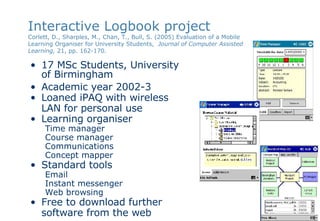
Interactive Logbook project Corlett, D.,  Sharples, M., Chan, T., Bull, S. (2005) Evaluation of a Mobile Learning Organiser for University Students,  Journal of Computer Assisted Learning,  21, pp. 162-170.   17 MSc Students, University  of Birmingham Academic year 2002-3 Loaned iPAQ with wireless LAN for personal use Learning organiser Time manager Course manager Communications Concept mapper Standard tools Email Instant messenger Web browsing Free to download further software from the web
Evaluation methods Questionnaires  administered at 1, 4, 16 weeks, and 10 months Focus groups, following each of the questionnaires Logbooks Students kept logbooks for six weeks  Students’ attitudes towards the learning organiser Patterns of usage of the various applications (including any they had downloaded themselves) Patterns of usage of the technology, particularly with respect to wireless connectivity Ease of use issues Issues relating to institutional support for mobile learning devices Videoed interactions to compare the concept map tools, three students were videoed carrying out an exercise, which they later commented on after reviewing the video
Data Usability Size, memory, battery life, speed, software usability, integration Usfulness of PDAs of Learning Organiser of concept mapping tools Patterns of use Locations Changes over time
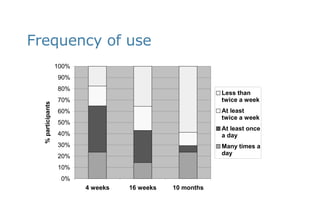
Frequency of use
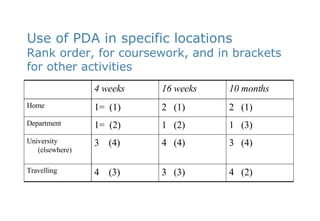
Use of PDA in specific locations Rank order, for coursework, and in brackets for other activities 4  (2) 3  (3) 4  (3) Travelling 3  (4) 4  (4) 3  (4) University (elsewhere) 1  (3) 1  (2) 1=  (2) Department 2  (1) 2  (1) 1=  (1) Home 10 months 16 weeks 4 weeks
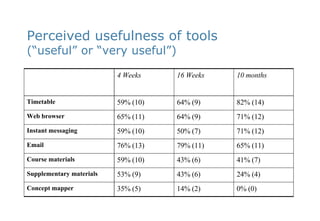
Perceived usefulness of tools  (“useful” or “very useful”) 0% (0) 14% (2) 35% (5) Concept mapper 24% (4) 43% (6) 53% (9) Supplementary materials 41% (7) 43% (6) 59% (10) Course materials 65% (11) 79% (11) 76% (13) Email 71% (12) 50% (7) 59% (10) Instant messaging 71% (12) 64% (9) 65% (11) Web browser 82% (14) 64% (9) 59% (10) Timetable 10 months 16 Weeks 4 Weeks
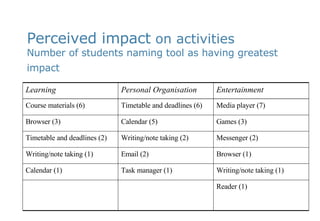
Perceived impact  on activities Number of students naming tool as having greatest impact   Reader (1) Writing/note taking (1) Task manager (1) Calendar (1) Browser (1) Email (2) Writing/note taking (1) Messenger (2) Writing/note taking (2)  Timetable and deadlines (2) Games (3) Calendar (5) Browser (3) Media player (7) Timetable and deadlines (6) Course materials (6) Entertainment Personal Organisation Learning
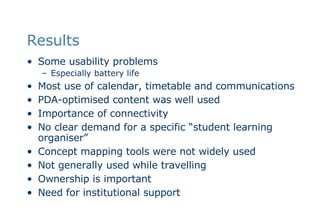
Results Some usability problems Especially battery life Most use of calendar, timetable and communications PDA-optimised content was well used  Importance of connectivity No clear demand for a specific “student learning organiser” Concept mapping tools were not widely used Not generally used while travelling Ownership is important Need for institutional support
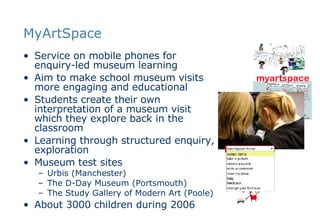
MyArtSpace Service on mobile phones for enquiry-led museum learning Aim to make school museum visits more engaging and educational Students create their own interpretation of a museum visit which they explore back in the classroom Learning through structured enquiry, exploration Museum test sites  Urbis (Manchester) The D-Day Museum (Portsmouth) The Study Gallery of Modern Art (Poole) About 3000 children during 2006
How it works In class before the visit, the teacher sets an  inquiry topic At the museum, children are loaned  multimedia phones Exhibits in the museum have  2-letter codes  printed by them Children can use the phone to Type the code to  ‘collect’ an object  and see a presentation about it Record  sounds Take  photos Make  notes See who else has ‘collected’ the object All the information collected or created is sent automatically to a personal website showing a  list of the items The website provides a record of the  child’s interpretation  of the visit In class after the visit, the children  share  the collected and recorded items and make them into  presentations
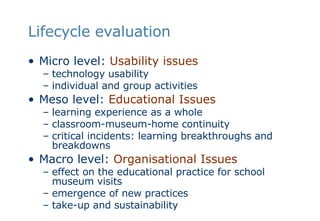
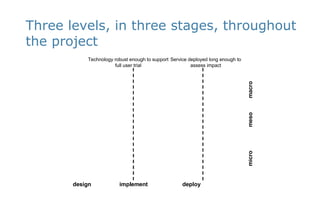
Lifecycle evaluation Micro level:  Usability issues   technology usability individual and group activities Meso level:  Educational Issues learning experience as a whole classroom-museum-home continuity  critical incidents: learning breakthroughs and breakdowns  Macro level:  Organisational Issues effect on the educational practice for school museum visits  emergence of new practices  take-up and sustainability
Evaluation At each level Step 1 –  what was supposed to happen   pre-interviews with stakeholders (teachers, students, museum educators),  documents provided to support the visits Step 2 –  what actually happened observer logs post-focus groups analysis of video diaries Step 3 –  differences between 1 & 2 reflective interviews with stakeholders  critical incident analysis
Three levels, in three stages, throughout the project micro  meso  macro design  implement  deploy  Technology robust enough to support full user trial Service deployed long enough to assess impact
Summary of results The  technology worked Photos, information on exhibits, notes, automatic sending to website Minor  usability problems Students liked the  ‘cool’ technology   Students  enjoyed the experience  more than their previous museum visit The students indicated that the phones made the visit  more interactive Teachers were pleased that students engaged with the inquiry learning task
Usability Issues Appropriate  form factor Device is a mobile phone, not a typical handheld museum guide Collecting and creating items was an  easy and natural process   Mobile   phone connection Text annotations Integration of website  with commercial software, e.g. PowerPoint
Educational Issues Supports curriculum topics in  literacy and media studies   Encourages  meaningful and enjoyable pre- and post-visit lessons   Encourages children to  make active choices  in what is normally a passive experience Teacher  preparation Need for teacher to understand the experience and run an appropriate pre-visit lesson Where to  impose constraints Structure and restrict the collecting activity, or learn from organising the material  back in the classroom  Support for  collaborative learning “ X has also collected” wasn’t successful
Organistional issues Museum  appeal attracting secondary schools to the museum  Student  engagement Students spent longer on a MAS visit (90 mins compared to 20 mins) Museum  accessibility Ability to engage with museum content after the visit Problems of  museum staff engagement Burden on museum staff  Business model Maintenance of phones Data charges Competition with other museum media
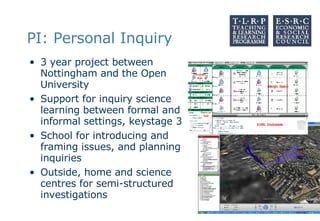
PI: Personal Inquiry 3 year project between Nottingham and the Open University Support for inquiry science learning between formal and informal settings, keystage 3 School for introducing and framing issues, and planning inquiries Outside, home and science centres for semi-structured investigations
PI Ethics, general issues Participatory design,  all participants will willing volunteers  kept fully informed of the purpose active participants in the design and evaluation Permissions  from the children, teachers parents Studies in the home will be with the signed informed consent of all target children and their parents  Other children in the family will be asked for their assent  Project staff subject to enhanced CRB checks.  Researchers will not go unaccompanied into homes Confidentiality   All data will be anonymised Participants and their schools will not be identified in publications or presentations (unless they wish to be)
PI Ethics, specific issues Monitoring Children will be using the technology as part of their curriculum work, so teachers should be able to monitor the online activities as they occur and to inspect all the collected data Children will be fully informed about how their learning activities outside the classroom may be monitored by teachers and researchers Children will be able to decide where and when to collect data  System will not continuously monitor movement and activity, but will only log actions and data explicitly entered by the children.  Ownership of data, privacy, and copyright All data collected will be subject to the provisions of the Data Protection Act 1998, in particular Section 33 of the Act relating to data collected for the purposes of research.  Material captured or created by the children will be subject to normal standards of copyright and fair use, and inappropriate material will be deleted.  Authors of teaching materials and field data will retain copyright and moral rights of authorship over their material A condition of participation will be that the project has rights to publish the material for academic and educational purposes (either crediting the authors or anonymising the material where appropriate and by agreement).
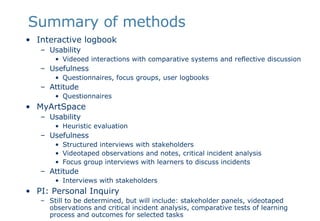
Summary of methods Interactive logbook Usability Videoed interactions with comparative systems and reflective discussion Usefulness Questionnaires, focus groups, user logbooks Attitude Questionnaires  MyArtSpace Usability Heuristic evaluation Usefulness Structured interviews with stakeholders Videotaped observations and notes, critical incident analysis Focus group interviews with learners to discuss incidents Attitude Interviews with stakeholders PI: Personal Inquiry Still to be determined, but will include: stakeholder panels, videotaped observations and critical incident analysis, comparative tests of learning process and outcomes for selected tasks

Evaluation Methods For Mobile Learning

  • 1.
    Evaluation Methods forMobile Learning Mike Sharples Learning Sciences Research Institute University of Nottingham www.nottingham.ac.uk/lsri/msh
  • 2.
    What is mobilelearning? Learning with portable technology Focus on the technology Could be in a fixed location, such as a classroom Learning across contexts Focus on the learner Could use portable or fixed technology How people learn across locations and transitions Learning in a mobile world Focus on the mobile society How to understand people and technology in constant mobility How to design learning for the mobile society
  • 3.
    Can mobile learningbe effective? We think so! Classroom response systems (Draper, Dufresne, Roschelle) Group learning with wireless mobiles and phones (Nussbaum et al., Dillenbourg) Classroom handheld simulation games (Collella, Virus Game) Mobile guides (Tate Modern, Caerus, Mobile Bristol) Connecting learning in formal and informal settings (Butterfly Watching, MyArtSpace) Lack of convincing studies of mobile learning Attitude surveys and interviews: “they say they enjoy it” Observations: “they look like they are learning” With a few exceptions (e.g. Nussbaum et al.)
  • 4.
    Issues in evaluatingmobile learning It may be mobile Tracking activity across locations It may be distributed Multiple participants in different locations It may be informal How can we distinguish learning from other activities? It may be extended How can we evaluate long-term learning? It may involve a variety of personal and institutional technologies Mobile and fixed phones, desktop machines, laptops, public information systems There may be specific ethical problems How can and should we monitor everyday activity?
  • 5.
    What do youwant to know? Usability Well-tested methods: Expert evaluations (e.g. Heuristic evaluation and Cognitive Walkthrough) Lab-based comparisons Usefulness Hard: depends on the educational aims and context Field-based interviews, observations and walk-throughs Ethnographic analysis Critical incident studies (including focus group replay) Learning outcome measures Control group Pre-test, intervention, post-test, delayed post-test Logbooks and diaries Logbooks of activity Diary-diary interview used successfully by Vavoula and others for intensive study of everyday learning over time
  • 6.
    Some evaluation methods(contd.) Usefulness (contd.) Other feedback methods Telephone probes Snap polls Interviews Focus groups Automatic logging Recording where, when and how a mobile device is used Quantitative analysis of student learning action (Trinder et al., 2005) Learning outcome measures Control group Pre-test, intervention, post-test, delayed post-test Attitude Attitude surveys General attitude surveys are little use: almost all innovations are rated between 3.5 and 4.5 on a 5 point Likert scale Specific questions can indicate issues (e.g. interface problems) Microsoft Desirability Toolkit Users indicate their attitudes through choice of cards
  • 7.
    Case studies StudentLearning Organiser Long term learning MyArtSpace Learning across contexts PI: Personal Inquiry Ethics
  • 8.
    Interactive Logbook projectCorlett, D., Sharples, M., Chan, T., Bull, S. (2005) Evaluation of a Mobile Learning Organiser for University Students, Journal of Computer Assisted Learning, 21, pp. 162-170. 17 MSc Students, University of Birmingham Academic year 2002-3 Loaned iPAQ with wireless LAN for personal use Learning organiser Time manager Course manager Communications Concept mapper Standard tools Email Instant messenger Web browsing Free to download further software from the web
  • 9.
    Evaluation methods Questionnaires administered at 1, 4, 16 weeks, and 10 months Focus groups, following each of the questionnaires Logbooks Students kept logbooks for six weeks Students’ attitudes towards the learning organiser Patterns of usage of the various applications (including any they had downloaded themselves) Patterns of usage of the technology, particularly with respect to wireless connectivity Ease of use issues Issues relating to institutional support for mobile learning devices Videoed interactions to compare the concept map tools, three students were videoed carrying out an exercise, which they later commented on after reviewing the video
  • 10.
    Data Usability Size,memory, battery life, speed, software usability, integration Usfulness of PDAs of Learning Organiser of concept mapping tools Patterns of use Locations Changes over time
  • 11.
  • 12.
    Use of PDAin specific locations Rank order, for coursework, and in brackets for other activities 4 (2) 3 (3) 4 (3) Travelling 3 (4) 4 (4) 3 (4) University (elsewhere) 1 (3) 1 (2) 1= (2) Department 2 (1) 2 (1) 1= (1) Home 10 months 16 weeks 4 weeks
  • 13.
    Perceived usefulness oftools (“useful” or “very useful”) 0% (0) 14% (2) 35% (5) Concept mapper 24% (4) 43% (6) 53% (9) Supplementary materials 41% (7) 43% (6) 59% (10) Course materials 65% (11) 79% (11) 76% (13) Email 71% (12) 50% (7) 59% (10) Instant messaging 71% (12) 64% (9) 65% (11) Web browser 82% (14) 64% (9) 59% (10) Timetable 10 months 16 Weeks 4 Weeks
  • 14.
    Perceived impact on activities Number of students naming tool as having greatest impact Reader (1) Writing/note taking (1) Task manager (1) Calendar (1) Browser (1) Email (2) Writing/note taking (1) Messenger (2) Writing/note taking (2) Timetable and deadlines (2) Games (3) Calendar (5) Browser (3) Media player (7) Timetable and deadlines (6) Course materials (6) Entertainment Personal Organisation Learning
  • 15.
    Results Some usabilityproblems Especially battery life Most use of calendar, timetable and communications PDA-optimised content was well used Importance of connectivity No clear demand for a specific “student learning organiser” Concept mapping tools were not widely used Not generally used while travelling Ownership is important Need for institutional support
  • 16.
    MyArtSpace Service onmobile phones for enquiry-led museum learning Aim to make school museum visits more engaging and educational Students create their own interpretation of a museum visit which they explore back in the classroom Learning through structured enquiry, exploration Museum test sites Urbis (Manchester) The D-Day Museum (Portsmouth) The Study Gallery of Modern Art (Poole) About 3000 children during 2006
  • 17.
    How it worksIn class before the visit, the teacher sets an inquiry topic At the museum, children are loaned multimedia phones Exhibits in the museum have 2-letter codes printed by them Children can use the phone to Type the code to ‘collect’ an object and see a presentation about it Record sounds Take photos Make notes See who else has ‘collected’ the object All the information collected or created is sent automatically to a personal website showing a list of the items The website provides a record of the child’s interpretation of the visit In class after the visit, the children share the collected and recorded items and make them into presentations
  • 18.
    Lifecycle evaluation Microlevel: Usability issues technology usability individual and group activities Meso level: Educational Issues learning experience as a whole classroom-museum-home continuity critical incidents: learning breakthroughs and breakdowns Macro level: Organisational Issues effect on the educational practice for school museum visits emergence of new practices take-up and sustainability
  • 19.
    Evaluation At eachlevel Step 1 – what was supposed to happen pre-interviews with stakeholders (teachers, students, museum educators), documents provided to support the visits Step 2 – what actually happened observer logs post-focus groups analysis of video diaries Step 3 – differences between 1 & 2 reflective interviews with stakeholders critical incident analysis
  • 20.
    Three levels, inthree stages, throughout the project micro meso macro design implement deploy Technology robust enough to support full user trial Service deployed long enough to assess impact
  • 21.
    Summary of resultsThe technology worked Photos, information on exhibits, notes, automatic sending to website Minor usability problems Students liked the ‘cool’ technology Students enjoyed the experience more than their previous museum visit The students indicated that the phones made the visit more interactive Teachers were pleased that students engaged with the inquiry learning task
  • 22.
    Usability Issues Appropriate form factor Device is a mobile phone, not a typical handheld museum guide Collecting and creating items was an easy and natural process Mobile phone connection Text annotations Integration of website with commercial software, e.g. PowerPoint
  • 23.
    Educational Issues Supportscurriculum topics in literacy and media studies Encourages meaningful and enjoyable pre- and post-visit lessons Encourages children to make active choices in what is normally a passive experience Teacher preparation Need for teacher to understand the experience and run an appropriate pre-visit lesson Where to impose constraints Structure and restrict the collecting activity, or learn from organising the material back in the classroom Support for collaborative learning “ X has also collected” wasn’t successful
  • 24.
    Organistional issues Museum appeal attracting secondary schools to the museum Student engagement Students spent longer on a MAS visit (90 mins compared to 20 mins) Museum accessibility Ability to engage with museum content after the visit Problems of museum staff engagement Burden on museum staff Business model Maintenance of phones Data charges Competition with other museum media
  • 25.
    PI: Personal Inquiry3 year project between Nottingham and the Open University Support for inquiry science learning between formal and informal settings, keystage 3 School for introducing and framing issues, and planning inquiries Outside, home and science centres for semi-structured investigations
  • 26.
    PI Ethics, generalissues Participatory design, all participants will willing volunteers kept fully informed of the purpose active participants in the design and evaluation Permissions from the children, teachers parents Studies in the home will be with the signed informed consent of all target children and their parents Other children in the family will be asked for their assent Project staff subject to enhanced CRB checks. Researchers will not go unaccompanied into homes Confidentiality All data will be anonymised Participants and their schools will not be identified in publications or presentations (unless they wish to be)
  • 27.
    PI Ethics, specificissues Monitoring Children will be using the technology as part of their curriculum work, so teachers should be able to monitor the online activities as they occur and to inspect all the collected data Children will be fully informed about how their learning activities outside the classroom may be monitored by teachers and researchers Children will be able to decide where and when to collect data System will not continuously monitor movement and activity, but will only log actions and data explicitly entered by the children. Ownership of data, privacy, and copyright All data collected will be subject to the provisions of the Data Protection Act 1998, in particular Section 33 of the Act relating to data collected for the purposes of research. Material captured or created by the children will be subject to normal standards of copyright and fair use, and inappropriate material will be deleted. Authors of teaching materials and field data will retain copyright and moral rights of authorship over their material A condition of participation will be that the project has rights to publish the material for academic and educational purposes (either crediting the authors or anonymising the material where appropriate and by agreement).
  • 28.
    Summary of methodsInteractive logbook Usability Videoed interactions with comparative systems and reflective discussion Usefulness Questionnaires, focus groups, user logbooks Attitude Questionnaires MyArtSpace Usability Heuristic evaluation Usefulness Structured interviews with stakeholders Videotaped observations and notes, critical incident analysis Focus group interviews with learners to discuss incidents Attitude Interviews with stakeholders PI: Personal Inquiry Still to be determined, but will include: stakeholder panels, videotaped observations and critical incident analysis, comparative tests of learning process and outcomes for selected tasks