Evaluation for contents and front
           cover page
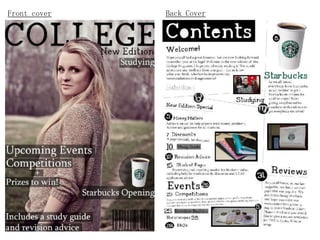
Front cover   Back Cover
Masthead
           For the masthead of the magazine I used a
           font off ‘Dafont.com’. I thought the
           masthead would look better if the writing
           was behind the models head, but in front of
           the main background, as it looks more
           professional and smart. The weight of the
           letters was a thin, but bold writing style
           so it gave the magazine a modern look, was
           simple to read, and nothing that big or
           bright. The typeface is serif, which makes
           the writing look more old fashioned, but
           also formal, which gives the magazine a
           good impression that its serious and not a
           joke.

           I used a subhead to add to the
           masthead, using the same font, but in a
           smaller size as its just telling us that
           it’s a new edition magazine. I also think
           that this just added to the magazine and
           gave it a better appearance.
Lead Image


             For the lead image, I used a picture of a
             friend. It was a medium-close up, which I
             think worked well as the back ground wasn’t
             to fussy. The only think I would have changed
             with the picture was probably to have a
             lighter background, as I think the whole
             picture maybe makes the front cover look a
             bit dull and plain. Especially for
             students, I think it would have been better
             if it was more colourful as that would
             probably appeal to students more, as this is
             probably a bit grown up as the colour scheme
             is rather bland.
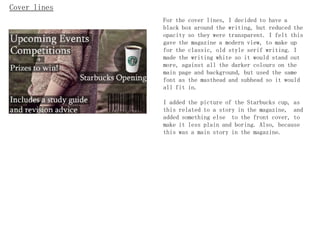
Cover lines
              For the cover lines, I decided to have a
              black box around the writing, but reduced the
              opacity so they were transparent. I felt this
              gave the magazine a modern view, to make up
              for the classic, old style serif writing. I
              made the writing white so it would stand out
              more, against all the darker colours on the
              main page and background, but used the same
              font as the masthead and subhead so it would
              all fit in.

              I added the picture of the Starbucks cup, as
              this related to a story in the magazine, and
              added something else to the front cover, to
              make it less plain and boring. Also, because
              this was a main story in the magazine.
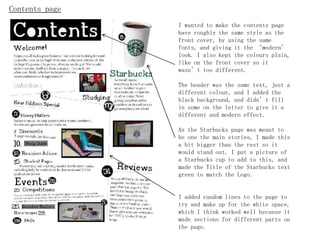
Contents page
                I wanted to make the contents page
                have roughly the same style as the
                front cover, by using the same
                fonts, and giving it the ‘modern’
                look. I also kept the colours plain,
                like on the front cover so it
                wasn’t too different.

                The header was the same text,   just a
                different colour, and I added   the
                black background, and didn’t    fill
                in some on the letter to give   it a
                different and modern effect.

                As the Starbucks page was meant to
                be one the main stories, I made this
                a bit bigger than the rest so it
                would stand out. I put a picture of
                a Starbucks cup to add to this, and
                made the Title of the Starbucks text
                green to match the Logo.


                I added random lines to the page to
                try and make up for the white space,
                which I think worked well because it
                made sections for different parts on
                the page.
Contents header
                  For the Contents header, I used the same
                  text that was used on the front cover.
                  This helped relate the contents page to
                  the Front cover, so it wasn’t totally
                  different, and you would realize it was
                  for the same magazine. I left two of the
                  letters white, instead f changing in to
                  black with the writing to give it a more
                  modern effect, and makes it more
                  fun, and not so serious and perfect. The
                  colour scheme is again, plain and simple
                  so its clear and stand out.

Pictures
                  I tried to take pictures that would
                  relate the articles on the magazine,
                  such as the picture of the people
                  was to show that the magazine was
                  saying ‘hello’ from the student
                  union. The pictures help fill the
                  white space, and might encourage
                  people to look at a certain article,
                  if they like the picture.
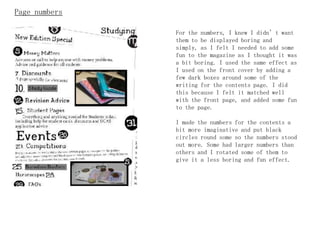
Page numbers

               For the numbers, I knew I didn’t want
               them to be displayed boring and
               simply, as I felt I needed to add some
               fun to the magazine as I thought it was
               a bit boring. I used the same effect as
               I used on the front cover by adding a
               few dark boxes around some of the
               writing for the contents page. I did
               this because I felt it matched well
               with the front page, and added some fun
               to the page.

               I made the numbers for the contents a
               bit more imaginative and put black
               circles round some so the numbers stood
               out more. Some had larger numbers than
               others and I rotated some of them to
               give it a less boring and fun effect.
Analysis

Before I started constructing the magazine, I made plans, and flat plans to decide what I
was going to include in my magazine, which really helped, because otherwise I would have no
idea what I was going to do! This ensure that I figured out what kind of pictures I wanted
to use, the text, articles and colour scheme.


What worked?
I think the bits that worked well was, on the front cover, the black transparent boxes. I
think these gave a really nice, simple, but modern effect to the magazine. I think they
worked especially well as the colour scheme was quite dark ,so I couldn’t have used just
black writing on its own, because it wouldn’t have shown up, and white writing with no
background would have looked very boring!
I also think that fun page numbers looked good as it made a better appearance to the
page, and was a bit different to normal magazines. I also like the way the Starbucks
lettering was the same Starbucks logo colour as it matches in really well, relates to that
article and adds a new colour into the page.


What didn’t work?
Think that I thought didn’t work as well was maybe the lead image. It was all very
dark, and would have been much better if it was brighter. Also, on the contents page I think
I could have made the pictures better, maybe to add in with the colour scheme, as I think
they made the page look a bit strange and random.
What was difficult?
I found the contents page the hardest to do, as all the layers got very confusing, as there
were so many to be working with! Making the page numbers, especially the ones with the
black circles around was very hard, as I had to make sure I linked the layers, and got them
in the right order, so the number could actually be seen.

I also found thinking of pictures hard, as I had no idea what I was going to do! Once I had
figured out what pictures I was going to do, and that I was going to relate them to the
articles, it was a lot easier.

When I was working out my flat plans, and what I was going to include in in, I got very
confused as I had no idea what to include, especially as there were so many options, and so
much that I could include, so I had to try and reduce my list to just a few!

Working out the pages numbers was also very confusing because I had to make sure I left
space for advertisements, so I had to miss out many numbers. And also, I had no idea how
many pages I should have included as all magazines have different amounts.


What was easy?
I found using Photoshop easy as I have no gotten used to it, so I managed to get through
things quite quickly after I had thought up ideas as I knew how to display them and sort
them out on Photoshop.
What have I learnt?
I learnt a lot of things about doing this magazine, such as what to include, and especially
that I need to leave space for advertisements, as I never really realised until I was
constructing the magazine!

I also learnt stuff about the front cover, like the identifier, left 3 rd, cover lines, lead
image, banners, flash boxes and the masthead. I knew roughly what these things were, but had
no idea what they were actually called, and with some of the, why they were actually used.


What if I had more time and money?
If I had more time and money, I would have got a better picture, brighter and with a more
inventive background. Also, made the colour scheme a lot brighter so the magazine doesn't
look as ‘old’
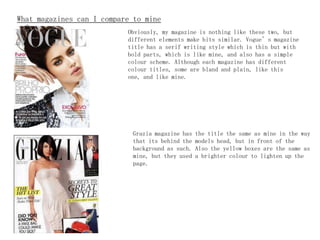
What magazines can I compare to mine
to?                         Obviously, my   magazine is nothing like these two, but
                              different elements make bits similar. Vogue’s magazine
                              title has a serif writing style which is thin but with
                              bold parts, which is like mine, and also has a simple
                              colour scheme. Although each magazine has different
                              colour titles, some are bland and plain, like this
                              one, and like mine.


                               Grazia magazine has   the title the same as mine in the way
                               that its behind the   models head, but in front of the
                               background as such.   Also the yellow boxes are the same as
                               mine, but they used   a brighter colour to lighten up the
                               page.

Evaluation for contents and front cover page

  • 1.
    Evaluation for contentsand front cover page
  • 2.
    Front cover Back Cover
  • 3.
    Masthead For the masthead of the magazine I used a font off ‘Dafont.com’. I thought the masthead would look better if the writing was behind the models head, but in front of the main background, as it looks more professional and smart. The weight of the letters was a thin, but bold writing style so it gave the magazine a modern look, was simple to read, and nothing that big or bright. The typeface is serif, which makes the writing look more old fashioned, but also formal, which gives the magazine a good impression that its serious and not a joke. I used a subhead to add to the masthead, using the same font, but in a smaller size as its just telling us that it’s a new edition magazine. I also think that this just added to the magazine and gave it a better appearance.
  • 4.
    Lead Image For the lead image, I used a picture of a friend. It was a medium-close up, which I think worked well as the back ground wasn’t to fussy. The only think I would have changed with the picture was probably to have a lighter background, as I think the whole picture maybe makes the front cover look a bit dull and plain. Especially for students, I think it would have been better if it was more colourful as that would probably appeal to students more, as this is probably a bit grown up as the colour scheme is rather bland.
  • 5.
    Cover lines For the cover lines, I decided to have a black box around the writing, but reduced the opacity so they were transparent. I felt this gave the magazine a modern view, to make up for the classic, old style serif writing. I made the writing white so it would stand out more, against all the darker colours on the main page and background, but used the same font as the masthead and subhead so it would all fit in. I added the picture of the Starbucks cup, as this related to a story in the magazine, and added something else to the front cover, to make it less plain and boring. Also, because this was a main story in the magazine.
  • 6.
    Contents page I wanted to make the contents page have roughly the same style as the front cover, by using the same fonts, and giving it the ‘modern’ look. I also kept the colours plain, like on the front cover so it wasn’t too different. The header was the same text, just a different colour, and I added the black background, and didn’t fill in some on the letter to give it a different and modern effect. As the Starbucks page was meant to be one the main stories, I made this a bit bigger than the rest so it would stand out. I put a picture of a Starbucks cup to add to this, and made the Title of the Starbucks text green to match the Logo. I added random lines to the page to try and make up for the white space, which I think worked well because it made sections for different parts on the page.
  • 7.
    Contents header For the Contents header, I used the same text that was used on the front cover. This helped relate the contents page to the Front cover, so it wasn’t totally different, and you would realize it was for the same magazine. I left two of the letters white, instead f changing in to black with the writing to give it a more modern effect, and makes it more fun, and not so serious and perfect. The colour scheme is again, plain and simple so its clear and stand out. Pictures I tried to take pictures that would relate the articles on the magazine, such as the picture of the people was to show that the magazine was saying ‘hello’ from the student union. The pictures help fill the white space, and might encourage people to look at a certain article, if they like the picture.
  • 8.
    Page numbers For the numbers, I knew I didn’t want them to be displayed boring and simply, as I felt I needed to add some fun to the magazine as I thought it was a bit boring. I used the same effect as I used on the front cover by adding a few dark boxes around some of the writing for the contents page. I did this because I felt it matched well with the front page, and added some fun to the page. I made the numbers for the contents a bit more imaginative and put black circles round some so the numbers stood out more. Some had larger numbers than others and I rotated some of them to give it a less boring and fun effect.
  • 9.
    Analysis Before I startedconstructing the magazine, I made plans, and flat plans to decide what I was going to include in my magazine, which really helped, because otherwise I would have no idea what I was going to do! This ensure that I figured out what kind of pictures I wanted to use, the text, articles and colour scheme. What worked? I think the bits that worked well was, on the front cover, the black transparent boxes. I think these gave a really nice, simple, but modern effect to the magazine. I think they worked especially well as the colour scheme was quite dark ,so I couldn’t have used just black writing on its own, because it wouldn’t have shown up, and white writing with no background would have looked very boring! I also think that fun page numbers looked good as it made a better appearance to the page, and was a bit different to normal magazines. I also like the way the Starbucks lettering was the same Starbucks logo colour as it matches in really well, relates to that article and adds a new colour into the page. What didn’t work? Think that I thought didn’t work as well was maybe the lead image. It was all very dark, and would have been much better if it was brighter. Also, on the contents page I think I could have made the pictures better, maybe to add in with the colour scheme, as I think they made the page look a bit strange and random.
  • 10.
    What was difficult? Ifound the contents page the hardest to do, as all the layers got very confusing, as there were so many to be working with! Making the page numbers, especially the ones with the black circles around was very hard, as I had to make sure I linked the layers, and got them in the right order, so the number could actually be seen. I also found thinking of pictures hard, as I had no idea what I was going to do! Once I had figured out what pictures I was going to do, and that I was going to relate them to the articles, it was a lot easier. When I was working out my flat plans, and what I was going to include in in, I got very confused as I had no idea what to include, especially as there were so many options, and so much that I could include, so I had to try and reduce my list to just a few! Working out the pages numbers was also very confusing because I had to make sure I left space for advertisements, so I had to miss out many numbers. And also, I had no idea how many pages I should have included as all magazines have different amounts. What was easy? I found using Photoshop easy as I have no gotten used to it, so I managed to get through things quite quickly after I had thought up ideas as I knew how to display them and sort them out on Photoshop.
  • 11.
    What have Ilearnt? I learnt a lot of things about doing this magazine, such as what to include, and especially that I need to leave space for advertisements, as I never really realised until I was constructing the magazine! I also learnt stuff about the front cover, like the identifier, left 3 rd, cover lines, lead image, banners, flash boxes and the masthead. I knew roughly what these things were, but had no idea what they were actually called, and with some of the, why they were actually used. What if I had more time and money? If I had more time and money, I would have got a better picture, brighter and with a more inventive background. Also, made the colour scheme a lot brighter so the magazine doesn't look as ‘old’
  • 12.
    What magazines canI compare to mine to? Obviously, my magazine is nothing like these two, but different elements make bits similar. Vogue’s magazine title has a serif writing style which is thin but with bold parts, which is like mine, and also has a simple colour scheme. Although each magazine has different colour titles, some are bland and plain, like this one, and like mine. Grazia magazine has the title the same as mine in the way that its behind the models head, but in front of the background as such. Also the yellow boxes are the same as mine, but they used a brighter colour to lighten up the page.