How did you use media
technologies in the construction
and research planning and
evaluation stages?
Research and Planning
 Before creating our documentaries we researched on previous

documentaries using the Apple Mac’s to observe previous documentaries.



We also used computers to research on our subject of knife crime, by using
Google to search the issues related to knife crime.

 We also used YouTube to observe codes and conventions of other

documentaries of our chosen genre.
 We used websites like BBC to analyse documentaries such as Paranoma to

see how we could contribute the analysis to our documentary.
Research and Planning
 We used websites like Sky to analyse TV listings

to contribute to our magazine article.
 We used the radio to analyse Radio channels

such as Capital FM to study radio trailers.

 We used mobile phones to contact each other in

the group to share ideas about the documentary.
Also to contact the people being interviewed
Research and Planning
 We used blogger to display our ideas, also to share ideas with

each other.
 We used Microsoft word and PowerPoint to display our planning

so all of had an idea of how to make the documentary.
 We used Hotmail to contact the professional interviews.

 We used slide share and scribed to display our information on

the blog as this was an easy way as well s a effective way.
Construction
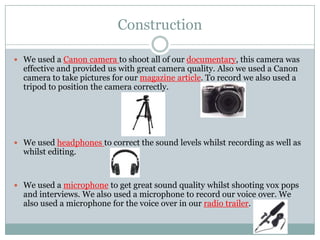
 We used a Canon camera to shoot all of our documentary, this camera was

effective and provided us with great camera quality. Also we used a Canon
camera to take pictures for our magazine article. To record we also used a
tripod to position the camera correctly.

 We used headphones to correct the sound levels whilst recording as well as

whilst editing.

 We used a microphone to get great sound quality whilst shooting vox pops

and interviews. We also used a microphone to record our voice over. We
also used a microphone for the voice over in our radio trailer.
Construction Documentary-Editing
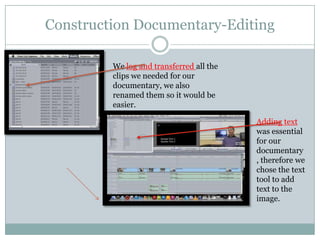
We log and transferred all the
clips we needed for our
documentary, we also
renamed them so it would be
easier.
Adding text
was essential
for our
documentary
, therefore we
chose the text
tool to add
text to the
image.
Construction Documentary-Editing
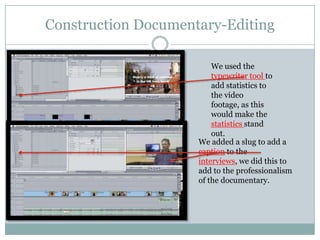
We used the
typewriter tool to
add statistics to
the video
footage, as this
would make the
statistics stand
out.
We added a slug to add a
caption to the
interviews, we did this to
add to the professionalism
of the documentary.
Construction Documentary-Editing
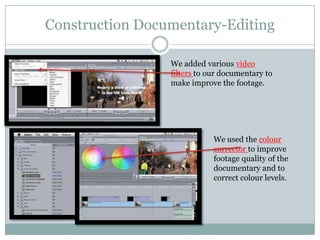
We added various video
filters to our documentary to
make improve the footage.

We used the colour
corrector to improve
footage quality of the
documentary and to
correct colour levels.
Construction Documentary-Editing
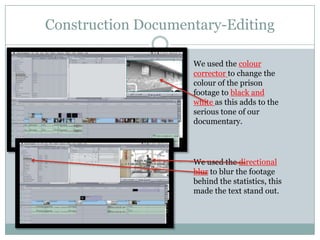
We used the colour
corrector to change the
colour of the prison
footage to black and
white as this adds to the
serious tone of our
documentary.

We used the directional
blur to blur the footage
behind the statistics, this
made the text stand out.
Construction Documentary-Editing
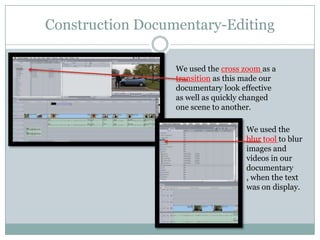
We used the cross zoom as a
transition as this made our
documentary look effective
as well as quickly changed
one scene to another.
We used the
blur tool to blur
images and
videos in our
documentary
, when the text
was on display.
Construction Documentary-Editing
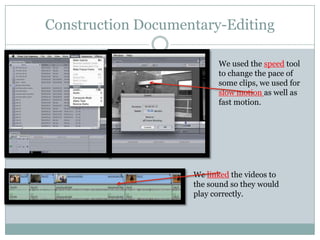
We used the speed tool
to change the pace of
some clips, we used for
slow motion as well as
fast motion.

We linked the videos to
the sound so they would
play correctly.
Construction Documentary-Editing
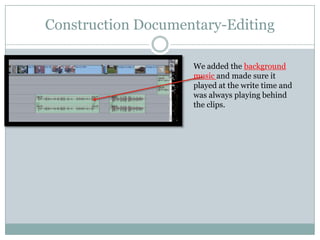
We added the background
music and made sure it
played at the write time and
was always playing behind
the clips.
Construction Documentary-Editing
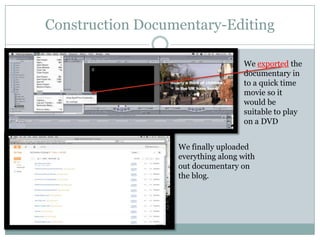
We exported the
documentary in
to a quick time
movie so it
would be
suitable to play
on a DVD
We finally uploaded
everything along with
out documentary on
the blog.
Construction Radio Trailer
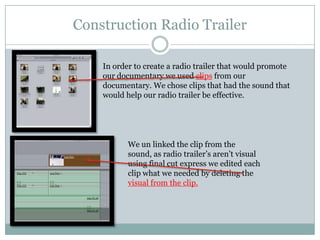
In order to create a radio trailer that would promote
our documentary we used clips from our
documentary. We chose clips that had the sound that
would help our radio trailer be effective.

We un linked the clip from the
sound, as radio trailer’s aren’t visual
using final cut express we edited each
clip what we needed by deleting the
visual from the clip.
Construction Radio Trailer
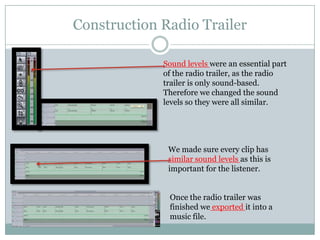
Sound levels were an essential part
of the radio trailer, as the radio
trailer is only sound-based.
Therefore we changed the sound
levels so they were all similar.

We made sure every clip has
similar sound levels as this is
important for the listener.

Once the radio trailer was
finished we exported it into a
music file.
Construction Magazine Article
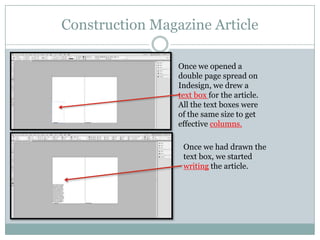
Once we opened a
double page spread on
Indesign, we drew a
text box for the article.
All the text boxes were
of the same size to get
effective columns.
Once we had drawn the
text box, we started
writing the article.
Construction Magazine Article
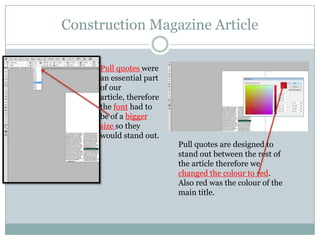
Pull quotes were
an essential part
of our
article, therefore
the font had to
be of a bigger
size so they
would stand out.

Pull quotes are designed to
stand out between the rest of
the article therefore we
changed the colour to red.
Also red was the colour of the
main title.
Construction Magazine Article
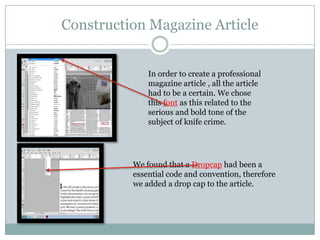
In order to create a professional
magazine article , all the article
had to be a certain. We chose
this font as this related to the
serious and bold tone of the
subject of knife crime.

We found that a Dropcap had been a
essential code and convention, therefore
we added a drop cap to the article.
Construction of magazine Article
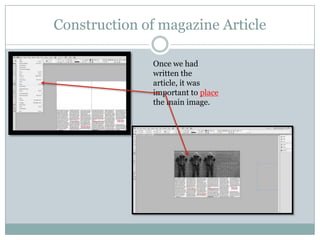
Once we had
written the
article, it was
important to place
the main image.
Construction Magazine Article
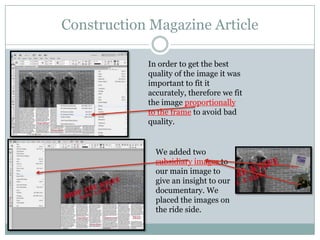
In order to get the best
quality of the image it was
important to fit it
accurately, therefore we fit
the image proportionally
to the frame to avoid bad
quality.

We added two
subsidiary images to
our main image to
give an insight to our
documentary. We
placed the images on
the ride side.
Construction Magazine Article
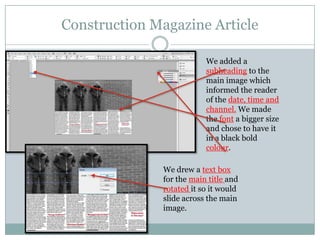
We added a
subheading to the
main image which
informed the reader
of the date, time and
channel. We made
the font a bigger size
and chose to have it
in a black bold
colour.
We drew a text box
for the main title and
rotated it so it would
slide across the main
image.
Construction Magazine Article
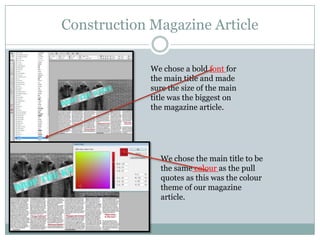
We chose a bold font for
the main title and made
sure the size of the main
title was the biggest on
the magazine article.

We chose the main title to be
the same colour as the pull
quotes as this was the colour
theme of our magazine
article.
Construction Magazine Article
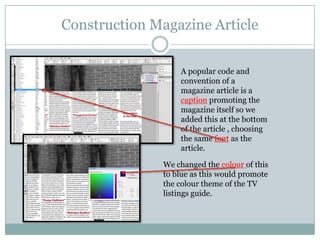
A popular code and
convention of a
magazine article is a
caption promoting the
magazine itself so we
added this at the bottom
of the article , choosing
the same font as the
article.
We changed the colour of this
to blue as this would promote
the colour theme of the TV
listings guide.
Evaluation
 I used prezi to create a effective presentation for one of

the evaluation questions, to meet the Level 4
requirements of a effective presentation.

 I used PowerPoint to create my presentations, as

PowerPoint is an effective to display information.
 I used slide share to present my evaluations on blogger.

 I used blogger to display all my evaluation in a effective

way.
Evaluation
 I used a DVD of my documentary to analyse what I

will be evaluating in my documentary.

 I used the Apple Macs to screenshot the construction

of my documentary.

 I used a computer to screenshot the construction of

my magazine article in InDesign.

Evaluation 4 Hira Raja

  • 1.
    How did youuse media technologies in the construction and research planning and evaluation stages?
  • 2.
    Research and Planning Before creating our documentaries we researched on previous documentaries using the Apple Mac’s to observe previous documentaries.  We also used computers to research on our subject of knife crime, by using Google to search the issues related to knife crime.  We also used YouTube to observe codes and conventions of other documentaries of our chosen genre.  We used websites like BBC to analyse documentaries such as Paranoma to see how we could contribute the analysis to our documentary.
  • 3.
    Research and Planning We used websites like Sky to analyse TV listings to contribute to our magazine article.  We used the radio to analyse Radio channels such as Capital FM to study radio trailers.  We used mobile phones to contact each other in the group to share ideas about the documentary. Also to contact the people being interviewed
  • 4.
    Research and Planning We used blogger to display our ideas, also to share ideas with each other.  We used Microsoft word and PowerPoint to display our planning so all of had an idea of how to make the documentary.  We used Hotmail to contact the professional interviews.  We used slide share and scribed to display our information on the blog as this was an easy way as well s a effective way.
  • 5.
    Construction  We useda Canon camera to shoot all of our documentary, this camera was effective and provided us with great camera quality. Also we used a Canon camera to take pictures for our magazine article. To record we also used a tripod to position the camera correctly.  We used headphones to correct the sound levels whilst recording as well as whilst editing.  We used a microphone to get great sound quality whilst shooting vox pops and interviews. We also used a microphone to record our voice over. We also used a microphone for the voice over in our radio trailer.
  • 6.
    Construction Documentary-Editing We logand transferred all the clips we needed for our documentary, we also renamed them so it would be easier. Adding text was essential for our documentary , therefore we chose the text tool to add text to the image.
  • 7.
    Construction Documentary-Editing We usedthe typewriter tool to add statistics to the video footage, as this would make the statistics stand out. We added a slug to add a caption to the interviews, we did this to add to the professionalism of the documentary.
  • 8.
    Construction Documentary-Editing We addedvarious video filters to our documentary to make improve the footage. We used the colour corrector to improve footage quality of the documentary and to correct colour levels.
  • 9.
    Construction Documentary-Editing We usedthe colour corrector to change the colour of the prison footage to black and white as this adds to the serious tone of our documentary. We used the directional blur to blur the footage behind the statistics, this made the text stand out.
  • 10.
    Construction Documentary-Editing We usedthe cross zoom as a transition as this made our documentary look effective as well as quickly changed one scene to another. We used the blur tool to blur images and videos in our documentary , when the text was on display.
  • 11.
    Construction Documentary-Editing We usedthe speed tool to change the pace of some clips, we used for slow motion as well as fast motion. We linked the videos to the sound so they would play correctly.
  • 12.
    Construction Documentary-Editing We addedthe background music and made sure it played at the write time and was always playing behind the clips.
  • 13.
    Construction Documentary-Editing We exportedthe documentary in to a quick time movie so it would be suitable to play on a DVD We finally uploaded everything along with out documentary on the blog.
  • 14.
    Construction Radio Trailer Inorder to create a radio trailer that would promote our documentary we used clips from our documentary. We chose clips that had the sound that would help our radio trailer be effective. We un linked the clip from the sound, as radio trailer’s aren’t visual using final cut express we edited each clip what we needed by deleting the visual from the clip.
  • 15.
    Construction Radio Trailer Soundlevels were an essential part of the radio trailer, as the radio trailer is only sound-based. Therefore we changed the sound levels so they were all similar. We made sure every clip has similar sound levels as this is important for the listener. Once the radio trailer was finished we exported it into a music file.
  • 16.
    Construction Magazine Article Oncewe opened a double page spread on Indesign, we drew a text box for the article. All the text boxes were of the same size to get effective columns. Once we had drawn the text box, we started writing the article.
  • 17.
    Construction Magazine Article Pullquotes were an essential part of our article, therefore the font had to be of a bigger size so they would stand out. Pull quotes are designed to stand out between the rest of the article therefore we changed the colour to red. Also red was the colour of the main title.
  • 18.
    Construction Magazine Article Inorder to create a professional magazine article , all the article had to be a certain. We chose this font as this related to the serious and bold tone of the subject of knife crime. We found that a Dropcap had been a essential code and convention, therefore we added a drop cap to the article.
  • 19.
    Construction of magazineArticle Once we had written the article, it was important to place the main image.
  • 20.
    Construction Magazine Article Inorder to get the best quality of the image it was important to fit it accurately, therefore we fit the image proportionally to the frame to avoid bad quality. We added two subsidiary images to our main image to give an insight to our documentary. We placed the images on the ride side.
  • 21.
    Construction Magazine Article Weadded a subheading to the main image which informed the reader of the date, time and channel. We made the font a bigger size and chose to have it in a black bold colour. We drew a text box for the main title and rotated it so it would slide across the main image.
  • 22.
    Construction Magazine Article Wechose a bold font for the main title and made sure the size of the main title was the biggest on the magazine article. We chose the main title to be the same colour as the pull quotes as this was the colour theme of our magazine article.
  • 23.
    Construction Magazine Article Apopular code and convention of a magazine article is a caption promoting the magazine itself so we added this at the bottom of the article , choosing the same font as the article. We changed the colour of this to blue as this would promote the colour theme of the TV listings guide.
  • 24.
    Evaluation  I usedprezi to create a effective presentation for one of the evaluation questions, to meet the Level 4 requirements of a effective presentation.  I used PowerPoint to create my presentations, as PowerPoint is an effective to display information.  I used slide share to present my evaluations on blogger.  I used blogger to display all my evaluation in a effective way.
  • 25.
    Evaluation  I useda DVD of my documentary to analyse what I will be evaluating in my documentary.  I used the Apple Macs to screenshot the construction of my documentary.  I used a computer to screenshot the construction of my magazine article in InDesign.