HOW DID YOU USE MEDIA
TECHNOLOGIES IN THE CONSTRUCTION
AND RESEARCH, PLANNING AND
EVALUATION STAGES?
Research
During the research and planning stage, a variety of media
technologies were used. Firstly, to research documentary we
used DVDs to watch ‘Supersize Me’, 4OD to watch ‘My Tattoo
Addiction’ and YouTube to watch ‘Skin Deep’. We watched
different types of documentaries using these technologies in
order to gain an understanding of the codes and conventions
and to also give us ideas of what we could put in our
documentary. I conducted research into ‘My Tattoo Addiction’ at
home where I used a Windows 8 laptop with Google Chrome.
Research

We also did research into different channels that we could air our
documentary on. This meant visiting various channel websites such
as ‘BBC Three’, ‘Channel 4’ and ‘Channel 5’. As well as this, we
visited popular TV guide websites such as ‘TV Choice’ to help us find
out what channel would be most suitable for our documentary. We
visited these websites using Internet Explorer on the Windows 7
computers at college. These media technologies definitely helped us
to decide what type of documentary we were going to create as we
wanted to aim to cater the channel we chose.
Planning
We didn’t use many media technologies when we planned our
documentary. The main technologies we used were Microsoft
Word, Microsoft PowerPoint and Prezi. This was because the
planning contained a lot of work which was written by hand at
first. The most efficient way to upload it to Blogger was to type it
up in a Word or PowerPoint document. We used Microsoft
Office 2010.
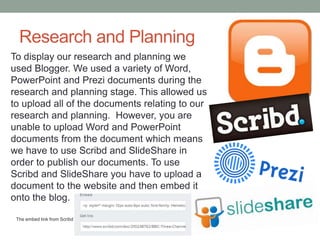
Research and Planning
To display our research and planning we
used Blogger. We used a variety of Word,
PowerPoint and Prezi documents during the
research and planning stage. This allowed us
to upload all of the documents relating to our
research and planning. However, you are
unable to upload Word and PowerPoint
documents from the document which means
we have to use Scribd and SlideShare in
order to publish our documents. To use
Scribd and SlideShare you have to upload a
document to the website and then embed it
onto the blog.
The embed link from Scribd
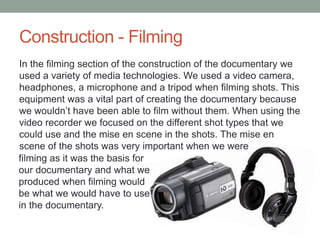
Construction - Filming
In the filming section of the construction of the documentary we
used a variety of media technologies. We used a video camera,
headphones, a microphone and a tripod when filming shots. This
equipment was a vital part of creating the documentary because
we wouldn’t have been able to film without them. When using the
video recorder we focused on the different shot types that we
could use and the mise en scene in the shots. The mise en
scene of the shots was very important when we were
filming as it was the basis for
our documentary and what we
produced when filming would
be what we would have to use
in the documentary.
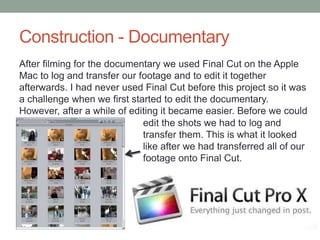
Construction - Documentary
After filming for the documentary we used Final Cut on the Apple
Mac to log and transfer our footage and to edit it together
afterwards. I had never used Final Cut before this project so it was
a challenge when we first started to edit the documentary.
However, after a while of editing it became easier. Before we could
edit the shots we had to log and
transfer them. This is what it looked
like after we had transferred all of our
footage onto Final Cut.
Construction - Documentary
The editing section of the documentary was the biggest and
most time consuming section. This was all done on Final Cut.
There were several tools that we regularly used in this program.

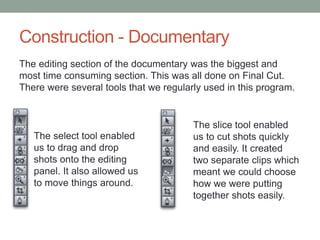
The select tool enabled
us to drag and drop
shots onto the editing
panel. It also allowed us
to move things around.

The slice tool enabled
us to cut shots quickly
and easily. It created
two separate clips which
meant we could choose
how we were putting
together shots easily.
Construction - Documentary
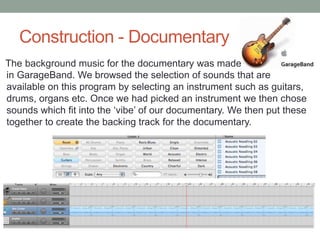
The background music for the documentary was made
in GarageBand. We browsed the selection of sounds that are
available on this program by selecting an instrument such as guitars,
drums, organs etc. Once we had picked an instrument we then chose
sounds which fit into the ‘vibe’ of our documentary. We then put these
together to create the backing track for the documentary.
Construction – Double Page Spread
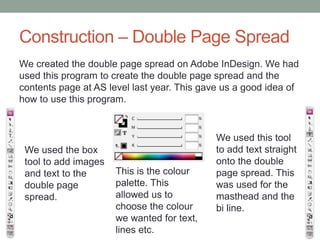
We created the double page spread on Adobe InDesign. We had
used this program to create the double page spread and the
contents page at AS level last year. This gave us a good idea of
how to use this program.

We used the box
tool to add images
and text to the
double page
spread.

This is the colour
palette. This
allowed us to
choose the colour
we wanted for text,
lines etc.

We used this tool
to add text straight
onto the double
page spread. This
was used for the
masthead and the
bi line.
Construction – Radio Trail
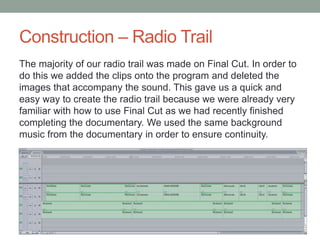
The majority of our radio trail was made on Final Cut. In order to
do this we added the clips onto the program and deleted the
images that accompany the sound. This gave us a quick and
easy way to create the radio trail because we were already very
familiar with how to use Final Cut as we had recently finished
completing the documentary. We used the same background
music from the documentary in order to ensure continuity.
Construction - Publishing
We published our products onto Blogger. In order to do this, we
uploaded our documentary onto YouTube and our radio trail onto
SoundCloud. We then embedded these onto the blog by copy
and pasting the link into the HTML box on Blogger. We uploaded
the double page spread straight onto the blog.

http://www.youtube.com/watch?v=N
Eipq52F3rY

https://soundcloud.com/a2columnd12/radio
-trail-rachael-chelsea
Evaluation
I used a range of media technologies in my
conclusion. I completed Question one on Microsoft
Word, Question two and four on Microsoft
PowerPoint and Question three on Prezi. This
variety of programs meant that I had to use Scribd
and SlideShare in order to embed them onto
Blogger. I feel that I have used a variety of media
technologies whilst completing my evaluation.
Overall I believe that over the course of this project,
we used a substantial amount of media
technologies which have contributed to the positive
outcome of our products.

Question 4

  • 1.
    HOW DID YOUUSE MEDIA TECHNOLOGIES IN THE CONSTRUCTION AND RESEARCH, PLANNING AND EVALUATION STAGES?
  • 2.
    Research During the researchand planning stage, a variety of media technologies were used. Firstly, to research documentary we used DVDs to watch ‘Supersize Me’, 4OD to watch ‘My Tattoo Addiction’ and YouTube to watch ‘Skin Deep’. We watched different types of documentaries using these technologies in order to gain an understanding of the codes and conventions and to also give us ideas of what we could put in our documentary. I conducted research into ‘My Tattoo Addiction’ at home where I used a Windows 8 laptop with Google Chrome.
  • 3.
    Research We also didresearch into different channels that we could air our documentary on. This meant visiting various channel websites such as ‘BBC Three’, ‘Channel 4’ and ‘Channel 5’. As well as this, we visited popular TV guide websites such as ‘TV Choice’ to help us find out what channel would be most suitable for our documentary. We visited these websites using Internet Explorer on the Windows 7 computers at college. These media technologies definitely helped us to decide what type of documentary we were going to create as we wanted to aim to cater the channel we chose.
  • 4.
    Planning We didn’t usemany media technologies when we planned our documentary. The main technologies we used were Microsoft Word, Microsoft PowerPoint and Prezi. This was because the planning contained a lot of work which was written by hand at first. The most efficient way to upload it to Blogger was to type it up in a Word or PowerPoint document. We used Microsoft Office 2010.
  • 5.
    Research and Planning Todisplay our research and planning we used Blogger. We used a variety of Word, PowerPoint and Prezi documents during the research and planning stage. This allowed us to upload all of the documents relating to our research and planning. However, you are unable to upload Word and PowerPoint documents from the document which means we have to use Scribd and SlideShare in order to publish our documents. To use Scribd and SlideShare you have to upload a document to the website and then embed it onto the blog. The embed link from Scribd
  • 6.
    Construction - Filming Inthe filming section of the construction of the documentary we used a variety of media technologies. We used a video camera, headphones, a microphone and a tripod when filming shots. This equipment was a vital part of creating the documentary because we wouldn’t have been able to film without them. When using the video recorder we focused on the different shot types that we could use and the mise en scene in the shots. The mise en scene of the shots was very important when we were filming as it was the basis for our documentary and what we produced when filming would be what we would have to use in the documentary.
  • 7.
    Construction - Documentary Afterfilming for the documentary we used Final Cut on the Apple Mac to log and transfer our footage and to edit it together afterwards. I had never used Final Cut before this project so it was a challenge when we first started to edit the documentary. However, after a while of editing it became easier. Before we could edit the shots we had to log and transfer them. This is what it looked like after we had transferred all of our footage onto Final Cut.
  • 8.
    Construction - Documentary Theediting section of the documentary was the biggest and most time consuming section. This was all done on Final Cut. There were several tools that we regularly used in this program. The select tool enabled us to drag and drop shots onto the editing panel. It also allowed us to move things around. The slice tool enabled us to cut shots quickly and easily. It created two separate clips which meant we could choose how we were putting together shots easily.
  • 9.
    Construction - Documentary Thebackground music for the documentary was made in GarageBand. We browsed the selection of sounds that are available on this program by selecting an instrument such as guitars, drums, organs etc. Once we had picked an instrument we then chose sounds which fit into the ‘vibe’ of our documentary. We then put these together to create the backing track for the documentary.
  • 10.
    Construction – DoublePage Spread We created the double page spread on Adobe InDesign. We had used this program to create the double page spread and the contents page at AS level last year. This gave us a good idea of how to use this program. We used the box tool to add images and text to the double page spread. This is the colour palette. This allowed us to choose the colour we wanted for text, lines etc. We used this tool to add text straight onto the double page spread. This was used for the masthead and the bi line.
  • 11.
    Construction – RadioTrail The majority of our radio trail was made on Final Cut. In order to do this we added the clips onto the program and deleted the images that accompany the sound. This gave us a quick and easy way to create the radio trail because we were already very familiar with how to use Final Cut as we had recently finished completing the documentary. We used the same background music from the documentary in order to ensure continuity.
  • 12.
    Construction - Publishing Wepublished our products onto Blogger. In order to do this, we uploaded our documentary onto YouTube and our radio trail onto SoundCloud. We then embedded these onto the blog by copy and pasting the link into the HTML box on Blogger. We uploaded the double page spread straight onto the blog. http://www.youtube.com/watch?v=N Eipq52F3rY https://soundcloud.com/a2columnd12/radio -trail-rachael-chelsea
  • 13.
    Evaluation I used arange of media technologies in my conclusion. I completed Question one on Microsoft Word, Question two and four on Microsoft PowerPoint and Question three on Prezi. This variety of programs meant that I had to use Scribd and SlideShare in order to embed them onto Blogger. I feel that I have used a variety of media technologies whilst completing my evaluation. Overall I believe that over the course of this project, we used a substantial amount of media technologies which have contributed to the positive outcome of our products.