4 How did you use new media technologies in the
construction and research, planning and
evaluation stages?
Joe Hannaghan
Research
New media technologies were crucial in all stages of our production and
utilising them effectively was key. The internet was the main technology
used in the research stages of our film. We mainly used the following sites:
 Google
 YouTube
 Blogger
Google
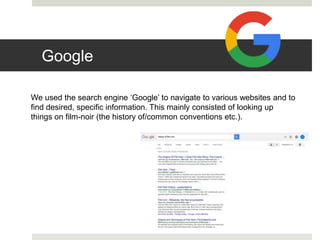
We used the search engine ‘Google’ to navigate to various websites and to
find desired, specific information. This mainly consisted of looking up
things on film-noir (the history of/common conventions etc.).
YouTube
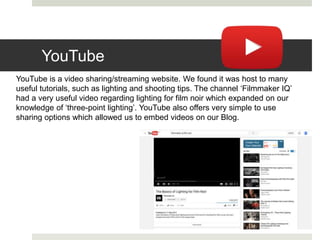
YouTube is a video sharing/streaming website. We found it was host to many
useful tutorials, such as lighting and shooting tips. The channel ‘Filmmaker IQ’
had a very useful video regarding lighting for film noir which expanded on our
knowledge of ‘three-point lighting’. YouTube also offers very simple to use
sharing options which allowed us to embed videos on our Blog.
Blogger
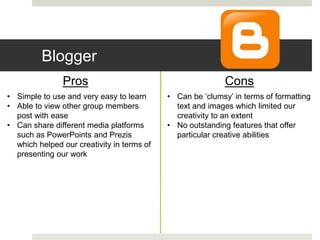
Blogger is a publishing service which we use to create a blog, documenting all of
our work in all stages of production. Blogger is a fairly good website for
presenting our work, it is simple to use and doesn't require any particular
knowledge or training to use. On its own, Blogger has the bare minimum in its
ability; able to create simple text documents with images. However, it is possible
to embed things such as videos and presentations which added a dynamic to
how we were able to present our work.
Blogger
Pros Cons
• Simple to use and very easy to learn
• Able to view other group members
post with ease
• Can share different media platforms
such as PowerPoints and Prezis
which helped our creativity in terms of
presenting our work
• Can be ‘clumsy’ in terms of formatting
text and images which limited our
creativity to an extent
• No outstanding features that offer
particular creative abilities
Production
We also used a range of new technology when shooting our film,
from the cameras we used to the equipment that helped us
achieve certain shots.
GoPro Hero 4 Black
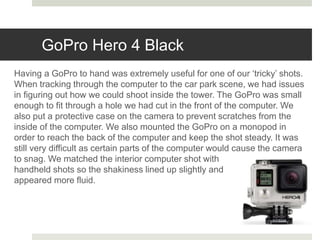
Having a GoPro to hand was extremely useful for one of our ‘tricky’ shots.
When tracking through the computer to the car park scene, we had issues
in figuring out how we could shoot inside the tower. The GoPro was small
enough to fit through a hole we had cut in the front of the computer. We
also put a protective case on the camera to prevent scratches from the
inside of the computer. We also mounted the GoPro on a monopod in
order to reach the back of the computer and keep the shot steady. It was
still very difficult as certain parts of the computer would cause the camera
to snag. We matched the interior computer shot with
handheld shots so the shakiness lined up slightly and
appeared more fluid.
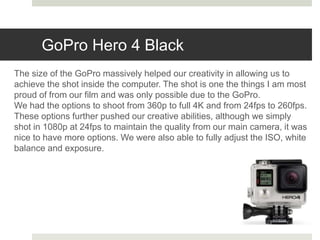
GoPro Hero 4 Black
The size of the GoPro massively helped our creativity in allowing us to
achieve the shot inside the computer. The shot is one the things I am most
proud of from our film and was only possible due to the GoPro.
We had the options to shoot from 360p to full 4K and from 24fps to 260fps.
These options further pushed our creative abilities, although we simply
shot in 1080p at 24fps to maintain the quality from our main camera, it was
nice to have more options. We were also able to fully adjust the ISO, white
balance and exposure.
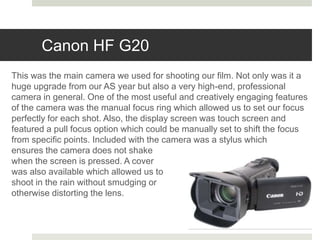
Canon HF G20
This was the main camera we used for shooting our film. Not only was it a
huge upgrade from our AS year but also a very high-end, professional
camera in general. One of the most useful and creatively engaging features
of the camera was the manual focus ring which allowed us to set our focus
perfectly for each shot. Also, the display screen was touch screen and
featured a pull focus option which could be manually set to shift the focus
from specific points. Included with the camera was a stylus which
ensures the camera does not shake
when the screen is pressed. A cover
was also available which allowed us to
shoot in the rain without smudging or
otherwise distorting the lens.
Pre-Production
Adobe Premiere Pro CC
When editing our film we used Adobe Premiere Pro CC.
Premiere Pro is an industry standard piece of software and was very
powerful when used for editing our film. As well as being a sound linear
video editor, it held some very useful tools in regards to colour correction,
sound, effects and more.
Of course one of the main effects in our film was the Black and White
effect. Premiere Pro offers a range of different ‘types’ of black and white
which varied in contrast, brightness, gain, tone, depth etc.
Pre-Production
Adobe Premiere Pro CC
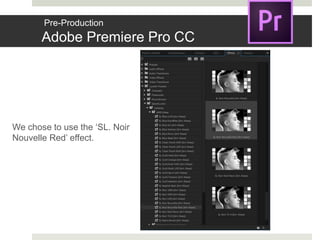
We chose to use the ‘SL. Noir
Nouvelle Red’ effect.
Pre-Production
Websites
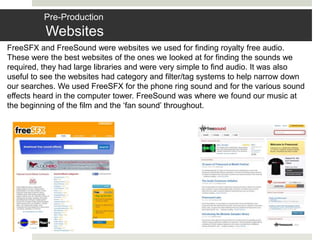
FreeSFX and FreeSound were websites we used for finding royalty free audio.
These were the best websites of the ones we looked at for finding the sounds we
required, they had large libraries and were very simple to find audio. It was also
useful to see the websites had category and filter/tag systems to help narrow down
our searches. We used FreeSFX for the phone ring sound and for the various sound
effects heard in the computer tower. FreeSound was where we found our music at
the beginning of the film and the ‘fan sound’ throughout.
Prezi (Evaluation)
Prezi is an online presentation software similar to that of
Microsoft PowerPoint. Prezi is a fairly unique way of
presenting work as it relies on a fair amount of creativity
from the user. Prezi has the ability to embed images and
videos directly onto ‘slides’ which makes referring to
specific examples in the evaluation much easier and
dynamic. Prezis can also be embedded onto Blogger which
make them very useful in terms of sharing.

Evaluation Question 4- A2 Media Studies

  • 1.
    4 How didyou use new media technologies in the construction and research, planning and evaluation stages? Joe Hannaghan
  • 2.
    Research New media technologieswere crucial in all stages of our production and utilising them effectively was key. The internet was the main technology used in the research stages of our film. We mainly used the following sites:  Google  YouTube  Blogger
  • 3.
    Google We used thesearch engine ‘Google’ to navigate to various websites and to find desired, specific information. This mainly consisted of looking up things on film-noir (the history of/common conventions etc.).
  • 4.
    YouTube YouTube is avideo sharing/streaming website. We found it was host to many useful tutorials, such as lighting and shooting tips. The channel ‘Filmmaker IQ’ had a very useful video regarding lighting for film noir which expanded on our knowledge of ‘three-point lighting’. YouTube also offers very simple to use sharing options which allowed us to embed videos on our Blog.
  • 5.
    Blogger Blogger is apublishing service which we use to create a blog, documenting all of our work in all stages of production. Blogger is a fairly good website for presenting our work, it is simple to use and doesn't require any particular knowledge or training to use. On its own, Blogger has the bare minimum in its ability; able to create simple text documents with images. However, it is possible to embed things such as videos and presentations which added a dynamic to how we were able to present our work.
  • 6.
    Blogger Pros Cons • Simpleto use and very easy to learn • Able to view other group members post with ease • Can share different media platforms such as PowerPoints and Prezis which helped our creativity in terms of presenting our work • Can be ‘clumsy’ in terms of formatting text and images which limited our creativity to an extent • No outstanding features that offer particular creative abilities
  • 7.
    Production We also useda range of new technology when shooting our film, from the cameras we used to the equipment that helped us achieve certain shots.
  • 8.
    GoPro Hero 4Black Having a GoPro to hand was extremely useful for one of our ‘tricky’ shots. When tracking through the computer to the car park scene, we had issues in figuring out how we could shoot inside the tower. The GoPro was small enough to fit through a hole we had cut in the front of the computer. We also put a protective case on the camera to prevent scratches from the inside of the computer. We also mounted the GoPro on a monopod in order to reach the back of the computer and keep the shot steady. It was still very difficult as certain parts of the computer would cause the camera to snag. We matched the interior computer shot with handheld shots so the shakiness lined up slightly and appeared more fluid.
  • 9.
    GoPro Hero 4Black The size of the GoPro massively helped our creativity in allowing us to achieve the shot inside the computer. The shot is one the things I am most proud of from our film and was only possible due to the GoPro. We had the options to shoot from 360p to full 4K and from 24fps to 260fps. These options further pushed our creative abilities, although we simply shot in 1080p at 24fps to maintain the quality from our main camera, it was nice to have more options. We were also able to fully adjust the ISO, white balance and exposure.
  • 10.
    Canon HF G20 Thiswas the main camera we used for shooting our film. Not only was it a huge upgrade from our AS year but also a very high-end, professional camera in general. One of the most useful and creatively engaging features of the camera was the manual focus ring which allowed us to set our focus perfectly for each shot. Also, the display screen was touch screen and featured a pull focus option which could be manually set to shift the focus from specific points. Included with the camera was a stylus which ensures the camera does not shake when the screen is pressed. A cover was also available which allowed us to shoot in the rain without smudging or otherwise distorting the lens.
  • 11.
    Pre-Production Adobe Premiere ProCC When editing our film we used Adobe Premiere Pro CC. Premiere Pro is an industry standard piece of software and was very powerful when used for editing our film. As well as being a sound linear video editor, it held some very useful tools in regards to colour correction, sound, effects and more. Of course one of the main effects in our film was the Black and White effect. Premiere Pro offers a range of different ‘types’ of black and white which varied in contrast, brightness, gain, tone, depth etc.
  • 12.
    Pre-Production Adobe Premiere ProCC We chose to use the ‘SL. Noir Nouvelle Red’ effect.
  • 13.
    Pre-Production Websites FreeSFX and FreeSoundwere websites we used for finding royalty free audio. These were the best websites of the ones we looked at for finding the sounds we required, they had large libraries and were very simple to find audio. It was also useful to see the websites had category and filter/tag systems to help narrow down our searches. We used FreeSFX for the phone ring sound and for the various sound effects heard in the computer tower. FreeSound was where we found our music at the beginning of the film and the ‘fan sound’ throughout.
  • 14.
    Prezi (Evaluation) Prezi isan online presentation software similar to that of Microsoft PowerPoint. Prezi is a fairly unique way of presenting work as it relies on a fair amount of creativity from the user. Prezi has the ability to embed images and videos directly onto ‘slides’ which makes referring to specific examples in the evaluation much easier and dynamic. Prezis can also be embedded onto Blogger which make them very useful in terms of sharing.