Editing on Edius 7
Emily Capon
Editing is the one of the most important aspects when
creating a film as after shooting editing basically makes the
film as it is important to make the footage string together
fluently. Within editing you can fix the colour, transitions, the
type of angle, produce dynamic conversations and special
effects. The editing software that we used was Edius 7 that
allowed us to create cinematic elements to our production
PROMISE by adjusting the lighting, colour and sound
correction.
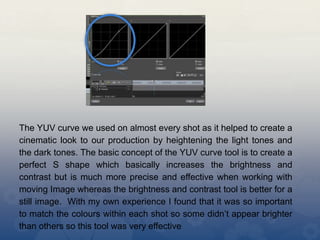
The YUV curve we used on almost every shot as it helped to create a
cinematic look to our production by heightening the light tones and
the dark tones. The basic concept of the YUV curve tool is to create a
perfect S shape which basically increases the brightness and
contrast but is much more precise and effective when working with
moving Image whereas the brightness and contrast tool is better for a
still image. With my own experience I found that it was so important
to match the colours within each shot so some didn’t appear brighter
than others so this tool was very effective
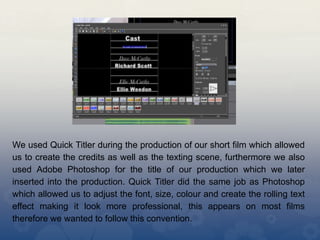
We used Quick Titler during the production of our short film which allowed
us to create the credits as well as the texting scene, furthermore we also
used Adobe Photoshop for the title of our production which we later
inserted into the production. Quick Titler did the same job as Photoshop
which allowed us to adjust the font, size, colour and create the rolling text
effect making it look more professional, this appears on most films
therefore we wanted to follow this convention.
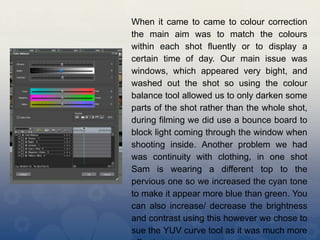
When it came to came to colour correction
the main aim was to match the colours
within each shot fluently or to display a
certain time of day. Our main issue was
windows, which appeared very bight, and
washed out the shot so using the colour
balance tool allowed us to only darken some
parts of the shot rather than the whole shot,
during filming we did use a bounce board to
block light coming through the window when
shooting inside. Another problem we had
was continuity with clothing, in one shot
Sam is wearing a different top to the
pervious one so we increased the cyan tone
to make it appear more blue than green. You
can also increase/ decrease the brightness
and contrast using this however we chose to
sue the YUV curve tool as it was much more
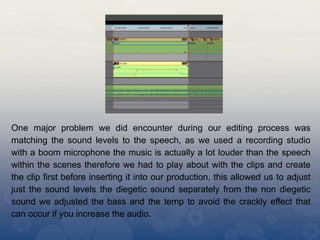
One major problem we did encounter during our editing process was
matching the sound levels to the speech, as we used a recording studio
with a boom microphone the music is actually a lot louder than the speech
within the scenes therefore we had to play about with the clips and create
the clip first before inserting it into our production, this allowed us to adjust
just the sound levels the diegetic sound separately from the non diegetic
sound we adjusted the bass and the temp to avoid the crackly effect that
can occur if you increase the audio.
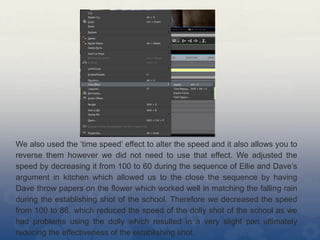
We also used the ‘time speed’ effect to alter the speed and it also allows you to
reverse them however we did not need to use that effect. We adjusted the
speed by decreasing it from 100 to 60 during the sequence of Ellie and Dave’s
argument in kitchen which allowed us to the close the sequence by having
Dave throw papers on the flower which worked well in matching the falling rain
during the establishing shot of the school. Therefore we decreased the speed
from 100 to 86, which reduced the speed of the dolly shot of the school as we
had problems using the dolly which resulted in a very slight pan ultimately
reducing the effectiveness of the establishing shot.
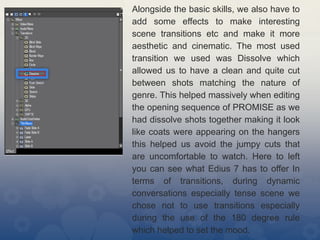
Alongside the basic skills, we also have to
add some effects to make interesting
scene transitions etc and make it more
aesthetic and cinematic. The most used
transition we used was Dissolve which
allowed us to have a clean and quite cut
between shots matching the nature of
genre. This helped massively when editing
the opening sequence of PROMISE as we
had dissolve shots together making it look
like coats were appearing on the hangers
this helped us avoid the jumpy cuts that
are uncomfortable to watch. Here to left
you can see what Edius 7 has to offer In
terms of transitions, during dynamic
conversations especially tense scene we
chose not to use transitions especially
during the use of the 180 degree rule
which helped to set the mood.
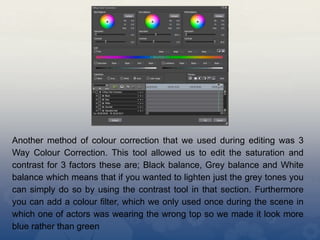
Another method of colour correction that we used during editing was 3
Way Colour Correction. This tool allowed us to edit the saturation and
contrast for 3 factors these are; Black balance, Grey balance and White
balance which means that if you wanted to lighten just the grey tones you
can simply do so by using the contrast tool in that section. Furthermore
you can add a colour filter, which we only used once during the scene in
which one of actors was wearing the wrong top so we made it look more
blue rather than green

Edius 7

  • 1.
    Editing on Edius7 Emily Capon
  • 2.
    Editing is theone of the most important aspects when creating a film as after shooting editing basically makes the film as it is important to make the footage string together fluently. Within editing you can fix the colour, transitions, the type of angle, produce dynamic conversations and special effects. The editing software that we used was Edius 7 that allowed us to create cinematic elements to our production PROMISE by adjusting the lighting, colour and sound correction.
  • 3.
    The YUV curvewe used on almost every shot as it helped to create a cinematic look to our production by heightening the light tones and the dark tones. The basic concept of the YUV curve tool is to create a perfect S shape which basically increases the brightness and contrast but is much more precise and effective when working with moving Image whereas the brightness and contrast tool is better for a still image. With my own experience I found that it was so important to match the colours within each shot so some didn’t appear brighter than others so this tool was very effective
  • 4.
    We used QuickTitler during the production of our short film which allowed us to create the credits as well as the texting scene, furthermore we also used Adobe Photoshop for the title of our production which we later inserted into the production. Quick Titler did the same job as Photoshop which allowed us to adjust the font, size, colour and create the rolling text effect making it look more professional, this appears on most films therefore we wanted to follow this convention.
  • 5.
    When it cameto came to colour correction the main aim was to match the colours within each shot fluently or to display a certain time of day. Our main issue was windows, which appeared very bight, and washed out the shot so using the colour balance tool allowed us to only darken some parts of the shot rather than the whole shot, during filming we did use a bounce board to block light coming through the window when shooting inside. Another problem we had was continuity with clothing, in one shot Sam is wearing a different top to the pervious one so we increased the cyan tone to make it appear more blue than green. You can also increase/ decrease the brightness and contrast using this however we chose to sue the YUV curve tool as it was much more
  • 6.
    One major problemwe did encounter during our editing process was matching the sound levels to the speech, as we used a recording studio with a boom microphone the music is actually a lot louder than the speech within the scenes therefore we had to play about with the clips and create the clip first before inserting it into our production, this allowed us to adjust just the sound levels the diegetic sound separately from the non diegetic sound we adjusted the bass and the temp to avoid the crackly effect that can occur if you increase the audio.
  • 7.
    We also usedthe ‘time speed’ effect to alter the speed and it also allows you to reverse them however we did not need to use that effect. We adjusted the speed by decreasing it from 100 to 60 during the sequence of Ellie and Dave’s argument in kitchen which allowed us to the close the sequence by having Dave throw papers on the flower which worked well in matching the falling rain during the establishing shot of the school. Therefore we decreased the speed from 100 to 86, which reduced the speed of the dolly shot of the school as we had problems using the dolly which resulted in a very slight pan ultimately reducing the effectiveness of the establishing shot.
  • 8.
    Alongside the basicskills, we also have to add some effects to make interesting scene transitions etc and make it more aesthetic and cinematic. The most used transition we used was Dissolve which allowed us to have a clean and quite cut between shots matching the nature of genre. This helped massively when editing the opening sequence of PROMISE as we had dissolve shots together making it look like coats were appearing on the hangers this helped us avoid the jumpy cuts that are uncomfortable to watch. Here to left you can see what Edius 7 has to offer In terms of transitions, during dynamic conversations especially tense scene we chose not to use transitions especially during the use of the 180 degree rule which helped to set the mood.
  • 9.
    Another method ofcolour correction that we used during editing was 3 Way Colour Correction. This tool allowed us to edit the saturation and contrast for 3 factors these are; Black balance, Grey balance and White balance which means that if you wanted to lighten just the grey tones you can simply do so by using the contrast tool in that section. Furthermore you can add a colour filter, which we only used once during the scene in which one of actors was wearing the wrong top so we made it look more blue rather than green