1
NETWORKING
ESSENTIALS
2
NETWORK
 An interconnected system of things or people (Literally).
 Computer Network
 A collection of computing devices that are connected in
various ways in order to communicate and share resources.
 Connections are made with.
 Physical wires or cables
 But can be
 Wireless using the radio waves or infrared signals
3
INTERNET
 An enormous network of networks.
The Internet is a global system of interconnected computer
networks that use the standard Internet protocol suite (TCP/IP) to
serve several billion users worldwide. [Wikipedia]
An Opte
Project visualization
of routing paths
through a portion of
the Internet.
[Wikipedia]
4
NETWORK TYPES
 Basic
 LAN (Local Area Network)
 WAN (Wide Area Network)
 Others
 CAN (Campus Area Network)
 MAN (Metropolitan Area Network)
5
NETWORK TOPOLOGIES
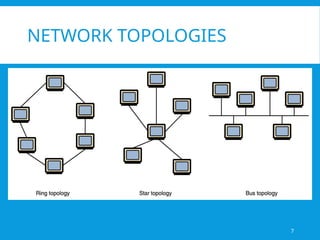
 Topology: The geometric arrangement/shape of a
communication network.
 BUS
 All nodes are connected to a single communication line that
carries messages in both directions.
 STAR
 A configuration that centers around one node to which all
others are connected and through which all messages are sent.
 RING
 A configuration that connects all nodes in a closed loop
on which messages travel in one direction.
09/20/2025 Summer Internship Program CS MUET 2013 6
NETWORK TOPOLOGIES
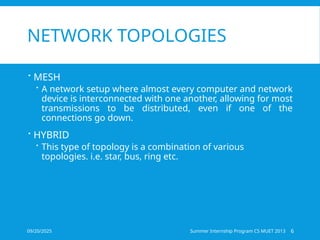
 MESH
 A network setup where almost every computer and network
device is interconnected with one another, allowing for most
transmissions to be distributed, even if one of the
connections go down.
 HYBRID
 This type of topology is a combination of various
topologies. i.e. star, bus, ring etc.
7
NETWORK TOPOLOGIES
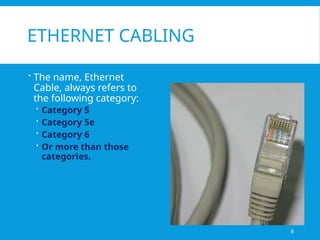
ETHERNET CABLING
 The name, Ethernet
Cable, always refers to
the following category:
 Category 5
 Category 5e
 Category 6
 Or more than those
categories.
8
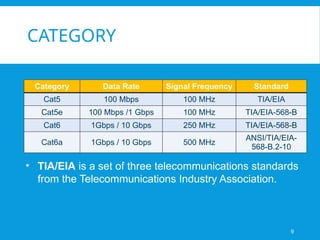
CATEGORY
Category Data Rate Signal Frequency Standard
Cat5 100 Mbps 100 MHz TIA/EIA
Cat5e 100 Mbps /1 Gbps 100 MHz TIA/EIA-568-B
Cat6 1Gbps / 10 Gbps 250 MHz TIA/EIA-568-B
Cat6a 1Gbps / 10 Gbps 500 MHz
ANSI/TIA/EIA-
568-B.2-10
• TIA/EIA is a set of three telecommunications standards
from the Telecommunications Industry Association.
9
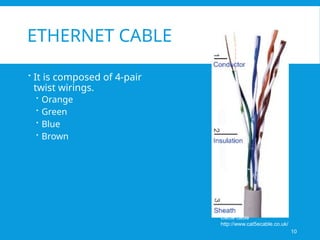
ETHERNET CABLE
 It is composed of 4-pair
twist wirings.
 Orange
 Green
 Blue
 Brown
Cat5e cable
http://www.cat5ecable.co.uk/
10
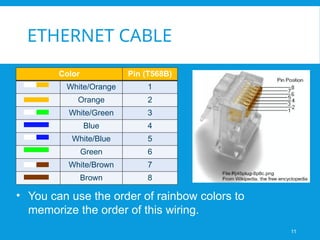
ETHERNET CABLE
Color Pin (T568B)
White/Orange 1
Orange 2
White/Green 3
Blue 4
White/Blue 5
Green 6
White/Brown 7
Brown 8
• You can use the order of rainbow colors to
memorize the order of this wiring.
11
ETHERNET CABLE
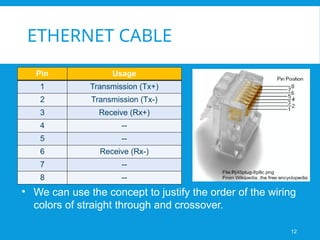
Pin Usage
1 Transmission (Tx+)
2 Transmission (Tx-)
3 Receive (Rx+)
4 --
5 --
6 Receive (Rx-)
7 --
8 --
• We can use the concept to justify the order of the wiring
colors of straight through and crossover.
12
HOW TO WIRE
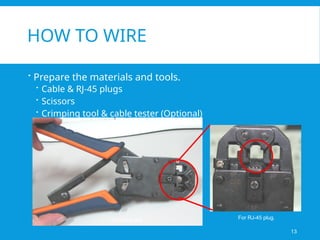
 Prepare the materials and tools.
 Cable & RJ-45 plugs
 Scissors
 Crimping tool & cable tester (Optional)
13
For RJ-45 plug.
Crimping tool
HOW TO WIRE
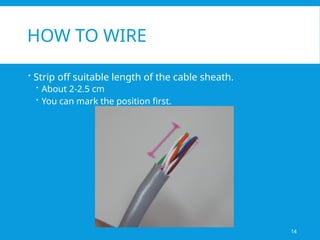
 Strip off suitable length of the cable sheath.
 About 2-2.5 cm
 You can mark the position first.
14
HOW TO WIRE
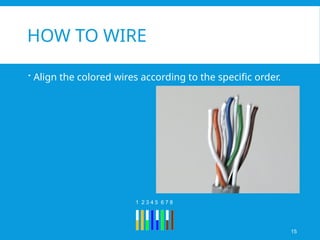
 Align the colored wires according to the specific order.
15
1 2 3 4 5 6 7 8
1→8
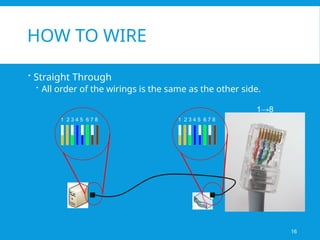
HOW TO WIRE
 Straight Through
 All order of the wirings is the same as the other side.
1 2 3 4 5 6 7 8 1 2 3 4 5 6 7 8
16
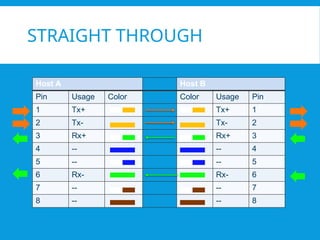
STRAIGHT THROUGH
Host A Host B
Pin Usage Color Color Usage Pin
1 Tx+ Tx+ 1
2 Tx- Tx- 2
3 Rx+ Rx+ 3
4 -- -- 4
5 -- -- 5
6 Rx- Rx- 6
7 -- -- 7
8 -- -- 8
1→8
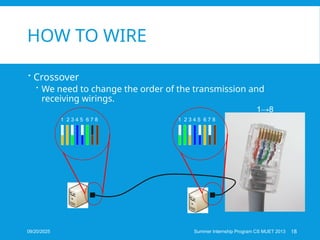
HOW TO WIRE
 Crossover
 We need to change the order of the transmission and
receiving wirings.
1 2 3 4 5 6 7 8 1 2 3 4 5 6 7 8
18
Summer Internship Program CS MUET 2013
09/20/2025
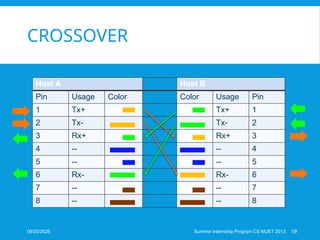
CROSSOVER
Host A Host B
Pin Usage Color Color Usage Pin
1 Tx+ Tx+ 1
2 Tx- Tx- 2
3 Rx+ Rx+ 3
4 -- -- 4
5 -- -- 5
6 Rx- Rx- 6
7 -- -- 7
8 -- -- 8
19
Summer Internship Program CS MUET 2013
09/20/2025
HOW TO WIRE
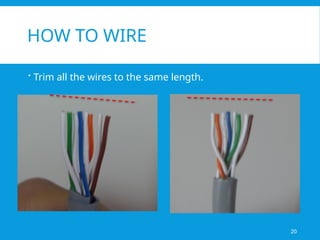
 Trim all the wires to the same length.
20
HOW TO WIRE
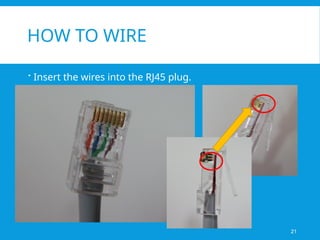
 Insert the wires into the RJ45 plug.
21
HOW TO WIRE
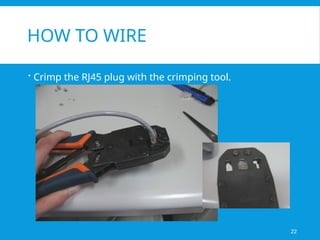
 Crimp the RJ45 plug with the crimping tool.
22
HOW TO WIRE?
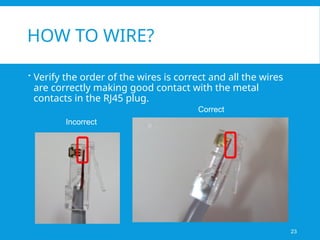
 Verify the order of the wires is correct and all the wires
are correctly making good contact with the metal
contacts in the RJ45 plug.
23
Incorrect
Correct
HOW TO WIRE
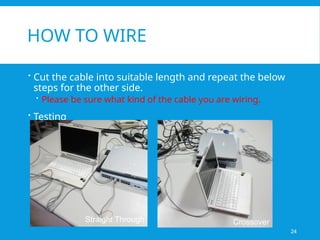
 Cut the cable into suitable length and repeat the below
steps for the other side.
 Please be sure what kind of the cable you are wiring.
 Testing
24
Straight Through Crossover
25
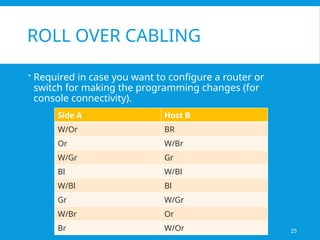
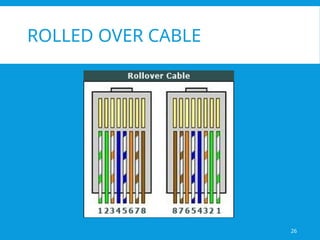
ROLL OVER CABLING
 Required in case you want to configure a router or
switch for making the programming changes (for
console connectivity).
Side A Host B
W/Or BR
Or W/Br
W/Gr Gr
Bl W/Bl
W/Bl Bl
Gr W/Gr
W/Br Or
Br W/Or
26
ROLLED OVER CABLE
27
TIPS FOR ETHERNET CABLING
 A straight-through cable has identical ends.
 A crossover cable has different ends.
 A straight-thru is used as a patch cord in Ethernet connections.
 A crossover is used to connect two Ethernet devices without a central device or for
connecting two central devices.
 A crossover has one end with the Orange set of wires switched with the Green set.
 Odd numbered pins are always striped, even numbered pins are always solid colored.
 Looking at the RJ-45 with the clip facing away from you, Brown is always on the right, and
pin 1 is on the left.
 No more than 1/2" of the Ethernet cable should be untwisted otherwise it will be
susceptible to crosstalk.
 Do not deform, do not bend, do not stretch, do not staple, do not run parallel with power
cables, and do not run Ethernet cables near noise inducing components.
Computer Networking Essentials Presentation.pptx

  • 1.
  • 2.
    2 NETWORK  An interconnectedsystem of things or people (Literally).  Computer Network  A collection of computing devices that are connected in various ways in order to communicate and share resources.  Connections are made with.  Physical wires or cables  But can be  Wireless using the radio waves or infrared signals
  • 3.
    3 INTERNET  An enormousnetwork of networks. The Internet is a global system of interconnected computer networks that use the standard Internet protocol suite (TCP/IP) to serve several billion users worldwide. [Wikipedia] An Opte Project visualization of routing paths through a portion of the Internet. [Wikipedia]
  • 4.
    4 NETWORK TYPES  Basic LAN (Local Area Network)  WAN (Wide Area Network)  Others  CAN (Campus Area Network)  MAN (Metropolitan Area Network)
  • 5.
    5 NETWORK TOPOLOGIES  Topology:The geometric arrangement/shape of a communication network.  BUS  All nodes are connected to a single communication line that carries messages in both directions.  STAR  A configuration that centers around one node to which all others are connected and through which all messages are sent.  RING  A configuration that connects all nodes in a closed loop on which messages travel in one direction.
  • 6.
    09/20/2025 Summer InternshipProgram CS MUET 2013 6 NETWORK TOPOLOGIES  MESH  A network setup where almost every computer and network device is interconnected with one another, allowing for most transmissions to be distributed, even if one of the connections go down.  HYBRID  This type of topology is a combination of various topologies. i.e. star, bus, ring etc.
  • 7.
  • 8.
    ETHERNET CABLING  Thename, Ethernet Cable, always refers to the following category:  Category 5  Category 5e  Category 6  Or more than those categories. 8
  • 9.
    CATEGORY Category Data RateSignal Frequency Standard Cat5 100 Mbps 100 MHz TIA/EIA Cat5e 100 Mbps /1 Gbps 100 MHz TIA/EIA-568-B Cat6 1Gbps / 10 Gbps 250 MHz TIA/EIA-568-B Cat6a 1Gbps / 10 Gbps 500 MHz ANSI/TIA/EIA- 568-B.2-10 • TIA/EIA is a set of three telecommunications standards from the Telecommunications Industry Association. 9
  • 10.
    ETHERNET CABLE  Itis composed of 4-pair twist wirings.  Orange  Green  Blue  Brown Cat5e cable http://www.cat5ecable.co.uk/ 10
  • 11.
    ETHERNET CABLE Color Pin(T568B) White/Orange 1 Orange 2 White/Green 3 Blue 4 White/Blue 5 Green 6 White/Brown 7 Brown 8 • You can use the order of rainbow colors to memorize the order of this wiring. 11
  • 12.
    ETHERNET CABLE Pin Usage 1Transmission (Tx+) 2 Transmission (Tx-) 3 Receive (Rx+) 4 -- 5 -- 6 Receive (Rx-) 7 -- 8 -- • We can use the concept to justify the order of the wiring colors of straight through and crossover. 12
  • 13.
    HOW TO WIRE Prepare the materials and tools.  Cable & RJ-45 plugs  Scissors  Crimping tool & cable tester (Optional) 13 For RJ-45 plug. Crimping tool
  • 14.
    HOW TO WIRE Strip off suitable length of the cable sheath.  About 2-2.5 cm  You can mark the position first. 14
  • 15.
    HOW TO WIRE Align the colored wires according to the specific order. 15 1 2 3 4 5 6 7 8
  • 16.
    1→8 HOW TO WIRE Straight Through  All order of the wirings is the same as the other side. 1 2 3 4 5 6 7 8 1 2 3 4 5 6 7 8 16
  • 17.
    STRAIGHT THROUGH Host AHost B Pin Usage Color Color Usage Pin 1 Tx+ Tx+ 1 2 Tx- Tx- 2 3 Rx+ Rx+ 3 4 -- -- 4 5 -- -- 5 6 Rx- Rx- 6 7 -- -- 7 8 -- -- 8
  • 18.
    1→8 HOW TO WIRE Crossover  We need to change the order of the transmission and receiving wirings. 1 2 3 4 5 6 7 8 1 2 3 4 5 6 7 8 18 Summer Internship Program CS MUET 2013 09/20/2025
  • 19.
    CROSSOVER Host A HostB Pin Usage Color Color Usage Pin 1 Tx+ Tx+ 1 2 Tx- Tx- 2 3 Rx+ Rx+ 3 4 -- -- 4 5 -- -- 5 6 Rx- Rx- 6 7 -- -- 7 8 -- -- 8 19 Summer Internship Program CS MUET 2013 09/20/2025
  • 20.
    HOW TO WIRE Trim all the wires to the same length. 20
  • 21.
    HOW TO WIRE Insert the wires into the RJ45 plug. 21
  • 22.
    HOW TO WIRE Crimp the RJ45 plug with the crimping tool. 22
  • 23.
    HOW TO WIRE? Verify the order of the wires is correct and all the wires are correctly making good contact with the metal contacts in the RJ45 plug. 23 Incorrect Correct
  • 24.
    HOW TO WIRE Cut the cable into suitable length and repeat the below steps for the other side.  Please be sure what kind of the cable you are wiring.  Testing 24 Straight Through Crossover
  • 25.
    25 ROLL OVER CABLING Required in case you want to configure a router or switch for making the programming changes (for console connectivity). Side A Host B W/Or BR Or W/Br W/Gr Gr Bl W/Bl W/Bl Bl Gr W/Gr W/Br Or Br W/Or
  • 26.
  • 27.
    27 TIPS FOR ETHERNETCABLING  A straight-through cable has identical ends.  A crossover cable has different ends.  A straight-thru is used as a patch cord in Ethernet connections.  A crossover is used to connect two Ethernet devices without a central device or for connecting two central devices.  A crossover has one end with the Orange set of wires switched with the Green set.  Odd numbered pins are always striped, even numbered pins are always solid colored.  Looking at the RJ-45 with the clip facing away from you, Brown is always on the right, and pin 1 is on the left.  No more than 1/2" of the Ethernet cable should be untwisted otherwise it will be susceptible to crosstalk.  Do not deform, do not bend, do not stretch, do not staple, do not run parallel with power cables, and do not run Ethernet cables near noise inducing components.