
errorhandling techniques in XPages,
    Javascript, Java, Lotusscript and
                         @Formulas
What is error handling?
Errorhandling in:
 ◦@Formula
 ◦Javascript
 ◦Lotusscript
 ◦Java
 ◦xPages

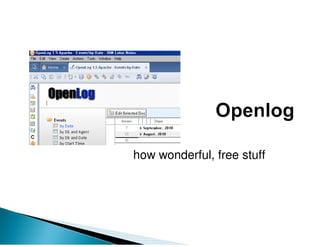
Openlog
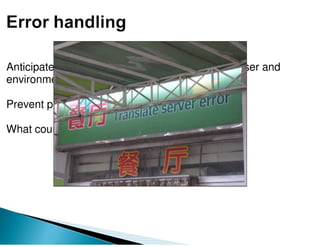
Anticipate, detect and process of programming, user and
environment failures or errors

Prevent partially by defensive programming

What counts is what you do with the errors
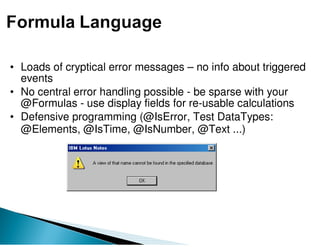
• Loads of cryptical error messages – no info about triggered
  events
• No central error handling possible - be sparse with your
  @Formulas - use display fields for re-usable calculations
• Defensive programming (@IsError, Test DataTypes:
  @Elements, @IsTime, @IsNumber, @Text ...)
Standard try - catch routine

try {
   // call a function that could error out
   var result = getInvoiceNumbers(customerNumber,invoiceDate);;
}
catch (e) {
    result = "Error in retrieving invoices";
}
// optional use finally runs after the try/catch block
finally {
    window.Forms[0].fldname.value = result
}

Throw your own errors
if (number > 10) { throw "NumberTooHighError" }
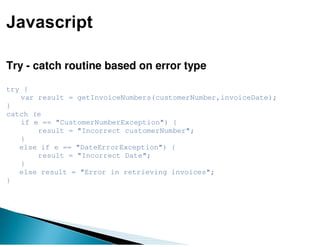
Try - catch routine based on error type

try {
   var result = getInvoiceNumbers(customerNumber,invoiceDate);
}
catch (e
   if e == "CustomerNumberException") {
       result = "Incorrect customerNumber";
   }
   else if e == "DateErrorException") {
       result = "Incorrect Date";
   }
   else result = "Error in retrieving invoices";
}
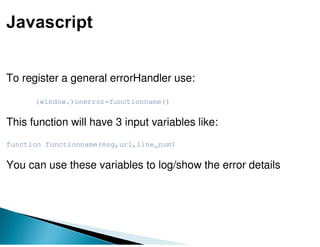
To register a general errorHandler use:

      (window.)onerror=functionname()


This function will have 3 input variables like:
function functionname(msg,url,line_num)


You can use these variables to log/show the error details
◦ use On   Error   blocks
◦                     is a big nono .. you are supposed to
    On Error resume next
  handle things, not ignoring them
◦ You have differtent audiences: users, developers,
  administrators. So throw custom errors.
◦ Then handle specific errors
◦ Option Declare prevents some programmatic errors
◦      Create a template in the new 8.5.1 LS IDE for your error
    new!
    handling blocks in subs and functions
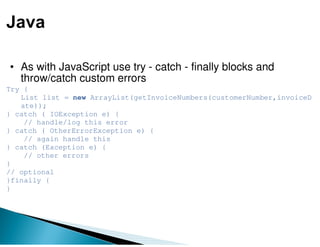
• As with JavaScript use try - catch - finally blocks and
  throw/catch custom errors
Try {
   List list = new ArrayList(getInvoiceNumbers(customerNumber,invoiceD
   ate));
} catch ( IOException e) {
    // handle/log this error
} catch ( OtherErrorException e) {
    // again handle this
} catch (Exception e) {
    // other errors
}
// optional
}finally {
}
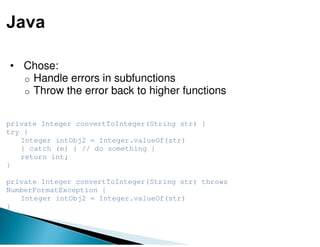
• Chose:
  o Handle errors in subfunctions
  o Throw the error back to higher functions


private Integer convertToInteger(String str) {
try {
   Integer intObj2 = Integer.valueOf(str)
   } catch (e) { // do something }
   return int;
}

private Integer convertToInteger(String str) throws
NumberFormatException {
   Integer intObj2 = Integer.valueOf(str)
}
class CustomException extends Exception {
    public CustomException(String msg){
           super(msg);
       }
}

public class Test {

 public static void main(String[] args) {
  try {
    System.out.println(divide(4,0));
  }
    catch (CustomException e) { e.printStackTrace(); }
  }

static int divide(int first,int second) throws CustomException{
   if(second==0) throw new MyException("dividing by zero");
   return first/second;
  }
}
Error handling in xPages
 • Default errorpage on server (admin can change xspnsfxsp.properties)
 • Set errorpage in application
 • Custom Error page (general, debug, specific)
 • Logging to AgentLog
how wonderful, free stuff
•   JavaScript
•   Java
•   XPages
•   Lotusscript


                  DEMO!!!!!!
◦ Getting it to work is NOT ENOUGH!
◦ Always add errorhandling to production code
◦ Thou shall avoid the use of hard coded stuff
◦ When not sure: check
◦ If it can go wrong, it will go wrong. At one point.
◦ Think first, then build your logic
◦ Do not repeat code
◦ Use only one line of code in events (click,
  query*)
◦ Your users are dumb ...
but: you are even dumber (if you ignore them)
◦ Make your code beautiful: comment not what,
  but why and use meaningfull names
Vince Schuurman             Martin Schaefer
vince.schuurman@gmail.com   martin@mschaefer.nl

Error handling in XPages

  • 1.
    errorhandling techniques inXPages, Javascript, Java, Lotusscript and @Formulas
  • 2.
    What is errorhandling? Errorhandling in: ◦@Formula ◦Javascript ◦Lotusscript ◦Java ◦xPages Openlog
  • 3.
    Anticipate, detect andprocess of programming, user and environment failures or errors Prevent partially by defensive programming What counts is what you do with the errors
  • 6.
    • Loads ofcryptical error messages – no info about triggered events • No central error handling possible - be sparse with your @Formulas - use display fields for re-usable calculations • Defensive programming (@IsError, Test DataTypes: @Elements, @IsTime, @IsNumber, @Text ...)
  • 8.
    Standard try -catch routine try { // call a function that could error out var result = getInvoiceNumbers(customerNumber,invoiceDate);; } catch (e) { result = "Error in retrieving invoices"; } // optional use finally runs after the try/catch block finally { window.Forms[0].fldname.value = result } Throw your own errors if (number > 10) { throw "NumberTooHighError" }
  • 9.
    Try - catchroutine based on error type try { var result = getInvoiceNumbers(customerNumber,invoiceDate); } catch (e if e == "CustomerNumberException") { result = "Incorrect customerNumber"; } else if e == "DateErrorException") { result = "Incorrect Date"; } else result = "Error in retrieving invoices"; }
  • 10.
    To register ageneral errorHandler use: (window.)onerror=functionname() This function will have 3 input variables like: function functionname(msg,url,line_num) You can use these variables to log/show the error details
  • 12.
    ◦ use On Error blocks ◦ is a big nono .. you are supposed to On Error resume next handle things, not ignoring them ◦ You have differtent audiences: users, developers, administrators. So throw custom errors. ◦ Then handle specific errors ◦ Option Declare prevents some programmatic errors ◦ Create a template in the new 8.5.1 LS IDE for your error new! handling blocks in subs and functions
  • 14.
    • As withJavaScript use try - catch - finally blocks and throw/catch custom errors Try { List list = new ArrayList(getInvoiceNumbers(customerNumber,invoiceD ate)); } catch ( IOException e) { // handle/log this error } catch ( OtherErrorException e) { // again handle this } catch (Exception e) { // other errors } // optional }finally { }
  • 15.
    • Chose: o Handle errors in subfunctions o Throw the error back to higher functions private Integer convertToInteger(String str) { try { Integer intObj2 = Integer.valueOf(str) } catch (e) { // do something } return int; } private Integer convertToInteger(String str) throws NumberFormatException { Integer intObj2 = Integer.valueOf(str) }
  • 16.
    class CustomException extendsException { public CustomException(String msg){ super(msg); } } public class Test { public static void main(String[] args) { try { System.out.println(divide(4,0)); } catch (CustomException e) { e.printStackTrace(); } } static int divide(int first,int second) throws CustomException{ if(second==0) throw new MyException("dividing by zero"); return first/second; } }
  • 18.
    Error handling inxPages • Default errorpage on server (admin can change xspnsfxsp.properties) • Set errorpage in application • Custom Error page (general, debug, specific) • Logging to AgentLog
  • 19.
  • 20.
    JavaScript • Java • XPages • Lotusscript DEMO!!!!!!
  • 21.
    ◦ Getting itto work is NOT ENOUGH! ◦ Always add errorhandling to production code ◦ Thou shall avoid the use of hard coded stuff ◦ When not sure: check ◦ If it can go wrong, it will go wrong. At one point. ◦ Think first, then build your logic ◦ Do not repeat code ◦ Use only one line of code in events (click, query*) ◦ Your users are dumb ... but: you are even dumber (if you ignore them) ◦ Make your code beautiful: comment not what, but why and use meaningfull names
  • 22.
    Vince Schuurman Martin Schaefer vince.schuurman@gmail.com martin@mschaefer.nl