Leverage DXL to Overcome Web Browser Rich Text Limitations Lance Spellman Workflow Studios
What We’ll Cover … Delivering Rich Text to the Web Exploring workarounds for rendering Rich Text Understanding the DXL output of Rich Text Creating a DOM object from DXL text Transforming DXL to HTML via XSL Transformations Wrap-up
The Specific Problem to Be Addressed Users create Notes documents with Rich Text content The content needs to be presented with 100% fidelity on the Web The documents (or at least the Rich Text) will NOT be edited on the Web, just viewed Usage Scenarios: Web sites Documentation databases Policies and procedures
How Does Domino Deliver Rich Text to the Web? Notes stores Rich Text in an internal format of Composite Data (CD) records CD records are streams of data structures with standardized headers for the type of record and the number of bytes it uses When a browser makes a Web request, the HTTP task asks Domino to convert the CD records to HTML In this conversion process, most elements in a Rich Text field convert well However, there are some elements that either do not convert well or do not convert at all
What Rich Text Elements Does Domino Have Trouble With? Tables All table borders are applied universally, regardless of individual cell border settings Borders are shown as 4px ridges Cell padding is ignored Table cells are divided evenly  Wrapping text around the outside of the table is not supported
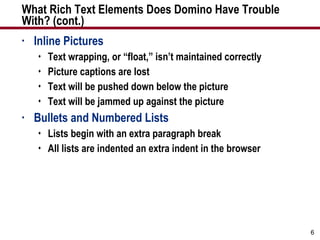
What Rich Text Elements Does Domino Have Trouble  With? (cont.) Inline Pictures Text wrapping, or “float,” isn’t maintained correctly Picture captions are lost Text will be pushed down below the picture Text will be jammed up against the picture Bullets and Numbered Lists Lists begin with an extra paragraph break All lists are indented an extra indent in the browser
Demonstration: How Domino Handles Rich Text on the Web Domino default rendering of Rich Text to the Web
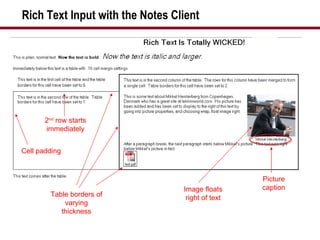
Rich Text Input with the Notes Client Image floats right of text 2 nd  row starts immediately Table borders of varying thickness Cell padding Picture caption
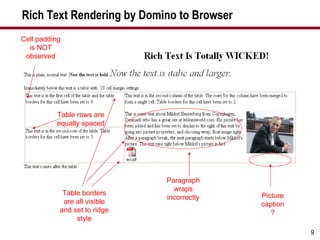
Rich Text Rendering by Domino to Browser Table rows are equally spaced Table borders are all visible and set to ridge style Picture caption? Paragraph wraps incorrectly Cell padding is NOT observed
What We’ll Cover … Delivering Rich Text to the Web Exploring workarounds for rendering Rich Text Understanding the DXL output of Rich Text Creating a DOM object from DXL text Transforming DXL to HTML via XSL Transformations Wrap-up
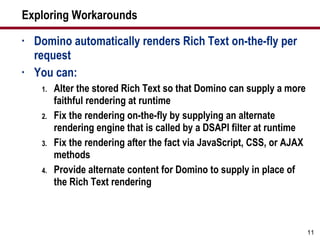
Exploring Workarounds Domino automatically renders Rich Text on-the-fly per request You can: Alter the stored Rich Text so that Domino can supply a more faithful rendering at runtime Fix the rendering on-the-fly by supplying an alternate rendering engine that is called by a DSAPI filter at runtime Fix the rendering after the fact via JavaScript, CSS, or AJAX methods Provide alternate content for Domino to supply in place of the Rich Text rendering
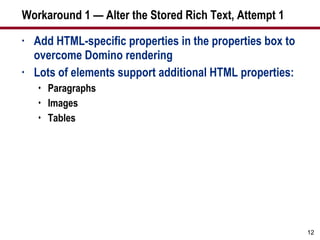
Workaround 1 — Alter the Stored Rich Text, Attempt 1 Add HTML-specific properties in the properties box to overcome Domino rendering Lots of elements support additional HTML properties: Paragraphs Images Tables
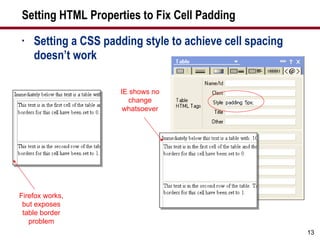
Setting HTML Properties to Fix Cell Padding Setting a CSS padding style to achieve cell spacing doesn’t work Firefox works, but exposes table border problem IE shows no change whatsoever
Workaround 1 — Alter the Stored Rich Text, Attempt 2 Don’t let Notes store the Rich Text as CD records and don’t let Domino render it on-the-fly At document save, store the content as HTML/MIME
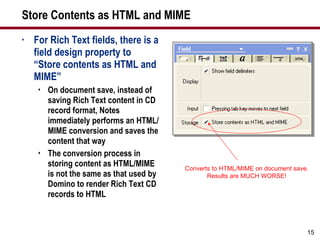
Store Contents as HTML and MIME For Rich Text fields, there is a field design property to “Store contents as HTML and MIME” On document save, instead of saving Rich Text content in CD record format, Notes immediately performs an HTML/MIME conversion and saves the content that way The conversion process in storing content as HTML/MIME is not the same as that used by Domino to render Rich Text CD records to HTML Converts to HTML/MIME on document save. Results are MUCH WORSE!
Potential Workaround Methods Add HTML-specific properties in the properties box to overcome Domino rendering Bypass Domino rendering by setting the Rich Text field property to store content as HTML/MIME Intercept Domino rendering of HTML via a DSAPI filter and take over rendering
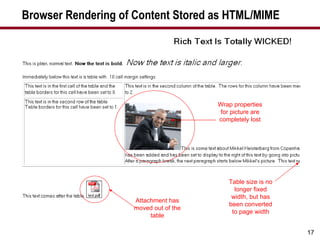
Browser Rendering of Content Stored as HTML/MIME Attachment has moved out of the table Wrap properties for picture are completely lost Table size is no longer fixed width, but has been converted to page width
Browser Rendering Now Closely Matches Notes?!? That’s a joke in case you missed it When viewing the content in a Notes client and in a browser, the results will look very similar The problem is BOTH clients now render very poorly, if consistently The author will see significant change in the document from when the document is saved to the next time he opens it
Demonstration: Saving Rich Text Content as MIME and Viewing It Saving RT content as MIME/HTML
Workaround 1 — Alter the Stored Rich Text, Attempt 3 Continuing with the “Store Contents as HTML/MIME” theme, alter the stored HTML/MIME after the document is saved With this approach, the generated HTML is saved in the document and, theoretically, the known issues can be accounted for, corrected, and the document re-saved
Issues with Fixing Stored HTML/MIME Once the Rich Text is saved, there is data loss It’s unclear what the author actually intended Therefore, any fix that’s applied would be a best-guess and would still not render the content faithfully
Workaround 2 — Fix the Rendering On-the-Fly  Do you have any idea how difficult this would be? Deep knowledge of the following is required: Architect level knowledge of Rich Text data structures Highly competent C programming skills Lotus Notes C API  DSAPI and HTML libraries HTTP protocol handling HTML/CSS construction I am a highly paid (I wish) professional.  Please, do not try this at home!
Workaround 3 — Fix the Rendering After the Fact This would involve adding a JavaScript function to the Web page, probably invoking an AJAX library Domino would send the page to the browser The JavaScript code would have to compare the delivered (and possibly hidden) HTML with the original Rich Text Accessing the Rich Text would have to be done by an agent/servlet And so on … Tedious, and more importantly,  performance would be awful Caution
Workaround 4 — Provide Alternate Content via DXL Similar in nature to the idea of storing Rich Text content as HTML/MIME However, rather than trying to fix the errors introduced by storing Rich Text content as HTML/MIME, bypass it altogether Allow the document to save the Rich Text Post save, read the Rich Text and create your own HTML representation and save it to the document When serving the document to the browser, provide the custom HTML representation rather than the Rich Text field (i.e., hide it)
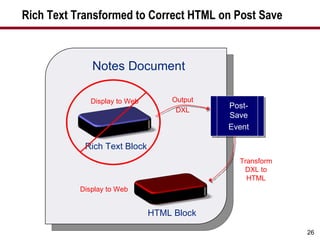
The Secret Sauce is Domino Extensible Language (DXL) In the post-save process, the Rich Text is output as DXL All Notes design and data elements can be output as DXL, a Domino XML data structure DXL can be transformed to HTML with an XSL stylesheet The resulting HTML is stored in the Notes document When a browser request is made, the HTML field is shown for a speedy response Rather than the Rich Text field Handles styled text, tables, inline pictures, attachments Does not support bidirectional editing from both clients
Rich Text Transformed to Correct HTML on Post Save Notes Document Output DXL Transform DXL to HTML Display to Web Display to Web Rich Text Block Post-Save Event HTML Block
What We’ll Cover … Delivering Rich Text to the Web Exploring workarounds for rendering Rich Text Understanding the DXL output of Rich Text Creating a DOM object from DXL text Transforming DXL to HTML via XSL Transformations Wrap-up
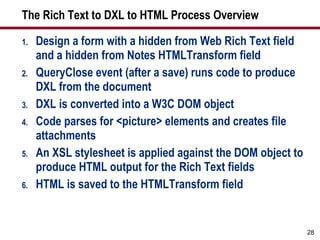
The Rich Text to DXL to HTML Process Overview Design a form with a hidden from Web Rich Text field and a hidden from Notes HTMLTransform field QueryClose event (after a save) runs code to produce DXL from the document DXL is converted into a W3C DOM object Code parses for <picture> elements and creates file attachments An XSL stylesheet is applied against the DOM object to produce HTML output for the Rich Text fields HTML is saved to the HTMLTransform field
Understanding the DXL Output of Rich Text DXL is a specific implementation of XML for Domino data There is a DTD (Document Type Definition) for DXL that defines the XML tags and structures for Domino DXL can be used for both data (documents) and design (forms, views, agents, etc.) Rich Text is just another type of Domino data where the DTD has specified the output tags and structure for DXL
Demonstration: DXL Process — Rich Text to DXL to HTML Overview of the process for RT to DXL to HTML
Inline Images in Rich Text and DXL An inline image is an image the user copied and pasted into the Rich Text field When reading a document, the image is visible to the user It’s not an attachment Notes saves an inline image in Rich Text as a Notes bitmap, a proprietary format When Rich Text is exported as DXL, the inline image can be exported as either a Notes bitmap or a GIF
Code That Produces DXL Output Code can be LotusScript or Java By default, DXL export of inline images generates an internal Notes bitmap format An export flag must be set to convert to GIF format By default, DXL export will contain a DOCTYPE reference An export flag must be set to omit this output so that later DOM processing will not fail
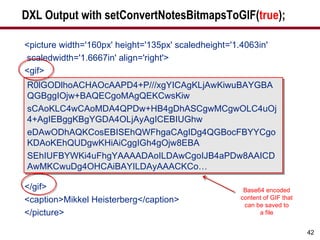
Code Example for DXL Export try { … DxlExporter dxl = session.createDxlExporter(); … // handle inline images in the Rich Text dxl.setConvertNotesBitmapsToGIF(true); // turn DOCTYPE output off because DOM processor  // can't find the DOCTYPE declaration file and errors dxl.setOutputDOCTYPE(false);  String docDxl = dxl.exportDxl(doc); Exports document as XML to a string Changes output of inline pictures from Notes bitmap to GIF
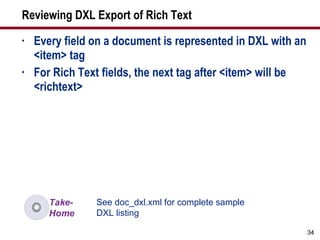
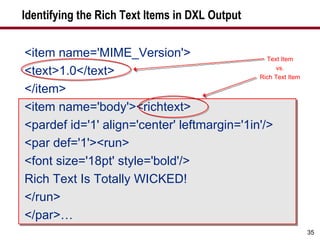
Reviewing DXL Export of Rich Text Every field on a document is represented in DXL with an <item> tag For Rich Text fields, the next tag after <item> will be <richtext> See doc_dxl.xml for complete sample DXL listing
Identifying the Rich Text Items in DXL Output <item name='MIME_Version'> <text>1.0</text> </item> <item name='body'><richtext> <pardef id='1' align='center' leftmargin='1in'/> <par def='1'><run> <font size='18pt' style='bold'/> Rich Text Is Totally WICKED! </run> </par>… Text Item vs. Rich Text Item
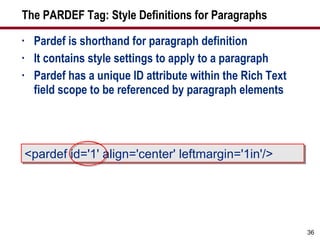
The PARDEF Tag: Style Definitions for Paragraphs Pardef is shorthand for paragraph definition It contains style settings to apply to a paragraph Pardef has a unique ID attribute within the Rich Text field scope to be referenced by paragraph elements <pardef id='1' align='center' leftmargin='1in'/>
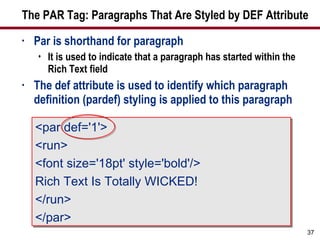
The PAR Tag: Paragraphs That Are Styled by DEF Attribute Par is shorthand for paragraph It is used to indicate that a paragraph has started within the Rich Text field The def attribute is used to identify which paragraph definition (pardef) styling is applied to this paragraph <par def='1'> <run> <font size='18pt' style='bold'/> Rich Text Is Totally WICKED! </run> </par>
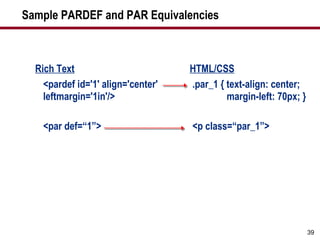
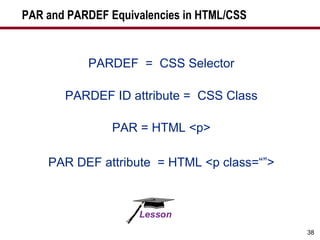
PAR and PARDEF Equivalencies in HTML/CSS PARDEF  =  CSS Selector PARDEF ID attribute =  CSS Class PAR = HTML <p> PAR DEF attribute  = HTML <p class=“”>
Sample PARDEF and PAR Equivalencies Rich Text <pardef id='1' align='center' leftmargin='1in'/> <par def=“1”> HTML/CSS .par_1 { text-align: center;   margin-left: 70px; } <p class=“par_1”>
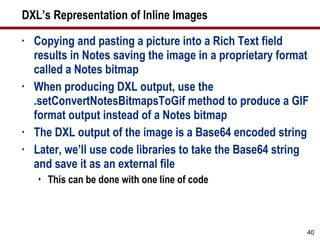
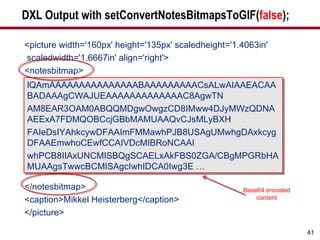
DXL’s Representation of Inline Images Copying and pasting a picture into a Rich Text field results in Notes saving the image in a proprietary format called a Notes bitmap When producing DXL output, use the .setConvertNotesBitmapsToGif method to produce a GIF format output instead of a Notes bitmap The DXL output of the image is a Base64 encoded string Later, we’ll use code libraries to take the Base64 string and save it as an external file This can be done with one line of code
DXL Output with setConvertNotesBitmapsToGIF( false ); <picture width='160px' height='135px' scaledheight='1.4063in' scaledwidth='1.6667in' align='right'> <notesbitmap> </notesbitmap> <caption>Mikkel Heisterberg</caption> </picture> lQAmAAAAAAAAAAAAAAABAAAAAAAAACsALwAIAAEACAABADAAAgCWAJUEAAAAAAAAAAAAAC8AgwTN AM8EAR3OAM0ABQQMDgwOwgzCD8IMww4DJyMWzQDNAAEExA7FDMQOBCcjGBbMAMUAAQvCJsMLyBXH FAIeDsIYAhkcywDFAAImFMMawhPJB8USAgUMwhgDAxkcygDFAAEmwhoCEwfCCAIVDcMIBRoNCAAI whPCB8IIAxUNCMISBQgSCAELxAkFBS0ZGA/CBgMPGRbHAMUAAgsTwwcBCMISAgcIwhIDCA0Iwg3E … Base64 encoded content
DXL Output with setConvertNotesBitmapsToGIF( true ); <picture width='160px' height='135px' scaledheight='1.4063in' scaledwidth='1.6667in' align='right'> <gif> </gif> <caption>Mikkel Heisterberg</caption> </picture> R0lGODlhoACHAOcAAPD4+P///xgYICAgKLjAwKiwuBAYGBAQGBggIOjw+BAQECgoMAgQEKCwsKiw sCAoKLC4wCAoMDA4QPDw+HB4gDhASCgwMCgwOLC4uOj4+AgIEBggKBgYGDA4OLjAyAgICEBIUGhw eDAwODhAQKCosEBISEhQWFhgaCAgIDg4QGBocFBYYCgoKDAoKEhQUDgwKHiAiCggIGh4gOjw8EBA SEhIUFBYWKi4uFhgYAAAADAoILDAwCgoIJB4aPDw8AAICDAwMKCwuDg4OHCAiBAYILDAyAAACKCo… Base64 encoded content of GIF that can be saved to a file
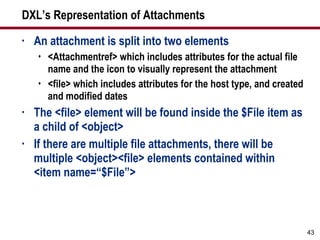
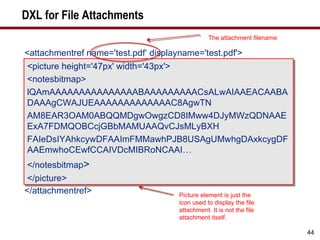
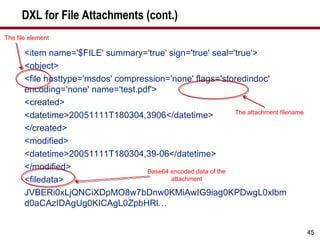
DXL’s Representation of Attachments An attachment is split into two elements <Attachmentref> which includes attributes for the actual file name and the icon to visually represent the attachment <file> which includes attributes for the host type, and created and modified dates The <file> element will be found inside the $File item as a child of <object> If there are multiple file attachments, there will be multiple <object><file> elements contained within <item name=“$File”>
DXL for File Attachments <attachmentref name='test.pdf‘ displayname='test.pdf'> <picture height='47px' width='43px'> <notesbitmap> lQAmAAAAAAAAAAAAAAABAAAAAAAAACsALwAIAAEACAABADAAAgCWAJUEAAAAAAAAAAAAAC8AgwTN AM8EAR3OAM0ABQQMDgwOwgzCD8IMww4DJyMWzQDNAAEExA7FDMQOBCcjGBbMAMUAAQvCJsMLyBXH FAIeDsIYAhkcywDFAAImFMMawhPJB8USAgUMwhgDAxkcygDFAAEmwhoCEwfCCAIVDcMIBRoNCAAI… </notesbitmap > </picture> </attachmentref> <picture height='47px' width='43px'> <notesbitmap> lQAmAAAAAAAAAAAAAAABAAAAAAAAACsALwAIAAEACAABADAAAgCWAJUEAAAAAAAAAAAAAC8AgwTN AM8EAR3OAM0ABQQMDgwOwgzCD8IMww4DJyMWzQDNAAEExA7FDMQOBCcjGBbMAMUAAQvCJsMLyBXH FAIeDsIYAhkcywDFAAImFMMawhPJB8USAgUMwhgDAxkcygDFAAEmwhoCEwfCCAIVDcMIBRoNCAAI… </notesbitmap > </picture> The attachment filename Picture element is just the icon used to display the file attachment. It is not the file attachment itself.
DXL for File Attachments (cont.) <item name='$FILE' summary='true' sign='true' seal='true'> <object> <file hosttype='msdos' compression='none' flags='storedindoc' encoding='none' name='test.pdf'> <created> <datetime>20051111T180304,3906</datetime> </created> <modified> <datetime>20051111T180304,39-06</datetime> </modified> <filedata> JVBERi0xLjQNCiXDpMO8w7bDnw0KMiAwIG9iag0KPDwgL0xlbmd0aCAzIDAgUg0KICAgL0ZpbHRl… The attachment filename Base64 encoded data of the attachment The file element
What We’ll Cover … Delivering Rich Text to the Web Exploring workarounds for rendering Rich Text Understanding the DXL output of Rich Text Creating a DOM object from DXL text Transforming DXL to HTML via XSL Transformations Wrap-up
Produce a W3C DOM Object from Rich Text DXL By creating a W3C DOM object from the DXL output, an XSL transformation can be performed Inline <picture> elements can be parsed and saved back to the document as file attachments
Create a DOM Object from DXL Text DXL from the earlier code example is simply an in-memory string The DXL needs to be converted into a DOM object so that it: Can be parsed to look for inline picture elements Can be transformed with an XSL stylesheet
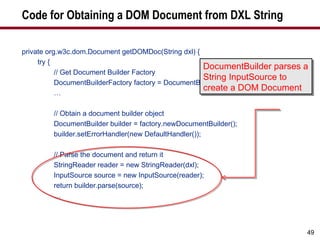
Code for Obtaining a DOM Document from DXL String private org.w3c.dom.Document getDOMDoc(String dxl) { try { // Get Document Builder Factory DocumentBuilderFactory factory = DocumentBuilderFactory.newInstance(); … // Obtain a document builder object DocumentBuilder builder = factory.newDocumentBuilder(); builder.setErrorHandler(new DefaultHandler()); // Parse the document and return it StringReader reader = new StringReader(dxl); InputSource source = new InputSource(reader); return builder.parse(source); … DocumentBuilder parses a String InputSource to create a DOM Document
Working with DXL Output of Rich Text Inline Image Remember, when Rich Text is exported as DXL, inline images can be exported as either Notes bitmap or GIF The DXL image data is encoded as a Base64 string The string can be decoded and saved to a file
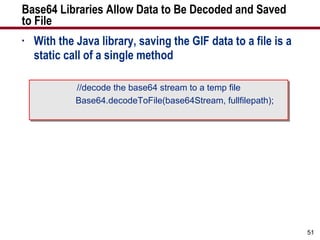
Base64 Libraries Allow Data to Be Decoded and Saved to File With the Java library, saving the GIF data to a file is a static call of a single method //decode the base64 stream to a temp file Base64.decodeToFile(base64Stream, fullfilepath);
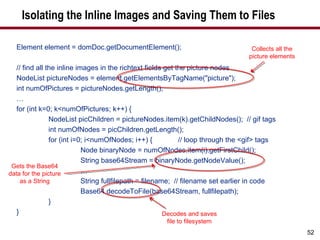
Isolating the Inline Images and Saving Them to Files Element element = domDoc.getDocumentElement(); // find all the inline images in the richtext fields get the picture nodes NodeList pictureNodes = element.getElementsByTagName(&quot;picture&quot;); int numOfPictures = pictureNodes.getLength(); … for (int k=0; k<numOfPictures; k++) { NodeList picChildren = pictureNodes.item(k).getChildNodes();  // gif tags int numOfNodes = picChildren.getLength(); for (int i=0; i<numOfNodes; i++) {  // loop through the <gif> tags Node binaryNode = numOfNodes.item(i).getFirstChild(); String base64Stream = binaryNode.getNodeValue(); … String fullfilepath = filename;  // filename set earlier in code Base64.decodeToFile(base64Stream, fullfilepath);  } } Collects all the picture elements Gets the Base64 data for the picture as a String Decodes and saves file to filesystem
What We’ll Cover … Delivering Rich Text to the Web Exploring workarounds for rendering Rich Text Understanding the DXL output of Rich Text Creating a DOM object from DXL text Transforming DXL to HTML via XSL Transformations Wrap-up
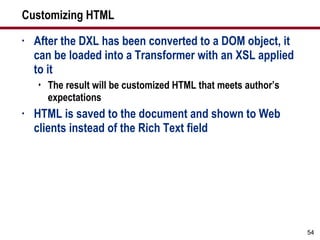
Customizing HTML After the DXL has been converted to a DOM object, it can be loaded into a Transformer with an XSL applied  to it The result will be customized HTML that meets author’s expectations HTML is saved to the document and shown to Web clients instead of the Rich Text field
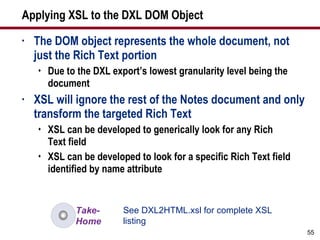
Applying XSL to the DXL DOM Object The DOM object represents the whole document, not just the Rich Text portion Due to the DXL export’s lowest granularity level being the document XSL will ignore the rest of the Notes document and only transform the targeted Rich Text XSL can be developed to generically look for any Rich Text field XSL can be developed to look for a specific Rich Text field identified by name attribute See DXL2HTML.xsl for complete XSL listing
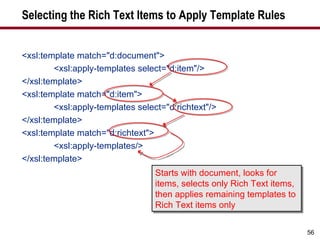
Selecting the Rich Text Items to Apply Template Rules <xsl:template match=&quot;d:document&quot;> <xsl:apply-templates select=&quot;d:item&quot;/> </xsl:template> <xsl:template match=&quot;d:item&quot;> <xsl:apply-templates select=&quot;d:richtext&quot;/> </xsl:template> <xsl:template match=&quot;d:richtext&quot;> <xsl:apply-templates/> </xsl:template> Starts with document, looks for items, selects only Rich Text items, then applies remaining templates to Rich Text items only
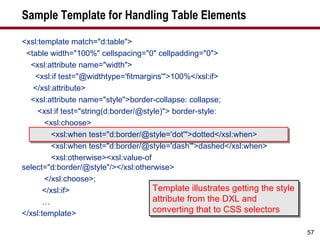
Sample Template for Handling Table Elements <xsl:template match=&quot;d:table&quot;> <table width=&quot;100%&quot; cellspacing=&quot;0&quot; cellpadding=&quot;0&quot;> <xsl:attribute name=&quot;width&quot;> <xsl:if test=&quot;@widthtype='fitmargins'&quot;>100%</xsl:if> </xsl:attribute> <xsl:attribute name=&quot;style&quot;>border-collapse: collapse; <xsl:if test=&quot;string(d:border/@style)&quot;> border-style:  <xsl:choose> <xsl:when test=&quot;d:border/@style='dot'&quot;>dotted</xsl:when> <xsl:when test=&quot;d:border/@style='dash'&quot;>dashed</xsl:when> <xsl:otherwise><xsl:value-of select=&quot;d:border/@style&quot;/></xsl:otherwise> </xsl:choose>; </xsl:if> … </xsl:template> Template illustrates getting the style attribute from the DXL and converting that to CSS selectors
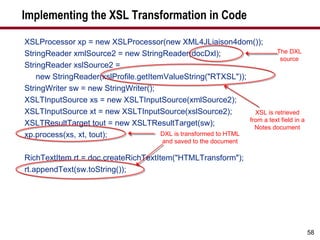
Implementing the XSL Transformation in Code XSLProcessor xp = new XSLProcessor(new XML4JLiaison4dom()); StringReader xmlSource2 = new StringReader(docDxl); StringReader xslSource2 =  new StringReader(xslProfile.getItemValueString(&quot;RTXSL&quot;)); StringWriter sw = new StringWriter(); XSLTInputSource xs = new XSLTInputSource(xmlSource2); XSLTInputSource xt = new XSLTInputSource(xslSource2); XSLTResultTarget tout = new XSLTResultTarget(sw); xp.process(xs, xt, tout); RichTextItem rt = doc.createRichTextItem(&quot;HTMLTransform&quot;); rt.appendText(sw.toString()); XSL is retrieved from a text field in a Notes document The DXL source DXL is transformed to HTML and saved to the document
Demonstration: Live Debug Session for DXL2HTML.xsl Visual Studio Debugger for  DXL2HTML.xsl
What We’ll Cover … Delivering Rich Text to the Web Exploring workarounds for rendering Rich Text Understanding the DXL output of Rich Text Creating a DOM object from DXL text Transforming DXL to HTML via XSL Transformations Wrap-up
Extending the Idea … What if your boss says, “Move this app to SharePoint, .NET, WebSphere, etc.”? First of all … boo! Integrate, not migrate! But if you must, use the DXL export process to get Rich Text and convert it to HTML and save it in the new system
Acknowledgements Much of the work shown here is a result of the dedicated effort of David Bockes at Workflow Studios I claim some of the inspiration, he provided much of the perspiration In particular, the efforts in developing the XSL stylesheet are entirely his doing
Resources for Working with Base64 Encoded Data There are free LotusScript and Java libraries for encoding and decoding binary data as strings The Java library used in the sample db is from http://iharder.net/base64 by Robert Harder. It is a comprehensive and widely used library. For reference, the resources section also includes a LotusScript class library from Johan Kanngard at http://dev.kanngard.net/Permalinks/ID_20030324233829.html based on work from Julian Robichaux. See Script Libraries in dxl_sample.nsf for both Java and LotusScript libraries
Rich Text Handling for Free Resources Genii Software’s CoexEdit for bidirectional Rich Text editing www.geniisoft.com/showcase.nsf/CoexEdit  Proposion Software’s Portal Migrator, which handles Rich Text conversion to the .NET platform www.proposion.com
7 Key Points to Take Home Domino’s rendering of Rich Text to the Web requires alternatives for 100% rendering Storing Rich Text as HTML/MIME does not solve the problem, it makes it worse The complete data structure of a Rich Text field is available as XML when using DXL Export Inline images can be extracted from Rich Text DXL and saved as file attachments XSL can be used to transform the DXL into HTML This solution is one-way only … from Notes to Web Use this approach to move Rich Text to other platforms
Your Turn! How to Contact Me: Lance Spellman [email_address]

leverage dxl

  • 1.
    Leverage DXL toOvercome Web Browser Rich Text Limitations Lance Spellman Workflow Studios
  • 2.
    What We’ll Cover… Delivering Rich Text to the Web Exploring workarounds for rendering Rich Text Understanding the DXL output of Rich Text Creating a DOM object from DXL text Transforming DXL to HTML via XSL Transformations Wrap-up
  • 3.
    The Specific Problemto Be Addressed Users create Notes documents with Rich Text content The content needs to be presented with 100% fidelity on the Web The documents (or at least the Rich Text) will NOT be edited on the Web, just viewed Usage Scenarios: Web sites Documentation databases Policies and procedures
  • 4.
    How Does DominoDeliver Rich Text to the Web? Notes stores Rich Text in an internal format of Composite Data (CD) records CD records are streams of data structures with standardized headers for the type of record and the number of bytes it uses When a browser makes a Web request, the HTTP task asks Domino to convert the CD records to HTML In this conversion process, most elements in a Rich Text field convert well However, there are some elements that either do not convert well or do not convert at all
  • 5.
    What Rich TextElements Does Domino Have Trouble With? Tables All table borders are applied universally, regardless of individual cell border settings Borders are shown as 4px ridges Cell padding is ignored Table cells are divided evenly Wrapping text around the outside of the table is not supported
  • 6.
    What Rich TextElements Does Domino Have Trouble With? (cont.) Inline Pictures Text wrapping, or “float,” isn’t maintained correctly Picture captions are lost Text will be pushed down below the picture Text will be jammed up against the picture Bullets and Numbered Lists Lists begin with an extra paragraph break All lists are indented an extra indent in the browser
  • 7.
    Demonstration: How DominoHandles Rich Text on the Web Domino default rendering of Rich Text to the Web
  • 8.
    Rich Text Inputwith the Notes Client Image floats right of text 2 nd row starts immediately Table borders of varying thickness Cell padding Picture caption
  • 9.
    Rich Text Renderingby Domino to Browser Table rows are equally spaced Table borders are all visible and set to ridge style Picture caption? Paragraph wraps incorrectly Cell padding is NOT observed
  • 10.
    What We’ll Cover… Delivering Rich Text to the Web Exploring workarounds for rendering Rich Text Understanding the DXL output of Rich Text Creating a DOM object from DXL text Transforming DXL to HTML via XSL Transformations Wrap-up
  • 11.
    Exploring Workarounds Dominoautomatically renders Rich Text on-the-fly per request You can: Alter the stored Rich Text so that Domino can supply a more faithful rendering at runtime Fix the rendering on-the-fly by supplying an alternate rendering engine that is called by a DSAPI filter at runtime Fix the rendering after the fact via JavaScript, CSS, or AJAX methods Provide alternate content for Domino to supply in place of the Rich Text rendering
  • 12.
    Workaround 1 —Alter the Stored Rich Text, Attempt 1 Add HTML-specific properties in the properties box to overcome Domino rendering Lots of elements support additional HTML properties: Paragraphs Images Tables
  • 13.
    Setting HTML Propertiesto Fix Cell Padding Setting a CSS padding style to achieve cell spacing doesn’t work Firefox works, but exposes table border problem IE shows no change whatsoever
  • 14.
    Workaround 1 —Alter the Stored Rich Text, Attempt 2 Don’t let Notes store the Rich Text as CD records and don’t let Domino render it on-the-fly At document save, store the content as HTML/MIME
  • 15.
    Store Contents asHTML and MIME For Rich Text fields, there is a field design property to “Store contents as HTML and MIME” On document save, instead of saving Rich Text content in CD record format, Notes immediately performs an HTML/MIME conversion and saves the content that way The conversion process in storing content as HTML/MIME is not the same as that used by Domino to render Rich Text CD records to HTML Converts to HTML/MIME on document save. Results are MUCH WORSE!
  • 16.
    Potential Workaround MethodsAdd HTML-specific properties in the properties box to overcome Domino rendering Bypass Domino rendering by setting the Rich Text field property to store content as HTML/MIME Intercept Domino rendering of HTML via a DSAPI filter and take over rendering
  • 17.
    Browser Rendering ofContent Stored as HTML/MIME Attachment has moved out of the table Wrap properties for picture are completely lost Table size is no longer fixed width, but has been converted to page width
  • 18.
    Browser Rendering NowClosely Matches Notes?!? That’s a joke in case you missed it When viewing the content in a Notes client and in a browser, the results will look very similar The problem is BOTH clients now render very poorly, if consistently The author will see significant change in the document from when the document is saved to the next time he opens it
  • 19.
    Demonstration: Saving RichText Content as MIME and Viewing It Saving RT content as MIME/HTML
  • 20.
    Workaround 1 —Alter the Stored Rich Text, Attempt 3 Continuing with the “Store Contents as HTML/MIME” theme, alter the stored HTML/MIME after the document is saved With this approach, the generated HTML is saved in the document and, theoretically, the known issues can be accounted for, corrected, and the document re-saved
  • 21.
    Issues with FixingStored HTML/MIME Once the Rich Text is saved, there is data loss It’s unclear what the author actually intended Therefore, any fix that’s applied would be a best-guess and would still not render the content faithfully
  • 22.
    Workaround 2 —Fix the Rendering On-the-Fly Do you have any idea how difficult this would be? Deep knowledge of the following is required: Architect level knowledge of Rich Text data structures Highly competent C programming skills Lotus Notes C API DSAPI and HTML libraries HTTP protocol handling HTML/CSS construction I am a highly paid (I wish) professional. Please, do not try this at home!
  • 23.
    Workaround 3 —Fix the Rendering After the Fact This would involve adding a JavaScript function to the Web page, probably invoking an AJAX library Domino would send the page to the browser The JavaScript code would have to compare the delivered (and possibly hidden) HTML with the original Rich Text Accessing the Rich Text would have to be done by an agent/servlet And so on … Tedious, and more importantly, performance would be awful Caution
  • 24.
    Workaround 4 —Provide Alternate Content via DXL Similar in nature to the idea of storing Rich Text content as HTML/MIME However, rather than trying to fix the errors introduced by storing Rich Text content as HTML/MIME, bypass it altogether Allow the document to save the Rich Text Post save, read the Rich Text and create your own HTML representation and save it to the document When serving the document to the browser, provide the custom HTML representation rather than the Rich Text field (i.e., hide it)
  • 25.
    The Secret Sauceis Domino Extensible Language (DXL) In the post-save process, the Rich Text is output as DXL All Notes design and data elements can be output as DXL, a Domino XML data structure DXL can be transformed to HTML with an XSL stylesheet The resulting HTML is stored in the Notes document When a browser request is made, the HTML field is shown for a speedy response Rather than the Rich Text field Handles styled text, tables, inline pictures, attachments Does not support bidirectional editing from both clients
  • 26.
    Rich Text Transformedto Correct HTML on Post Save Notes Document Output DXL Transform DXL to HTML Display to Web Display to Web Rich Text Block Post-Save Event HTML Block
  • 27.
    What We’ll Cover… Delivering Rich Text to the Web Exploring workarounds for rendering Rich Text Understanding the DXL output of Rich Text Creating a DOM object from DXL text Transforming DXL to HTML via XSL Transformations Wrap-up
  • 28.
    The Rich Textto DXL to HTML Process Overview Design a form with a hidden from Web Rich Text field and a hidden from Notes HTMLTransform field QueryClose event (after a save) runs code to produce DXL from the document DXL is converted into a W3C DOM object Code parses for <picture> elements and creates file attachments An XSL stylesheet is applied against the DOM object to produce HTML output for the Rich Text fields HTML is saved to the HTMLTransform field
  • 29.
    Understanding the DXLOutput of Rich Text DXL is a specific implementation of XML for Domino data There is a DTD (Document Type Definition) for DXL that defines the XML tags and structures for Domino DXL can be used for both data (documents) and design (forms, views, agents, etc.) Rich Text is just another type of Domino data where the DTD has specified the output tags and structure for DXL
  • 30.
    Demonstration: DXL Process— Rich Text to DXL to HTML Overview of the process for RT to DXL to HTML
  • 31.
    Inline Images inRich Text and DXL An inline image is an image the user copied and pasted into the Rich Text field When reading a document, the image is visible to the user It’s not an attachment Notes saves an inline image in Rich Text as a Notes bitmap, a proprietary format When Rich Text is exported as DXL, the inline image can be exported as either a Notes bitmap or a GIF
  • 32.
    Code That ProducesDXL Output Code can be LotusScript or Java By default, DXL export of inline images generates an internal Notes bitmap format An export flag must be set to convert to GIF format By default, DXL export will contain a DOCTYPE reference An export flag must be set to omit this output so that later DOM processing will not fail
  • 33.
    Code Example forDXL Export try { … DxlExporter dxl = session.createDxlExporter(); … // handle inline images in the Rich Text dxl.setConvertNotesBitmapsToGIF(true); // turn DOCTYPE output off because DOM processor // can't find the DOCTYPE declaration file and errors dxl.setOutputDOCTYPE(false); String docDxl = dxl.exportDxl(doc); Exports document as XML to a string Changes output of inline pictures from Notes bitmap to GIF
  • 34.
    Reviewing DXL Exportof Rich Text Every field on a document is represented in DXL with an <item> tag For Rich Text fields, the next tag after <item> will be <richtext> See doc_dxl.xml for complete sample DXL listing
  • 35.
    Identifying the RichText Items in DXL Output <item name='MIME_Version'> <text>1.0</text> </item> <item name='body'><richtext> <pardef id='1' align='center' leftmargin='1in'/> <par def='1'><run> <font size='18pt' style='bold'/> Rich Text Is Totally WICKED! </run> </par>… Text Item vs. Rich Text Item
  • 36.
    The PARDEF Tag:Style Definitions for Paragraphs Pardef is shorthand for paragraph definition It contains style settings to apply to a paragraph Pardef has a unique ID attribute within the Rich Text field scope to be referenced by paragraph elements <pardef id='1' align='center' leftmargin='1in'/>
  • 37.
    The PAR Tag:Paragraphs That Are Styled by DEF Attribute Par is shorthand for paragraph It is used to indicate that a paragraph has started within the Rich Text field The def attribute is used to identify which paragraph definition (pardef) styling is applied to this paragraph <par def='1'> <run> <font size='18pt' style='bold'/> Rich Text Is Totally WICKED! </run> </par>
  • 38.
    PAR and PARDEFEquivalencies in HTML/CSS PARDEF = CSS Selector PARDEF ID attribute = CSS Class PAR = HTML <p> PAR DEF attribute = HTML <p class=“”>
  • 39.
    Sample PARDEF andPAR Equivalencies Rich Text <pardef id='1' align='center' leftmargin='1in'/> <par def=“1”> HTML/CSS .par_1 { text-align: center; margin-left: 70px; } <p class=“par_1”>
  • 40.
    DXL’s Representation ofInline Images Copying and pasting a picture into a Rich Text field results in Notes saving the image in a proprietary format called a Notes bitmap When producing DXL output, use the .setConvertNotesBitmapsToGif method to produce a GIF format output instead of a Notes bitmap The DXL output of the image is a Base64 encoded string Later, we’ll use code libraries to take the Base64 string and save it as an external file This can be done with one line of code
  • 41.
    DXL Output withsetConvertNotesBitmapsToGIF( false ); <picture width='160px' height='135px' scaledheight='1.4063in' scaledwidth='1.6667in' align='right'> <notesbitmap> </notesbitmap> <caption>Mikkel Heisterberg</caption> </picture> lQAmAAAAAAAAAAAAAAABAAAAAAAAACsALwAIAAEACAABADAAAgCWAJUEAAAAAAAAAAAAAC8AgwTN AM8EAR3OAM0ABQQMDgwOwgzCD8IMww4DJyMWzQDNAAEExA7FDMQOBCcjGBbMAMUAAQvCJsMLyBXH FAIeDsIYAhkcywDFAAImFMMawhPJB8USAgUMwhgDAxkcygDFAAEmwhoCEwfCCAIVDcMIBRoNCAAI whPCB8IIAxUNCMISBQgSCAELxAkFBS0ZGA/CBgMPGRbHAMUAAgsTwwcBCMISAgcIwhIDCA0Iwg3E … Base64 encoded content
  • 42.
    DXL Output withsetConvertNotesBitmapsToGIF( true ); <picture width='160px' height='135px' scaledheight='1.4063in' scaledwidth='1.6667in' align='right'> <gif> </gif> <caption>Mikkel Heisterberg</caption> </picture> R0lGODlhoACHAOcAAPD4+P///xgYICAgKLjAwKiwuBAYGBAQGBggIOjw+BAQECgoMAgQEKCwsKiw sCAoKLC4wCAoMDA4QPDw+HB4gDhASCgwMCgwOLC4uOj4+AgIEBggKBgYGDA4OLjAyAgICEBIUGhw eDAwODhAQKCosEBISEhQWFhgaCAgIDg4QGBocFBYYCgoKDAoKEhQUDgwKHiAiCggIGh4gOjw8EBA SEhIUFBYWKi4uFhgYAAAADAoILDAwCgoIJB4aPDw8AAICDAwMKCwuDg4OHCAiBAYILDAyAAACKCo… Base64 encoded content of GIF that can be saved to a file
  • 43.
    DXL’s Representation ofAttachments An attachment is split into two elements <Attachmentref> which includes attributes for the actual file name and the icon to visually represent the attachment <file> which includes attributes for the host type, and created and modified dates The <file> element will be found inside the $File item as a child of <object> If there are multiple file attachments, there will be multiple <object><file> elements contained within <item name=“$File”>
  • 44.
    DXL for FileAttachments <attachmentref name='test.pdf‘ displayname='test.pdf'> <picture height='47px' width='43px'> <notesbitmap> lQAmAAAAAAAAAAAAAAABAAAAAAAAACsALwAIAAEACAABADAAAgCWAJUEAAAAAAAAAAAAAC8AgwTN AM8EAR3OAM0ABQQMDgwOwgzCD8IMww4DJyMWzQDNAAEExA7FDMQOBCcjGBbMAMUAAQvCJsMLyBXH FAIeDsIYAhkcywDFAAImFMMawhPJB8USAgUMwhgDAxkcygDFAAEmwhoCEwfCCAIVDcMIBRoNCAAI… </notesbitmap > </picture> </attachmentref> <picture height='47px' width='43px'> <notesbitmap> lQAmAAAAAAAAAAAAAAABAAAAAAAAACsALwAIAAEACAABADAAAgCWAJUEAAAAAAAAAAAAAC8AgwTN AM8EAR3OAM0ABQQMDgwOwgzCD8IMww4DJyMWzQDNAAEExA7FDMQOBCcjGBbMAMUAAQvCJsMLyBXH FAIeDsIYAhkcywDFAAImFMMawhPJB8USAgUMwhgDAxkcygDFAAEmwhoCEwfCCAIVDcMIBRoNCAAI… </notesbitmap > </picture> The attachment filename Picture element is just the icon used to display the file attachment. It is not the file attachment itself.
  • 45.
    DXL for FileAttachments (cont.) <item name='$FILE' summary='true' sign='true' seal='true'> <object> <file hosttype='msdos' compression='none' flags='storedindoc' encoding='none' name='test.pdf'> <created> <datetime>20051111T180304,3906</datetime> </created> <modified> <datetime>20051111T180304,39-06</datetime> </modified> <filedata> JVBERi0xLjQNCiXDpMO8w7bDnw0KMiAwIG9iag0KPDwgL0xlbmd0aCAzIDAgUg0KICAgL0ZpbHRl… The attachment filename Base64 encoded data of the attachment The file element
  • 46.
    What We’ll Cover… Delivering Rich Text to the Web Exploring workarounds for rendering Rich Text Understanding the DXL output of Rich Text Creating a DOM object from DXL text Transforming DXL to HTML via XSL Transformations Wrap-up
  • 47.
    Produce a W3CDOM Object from Rich Text DXL By creating a W3C DOM object from the DXL output, an XSL transformation can be performed Inline <picture> elements can be parsed and saved back to the document as file attachments
  • 48.
    Create a DOMObject from DXL Text DXL from the earlier code example is simply an in-memory string The DXL needs to be converted into a DOM object so that it: Can be parsed to look for inline picture elements Can be transformed with an XSL stylesheet
  • 49.
    Code for Obtaininga DOM Document from DXL String private org.w3c.dom.Document getDOMDoc(String dxl) { try { // Get Document Builder Factory DocumentBuilderFactory factory = DocumentBuilderFactory.newInstance(); … // Obtain a document builder object DocumentBuilder builder = factory.newDocumentBuilder(); builder.setErrorHandler(new DefaultHandler()); // Parse the document and return it StringReader reader = new StringReader(dxl); InputSource source = new InputSource(reader); return builder.parse(source); … DocumentBuilder parses a String InputSource to create a DOM Document
  • 50.
    Working with DXLOutput of Rich Text Inline Image Remember, when Rich Text is exported as DXL, inline images can be exported as either Notes bitmap or GIF The DXL image data is encoded as a Base64 string The string can be decoded and saved to a file
  • 51.
    Base64 Libraries AllowData to Be Decoded and Saved to File With the Java library, saving the GIF data to a file is a static call of a single method //decode the base64 stream to a temp file Base64.decodeToFile(base64Stream, fullfilepath);
  • 52.
    Isolating the InlineImages and Saving Them to Files Element element = domDoc.getDocumentElement(); // find all the inline images in the richtext fields get the picture nodes NodeList pictureNodes = element.getElementsByTagName(&quot;picture&quot;); int numOfPictures = pictureNodes.getLength(); … for (int k=0; k<numOfPictures; k++) { NodeList picChildren = pictureNodes.item(k).getChildNodes(); // gif tags int numOfNodes = picChildren.getLength(); for (int i=0; i<numOfNodes; i++) { // loop through the <gif> tags Node binaryNode = numOfNodes.item(i).getFirstChild(); String base64Stream = binaryNode.getNodeValue(); … String fullfilepath = filename; // filename set earlier in code Base64.decodeToFile(base64Stream, fullfilepath); } } Collects all the picture elements Gets the Base64 data for the picture as a String Decodes and saves file to filesystem
  • 53.
    What We’ll Cover… Delivering Rich Text to the Web Exploring workarounds for rendering Rich Text Understanding the DXL output of Rich Text Creating a DOM object from DXL text Transforming DXL to HTML via XSL Transformations Wrap-up
  • 54.
    Customizing HTML Afterthe DXL has been converted to a DOM object, it can be loaded into a Transformer with an XSL applied to it The result will be customized HTML that meets author’s expectations HTML is saved to the document and shown to Web clients instead of the Rich Text field
  • 55.
    Applying XSL tothe DXL DOM Object The DOM object represents the whole document, not just the Rich Text portion Due to the DXL export’s lowest granularity level being the document XSL will ignore the rest of the Notes document and only transform the targeted Rich Text XSL can be developed to generically look for any Rich Text field XSL can be developed to look for a specific Rich Text field identified by name attribute See DXL2HTML.xsl for complete XSL listing
  • 56.
    Selecting the RichText Items to Apply Template Rules <xsl:template match=&quot;d:document&quot;> <xsl:apply-templates select=&quot;d:item&quot;/> </xsl:template> <xsl:template match=&quot;d:item&quot;> <xsl:apply-templates select=&quot;d:richtext&quot;/> </xsl:template> <xsl:template match=&quot;d:richtext&quot;> <xsl:apply-templates/> </xsl:template> Starts with document, looks for items, selects only Rich Text items, then applies remaining templates to Rich Text items only
  • 57.
    Sample Template forHandling Table Elements <xsl:template match=&quot;d:table&quot;> <table width=&quot;100%&quot; cellspacing=&quot;0&quot; cellpadding=&quot;0&quot;> <xsl:attribute name=&quot;width&quot;> <xsl:if test=&quot;@widthtype='fitmargins'&quot;>100%</xsl:if> </xsl:attribute> <xsl:attribute name=&quot;style&quot;>border-collapse: collapse; <xsl:if test=&quot;string(d:border/@style)&quot;> border-style: <xsl:choose> <xsl:when test=&quot;d:border/@style='dot'&quot;>dotted</xsl:when> <xsl:when test=&quot;d:border/@style='dash'&quot;>dashed</xsl:when> <xsl:otherwise><xsl:value-of select=&quot;d:border/@style&quot;/></xsl:otherwise> </xsl:choose>; </xsl:if> … </xsl:template> Template illustrates getting the style attribute from the DXL and converting that to CSS selectors
  • 58.
    Implementing the XSLTransformation in Code XSLProcessor xp = new XSLProcessor(new XML4JLiaison4dom()); StringReader xmlSource2 = new StringReader(docDxl); StringReader xslSource2 = new StringReader(xslProfile.getItemValueString(&quot;RTXSL&quot;)); StringWriter sw = new StringWriter(); XSLTInputSource xs = new XSLTInputSource(xmlSource2); XSLTInputSource xt = new XSLTInputSource(xslSource2); XSLTResultTarget tout = new XSLTResultTarget(sw); xp.process(xs, xt, tout); RichTextItem rt = doc.createRichTextItem(&quot;HTMLTransform&quot;); rt.appendText(sw.toString()); XSL is retrieved from a text field in a Notes document The DXL source DXL is transformed to HTML and saved to the document
  • 59.
    Demonstration: Live DebugSession for DXL2HTML.xsl Visual Studio Debugger for DXL2HTML.xsl
  • 60.
    What We’ll Cover… Delivering Rich Text to the Web Exploring workarounds for rendering Rich Text Understanding the DXL output of Rich Text Creating a DOM object from DXL text Transforming DXL to HTML via XSL Transformations Wrap-up
  • 61.
    Extending the Idea… What if your boss says, “Move this app to SharePoint, .NET, WebSphere, etc.”? First of all … boo! Integrate, not migrate! But if you must, use the DXL export process to get Rich Text and convert it to HTML and save it in the new system
  • 62.
    Acknowledgements Much ofthe work shown here is a result of the dedicated effort of David Bockes at Workflow Studios I claim some of the inspiration, he provided much of the perspiration In particular, the efforts in developing the XSL stylesheet are entirely his doing
  • 63.
    Resources for Workingwith Base64 Encoded Data There are free LotusScript and Java libraries for encoding and decoding binary data as strings The Java library used in the sample db is from http://iharder.net/base64 by Robert Harder. It is a comprehensive and widely used library. For reference, the resources section also includes a LotusScript class library from Johan Kanngard at http://dev.kanngard.net/Permalinks/ID_20030324233829.html based on work from Julian Robichaux. See Script Libraries in dxl_sample.nsf for both Java and LotusScript libraries
  • 64.
    Rich Text Handlingfor Free Resources Genii Software’s CoexEdit for bidirectional Rich Text editing www.geniisoft.com/showcase.nsf/CoexEdit Proposion Software’s Portal Migrator, which handles Rich Text conversion to the .NET platform www.proposion.com
  • 65.
    7 Key Pointsto Take Home Domino’s rendering of Rich Text to the Web requires alternatives for 100% rendering Storing Rich Text as HTML/MIME does not solve the problem, it makes it worse The complete data structure of a Rich Text field is available as XML when using DXL Export Inline images can be extracted from Rich Text DXL and saved as file attachments XSL can be used to transform the DXL into HTML This solution is one-way only … from Notes to Web Use this approach to move Rich Text to other platforms
  • 66.
    Your Turn! Howto Contact Me: Lance Spellman [email_address]