Exception Handling
By
Sana Mateen
Exception Handling
• The exception handling in java is one of the powerful mechanism to
handle the runtime errors so that normal flow of the application can be
maintained.
• What is exception?
• Meaning: Exception is an abnormal condition.
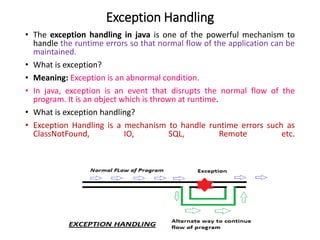
• In java, exception is an event that disrupts the normal flow of the
program. It is an object which is thrown at runtime.
• What is exception handling?
• Exception Handling is a mechanism to handle runtime errors such as
ClassNotFound, IO, SQL, Remote etc.
Types of Exception
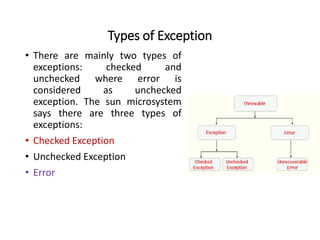
• There are mainly two types of
exceptions: checked and
unchecked where error is
considered as unchecked
exception. The sun microsystem
says there are three types of
exceptions:
• Checked Exception
• Unchecked Exception
• Error
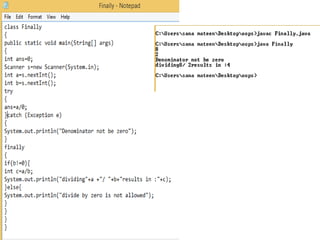
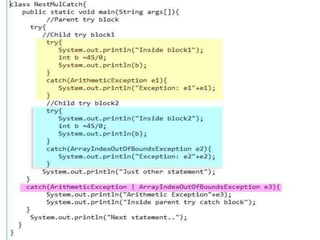
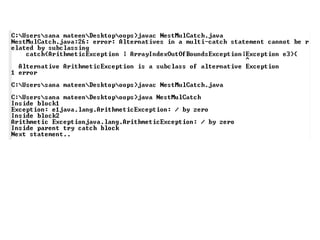
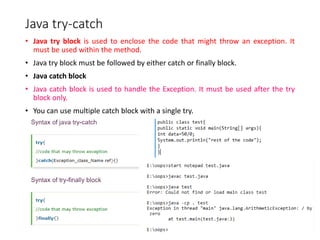
Java try-catch
• Java try block is used to enclose the code that might throw an exception. It
must be used within the method.
• Java try block must be followed by either catch or finally block.
• Java catch block
• Java catch block is used to handle the Exception. It must be used after the try
block only.
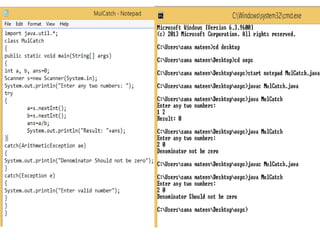
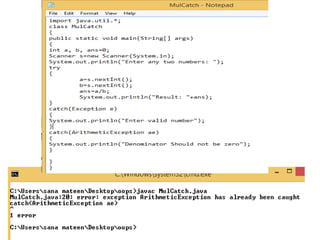
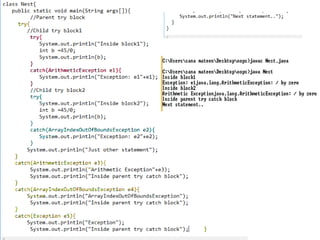
• You can use multiple catch block with a single try.
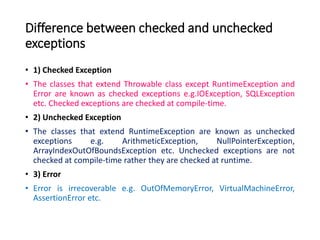
Difference between checked and unchecked
exceptions
• 1) Checked Exception
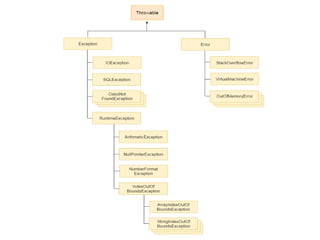
• The classes that extend Throwable class except RuntimeException and
Error are known as checked exceptions e.g.IOException, SQLException
etc. Checked exceptions are checked at compile-time.
• 2) Unchecked Exception
• The classes that extend RuntimeException are known as unchecked
exceptions e.g. ArithmeticException, NullPointerException,
ArrayIndexOutOfBoundsException etc. Unchecked exceptions are not
checked at compile-time rather they are checked at runtime.
• 3) Error
• Error is irrecoverable e.g. OutOfMemoryError, VirtualMachineError,
AssertionError etc.
• Common scenarios where exceptions may occur
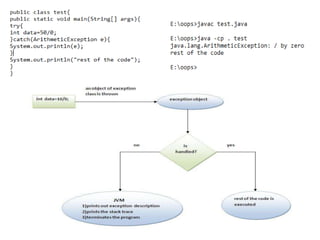
• 1) Scenario where ArithmeticException occurs
• If we divide any number by zero, there occurs an ArithmeticException.
• int a=50/0;//ArithmeticException
• 2) Scenario where NullPointerException occurs
• If we have null value in any variable, performing any operation by the variable occurs an
NullPointerException.
• String s=null;
• System.out.println(s.length());//NullPointerException
• 3) Scenario where NumberFormatException occurs
• The wrong formatting of any value, may occur NumberFormatException. Suppose I have a string
variable that have characters, converting this variable into digit will occur NumberFormatException.
• String s="abc";
• int i=Integer.parseInt(s);//NumberFormatException
• 4) Scenario where ArrayIndexOutOfBoundsException occurs
• If you are inserting any value in the wrong index, it would result ArrayIndexOutOfBoundsException as
shown below:
• int a[]=new int[5];
• a[10]=50; //ArrayIndexOutOfBoundsException
Termination or Resumptive Models
• There are two basic models in exception-handling theory.
• In termination the error is so critical there’s no way to get back to where
the exception occurred.
• The alternative is called resumption.
• It means that the exception handler is expected to do something to
rectify the situation and then the faulty method is retried, presuming
success the second time .
• If you want resumption, it means you still hope to continue execution
after the exception is handled.
throw keyword
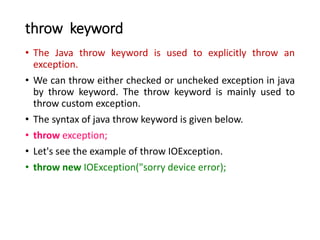
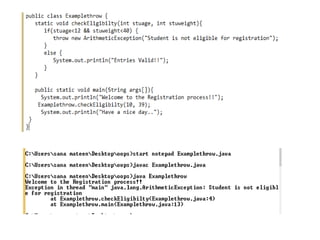
• The Java throw keyword is used to explicitly throw an
exception.
• We can throw either checked or uncheked exception in java
by throw keyword. The throw keyword is mainly used to
throw custom exception.
• The syntax of java throw keyword is given below.
• throw exception;
• Let's see the example of throw IOException.
• throw new IOException("sorry device error);
throws keyword
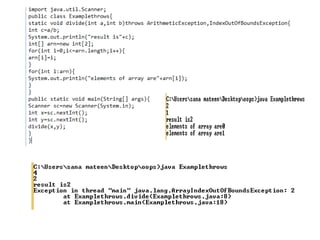
• “Throws keyword” is mainly used for handling checked
exception as using throws we can declare multiple
exceptions in one go.
• The throws keyword is used in method declaration, in order
to explicitly specify the exceptions that a particular method
might throw.
• When a method declaration has one or more exceptions
defined using throws clause then the method-call must
handle all the defined exceptions.
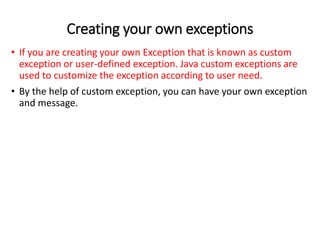
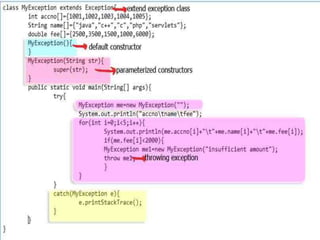
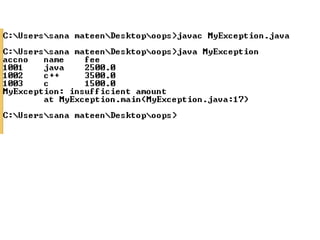
Creating your own exceptions
• If you are creating your own Exception that is known as custom
exception or user-defined exception. Java custom exceptions are
used to customize the exception according to user need.
• By the help of custom exception, you can have your own exception
and message.
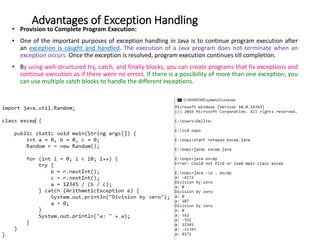
Advantages of Exception Handling
• Provision to Complete Program Execution:
• One of the important purposes of exception handling in Java is to continue program execution after
an exception is caught and handled. The execution of a Java program does not terminate when an
exception occurs. Once the exception is resolved, program execution continues till completion.
• By using well-structured try, catch, and finally blocks, you can create programs that fix exceptions and
continue execution as if there were no errors. If there is a possibility of more than one exception, you
can use multiple catch blocks to handle the different exceptions.
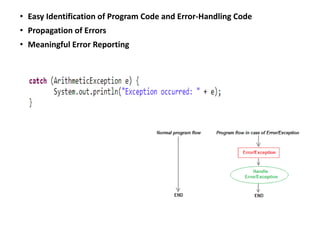
• Easy Identification of Program Code and Error-Handling Code
• Propagation of Errors
• Meaningful Error Reporting

Exceptionhandling

  • 1.
  • 2.
    Exception Handling • Theexception handling in java is one of the powerful mechanism to handle the runtime errors so that normal flow of the application can be maintained. • What is exception? • Meaning: Exception is an abnormal condition. • In java, exception is an event that disrupts the normal flow of the program. It is an object which is thrown at runtime. • What is exception handling? • Exception Handling is a mechanism to handle runtime errors such as ClassNotFound, IO, SQL, Remote etc.
  • 4.
    Types of Exception •There are mainly two types of exceptions: checked and unchecked where error is considered as unchecked exception. The sun microsystem says there are three types of exceptions: • Checked Exception • Unchecked Exception • Error
  • 5.
    Java try-catch • Javatry block is used to enclose the code that might throw an exception. It must be used within the method. • Java try block must be followed by either catch or finally block. • Java catch block • Java catch block is used to handle the Exception. It must be used after the try block only. • You can use multiple catch block with a single try.
  • 7.
    Difference between checkedand unchecked exceptions • 1) Checked Exception • The classes that extend Throwable class except RuntimeException and Error are known as checked exceptions e.g.IOException, SQLException etc. Checked exceptions are checked at compile-time. • 2) Unchecked Exception • The classes that extend RuntimeException are known as unchecked exceptions e.g. ArithmeticException, NullPointerException, ArrayIndexOutOfBoundsException etc. Unchecked exceptions are not checked at compile-time rather they are checked at runtime. • 3) Error • Error is irrecoverable e.g. OutOfMemoryError, VirtualMachineError, AssertionError etc.
  • 8.
    • Common scenarioswhere exceptions may occur • 1) Scenario where ArithmeticException occurs • If we divide any number by zero, there occurs an ArithmeticException. • int a=50/0;//ArithmeticException • 2) Scenario where NullPointerException occurs • If we have null value in any variable, performing any operation by the variable occurs an NullPointerException. • String s=null; • System.out.println(s.length());//NullPointerException • 3) Scenario where NumberFormatException occurs • The wrong formatting of any value, may occur NumberFormatException. Suppose I have a string variable that have characters, converting this variable into digit will occur NumberFormatException. • String s="abc"; • int i=Integer.parseInt(s);//NumberFormatException • 4) Scenario where ArrayIndexOutOfBoundsException occurs • If you are inserting any value in the wrong index, it would result ArrayIndexOutOfBoundsException as shown below: • int a[]=new int[5]; • a[10]=50; //ArrayIndexOutOfBoundsException
  • 9.
    Termination or ResumptiveModels • There are two basic models in exception-handling theory. • In termination the error is so critical there’s no way to get back to where the exception occurred. • The alternative is called resumption. • It means that the exception handler is expected to do something to rectify the situation and then the faulty method is retried, presuming success the second time . • If you want resumption, it means you still hope to continue execution after the exception is handled.
  • 14.
    throw keyword • TheJava throw keyword is used to explicitly throw an exception. • We can throw either checked or uncheked exception in java by throw keyword. The throw keyword is mainly used to throw custom exception. • The syntax of java throw keyword is given below. • throw exception; • Let's see the example of throw IOException. • throw new IOException("sorry device error);
  • 16.
    throws keyword • “Throwskeyword” is mainly used for handling checked exception as using throws we can declare multiple exceptions in one go. • The throws keyword is used in method declaration, in order to explicitly specify the exceptions that a particular method might throw. • When a method declaration has one or more exceptions defined using throws clause then the method-call must handle all the defined exceptions.
  • 20.
    Creating your ownexceptions • If you are creating your own Exception that is known as custom exception or user-defined exception. Java custom exceptions are used to customize the exception according to user need. • By the help of custom exception, you can have your own exception and message.
  • 23.
    Advantages of ExceptionHandling • Provision to Complete Program Execution: • One of the important purposes of exception handling in Java is to continue program execution after an exception is caught and handled. The execution of a Java program does not terminate when an exception occurs. Once the exception is resolved, program execution continues till completion. • By using well-structured try, catch, and finally blocks, you can create programs that fix exceptions and continue execution as if there were no errors. If there is a possibility of more than one exception, you can use multiple catch blocks to handle the different exceptions.
  • 24.
    • Easy Identificationof Program Code and Error-Handling Code • Propagation of Errors • Meaningful Error Reporting