

JunitOverview
Creating a test class in Junit:
• Define a subclass of TestCase
• Override the setUp() method to initialize object(s) under
test.
• Override the tearDown() method to release object(s) under
test.
• Define one or more public testXXX() methods that exercise
the object(s) under test and assert expected results.
• Define a static suite() factory method that creates a
TestSuite containing all the testXXX() methods of the
TestCase.
• Optionally define a main() method that runs the TestCase in
batch mode.
Example
public class CounterTest extends junit.framework.TestCase {
Counter counter1;
public CounterTest() { } // default constructor
protected void setUp() { // creates a (simple) test fixture
counter1 = new Counter();
}
protected void tearDown() { } // no resources to release
public void testIncrement() {
assertTrue(counter1.increment() == 1);
assertTrue(counter1.increment() == 2);
}
public void testDecrement() {
assertTrue(counter1.decrement() == -1);
}
}
Limitation : Mocking
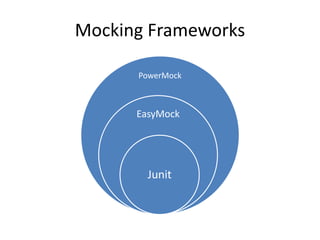
Mocking Frameworks
PowerMock
EasyMock
Junit
EasyMock
Quick Review
PowerMock
• PowerMock is a framework that
extend other mock libraries
such as EasyMock with more
powerful capabilities.
• PowerMock uses a custom
classloader and bytecode
manipulation to enable
mocking of static methods,
constructors, final classes and
methods, private methods,
removal of static initializers and
more.
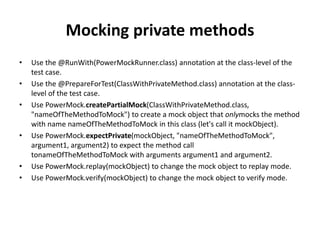
Mocking private methods
• Use the @RunWith(PowerMockRunner.class) annotation at the class-level of the
test case.
• Use the @PrepareForTest(ClassWithPrivateMethod.class) annotation at the class-
level of the test case.
• Use PowerMock.createPartialMock(ClassWithPrivateMethod.class,
"nameOfTheMethodToMock") to create a mock object that onlymocks the method
with name nameOfTheMethodToMock in this class (let's call it mockObject).
• Use PowerMock.expectPrivate(mockObject, "nameOfTheMethodToMock",
argument1, argument2) to expect the method call
tonameOfTheMethodToMock with arguments argument1 and argument2.
• Use PowerMock.replay(mockObject) to change the mock object to replay mode.
• Use PowerMock.verify(mockObject) to change the mock object to verify mode.
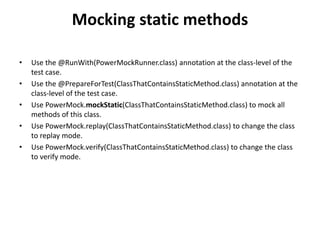
Mocking static methods
• Use the @RunWith(PowerMockRunner.class) annotation at the class-level of the
test case.
• Use the @PrepareForTest(ClassThatContainsStaticMethod.class) annotation at the
class-level of the test case.
• Use PowerMock.mockStatic(ClassThatContainsStaticMethod.class) to mock all
methods of this class.
• Use PowerMock.replay(ClassThatContainsStaticMethod.class) to change the class
to replay mode.
• Use PowerMock.verify(ClassThatContainsStaticMethod.class) to change the class
to verify mode.
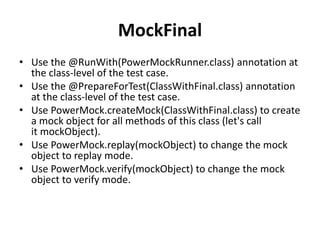
MockFinal
• Use the @RunWith(PowerMockRunner.class) annotation at
the class-level of the test case.
• Use the @PrepareForTest(ClassWithFinal.class) annotation
at the class-level of the test case.
• Use PowerMock.createMock(ClassWithFinal.class) to create
a mock object for all methods of this class (let's call
it mockObject).
• Use PowerMock.replay(mockObject) to change the mock
object to replay mode.
• Use PowerMock.verify(mockObject) to change the mock
object to verify mode.
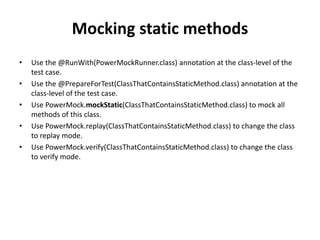
Mocking static methods
• Use the @RunWith(PowerMockRunner.class) annotation at the class-level of the
test case.
• Use the @PrepareForTest(ClassThatContainsStaticMethod.class) annotation at the
class-level of the test case.
• Use PowerMock.mockStatic(ClassThatContainsStaticMethod.class) to mock all
methods of this class.
• Use PowerMock.replay(ClassThatContainsStaticMethod.class) to change the class
to replay mode.
• Use PowerMock.verify(ClassThatContainsStaticMethod.class) to change the class
to verify mode.
For more info: m@piyushmittal.com

Power mock

  • 2.
    JunitOverview Creating a testclass in Junit: • Define a subclass of TestCase • Override the setUp() method to initialize object(s) under test. • Override the tearDown() method to release object(s) under test. • Define one or more public testXXX() methods that exercise the object(s) under test and assert expected results. • Define a static suite() factory method that creates a TestSuite containing all the testXXX() methods of the TestCase. • Optionally define a main() method that runs the TestCase in batch mode.
  • 3.
    Example public class CounterTestextends junit.framework.TestCase { Counter counter1; public CounterTest() { } // default constructor protected void setUp() { // creates a (simple) test fixture counter1 = new Counter(); } protected void tearDown() { } // no resources to release public void testIncrement() { assertTrue(counter1.increment() == 1); assertTrue(counter1.increment() == 2); } public void testDecrement() { assertTrue(counter1.decrement() == -1); } }
  • 4.
  • 5.
  • 6.
  • 7.
    PowerMock • PowerMock isa framework that extend other mock libraries such as EasyMock with more powerful capabilities. • PowerMock uses a custom classloader and bytecode manipulation to enable mocking of static methods, constructors, final classes and methods, private methods, removal of static initializers and more.
  • 8.
    Mocking private methods •Use the @RunWith(PowerMockRunner.class) annotation at the class-level of the test case. • Use the @PrepareForTest(ClassWithPrivateMethod.class) annotation at the class- level of the test case. • Use PowerMock.createPartialMock(ClassWithPrivateMethod.class, "nameOfTheMethodToMock") to create a mock object that onlymocks the method with name nameOfTheMethodToMock in this class (let's call it mockObject). • Use PowerMock.expectPrivate(mockObject, "nameOfTheMethodToMock", argument1, argument2) to expect the method call tonameOfTheMethodToMock with arguments argument1 and argument2. • Use PowerMock.replay(mockObject) to change the mock object to replay mode. • Use PowerMock.verify(mockObject) to change the mock object to verify mode.
  • 9.
    Mocking static methods •Use the @RunWith(PowerMockRunner.class) annotation at the class-level of the test case. • Use the @PrepareForTest(ClassThatContainsStaticMethod.class) annotation at the class-level of the test case. • Use PowerMock.mockStatic(ClassThatContainsStaticMethod.class) to mock all methods of this class. • Use PowerMock.replay(ClassThatContainsStaticMethod.class) to change the class to replay mode. • Use PowerMock.verify(ClassThatContainsStaticMethod.class) to change the class to verify mode.
  • 10.
    MockFinal • Use the@RunWith(PowerMockRunner.class) annotation at the class-level of the test case. • Use the @PrepareForTest(ClassWithFinal.class) annotation at the class-level of the test case. • Use PowerMock.createMock(ClassWithFinal.class) to create a mock object for all methods of this class (let's call it mockObject). • Use PowerMock.replay(mockObject) to change the mock object to replay mode. • Use PowerMock.verify(mockObject) to change the mock object to verify mode.
  • 11.
    Mocking static methods •Use the @RunWith(PowerMockRunner.class) annotation at the class-level of the test case. • Use the @PrepareForTest(ClassThatContainsStaticMethod.class) annotation at the class-level of the test case. • Use PowerMock.mockStatic(ClassThatContainsStaticMethod.class) to mock all methods of this class. • Use PowerMock.replay(ClassThatContainsStaticMethod.class) to change the class to replay mode. • Use PowerMock.verify(ClassThatContainsStaticMethod.class) to change the class to verify mode.
  • 12.
    For more info:m@piyushmittal.com