Implementing the XPage Extension Library Paul T. Calhoun Director of Worldwide Enablement GBS
Obligatory Introduction Slide Paul T. Calhoun Director of Worldwide Enablement GBS Have attained Notes/Domino 6, 7, and 8 PCLI and PCLP certification Currently build Domino, Web, Java, XML, and XPage applications for customers using Domino  Co-author of the IBM Redbook  “XML Powered by Domino,” and have developed several online XML, Java, and XPages programming courses Have written articles for both  “THE VIEW” and “The Sphere” technical publications
What we are going to talk about Installing the Extension Library Configuring DDE to test Extension Library Pages Developing XPages with the Extension Library Deploying Extension Library Apps to the Domino Server Wrap up
Why use the Extension Library The benefits of the Extension Library include… Easier access to “standard” Dojo controls Validation Control Number Spinner Slider Etc.. Easier implementation of OneUI v2 layout
Before you get started… Starting your XPage adventure with the Extension Library is neither a good idea OR a best practice Before implementing and adding Extension Library functionality to you applications, make sure that… You are WELL grounded in CORE XPage development skills which includes Notes and Domino data architecture XPage development and execution CSS and Themes JavaScript – Both Client Side and Server Side XML HTML
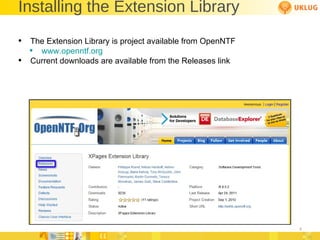
Installing the Extension Library The Extension Library is project available from OpenNTF www.openntf.org Current downloads are available from the Releases link
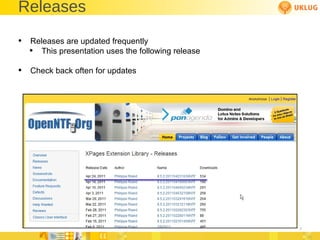
Releases Releases are updated frequently This presentation uses the following release Check back often for updates
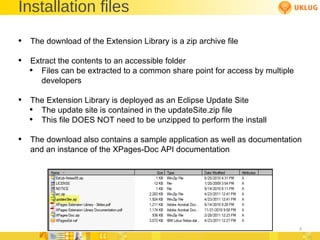
Installation files The download of the Extension Library is a zip archive file Extract the contents to an accessible folder Files can be extracted to a common share point for access by multiple developers The Extension Library is deployed as an Eclipse Update Site The update site is contained in the updateSite.zip file This file DOES NOT need to be unzipped to perform the install The download also contains a sample application as well as documentation and an instance of the XPages-Doc API documentation
Installing the Plug-in in DDE The Extension Library is an Eclipse plug-in that is installed into Domino Designer on Eclipse (DDE) Pre-requisites  The supported Version of DDE and Domino are 8.5.2 Both the DDE and target Domino Servers must be running version 8.5.2 Fixpak 1 and 2 are not required but generally a good idea
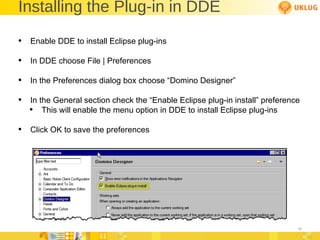
Installing the Plug-in in DDE Enable DDE to install Eclipse plug-ins In DDE choose File | Preferences In the Preferences dialog box choose “Domino Designer” In the General section check the “Enable Eclipse plug-in install” preference This will enable the menu option in DDE to install Eclipse plug-ins Click OK to save the preferences
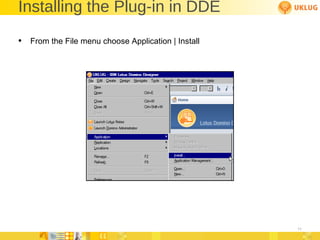
Installing the Plug-in in DDE From the File menu choose Application | Install
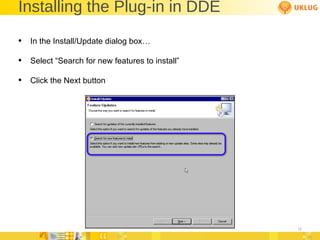
Installing the Plug-in in DDE In the Install/Update dialog box… Select “Search for new features to install” Click the Next button
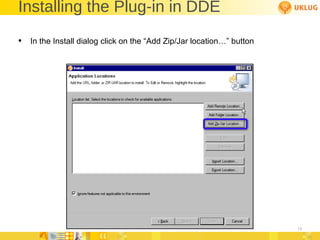
Installing the Plug-in in DDE In the Install dialog click on the “Add Zip/Jar location…” button
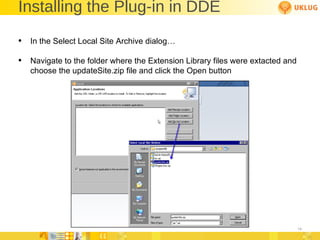
Installing the Plug-in in DDE In the Select Local Site Archive dialog… Navigate to the folder where the Extension Library files were extacted and choose the updateSite.zip file and click the Open button
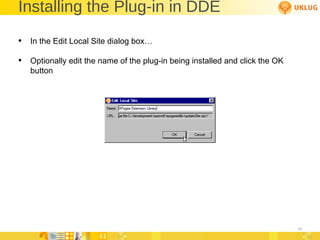
Installing the Plug-in in DDE In the Edit Local Site dialog box… Optionally edit the name of the plug-in being installed and click the OK button
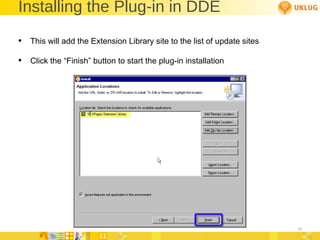
Installing the Plug-in in DDE This will add the Extension Library site to the list of update sites Click the “Finish” button to start the plug-in installation
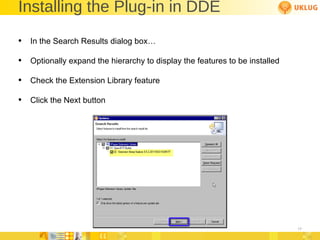
Installing the Plug-in in DDE In the Search Results dialog box… Optionally expand the hierarchy to display the features to be installed Check the Extension Library feature Click the Next button
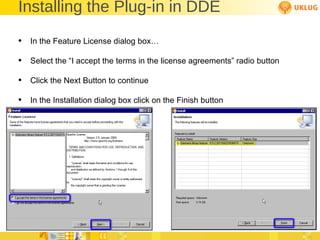
Installing the Plug-in in DDE In the Feature License dialog box… Select the “I accept the terms in the license agreements” radio button Click the Next Button to continue In the Installation dialog box click on the Finish button
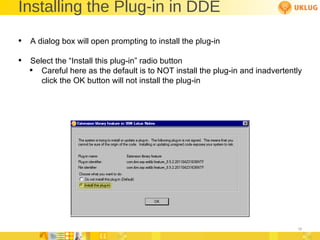
Installing the Plug-in in DDE A dialog box will open prompting to install the plug-in Select the “Install this plug-in” radio button Careful here as the default is to NOT install the plug-in and inadvertently click the OK button will not install the plug-in
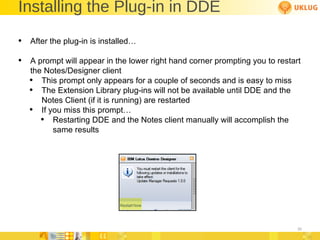
Installing the Plug-in in DDE After the plug-in is installed… A prompt will appear in the lower right hand corner prompting you to restart the Notes/Designer client This prompt only appears for a couple of seconds and is easy to miss The Extension Library plug-ins will not be available until DDE and the Notes Client (if it is running) are restarted If you miss this prompt… Restarting DDE and the Notes client manually will accomplish the same results
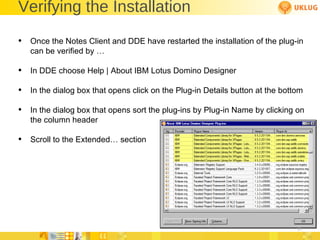
Verifying the Installation Once the Notes Client and DDE have restarted the installation of the plug-in can be verified by … In DDE choose Help | About IBM Lotus Domino Designer In the dialog box that opens click on the Plug-in Details button at the bottom In the dialog box that opens sort the plug-ins by Plug-in Name by clicking on the column header Scroll to the Extended… section
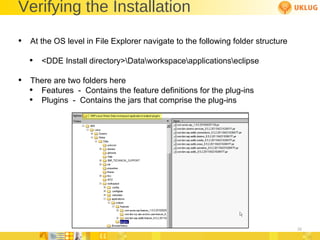
Verifying the Installation At the OS level in File Explorer navigate to the following folder structure <DDE Install directory>\Data\workspace\applications\eclipse There are two folders here Features  -  Contains the feature definitions for the plug-ins Plugins  -  Contains the jars that comprise the plug-ins
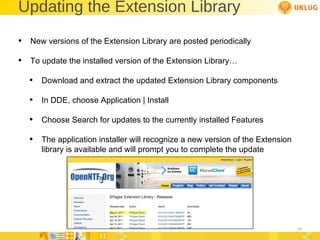
Updating the Extension Library New versions of the Extension Library are posted periodically To update the installed version of the Extension Library… Download and extract the updated Extension Library components In DDE, choose Application | Install Choose Search for updates to the currently installed Features The application installer will recognize a new version of the Extension library is available and will prompt you to complete the update
What we are going to talk about Installing the Extension Library Configuring DDE to test Extension Library Pages Developing XPages with the Extension Library Deploying Extension Library Apps to the Domino Server Wrap up
What you can do post installation After installing the plug-in you can create and test applications that use the Extension Library But ONLY from XPiNC (XPages in the Notes Client) Applications that use the Extension Library can not be previewed using DDE’s local web preview until the plug-ins have been “deployed” To deploy the plug-ins they must be either… Manually copied from the plug-ins folder to the proper folder The contents of the updateSite.zip file must be extracted to the proper folder
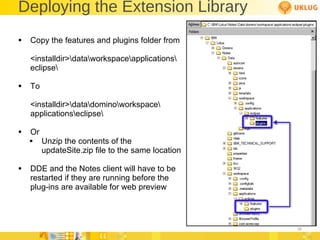
Deploying the Extension Library Copy the features and plugins folder from <installdir>\data\workspace\applications\ eclipse\ To <installdir>\data\domino\workspace\ applications\eclipse\ Or Unzip the contents of the updateSite.zip file to the same location DDE and the Notes client will have to be  restarted if they are running before the  plug-ins are available for web preview
Deploying to the Domino Server The previous procedure is currently the same procedure used to deploy the Extension Library to the Domino Server Note that if the HTTP task is running it will have to be stopped in order to copy the jars  This is not required on the first deployment but IS required on any subsequent deployments as the HTTP task will have any referenced jar files locked Telling HTTP restart will NOT accomplish the re-loading of the jar files The tell http quit and the load http server command lines must be used There is also a modified update site template available from OpenNTF that will deploy the extension library to the Domino Server without having to copy the jar files This is the best option for deploying the extension library in production
Testing the Extension Library The easiest way to test the Extension Library deployment both in DDE and on the Domino Server is to load sample XPages from the included sample file Copy the XPages Extension Library Demo (XPagesExt.nsf) to the local DDE data directory Sign the application Build the application (not really necessary but not a bad idea) Edit the ACL to include you developer id Create a new replica on the Domino test server
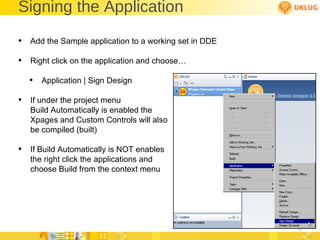
Signing the Application Add the Sample application to a working set in DDE Right click on the application and choose… Application | Sign Design If under the project menu  Build Automatically is enabled the  Xpages and Custom Controls will also be compiled (built) If Build Automatically is NOT enables the right click the applications and choose Build from the context menu
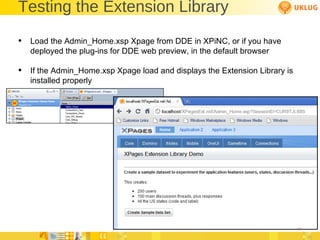
Testing the Extension Library  Load the Admin_Home.xsp Xpage from DDE in XPiNC, or if you have deployed the plug-ins for DDE web preview, in the default browser If the Admin_Home.xsp Xpage load and displays the Extension Library is installed properly
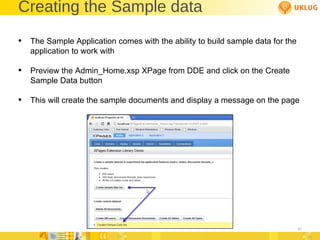
Creating the Sample data The Sample Application comes with the ability to build sample data for the application to work with Preview the Admin_Home.xsp XPage from DDE and click on the Create Sample Data button This will create the sample documents and display a message on the page
What we are going to talk about Installing the Extension Library Configuring DDE to test Extension Library Pages Developing XPages with the Extension Library Deploying Extension Library Apps to the Domino Server Wrap up
Application Properties The Application Properties of new or existing applications that will use components from the Extension Library should be set to reference the Extension Library libraries In the application navigator in DDE choose Application Properties On the Advanced Tab in Application Properties check the libraries that will be used in the XPage Libraries section
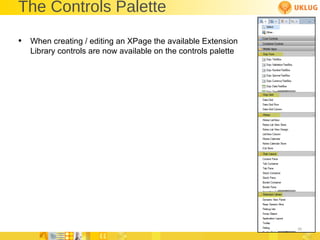
Extension Library Controls The Extension Library adds additional controls to the control palette available when creating/editing XPages  Not all of the controls are listed in the control palette by default Enable the listing of controls in the control palette by choosing File | Preferences – Domino Desginer | Palette
The Controls Palette When creating / editing an XPage the available Extension Library controls are now available on the controls palette
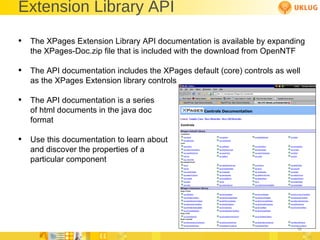
Extension Library API The XPages Extension Library API documentation is available by expanding the XPages-Doc.zip file that is included with the download from OpenNTF The API documentation includes the XPages default (core) controls as well as the XPages Extension library controls The API documentation is a series of html documents in the java doc format Use this documentation to learn about  and discover the properties of a  particular component
One UI version 2 The Extension Library does not REQUIRE the use of the One UI Layout, but developers should at least investigate the benefits of using it See the Developerworks articles on the implementation of the OneUI layout controls http://www-10.lotus.com/ldd/ddwiki.nsf/dx/Demo_XPages_Extension_Library-Application_Layout__Page_Navigator_Controls
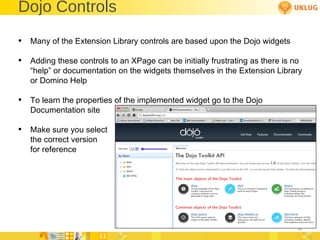
Dojo Controls Many of the Extension Library controls are based upon the Dojo widgets Adding these controls to an XPage can be initially frustrating as there is no “help” or documentation on the widgets themselves in the Extension Library or Domino Help To learn the properties of the implemented widget go to the Dojo Documentation site Make sure you select the correct version for reference
A Practical Example A Practical Example of an application using the Extension Library
What we are going to talk about Installing the Extension Library Configuring DDE to test Extension Library Pages Developing XPages with the Extension Library Deploying Extension Library Apps to the Domino Server Wrap up
The Biggest Obstacle Unfortunately the biggest obstacle to deploying extension library applications to the Domino Server is NOT a technology issue, but a human one I HIGHLY recommend that you find out what the policy in you company is for deploying code to the servers The Extension Library is comprised of a set of .jar files that must be deployed the Domino Server If the EA’s *  will not let you deploy the Extension Library jars to the server then developing code with the Extension Library is just an exercise in what could be  There is a template on OpenNTF (New Update Site) that makes this process a little more palatable *Evil Admins (You know, like Paul Mooney)
Domino Server Configuration Applications built on top of the extension library will only execute on a Domino Server where the Extension Library has been deployed This may seem like a no brainer, but after testing “locally” this step is OFTEN looked over The Domino Server security has to be configured for executing XPages  Again, this may seem like a no brainer, but if this hadn’t been the resolution over a dozen times to the “My Extension Library Applications don’t work” problem, I wouldn’t be sharing it with you
What we are going to talk about Installing the Extension Library Configuring DDE to test Extension Library Pages Developing XPages with the Extension Library Deploying Extension Library Apps to the Domino Server Wrap Up
References OpenNTF – www.openntf.org Developerworks – www.ibm.com/developerworks Dojo – dojotoolkit.org/api ANNOUNCEMENT:  New Book in the works on the Extension Library Paul Withers Jeremy Hodge Paul Hannon Declan Lynch Tim Tripcony Various Other XPage Experts contributing
XPage Design Resources XPage Wiki www.lotus.com/ldd/ddwiki.nsf Domino 8.5 Discussion Forum www.lotus.com/ldd/nd85forum.nsf?OpenDatabase IBM developerWorks – All Things IBM www.ibm.com/developerworks www.ibm.com/developerworks/lotus www.ibm.com/developerworks/lotus/documentation/domino www.ibm.com/developerworks/java www.ibm.com/developerworks/xml 2
XPage Design Resources (cont.) Bleedyellow Forum www.bleedyellow.com/communities/service/html/communityview?communityUuid=120fc506-ca30-426d-a149-ee6f21916ca7 Extensibility API Documentation www.lotus.com/ldd/ddwiki.nsf/dx/Master_Table_of_Contents_for_XPages_Extensibility_APIs_Developer_Guide Extensibility API JavaDocs http://public.dhe.ibm.com/software/dw/lotus/Domino-Designer/JavaDocs/XPagesExtAPI/8.5.2/index.html 3
XPage Design Resources (cont.) OpenNTF – Open Source Applications, Utilities, Samples, etc. Extensibility library Mobile tools Dozens more www.openntf.org XPages Info - UPDATE http://xpages.info/XPagesHome.nsf/Home.xsp XPages Blog http://xpagesblog.com OneUI Framework Layout Documentation www.lotus.com/ldd/doc/oneuidoc/docpublic/components/framework.htm?spriteson=false XPages Wiki – Independent  http://xpageswiki.com 4
XPage Design Resources (cont.) XPages Object Map www.lotus.com/ldd/ddwiki.nsf/dx/XPages_Domino_Object_map_8.5.1 XPage Knowledge Collection www.ibm.com/support/docview.wss?rs=899&uid=swg27014929 UPDATE: XPages Tips iPhone Application On Xpagesblog.com now 5
Resources — Client Code W3Schools.com – Good for Things Web www.w3schools.com  Dojo Toolkit – JavaScript Client Library http://dojotoolkit.org SitePen Blog – Great Dojo Tips and Tutorials www.sitepen.com/blog jQuery – JavaScript Client Library http://jquery.com Blueprint CSS – CSS Framework/Great for column positioning http://blueprintcss.org Elastic CSS – CSS Framework http://elasticss.com 6
Resources — Client Code (cont.) Douglas Crockford – JavaScript Guru www.crockford.com www.crockford.com/javascript JSON – JavaScript Object Notation/Official Site www.json.org www.json.org/js.html JS Lint – JavaScript Code Validator www.jslint.com Mozilla Developers Guide https://developer.mozilla.org/en/JavaScript/Guide 7 7
Resources — Client Code (cont.) Firebug is an extension/plug-in for the Firefox browser The Firefox browser can be downloaded at the following URL: www.mozilla.com/en-US/firefox/personal.html Once the Firefox browser is installed, go to the following URL to add extensions and plug-ins: https://addons.mozilla.org/en-US/firefox Head First Series Books Head First HTML with CSS and XHTML Head First JavaScript Head First AJAX http://headfirstlabs.com 8 8
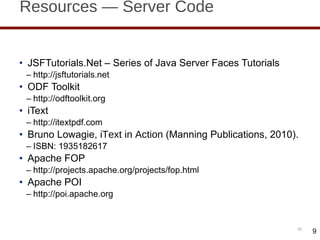
Resources — Server Code JSFTutorials.Net – Series of Java Server Faces Tutorials http://jsftutorials.net ODF Toolkit http://odftoolkit.org iText http://itextpdf.com Bruno Lowagie,  iText in Action  (Manning Publications, 2010). ISBN: 1935182617 Apache FOP http://projects.apache.org/projects/fop.html Apache POI http://poi.apache.org 9
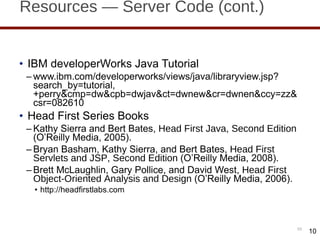
Resources — Server Code (cont.) IBM developerWorks Java Tutorial www.ibm.com/developerworks/views/java/libraryview.jsp?search_by=tutorial,+perry&cmp=dw&cpb=dwjav&ct=dwnew&cr=dwnen&ccy=zz&csr=082610 Head First Series Books Kathy Sierra and Bert Bates,  Head First Java, Second Edition  (O ’Reilly Media, 2005). Bryan Basham, Kathy Sierra, and Bert Bates,  Head First Servlets and JSP, Second Edition  (O ’Reilly Media, 2008). Brett McLaughlin, Gary Pollice, and David West,  Head First Object-Oriented Analysis and Design  (O ’Reilly Media, 2006). http://headfirstlabs.com 10
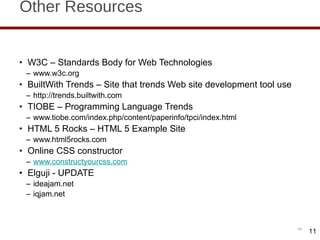
Other Resources W3C – Standards Body for Web Technologies www.w3c.org BuiltWith Trends – Site that trends Web site development tool use http://trends.builtwith.com TIOBE – Programming Language Trends www.tiobe.com/index.php/content/paperinfo/tpci/index.html HTML 5 Rocks – HTML 5 Example Site www.html5rocks.com Online CSS constructor www.constructyourcss.com Elguji - UPDATE ideajam.net iqjam.net 11
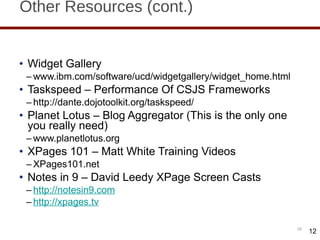
Other Resources (cont.) Widget Gallery www.ibm.com/software/ucd/widgetgallery/widget_home.html Taskspeed – Performance Of CSJS Frameworks http://dante.dojotoolkit.org/taskspeed/ Planet Lotus – Blog Aggregator (This is the only one you really need) www.planetlotus.org XPages 101 – Matt White Training Videos XPages101.net Notes in 9 – David Leedy XPage Screen Casts http://notesin9.com http://xpages.tv 12
Other Resources (cont.) Tip of the Iceburg – Tim Tripcony www.timtripcony.com Paul Withers http://hermes.intec.co.uk/intec/blog.nsf Mark Hughes http://dominoextnd.blogspot.com/ Kuler – Color Scheme Site http://kuler.adobe.com/#themes/rating?time=30 Color Scheme Generator www.perbang.dk/color+scheme Single Landing Page for all IBM Documentation www.ibm.com/developerworks/lotus/documentation 13
Other Resources (cont.) TLCC – The Learning Continuum Company Domino Designer 8.5.1 Free TLCC course on using DDE www.tlcc.com/admin/courses.nsf/lookupcoursecode/DD85INTR?opendocument&viewname=R85Cur Notes Client Based Training  Java (Intro and Advanced) XML, Web Services XPages (Intro and Advanced) JavaScript www.tlcc.com  14
Questions and Answers  Paul T. Calhoun Director or Worldwide Enablement [email_address]

Implementing xpages extension library

  • 1.
    Implementing the XPageExtension Library Paul T. Calhoun Director of Worldwide Enablement GBS
  • 2.
    Obligatory Introduction SlidePaul T. Calhoun Director of Worldwide Enablement GBS Have attained Notes/Domino 6, 7, and 8 PCLI and PCLP certification Currently build Domino, Web, Java, XML, and XPage applications for customers using Domino Co-author of the IBM Redbook “XML Powered by Domino,” and have developed several online XML, Java, and XPages programming courses Have written articles for both “THE VIEW” and “The Sphere” technical publications
  • 3.
    What we aregoing to talk about Installing the Extension Library Configuring DDE to test Extension Library Pages Developing XPages with the Extension Library Deploying Extension Library Apps to the Domino Server Wrap up
  • 4.
    Why use theExtension Library The benefits of the Extension Library include… Easier access to “standard” Dojo controls Validation Control Number Spinner Slider Etc.. Easier implementation of OneUI v2 layout
  • 5.
    Before you getstarted… Starting your XPage adventure with the Extension Library is neither a good idea OR a best practice Before implementing and adding Extension Library functionality to you applications, make sure that… You are WELL grounded in CORE XPage development skills which includes Notes and Domino data architecture XPage development and execution CSS and Themes JavaScript – Both Client Side and Server Side XML HTML
  • 6.
    Installing the ExtensionLibrary The Extension Library is project available from OpenNTF www.openntf.org Current downloads are available from the Releases link
  • 7.
    Releases Releases areupdated frequently This presentation uses the following release Check back often for updates
  • 8.
    Installation files Thedownload of the Extension Library is a zip archive file Extract the contents to an accessible folder Files can be extracted to a common share point for access by multiple developers The Extension Library is deployed as an Eclipse Update Site The update site is contained in the updateSite.zip file This file DOES NOT need to be unzipped to perform the install The download also contains a sample application as well as documentation and an instance of the XPages-Doc API documentation
  • 9.
    Installing the Plug-inin DDE The Extension Library is an Eclipse plug-in that is installed into Domino Designer on Eclipse (DDE) Pre-requisites The supported Version of DDE and Domino are 8.5.2 Both the DDE and target Domino Servers must be running version 8.5.2 Fixpak 1 and 2 are not required but generally a good idea
  • 10.
    Installing the Plug-inin DDE Enable DDE to install Eclipse plug-ins In DDE choose File | Preferences In the Preferences dialog box choose “Domino Designer” In the General section check the “Enable Eclipse plug-in install” preference This will enable the menu option in DDE to install Eclipse plug-ins Click OK to save the preferences
  • 11.
    Installing the Plug-inin DDE From the File menu choose Application | Install
  • 12.
    Installing the Plug-inin DDE In the Install/Update dialog box… Select “Search for new features to install” Click the Next button
  • 13.
    Installing the Plug-inin DDE In the Install dialog click on the “Add Zip/Jar location…” button
  • 14.
    Installing the Plug-inin DDE In the Select Local Site Archive dialog… Navigate to the folder where the Extension Library files were extacted and choose the updateSite.zip file and click the Open button
  • 15.
    Installing the Plug-inin DDE In the Edit Local Site dialog box… Optionally edit the name of the plug-in being installed and click the OK button
  • 16.
    Installing the Plug-inin DDE This will add the Extension Library site to the list of update sites Click the “Finish” button to start the plug-in installation
  • 17.
    Installing the Plug-inin DDE In the Search Results dialog box… Optionally expand the hierarchy to display the features to be installed Check the Extension Library feature Click the Next button
  • 18.
    Installing the Plug-inin DDE In the Feature License dialog box… Select the “I accept the terms in the license agreements” radio button Click the Next Button to continue In the Installation dialog box click on the Finish button
  • 19.
    Installing the Plug-inin DDE A dialog box will open prompting to install the plug-in Select the “Install this plug-in” radio button Careful here as the default is to NOT install the plug-in and inadvertently click the OK button will not install the plug-in
  • 20.
    Installing the Plug-inin DDE After the plug-in is installed… A prompt will appear in the lower right hand corner prompting you to restart the Notes/Designer client This prompt only appears for a couple of seconds and is easy to miss The Extension Library plug-ins will not be available until DDE and the Notes Client (if it is running) are restarted If you miss this prompt… Restarting DDE and the Notes client manually will accomplish the same results
  • 21.
    Verifying the InstallationOnce the Notes Client and DDE have restarted the installation of the plug-in can be verified by … In DDE choose Help | About IBM Lotus Domino Designer In the dialog box that opens click on the Plug-in Details button at the bottom In the dialog box that opens sort the plug-ins by Plug-in Name by clicking on the column header Scroll to the Extended… section
  • 22.
    Verifying the InstallationAt the OS level in File Explorer navigate to the following folder structure <DDE Install directory>\Data\workspace\applications\eclipse There are two folders here Features - Contains the feature definitions for the plug-ins Plugins - Contains the jars that comprise the plug-ins
  • 23.
    Updating the ExtensionLibrary New versions of the Extension Library are posted periodically To update the installed version of the Extension Library… Download and extract the updated Extension Library components In DDE, choose Application | Install Choose Search for updates to the currently installed Features The application installer will recognize a new version of the Extension library is available and will prompt you to complete the update
  • 24.
    What we aregoing to talk about Installing the Extension Library Configuring DDE to test Extension Library Pages Developing XPages with the Extension Library Deploying Extension Library Apps to the Domino Server Wrap up
  • 25.
    What you cando post installation After installing the plug-in you can create and test applications that use the Extension Library But ONLY from XPiNC (XPages in the Notes Client) Applications that use the Extension Library can not be previewed using DDE’s local web preview until the plug-ins have been “deployed” To deploy the plug-ins they must be either… Manually copied from the plug-ins folder to the proper folder The contents of the updateSite.zip file must be extracted to the proper folder
  • 26.
    Deploying the ExtensionLibrary Copy the features and plugins folder from <installdir>\data\workspace\applications\ eclipse\ To <installdir>\data\domino\workspace\ applications\eclipse\ Or Unzip the contents of the updateSite.zip file to the same location DDE and the Notes client will have to be restarted if they are running before the plug-ins are available for web preview
  • 27.
    Deploying to theDomino Server The previous procedure is currently the same procedure used to deploy the Extension Library to the Domino Server Note that if the HTTP task is running it will have to be stopped in order to copy the jars This is not required on the first deployment but IS required on any subsequent deployments as the HTTP task will have any referenced jar files locked Telling HTTP restart will NOT accomplish the re-loading of the jar files The tell http quit and the load http server command lines must be used There is also a modified update site template available from OpenNTF that will deploy the extension library to the Domino Server without having to copy the jar files This is the best option for deploying the extension library in production
  • 28.
    Testing the ExtensionLibrary The easiest way to test the Extension Library deployment both in DDE and on the Domino Server is to load sample XPages from the included sample file Copy the XPages Extension Library Demo (XPagesExt.nsf) to the local DDE data directory Sign the application Build the application (not really necessary but not a bad idea) Edit the ACL to include you developer id Create a new replica on the Domino test server
  • 29.
    Signing the ApplicationAdd the Sample application to a working set in DDE Right click on the application and choose… Application | Sign Design If under the project menu Build Automatically is enabled the Xpages and Custom Controls will also be compiled (built) If Build Automatically is NOT enables the right click the applications and choose Build from the context menu
  • 30.
    Testing the ExtensionLibrary Load the Admin_Home.xsp Xpage from DDE in XPiNC, or if you have deployed the plug-ins for DDE web preview, in the default browser If the Admin_Home.xsp Xpage load and displays the Extension Library is installed properly
  • 31.
    Creating the Sampledata The Sample Application comes with the ability to build sample data for the application to work with Preview the Admin_Home.xsp XPage from DDE and click on the Create Sample Data button This will create the sample documents and display a message on the page
  • 32.
    What we aregoing to talk about Installing the Extension Library Configuring DDE to test Extension Library Pages Developing XPages with the Extension Library Deploying Extension Library Apps to the Domino Server Wrap up
  • 33.
    Application Properties TheApplication Properties of new or existing applications that will use components from the Extension Library should be set to reference the Extension Library libraries In the application navigator in DDE choose Application Properties On the Advanced Tab in Application Properties check the libraries that will be used in the XPage Libraries section
  • 34.
    Extension Library ControlsThe Extension Library adds additional controls to the control palette available when creating/editing XPages Not all of the controls are listed in the control palette by default Enable the listing of controls in the control palette by choosing File | Preferences – Domino Desginer | Palette
  • 35.
    The Controls PaletteWhen creating / editing an XPage the available Extension Library controls are now available on the controls palette
  • 36.
    Extension Library APIThe XPages Extension Library API documentation is available by expanding the XPages-Doc.zip file that is included with the download from OpenNTF The API documentation includes the XPages default (core) controls as well as the XPages Extension library controls The API documentation is a series of html documents in the java doc format Use this documentation to learn about and discover the properties of a particular component
  • 37.
    One UI version2 The Extension Library does not REQUIRE the use of the One UI Layout, but developers should at least investigate the benefits of using it See the Developerworks articles on the implementation of the OneUI layout controls http://www-10.lotus.com/ldd/ddwiki.nsf/dx/Demo_XPages_Extension_Library-Application_Layout__Page_Navigator_Controls
  • 38.
    Dojo Controls Manyof the Extension Library controls are based upon the Dojo widgets Adding these controls to an XPage can be initially frustrating as there is no “help” or documentation on the widgets themselves in the Extension Library or Domino Help To learn the properties of the implemented widget go to the Dojo Documentation site Make sure you select the correct version for reference
  • 39.
    A Practical ExampleA Practical Example of an application using the Extension Library
  • 40.
    What we aregoing to talk about Installing the Extension Library Configuring DDE to test Extension Library Pages Developing XPages with the Extension Library Deploying Extension Library Apps to the Domino Server Wrap up
  • 41.
    The Biggest ObstacleUnfortunately the biggest obstacle to deploying extension library applications to the Domino Server is NOT a technology issue, but a human one I HIGHLY recommend that you find out what the policy in you company is for deploying code to the servers The Extension Library is comprised of a set of .jar files that must be deployed the Domino Server If the EA’s * will not let you deploy the Extension Library jars to the server then developing code with the Extension Library is just an exercise in what could be There is a template on OpenNTF (New Update Site) that makes this process a little more palatable *Evil Admins (You know, like Paul Mooney)
  • 42.
    Domino Server ConfigurationApplications built on top of the extension library will only execute on a Domino Server where the Extension Library has been deployed This may seem like a no brainer, but after testing “locally” this step is OFTEN looked over The Domino Server security has to be configured for executing XPages Again, this may seem like a no brainer, but if this hadn’t been the resolution over a dozen times to the “My Extension Library Applications don’t work” problem, I wouldn’t be sharing it with you
  • 43.
    What we aregoing to talk about Installing the Extension Library Configuring DDE to test Extension Library Pages Developing XPages with the Extension Library Deploying Extension Library Apps to the Domino Server Wrap Up
  • 44.
    References OpenNTF –www.openntf.org Developerworks – www.ibm.com/developerworks Dojo – dojotoolkit.org/api ANNOUNCEMENT: New Book in the works on the Extension Library Paul Withers Jeremy Hodge Paul Hannon Declan Lynch Tim Tripcony Various Other XPage Experts contributing
  • 45.
    XPage Design ResourcesXPage Wiki www.lotus.com/ldd/ddwiki.nsf Domino 8.5 Discussion Forum www.lotus.com/ldd/nd85forum.nsf?OpenDatabase IBM developerWorks – All Things IBM www.ibm.com/developerworks www.ibm.com/developerworks/lotus www.ibm.com/developerworks/lotus/documentation/domino www.ibm.com/developerworks/java www.ibm.com/developerworks/xml 2
  • 46.
    XPage Design Resources(cont.) Bleedyellow Forum www.bleedyellow.com/communities/service/html/communityview?communityUuid=120fc506-ca30-426d-a149-ee6f21916ca7 Extensibility API Documentation www.lotus.com/ldd/ddwiki.nsf/dx/Master_Table_of_Contents_for_XPages_Extensibility_APIs_Developer_Guide Extensibility API JavaDocs http://public.dhe.ibm.com/software/dw/lotus/Domino-Designer/JavaDocs/XPagesExtAPI/8.5.2/index.html 3
  • 47.
    XPage Design Resources(cont.) OpenNTF – Open Source Applications, Utilities, Samples, etc. Extensibility library Mobile tools Dozens more www.openntf.org XPages Info - UPDATE http://xpages.info/XPagesHome.nsf/Home.xsp XPages Blog http://xpagesblog.com OneUI Framework Layout Documentation www.lotus.com/ldd/doc/oneuidoc/docpublic/components/framework.htm?spriteson=false XPages Wiki – Independent http://xpageswiki.com 4
  • 48.
    XPage Design Resources(cont.) XPages Object Map www.lotus.com/ldd/ddwiki.nsf/dx/XPages_Domino_Object_map_8.5.1 XPage Knowledge Collection www.ibm.com/support/docview.wss?rs=899&uid=swg27014929 UPDATE: XPages Tips iPhone Application On Xpagesblog.com now 5
  • 49.
    Resources — ClientCode W3Schools.com – Good for Things Web www.w3schools.com Dojo Toolkit – JavaScript Client Library http://dojotoolkit.org SitePen Blog – Great Dojo Tips and Tutorials www.sitepen.com/blog jQuery – JavaScript Client Library http://jquery.com Blueprint CSS – CSS Framework/Great for column positioning http://blueprintcss.org Elastic CSS – CSS Framework http://elasticss.com 6
  • 50.
    Resources — ClientCode (cont.) Douglas Crockford – JavaScript Guru www.crockford.com www.crockford.com/javascript JSON – JavaScript Object Notation/Official Site www.json.org www.json.org/js.html JS Lint – JavaScript Code Validator www.jslint.com Mozilla Developers Guide https://developer.mozilla.org/en/JavaScript/Guide 7 7
  • 51.
    Resources — ClientCode (cont.) Firebug is an extension/plug-in for the Firefox browser The Firefox browser can be downloaded at the following URL: www.mozilla.com/en-US/firefox/personal.html Once the Firefox browser is installed, go to the following URL to add extensions and plug-ins: https://addons.mozilla.org/en-US/firefox Head First Series Books Head First HTML with CSS and XHTML Head First JavaScript Head First AJAX http://headfirstlabs.com 8 8
  • 52.
    Resources — ServerCode JSFTutorials.Net – Series of Java Server Faces Tutorials http://jsftutorials.net ODF Toolkit http://odftoolkit.org iText http://itextpdf.com Bruno Lowagie, iText in Action (Manning Publications, 2010). ISBN: 1935182617 Apache FOP http://projects.apache.org/projects/fop.html Apache POI http://poi.apache.org 9
  • 53.
    Resources — ServerCode (cont.) IBM developerWorks Java Tutorial www.ibm.com/developerworks/views/java/libraryview.jsp?search_by=tutorial,+perry&cmp=dw&cpb=dwjav&ct=dwnew&cr=dwnen&ccy=zz&csr=082610 Head First Series Books Kathy Sierra and Bert Bates, Head First Java, Second Edition (O ’Reilly Media, 2005). Bryan Basham, Kathy Sierra, and Bert Bates, Head First Servlets and JSP, Second Edition (O ’Reilly Media, 2008). Brett McLaughlin, Gary Pollice, and David West, Head First Object-Oriented Analysis and Design (O ’Reilly Media, 2006). http://headfirstlabs.com 10
  • 54.
    Other Resources W3C– Standards Body for Web Technologies www.w3c.org BuiltWith Trends – Site that trends Web site development tool use http://trends.builtwith.com TIOBE – Programming Language Trends www.tiobe.com/index.php/content/paperinfo/tpci/index.html HTML 5 Rocks – HTML 5 Example Site www.html5rocks.com Online CSS constructor www.constructyourcss.com Elguji - UPDATE ideajam.net iqjam.net 11
  • 55.
    Other Resources (cont.)Widget Gallery www.ibm.com/software/ucd/widgetgallery/widget_home.html Taskspeed – Performance Of CSJS Frameworks http://dante.dojotoolkit.org/taskspeed/ Planet Lotus – Blog Aggregator (This is the only one you really need) www.planetlotus.org XPages 101 – Matt White Training Videos XPages101.net Notes in 9 – David Leedy XPage Screen Casts http://notesin9.com http://xpages.tv 12
  • 56.
    Other Resources (cont.)Tip of the Iceburg – Tim Tripcony www.timtripcony.com Paul Withers http://hermes.intec.co.uk/intec/blog.nsf Mark Hughes http://dominoextnd.blogspot.com/ Kuler – Color Scheme Site http://kuler.adobe.com/#themes/rating?time=30 Color Scheme Generator www.perbang.dk/color+scheme Single Landing Page for all IBM Documentation www.ibm.com/developerworks/lotus/documentation 13
  • 57.
    Other Resources (cont.)TLCC – The Learning Continuum Company Domino Designer 8.5.1 Free TLCC course on using DDE www.tlcc.com/admin/courses.nsf/lookupcoursecode/DD85INTR?opendocument&viewname=R85Cur Notes Client Based Training Java (Intro and Advanced) XML, Web Services XPages (Intro and Advanced) JavaScript www.tlcc.com 14
  • 58.
    Questions and Answers Paul T. Calhoun Director or Worldwide Enablement [email_address]