Microsoft SharePoint and Office Forum 2008Delivering Seamless Productivity
Benefits Of Combining Project Server 2007 And SharePoint For Effective Work ManagementBrad PurdyEPM Solution Specialist | Microsoft CorporationKirk BarrettSolutions Architect | CSC
AgendaBusiness challengesIntroducing SharePoint Project ManagementProject Server and Sharepint ServicesEnabling Effective Work ManagementCSC E- PMO Business BackgroundCSC E- PMO Technical BackgroundCSC DemonstrationBenefits of Integrating project Server and SharePoint ServerQ&A
Business ChallengesManage and understand project schedulesTrack and monitor projects to stay up to date on status changesEffectively communicate project information Clearly communicate and present project information in a variety of ways, from reports in Project or through integration with Microsoft Office system programsGet productive quicklyCentrally store and manage all project information in a single online workspaceCustomised Business Processes
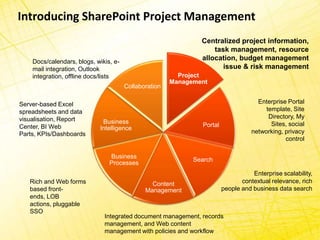
Introducing SharePoint Project ManagementCentralized project information,task management, resource allocation, budget management issue & risk management Docs/calendars, blogs, wikis, e-mail integration, Outlook integration, offline docs/listsEnterprise Portal template, Site Directory, My Sites, social networking, privacy controlServer-based Excel spreadsheets and data visualisation, Report Center, BI Web Parts, KPIs/DashboardsEnterprise scalability,contextual relevance, rich people and business data searchRich and Web forms based front-ends, LOB actions, pluggable SSOIntegrated document management, records management, and Web content management with policies and workflow
Project Server & SharePoint ServicesBuilt In FeaturesWindows Sahrepoint Services 3.0Document ManagementChange request ManagementWikis, blogs, FAQ’s, & moreProject Server as a SharePoint Services Application	Rich Gant chart reports	Issues and risk management	Status reports	Assignment notification   Manage interdependencies with deliverables	Task management and time reporting (via outlook)
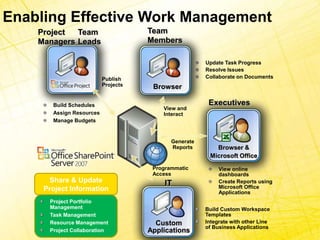
Enabling Effective Work ManagementTeam MembersProject ManagersTeam LeadsUpdate Task ProgressResolve IssuesCollaborate on DocumentsPublish ProjectsBrowserExecutivesBuild SchedulesAssign ResourcesManage BudgetsView and Interact Browser &Microsoft OfficeGenerate ReportsProgrammatic AccessView online dashboardsCreate Reports using Microsoft Office ApplicationsShare & Update Project InformationITProject Portfolio ManagementTask ManagementResource ManagementProject CollaborationBuild Custom Workspace TemplatesIntegrate with other Line of Business ApplicationsCustomApplications
CSC E-PMO - Business Background CSC – IT Consulting, Outsourcing and Services
 Around 4,000 staff across Australia
 Began in 2003 using Project Server 2003 & WSS 2.0
 Upgraded to Project Server 2007 and MOSS
 Supports 250 Program and Project managers
 Around 200 active projects in 2007 CSC E-PMO – Technical Background Project Server 2007
 MOSS Enterprise Edition

Combining Project and Sharepoint

  • 1.
    Microsoft SharePoint andOffice Forum 2008Delivering Seamless Productivity
  • 2.
    Benefits Of CombiningProject Server 2007 And SharePoint For Effective Work ManagementBrad PurdyEPM Solution Specialist | Microsoft CorporationKirk BarrettSolutions Architect | CSC
  • 3.
    AgendaBusiness challengesIntroducing SharePointProject ManagementProject Server and Sharepint ServicesEnabling Effective Work ManagementCSC E- PMO Business BackgroundCSC E- PMO Technical BackgroundCSC DemonstrationBenefits of Integrating project Server and SharePoint ServerQ&A
  • 4.
    Business ChallengesManage andunderstand project schedulesTrack and monitor projects to stay up to date on status changesEffectively communicate project information Clearly communicate and present project information in a variety of ways, from reports in Project or through integration with Microsoft Office system programsGet productive quicklyCentrally store and manage all project information in a single online workspaceCustomised Business Processes
  • 5.
    Introducing SharePoint ProjectManagementCentralized project information,task management, resource allocation, budget management issue & risk management Docs/calendars, blogs, wikis, e-mail integration, Outlook integration, offline docs/listsEnterprise Portal template, Site Directory, My Sites, social networking, privacy controlServer-based Excel spreadsheets and data visualisation, Report Center, BI Web Parts, KPIs/DashboardsEnterprise scalability,contextual relevance, rich people and business data searchRich and Web forms based front-ends, LOB actions, pluggable SSOIntegrated document management, records management, and Web content management with policies and workflow
  • 6.
    Project Server &SharePoint ServicesBuilt In FeaturesWindows Sahrepoint Services 3.0Document ManagementChange request ManagementWikis, blogs, FAQ’s, & moreProject Server as a SharePoint Services Application Rich Gant chart reports Issues and risk management Status reports Assignment notification Manage interdependencies with deliverables Task management and time reporting (via outlook)
  • 7.
    Enabling Effective WorkManagementTeam MembersProject ManagersTeam LeadsUpdate Task ProgressResolve IssuesCollaborate on DocumentsPublish ProjectsBrowserExecutivesBuild SchedulesAssign ResourcesManage BudgetsView and Interact Browser &Microsoft OfficeGenerate ReportsProgrammatic AccessView online dashboardsCreate Reports using Microsoft Office ApplicationsShare & Update Project InformationITProject Portfolio ManagementTask ManagementResource ManagementProject CollaborationBuild Custom Workspace TemplatesIntegrate with other Line of Business ApplicationsCustomApplications
  • 8.
    CSC E-PMO -Business Background CSC – IT Consulting, Outsourcing and Services
  • 9.
    Around 4,000staff across Australia
  • 10.
    Began in2003 using Project Server 2003 & WSS 2.0
  • 11.
    Upgraded toProject Server 2007 and MOSS
  • 12.
    Supports 250Program and Project managers
  • 13.
    Around 200active projects in 2007 CSC E-PMO – Technical Background Project Server 2007
  • 14.

Editor's Notes

  • #4 The agenda we will follow today certainly crams a lot of content into a short amount of time but it will enable us to look at the challenges the business community face regarding project management (high level). In particular we will cover;What is SharePoint project management, current capabilities regarding project server when it utilizes SharePoint services. We will also look at enabling effective work management through integrating project server with SharePoint server.This will all be covered at a very high level with a great deal of the presentation focused on real world application. As mentioned I have Kirk Barret from CSC with me here today and Kirk will demonstrate how CSC are using project server and SharePoint server to enable the effective work management discussed. We will wrap up with Q&A.