

Enhance your SharePoint 
with the best BPM capabilities
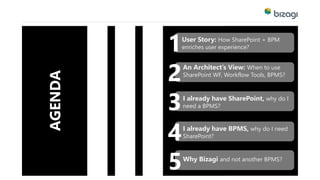
AGENDA 
1User Story: How SharePoint + BPM 
enriches user experience? 
2An Architect’s View: When to use 
SharePoint WF, Workflow Tools, BPMS? 
3I already have SharePoint, why do I 
need a BPMS? 
4I already have BPMS, why do I need 
SharePoint? 
5Why Bizagi and not another BPMS?
How SharePoint + 
BPMS enriched 
User Expectations? 
User Story
Sports 
Marketing 
Contracts 
are always: 
 High-value 
 Undergo faster approval 
 Long negotiation process 
 Multiple approval 
 Co-ordination with various 
departments
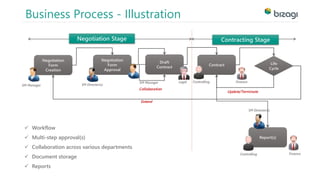
Business Process - Illustration 
Negotiation Stage Contracting Stage 
SM Manager 
Update/Terminate 
Negotiation 
Form 
Creation 
Negotiation 
Form 
Approval 
Draft 
Contract 
Contract Life 
Cycle 
SM Manager SM Director(s) 
Legal Controlling Finance 
Collaboration 
Extend 
Report(s) 
Controlling 
 Workflow 
 Multi-step approval(s) 
 Collaboration across various departments 
 Document storage 
 Reports 
Finance 
SM Director(s)
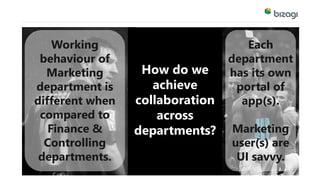
How do we 
achieve 
collaboration 
across 
departments? 
Working 
behaviour of 
Marketing 
department is 
different when 
compared to 
Finance & 
Controlling 
departments. 
Each 
department 
has its own 
portal of 
app(s). 
Marketing 
user(s) are 
UI savvy.
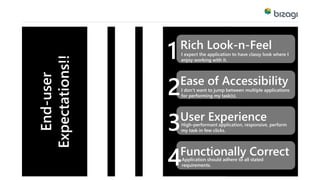
End-user 
Expectations!! 
Rich Look-n-Feel 
I expect the application to have classy look where I 
enjoy working with it. 
Ease of Accessibility 
I don’t want to jump between multiple applications 
for performing my task(s). 
User Experience 
High-performant application, responsive, perform 
my task in few clicks. 
Functionally Correct 
Application should adhere to all stated 
requirements. 
1 
2 
3 
4
Contract 
Management 
System 
Demonstration
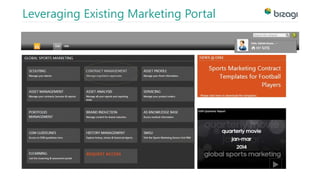
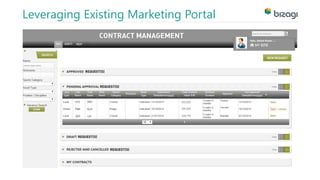
Leveraging Existing Marketing Portal
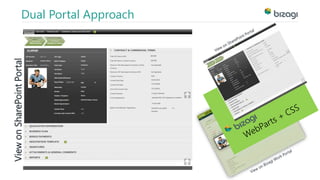
Dual Portal Approach 
View on SharePoint Portal
SharePoint based 
Workflow, 
Workflow Tools, 
BPMS? 
When to use
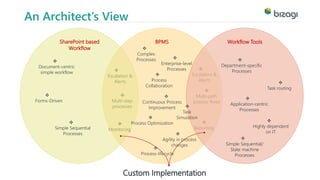
BPMS 
 
Escalation & 
Alerts 
 
Multi-path 
process flows 
 
Reporting 
An Architect’s View 
 
Escalation & 
Alerts 
 
Multi-step 
processes 
 
Monitoring 
SharePoint based 
Workflow 
Workflow Tools 
 
Application-centric 
Processes 
 
Enterprise-level 
Processes 
 
Department-specific 
Processes 
 
Task routing 
Complex 
Processes 
 
 
Process-lifecycle 
 
Task 
Simulation 
 
Continuous Process 
Improvement 
 
Simple Sequential/ 
State machine 
Processes 
 
Document-centric 
simple workflow 
 
Forms-Driven 
 
Process Optimization  
Simple Sequential 
Processes 
 
Process 
Collaboration 
 
Agility in process 
changes 
 
Highly dependent 
on IT 
Custom Implementation
Why do I need 
BPMS? 
I already 
Have SharePoint!
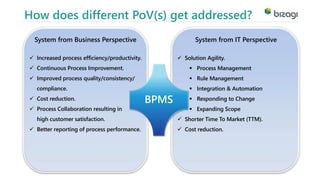
How does different PoV(s) get addressed? 
 Increased process efficiency/productivity. 
 Continuous Process Improvement. 
 Improved process quality/consistency/ 
compliance. 
 Cost reduction. 
 Process Collaboration resulting in 
high customer satisfaction. 
 Better reporting of process performance. 
BPMS 
System from Business Perspective 
System from IT Perspective 
 Solution Agility. 
 Process Management 
 Rule Management 
 Integration & Automation 
 Responding to Change 
 Expanding Scope 
 Shorter Time To Market (TTM). 
 Cost reduction.
Why do I need 
SharePoint? 
I already have BPMS!
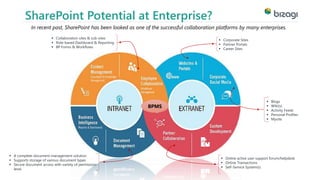
SharePoint Potential at Enterprise? 
In recent past, SharePoint has been looked as one of the successful collaboration platforms by many enterprises. 
 Collaboration sites & sub-sites 
 Role-based Dashboard & Reporting 
 BP Forms & Workflows 
 Blogs 
 Wiki(s) 
 Activity Feeds 
 Personal Profiles 
 Mysite 
 Online active user support forum/helpdesk 
 Online Transactions 
 Self-Service System(s) 
BPMS 
 Corporate Sites 
 Partner Portals 
 Career Sites 
 A complete document management solution 
 Supports storage of various document types 
 Secure document access with variety of permission-level.
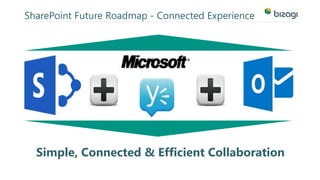
SharePoint Future Roadmap - Connected Experience 
Simple, Connected & Efficient Collaboration
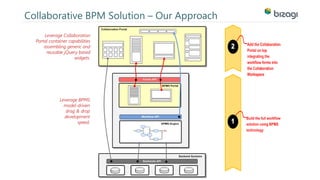
Collaborative BPM Solution – Our Approach 
Leverage Collaboration 
Portal container capabilities 
assembling generic and 
reusable jQuery based 
widgets. 
Leverage BPMS 
model-driven 
drag & drop 
development 
speed.
Not other 
BPMS? 
Why Bizagi
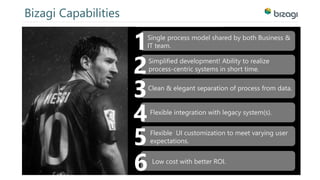
Bizagi Capabilities 
1Single process model shared by both Business & 
IT team. 
2Simplified development! Ability to realize 
process-centric systems in short time. 
3Clean & elegant separation of process from data. 
4Flexible integration with legacy system(s). 
5Flexible UI customization to meet varying user 
expectations. 
6 Low cost with better ROI.
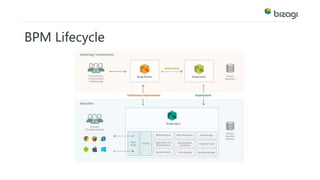
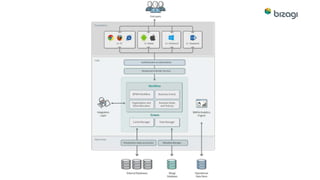
The Bizagi BPMS Solution
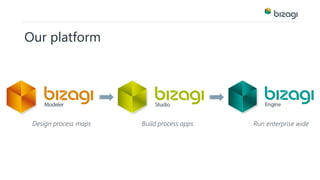
Our platform 
Design process maps Build process apps Run enterprise wide
BPM Lifecycle
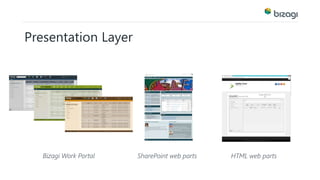
Presentation Layer 
Bizagi Work Portal SharePoint web parts HTML web parts
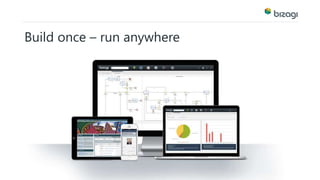
Build once – run anywhere
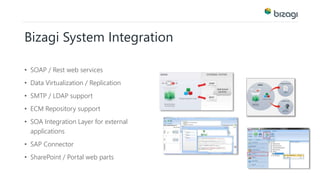
Bizagi System Integration 
• SOAP / Rest web services 
• Data Virtualization / Replication 
• SMTP / LDAP support 
• ECM Repository support 
• SOA Integration Layer for external 
applications 
• SAP Connector 
• SharePoint / Portal web parts
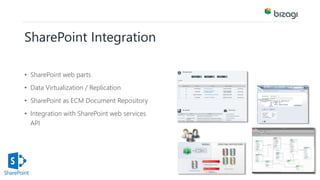
SharePoint Integration 
• SharePoint web parts 
• Data Virtualization / Replication 
• SharePoint as ECM Document Repository 
• Integration with SharePoint web services 
API
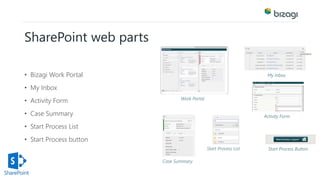
SharePoint web parts 
• Bizagi Work Portal 
• My Inbox 
• Activity Form 
• Case Summary 
• Start Process List 
• Start Process button 
Work Portal 
My Inbox 
Activity Form 
Case Summary 
Start Process List Start Process Button
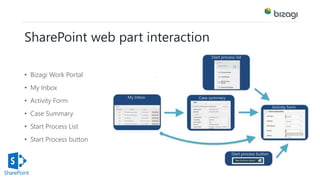
SharePoint web part interaction 
• Bizagi Work Portal 
• My Inbox 
• Activity Form 
• Case Summary 
• Start Process List 
• Start Process button
Product demonstration
Collaborative BPM Solution 
Benefits of an integrated SharePoint/Bizagi BPMS: 
 Quick and simple to install 
 Broad range of BPM functions 
 Familiar Windows/SharePoint environment 
 ‘Click and Share’ 
 Enhanced Publishing / Document Repository 
 Enhanced Business Collaboration
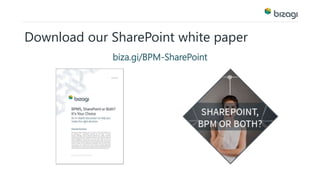
Download our SharePoint white paper 
biza.gi/BPM-SharePoint
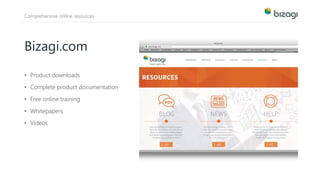
Comprehensive online resources 
Bizagi.com 
• Product downloads 
• Complete product documentation 
• Free online training 
• Whitepapers 
• Videos
Q & A 
For more info please visit Bizagi.com

Enhance SharePoint with the best BPM capabilities

  • 1.
    Enhance your SharePoint with the best BPM capabilities
  • 3.
    AGENDA 1User Story:How SharePoint + BPM enriches user experience? 2An Architect’s View: When to use SharePoint WF, Workflow Tools, BPMS? 3I already have SharePoint, why do I need a BPMS? 4I already have BPMS, why do I need SharePoint? 5Why Bizagi and not another BPMS?
  • 4.
    How SharePoint + BPMS enriched User Expectations? User Story
  • 5.
    Sports Marketing Contracts are always:  High-value  Undergo faster approval  Long negotiation process  Multiple approval  Co-ordination with various departments
  • 6.
    Business Process -Illustration Negotiation Stage Contracting Stage SM Manager Update/Terminate Negotiation Form Creation Negotiation Form Approval Draft Contract Contract Life Cycle SM Manager SM Director(s) Legal Controlling Finance Collaboration Extend Report(s) Controlling  Workflow  Multi-step approval(s)  Collaboration across various departments  Document storage  Reports Finance SM Director(s)
  • 7.
    How do we achieve collaboration across departments? Working behaviour of Marketing department is different when compared to Finance & Controlling departments. Each department has its own portal of app(s). Marketing user(s) are UI savvy.
  • 8.
    End-user Expectations!! RichLook-n-Feel I expect the application to have classy look where I enjoy working with it. Ease of Accessibility I don’t want to jump between multiple applications for performing my task(s). User Experience High-performant application, responsive, perform my task in few clicks. Functionally Correct Application should adhere to all stated requirements. 1 2 3 4
  • 9.
  • 10.
  • 11.
  • 12.
    Dual Portal Approach View on SharePoint Portal
  • 13.
    SharePoint based Workflow, Workflow Tools, BPMS? When to use
  • 14.
    BPMS  Escalation& Alerts  Multi-path process flows  Reporting An Architect’s View  Escalation & Alerts  Multi-step processes  Monitoring SharePoint based Workflow Workflow Tools  Application-centric Processes  Enterprise-level Processes  Department-specific Processes  Task routing Complex Processes   Process-lifecycle  Task Simulation  Continuous Process Improvement  Simple Sequential/ State machine Processes  Document-centric simple workflow  Forms-Driven  Process Optimization  Simple Sequential Processes  Process Collaboration  Agility in process changes  Highly dependent on IT Custom Implementation
  • 15.
    Why do Ineed BPMS? I already Have SharePoint!
  • 16.
    How does differentPoV(s) get addressed?  Increased process efficiency/productivity.  Continuous Process Improvement.  Improved process quality/consistency/ compliance.  Cost reduction.  Process Collaboration resulting in high customer satisfaction.  Better reporting of process performance. BPMS System from Business Perspective System from IT Perspective  Solution Agility.  Process Management  Rule Management  Integration & Automation  Responding to Change  Expanding Scope  Shorter Time To Market (TTM).  Cost reduction.
  • 17.
    Why do Ineed SharePoint? I already have BPMS!
  • 18.
    SharePoint Potential atEnterprise? In recent past, SharePoint has been looked as one of the successful collaboration platforms by many enterprises.  Collaboration sites & sub-sites  Role-based Dashboard & Reporting  BP Forms & Workflows  Blogs  Wiki(s)  Activity Feeds  Personal Profiles  Mysite  Online active user support forum/helpdesk  Online Transactions  Self-Service System(s) BPMS  Corporate Sites  Partner Portals  Career Sites  A complete document management solution  Supports storage of various document types  Secure document access with variety of permission-level.
  • 19.
    SharePoint Future Roadmap- Connected Experience Simple, Connected & Efficient Collaboration
  • 20.
    Collaborative BPM Solution– Our Approach Leverage Collaboration Portal container capabilities assembling generic and reusable jQuery based widgets. Leverage BPMS model-driven drag & drop development speed.
  • 21.
    Not other BPMS? Why Bizagi
  • 22.
    Bizagi Capabilities 1Singleprocess model shared by both Business & IT team. 2Simplified development! Ability to realize process-centric systems in short time. 3Clean & elegant separation of process from data. 4Flexible integration with legacy system(s). 5Flexible UI customization to meet varying user expectations. 6 Low cost with better ROI.
  • 24.
  • 25.
    Our platform Designprocess maps Build process apps Run enterprise wide
  • 26.
  • 28.
    Presentation Layer BizagiWork Portal SharePoint web parts HTML web parts
  • 29.
    Build once –run anywhere
  • 30.
    Bizagi System Integration • SOAP / Rest web services • Data Virtualization / Replication • SMTP / LDAP support • ECM Repository support • SOA Integration Layer for external applications • SAP Connector • SharePoint / Portal web parts
  • 31.
    SharePoint Integration •SharePoint web parts • Data Virtualization / Replication • SharePoint as ECM Document Repository • Integration with SharePoint web services API
  • 32.
    SharePoint web parts • Bizagi Work Portal • My Inbox • Activity Form • Case Summary • Start Process List • Start Process button Work Portal My Inbox Activity Form Case Summary Start Process List Start Process Button
  • 33.
    SharePoint web partinteraction • Bizagi Work Portal • My Inbox • Activity Form • Case Summary • Start Process List • Start Process button
  • 34.
  • 35.
    Collaborative BPM Solution Benefits of an integrated SharePoint/Bizagi BPMS:  Quick and simple to install  Broad range of BPM functions  Familiar Windows/SharePoint environment  ‘Click and Share’  Enhanced Publishing / Document Repository  Enhanced Business Collaboration
  • 36.
    Download our SharePointwhite paper biza.gi/BPM-SharePoint
  • 37.
    Comprehensive online resources Bizagi.com • Product downloads • Complete product documentation • Free online training • Whitepapers • Videos
  • 38.
    Q & A For more info please visit Bizagi.com